
Quotex Demo Account Review: Features & Benefits


Editorial Note: While we adhere to strict Editorial Integrity, this post may contain references to products from our partners. Here's an explanation for How We Make Money. None of the data and information on this webpage constitutes investment advice according to our Disclaimer.
To open a Quotex demo account, visit the official website, click “Open Demo Account”, fill in your details, and start demo trading on Quotex with $10,000 in virtual funds. This free practice account lets you explore the platform’s features without risking real money and is ideal for testing strategies in real-time market conditions.
The Quotex demo account, also known as the QxBroker demo platform, allows both new and experienced traders to practice binary options and Forex trading safely. You can log in via the Quotex demo login page to access live price charts and indicators and use the Quotex paper trading mode to test strategies without financial risk.
In this review, we analyze the latest Quotex demo trading account features, show you how to sign up for a free demo account, and explain why this broker remains one of the top choices for beginners learning how to trade online. By using a Quotex demo account free of charge, traders can enhance their skills, gain confidence in real market conditions, and prepare for live trading.
Quotex demo account review 2026


The Quotex demo account is a free trading simulator within the Quotex platform, designed for traders who want to test strategies without risking real funds. By using the Quotex demo trading feature, clients can engage in real-time market simulations with $10,000 in virtual balance, replicating the same environment as a live account but entirely risk-free.
Unlike live trading, the Quotex free demo account operates with virtual money, allowing users to explore various markets, including Forex, crypto, and binary options. Whether you access it through the Quotex demo login page or the QxBroker demo link, the platform provides a seamless and realistic trading experience ideal for skill-building and strategy testing.
How does the Quotex demo account differ from a live account?
The difference between a Quotex demo account and a live account lies in the use of virtual vs. real funds. The demo environment eliminates financial risk, enabling traders to learn price action, manage trades, and practice strategies using simulated data. In contrast, live accounts use real deposits, meaning gains and losses are actual.
Using the Quotex demo account is an excellent way for beginners to understand how trades are executed in real markets before committing capital.
The Quotex demo trading account is built with simplicity and accuracy in mind. Its intuitive interface ensures that even beginners can open trades, track performance, and analyze charts easily. The platform’s realistic simulation mirrors live market conditions, including price movements, spreads, and liquidity fluctuations providing a genuine trading feel.
In 2026, Quotex broker’s demo account continues to rank among the best for its reliability and seamless market replication. This environment is ideal for anyone seeking to understand how trading works before switching to real investments.
How to open a Quotex demo account in 2026
Opening a Quotex demo account in 2026 is fast, secure, and completely free. The platform allows users to start Quotex demo trading instantly with $10,000 in virtual funds, ideal for both beginners and experienced traders testing strategies. Follow these steps to open your Quotex demo account for free and begin practicing without risk.
Step 1. Visit the official Quotex website
Go to Quotex.com and click “Open Demo Account.”
This is the simplest way to access the Quotex trading demo account and immediately start Quotex paper trading. The process does not require an initial deposit or identity verification, making it accessible to all new users.
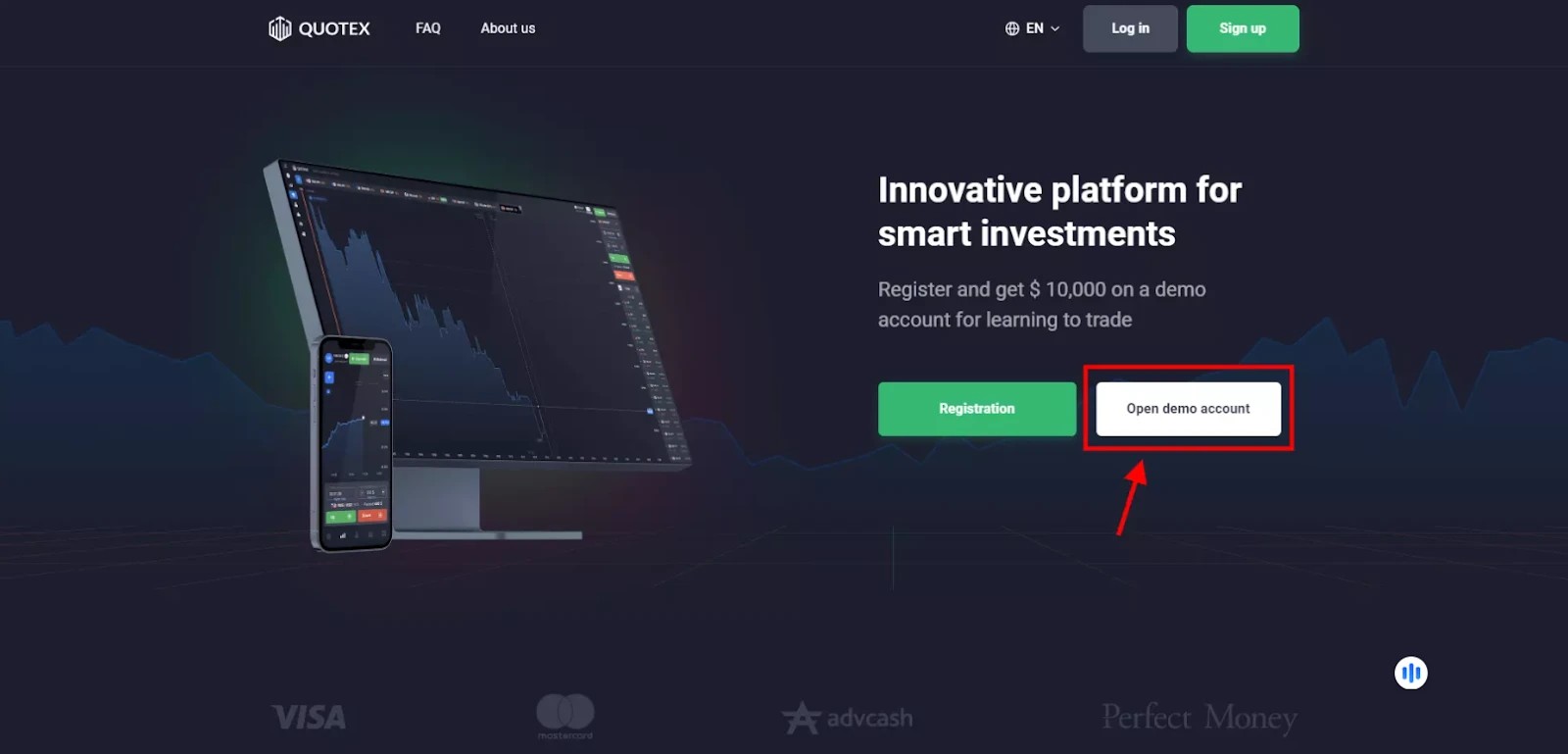
Tip: if you prefer to try the Quotex demo without login, you can explore basic features directly on the homepage before creating a full account.
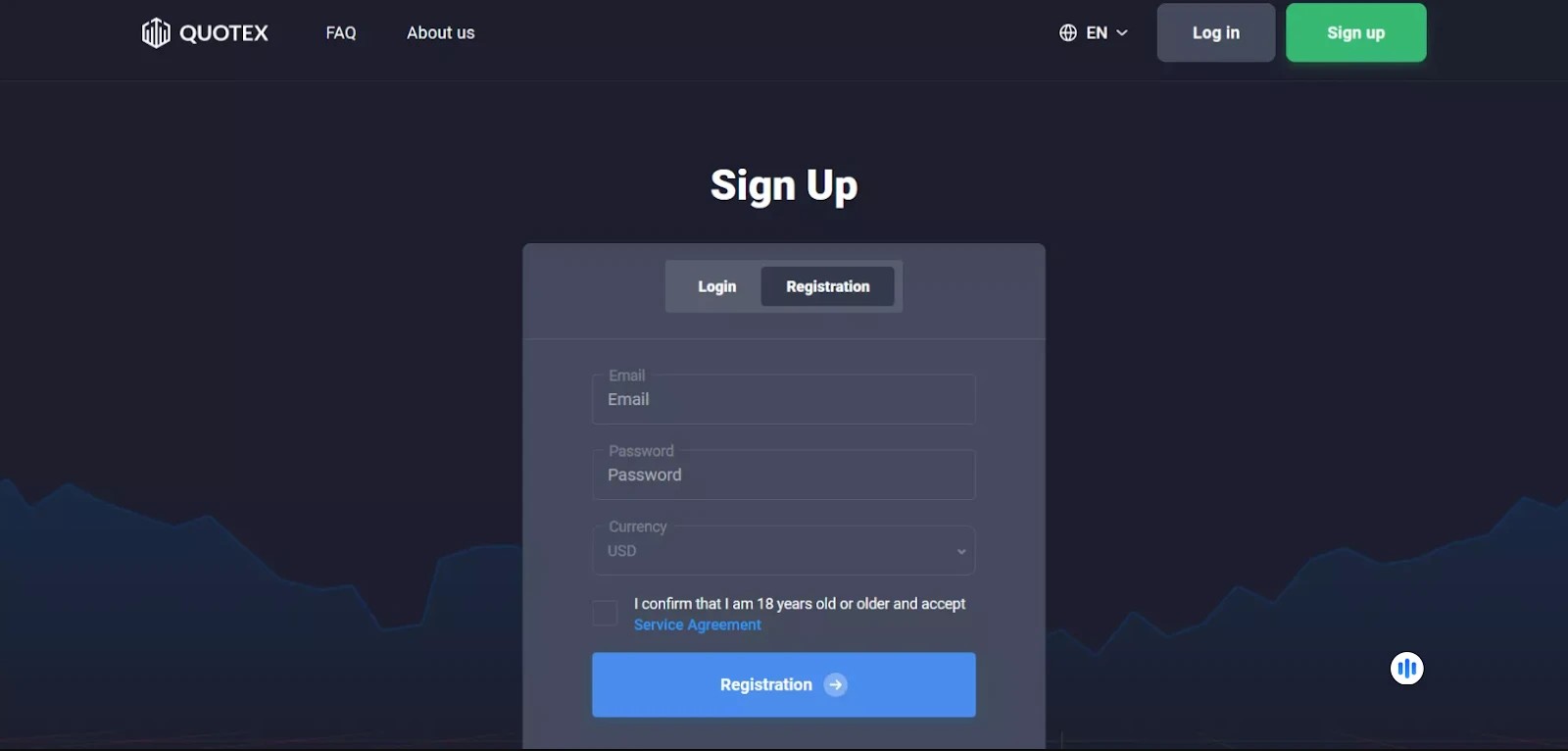
Step 2. Register your demo account
Fill in your email, create a password, and select your preferred currency. Confirm that you are over 18 and agree to the platform’s terms of service. Then click “Register.”
Once completed, you’ll receive a verification link by email. Open it to activate your Quotex demo account login credentials and access your dashboard.
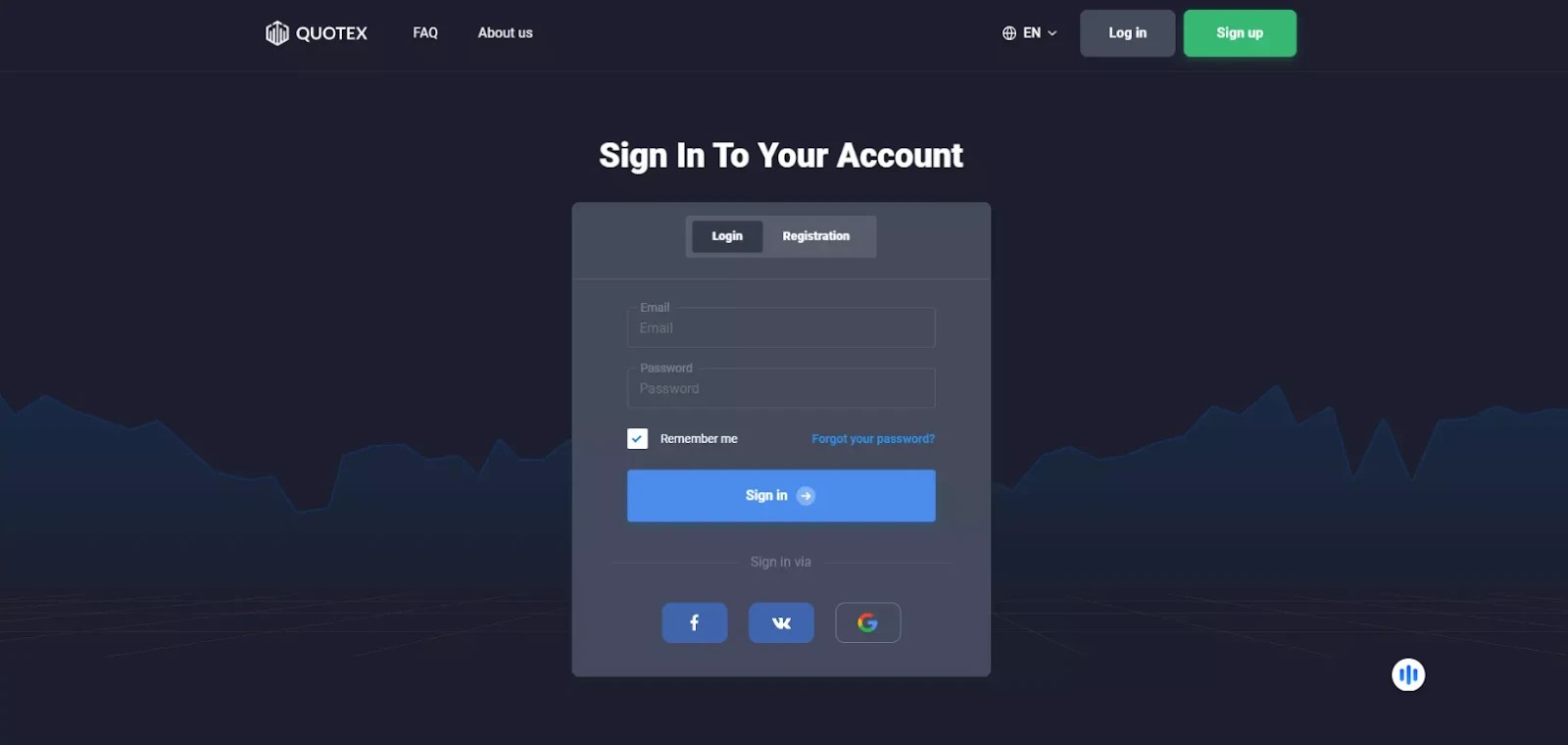
Step 3. Log in to the Quotex demo platform
Return to the homepage and click “Login” at the top right corner. Enter your registered email and password.
After signing in, accept the terms of use to proceed to the Quotex broker demo account dashboard.
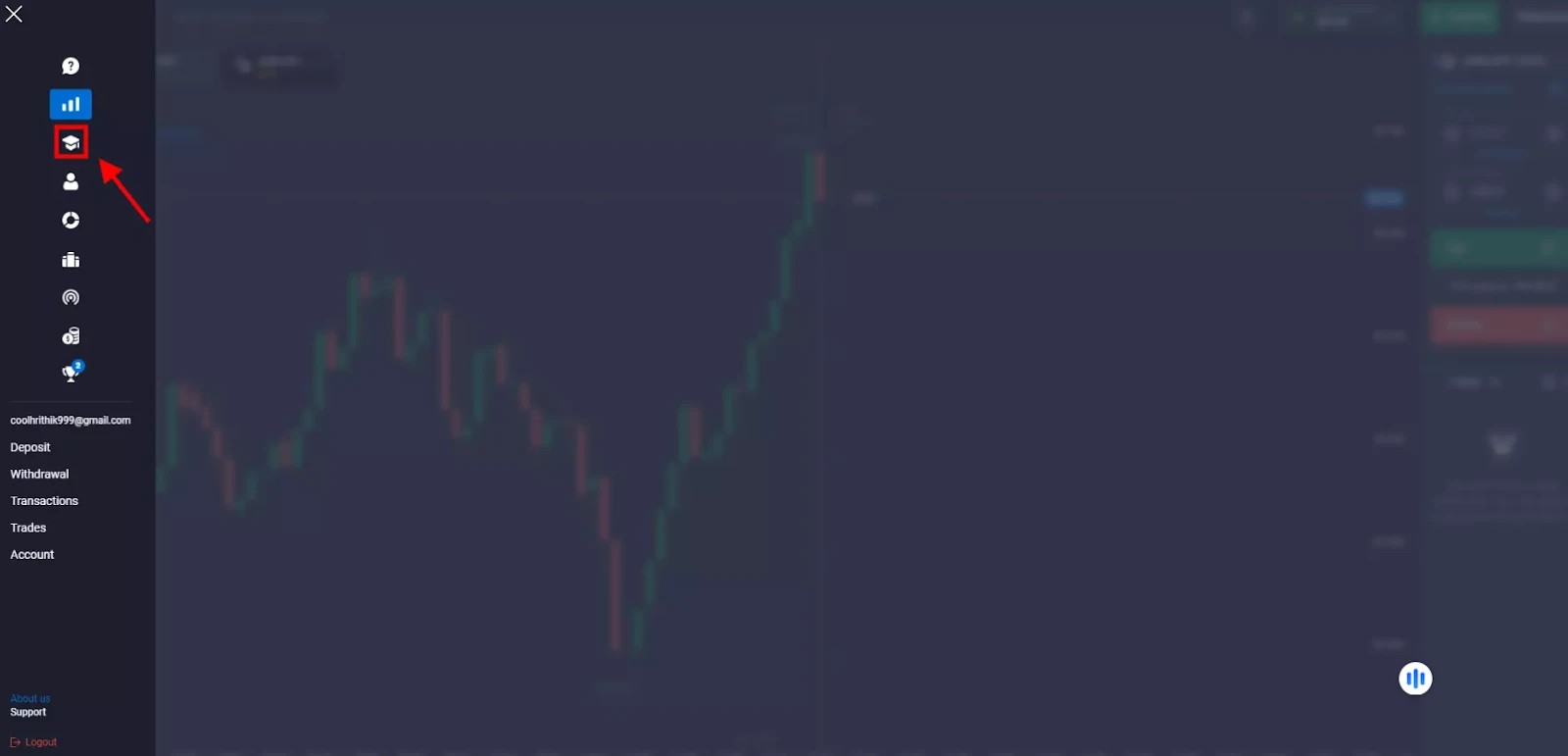
Step 4. Access the demo trading mode
Once inside your account, open the side menu (☰ icon on the left). Click the “Demo” tab, marked with the scholar’s hat icon. You’ll be redirected to the demo trading area, where you can explore indicators, charts, and trading tools using your $10,000 virtual balance.
From this moment, you can test binary options, cryptocurrencies, Forex pairs, and commodities under real-time market conditions. This practice area provides the same functionality as live trading, helping you master risk management and trade execution before switching to real capital.
How to switch from a demo to a real account
Once you’ve gained confidence using the trading demo account offered by Quotex, you can switch to a live account and start trading real funds.
Log in to your Quotex account.
Click the menu icon on the left-hand side of the page (☰).
Select “Trade” from the options.
Complete the verification process by uploading identity documents.
Make a deposit using your preferred payment method (cards, crypto, e-wallets, etc.).
After approval, your live account will be activated. You can easily switch between your Quotex demo account and real trading account anytime through the dropdown menu in the platform header. Learn the truth about Quotex demo-to-live code scams and why demo funds can’t be converted, as well as how to safely switch to a live account.
Is the Quotex demo good for beginners?
Yes, the Quotex demo account remains one of the best training tools for beginners in 2026. Many new traders make the common mistake of depositing into a live account without first practicing in a Quotex demo trading environment. This usually leads to losses caused by inexperience and emotional decisions.
A demo account eliminates these risks by providing a realistic market simulator with $10,000 in virtual funds. It allows users to learn how trading works without pressure or financial loss. This setup mirrors live conditions, offering the same charts, indicators, and execution speeds as a real account on the Quotex platform.
Risk-free learning
The demo trading feature on Quotex lets you test hundreds of strategies, timeframes, and assets without losing money. It removes the emotional stress tied to real trading, helping users focus purely on skill development and analysis.
Build trading intuition
Repeated sessions in the Quotex demo trading account train your instincts to recognize patterns, trends, and price action triggers. Over time, you’ll develop the same reflexes professional traders rely on in live markets.
Sharpen technical analysis skills
Practicing in the Quotex paper trading environment helps new traders master technical tools from support/resistance to RSI and MACD indicators in a practical, hands-on way. Since all features of the live platform are included in the Quotex demo account, the transition to real trading feels seamless.
Improve emotional discipline
Trading without money on the line cultivates patience and objectivity. Beginners can learn to analyze calmly instead of reacting emotionally to profit and loss. This mindset is vital for consistent performance in real markets.
Demo is a risk-free solution for gaining first-hand market experience

The Quotex demo account trading remains a practical, risk-free way to gain first-hand trading experience. While demo trading in Quotex does not replicate the emotional stress of real-money trading, it provides an authentic environment for understanding how assets, charts, and indicators behave in live market conditions. By using the demo mode, traders can experiment with position sizes, expiry times, and risk management strategies to refine their methods and develop consistency before transitioning to a live setup.
Practicing through the Quotex demo trading platform also helps users analyze market movements in real time, test strategies without losses, and build confidence at their own pace. This simulated experience mirrors the functionality of a real account, offering access to price charts, multiple assets, and fast execution under real conditions. For anyone curious about trading but not yet ready to invest real funds, the QxBroker demo provides a safe and structured environment to learn, adapt, and prepare for professional-level performance.
Conclusion
Use the Quotex demo as a training loop, not a toy. Mirror the exact assets, expiry windows, and position sizes you plan to use live. Log at least 20 trades per setup, then check fill speed, slippage, and how spreads change around news. Reset the 10,000 virtual balance to test risk steps and scaling rules. When you keep three steady weeks, move to the smallest live size and repeat the same checklist. The habit you build in a demo is the edge you carry into cash.
FAQs
Can I reset the $10,000 balance in my Quotex demo account?
Yes. You can refresh or reset your Quotex demo balance anytime from your trading dashboard. Once the virtual funds run out, the platform allows you to refill them instantly. This makes it easy to continue testing new strategies or recover from mistakes without creating a new account.
Does the Quotex demo account include all live trading assets?
Almost all assets available in the live Quotex account are also included in the demo version, such as Forex pairs, cryptocurrencies, indices, and commodities. However, certain new or promotional instruments may appear first in the live environment before being added to the demo section.
Can I use my demo results to predict live performance?
Demo results give a general idea of how your strategy works under live market conditions, but they do not fully reflect emotional or liquidity factors. In live trading, spreads, execution speed, and pressure often change outcomes. Treat demo results as a learning guide, not a guaranteed forecast.
Does the Quotex demo account expire after a certain time?
No. The Quotex demo account stays active as long as you log in periodically. There is no set expiration date or time limit, so you can practice for weeks or months before switching to live trading. Regular logins keep your demo account accessible and updated.
Related Articles
Team that worked on the article
Andreas Kristo Saragih is a seasoned equity research analyst with over a decade of experience across both buy-side and sell-side roles, focused on the Indonesian capital market. He has extensive sector coverage, including banking, consumer goods, retail, real estate, healthcare, transportation, poultry, cement, pharmaceuticals, construction, and infrastructure.
Dan Blystone began his trading career in 1998 as an arbitrage clerk on the floor of the Chicago Mercantile Exchange (CME). He later traded bond and Eurex futures at proprietary firms such as Altea Trading, gaining valuable experience in high-frequency trading and risk management.
Chinmay Soni is a financial analyst with more than 5 years of experience in working with stocks, Forex, derivatives, and other assets. As a founder of a boutique research firm and an active researcher, he covers various industries and fields, providing insights backed by statistical data.
-
 Afghanistan
-
 Albania
-
 Algeria
-
 Angola
-
 Argentina
-
 Armenia
-
 Australia
-
 Austria
-
 Azerbaijan
-
 Bahamas
-
 Bahrain
-
 Bangladesh
-
 Belarus
-
 Belgium
-
 Bolivia
-
 Botswana
-
 Brazil
-
 Brunei
-
 Bulgaria
-
 Cambodia
-
 Cameroon
-
 Canada
-
 Chile
Chile
-
 China
China
-
 Colombia
-
 Congo
Congo
-
 Costa Rica
-
 Cote d'Ivoire
-
 Croatia
-
 Cuba
Cuba
-
 Cyprus
-
 Czechia
-
 DR Congo
-
 Denmark
-
 Dominican Republic
-
 Ecuador
-
 Egypt
Egypt
-
 El Salvador
-
 Estonia
-
 Eswatini
-
 Ethiopia
-
 Finland
-
 France
-
 Georgia
-
 Germany
-
 Ghana
Ghana
-
 Greece
-
 Haiti
Haiti
-
 Hong Kong
-
 Hungary
-
 India
India
-
 Indonesia
-
 Iran, Islamic republic
-
 Iraq
Iraq
-
 Ireland
-
 Israel
-
 Italy
Italy
-
 Jamaica
-
 Japan
Japan
-
 Jordan
-
 Kazakhstan
-
 Kenya
Kenya
-
 Korea
Korea
-
 Kuwait
-
 Kyrgyzstan
-
 Laos
Laos
-
 Latvia
-
 Lebanon
-
 Lesotho
-
 Libya
Libya
-
 Lithuania
-
 Luxembourg
-
 Madagascar
-
 Malaysia
-
 Malta
Malta
-
 Mauritius
-
 Mexico
-
 Moldova
-
 Mongolia
-
 Montenegro
-
 Morocco
-
 Mozambique
-
 Myanmar
-
 Namibia
-
 Nepal
Nepal
-
 Netherlands
-
 New Zealand
-
 Nigeria
-
 North Macedonia
-
 Norway
-
 Oman
Oman
-
 Pakistan
-
 Palestine
-
 Panama
-
 Papua New Guinea
-
 Paraguay
-
 Peru
Peru
-
 Philippines
-
 Poland
-
 Portugal
-
 Puerto Rico
-
 Qatar
Qatar
-
 Reunion
-
 Romania
-
 Rwanda
-
 Saudi Arabia
-
 Serbia
-
 Singapore
-
 Slovakia
-
 Slovenia
-
 Somalia
-
 South Africa
-
 Spain
Spain
-
 Sri Lanka
-
 Sweden
-
 Switzerland
-
 Syria
Syria
-
 Taiwan
-
 Tajikistan
-
 Tanzania
-
 Thailand
-
 Trinidad and Tobago
-
 Tunisia
-
 Turkey
-
 UAE
UAE
-
 Uganda
-
 Ukraine
-
 United Kingdom
-
United States
-
 Uruguay
-
 Uzbekistan
-
 Venezuela
-
 Vietnam
-
 Yemen
Yemen
-
 Zambia
-
 Zimbabwe
- Forex
- Crypto












