

How To Withdraw $HMSTR From BingX: Guide For Beginners
Follow these steps to withdraw $HMSTR From BingX:
-
Log in to your BingX account
-
Converting $HMSTR to a major cryptocurrency
-
Withdrawing the converted cryptocurrency
-
Monitor the transaction status

As the cryptocurrency market continues to grow, $HMSTR, the native token of the widely popular Hamster Kombat game, is seeing a surge in popularity. Thanks to its integration into both the gaming world and decentralized finance, $HMSTR is becoming increasingly accessible for trading and investment purposes. With its fututre listing on platforms like BingX, many traders and investors are eager to learn how to withdraw their $HMSTR tokens. This guide will provide a comprehensive walkthrough, ensuring you can handle your withdrawals smoothly and securely.
Don't miss a single hot update on drops and listings! Subscribe to our Telegram channel TU Airdrop Daily 🛎️ to stay updated on all key events 🚀. Be the first to know and ride the wave of the freshest airdrops and trading opportunities 🔥!
How to withdraw $HMSTR from BingX

Withdrawing $HMSTR from BingX may appear complicated at first, but by following these straightforward steps, you can ensure a hassle-free and successful process.
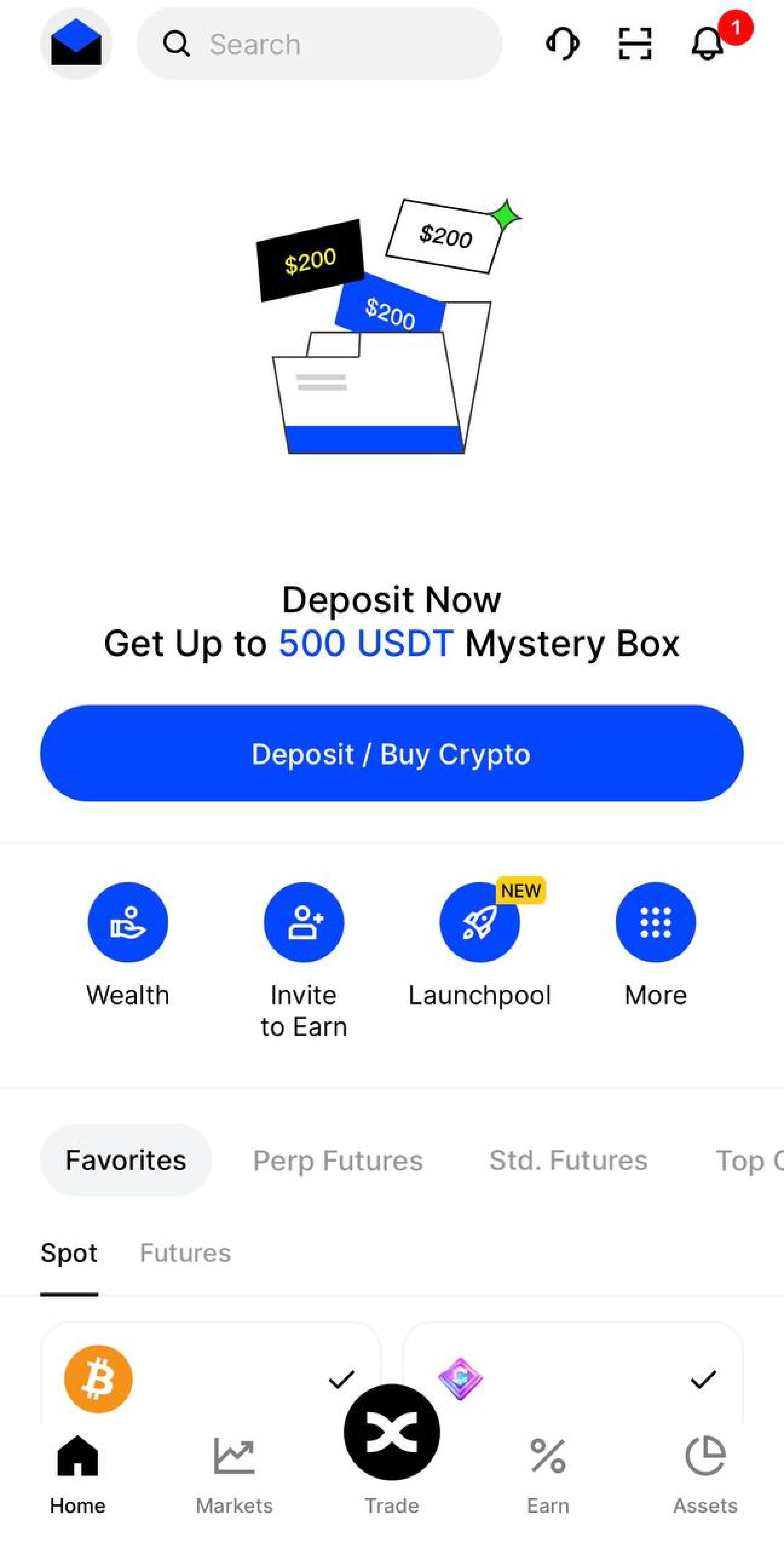
Step 1: Access your BingX account
Start by logging into your BingX account. For added security, ensure that Two-Factor Authentication (2FA) is activated. This extra security measure helps protect your account from unauthorized access, keeping your funds safe.
How to withdraw $HMSTR from BingX
Step 2: Converting $HMSTR to a major cryptocurrency
Before you can withdraw $HMSTR, it must first be converted into a commonly traded cryptocurrency like USDT. Follow these steps to complete the conversion:
-
Navigate to spot trading. On the BingX homepage, click on "Markets" and head to the "Spot" section to access the trading interface.
-
Select a trading pair. Use the search function to find "$HMSTR" and pick the relevant trading pair, such as HMSTR/USDT.
-
Execute the trade. For instant selling at the current market rate, select "Market," input the amount of $HMSTR to trade, and click "Sell $HMSTR." If you prefer a specific price, place a "Limit" order, which will only execute when the market hits your target price.
-
Confirm the transaction. After the trade completes, check your wallet balance in the "Overview" section to confirm the conversion is successful.
Step 3: Withdrawing the converted cryptocurrency
Once you've converted your $HMSTR into USDT or another major cryptocurrency, follow these steps to withdraw:
-
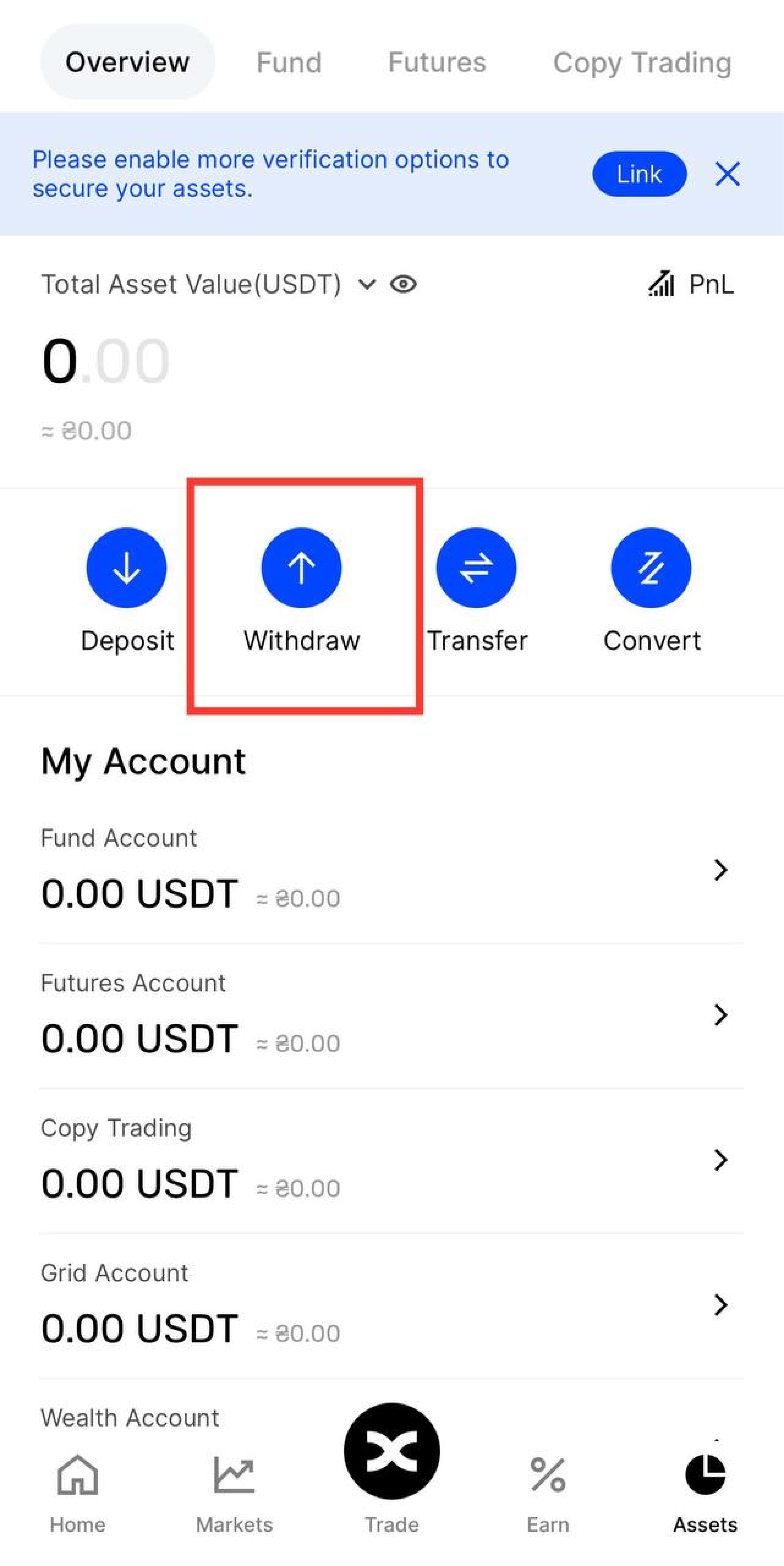
Go to the withdrawal page. Navigate to the "Assets" section and select "Withdraw."
-
Choose the cryptocurrency. Select the converted cryptocurrency, such as USDT, for withdrawal.
-
Enter withdrawal information. Input the recipient wallet address, ensure the correct blockchain network is chosen, and specify the withdrawal amount. Carefully verify all information to prevent loss of funds.
-
Complete security procedures. BingX will prompt you to pass Two-Factor Authentication (2FA) and email verification to ensure a secure transaction.
-
Submit the withdrawal request. After verification, confirm the withdrawal, and your funds will be processed accordingly.
How to withdraw $HMSTR from BingX
Step 4: Track your transaction status
After submitting your withdrawal request, you can follow its progress in the "Transaction History" section of your wallet. To get more detailed updates, you can also use blockchain explorers such as BscScan or Etherscan to monitor the transaction's status directly.
Risks and warnings
Withdrawing tokens accumulated in the Hamster Kombat game or any cryptocurrency involves certain risks:
-
Network mismatch risks: Always confirm that the network you choose matches the recipient’s wallet network. A mismatch could lead to permanent loss of your funds.
-
Potential delays: While crypto transactions are generally fast, they may experience delays due to network congestion. It’s important to stay patient and monitor the progress before contacting support.
-
Security concerns: Never disclose your 2FA codes or account passwords to anyone. Use all available security measures, such as Two-Factor Authentication, to safeguard your BingX account.
Pros and cons of withdrawing $HMSTR from BingX
👍 Pros:
• Simple and user-friendly withdrawal process
• Quick transactions, depending on network conditions
• Flexibility to convert $HMSTR into widely used cryptocurrencies for easier liquidity
👎 Cons:
• Fees can be high during periods of network congestion
• Risk of losing funds if incorrect details are entered
• Limited options for directly withdrawing $HMSTR
BingX offers a seamless withdrawal experience
In my experience, BingX provides a relatively straightforward process for withdrawing $HMSTR. Users should always double-check the recipient's wallet address, as blockchain transactions cannot be undone. Also, be aware of potential withdrawal fees, which can fluctuate based on network congestion. BingX’s verification process adds a layer of security, but it’s vital to double-check all transaction details before confirming. Overall, I find BingX to offer a smooth withdrawal experience, but staying updated on their fee structure and policies is essential.

Summary
Withdrawing $HMSTR (Hamster Kombat token) from BingX involves a few critical steps that require users to follow the platform’s procedures carefully. The process starts by logging into your account, accessing the withdrawal section, selecting $HMSTR from the assets list, and entering the recipient wallet address. Users should be aware of potential fees, possible delays, and the importance of double-checking wallet addresses to avoid losing funds. BingX offers a user-friendly interface for withdrawals, but it's crucial to fully understand each step to ensure a smooth and secure transaction.
FAQs
What are the withdrawal fees for $HMSTR on BingX?
Fees vary based on network congestion, but BingX provides clear details before confirming your withdrawal.
How long does it take to withdraw $HMSTR from BingX?
Withdrawals usually take just a few minutes but can be delayed during high network activity. Always monitor the transaction status in your account.
Can I cancel a withdrawal after it’s initiated on BingX?
No, once a withdrawal is processed on the blockchain, it cannot be canceled or reversed.
What should I do if my withdrawal doesn't go through?
If there's a delay or issue with your withdrawal, check the transaction ID on the blockchain and reach out to BingX’s customer support for further assistance if needed.
Team that worked on the article

Parshwa is a content expert and finance professional possessing deep knowledge of stock and options trading, technical and fundamental analysis, and equity research. As a Chartered Accountant Finalist, Parshwa also has expertise in Forex, crypto trading, and personal taxation. His experience is showcased by a prolific body of over 100 articles on Forex, crypto, equity, and personal finance, alongside personalized advisory roles in tax consultation.

Chinmay Soni is a financial analyst with more than 5 years of experience in working with stocks, Forex, derivatives, and other assets. As a founder of a boutique research firm and an active researcher, he covers various industries and fields, providing insights backed by statistical data. He is also an educator in the field of finance and technology.
As an author for Traders Union, he contributes his deep analytical insights on various topics, taking into account various aspects.

Mirjan Hipolito is a journalist and news editor at Traders Union. She is an expert crypto writer with five years of experience in the financial markets. Her specialties are daily market news, price predictions, and Initial Coin Offerings (ICO).


