How to Verify BitGet Account: Full Tutorial


Editorial Note: While we adhere to strict Editorial Integrity, this post may contain references to products from our partners. Here's an explanation for How We Make Money. None of the data and information on this webpage constitutes investment advice according to our Disclaimer.
To verify a Bitget account, complete the platform's identity verification (KYC) by submitting a valid government-issued ID and completing facial recognition. Depending on your country or verification level, Bitget may also request proof of address before approving your account.
BitGet is one of the leading cryptocurrency exchanges, offering spot trading, futures, copy trading, and other digital asset services. To comply with international Know Your Customer (KYC) and Anti-Money Laundering (AML) requirements, the platform requires users to complete identity verification before accessing certain account features.This article explains how to verify a Bitget account, which documents may be required, common verification issues, and the benefits of completing the verification process.
How to verify my account on BitGet?


Here is a step-by-step procedure to verify an account on BitGet:
Login to your BitGet Account: Firstly, visit the BitGet official website and log in to your account.
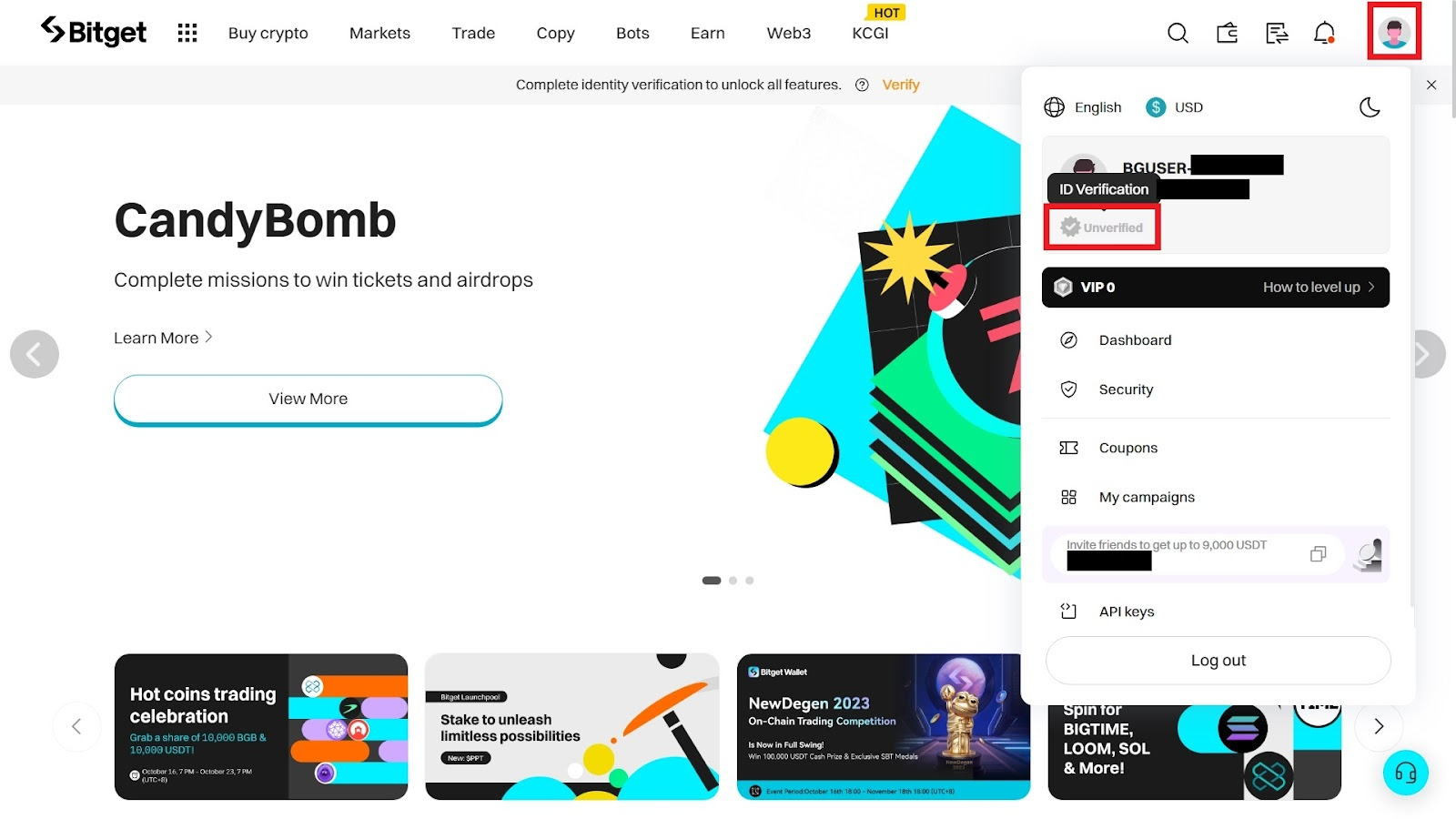
Click on the Profile Icon: Locate and click the profile icon at the top right corner of your dashboard. Click on the verification status and the “Verify” tab to begin the verification process.
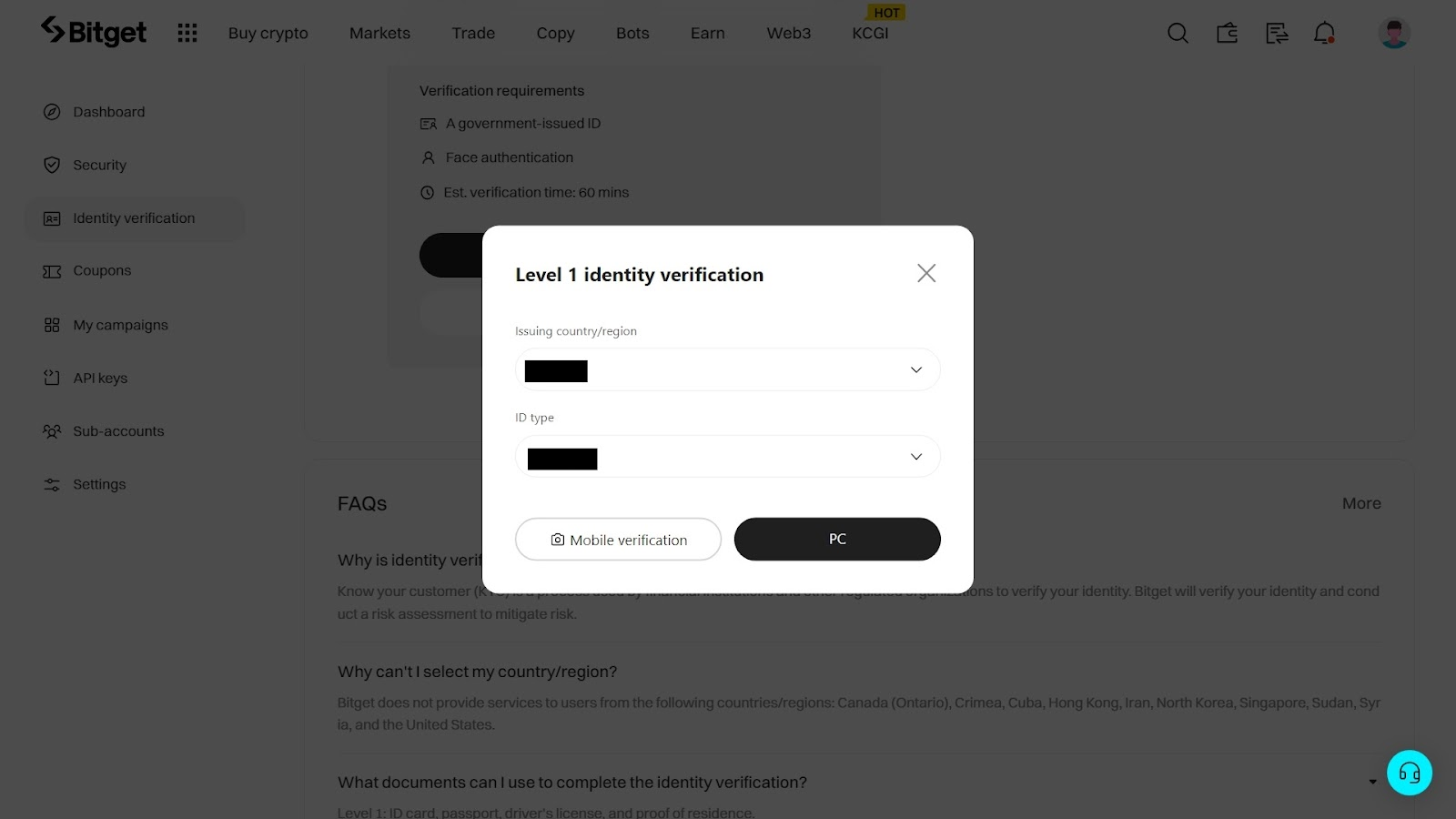
Choose the issuing country/region and ID type: Next, select the country that issued your identification (ID) document and the type of ID (e.g., passport, Driver's license, etc.) you want to submit.
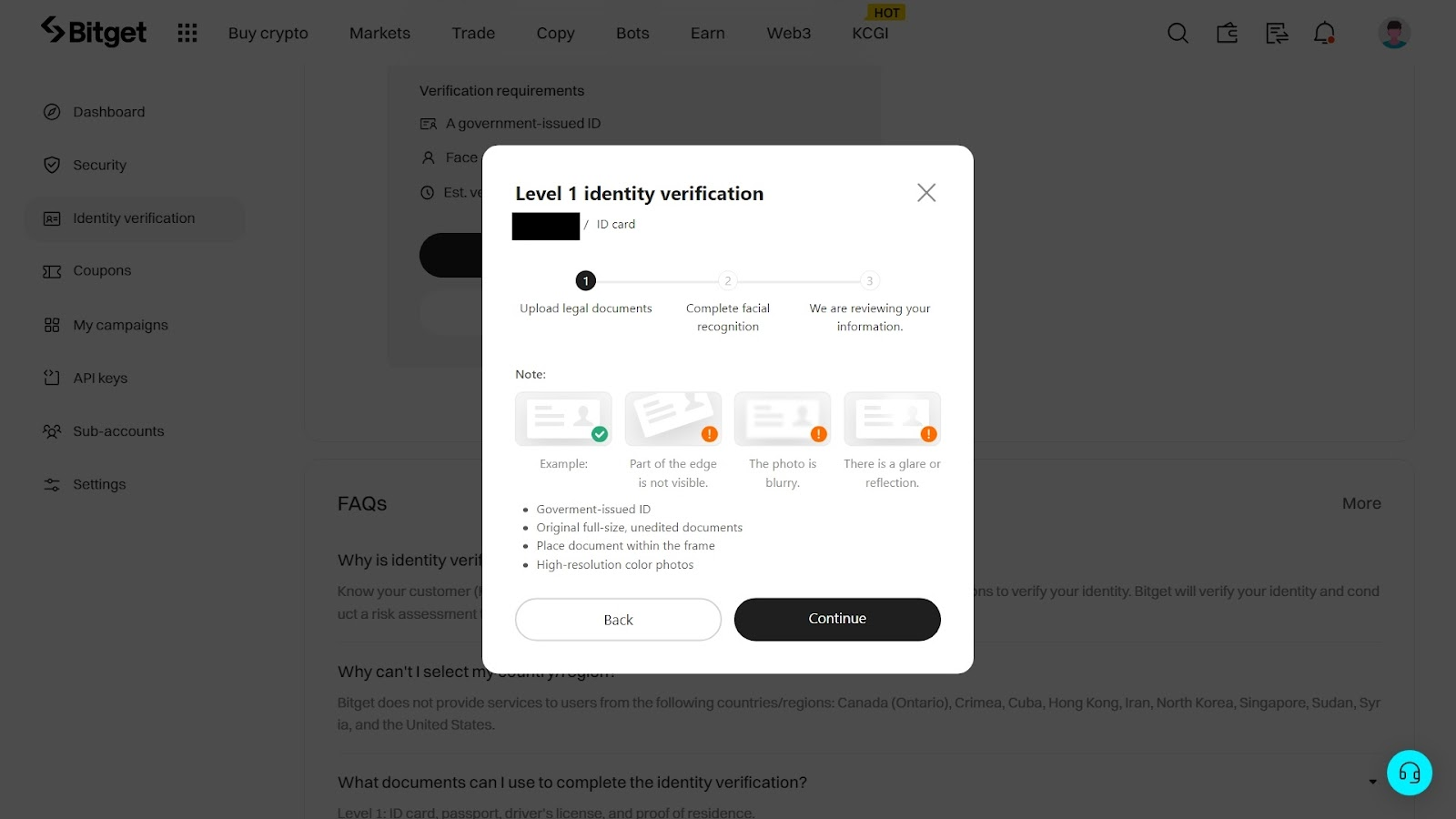
Upload your ID documents: Begin by uploading clear pictures of your preferred documents to the appropriate field, ensuring the pictures are clear and legible to make the process hassle-free. Once the pictures are uploaded, click the “Continue” button to proceed to the next stage.
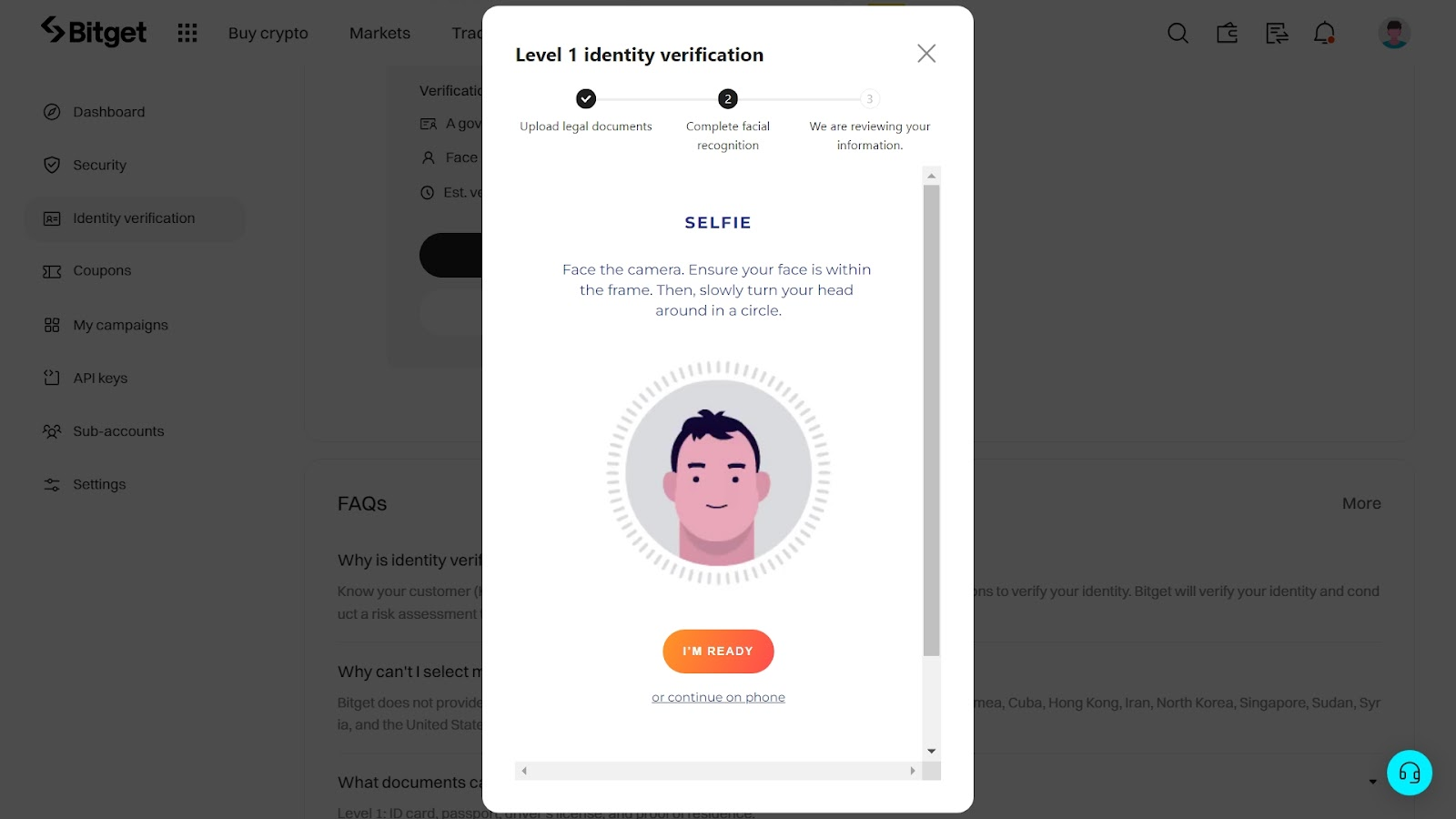
Take a selfie of your face: Grant BitGet access to your device’s camera for a live facial recognition test to complete the verification process. Ensure adequate lighting and a clear view of your face for optimal results.
Wait for Confirmation: After completing the live verification test, you will receive a notification from BitGet about your account status.
What Documents Do You Need?
Bitget requires users to provide a valid government-issued identity document, such as a passport, national ID card, or driver's license. The document must be valid, clearly legible, and display the user's full name and date of birth.
Depending on the user's country of residence or selected verification level, Bitget may also request proof of address, such as a recent utility bill or bank statement, to complete identity verification.
Possible Problems with BitGet Verification and How to Solve Them
Let’s delve into some common problems users encounter with BItGet verification and their possible solutions:
Poor document quality: Documents with unclear or poor quality are not accepted for verification on BitGet. Therefore, users should ensure that they submit a clear and legible document.
Expired ID: If the submitted document has expired, users will encounter problems with the verification process. Users should ensure they submit a valid document that has not expired.
Submitting unsupported or unrecognized document types: Users who submit the wrong type of document may have issues with BitGet’s verification. So, users should submit government-issued ID documents as required by BitGet.
Face image does not match ID photo: Verification would be declined if the user’s face does not match the photo on their ID during face verification. Users should submit a document with a picture of their recent face.
Expert Igor Krasulya also noted that BitGet has age restrictions. Crypto exchange does not accept users below 18 years. Users should ensure they are above 18 before signing up for an account with BitGet.
Can You Use BitGet Without Verification?
BitGet mandates that all users undergo an identity verification process before they can access the platform’s full functionalities. Consequently, BitGet accounts without verification are restricted from engaging in trading, deposit, or withdrawal activities.
Why Do I Need Verification on BitGet?
User’s identity verification on the BitGet exchange is required for the following reasons:
Regulatory Compliance Verification helps ensure that BitGet complies with the regulatory requirements regarding anti-money laundering (AML) and know-your-customer (KYC) regulations.
Unlock BitGet Features: BitGet verification grants users access to the platform’s complete suite of functionalities, such as deposit/withdrawal, spot trading, peer-to-peer (P2P) trading, bot trading, etc.
Access Exclusive Promotion: Verified users on BitGet are eligible for exclusive promotions, such as Super Airdrop, Launchpad, and CandyBomb.
Boost Security: Verification enhances the security of user accounts on BitGet, protecting them from unauthorized access and potential fraudulent activities.
Protect User Interest: Finally, BitGet verification establishes a secure trading environment, protecting users’ funds and shielding their accounts from illicit activities.
Complete verification before making your first deposit

Many new users create an exchange account and immediately transfer cryptocurrency, leaving identity verification until later. In my experience, completing the verification process before funding an account is the better approach. It helps avoid delays when accessing trading products or making withdrawals and reduces the likelihood of additional document requests after funds have already been deposited.
Most verification issues result from simple mistakes, such as uploading low-quality images, using expired identification documents, or failing the facial recognition check. Taking a few extra minutes to ensure that documents are clear and up to date can significantly speed up the approval process.
Conclusion
Identity verification is an important step for anyone planning to use Bitget regularly. Completing KYC not only helps the exchange comply with international regulatory requirements but also unlocks access to trading products, higher account limits, and additional platform features.The verification process is generally straightforward and requires only a valid government-issued ID and facial recognition, while proof of address may be requested in certain situations. Completing verification before making your first deposit can help ensure uninterrupted access to Bitget's services.
FAQs
What do you need for Bitget verification?
Documents required for BitGet verification include a valid ID card, passport, or driver’s license, and proof of residence.
Can I use BitGet without verification?
BitGet mandates all users to verify their accounts. Unverified accounts are not eligible to deposit, withdraw, or trade on the BitGet platform.
How long is BitGet verification?
BitGet’s verification process can take several minutes to an hour, depending on the type of documents a user submits.
What happens if I don't verify my BitGet account?
BitGet users without identity verification are limited from making deposits into their accounts and participating in trading activities.
Related Articles
Team that worked on the article
Joshua Francis is a professional Forex trader with 4+ years of experience in the financial industry. He trades the XAU/USD and GBP/JPY pairs.
Dr. BJ Johnson is a PhD in English Language and an editor with over 15 years of experience. He earned his degree in English Language in the U.S and the UK.
Mirjan Hipolito is a journalist and news editor at Traders Union. She is an expert crypto writer with five years of experience in the financial markets.
-
 Afghanistan
-
 Albania
-
 Algeria
-
 Angola
-
 Argentina
-
 Armenia
-
 Australia
-
 Austria
-
 Azerbaijan
-
 Bahamas
-
 Bahrain
-
 Bangladesh
-
 Belarus
-
 Belgium
-
 Bolivia
-
 Botswana
-
 Brazil
-
 Brunei
-
 Bulgaria
-
 Cambodia
-
 Cameroon
-
 Canada
-
 Chile
Chile
-
 China
China
-
 Colombia
-
 Congo
Congo
-
 Costa Rica
-
 Cote d'Ivoire
-
 Croatia
-
 Cuba
Cuba
-
 Cyprus
-
 Czechia
-
 DR Congo
-
 Denmark
-
 Dominican Republic
-
 Ecuador
-
 Egypt
Egypt
-
 El Salvador
-
 Estonia
-
 Eswatini
-
 Ethiopia
-
 Finland
-
 France
-
 Georgia
-
 Germany
-
 Ghana
Ghana
-
 Greece
-
 Haiti
Haiti
-
 Hong Kong
-
 Hungary
-
 India
India
-
 Indonesia
-
 Iran, Islamic republic
-
 Iraq
Iraq
-
 Ireland
-
 Israel
-
 Italy
Italy
-
 Jamaica
-
 Japan
Japan
-
 Jordan
-
 Kazakhstan
-
 Kenya
Kenya
-
 Korea
Korea
-
 Kuwait
-
 Kyrgyzstan
-
 Laos
Laos
-
 Latvia
-
 Lebanon
-
 Lesotho
-
 Libya
Libya
-
 Lithuania
-
 Luxembourg
-
 Madagascar
-
 Malaysia
-
 Malta
Malta
-
 Mauritius
-
 Mexico
-
 Moldova
-
 Mongolia
-
 Montenegro
-
 Morocco
-
 Mozambique
-
 Myanmar
-
 Namibia
-
 Nepal
Nepal
-
 Netherlands
-
 New Zealand
-
 Nigeria
-
 North Macedonia
-
 Norway
-
 Oman
Oman
-
 Pakistan
-
 Palestine
-
 Panama
-
 Papua New Guinea
-
 Paraguay
-
 Peru
Peru
-
 Philippines
-
 Poland
-
 Portugal
-
 Puerto Rico
-
 Qatar
Qatar
-
 Reunion
-
 Romania
-
 Rwanda
-
 Saudi Arabia
-
 Serbia
-
 Singapore
-
 Slovakia
-
 Slovenia
-
 Somalia
-
 South Africa
-
 Spain
Spain
-
 Sri Lanka
-
 Sweden
-
 Switzerland
-
 Syria
Syria
-
 Taiwan
-
 Tajikistan
-
 Tanzania
-
 Thailand
-
 Trinidad and Tobago
-
 Tunisia
-
 Turkey
-
 UAE
UAE
-
 Uganda
-
 Ukraine
-
 United Kingdom
-
United States
-
 Uruguay
-
 Uzbekistan
-
 Venezuela
-
 Vietnam
-
 Yemen
Yemen
-
 Zambia
-
 Zimbabwe
- Forex
- Crypto