

How To Open A TON Wallet On OKX Quick Guide
How to open a TON Wallet on OKX:
TON (The Open Network) is a blockchain platform focused on interaction with various crypto exchanges and integration into the Web3 ecosystem. Opening a TON wallet on OKX allows users to easily manage their digital assets and conduct cryptocurrency transactions. OKX, being one of the leading exchanges, offers support for TON through its multi-network Web3 wallet, which ensures compatibility with various blockchains and platforms. This simplifies access to decentralized applications and allows users to switch between networks, effectively managing assets. The role of the Web3 platform in this case is to provide a secure and convenient interface for working with multiple networks and crypto exchanges at the same time.
How to open a TON Wallet on OKX: Step-by-Step Guide


Step 1: Log in to your OKX account
Go to the OKX app or website and log in to your account. Make sure your account is verified, as a verified account is required to create a Web3 wallet.

Login to your account OKX
Step 2: Go to the Wallet section and select Web3 Wallet
Open the Web3 Wallet tab and select the "Create a new wallet" or "Import a wallet" option. OKX supports connecting via seed phrase, hardware wallet or key files.
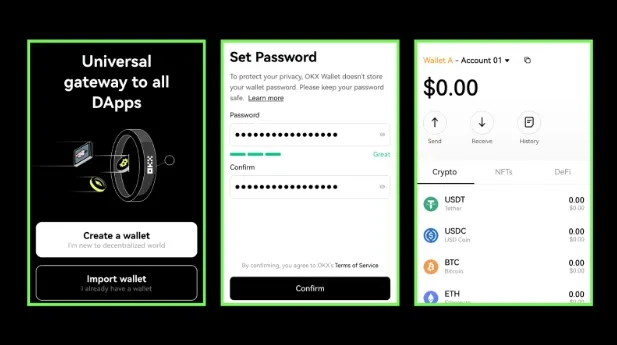
Create a new wallet or restore an existing one
Step 3: Select Connect Wallet to get started

OKX Connect Wallet
Step 4: Select "Import Wallet"
Select "Import Wallet" if you have an existing wallet, and select Keyless Wallet, Seed Phrase, or Hardware Wallet to import an existing wallet.

OKX import wallet
Step 5: Enter your seed/private key
Enter your Seed/Private Key or connect your hardware wallet and confirm. Set a password to protect your privacy and click "Confirm" to complete the import.
Step 6: Transfer assets
Transfer assets from another platform or from the OKX spot wallet to your new Web3 Wallet. You can do this using a QR code or wallet address available in the Web3 Wallet settings.
Security tips for using OKX Web3 Wallet
-
Backups. Back up your seed phrase regularly and store it in a safe place.
-
Use a cold wallet for long-term storage. For storing large amounts of money for a long time, we recommend using cold wallets such as Ledger, which provide security by storing keys offline.
-
Check addresses and networks before transacting. Make sure the correct network is selected to match the sending address.
TON wallet and OKX
TON (The Open Network) is a decentralized blockchain platform focused on fast transaction processing and support for decentralized applications (dApps). TON includes cross-chain features, allowing you to operate assets across different blockchains through compatibility with them. The initial initiative to create TON came from Telegram, but now the project is supported by an active community of developers and users.
OKX is one of the leading crypto exchanges that offers a multi-network Web3 wallet that allows users to easily manage assets on the TON network and other blockchains. Connecting the TON wallet to OKX opens access to the Web3 ecosystem and ensures compatibility with multiple networks and decentralized applications.
Users can choose from different types of wallets for working with TON:
-
Hot wallets (software), such as OKX Web3 Wallet, provide quick access to assets, staking support, and integration with dApps.
-
Cold wallets (hardware), such as Ledger, provide secure long-term storage.
-
Multi-network wallets, which support multiple blockchains, allowing you to manage different cryptocurrencies in one application.
TON Wallet, which connects to OKX, is a hot wallet integrated into the OKX platform, making it easy to manage your assets without having to enter seed phrases.
Distribute assets across multiple addresses with different levels of access
When using the TON wallet on OKX, use more advanced asset protection strategies. For example, for long-term storage of large amounts in Web3 Wallet, you can use "access splitting" — distributing assets across several addresses or wallets with different levels of access. This reduces the risks associated with a possible compromise of one of the wallets and makes it more difficult for attackers.
In addition, it is worth remembering that working with multi-network wallets, such as OKX Web3 Wallet, requires taking into account the peculiarities of each network. For example, TON has a unique architecture, which can affect the speed of transaction confirmation and the size of fees. Before making transfers between networks, we recommended planning actions taking into account the network load and possible delays in order to optimize costs and minimize the risks of blocking assets during the transfer process.
Conclusion
Opening a TON wallet on OKX gives you access to the wide range of Web3 features, including asset management and interaction with decentralized applications. Following the steps outlined in this guide, you can quickly set up your wallet and start using it to trade cryptocurrencies. Remember to keep your security in mind, regularly check that your settings are up-to-date, and use additional security measures. Web3 Wallet on OKX supports multiple blockchains, making it a convenient tool for working with multi-chain assets. Use these features to effectively manage your crypto assets and explore new financial products.
FAQs
What are the risks of using Web3 Wallet for beginners?
Web3 Wallet requires the user to store and protect private keys and seed phrases on their own. Losing access to these data can lead to irretrievable loss of funds. In addition, interaction with dApps may carry risks associated with smart contract vulnerabilities.
What additional methods can be used to protect assets in Web3 Wallet?
In addition to the standard backup of the seed phrase, you can split assets into multiple addresses, set limits on transaction amounts, or use multi-signatures, where confirmation from multiple participants is required to complete an operation.
How to interact with dApps to minimize risks?
Before connecting to a dApp, check if it has been security audited and read community reviews. Also, use a testnet to check the functionality before working with large amounts.
Why can Web3 Wallet fees vary across networks?
Fees depend on the level of blockchain load and the architecture of a particular network. For example, high-bandwidth networks may have lower fees, but this also depends on market conditions and the demand for transactions on the network.
Team that worked on the article

Mikhail Vnuchkov joined Traders Union as an author in 2020. He began his professional career as a journalist-observer at a small online financial publication, where he covered global economic events and discussed their impact on the segment of financial investment, including investor income. With five years of experience in finance, Mikhail joined Traders Union team, where he is in charge of forming the pool of latest news for traders, who trade stocks, cryptocurrencies, Forex instruments and fixed income.

Chinmay Soni is a financial analyst with more than 5 years of experience in working with stocks, Forex, derivatives, and other assets. As a founder of a boutique research firm and an active researcher, he covers various industries and fields, providing insights backed by statistical data. He is also an educator in the field of finance and technology.
As an author for Traders Union, he contributes his deep analytical insights on various topics, taking into account various aspects.

Mirjan Hipolito is a journalist and news editor at Traders Union. She is an expert crypto writer with five years of experience in the financial markets. Her specialties are daily market news, price predictions, and Initial Coin Offerings (ICO).


