
How To Withdraw Notcoin From Bybit
Bybit officially listed Notcoin (NOT) on May 9, 2024, opening deposits and trading on May 16. Withdrawals became possible on May 17, with all transactions going through The Open Network (TON).
Notcoin is a gaming token associated with Telegram. It was listed on Bybit in May 2024, allowing users to not only trade the token but also withdraw it through the TON network. Listing on a major platform like Bybit is an important step to increase the liquidity of the token and attract new market participants. In this article, we will explain how to trade Notcoin on Bybit and how to safely withdraw the tokens you earn by following simple steps.
Bybit Notcoin listing


Notcoin is a cryptocurrency project built into Telegram and powered by The Open Network (TON) blockchain. It was launched in January 2024 as a game with "play-to-earn" mechanics, where users can earn in-game coins by clicking on its image. These coins can then be converted into the NOT token, which can be withdrawn to cryptocurrency platforms and transacted with. Notcoin has become popular due to its simple game mechanics and integration with TON, which ensures high security and transaction speed.
Notcoin was listed on Bybit on May 9, 2024. Trading began on May 16, and the ability to withdraw tokens became available on May 17. Users can trade the token in the NOT/USDT pair using the platform's automated tools. Transactions from Notcoin on Bybit are supported through the TON blockchain, which has high throughput and enhanced security. This ensures security and fast withdrawals to external wallets.
The listing of Notcoin on Bybit has created several opportunities and benefits for traders and the broader crypto community:
-
Access to a promising asset. Traders can now invest in an innovative cryptocurrency with potential for significant growth, adding diversity to their portfolios.
-
Enhanced liquidity. Bybit's robust trading volume ensures high liquidity for Notcoin, making it easier for traders to buy and sell without significant price impact.
-
Competitive trading fees. Bybit offers some of the lowest trading fees in the industry, allowing users to maximize their profits when trading Notcoin.
-
Promotional campaigns. To celebrate the listing, Bybit introduced special incentives like reduced trading fees, trading competitions, and airdrops for active traders.
-
Increased awareness for Notcoin. The listing boosts Notcoin’s visibility, attracting institutional and retail investors and fostering adoption.
How to trade Notcoin on Bybit
Step 1: Register on Bybit
To start trading Notcoin, the first thing you need to do is create an account on the Bybit platform. To do this, go to the official website of the exchange and click on the register button. You will need to provide an email address or phone number, as well as create a password. After that, confirm your email or phone number using the code that will be sent to you via SMS or email. Once registered, complete the identity verification procedure (KYC) to gain full access to the platform's functionality.
Step 2: Deposit funds
To trade Notcoin, you will need to deposit funds into your Bybit account. Go to the "Assets" section in the upper right corner of the screen and select "Deposit".
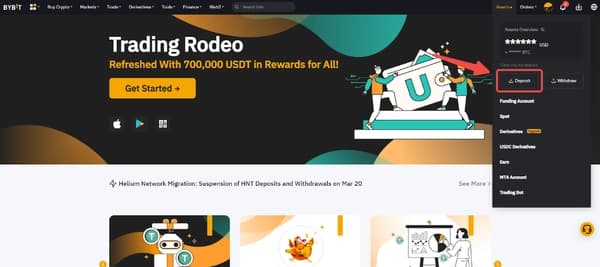
Bybit deposit funds
You will need to select the cryptocurrency (for example, BTC) you will be trading with.
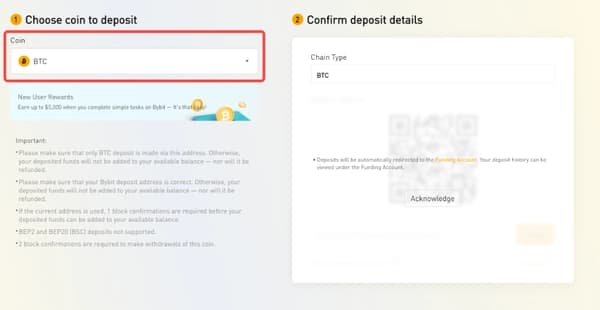
Bybit choosing deposit token
Make sure you are using a supported network (TON or another depending on the coin). Copy the provided address or use the QR code to transfer funds from your external wallet to the Bybit platform. Once the transaction is confirmed, the funds will appear in your account.
Step 3: Trading Notcoin
Once the funds have been credited, go to the "Spot Trading" section on the main page.
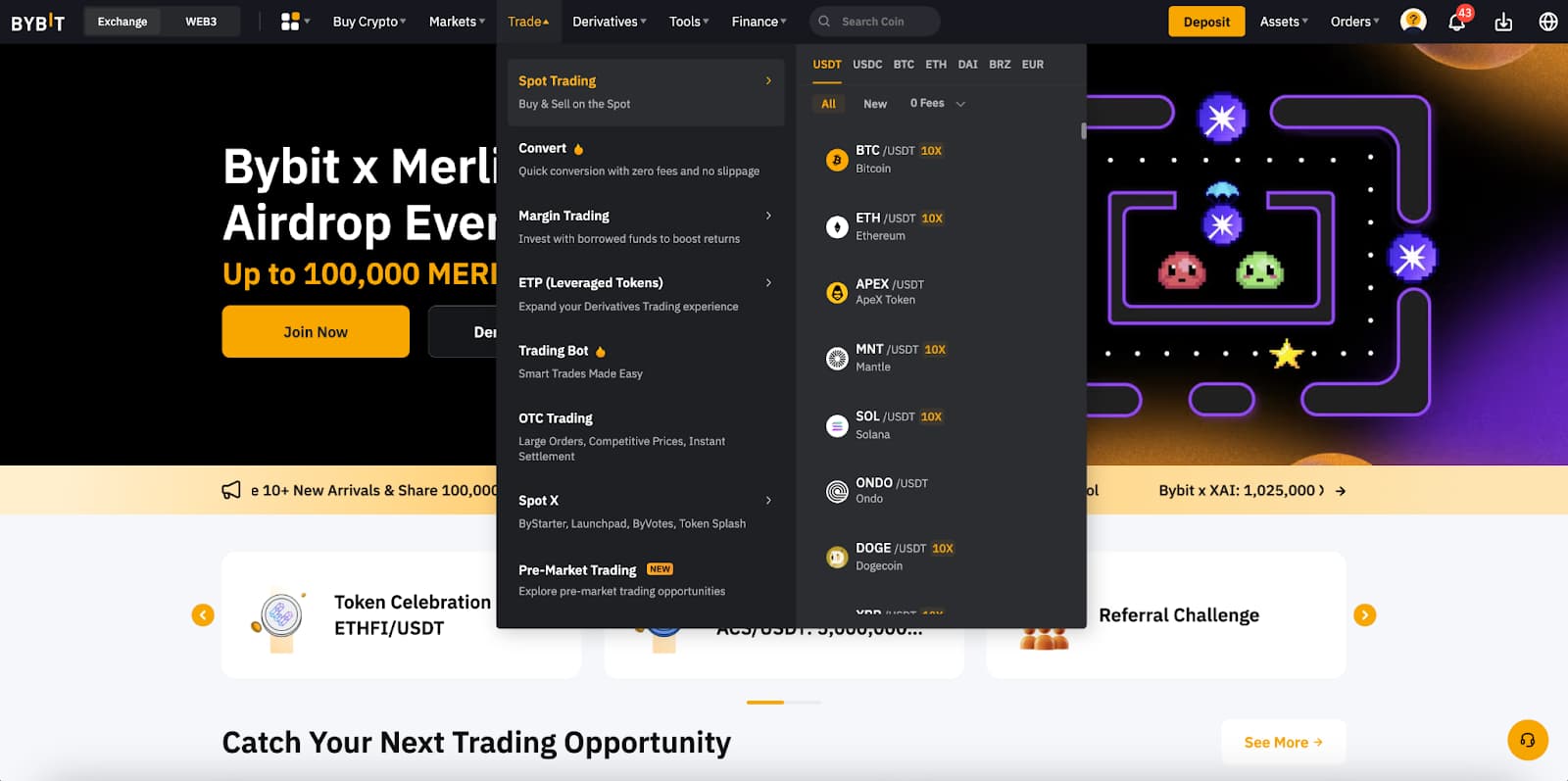
Spot trading on Bybit
In the search bar, find the trading pair NOT/USDT. Select the desired pair and specify the order type (market or limit) to buy or sell Notcoin.
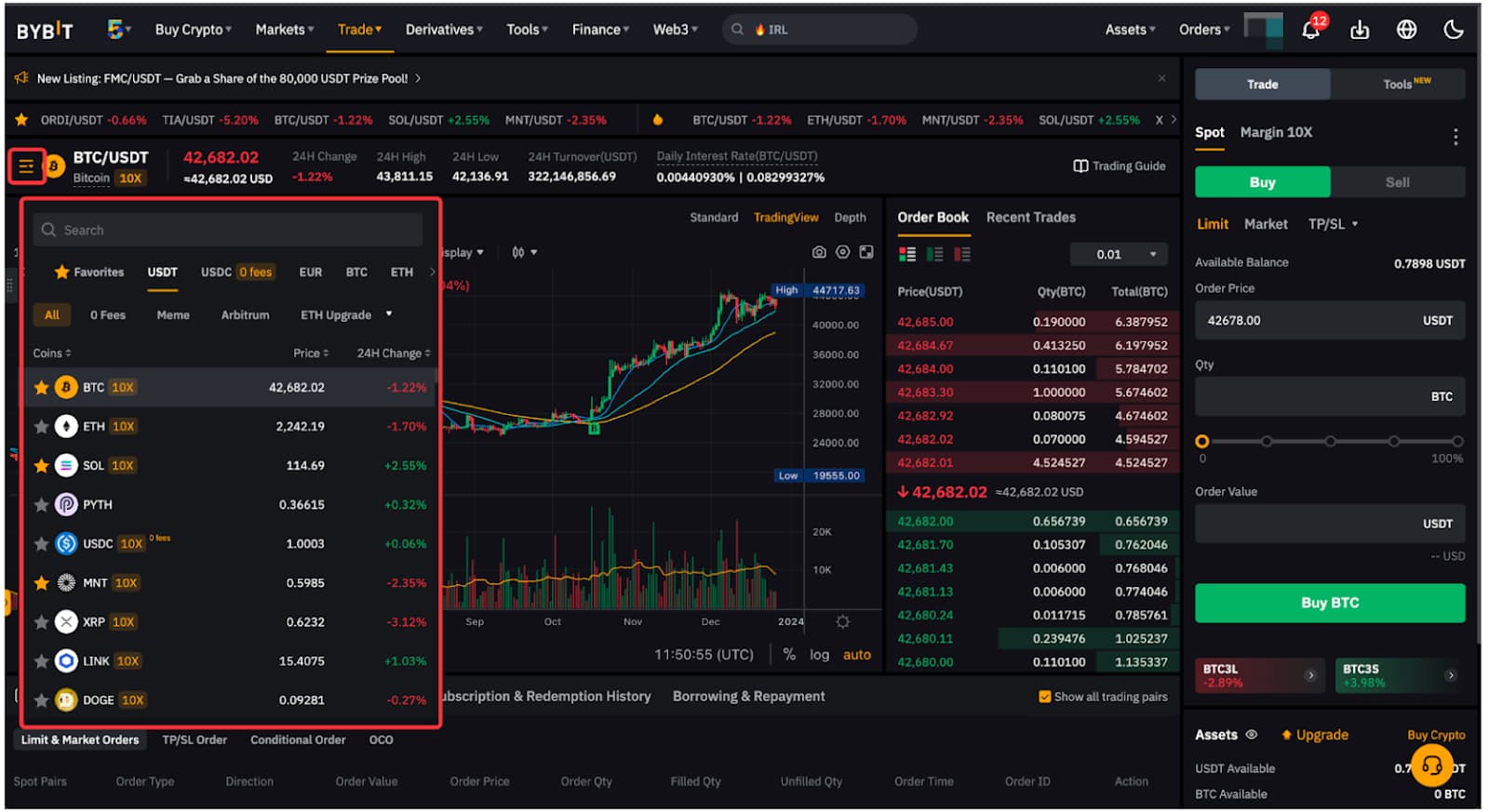
Bybit crypto pair search
You can use automated tools to simplify the trading process to place an order depending on your goals and current market conditions.
How to withdraw Notcoin from Bybit
Step 1: Log in to your Bybit account and go to the Assets section located at the top-right corner of the homepage. Then select the Withdraw option.
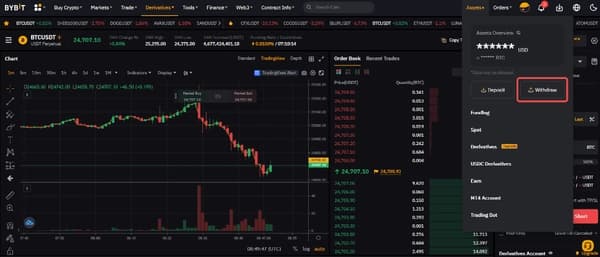
Bybit withdrawal
Step 2: Find the account you want to withdraw funds from and click the Withdraw button next to it.
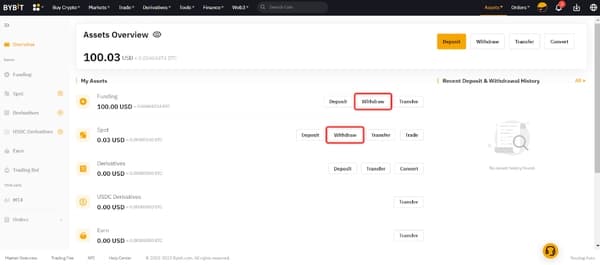
Bybit withdraw funds
Step 3: Specify the coin you wish to withdraw and enter the wallet address. You have several options:
-
Manually enter the wallet address in the designated field.
-
Select a previously saved address from your registered withdrawal addresses.
-
Add a new wallet address by clicking Add. If you haven’t registered a withdrawal address yet, use this step to do so. You can find more details in the guide on adding a withdrawal wallet address.
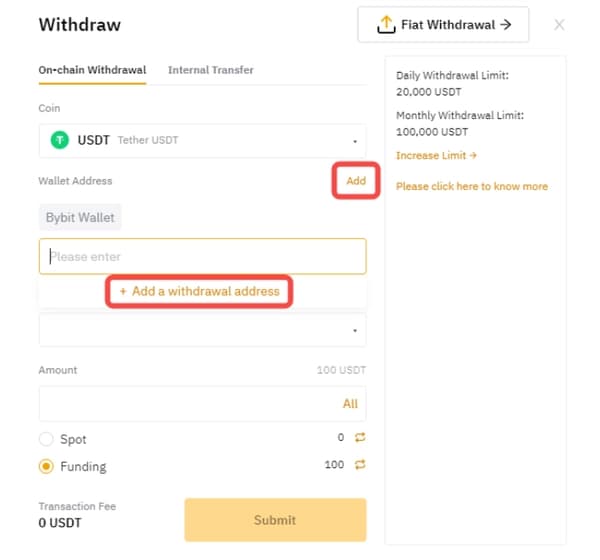
Bybit add withdrawal address
Step 4: Choose the blockchain network for your withdrawal. The withdrawal fee for each available network will be displayed.
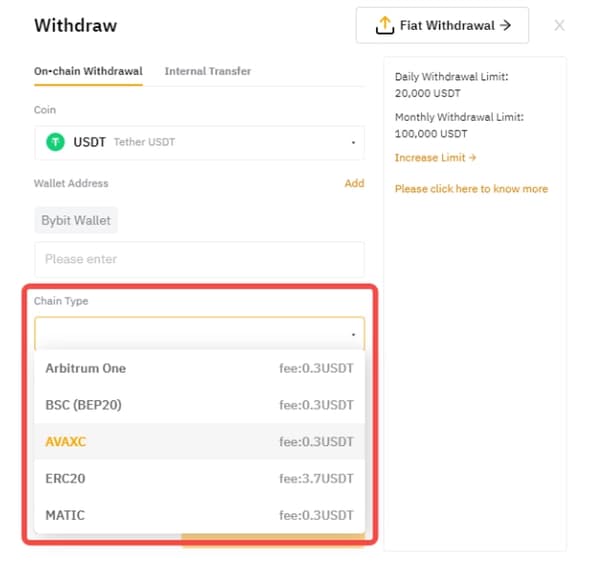
Bybit withdrawal chain
Step 5: Enter the amount you wish to withdraw, or click All to withdraw your entire balance. Once you select the chain type, the minimum withdrawal amount for the chosen coin and blockchain network will be displayed on the right side of the window.
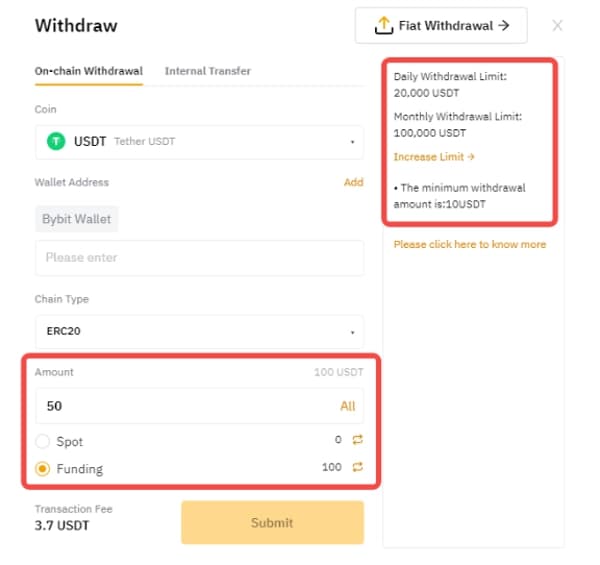
Bybit withdrawal amount
Step 6: Click Submit to proceed to the withdrawal verification page.
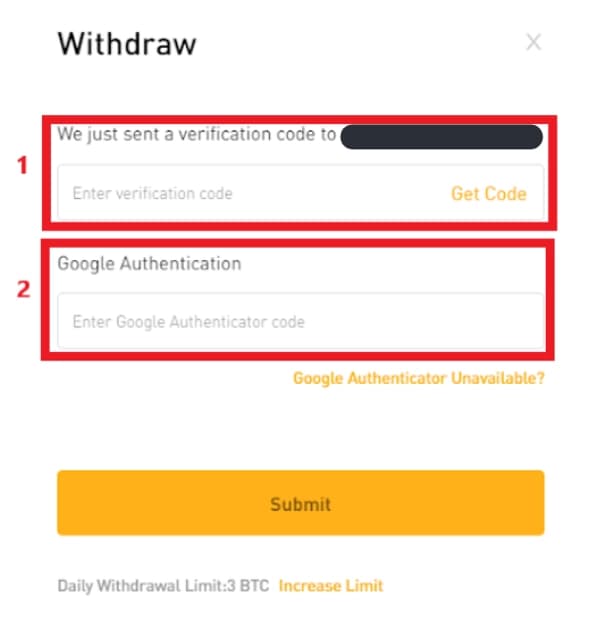
Bybit withdrawal verification
If your wallet address is not on the Whitelist, two-factor authentication (2FA) via email and Google Authenticator will be required.
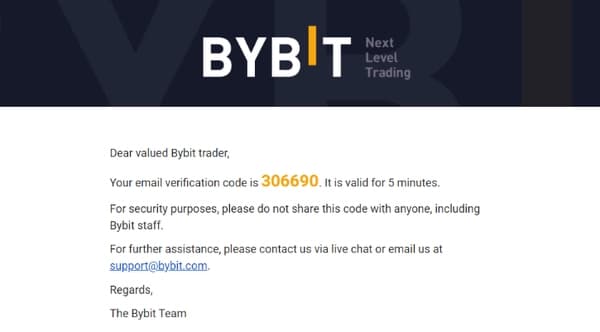
Step 7: To receive your email verification code, click Get Code and complete the verification by moving the slider.
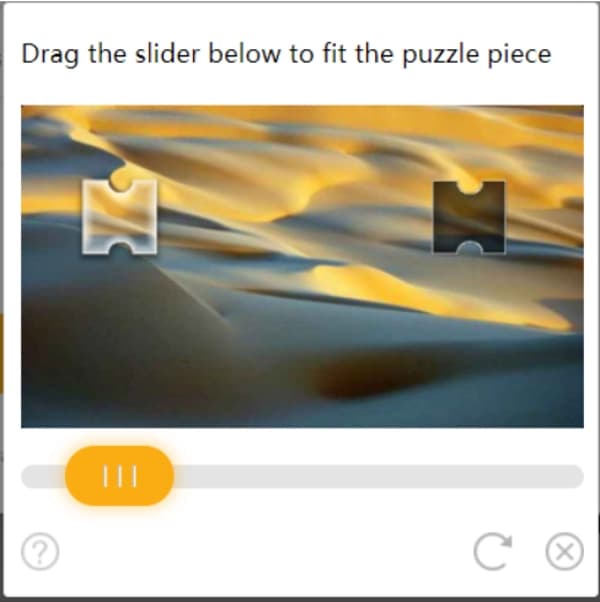
Bybit verification process
Step 8: Check your registered email inbox. Enter the verification code you received into the designated field.
Bybit verification code
Step 9: Open the Google Authenticator app and enter the 6-digit security code to complete the two-factor authentication process.
Step 10: Click Submit. Once successfully verified, your withdrawal request will be processed within the specified timeline.
Don’t rush into big trades in a volatile market
There are a few important aspects that beginners often miss when trading Notcoin. First, always consider volatility, especially in the first days after listing. During this period, prices can fluctuate wildly due to high trading volumes, as well as the activity of investors looking to make a quick profit on price differences. If you are a beginner, do not rush to make large trades, wait for the market to stabilize, or consider using limit orders for better control over buying and selling.
Another thing to consider is choosing the right network for withdrawals. Notcoin runs on the TON blockchain, and although this network offers high throughput and low fees, mistakes in choosing a network for withdrawals can lead to loss of funds. Always double-check the compatibility of the wallet address and the chosen network before confirming a transaction. If you are unsure, it is better to start with a small amount to ensure that the transaction goes through correctly.

Conclusion
Notcoin listing on Bybit has opened up new opportunities for users to trade and withdraw tokens. Thanks to the support of the TON network, transactions are fast and secure, making this token attractive to both short-term traders and long-term investors. The process of trading Notcoin on Bybit is quite simple, especially for those already familiar with cryptocurrency exchanges, but always consider the volatility of the market and the peculiarities of withdrawal. In the future, Notcoin has every chance to strengthen its position, thanks to the integration with Telegram and the possible listing on other major exchanges.
FAQs
Can Notcoin be used to play other blockchain games?
In future, yes, as Notcoin plans to expand its use beyond the main game by adding integration opportunities with other blockchain projects and games. This could include participation in partner gaming projects or using the token in Web3 ecosystems.
How can you minimize risks when trading Notcoin?
To minimize risks, it is important to monitor the token’s volatility, use limit orders to better control the price, and avoid investing large amounts in the first days after listing, when the market can be volatile.
What factors can affect the long-term price of Notcoin?
The long-term price of Notcoin depends on many factors. These include community interest, the number of active users, and further project updates. Listings on new exchanges and integrations with other blockchain projects also play an important role, which can increase demand for the token.
What to do if a Notcoin withdrawal transaction fails?
Please check that you have entered the address and network correctly and that the funds are not blocked due to active orders. If the error persists, please contact the exchange support service to resolve the issue.
Team that worked on the article

Maxim Nechiporenko has been a contributor to Traders Union since 2023. He started his professional career in the media in 2006. He has expertise in finance and investment, and his field of interest covers all aspects of geoeconomics. Maxim provides up-to-date information on trading, cryptocurrencies and other financial instruments. He regularly updates his knowledge to keep abreast of the latest innovations and trends in the market.

Chinmay Soni is a financial analyst with more than 5 years of experience in working with stocks, Forex, derivatives, and other assets. As a founder of a boutique research firm and an active researcher, he covers various industries and fields, providing insights backed by statistical data. He is also an educator in the field of finance and technology.
As an author for Traders Union, he contributes his deep analytical insights on various topics, taking into account various aspects.

Mirjan Hipolito is a journalist and news editor at Traders Union. She is an expert crypto writer with five years of experience in the financial markets. Her specialties are daily market news, price predictions, and Initial Coin Offerings (ICO).


