KuCoin Verification: A Step-by-Step Guide


Editorial Note: While we adhere to strict Editorial Integrity, this post may contain references to products from our partners. Here's an explanation for How We Make Money. None of the data and information on this webpage constitutes investment advice according to our Disclaimer.
How to complete KuCoin verification:
Step 1. Sign in to your KuCoin account.
Step 2. Open “Account Center” → “Identity Verification”.
Step 3. Select individual verification and specify the country that issued your document.
Step 4. Select your identity document type and enter your personal details.
Step 5. Take a photo of your document and complete facial verification.
Step 6. Submit your information and wait for your KYC result.
KuCoin verification is a mandatory identity verification procedure for users who want to trade cryptocurrencies and use the exchange’s core services. Since August 31, 2023, new customers have been required to complete KYC by providing an identity document and passing facial biometric verification. Without it, deposits, cryptocurrency purchases, and most trading activities are unavailable.
In this article, we’ll explain how to verify your KuCoin account, which documents the crypto exchange accepts, how long verification takes, and what restrictions apply to accounts without identity verification.
What Is KuCoin Verification and Why Is It Needed?


KuCoin KYC (Know Your Customer) is a procedure for identifying an account owner. The exchange checks personal information and identity documents, and verifies that the photo on the document matches the user’s face.
Verification on KuCoin is necessary to comply with requirements for combating money laundering (AML), financing illicit activities, and fraud. It also allows the exchange to apply restrictions and limits based on the user’s country of residence and legal requirements. After successfully verifying their identity, customers gain access to the trading features permitted in their region, deposits, and other products.
However, completing KYC does not guarantee protection against market risks, technical failures, or restrictions imposed by the platform. For added security, enable two-factor authentication and set a password.
Is Verification on KuCoin Required to Start Trading
Yes. Under current rules, KuCoin requires identity verification to use its core trading products. The table shows which features are available depending on your account status.
| Feature | Without KYC | After KYC |
|---|---|---|
| Sign-up and login | Yes | Yes |
| Security settings | Yes | Yes |
| Crypto deposit | No | Yes |
| Buying cryptocurrency with a card | No | Yes* |
| P2P trading | No | Yes* |
| New spot trades | No | Yes* |
| API trading | No | Yes* |
| Cryptocurrency withdrawals | Limited access for older accounts | Yes* |
| KuCoin Earn products | Limited redemption of existing positions | Yes* |
*Subject to product availability in the user's country and any individual account restrictions.
It is important to distinguish between registration and identity verification. Creating an account with an email address or phone number does not mean that you have successfully completed KYC. You will need to verify your identity separately to access trading. The exchange may also request additional information depending on your country of residence, the product you use, and the results of the review.
How to complete verification on KuCoin: step-by-step guide
To complete verification on KuCoin, prepare a valid identity document and a device with a camera. You can complete the process on the official cryptocurrency exchange website or in the mobile app.
Step 1. Sign in to your KuCoin account
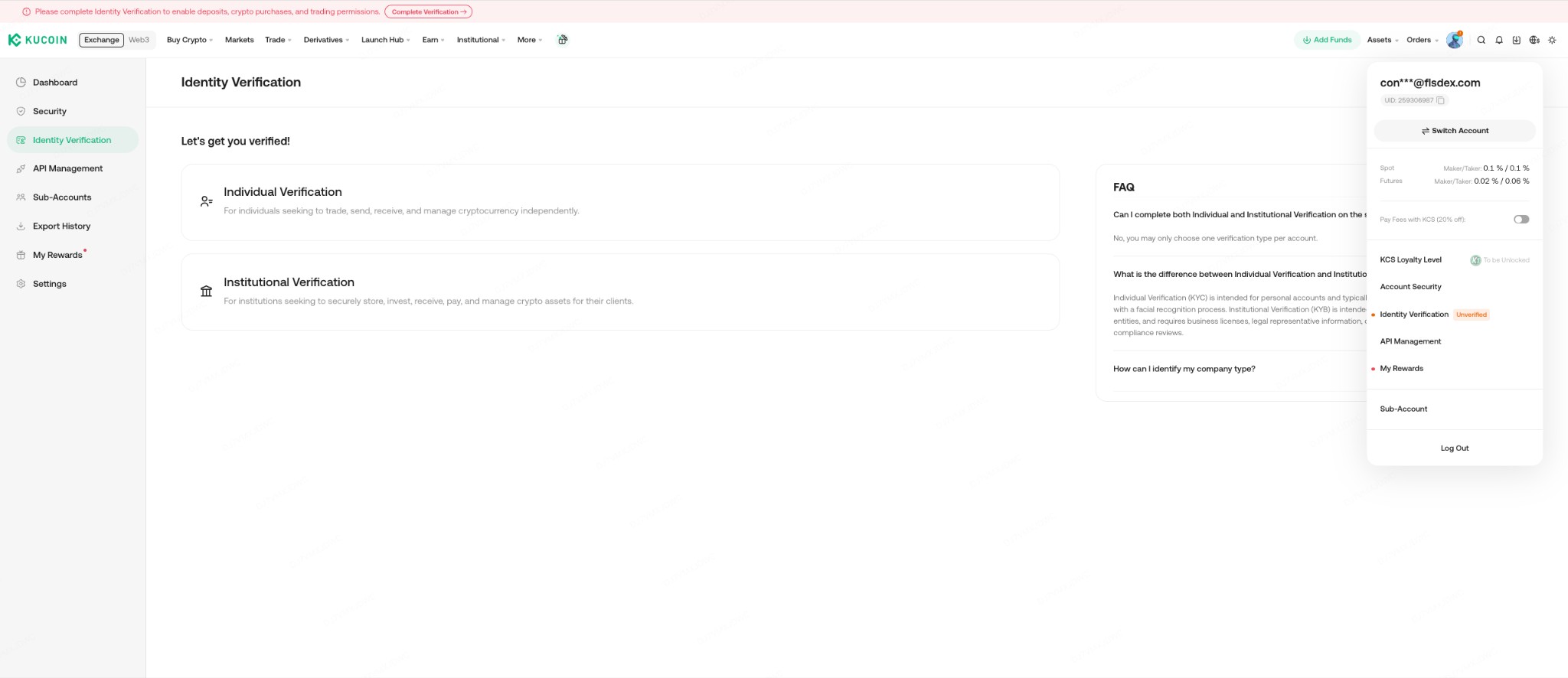
Go to the official KuCoin website and sign in. At the top of the page, click the profile icon, then open “Account Center” → “Identity Verification.” If you don't have an account yet, register first and verify your contact details. Then proceed with the KYC process.
Step 2. Start individual verification
On the verification page, select “Individual Verification.” Then click “Verify Now” to proceed to the form.
Individual verification is used for personal accounts. Institutional verification is intended for companies and involves a separate KYB (Know Your Business) process.
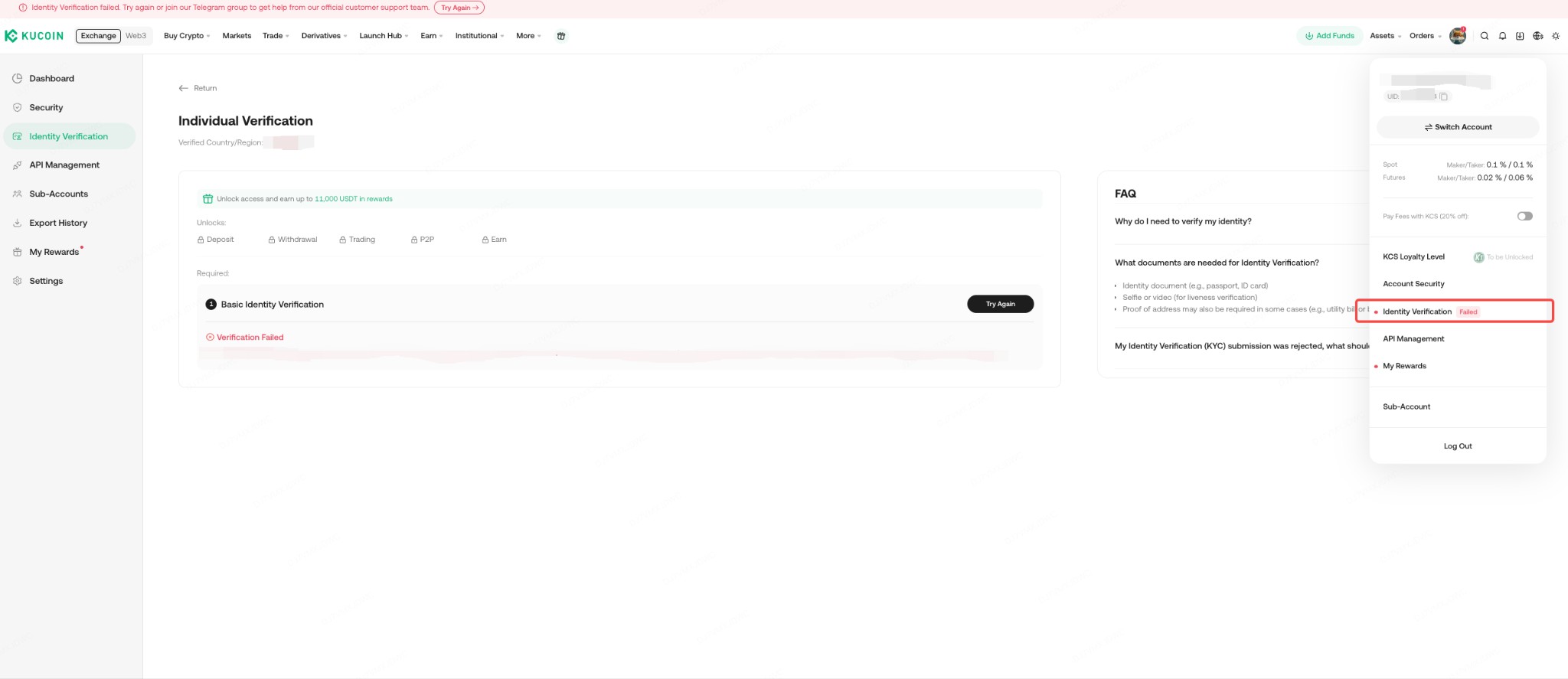
Step 3. Specify your country and document type
Select the country or region that issued your identity document. Then specify the type of document you will use for verification. KuCoin accepts passports, ID cards, driver's licenses, and residence permits. The list of accepted documents varies by country.
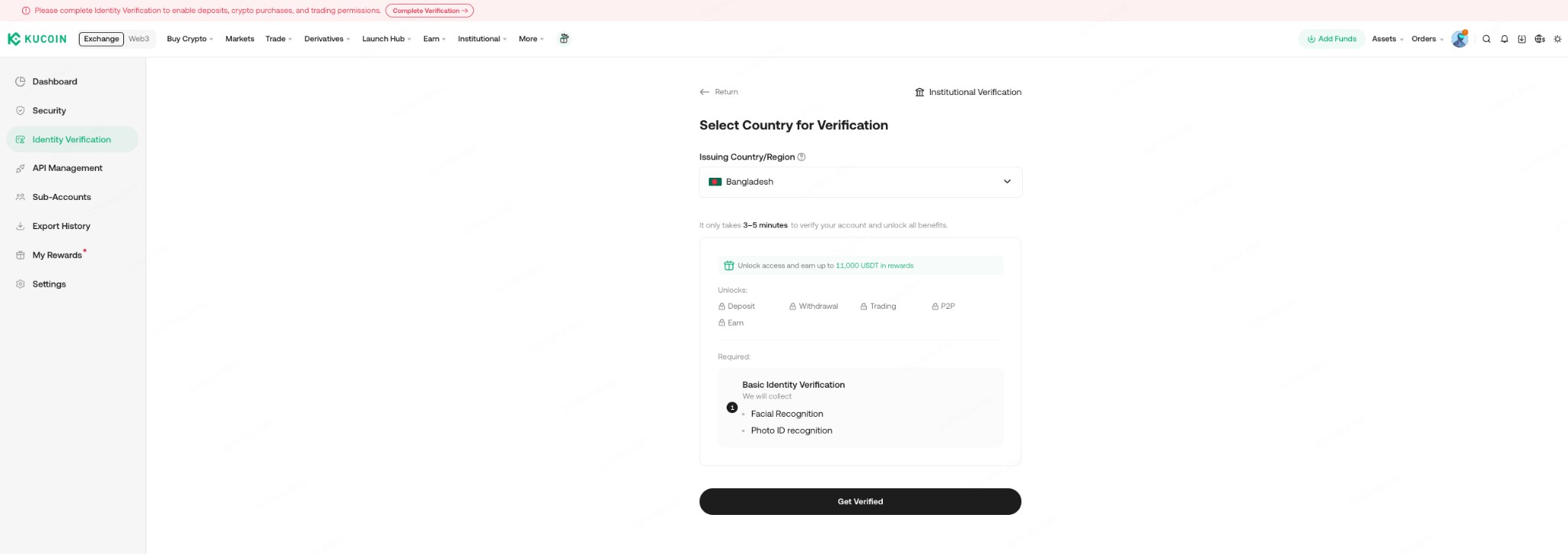
After selecting your document, enter your personal details if prompted by the interface. Check the spelling of your first name, last name, and other details. The information must match your document.
Step 4. Upload photos of your identity document
Select the device you will use to photograph your document, then click “Continue.” Allow your browser to access the camera. Place the original identity document in the frame and follow the system instructions. If required, take photos of the front and back.
Before submitting, make sure that:
All edges of the document are fully visible.
The text, number, and date of birth are clearly legible.
The photo has no glare or blur.
The document is valid and undamaged.
The image has not been edited.

The KuCoin web interface also offers an option to upload photos of your document, if the relevant button is available to you. Do not use scanned copies or images of the document displayed on another device’s screen instead of the original. They may be rejected by the system.
Step 5. Complete biometric verification
After uploading your identity document, the system will prompt you to complete biometric verification. Select a device for facial recognition and click “Continue.”

Position your face within the marked frame and follow the on-screen instructions. For best results, use even lighting and remove anything covering your face.
Depending on the system, you may need to turn your head or perform another action to confirm that a real person is in front of the camera.
Step 6. Wait for identity verification
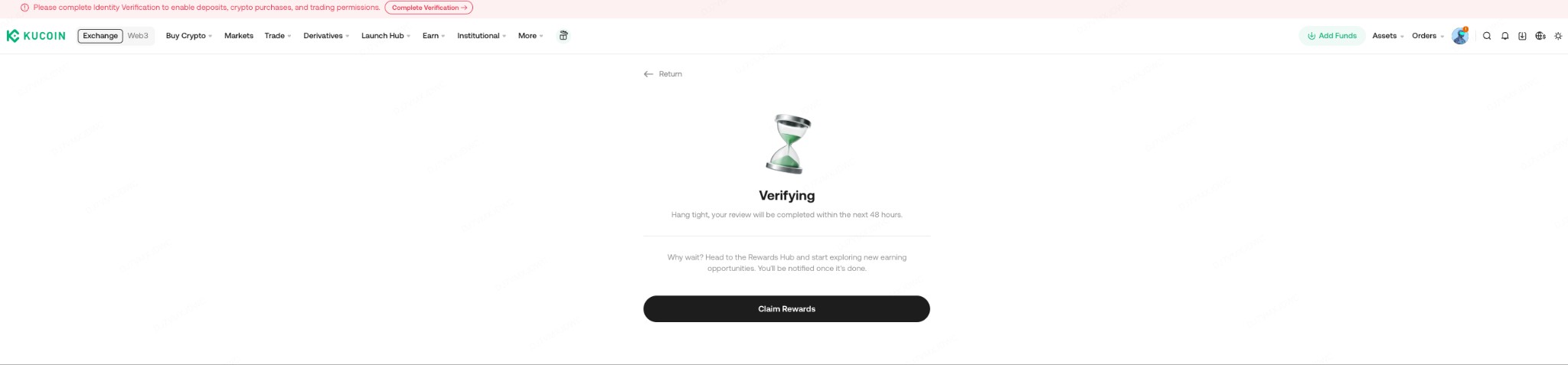
Once the process is complete, your information will be submitted for review. You can track the result in the “Identity Verification” section. If KuCoin approves your application, your account status will be updated. The result may also be sent to your email address.
What documents are required for KuCoin verification
Standard KYC requires a photo ID. The specific list of accepted documents depends on the country of issuance and the options available in the verification interface.
| Document | Main requirements |
|---|---|
| International passport | A valid document with legible personal information |
| National ID card | Original document; both sides if required |
| Driver's license | Accepted if available for the selected country |
| Residence permit | Accepted in supported regions |
KuCoin sets the following general requirements: users must be at least 18 years old, provide a valid document and a clear photo, and ensure their personal details match.
For image uploads, the exchange's help guide specifies JPG/PNG formats, with a recommended file size of less than 50 MB. However, limits on the specific upload screen may differ, so follow the requirements shown in the interface.
Does KuCoin require proof of residential address?
KuCoin's standard verification process focuses primarily on identity verification and biometric checks. The current general instructions do not specify a separate proof-of-address step that is mandatory for all users.
However, the exchange may request additional information and documents to meet regional requirements, verify the source of funds, or provide access to certain fiat services. Therefore, you do not need to upload utility bills or bank statements in advance unless KuCoin prompts you to do so directly in your account.
Why can’t I complete verification on KuCoin?
If KuCoin rejects your application, the reason is usually shown on the identity verification page or in an email notification. Before resubmitting your documents, correct the issue identified.
| Problem | Possible reason | What to do |
|---|---|---|
| Document rejected | Blurry photo or cropped edges | Retake a photo of the original document |
| Face verification failed | Insufficient lighting or camera error | Retry verification in good lighting |
| The details do not match | Error in first name, last name, or other details | Correct your personal information |
| Document not accepted | Expired or unsupported document type | Select another accepted document |
| Duplicate detected | This information has already been used on another account | Contact support |
| Unable to upload photo | Browser, network, or file format error | Check your connection and file requirements |
| Verification unavailable | Age or regional restrictions | Check the terms of service |
| Application review taking a long time | Additional verification | Wait for the result or contact support |
Do not keep all your crypto holdings on an exchange

Verification on KuCoin is required to access trading features, but it should not be seen as a guarantee that your funds are safe. Even after successfully completing KYC, users remain subject to the rules of a centralized exchange, its technical infrastructure, and any potential restrictions.
I recommend enabling two-factor authentication in advance, setting a trading password, and checking whether you can withdraw a small amount. For long-term cryptocurrency storage, consider using a personal crypto wallet whose keys are controlled by the owner.
Conclusion
Verification on KuCoin is mandatory for users who plan to buy, sell, and exchange cryptocurrency through the exchange’s main services. Standard verification requires submitting a valid identity document, uploading photos of it, and completing biometric identification.
New accounts without KYC do not have full access to trading. Existing users with older accounts can carry out limited transactions involving their current assets, including closing positions and withdrawing funds, subject to the applicable terms.
To avoid delays during verification, use original documents, enter your personal details carefully, and follow the photo requirements. Before depositing funds, also check whether KuCoin and the trading products you need are available in your country.
FAQs
Can you withdraw money from KuCoin without verification?
For older accounts registered before August 31, 2023, KuCoin allows users to withdraw funds without completing verification. However, individual restrictions apply. New users must complete verification to use the exchange’s services fully.
Can you complete verification on KuCoin again?
Yes, if the previous application was rejected and the system offers you the option to verify again. You need to correct the errors and provide acceptable documents. If your details are already being used in another account, contact the crypto exchange’s support team.
Why won’t KuCoin accept my passport?
Possible reasons include an expired passport, a blurry photo, mismatched personal details, or an unsupported document type. Check the error message in the verification section and follow the crypto exchange’s instructions.
How long does KuCoin verification take?
It usually takes 3–5 minutes, but additional checks may take up to 48 hours. If your application is taking longer to process, contact the support team.
Related Articles
Team that worked on the article
Anastasiia has 17 years of experience in finance and content marketing. She believes that the support of information and expert opinion is very important for the success of investors and new traders.
Eugene Komchuk is the Editor-in-Chief at Traders Union, bringing many years of experience in journalism and analysis. His professional journey began over 25 years ago, and since then, he has progressed through all stages of the media sphere – from reporting to editorial positions in leading publications.
Chinmay Soni is a financial analyst with more than 5 years of experience in working with stocks, Forex, derivatives, and other assets. As a founder of a boutique research firm and an active researcher, he covers various industries and fields, providing insights backed by statistical data.
-
 Afghanistan
-
 Albania
-
 Algeria
-
 Angola
-
 Argentina
-
 Armenia
-
 Australia
-
 Austria
-
 Azerbaijan
-
 Bahamas
-
 Bahrain
-
 Bangladesh
-
 Belarus
-
 Belgium
-
 Bolivia
-
 Botswana
-
 Brazil
-
 Brunei
-
 Bulgaria
-
 Cambodia
-
 Cameroon
-
 Canada
-
 Chile
-
 China
-
 Colombia
-
 Congo
-
 Costa Rica
-
 Cote d'Ivoire
-
 Croatia
-
 Cuba
-
 Cyprus
-
 Czechia
-
 DR Congo
-
 Denmark
-
 Dominican Republic
-
 Ecuador
-
 Egypt
-
 El Salvador
-
 Estonia
-
 Eswatini
-
 Ethiopia
-
 Finland
-
 France
-
 Georgia
-
 Germany
-
 Ghana
-
 Greece
-
 Haiti
-
 Hong Kong
-
 Hungary
-
 India
-
 Indonesia
-
 Iran, Islamic republic
-
 Iraq
-
 Ireland
-
 Israel
-
 Italy
-
 Jamaica
-
 Japan
-
 Jordan
-
 Kazakhstan
-
 Kenya
-
 Korea
-
 Kuwait
-
 Kyrgyzstan
-
 Laos
-
 Latvia
-
 Lebanon
-
 Lesotho
-
 Libya
-
 Lithuania
-
 Luxembourg
-
 Madagascar
-
 Malaysia
-
 Malta
-
 Mauritius
-
 Mexico
-
 Moldova
-
 Mongolia
-
 Montenegro
-
 Morocco
-
 Mozambique
-
 Myanmar
-
 Namibia
-
 Nepal
-
 Netherlands
-
 New Zealand
-
 Nigeria
-
 North Macedonia
-
 Norway
-
 Oman
-
 Pakistan
-
 Palestine
-
 Panama
-
 Papua New Guinea
-
 Paraguay
-
 Peru
-
 Philippines
-
 Poland
-
 Portugal
-
 Puerto Rico
-
 Qatar
-
 Reunion
-
 Romania
-
 Rwanda
-
 Saudi Arabia
-
 Serbia
-
 Singapore
-
 Slovakia
-
 Slovenia
-
 Somalia
-
 South Africa
-
 Spain
-
 Sri Lanka
-
 Sweden
-
 Switzerland
-
 Syria
-
 Taiwan
-
 Tajikistan
-
 Tanzania
-
 Thailand
-
 Trinidad and Tobago
-
 Tunisia
-
 Turkey
-
 UAE
-
 Uganda
-
 Ukraine
-
 United Kingdom
-
United States
-
 Uruguay
-
 Uzbekistan
-
 Venezuela
-
 Vietnam
-
 Yemen
-
 Zambia
-
 Zimbabwe
- Forex
- Crypto