
Bitget Wallet Card Review: Fees, Cashback and Spending Limits


Editorial Note: While we adhere to strict Editorial Integrity, this post may contain references to products from our partners. Here's an explanation for How We Make Money. None of the data and information on this webpage constitutes investment advice according to our Disclaimer.
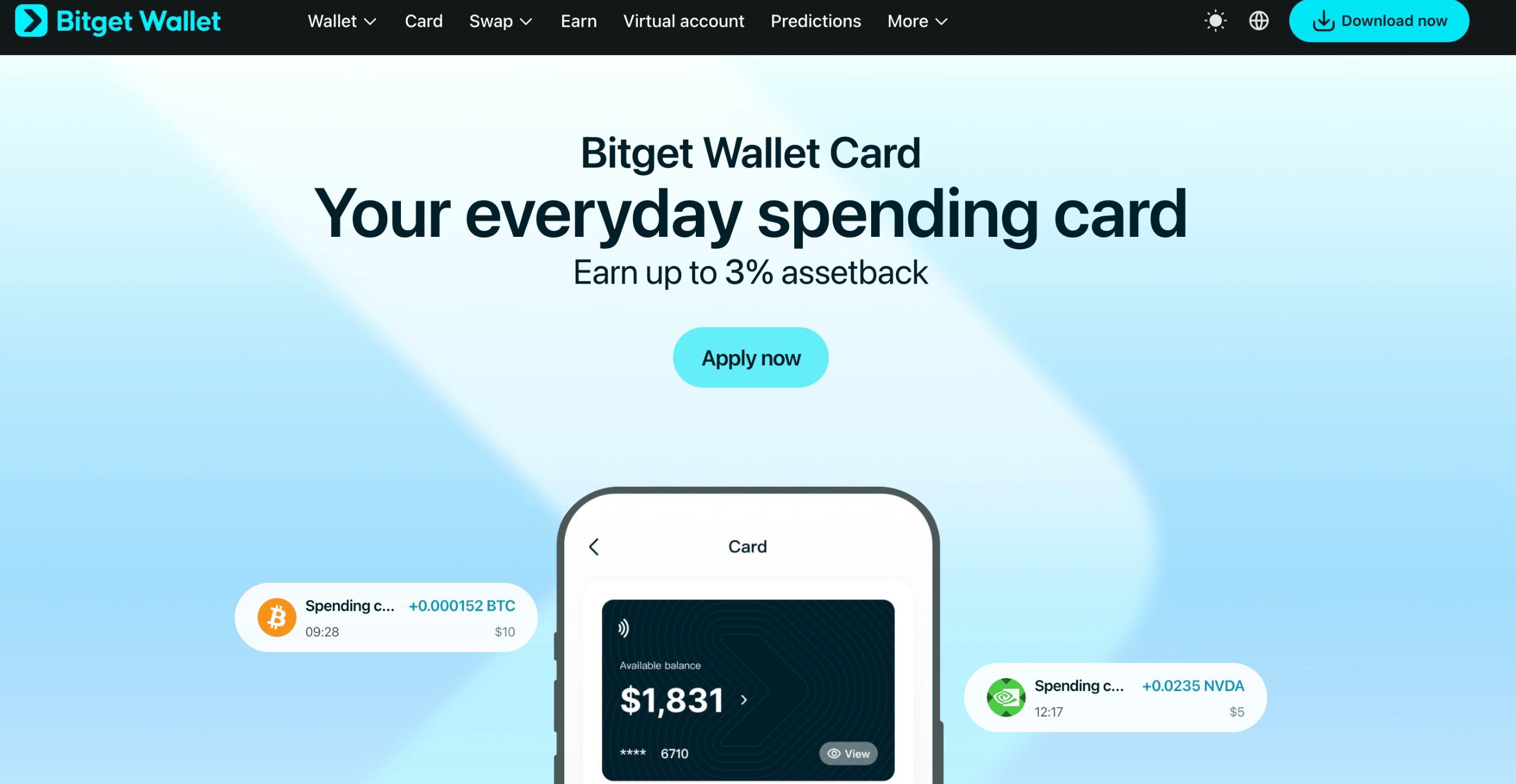
Bitget Wallet Card is a crypto payment card that lets users pay for goods and services with digital assets. It supports top-ups in USDT, USDC, ETH, SOL, and other cryptocurrencies, works with Visa or Mastercard, and offers up to 3% cashback in selected assets. Issuance and annual maintenance are free.
As of August 1, 2026, new applications for Bitget crypto cards are accepted through the Bitget Wallet app. The card is available in more than 50 countries and regions, supports Apple Pay and Google Pay, and is suitable for everyday purchases, online payments, and subscriptions.
In this review, we explain how the Bitget card works, how much it costs to use, how to earn cashback, and what you need to apply.
What Is Bitget Wallet Card and How Does It Work?


Bitget Wallet Card is a payment instrument in the Bitget ecosystem that lets users pay with cryptocurrency in brick-and-mortar stores and online. Users add digital assets to their card balance and can then pay for purchases in fiat currency. Conversion takes place within the payment infrastructure, so there is no need to sell cryptocurrency on an exchange or transfer funds to a bank account beforehand.
| Parameter | Terms |
|---|---|
| Payment network | Visa or Mastercard |
| Format | Virtual and, in select regions, physical card |
| Supported assets | USDT, USDC, ETH, SOL, and others |
| Issuance | Free |
| Annual fee | $0 |
| Monthly fee | $0 |
| Assetback cashback | 2–3% |
| Mobile payments | Apple Pay, Google Pay, and more |
| Card availability | More than 50 countries and regions |
| Identity verification | Required |
Bitget Wallet Card can be used to pay for purchases, subscriptions, transportation, and travel. According to the official website, the card is designed for payments at more than 150 million merchant locations worldwide.
At the same time, the availability of certain features depends on the country, payment network, and issuing partner. For example, a physical card is not issued in all regions where the virtual card is available.
Bitget Wallet Card fees
One advantage of Bitget Wallet Card is that it is free to issue and has no recurring maintenance fee. However, some transactions may incur additional costs.
| Transaction | Fee |
|---|---|
| Card issuance | $0 |
| Annual maintenance | $0 |
| Monthly maintenance | $0 |
| Crypto top-up | Depends on the region and transaction |
| Currency conversion | Fees may apply |
| Pay with Apple Pay and Google Pay | Without a separate fee for these services |
| Payment refund | Subject to the issuer's terms |
| Cash withdrawal | Availability and fees vary by region |
Until July 31, 2026, Bitget Wallet offered a fee reimbursement program for certain payment transactions. On August 1, it was replaced by the Assetback program, which lets users earn rewards on purchases.
Users can now offset some of their expenses with cashback, but this does not mean that there are no fees at all. The actual cost of a transaction depends on the currency used, the funding method, and the regional card program.
Bitget Wallet Card cashback: how to earn up to 3%
The card’s main feature is the Assetback program, which lets you earn rewards on purchases in cryptocurrency and other assets. Unlike standard bank cashback, which is usually paid in fiat currency or as bonus points on the card, Bitget Wallet lets you choose the asset in which to receive your rewards.
The following options are available:
Bitcoin (BTC);
stablecoin USDC;
tokenized gold;
assets linked to the stocks of NVIDIA, Tesla, and Google;
instruments linked to the S&P 500 index.
The program offers two reward tiers:
| Tier | Cashback | Conditions |
|---|---|---|
| Base | 2% | Base rate for cardholders |
| Booster | 3% | For new cardholders or after reaching the spending threshold |
The spending threshold for upgrading to Booster depends on the country:
$200 per month – EEA countries, the UK, China, South Korea, Japan, Malaysia, Taiwan, and Australia.
$100 per month – Vietnam, Thailand, the Philippines, Brazil, Mexico, Argentina, South Africa, Pakistan, and a number of other supported countries.
Once you meet the requirement, the increased rate applies for the current and following calendar months. The 3% rate applies to all eligible purchases made in the current month, including those made before you reached the threshold. You can change the asset used to earn cashback once per calendar month.
In which countries is the Bitget Wallet Card available?
Bitget Wallet Card is available in more than 50 countries and regions. Availability for applying depends on issuing partners and local requirements.
Key supported regions:
| Region | Countries |
|---|---|
| Europe | Countries in the European Economic Area and the United Kingdom |
| Latin America | Argentina, Brazil, Chile, Colombia, Ecuador, Mexico, Panama, Peru, and others |
| Asia-Pacific | South Korea, Japan, Vietnam, Malaysia, Taiwan, Australia, Thailand, the Philippines |
| South Asia | Pakistan, Bangladesh |
| Africa | South Africa |
Russia and Ukraine are not included in the main published list of supported countries. Therefore, residents of these countries should check directly in the app whether they can apply.
It is important to distinguish between the country of issuance and the country of use. A card issued in a supported jurisdiction can be used for international payments, but transactions may be restricted by the issuer’s and payment network’s rules.
Is a physical Bitget Wallet Card available?
Yes, but physical card issuance is limited geographically. According to official Bitget Wallet information, physical cards are available in South Korea, Japan, Vietnam, Malaysia, Taiwan, Australia, Thailand, and the Philippines. Singapore is also mentioned on some pages.
For other regions, the virtual card remains the main option. Check the app to see whether you can order a physical card.
How to get a Bitget Wallet Card: step-by-step guide
The Bitget Card is set up through the Bitget Wallet app. To apply, you must be in a supported country and complete identity verification.
Step 1. Install Bitget Wallet
Download the latest version of the app from the official website, web3.bitget.com, or from an app store.
Step 2. Create a crypto wallet
Create a new crypto wallet or connect an existing one. Wallets with a seed phrase and MPC wallets are supported. Wallets imported using only a private key may not be supported.
Step 3. Go to the Card section
Open Wallet → Card or Pay → Card, depending on the app version and region. Select the option to get a Bitget Wallet Card.
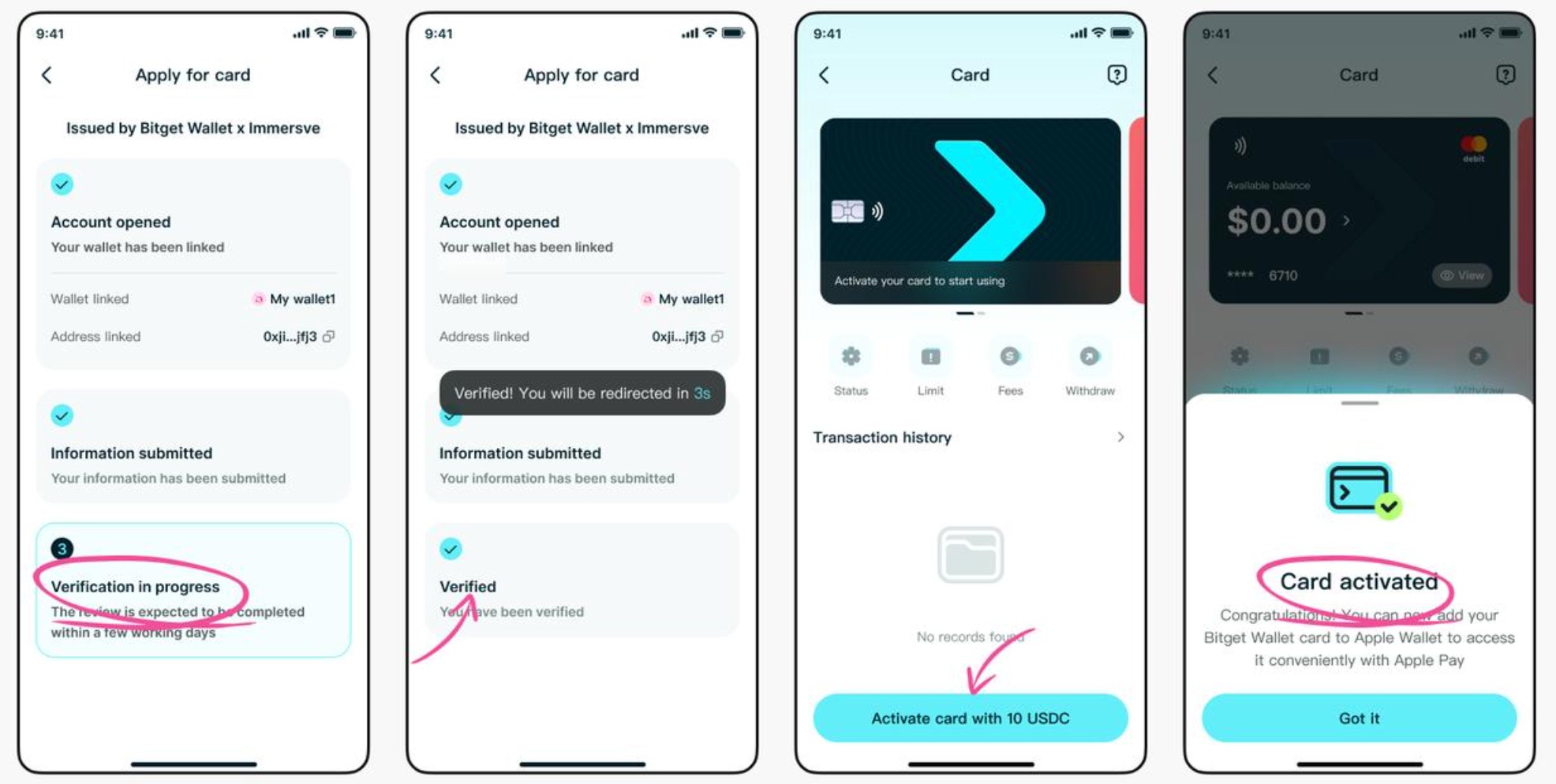
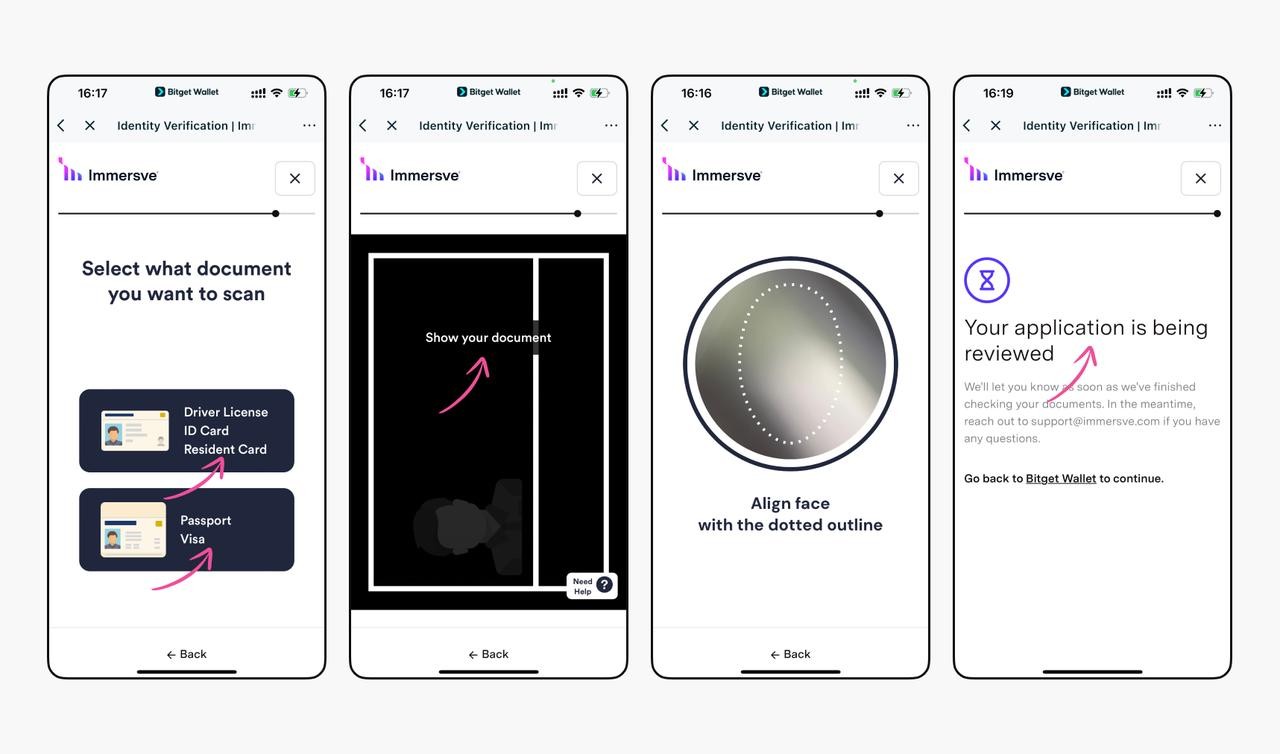
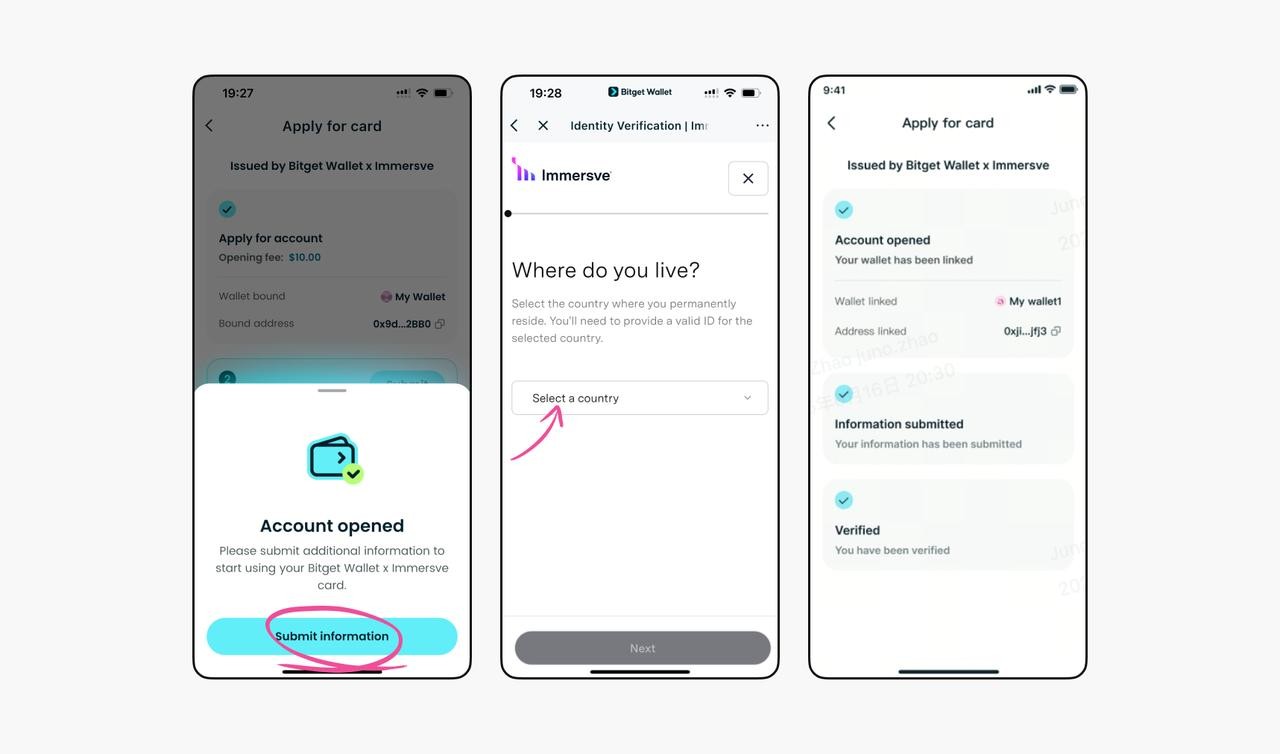
Step 4. Complete identity verification
Fill out the form and provide the documents requested by the issuer. In some regions, a smartphone with NFC is required for verification. If your information is correct, automated verification may take 1–2 minutes. If manual processing is required, it can take 1–3 days.
Step 5. Activate your card
Once your application is approved, activate your virtual card. Your card details will be available in the app.
Step 6. Add funds to your balance
Transfer supported crypto to your card balance. For certain regional programs, you must have at least $10 in crypto assets in your wallet before applying.
Step 7. Enable mobile payments
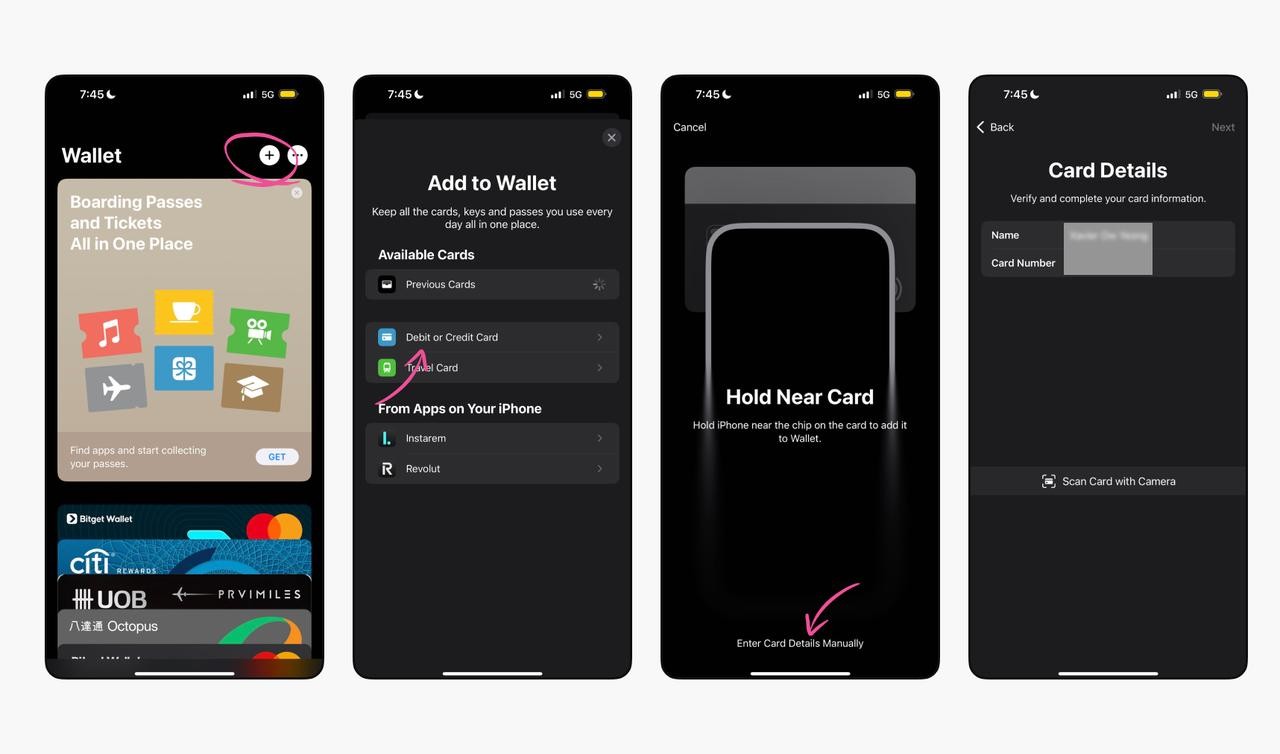
Add your card to Apple Pay or Google Pay if this option is available under your regional program. Once activated, you can pay for purchases and earn Assetback rewards on eligible transactions.
How do I add funds to my Bitget Wallet Card?
You can add funds using supported cryptocurrencies, including USDT, USDC, ETH, and SOL. The specific list of assets depends on your region and the card program available to you.
To top up the card:
Open Bitget Wallet and go to the Card section.
Select the top-up function.
Choose the cryptocurrency and amount.
Check the fee, exchange rate and total amount.
Confirm the transaction.
Once processing is complete, the funds will be available for payments. If you are transferring cryptocurrency from another wallet or exchange, make sure the selected network is compatible. Sending funds via an unsupported network may result in their loss.
It is also worth noting that the card balance and the main crypto wallet may be subject to different rules for managing funds. The ability to transfer funds back depends on the terms of the specific program.
Where can you use Bitget Wallet Card?
Bitget Wallet Card is designed for everyday spending, including online shopping and payments for digital services.
Main ways to use it:
Online stores. Pay for orders on Amazon, eBay, AliExpress, and other platforms that accept the relevant payment network.
Subscriptions. Pay for AI services, streaming platforms, cloud tools, and other digital products.
Transport and delivery. Make purchases in taxi, food delivery, and transport service apps.
Travel. Paying for bookings, tickets, and related expenses when the merchant supports the card.
In-store purchases. Contactless payments via Apple Pay or Google Pay in supported regions.
Bitget Wallet also states that it is compatible with certain regional payment services, including Alipay and WeChat Pay. However, a merchant displaying the Visa or Mastercard logo does not guarantee a successful payment. Some businesses restrict the acceptance of virtual, prepaid, or crypto cards.
Cash withdrawals should be considered separately. For example, Bitget Wallet states that the regional program for Europe, Africa, and Latin America restricts ATM transactions. Therefore, check cash withdrawal availability separately.
Bitget Wallet Card limits and security
Bitget Wallet Card has no single publicly disclosed spending limit that applies equally to all users. Limits depend on the country of issuance, issuer, verification level, and transaction type.
In the app, check:
maximum amount per transaction;
daily and monthly limits;
deposit and withdrawal limits;
monthly spending volume eligible for Assetback.
To protect your funds, use the official Bitget Wallet app, store your seed phrase securely, and check your transaction history regularly. A crypto wallet has one distinctive feature: users are responsible for keeping their recovery information safe.
If access to the wallet is lost, an already activated card may still work for paying for purchases. However, adding funds, withdrawing funds, and recovering linked assets may become unavailable. Therefore, do not store your seed phrase in unprotected notes, send it through messaging apps, or enter it on third-party websites.
Bitget Wallet Card vs. Bitget Card
Previously, the crypto exchange offered the Bitget Card, a Visa card aimed primarily at VIP users. It allowed users to pay for purchases with USDT, but had its own fee and limit structure.
As of August 1, 2026, new applications for the Bitget Card have been discontinued. Existing cards will continue to work until they expire, but renewals will no longer be available.
| Feature | Bitget Card | Bitget Wallet Card |
|---|---|---|
| New applications | Unavailable | Available in supported countries |
| Platform | Bitget exchange | Bitget Wallet app |
| Payment network | Visa | Visa or Mastercard |
| Supported assets | USDT | USDT, USDC, ETH, SOL, and others |
| Annual fee | $0 | $0 |
| Purchase fee | 0,9% | Depends on regional fees |
| Cashback | Regional programs | Up to 3% Assetback |
| Target audience | Primarily VIP clients | Users in supported regions |
| Renewal | Unavailable | According to the issuer's terms |
Thus, Bitget Wallet Card has become the current option for new users. Holders of the old card can continue using it until it expires.
Pros and cons of Bitget Wallet Card
- Pros
- Cons
Free card issuance and maintenance.
Support for multiple cryptocurrencies.
Up to 3% cashback in selected assets.
Payments via Apple Pay and Google Pay.
Paying for online purchases and subscriptions.
Using cryptocurrency without first withdrawing it to a bank account.
Virtual and physical card options are available.
Not available in all countries.
Currency conversion fees may apply.
Restrictions apply to cashback earned through the Assetback program.
The availability of certain features depends on the region.
Mandatory identity verification .
Risk of losing access to the crypto wallet.
The physical card is not available in all countries.
Test the Bitget Wallet Card with small payments before using it actively

I recommend starting to use the Bitget Wallet Card for small everyday purchases. This will let you assess transaction processing speed, the convenience of adding funds, and the actual costs of conversion. This approach is especially useful for those who have not used crypto cards before.
For regular payments, determine in advance how much you need to add, based on your planned expenses. It is also worth keeping an alternative payment method in case of temporary restrictions or a declined transaction.
When assessing the value, I would focus primarily on the total cost of payments, not just the cashback amount. Comparing the amount actually charged with the cost of a similar purchase made with a regular bank card will help you determine how well the Bitget Wallet Card suits your personal financial needs.
Conclusion
The Bitget Wallet Card is the current cryptocurrency card in the Bitget ecosystem for everyday payments. It lets you use digital assets to make purchases, supports international payment networks, and offers up to 3% in rewards through the Assetback program.
Its advantages include free issuance, no recurring maintenance fees, support for multiple cryptocurrencies, and the ability to pay through mobile payment services. The main limitations relate to regional availability, regional fees, and cashback rules. In addition, access to certain features depends on the issuing partner.
FAQs
Can I use the Bitget card to pay for subscriptions?
Yes, you can link the card to services that charge you automatically, such as streaming platforms or cloud services. Just make sure you have a sufficient balance for the next payment. Whether a payment goes through depends on the rules of the specific service and the card issuer.
What should I do if a Bitget card payment is declined?
First, check your available balance, card status, and any limits in place. If you have sufficient funds, the decline may be due to restrictions imposed by the merchant, payment network, or issuer. In that case, contact Bitget Wallet support and provide the transaction date, amount, and status.
Can I get a refund for a purchase paid for with the Bitget Wallet Card?
Yes, if the merchant supports refunds to the original payment method. The time it takes for the refund to be credited depends on the merchant and payment infrastructure. Assetback rewards for a returned purchase may be reversed.
What happens to your money if you freeze your Bitget Wallet Card?
Freezing the card typically prevents new payments, but does not in itself mean that the funds in the linked account are lost. Access to the remaining balance, unfreezing the card, and refunds are governed by the issuer's terms.
Related Articles
Team that worked on the article
Anastasiia has 17 years of experience in finance and content marketing. She believes that the support of information and expert opinion is very important for the success of investors and new traders.
Olga Shendetskaya has been a part of the Traders Union team as an author, editor and proofreader since 2017. Since 2020, Shendetskaya has been the assistant chief editor of the website of Traders Union, an international association of traders.
Chinmay Soni is a financial analyst with more than 5 years of experience in working with stocks, Forex, derivatives, and other assets. As a founder of a boutique research firm and an active researcher, he covers various industries and fields, providing insights backed by statistical data.
-
 Afghanistan
-
 Albania
-
 Algeria
-
 Angola
-
 Argentina
-
 Armenia
-
 Australia
-
 Austria
-
 Azerbaijan
-
 Bahamas
-
 Bahrain
-
 Bangladesh
-
 Belarus
-
 Belgium
-
 Bolivia
-
 Botswana
-
 Brazil
-
 Brunei
-
 Bulgaria
-
 Cambodia
-
 Cameroon
-
 Canada
-
 Chile
-
 China
-
 Colombia
-
 Congo
-
 Costa Rica
-
 Cote d'Ivoire
-
 Croatia
-
 Cuba
-
 Cyprus
-
 Czechia
-
 DR Congo
-
 Denmark
-
 Dominican Republic
-
 Ecuador
-
 Egypt
-
 El Salvador
-
 Estonia
-
 Eswatini
-
 Ethiopia
-
 Finland
-
 France
-
 Georgia
-
 Germany
-
 Ghana
-
 Greece
-
 Haiti
-
 Hong Kong
-
 Hungary
-
 India
-
 Indonesia
-
 Iran, Islamic republic
-
 Iraq
-
 Ireland
-
 Israel
-
 Italy
-
 Jamaica
-
 Japan
-
 Jordan
-
 Kazakhstan
-
 Kenya
-
 Korea
-
 Kuwait
-
 Kyrgyzstan
-
 Laos
-
 Latvia
-
 Lebanon
-
 Lesotho
-
 Libya
-
 Lithuania
-
 Luxembourg
-
 Madagascar
-
 Malaysia
-
 Malta
-
 Mauritius
-
 Mexico
-
 Moldova
-
 Mongolia
-
 Montenegro
-
 Morocco
-
 Mozambique
-
 Myanmar
-
 Namibia
-
 Nepal
-
 Netherlands
-
 New Zealand
-
 Nigeria
-
 North Macedonia
-
 Norway
-
 Oman
-
 Pakistan
-
 Palestine
-
 Panama
-
 Papua New Guinea
-
 Paraguay
-
 Peru
-
 Philippines
-
 Poland
-
 Portugal
-
 Puerto Rico
-
 Qatar
-
 Reunion
-
 Romania
-
 Rwanda
-
 Saudi Arabia
-
 Serbia
-
 Singapore
-
 Slovakia
-
 Slovenia
-
 Somalia
-
 South Africa
-
 Spain
-
 Sri Lanka
-
 Sweden
-
 Switzerland
-
 Syria
-
 Taiwan
-
 Tajikistan
-
 Tanzania
-
 Thailand
-
 Trinidad and Tobago
-
 Tunisia
-
 Turkey
-
 UAE
-
 Uganda
-
 Ukraine
-
 United Kingdom
-
United States
-
 Uruguay
-
 Uzbekistan
-
 Venezuela
-
 Vietnam
-
 Yemen
-
 Zambia
-
 Zimbabwe
- Forex
- Crypto










- What is Bitget Wallet Card?
- Bitget Wallet Card fees
- Bitget Wallet Card cashback
- In which countries is Bitget Wallet Card available?
- How to apply for Bitget Wallet Card
- How to top up Bitget Wallet Card?
- Where can you use Bitget Wallet Card?
- Bitget Card limits and security
- Bitget Wallet Card vs Bitget Card
- Pros and cons
- Expert opinion
- Conclusion
- FAQs


