
How To Find Your Bybit Wallet Address


Editorial Note: While we adhere to strict Editorial Integrity, this post may contain references to products from our partners. Here's an explanation for How We Make Money. None of the data and information on this webpage constitutes investment advice according to our Disclaimer.
How to find your Bybit wallet address:
Bybit Wallet is a popular Web3 wallet used to store, receive, and manage cryptocurrencies. To fund your wallet, you need a Bybit wallet address, since the Web3 wallet does not support direct fiat deposits. This address is required for every incoming crypto transfer and always depends on the selected blockchain network.
In this guide, we explain how to find your Bybit wallet address, where to view it in the app and browser extension, and what details matter when sending funds. You will also learn how a Bybit wallet number works, how to avoid network and Memo errors, and how to copy the address correctly for safe transfers.
If you want to fund your Bybit Wallet, always use the wallet address shown after clicking Receive inside the Web3 wallet. Do not use the exchange deposit address. If you are adding funds to your exchange balance, use the deposit address provided in Bybit Exchange.
Where to find your BybitWeb3 wallet address?

In this section, we explain where to find your Bybit Wallet address on Web3 using the mobile app or browser extension. Before you proceed, it is important to understand the difference between the two wallets available on the platform.
Bybit Wallet uses a self-custody-style setup that depends on the wallet mode you choose. Bybit has phased out seed-phrase wallets and now supports modes such as Keyless (a split-key model) and Cloud (a more custodial-style setup). The practical takeaway is the same: your Web3 wallet address is an on-chain address, but how recovery and key control work depends on the selected wallet mode, so users should review the wallet’s security/recovery method before moving large funds.
Bybit Exchange is a custodial account. It follows its own deposit and withdrawal rules, supports internal transfers, and uses exchange-managed deposit addresses rather than personal on-chain wallets.
To find your Bybit wallet address on Web3, follow the four simple steps below.
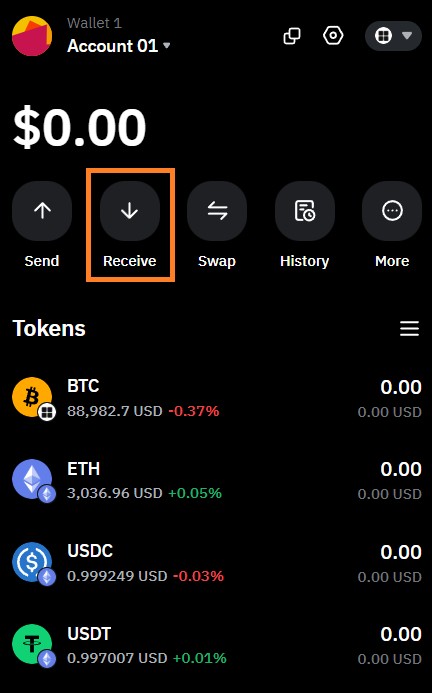
Step 1. Log in and click “Receive”
Open the Bybit Wallet on Web3 and log in using your password or biometric authentication. On the main screen, tap Receive to start the process of finding your wallet address.
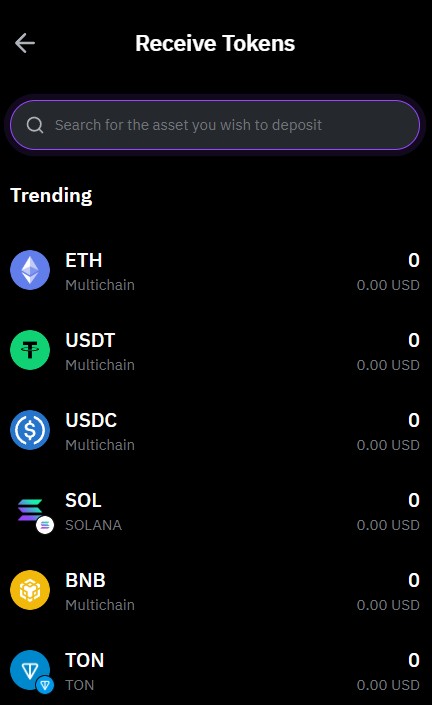
Step 2. Select the cryptocurrency
Choose the coin you want to receive (e.g., USDT, ETH, BTC). In many wallets, the receiving address is determined mainly by the network/account, not the specific token. For example, on Ethereum, the same address can receive ETH and ERC-20 tokens. The key step is confirming the correct network in the next step.
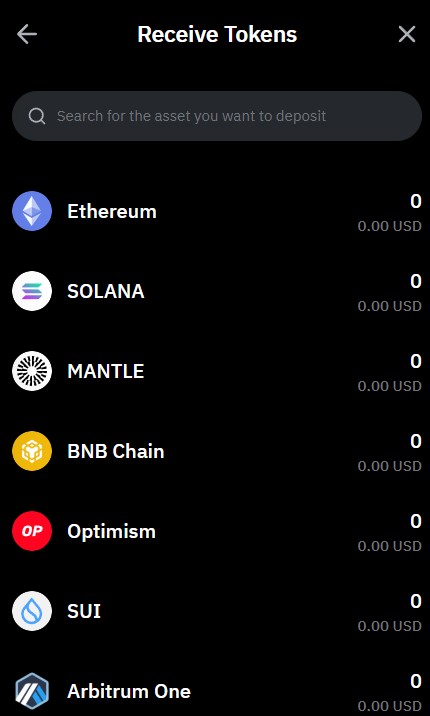
Step 3. Select the network
After choosing the coin, select the blockchain network. This step is critical. If the sender uses a different network, the transfer may be lost and cannot be reversed. Always make sure the sender’s network matches the one selected in your wallet.
Step 4. Get the wallet address on Bybit
Once the network is selected, your Bybit wallet address will appear as a text string and a QR code. Use the Copy button or the QR code to share the address. Do not type the address manually to avoid errors.
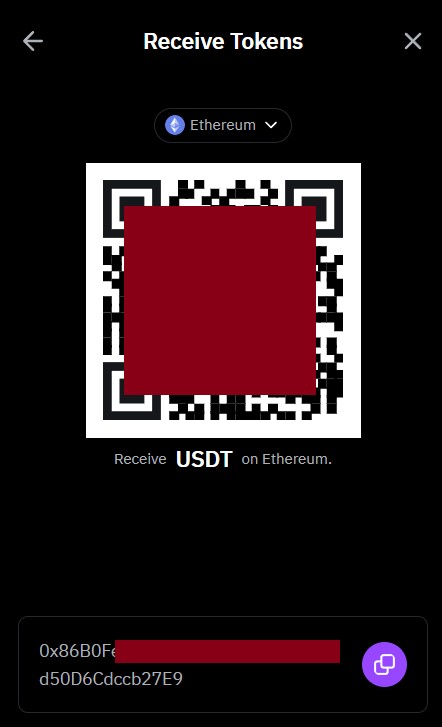
If you are sending funds from an exchange, it is often convenient to deposit crypto to your exchange balance first and then transfer it to your Bybit Wallet on Web3.
What is a Bybit Web3 wallet address?
To use crypto safely, it is important to understand not only how to find your Bybit Web3 wallet address, but also what this address actually is, why it matters, and other key pointers on this topic.
A Bybit Wallet address on Web3 is a public blockchain identifier. You share this address with a sender so they can transfer cryptocurrency to you. In practice, it works like an account number. Each address belongs to a specific blockchain network and is generated automatically by the wallet.
Most wallets, including Bybit Wallet, display the address in two formats:
Text format. A string of letters and numbers used for manual copying.
QR code. A scannable version of the same address for faster transfers.
Wallet addresses also follow different formats depending on the network:
EVM networks (Ethereum, BNB Chain, Arbitrum, Optimism). Addresses usually start with 0x.
Tron. Addresses usually start with T.
Bitcoin. Addresses may start with bc1, 1, or 3.
A Bybit wallet address is not only used to receive funds. It also allows you to move assets on-chain, connect to DeFi platforms, participate in staking, and interact with decentralized applications.
Your Bybit wallet address on Web3 is a public key. Do not confuse it with private keys or a seed phrase. Never share your private keys with anyone.
Where to get a Bybit wallet address: alternative methods
The Receive button is the main and safest way to get your Bybit wallet address, but it is not the only option. In some situations, you may need to check an address that was already used or verify past transfers. Below are alternative methods that can help.
Deposit/transaction history
If you need to find a previously used Bybit wallet address, open your transaction history and select a completed transfer. The sender or recipient address is shown in the transaction details. This method is useful for verification or checking suspicious activity.
Watch-only addresses
Another way to find your wallet address on Bybit is by using watch-only addresses. These can be your own wallets or external ones. You can monitor balances and transaction activity without having access to private keys. This option is useful for portfolio tracking and strategy monitoring.
Account details/export for advanced users
Advanced users can use a transaction hash, also known as TxID, to restore full transfer details. This includes the wallet address, network, and amount. In practice, this method is mainly used for accounting or audits, as the Receive button is usually enough to get a valid address.
What is a Memo or Tag and where to find it in Bybit Wallet?
When learning how to find your Bybit wallet address, it is also important to check whether the selected cryptocurrency requires a Memo or Tag. This is not an error or an extra security step. It is a built-in feature of certain blockchain networks.
A Memo or Tag is an additional identifier linked to a Bybit wallet address. It helps the system correctly assign incoming funds to the right account. You can think of it like an apartment number. The building has one address, but each apartment has its own number.
If you forget to include the Memo or Tag, or enter it incorrectly, the transfer may not be credited automatically. In many cases, you will need to contact support for manual recovery, which can take time.
Memo or Tag fields are most commonly required for XRP, XLM, EOS, TON, and some other cryptocurrencies. If a Memo or Tag field appears in the Receive section, it is mandatory.
How to find a Memo or Tag in Bybit Wallet?
The Memo or Tag is displayed in the same place as the wallet address. After selecting a supported cryptocurrency and clicking Receive, the Memo or Tag will appear below the address or in a separate field labeled Memo or Tag. Always copy the Memo or Tag together with the wallet address when making a transfer.
How to transfer funds to your Bybit wallet address correctly?
Most users want to complete a transfer as fast as possible, leading to the majority of the mistakes. Taking a few extra seconds to double-check details can prevent permanent loss of funds.
When you open Bybit Wallet and tap Receive, you can view your Bybit wallet address and, if applicable, the Memo or Tag. This is also where you should copy the address before sending funds.
Before transferring crypto, keep the following points in mind.
Select the correct network. Your Bybit wallet address is always tied to a specific blockchain. If the sender uses a different network, the funds may not arrive and cannot be recovered.
Copy the address correctly. It is important to learn how to copy a wallet address on Bybit; never type it manually. Always use the Copy button or scan the QR code. This reduces the risk of typos and protects against clipboard replacement malware.
Check for a Memo or Tag. If a Memo or Tag is shown, it is required. Sending funds without it may result in delayed or missing deposits and require manual recovery through support.
Respect minimum transfer amounts. Some networks and tokens have a minimum deposit limit. If you send less than the required amount, the transfer may not be credited. Always read the notes shown in the Receive section.
For large transfers or new networks, it is good practice to send a small test transaction first. Once confirmed, you can proceed with the full amount using the same Bybit wallet number and network.
Bybit alternatives
When choosing a crypto platform, users often compare more than just popularity. Trading fees, supported markets, verification rules, platform stability, and security standards all affect how convenient and safe trading is in practice.
Bybit is known for high liquidity, an advanced trading interface, and strong support for derivatives and Web3 tools. It suits active traders who need fast execution and access to multiple markets.
At the same time, some users may look for alternatives based on specific needs, such as lower spot fees, simpler interfaces, stronger regulation in certain regions, or a focus on beginner-friendly tools. Comparing exchanges side by side helps identify platforms that better match your trading style and risk tolerance. Below is a comparison of leading crypto exchanges in your region based on key parameters.
| Coinbase | OKX | BTCC | Cryptohopper | Crypto.com | |
|---|---|---|---|---|---|
|
Crypto |
Yes | Yes | Yes | Yes | Yes |
|
Foundation year |
2012 | 2017 | 2011 | 2018 | 2016 |
|
Min. Deposit, $ |
10 | 10 | 10 | No | 1 |
|
Coins Supported |
400+ | 600+ | 399 | 1000 | 400+ |
|
Spot Taker fee, % |
0.5 | 0.1 | 0.3 | 0 | 0.5 |
|
Spot Maker Fee, % |
0.5 | 0.08 | 0.2 | 0 | 0.25 |
|
Alerts |
Yes | Yes | No | Yes | Yes |
|
Copy trading |
No | Yes | Yes | Yes | No |
|
Tier-1 regulation |
Yes | No | Yes | No | Yes |
|
TU overall score |
8.5 | 8.46 | 8.08 | 7.8 | 7.76 |
|
Open an account |
Go to broker Your capital is at risk. |
Go to broker Your capital is at risk. |
Go to broker Your capital is at risk.
|
Go to broker Your capital is at risk. |
Go to broker Your capital is at risk. |
Double-check networks and use test transfers first

From my experience, most issues with a Bybit wallet address happen not because the platform is complicated, but because users rush transfers. I always recommend slowing down and treating every address and network selection as final. One wrong network or a missing Memo can turn a simple transfer into a long recovery process, or make funds unrecoverable.
A habit that consistently reduces mistakes is using test transactions and keeping addresses clearly labeled by purpose. I also advise separating wallets for trading, DeFi, and long-term storage. This makes it easier to track funds, avoid confusion, and spot errors early. If you work with Web3 regularly, these small routines save time, stress, and money in the long run.
Conclusion
Finding your Web3 wallet address on Bybit is a simple process once you know where to look. Open the Web3 wallet, select the cryptocurrency, tap Receive, and choose the correct network. Each Bybit wallet address is linked to a specific blockchain, so the sender and recipient networks must always match.
Some cryptocurrencies require an additional Memo or Tag, which must be copied together with the address. Before sending large amounts, it is a good practice to complete a small test transfer and confirm all details. By following these steps, you can safely use your Bybit wallet number and avoid common transfer mistakes.
FAQs
Where is the wallet address in Bybit if I am using a phone?
To find the wallet address on Bybit on a phone, open the Bybit Wallet app, tap Receive, select a coin and network, and copy the address shown. The process is identical on Android and iOS.
Do I need to create a wallet address on Bybit manually?
No. When you create a Bybit Wallet, addresses are generated automatically after you select a cryptocurrency and network. There is no separate setup process for creating a wallet address.
Is the Bybit deposit wallet address the same as the Web3 wallet address?
No. A Bybit wallet deposit address belongs to the exchange account. The Web3 wallet address is a separate on-chain address. Sending funds to the wrong one may result in delays or failed transfers.
Can my Bybit wallet number change over time?
Your Bybit wallet number stays the same for a specific blockchain network. However, selecting a different network or cryptocurrency will generate a different wallet address.
Related Articles
Team that worked on the article
Oleg Tkachenko is an economic analyst and risk manager having more than 14 years of experience in working with systemically important banks, investment companies, and analytical platforms. He has been a Traders Union analyst since 2018.
Dan Blystone began his trading career in 1998 as an arbitrage clerk on the floor of the Chicago Mercantile Exchange (CME). He later traded bond and Eurex futures at proprietary firms such as Altea Trading, gaining valuable experience in high-frequency trading and risk management.
Chinmay Soni is a financial analyst with more than 5 years of experience in working with stocks, Forex, derivatives, and other assets. As a founder of a boutique research firm and an active researcher, he covers various industries and fields, providing insights backed by statistical data.
-
 Afghanistan
-
 Albania
-
 Algeria
-
 Angola
-
 Argentina
-
 Armenia
-
 Australia
-
 Austria
-
 Azerbaijan
-
 Bahamas
-
 Bahrain
-
 Bangladesh
-
 Belarus
-
 Belgium
-
 Bolivia
-
 Botswana
-
 Brazil
-
 Brunei
-
 Bulgaria
-
 Cambodia
-
 Cameroon
-
 Canada
-
 Chile
Chile
-
 China
China
-
 Colombia
-
 Congo
Congo
-
 Costa Rica
-
 Cote d'Ivoire
-
 Croatia
-
 Cuba
Cuba
-
 Cyprus
-
 Czechia
-
 DR Congo
-
 Denmark
-
 Dominican Republic
-
 Ecuador
-
 Egypt
Egypt
-
 El Salvador
-
 Estonia
-
 Eswatini
-
 Ethiopia
-
 Finland
-
 France
-
 Georgia
-
 Germany
-
 Ghana
Ghana
-
 Greece
-
 Haiti
Haiti
-
 Hong Kong
-
 Hungary
-
 India
India
-
 Indonesia
-
 Iran, Islamic republic
-
 Iraq
Iraq
-
 Ireland
-
 Israel
-
 Italy
Italy
-
 Jamaica
-
 Japan
Japan
-
 Jordan
-
 Kazakhstan
-
 Kenya
Kenya
-
 Korea
Korea
-
 Kuwait
-
 Kyrgyzstan
-
 Laos
Laos
-
 Latvia
-
 Lebanon
-
 Lesotho
-
 Libya
Libya
-
 Lithuania
-
 Luxembourg
-
 Madagascar
-
 Malaysia
-
 Malta
Malta
-
 Mauritius
-
 Mexico
-
 Moldova
-
 Mongolia
-
 Montenegro
-
 Morocco
-
 Mozambique
-
 Myanmar
-
 Namibia
-
 Nepal
Nepal
-
 Netherlands
-
 New Zealand
-
 Nigeria
-
 North Macedonia
-
 Norway
-
 Oman
Oman
-
 Pakistan
-
 Palestine
-
 Panama
-
 Papua New Guinea
-
 Paraguay
-
 Peru
Peru
-
 Philippines
-
 Poland
-
 Portugal
-
 Puerto Rico
-
 Qatar
Qatar
-
 Reunion
-
 Romania
-
 Rwanda
-
 Saudi Arabia
-
 Serbia
-
 Singapore
-
 Slovakia
-
 Slovenia
-
 Somalia
-
 South Africa
-
 Spain
Spain
-
 Sri Lanka
-
 Sweden
-
 Switzerland
-
 Syria
Syria
-
 Taiwan
-
 Tajikistan
-
 Tanzania
-
 Thailand
-
 Trinidad and Tobago
-
 Tunisia
-
 Turkey
-
 UAE
UAE
-
 Uganda
-
 Ukraine
-
 United Kingdom
-
United States
-
 Uruguay
-
 Uzbekistan
-
 Venezuela
-
 Vietnam
-
 Yemen
Yemen
-
 Zambia
-
 Zimbabwe
- Forex
- Crypto










- Where to find your Bybit Web3 wallet address?
- What is a Bybit Web3 wallet address?
- Where to get a Bybit wallet address: alternative methods
- What is a Memo or Tag and where to find it in Bybit Wallet?
- How to transfer funds to your Bybit wallet address correctly?
- Bybit alternatives
- Expert opinion
- Conclusion
- FAQs


