
How To Send Crypto From Bybit To Another Wallet


Editorial Note: While we adhere to strict Editorial Integrity, this post may contain references to products from our partners. Here's an explanation for How We Make Money. None of the data and information on this webpage constitutes investment advice according to our Disclaimer.
To transfer crypto from Bybit to another wallet, follow these steps:
Transferring cryptocurrency between wallets is a basic skill for any crypto user. If you use Bybit, it is important to understand how to transfer from Bybit to another wallet, whether you are sending funds to a centralized exchange, a Web3 wallet like Trust Wallet or MetaMask, or moving USDT and TON to a Telegram Wallet.
In this guide, we explain how to send crypto from Bybit to another wallet step by step. We cover common transfer scenarios, including how to transfer USDT or Bitcoin from Bybit to another wallet, and how to withdraw funds from Bybit Wallet to exchanges and third-party wallets. You will also learn how to avoid common mistakes and check your transaction status on the blockchain.
How to send crypto from Bybit to another wallet


If you want to understand how to transfer from Bybit to another wallet, it is important to use the Web3 interface correctly. Bybit Wallet operates as a Web3 wallet that processes transfers directly on the blockchain. Depending on the selected wallet mode (such as Keyless or Cloud), key management and recovery methods may differ. Transfers are executed on-chain and are separate from Bybit Exchange withdrawals.
The steps below explain how to send crypto from Bybit to another wallet. The same process applies whether you want to transfer USDT, Bitcoin, or other supported cryptocurrencies.
Step 1. Select "Wallet" on the Bybit website or app
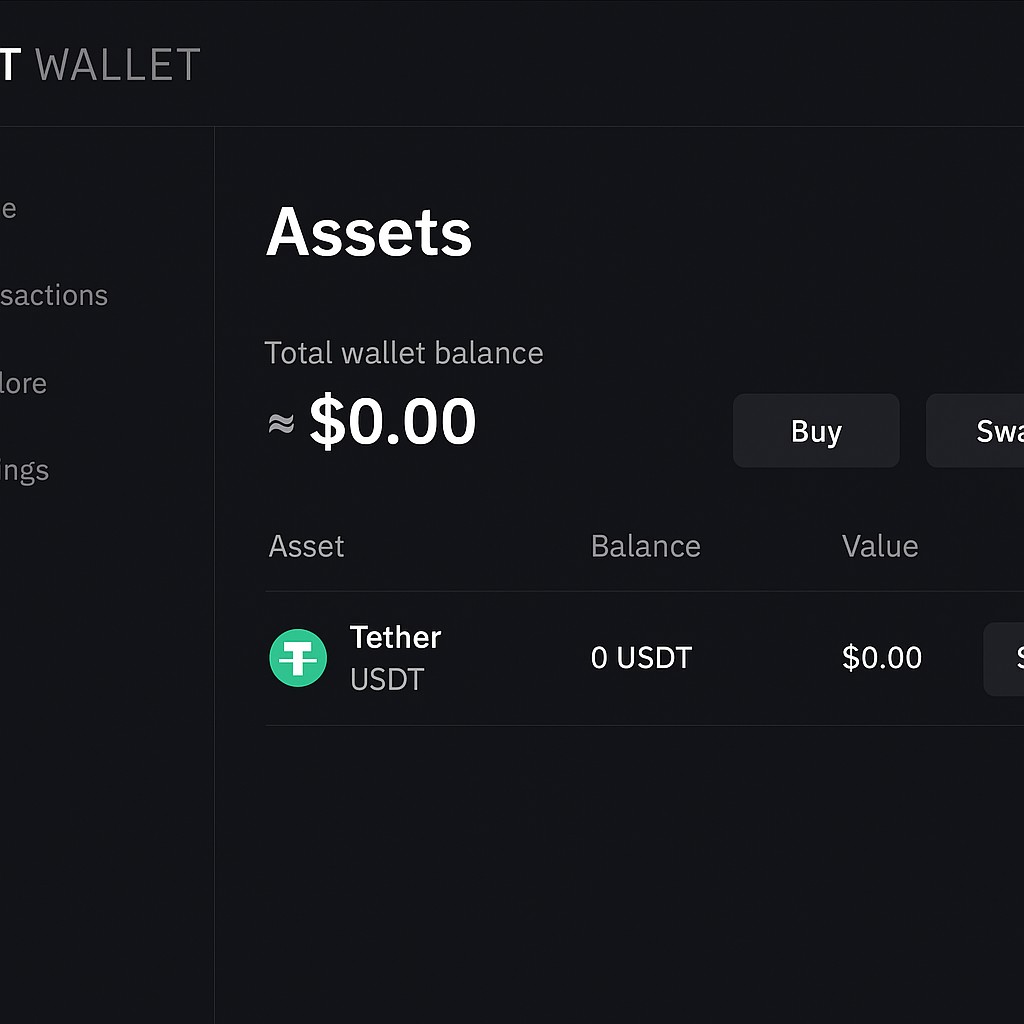
Log in to your Bybit account and open Bybit Wallet in the app or on the website. Make sure you are using the Web3 wallet, not the spot or funding account on the exchange.

Step 2. Select the cryptocurrency
From the list of available assets, choose the coin you want to send.
Step 3. Enter the recipient wallet address and choose the network
Paste the recipient’s wallet address into the address field. Then select the correct blockchain network. The network must be supported by the receiving wallet or exchange. Choosing the wrong network is the most common reason funds are lost.

Step 4. Enter the amount and confirm the transfer
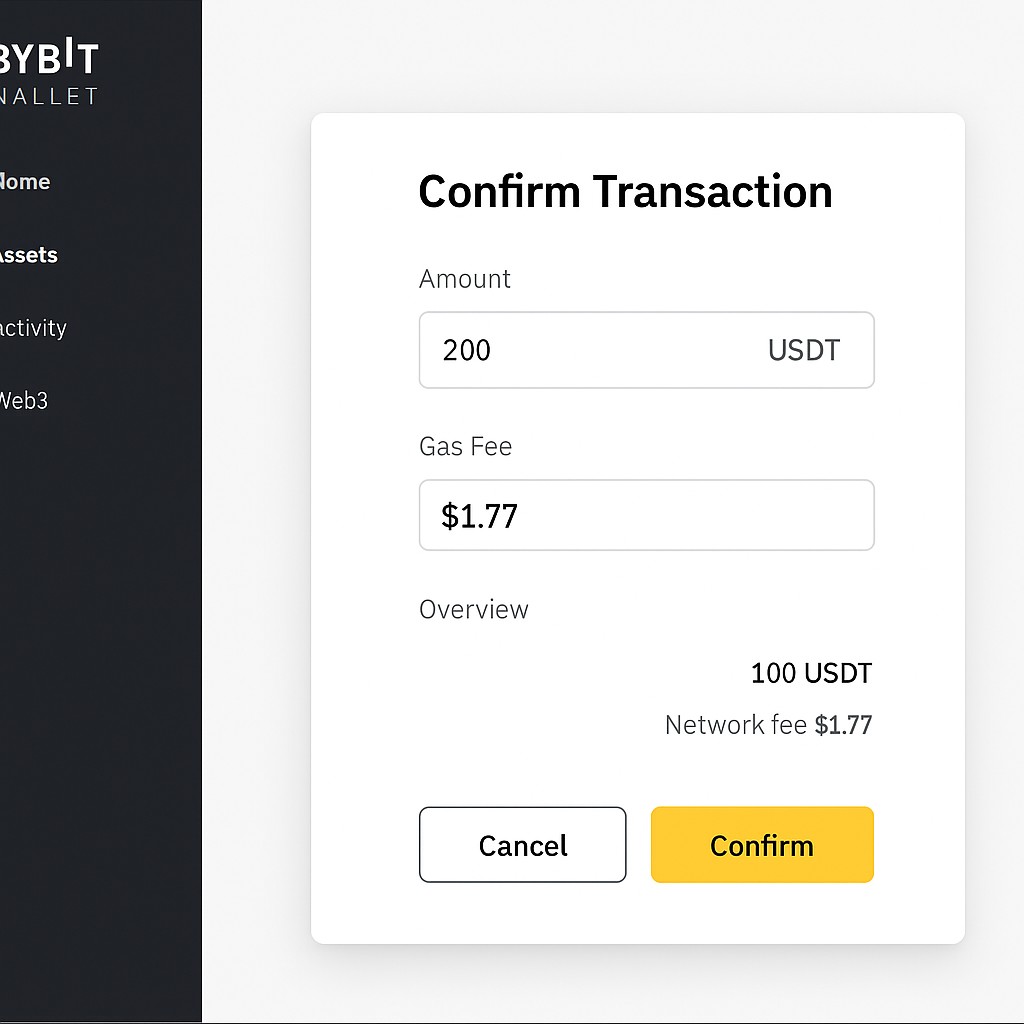
Specify the amount you want to send and review the transaction details. Confirm the transfer and approve the network fee. This fee is paid in the native coin of the selected network, not in USDT or BTC.
Step 5. Wait for network confirmation
After confirmation, the transaction is broadcast to the network. In most cases, a transfer from Bybit to another wallet is completed within a few minutes, depending on network congestion.
Transferring from Bybit to a wallet: networks, gas, fees, and limits
When making a transfer from Bybit to another wallet, understanding networks, gas fees, and limits is essential. Bybit Wallet works like any other Web3 wallet, meaning transactions are executed directly on the blockchain and require a network-specific fee.
Before you send crypto from Bybit to another wallet, pay attention to the following points.
Network selection. Each cryptocurrency can be sent over multiple networks. The selected network must be supported by the recipient’s wallet or exchange. If the networks do not match, funds may be permanently lost.
Gas fees. Fees are paid in the native coin of the chosen network, not in USDT or other tokens. For example, Ethereum transfers require ETH, Tron transfers require TRX, and BNB Chain transfers require BNB.
Minimum gas balance. Even if you hold a large amount of USDT or BTC, you cannot complete a transfer without a small balance of the network’s native coin.
Transfer limits. Bybit displays the minimum withdrawal amount in the interface. The receiving platform may also have its own minimum deposit requirement.
| Network | Cryptocurrency for “gas” |
|---|---|
| Ethereum (ERC-20) | ETH |
| Tron (TRC-20) | TRX |
| BNB Smart Chain (BEP-20) | BNB |
| Polygon | MATIC |
| TON | TON |
Below is a quick overview of which coin is required to pay gas on common networks.
Required gas token by network
Ethereum (ERC-20): ETH.
Tron (TRC-20): TRX.
BNB Smart Chain (BEP-20): BNB.
Polygon: MATIC.
TON: TON.
If gas fees are too low or the network is congested, a transfer from Bybit to another wallet may be delayed. In this case, you can either wait for congestion to ease or increase the fee if the wallet allows it.
Understanding these mechanics helps avoid failed transactions and unexpected delays when withdrawing crypto from Bybit to an external wallet.
How to transfer USDT from Bybit to another wallet: supported networks
Before making a transfer from Bybit to another wallet with USDT, it is important to check which blockchain networks are supported by the receiving wallet or exchange. USDT exists on multiple networks, and choosing the wrong one can result in permanent loss of funds.
The most commonly supported networks include the following.
TRC-20 (Tron). This is usually the cheapest and fastest option, making it popular for frequent transfers.
ERC-20 (Ethereum). Widely supported but often expensive, especially during network congestion.
BNB Smart Chain (BEP-20). A balanced option with lower fees than Ethereum and broad exchange support.
Arbitrum and Polygon. Layer-2 and sidechain networks that offer lower fees and faster confirmations.
TON. Supported for TON-based wallets and Telegram Wallet use cases, but not accepted by all exchanges or platforms.
When performing a USDT withdrawal from Bybit to an external wallet, always confirm that:
the recipient wallet supports USDT on the selected network;
the deposit address belongs to the same network you choose in Bybit Wallet;
any additional requirements, such as Memo or Tag fields, are not needed for USDT on that network.
If you accidentally send USDT over an unsupported network, recovery is usually impossible unless the receiving platform controls the private keys and agrees to assist. For this reason, when learning how to withdraw USDT from Bybit to another wallet, it is recommended to send a small test amount first.
This approach significantly reduces risk when making a transfer from Bybit to another wallet using USDT.
How to transfer from Bybit to a Telegram Wallet
Bybit Wallet supports the TON blockchain, which makes it possible to complete a transfer from Bybit to a Telegram Wallet quickly and with low fees. This option is commonly used for sending TON or USDT on the TON network directly to Telegram’s built-in wallet.
When performing a transfer from Bybit to a Telegram Wallet, it is essential to use the TON network and the correct wallet address. Telegram will not recognize transactions sent over other networks.
Where to find the Telegram Wallet address
To complete a transfer from Bybit to a Telegram Wallet, you first need the correct address.
Open the official @wallet bot in Telegram, tap Wallet, then select Receive. Choose TON as the currency and copy the displayed address. This address is specific to the TON network.
Important. Make sure TON is selected, not USDT or another token.
How to select the TON network in Bybit Wallet
In Bybit Wallet, locate the TON asset and click Send. In the transfer window, select the TON network. Paste the Telegram Wallet address, enter the amount, and confirm the transaction.
If you do not have enough TON to cover the network fee, the wallet will notify you. Without a small TON balance, the transfer cannot be completed.
Transfers to Telegram Wallet usually take only a few seconds. However, sending tokens over the wrong network will result in loss of funds, as Telegram Wallet only supports TON-based transactions.
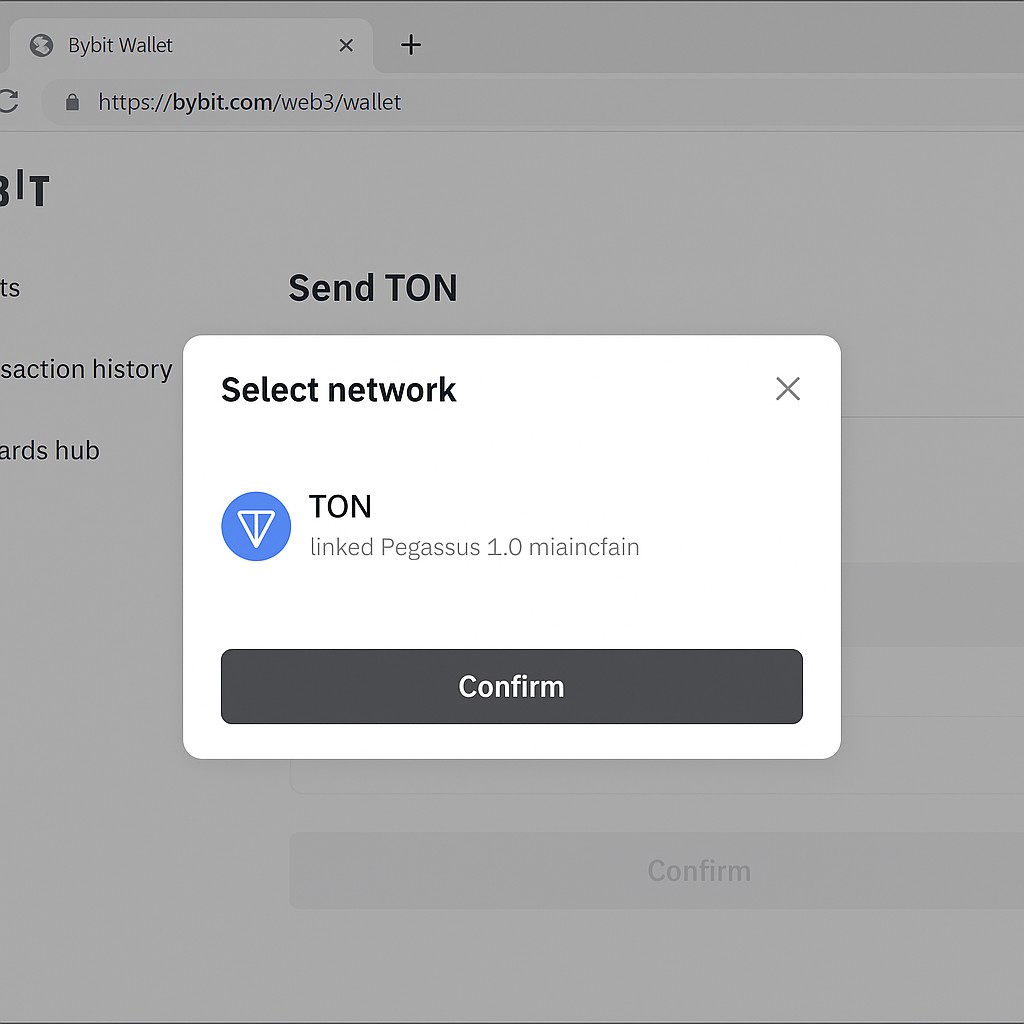
This method explains how to transfer from Bybit to a Telegram Wallet safely and avoids the most common errors associated with TON transfers.
How to withdraw funds from Bybit Wallet to a third-party exchange
A transfer from Bybit can also be made to a centralized exchange, such as Binance, WhiteBIT, or other supported platforms. This option is commonly used when you want to trade, sell, or further transfer your cryptocurrency after withdrawing it from Bybit Wallet.
When performing a withdrawal from Bybit Wallet to a third-party exchange, the most important step is choosing the correct deposit network on the receiving platform. Exchanges support only specific networks for each cryptocurrency, and using the wrong one may result in permanent loss of funds.
Before confirming the transfer, make sure that:
the exchange supports deposits for the selected cryptocurrency;
the deposit network on the exchange matches the network selected in Bybit Wallet;
any additional requirements, such as minimum deposit amounts or Memo or Tag fields, are clearly understood.
To complete the transfer, copy the deposit address from the exchange, paste it into Bybit Wallet, select the same network, enter the amount, and confirm the transaction. Once sent, the funds will appear on the exchange after the required number of blockchain confirmations.
Such transfers usually take a few minutes, but delays may occur during periods of high network congestion. Always verify transaction details carefully before confirming, as Web3 transfers cannot be reversed.
How to check a transaction in a blockchain explorer
After completing a transfer from Bybit to another wallet, it is important to verify the transaction status on the blockchain. A blockchain explorer allows you to track whether the transfer was confirmed, delayed, or failed.
Where to find the transaction hash in Bybit Wallet
Once you send crypto from Bybit to another wallet, Bybit Wallet displays a transaction hash, also called a tx hash, in the confirmation screen. You can also find it later in the transaction history of the selected asset. Tap the transaction and copy the hash.
Popular blockchain explorers by network
The blockchain explorer you use depends on the network selected for the transfer.
Ethereum (ERC-20): Etherscan.
BNB Smart Chain (BEP-20): BscScan.
Tron (TRC-20): Tronscan.
Polygon: Polygonscan.
TON: Tonviewer or Tonscan.
Bitcoin: Blockchain.com or BTC Explorer.
Paste the TX hash into the explorer’s search bar to view full transaction details, including sender and recipient addresses, amount, fees, and confirmation status.
Common transaction statuses
When checking a transfer from Bybit to another wallet, you will usually see one of the following statuses.
Pending. The transaction has been sent but is waiting to be included in a block.
Success or confirmed. The transaction has been completed and the funds have reached the recipient address.
Failed or dropped. The transaction did not complete, often due to insufficient gas or network issues.
If a transaction does not appear in the explorer at all, it may not have been signed or broadcast successfully. In this case, the transfer was not completed.
Common mistakes when transferring from Bybit Wallet to another wallet
Many users make costly mistakes when performing a transfer from Bybit to another wallet, especially when using a Web3 wallet for the first time. Because blockchain transactions are irreversible, even small errors can lead to permanent loss of funds.
Below are the most common mistakes and how to avoid them.
Wrong network selection. Choosing a network that is not supported by the recipient wallet is the most frequent error. Always confirm that the receiving address supports the same network you select in Bybit Wallet. If unsure, send a small test amount first.
Insufficient gas balance. A transfer from Bybit to another wallet requires a small amount of the network’s native coin to pay fees. Without enough gas, the transaction will fail or remain stuck.
Incorrect wallet address. Web3 wallets do not verify recipient names. A single incorrect character in the address can result in irreversible loss. Always copy and paste the full address and double-check the first and last characters.
Ignoring minimum limits. Bybit and the receiving platform may have minimum transfer or deposit amounts. Sending less than the required minimum can result in delayed or uncredited funds.
Rushing the transfer. Skipping verification steps increases the risk of errors. Taking an extra minute to review details is safer than trying to recover lost funds.
Important. In a Web3 environment, the user is fully responsible for all transaction parameters. If you are unsure how to withdraw from Bybit Wallet to another wallet, sending a small test amount is the safest approach.
What to do if the transfer didn’t go through
If a transfer from Bybit to another wallet did not arrive, do not panic. First, determine whether the transaction was actually sent and confirmed on the blockchain. Only after that should further action be taken.
Step 1. Check the transaction status
Open Bybit Wallet, copy the transaction hash, and paste it into the appropriate blockchain explorer for the selected network.
Confirmed or success. The funds have left Bybit Wallet. In this case, the issue is on the recipient’s side.
Pending. The transaction is waiting for confirmation. This usually resolves on its own, but delays may occur during network congestion.
No record found. The transaction was not signed or broadcast and was never sent.
Step 2. Verify the address and network
If you sent crypto using one network but the recipient address belongs to another network, the funds may be lost or stuck. This happens frequently when users do not verify deposit networks on exchanges or wallets in advance.
Always confirm that:
the network selected in Bybit Wallet matches the recipient’s supported network;
the address format is correct for that network.
Step 3. Check recipient requirements
Some wallets and exchanges require additional conditions for deposits.
These may include:
minimum deposit amounts;
memo or Tag fields for certain networks;
support only for specific token standards.
Missing any of these conditions can delay or prevent the funds from appearing.
Step 4. Contact support if needed
If the transaction is confirmed on the blockchain but the funds are not visible on the receiving platform, contact the recipient’s support team. Provide the transaction hash and a screenshot from the blockchain explorer.
Important. If the recipient is a non-custodial wallet, recovery is usually impossible. Exchanges may assist in some cases, but only if the funds reach their infrastructure.
What is Bybit Wallet and how is it different from the exchange
Bybit Wallet and the Bybit Exchange are two separate products with different rules and responsibilities.
Bybit Wallet is a non-custodial Web3 wallet. This means you fully control your private keys and assets. Transactions are executed directly on the blockchain without involvement from the exchange. Once a transfer is confirmed, it cannot be reversed or blocked by Bybit.
Bybit Exchange, on the other hand, is a custodial trading platform. Assets stored there are managed by the exchange, and withdrawals follow internal rules, limits, and compliance checks. Transfers from the exchange are processed as withdrawals, not direct on-chain wallet transactions.
In Bybit Wallet, users can:
send and receive cryptocurrency directly on supported blockchains;
connect to decentralized applications and DeFi protocols;
manage NFTs and interact with smart contracts;
use multiple networks such as Ethereum, Arbitrum, BNB Chain, Polygon, and TON.
Important. When performing a transfer from Bybit to another wallet, make sure you are using the Web3 wallet interface and not the exchange account. The steps, fees, and risks are different.
Is Bybit Wallet safe: what you need to know
Bybit Wallet is a non-custodial Web3 wallet, which means users have full control over their funds. Key management depends on the wallet mode selected (such as Keyless or Cloud Wallet). Bybit Wallet uses a distributed key or recovery model rather than traditional seed-phrase storage.
When performing a transfer from Bybit to another wallet, security depends entirely on correct user actions. If the recovery phrase is lost, access to the wallet cannot be restored. There is no account recovery process, password reset, or support intervention for non-custodial wallets.
To reduce risks, users should:
store the recovery phrase offline in a secure location;
enable device-level protection such as a PIN or biometrics;
avoid connecting the wallet to unknown or unverified dApps;
double-check addresses and networks before confirming transfers.
Bybit Wallet does not provide insurance or transaction guarantees. However, for users who understand Web3 mechanics and follow basic security practices, it is a reliable tool for sending crypto from Bybit to another wallet and interacting with decentralized ecosystems.
Risks and warnings
A transfer from Bybit to another wallet gives users full freedom, but it also comes with higher responsibility. Understanding the risks below helps prevent irreversible mistakes when working with a Web3 wallet.
Loss of recovery phrase. Losing the seed phrase makes wallet recovery impossible, with no support or reset options available.
Wrong network selection. Sending crypto through an unsupported network usually results in permanent loss of funds.
Incorrect wallet address. Even one wrong character in the address can cause an irreversible transfer to the wrong destination.
Clipboard replacement attacks. Malicious extensions may change copied addresses, so always verify the first and last characters.
Unverified dApp connections. Connecting to unknown decentralized applications may allow unauthorized token access.
No user protection or insurance. Bybit Wallet is not regulated or insured, and losses are not reimbursed.
Unsupported token formats. Sending wrapped or bridged tokens to wallets that do not support them may make funds invisible.
Using Bybit Wallet safely requires careful verification of every transfer detail. If there is any doubt, sending a small test amount first is the most reliable way to reduce risk.
Bybit News
Bybit announces limited-time TSLA Perp Options reward following Tesla and SpaceX news
Bybit outlines regulatory framework for Stocks service via Infra Capital Limited
Bybit launches stock giveaway for top watchlist picks

Bybit announces trading contest offering up to $5,000 USDC per trader
Bybit launches AAPLUSDT TradFi perpetual contracts
Bybit launches Up/Down option tool for BTC and ETH price predictions
Accuracy matters more than speed in Web3 transfers

Using a non-custodial wallet changes the entire transfer experience compared to a centralized exchange. A transfer from Bybit to another wallet is executed directly on the blockchain, which means speed and flexibility increase, but so does personal responsibility. There are no rollback options, no internal reviews, and no support team that can undo a mistake. Because of this, understanding how networks, gas fees, and address formats work becomes essential rather than optional.
The users who experience the fewest problems are those who treat every transfer as a checklist process. Verifying the network, confirming the address, keeping a small balance of native gas tokens, and sending a test amount first reduces most common risks. Bybit Wallet works reliably when used with discipline and attention, and it rewards users who prioritize accuracy over speed.
Conclusion
A transfer from Bybit to another wallet gives users full control over their cryptocurrency, but that control comes with clear responsibility. Bybit Wallet operates as a non-custodial Web3 wallet, meaning every transaction is final and entirely managed by the user. Understanding how networks, gas fees, and wallet addresses work is essential for sending crypto safely and without unnecessary delays.
For smooth transfers, always verify the recipient address, select the correct network, and ensure you have enough native tokens to cover fees. Using test transactions and checking confirmations in a blockchain explorer helps avoid costly mistakes. When used carefully, Bybit Wallet is a practical and efficient tool for transferring crypto to other wallets, exchanges, and Web3 platforms.
FAQs
Can I send bitcoin from Bybit to another wallet directly?
Yes, you can send BTC from Bybit to another wallet by selecting Bitcoin, entering the recipient address, and confirming the transfer on the Bitcoin network. Unlike USDT, Bitcoin does not require selecting between multiple token networks. Always confirm the address format before you send bitcoin from Bybit to another wallet.
How do I transfer USDT from Bybit to Trust Wallet safely?
To transfer USDT from Bybit to Trust Wallet, copy the USDT deposit address from Trust Wallet, select the same network in Bybit Wallet, and confirm the transfer. Sending a small test amount first helps avoid errors.
Is it possible to withdraw Solana from Bybit to Phantom Wallet?
Yes, you can withdraw Solana to Phantom Wallet by selecting SOL, pasting your Phantom Wallet address, and choosing the Solana network. This is the correct way to transfer SOL from Bybit to Phantom Wallet.
Can I withdraw crypto from Bybit to an external wallet without using the exchange?
Yes, Bybit Wallet allows you to withdraw crypto to an external wallet directly through its Web3 interface. This method bypasses the exchange and processes the transfer fully on-chain.
Related Articles
Team that worked on the article
Oleg Tkachenko is an economic analyst and risk manager having more than 14 years of experience in working with systemically important banks, investment companies, and analytical platforms. He has been a Traders Union analyst since 2018.
Dan Blystone began his trading career in 1998 as an arbitrage clerk on the floor of the Chicago Mercantile Exchange (CME). He later traded bond and Eurex futures at proprietary firms such as Altea Trading, gaining valuable experience in high-frequency trading and risk management.
Chinmay Soni is a financial analyst with more than 5 years of experience in working with stocks, Forex, derivatives, and other assets. As a founder of a boutique research firm and an active researcher, he covers various industries and fields, providing insights backed by statistical data.
-
 Afghanistan
-
 Albania
-
 Algeria
-
 Angola
-
 Argentina
-
 Armenia
-
 Australia
-
 Austria
-
 Azerbaijan
-
 Bahamas
-
 Bahrain
-
 Bangladesh
-
 Belarus
-
 Belgium
-
 Bolivia
-
 Botswana
-
 Brazil
-
 Brunei
-
 Bulgaria
-
 Cambodia
-
 Cameroon
-
 Canada
-
 Chile
Chile
-
 China
China
-
 Colombia
-
 Congo
Congo
-
 Costa Rica
-
 Cote d'Ivoire
-
 Croatia
-
 Cuba
Cuba
-
 Cyprus
-
 Czechia
-
 DR Congo
-
 Denmark
-
 Dominican Republic
-
 Ecuador
-
 Egypt
Egypt
-
 El Salvador
-
 Estonia
-
 Eswatini
-
 Ethiopia
-
 Finland
-
 France
-
 Georgia
-
 Germany
-
 Ghana
Ghana
-
 Greece
-
 Haiti
Haiti
-
 Hong Kong
-
 Hungary
-
 India
India
-
 Indonesia
-
 Iran, Islamic republic
-
 Iraq
Iraq
-
 Ireland
-
 Israel
-
 Italy
Italy
-
 Jamaica
-
 Japan
Japan
-
 Jordan
-
 Kazakhstan
-
 Kenya
Kenya
-
 Korea
Korea
-
 Kuwait
-
 Kyrgyzstan
-
 Laos
Laos
-
 Latvia
-
 Lebanon
-
 Lesotho
-
 Libya
Libya
-
 Lithuania
-
 Luxembourg
-
 Madagascar
-
 Malaysia
-
 Malta
Malta
-
 Mauritius
-
 Mexico
-
 Moldova
-
 Mongolia
-
 Montenegro
-
 Morocco
-
 Mozambique
-
 Myanmar
-
 Namibia
-
 Nepal
Nepal
-
 Netherlands
-
 New Zealand
-
 Nigeria
-
 North Macedonia
-
 Norway
-
 Oman
Oman
-
 Pakistan
-
 Palestine
-
 Panama
-
 Papua New Guinea
-
 Paraguay
-
 Peru
Peru
-
 Philippines
-
 Poland
-
 Portugal
-
 Puerto Rico
-
 Qatar
Qatar
-
 Reunion
-
 Romania
-
 Rwanda
-
 Saudi Arabia
-
 Serbia
-
 Singapore
-
 Slovakia
-
 Slovenia
-
 Somalia
-
 South Africa
-
 Spain
Spain
-
 Sri Lanka
-
 Sweden
-
 Switzerland
-
 Syria
Syria
-
 Taiwan
-
 Tajikistan
-
 Tanzania
-
 Thailand
-
 Trinidad and Tobago
-
 Tunisia
-
 Turkey
-
 UAE
UAE
-
 Uganda
-
 Ukraine
-
 United Kingdom
-
United States
-
 Uruguay
-
 Uzbekistan
-
 Venezuela
-
 Vietnam
-
 Yemen
Yemen
-
 Zambia
-
 Zimbabwe
- Forex
- Crypto










- How to send crypto from Bybit to another wallet
- Transferring from Bybit to a wallet: networks, gas, fees, and limits
- How to transfer USDT from Bybit to another wallet
- How to transfer from Bybit to a Telegram Wallet
- How to withdraw funds from Bybit Wallet to a third-party exchange
- How to check a transaction in a blockchain explorer
- Common mistakes when transferring from Bybit Wallet to another wallet
- What to do if the transfer didn’t go through
- What is Bybit Wallet and how is it different from the exchange
- Is Bybit Wallet safe: what you need to know
- Risks and warnings
- Expert opinion
- Conclusion
- FAQs


