
How To Open USDT Wallet On Bybit


Editorial Note: While we adhere to strict Editorial Integrity, this post may contain references to products from our partners. Here's an explanation for How We Make Money. None of the data and information on this webpage constitutes investment advice according to our Disclaimer.
To open a USDT wallet on Bybit, create or log in to your Bybit account, go to Assets, select USDT, choose the network, and generate your USDT deposit address. The USDT wallet is available by default, and a deposit address is generated after you select the blockchain network.
Opening a USDT wallet on Bybit is a simple way to start holding, depositing, and trading stablecoins on one of the world's largest cryptocurrency exchanges. This guide explains how to create a Bybit account, complete the verification process, and deposit or withdraw USDT. If you plan to use the TRON network, knowing how to locate your Bybit TRC20 wallet address is essential, as it becomes available only after selecting the correct blockchain network. Follow the steps below to set up and manage your USDT wallet with confidence.
How to open a USDT wallet on Bybit

To receive USDT, you need to find your wallet address on Bybit and match it with the correct blockchain network. The USDT wallet on Bybit is created automatically with your account. You only generate an address when you open the deposit screen. Follow these steps for an easy set-up.
Sign up or log in to Bybit
Sign up or log in to Bybit (if you already have an account on the cryptocurrency exchange).
USDT wallet address generation
A USDT wallet is automatically available once you create a Bybit account.
To generate your USDT deposit address, go to Assets, select USDT, click Deposit, and choose the blockchain network. Bybit will then generate a network-specific USDT deposit address that is ready to receive funds.
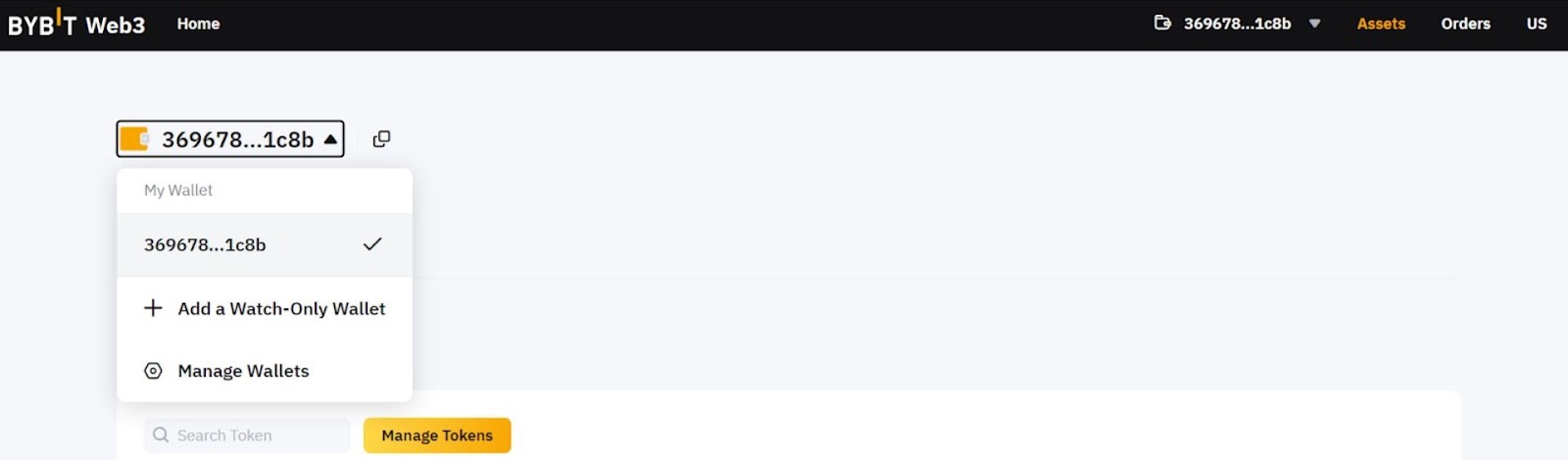
How to find and use a USDT wallet address on Bybit
Once you have generated your address, the next step is to make a deposit from an external wallet to Bybit. This process is the same whether you are sending funds from another exchange or a personal wallet.
To deposit USDT into your Bybit wallet:
Open the sending wallet or exchange
Go to the platform where your USDT is currently stored and choose Withdraw or Send.
Paste your USDT wallet address
Use the address shown on Bybit’s deposit screen. This is the same address you obtained when learning how to get a USDT wallet address on Bybit.
Match the network exactly
If you selected TRON on Bybit, you must send via TRC20 on the sending side. This is critical when using a TRC20 wallet on Bybit, as network mismatches can permanently lose funds.
Enter the transfer amount
Make sure the amount is above the minimum deposit requirement shown on Bybit.
Confirm and send
Approve the transaction in the sending wallet and wait for blockchain confirmations. After sending, you can track the transfer on the blockchain. This step completes a USDT deposit from an external wallet to Bybit and does not require any additional action on your side.
Processing time: USDT deposits usually arrive within a few minutes, but confirmation speed depends on the network and current congestion. TRC20 transfers are typically faster and cheaper than ERC20. If the balance does not appear immediately, check the transaction hash and confirm that the address and network were correct. This verification step is part of safely managing a USDT wallet on Bybit.
How to verify your USDT deposit and manage your wallet balance
After you send funds, the final step is to confirm that the transfer has arrived and that your USDT wallet on Bybit is ready for use.
How to verify a USDT deposit on Bybit
Return to assets. Open the Assets section and locate USDT. Your balance updates automatically once the network confirms the transaction.
Check transaction status. If the funds are still pending, click the deposit history to view confirmation progress on the blockchain.
Confirm the network. A delayed balance often means the network is still processing. This is common with ERC20 during congestion.
If you followed the correct steps for how to find a USDT wallet address on Bybit and matched the network, no manual confirmation is required.
Managing your USDT wallet on Bybit
View balances. USDT appears under your main assets and can be moved internally for trading or other uses.
Internal transfers. You can move funds between different balances inside Bybit without using the blockchain.
Withdraw USDT. To send funds out, select Withdraw and use the same care with network selection as when depositing.
Security checks. Keep two-factor authentication enabled and review withdrawal settings regularly.
If you ever forget where to locate your address, reopening the deposit screen shows you how to get your USDT address on Bybit again. This ensures you always use the correct address instead of reusing old screenshots. At this point, your USDT wallet on Bybit is fully operational and ready for trading, transfers, or long-term holding.
Tips, risks, and best practices for using a USDT wallet on Bybit
Using a USDT wallet on Bybit is simple, but small mistakes can still lead to delays or losses. These practical guidelines help you use your wallet more safely and efficiently.
Best practices for everyday use
Always select the network first. Your Bybit USDT wallet address changes depending on the blockchain.
Treat TRC20 separately. If you use TRON, make sure you understand how to get a TRC20 wallet address on Bybit and send only TRC20 USDT to it. A TRC20 wallet on Bybit cannot receive ERC20 tokens.
Make a test transfer. When using a new wallet or exchange, send a small amount first. This confirms you correctly followed the steps and matched the network.
Use internal transfers when possible. Moving funds inside Bybit avoids network fees and reduces risk.

Common risks to avoid
Network mismatch. This is the most common error. Sending USDT on the wrong chain usually means permanent loss.
Clipboard or address mistakes. Always verify the first and last characters of the address you copy. This matters even when you already know how to get USDT wallet address on Bybit.
Relying on old addresses. Do not reuse screenshots or saved notes. If unsure, reopen the deposit screen to see how to get your USDT address on Bybit again.
Security reminders
Follow these habits to keep your USDT wallet on Bybit reliable for deposits, trading, and transfers.
enable 2FA and withdrawal protection;
monitor login and withdrawal history;
never share wallet addresses together with private credentials;
ignore messages claiming to offer “support” or “recovery.”
If you are still choosing where to open and manage your USDT wallet, it helps to compare a few established exchanges available in your region. Different platforms offer different deposit networks, limits, and wallet interfaces. The table below highlights trusted crypto exchanges so you can decide where to set up and use your USDT wallet comfortably.
| OKX | Coinbase | Crypto.com | Cryptohopper | BTCC | |
|---|---|---|---|---|---|
|
Min. Deposit, $ |
10 | 10 | 1 | No | 10 |
|
Coins Supported |
600+ | 400+ | 400+ | 1000 | 399 |
|
Spot Taker fee, % |
0.1 | 0.5 | 0.5 | 0 | 0.3 |
|
Spot Maker Fee, % |
0.08 | 0.5 | 0.25 | 0 | 0.2 |
|
Alerts |
Yes | Yes | Yes | Yes | No |
|
Copy trading |
Yes | No | No | Yes | Yes |
|
TU overall score |
8.48 | 7.84 | 7.8 | 7.76 | 7.6 |
|
Open an account |
Go to broker Your capital is at risk. |
Go to broker Your capital is at risk. |
Go to broker Your capital is at risk. |
Go to broker Your capital is at risk. |
Go to broker Your capital is at risk.
|
Double-check network, then send

From my experience working with exchange wallets, a Bybit USDT wallet is best treated as an operational tool rather than a place to experiment. Most issues I see come from users rushing deposits without checking the network. Knowing exactly how to get a USDT wallet address on Bybit and selecting the correct chain each time is far more important than speed. A short pause before sending funds prevents nearly all avoidable mistakes.
I also recommend building a habit of reopening the deposit screen instead of reusing old addresses. Whether you are figuring out how to find a USDT wallet address on Bybit again or checking how to get a TRC20 wallet address on Bybit, the safest approach is to generate the address fresh for every transfer. This discipline keeps deposits predictable and makes the wallet reliable for both trading and long-term management.
Conclusion
Opening and using a USDT wallet on Bybit is a simple process, but accuracy matters more than speed. The wallet address is always generated based on the selected network, so understanding how to get a USDT address on Bybit and choosing the correct chain each time is essential.
Most deposit problems come from network mismatches or reused addresses. If you are unsure, reopen the deposit screen to see how to find a USDT wallet address on Bybit again and confirm the network before sending funds. When used with care, a USDT wallet is a reliable tool for holding USDT, trading, and managing transfers across different blockchain networks.
FAQs
Do I need KYC to open a USDT wallet on Bybit?
You can generate a USDT deposit address without completing KYC. However, some regions require verification before withdrawals or higher transaction limits are allowed.
Why does my USDT wallet address change on Bybit?
The address changes because each network uses a different format. When you select ERC20, TRC20, or another chain, Bybit generates a network specific USDT address.
Can I send TRC20 USDT to an ERC20 address on Bybit?
No. Sending USDT on the wrong network usually results in permanent loss. Always match the network shown on the Bybit deposit screen with the sending wallet.
How long does it take to deposit USDT into my ByBit wallet?
Depositing USDT into your ByBit wallet typically takes a few minutes to process, depending on the network congestion. You can check the transaction status and confirm the updated balance on the Assets page of your ByBit account.
Related Articles
Team that worked on the article
Ivan is a financial expert and analyst specializing in Forex, crypto, and stock trading. He prefers conservative trading strategies with low and medium risks, as well as medium-term and long-term investments.
Dan Blystone began his trading career in 1998 as an arbitrage clerk on the floor of the Chicago Mercantile Exchange (CME). He later traded bond and Eurex futures at proprietary firms such as Altea Trading, gaining valuable experience in high-frequency trading and risk management.
Chinmay Soni is a financial analyst with more than 5 years of experience in working with stocks, Forex, derivatives, and other assets. As a founder of a boutique research firm and an active researcher, he covers various industries and fields, providing insights backed by statistical data.
-
 Afghanistan
-
 Albania
-
 Algeria
-
 Angola
-
 Argentina
-
 Armenia
-
 Australia
-
 Austria
-
 Azerbaijan
-
 Bahamas
-
 Bahrain
-
 Bangladesh
-
 Belarus
-
 Belgium
-
 Bolivia
-
 Botswana
-
 Brazil
-
 Brunei
-
 Bulgaria
-
 Cambodia
-
 Cameroon
-
 Canada
-
 Chile
Chile
-
 China
China
-
 Colombia
-
 Congo
Congo
-
 Costa Rica
-
 Cote d'Ivoire
-
 Croatia
-
 Cuba
Cuba
-
 Cyprus
-
 Czechia
-
 DR Congo
-
 Denmark
-
 Dominican Republic
-
 Ecuador
-
 Egypt
Egypt
-
 El Salvador
-
 Estonia
-
 Eswatini
-
 Ethiopia
-
 Finland
-
 France
-
 Georgia
-
 Germany
-
 Ghana
Ghana
-
 Greece
-
 Haiti
Haiti
-
 Hong Kong
-
 Hungary
-
 India
India
-
 Indonesia
-
 Iran, Islamic republic
-
 Iraq
Iraq
-
 Ireland
-
 Israel
-
 Italy
Italy
-
 Jamaica
-
 Japan
Japan
-
 Jordan
-
 Kazakhstan
-
 Kenya
Kenya
-
 Korea
Korea
-
 Kuwait
-
 Kyrgyzstan
-
 Laos
Laos
-
 Latvia
-
 Lebanon
-
 Lesotho
-
 Libya
Libya
-
 Lithuania
-
 Luxembourg
-
 Madagascar
-
 Malaysia
-
 Malta
Malta
-
 Mauritius
-
 Mexico
-
 Moldova
-
 Mongolia
-
 Montenegro
-
 Morocco
-
 Mozambique
-
 Myanmar
-
 Namibia
-
 Nepal
Nepal
-
 Netherlands
-
 New Zealand
-
 Nigeria
-
 North Macedonia
-
 Norway
-
 Oman
Oman
-
 Pakistan
-
 Palestine
-
 Panama
-
 Papua New Guinea
-
 Paraguay
-
 Peru
Peru
-
 Philippines
-
 Poland
-
 Portugal
-
 Puerto Rico
-
 Qatar
Qatar
-
 Reunion
-
 Romania
-
 Rwanda
-
 Saudi Arabia
-
 Serbia
-
 Singapore
-
 Slovakia
-
 Slovenia
-
 Somalia
-
 South Africa
-
 Spain
Spain
-
 Sri Lanka
-
 Sweden
-
 Switzerland
-
 Syria
Syria
-
 Taiwan
-
 Tajikistan
-
 Tanzania
-
 Thailand
-
 Trinidad and Tobago
-
 Tunisia
-
 Turkey
-
 UAE
UAE
-
 Uganda
-
 Ukraine
-
 United Kingdom
-
United States
-
 Uruguay
-
 Uzbekistan
-
 Venezuela
-
 Vietnam
-
 Yemen
Yemen
-
 Zambia
-
 Zimbabwe
- Forex
- Crypto












