How to Backtest Forex Expert Advisor in MT4


Editorial Note: While we adhere to strict Editorial Integrity, this post may contain references to products from our partners. Here's an explanation for How We Make Money. None of the data and information on this webpage constitutes investment advice according to our Disclaimer.
Backtesting on MT4 in four simple steps:
- Choose and load your Expert Advisor (EA)
- Open the Strategy Tester from the view tab
- Set your test parameters and date range
- Run the test and scrutinize the results. It's like a time machine for your trading strategy
In Forex trading, the difference between success and "better luck next time" often boils down to the strategies employed. Forex robots can be at the heart of these strategies. Backtesting helps ensure the robot does its job right.
This article dives into the intricacies of backtesting your Forex robot on the MetaTrader 4 (MT4) platform.
How to backtest a Forex Expert Advisor in MT4
MetaTrader 4 (MT4) is a widely used platform in the Forex trading community, notable for its robust functionality and user-friendly interface. Integral to its operation is MQL4, a programming language specifically designed for developing trading strategies, indicators, and Expert Advisors (EAs).
These EAs, essentially automated trading algorithms, require rigorous testing to ensure effectiveness and reliability in live market conditions.
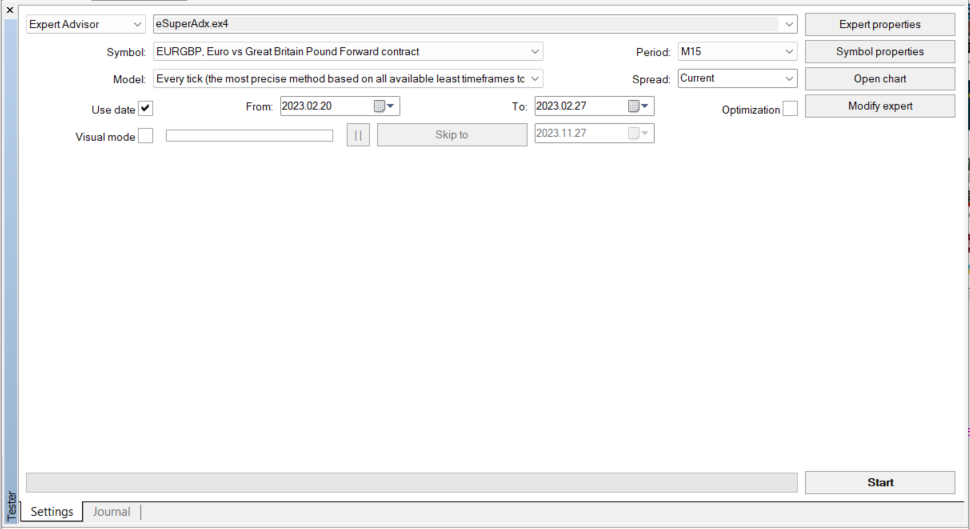 This is how the interface for testing the Expert Advisor looks like
The following list outlines the necessary parameters that must be defined to perform the test:
EA: This refers to the selection of the specific Expert Advisor to be tested. It is a critical step as it determines the algorithm that will be subjected to historical data analysis
EA Properties: Configuring the EA properties involves adjusting various operational parameters of the Expert Advisor. This step ensures you’re tailoring the backtest to reflect specific trading conditions and strategy preferences
Model: The model setting dictates the type of backtest to be conducted. It defines the methodological approach for the simulation, impacting the accuracy and comprehensiveness of the test
Period: The period parameter sets the timeframe over which the backtest is conducted. This can range from short-term intervals to extended durations, depending on the intended application of the EA
Date: Specifying the date range serves to select the historical data period over which the EA will be tested. This allows for a targeted analysis of the EA’s performance under specific market conditions
Upon setting these parameters, the backtest can be initiated. This process involves MT4 retrieving historical market data from the broker's server, which is then used to simulate how the EA would have performed during the specified period. This simulation provides valuable insights into the potential effectiveness and reliability of the trading strategy embodied in the Expert Advisor.
How to interpret backtest results
Interpreting the results of a backtest conducted on MT4 is obviously a necessary step in assessing the viability of a Forex Expert Advisor (EA). Traders need to analyze various metrics to understand the EA's performance during the testing phase.
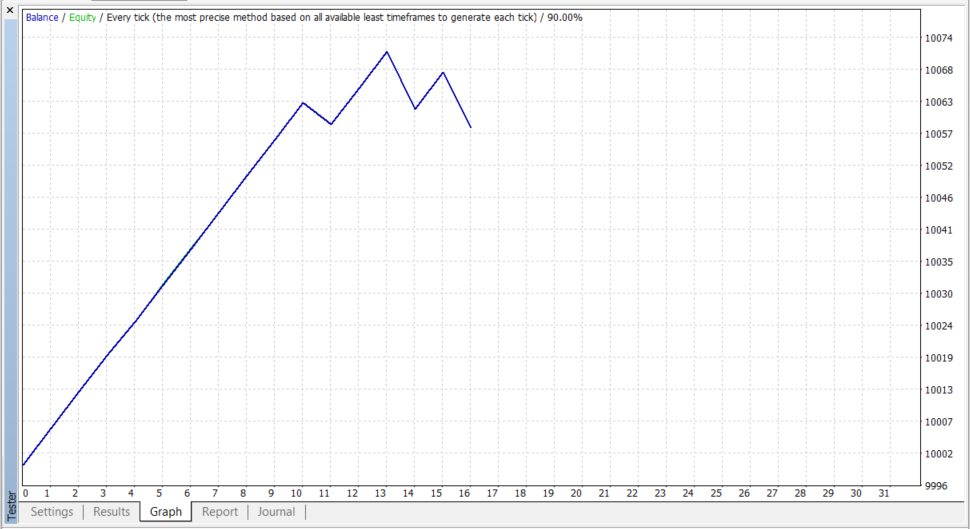 Testing shows a positive change in equity
Use the tabs in the Metatrader tester to analyze the maximum information about the EA backtesting
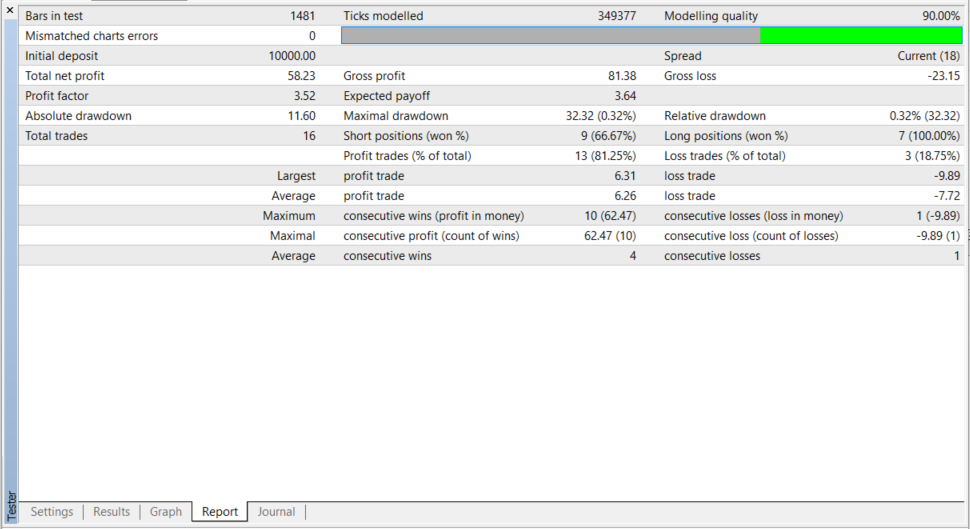 Test results may deteriorate if a longer period is chosen
Here's a breakdown of the key factors to consider:
Drawdown: This metric reflects the largest drop from peak to trough in the account balance during the backtest period. A smaller drawdown suggests a potentially lower risk, as it indicates that losses from a string of losing trades are not excessively large. However, do consider this in the context of overall returns; an EA with a small drawdown but also minimal profits may not be desirable
Quality of backtesting: The modeling quality indicates the perceived accuracy of the simulation. It is determined by the quality of the historical data used. In the provided screenshot, a 90% modeling quality suggests that the backtest results are relatively accurate and can be considered a fairly reliable representation of the EA's performance with the given data. Generally, aim for the highest modeling quality possible to ensure the most accurate simulation
Profit factor: This is the ratio of gross profits to gross losses. An EA with a profit factor greater than 1 is generally considered profitable, as it indicates that the system has won more than it has lost. For instance, a profit factor of 3.52, as seen in the screenshot, implies that EA's gross profits are 3.52 times the gross losses, which is a strong indicator of a profitable trading strategy
When analyzing these factors, traders should look for a consistent upward trend in equity, which suggests that the EA is profitable over time. They should also be cautious of any significant dips in the equity curve, as this may indicate periods of high risk or an EA that doesn't handle market volatility well. Additionally, traders should examine the total net profit, the absolute and relative drawdown, and the number of profitable trades compared to losing trades.
Ultimately, while these metrics can guide traders in evaluating an EA's past performance, they must remember that past performance is not always indicative of future results. Continuous monitoring and testing against current market conditions are advised to ensure ongoing effectiveness.
Before you switch a tested EA to a live account, make sure the broker you choose preserves the assumptions used in backtests: high-quality historical/tick data, stable MT4 servers, low and consistent spreads, reliable order execution and a usable demo/VPS environment. The table below compares brokers on exactly those dimensions so you can pick a provider that matches your backtest setup and execution needs.
| OANDA | FOREX.com | IG Markets | Zaner | XM | |
|---|---|---|---|---|---|
|
MT4 |
Yes | Yes | Yes | Yes | Yes |
|
MT5 |
Yes | Yes | No | No | Yes |
|
Currency pairs |
68 | 80 | 80 | 50 | 57 |
|
Min. deposit, $ |
No | 100 | 1 | 5000 | 5 |
|
Max. leverage |
1:200 | 1:50 | 1:200 | 1:50 | 1:1000 |
|
Min Spread EUR/USD, pips |
0.1 | 0.7 | 0.6 | No | 0.7 |
|
Max Spread EUR/USD, pips |
0.5 | 1.2 | 1.2 | No | 1.2 |
|
Investor protection |
£85,000 SGD 75,000 $500,000 | £85,000 | £85,000 €100,000 SGD 75,000 | Yes | £85,000 €20,000 |
|
Max. Regulation Level |
Tier-1 | Tier-1 | Tier-1 | Tier-1 | Tier-1 |
|
Open an account |
Go to broker Your capital is at risk. |
Study review | Study review | Study review | Go to broker Your capital is at risk. |
Pros and Cons of backtesting robots in MT4
Backtesting on MT4 offers a mixed bag of benefits and drawbacks for traders using automated systems.
- Pros
- Cons
- Versatile testing: MT4 supports backtesting over various timeframes and markets, allowing for a broad evaluation of a strategy
- Customization: Numerous settings are available, enabling detailed adjustments to refine the testing process
- Speed: The platform can quickly backtest strategies, saving valuable time for optimization
- Risk management: Backtesting aids in identifying risk factors, helping traders to adjust strategies accordingly
- Market insight: It provides an understanding of how strategies might perform under past market conditions
- Data reliability: Historical data may be incomplete or inaccurate, potentially skewing test results
- Developer fraud: There's a risk of manipulated results from unscrupulous developers
- No guarantee of future performance: Successful backtests do not guarantee future performance due to ever-changing market conditions
- Overfitting: Over-optimization can lead to strategies that perform well on historical data but fail in live markets
Tips for backtesting Forex Expert Advisors in MT4
To maximize the effectiveness of backtesting and ensure realistic results, consider the following tips:
Optimize responsibly: Utilize MT4’s built-in optimization features to fine-tune your EA’s parameters. This helps in identifying the most promising settings for performance. However, try to avoid over-optimization as it could lead to misleading backtest results due to overfitting to historical data
Set realistic expectations: Understand that backtesting is about strategy validation, not a promise of future riches. Successful backtesting does not guarantee profitable trading, as market conditions are constantly changing and past performance is not indicative of future results
Test on a demo account: Before going live, run your optimized EA in a demo account. This provides a real-time testing environment without financial risk. It allows you to observe the EA's interaction with live market conditions and make necessary adjustments before committing real capital
Following these tips allows traders to approach backtesting with a balanced perspective, aiming for sustainable performance rather than immediate financial gains.
How I approach backtesting in practice

I treat backtesting as a validation tool rather than proof that a strategy will work in live markets. Strong results can be useful, but they need to be viewed critically. I pay close attention to drawdowns, consistency of returns, and how the strategy performs across different market conditions, not just during favorable periods.
I also make sure the testing environment reflects real trading as closely as possible. This includes using high-quality data, realistic spreads, and avoiding over-optimization. Even after a successful backtest, I would always run the Expert Advisor on a demo account before going live, as this helps confirm whether the strategy can handle current market conditions.
Conclusion
Backtesting a Forex robot on MT4 is an essential step for anyone seeking consistent trading performance. When performed correctly, it validates your strategy by simulating historical performance and highlighting key risk metrics like drawdown and profit factor. For example, a carefully backtested EA that handles market volatility with low drawdown is far more likely to endure under live conditions. Ultimately, successful traders treat backtesting as a reality check rather than a guarantee of future profit and always reinforce it by running the EA on a demo account before risking real capital.
FAQs
What common pitfalls should be avoided when backtesting a Forex robot on MT4?
How does the choice of test period and date range influence the backtest outcome on MT4?
Why is it important to run a Forex robot on a demo account after backtesting in MT4?
Can backtesting on MT4 guarantee similar performance in live Forex trading?
Editors' Top Picks and Insights






Related Articles
Team that worked on the article
Vuk stands at the forefront of financial journalism, blending over six years of crypto investing experience with profound insights gained from navigating two bull/bear cycles. A dedicated content writer, Vuk has contributed to a myriad of publications and projects.
Dan Blystone began his trading career in 1998 as an arbitrage clerk on the floor of the Chicago Mercantile Exchange (CME). He later traded bond and Eurex futures at proprietary firms such as Altea Trading, gaining valuable experience in high-frequency trading and risk management.
Chinmay Soni is a financial analyst with more than 5 years of experience in working with stocks, Forex, derivatives, and other assets. As a founder of a boutique research firm and an active researcher, he covers various industries and fields, providing insights backed by statistical data.
Forex trading, short for foreign exchange trading, is the practice of buying and selling currencies in the global foreign exchange market with the aim of profiting from fluctuations in exchange rates. Traders speculate on whether one currency will rise or fall in value relative to another currency and make trading decisions accordingly. However, beware that trading carries risks, and you can lose your whole capital.
CFD is a contract between an investor/trader and seller that demonstrates that the trader will need to pay the price difference between the current value of the asset and its value at the time of contract to the seller.
An investor is an individual, who invests money in an asset with the expectation that its value would appreciate in the future. The asset can be anything, including a bond, debenture, mutual fund, equity, gold, silver, exchange-traded funds (ETFs), and real-estate property.
Forex leverage is a tool enabling traders to control larger positions with a relatively small amount of capital, amplifying potential profits and losses based on the chosen leverage ratio.
An Expert Advisor (EA) is a piece of software or script used in the MetaTrader trading platform to automate trading strategies. EAs are programmed to execute trading decisions based on predefined criteria, rules, and algorithms, allowing for automated and systematic trading without the need for manual intervention.

-
 Afghanistan
-
 Albania
-
 Algeria
-
 Angola
-
 Argentina
-
 Armenia
-
 Australia
-
 Austria
-
 Azerbaijan
-
 Bahamas
-
 Bahrain
-
 Bangladesh
-
 Belarus
-
 Belgium
-
 Bolivia
-
 Botswana
-
 Brazil
-
 Brunei
-
 Bulgaria
-
 Cambodia
-
 Cameroon
-
 Canada
-
 Chile
Chile
-
 China
China
-
 Colombia
-
 Congo
Congo
-
 Costa Rica
-
 Cote d'Ivoire
-
 Croatia
-
 Cuba
Cuba
-
 Cyprus
-
 Czechia
-
 DR Congo
-
 Denmark
-
 Dominican Republic
-
 Ecuador
-
 Egypt
Egypt
-
 El Salvador
-
 Estonia
-
 Eswatini
-
 Ethiopia
-
 Finland
-
 France
-
 Georgia
-
 Germany
-
 Ghana
Ghana
-
 Greece
-
 Haiti
Haiti
-
 Hong Kong
-
 Hungary
-
 India
India
-
 Indonesia
-
 Iran, Islamic republic
-
 Iraq
Iraq
-
 Ireland
-
 Israel
-
 Italy
Italy
-
 Jamaica
-
 Japan
Japan
-
 Jordan
-
 Kazakhstan
-
 Kenya
Kenya
-
 Korea
Korea
-
 Kuwait
-
 Kyrgyzstan
-
 Laos
Laos
-
 Latvia
-
 Lebanon
-
 Lesotho
-
 Libya
Libya
-
 Lithuania
-
 Luxembourg
-
 Madagascar
-
 Malaysia
-
 Malta
Malta
-
 Mauritius
-
 Mexico
-
 Moldova
-
 Mongolia
-
 Montenegro
-
 Morocco
-
 Mozambique
-
 Myanmar
-
 Namibia
-
 Nepal
Nepal
-
 Netherlands
-
 New Zealand
-
 Nigeria
-
 North Macedonia
-
 Norway
-
 Oman
Oman
-
 Pakistan
-
 Palestine
-
 Panama
-
 Papua New Guinea
-
 Paraguay
-
 Peru
Peru
-
 Philippines
-
 Poland
-
 Portugal
-
 Puerto Rico
-
 Qatar
Qatar
-
 Reunion
-
 Romania
-
 Rwanda
-
 Saudi Arabia
-
 Serbia
-
 Singapore
-
 Slovakia
-
 Slovenia
-
 Somalia
-
 South Africa
-
 Spain
Spain
-
 Sri Lanka
-
 Sweden
-
 Switzerland
-
 Syria
Syria
-
 Taiwan
-
 Tajikistan
-
 Tanzania
-
 Thailand
-
 Trinidad and Tobago
-
 Tunisia
-
 Turkey
-
 UAE
UAE
-
 Uganda
-
 Ukraine
-
 United Kingdom
-
United States
-
 Uruguay
-
 Uzbekistan
-
 Venezuela
-
 Vietnam
-
 Yemen
Yemen
-
 Zambia
-
 Zimbabwe
- Forex
- Crypto