
Exness Go Trading App: Everything You Need To Know


Editorial Note: While we adhere to strict Editorial Integrity, this post may contain references to products from our partners. Here's an explanation for How We Make Money. None of the data and information on this webpage constitutes investment advice according to our Disclaimer.
Exness Go is a trading app by Exness Global Limited that makes it easy for both beginners and experienced traders to access financial markets. It offers real-time market updates, advanced charting tools, price alerts, and quick trade execution. Users can manage multiple accounts, link their trades with MT4/MT5, and use risk management. The app supports various payment methods, including bank transfers, e-wallets, and cryptocurrencies. With strong security measures, 24/7 support, and learning, Exness Go provides a reliable trading experience.
If you're searching for an advanced online trading app, the Exness trade trading app is a top solution. But what exactly is Exness Go, and why is it gaining popularity among traders? In this guide, we’ll explore its key features, functionalities, and how it enables traders to make informed decisions. Stay with us to learn why this trading app is considered an advanced trading app platform that delivers top-tier online trading services.
Exness Go overview


Exness Go is an easy-to-use trading app created by Exness Global Limited, designed for both beginners and experienced traders to buy and sell stocks, currencies, and other assets. The app allows users to create and manage trading accounts, track market trends, place trades efficiently, and monitor their open and closed positions.
With fast trade execution, Exness Go helps traders react quickly to market changes. It includes useful features like price alerts, technical indicators, and market news, giving traders the insights they need to make informed decisions. The app offers a smooth and reliable trading experience, ensuring users stay updated with real-time financial data and can execute trades without delays.
Purpose and target audience
The Exness Go trading app is designed to help trade as different types of traders:
New traders. Benefit from a free demo account to practice and improve their online trading skills.
Active traders. Utilize advanced charting and market trend analysis for better decision-making.
Professional traders. Access top tradable assets, customize strategies with advanced trading equipment, and use price gap protection to minimize risks.
Key features and how Exness Go works
Exness Go provides a simple and easy-to-use investing platform for both novice and expert traders. The app allows traders to track active trades, access essential notifications, and monitor financial trends in real time. Other key features include:
Real-time trends. Stay updated with free market news and real-time asset performance.
Price alerts & notifications. Receive instant updates on unstable markets to seize the best opportunities.
Advanced charting & analysis. Use customizable indicators and interactive technical evaluation tools.
Instant trade execution. Experience fixed pricing with minimal slippage.
Easy account management. Switch between trading accounts effortlessly.


Exness Go and the Exness trading ecosystem
Exness trade trading app is more than just an investment app; it is a key part of the Exness trading ecosystem. The app connects seamlessly with other Exness platforms, allowing traders to manage multiple trading accounts, access advanced trading indicators, and execute trades efficiently.
Through Exness Go, traders can:
Sync with MT5 and TradingView. Access MetaTrader and TradingView platforms for deeper market analysis.
Use a single login. Manage trading operations across devices.
Monitor market developments. Get real-time updates on popular tradable assets and price movements.
Receive smart notifications. Stay informed about trade executions, price notifications, and market updates.

Essential trading tools in Exness Go
Exness app provides a set of advanced trading tools designed to help traders execute trades efficiently, manage risk, and analyze market patterns in fluctuating markets. These tools ensure that both beginner and professional traders can make data-driven decisions. Learn how to start copy trading with Exness.
1. Advanced charting tools
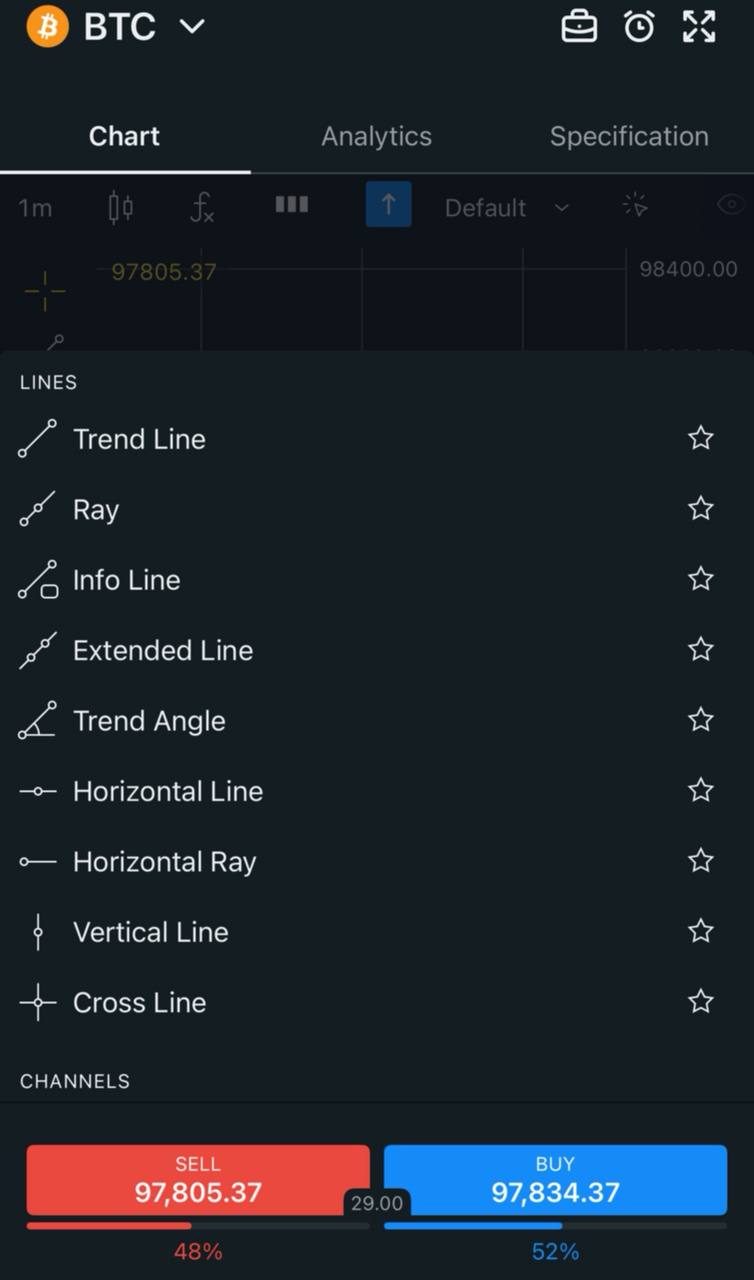
The Exness trading app offers interactive charts and support for sophisticated trading terminals that help traders perform in-depth technical analysis. These features enable traders to analyze market movements before executing trades with fixed pricing. The app includes:
Multiple timeframes. Analyze short-term and long-term trends.
Customizable indicators. Use technical assessment tools like moving averages, RSI, and Bollinger Bands.
Drawing tools. Identify patterns with trendlines, Fibonacci retracements, and support/resistance levels.


2. Real-Time price alerts

Price signals in Exness Go allow traders to stay updated on major market movements without constantly monitoring the app. With this feature, users can:
Set price notifications. Get instant alerts when assets hit specific price levels.
React to unstable markets. Avoid missing out on opportunities in fast-moving conditions.
Receive essential notifications. Stay informed about trade opportunities and risk management.
3. Built-in trading calculator

Risk management is a key part of trading, and the Exness trading app provides a built-in trading calculator to simplify calculations. Traders can:
Calculate lot sizes. Determine trade volume based on risk percentage.
Assess margin requirements. Ensure sufficient funds for open positions.
Estimate potential profits & losses. Plan trades effectively before execution.
4. Smart trading notifications

The smart notifications feature in Exness Go ensures traders stay updated on key events affecting their positions. These alerts provide:
Trade execution updates. Know when orders are filled or rejected.
Market movement alerts. Stay informed about high-impact news and events.
Price gap protection. Minimize risk during high volatility.
5. Order history and detailed trade overview

Tracking past and current trades is crucial for refining trading strategies. The order history feature allows traders to:
Monitor pending and closed trades. Analyze past performance and improve future trades.
Check execution details. Review spreads, commissions, and trade entry/exit points.
Identify trading patterns. Optimize strategies based on previous trends.
6. Watchlist and market dynamics

The watchlist feature helps traders track their favourite assets and stay ahead of market shifts. It offers:
Personalized asset tracking. Monitor top assets in one place.
Live price updates. Get real-time data on Forex, stocks, and commodities.
Instant trade execution. Act quickly when assets reach key levels.
Device compatibility and system requirements
The Exness Go trading app is designed for cross-platform compatibility, allowing traders to access their trading profiles on multiple devices. It is available for Android and iOS, ensuring a smooth trading operation experience.
Minimum system requirements
Android. Version 6.0 and above;
iOS. iPhone 7 or later, iOS 12+;
Storage. At least 100 MB of free space;
Internet. Stable connection for real-time market patterns.
Security and data protection
Exness app ensures top-tier security through data encryption and compliance with regulatory requirements. The app follows industry standards to protect traders' accounts, transactions, and personal data.
Data encryption. All transactions are secured with AES-256 encryption to prevent unauthorized access.
Two-factor authentication (2FA). Adds an extra security layer for login and withdrawals.
Regulatory compliance. Operates under Exness Global Limited, a regulated multi asset broker adhering to strict financial regulations.
Support and learning resources
Exness app provides comprehensive support and educational materials to help traders improve their trading skills. The app includes an in-app help center, live chat support, and market insights.
24/7 live support. Traders can contact Exness Trade customer service via live chat for instant assistance.
Educational materials. Access free market news, tutorials, and strategy guides to analyze market dynamics effectively.
Trading academy. Learn about technical analysis tools, risk management, and how to navigate volatile markets.
How to get started with Exness Go
Getting started with Exness app is simple and takes just a few minutes. The process includes downloading the app, creating an account, and verifying identity for secure trading.
Step 1: Download the Exness Go APK from the official website or the App Store/Google Play.
Step 2: Create a trading account by entering personal details.
Step 3: Verify identity with required documents to comply with regulatory requirements.
Step 4: Fund the account using bank wire, e-wallets, or credit/debit cards.
Step 5: Once set up, traders can explore investing tools and execute trades instantly.
How to use Exness Go — step-by-step guide
The Exness app simplifies trading activity with an intuitive interface, enabling traders to customize profiles, deposit funds, and connect MetaTrader accounts. After signing up with Exness, there are other tasks a user is expected to complete.
1. Customizing your profile and settings

Update personal details for security and a personalized trading experience.
Enable two-factor authentication (2FA) for added protection.
Adjust trading preferences to match your trading strategy.
2. Deposit and withdrawal methods on Exness app
Exness supported bank wire, e-wallets, and credit/debit cards. Exness allows minimum deposits starting from $1 to $10, depending on the payment method, with maximum deposits reaching up to $10 million for cryptocurrencies. Withdrawals start from $1 to $200, with a maximum limit of $10 million, and most transactions are processed instantly or within a few hours.
Deposit and withdrawal methods
| Deposit and withdrawal methods | Bank cards | Neteller | Skrill | SticPay | Crypto (USDT, BTC, USDC) |
|---|---|---|---|---|---|
Deposit processing time | Instant to 30 minutes | Instant to 30 minutes | Instant to 30 minutes | Instant to 30 minutes | Instant to 15 minutes |
Withdrawal processing time | Instant to 30 minutes | Instant to 1 day | Instant to 1 day | Instant to 1 day | Instant to 15 minutes |


3. Integrating MT5 on the Exness app
You can integrate MT5 with the Exness app by linking your trading account directly within the app. This allows you to seamlessly switch platforms, access advanced trading platforms, and manage orders.
4. Use the In-app chat support

Use the in-app chat support on Exness Go to get 24/7 assistance from live agents. You can also access FAQs and trading guides directly within the app for quick answers.
Identifying liquidity and making informed entries with Exness Go

As a financial expert, I often see beginners making the same mistake — blindly following technical indicators without understanding where liquidity is concentrated in the Exness Go trading system. Instead of relying solely on support and resistance levels, I recommend paying attention to areas where a large number of buy and sell orders are clustered. Exness Go provides advanced tools, such as real-time market depth, that help identify these liquidity pockets. When the price approaches these zones, significant market moves tend to occur. To avoid slippage and secure better prices, I advise using limit orders instead of impulsively placing market orders.
Another highly effective but often overlooked approach is leveraging Exness Go’s instant execution to analyze price movements that most traders miss. Large institutional players frequently manipulate prices, triggering stop-loss orders before reversing the trend. To avoid falling into this trap, I recommend using tick charts. Unlike standard candlestick charts, tick charts are based on transaction volume rather than time, allowing you to spot when big players are quietly buying or selling. This gives you the opportunity to enter the market before the majority of traders, significantly improving your chances of making profitable trades.
Conclusion
Exness Go is a powerful and feature rich trading app designed for both beginners and professional traders. It offers seamless access to real-time market changes and advanced investing tools like technical analysis indicators, price updates, and smart notifications.
The app integrates with the broader Exness trading ecosystem, allowing easy multi-account management, MetaTrader 4 & 5 compatibility, and secure transactions. Additionally, fast deposits and withdrawals, a built-in trading calculator, and 24/7 in-app support enhance the overall experience. In Exness Go, all services relate to optimizing the trading experience.
FAQs
What is the Exness app used for?
The Exness app is used for online trading, allowing traders to buy and sell Forex, stocks, commodities, and cryptocurrencies. It provides real-time market data, advanced charting tools, price updates, and secure trade execution.
Is the Exness app safe?
Yes, the Exness app is safe to use. It is operated by Exness Global Limited, a regulated multi asset broker that complies with strict financial regulations. The app features two-factor authentication (2FA), data encryption, and secure transactions.
Which country's app is Exness?
Exness is an international trading platform headquartered in Limassol, Cyprus. It operates under various global regulatory bodies, including CySEC (Europe), FSCA (South Africa), FCA (UK), and FSA (Seychelles), offering services in multiple countries.
Is Exness legal in India?
Yes, Exness is legal in India, but it is not directly regulated by SEBI. Indian traders can use Exness Go and other Exness platforms to trade Forex and CFDs, but they must comply with local financial regulations regarding offshore trading.
Is Exness Go and Exness the same?
Exness Go and Exness are part of the same ecosystem but serve different purposes. The Exness app is a mobile trading app designed for a simplified and user-friendly trading experience, while Exness (the main platform) provides access to MT4/MT5, and WebTrader, catering to advanced traders. Both allow trading on popular tradable assets with stable pricing.
Related Articles
Team that worked on the article
Peter Emmanuel Chijioke is a professional personal finance, Forex, crypto, blockchain, NFT, and Web3 writer and a contributor to the Traders Union website. As a computer science graduate with a robust background in programming, machine learning, and blockchain technology, he possesses a comprehensive understanding of software, technologies, cryptocurrency, and Forex trading.
Chinmay Soni is a financial analyst with more than 5 years of experience in working with stocks, Forex, derivatives, and other assets. As a founder of a boutique research firm and an active researcher, he covers various industries and fields, providing insights backed by statistical data.
Mirjan Hipolito is a journalist and news editor at Traders Union. She is an expert crypto writer with five years of experience in the financial markets.
-
 Afghanistan
-
 Albania
-
 Algeria
-
 Angola
-
 Argentina
-
 Armenia
-
 Australia
-
 Austria
-
 Azerbaijan
-
 Bahamas
-
 Bahrain
-
 Bangladesh
-
 Belarus
-
 Belgium
-
 Bolivia
-
 Botswana
-
 Brazil
-
 Brunei
-
 Bulgaria
-
 Cambodia
-
 Cameroon
-
 Canada
-
 Chile
Chile
-
 China
China
-
 Colombia
-
 Congo
Congo
-
 Costa Rica
-
 Cote d'Ivoire
-
 Croatia
-
 Cuba
Cuba
-
 Cyprus
-
 Czechia
-
 DR Congo
-
 Denmark
-
 Dominican Republic
-
 Ecuador
-
 Egypt
Egypt
-
 El Salvador
-
 Estonia
-
 Eswatini
-
 Ethiopia
-
 Finland
-
 France
-
 Georgia
-
 Germany
-
 Ghana
Ghana
-
 Greece
-
 Haiti
Haiti
-
 Hong Kong
-
 Hungary
-
 India
India
-
 Indonesia
-
 Iran, Islamic republic
-
 Iraq
Iraq
-
 Ireland
-
 Israel
-
 Italy
Italy
-
 Jamaica
-
 Japan
Japan
-
 Jordan
-
 Kazakhstan
-
 Kenya
Kenya
-
 Korea
Korea
-
 Kuwait
-
 Kyrgyzstan
-
 Laos
Laos
-
 Latvia
-
 Lebanon
-
 Lesotho
-
 Libya
Libya
-
 Lithuania
-
 Luxembourg
-
 Madagascar
-
 Malaysia
-
 Malta
Malta
-
 Mauritius
-
 Mexico
-
 Moldova
-
 Mongolia
-
 Montenegro
-
 Morocco
-
 Mozambique
-
 Myanmar
-
 Namibia
-
 Nepal
Nepal
-
 Netherlands
-
 New Zealand
-
 Nigeria
-
 North Macedonia
-
 Norway
-
 Oman
Oman
-
 Pakistan
-
 Palestine
-
 Panama
-
 Papua New Guinea
-
 Paraguay
-
 Peru
Peru
-
 Philippines
-
 Poland
-
 Portugal
-
 Puerto Rico
-
 Qatar
Qatar
-
 Reunion
-
 Romania
-
 Rwanda
-
 Saudi Arabia
-
 Serbia
-
 Singapore
-
 Slovakia
-
 Slovenia
-
 Somalia
-
 South Africa
-
 Spain
Spain
-
 Sri Lanka
-
 Sweden
-
 Switzerland
-
 Syria
Syria
-
 Taiwan
-
 Tajikistan
-
 Tanzania
-
 Thailand
-
 Trinidad and Tobago
-
 Tunisia
-
 Turkey
-
 UAE
UAE
-
 Uganda
-
 Ukraine
-
 United Kingdom
-
United States
-
 Uruguay
-
 Uzbekistan
-
 Venezuela
-
 Vietnam
-
 Yemen
Yemen
-
 Zambia
-
 Zimbabwe
- Forex
- Crypto












