
Tickmill Metatrader 4 Review: Features, Setup Guide, And Strategic Benefits


Editorial Note: While we adhere to strict Editorial Integrity, this post may contain references to products from our partners. Here's an explanation for How We Make Money. None of the data and information on this webpage constitutes investment advice according to our Disclaimer.
Tickmill MT4 is customized MetaTrader 4 platform offering ultra‑fast order execution of about 0.20 seconds, raw spreads from 0.0 pips with $3 per lot commission on Pro accounts, and more than 60 Forex pairs plus CFDs on indices, commodities, bonds, and crypto. Traders can open a free Tickmill MT4 demo, run Expert Advisors, and use one‑click trading on Windows, Mac, web, or mobile with a single login.
Tickmill MT4 is the official MetaTrader 4 platform offered by Tickmill, built for fast, low-cost Forex and CFD trading. It combines speed, flexibility, and automation with Tickmill’s trusted trading conditions. Traders get ultra-fast execution of about 0.20 seconds, raw spreads from 0.0 pips, and access to more than 60 currency pairs, indices, commodities, bonds, and crypto assets.
You can open a free demo, install the Tickmill MT4 client terminal, or log in from any device (Windows, Mac, Web, or mobile). Users can enjoy synchronized trading across all platforms with one Tickmill MT4 login.
The Tickmill MetaTrader 4 platform remains one of the best tools for both beginners and professionals in 2026. It provides smooth order execution, advanced charting, and full support for automated strategies. This review explains why many traders choose Metatrader 4 for Tickmill.
What is Tickmill MT4?


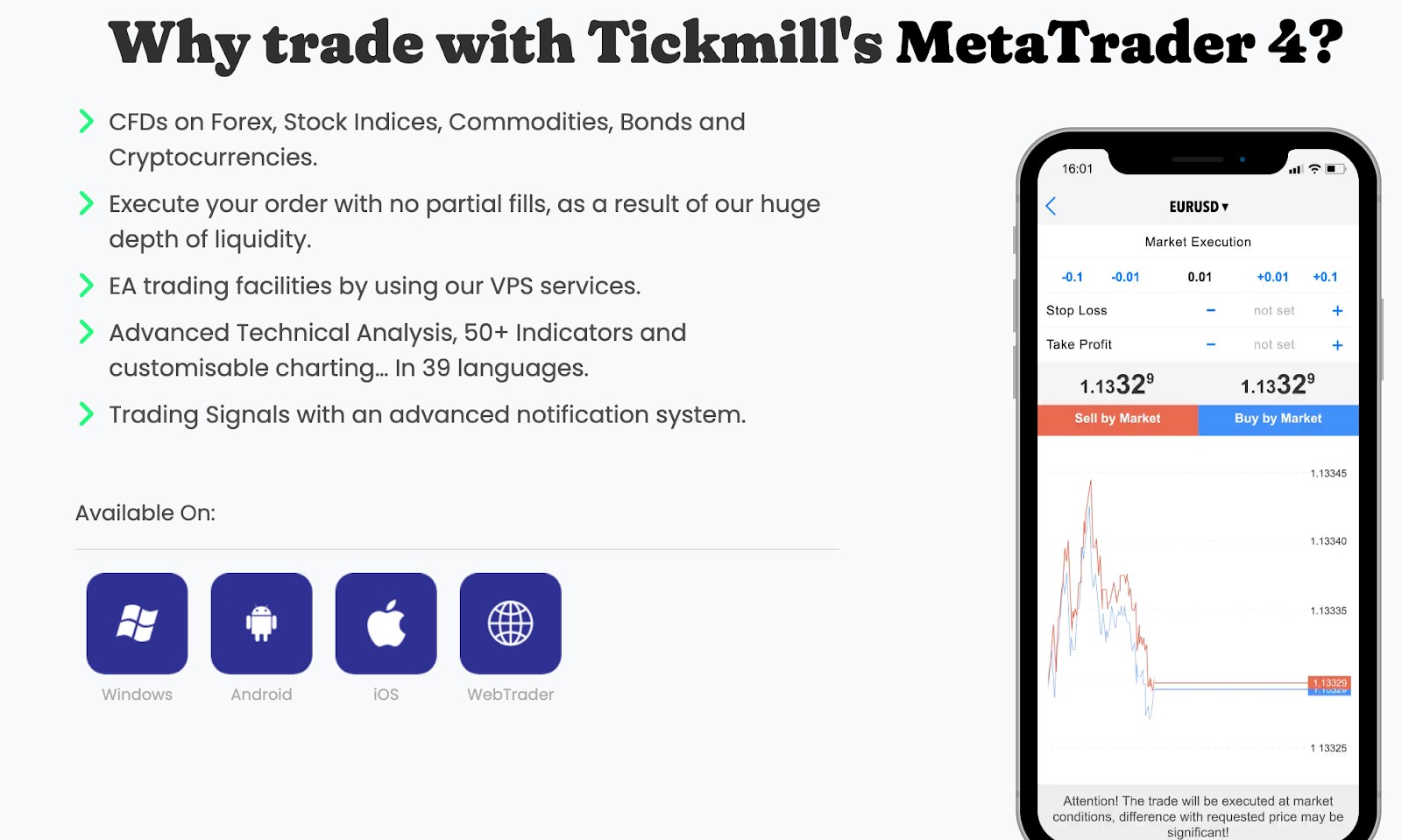
The Tickmill version of MT4 offers full compatibility with industry standards while integrating broker‑level enhancements. Through Tickmill’s MT4, traders gain access to deep liquidity, no partial fills policies, and advanced risk‑management tools. For those exploring the platform before committing funds, the demo functionality of Tickmill’s MT4 enables testing strategy performance with real market conditions and zero risk exposure.
Tickmill’s MT4 client terminal is the desktop interface used by traders to manage accounts, view charts, and run automated systems like Expert Advisors. For Mac users, Tickmill offers a native macOS version of MetaTrader 4 alongside the standard Windows installer; this allows full platform access on Apple devices without relying solely on Wine or virtualization.
If you’re considering trading with MetaTrader 4, it's essential to choose a broker that offers optimal conditions. Here’s how Tickmill stacks up against other top MT4 Forex brokers in 2026.
| Demo | Min. deposit, $ | Max. leverage | Deposit fee, % | Withdrawal fee, $ | Regulation | MT4 | Open an account | |
|---|---|---|---|---|---|---|---|---|
| Yes | 5000 | 1:50 | No | 10 | NFA, CFTC | Yes | Study review | |
| Yes | 5 | 1:1000 | No | No | CySEC, FSC (Belize), DFSA, FSCA, FSA (Seychelles), FSC (Mauritius), SCA (United Arab Emirates), CMA (Kenya) | Yes | Go to broker Your capital is at risk. |
|
| Yes | 100 | 1:50 | No | No | CIMA, FCA, FSA (Japan), NFA, IIROC, ASIC, CFTC | Yes | Study review | |
| Yes | No | 1:200 | No | 0-15 | FSC (BVI), ASIC, IIROC, FCA, CFTC, NFA | Yes | Go to broker Your capital is at risk. |
|
| Yes | 1 | 1:200 | No | No | FCA, BaFin, ASIC, MAS, CySec, FINMA, BMA, CFTC, NFA | Yes | Study review |
Versions available: which one to choose?
Tickmill MT4 for desktop
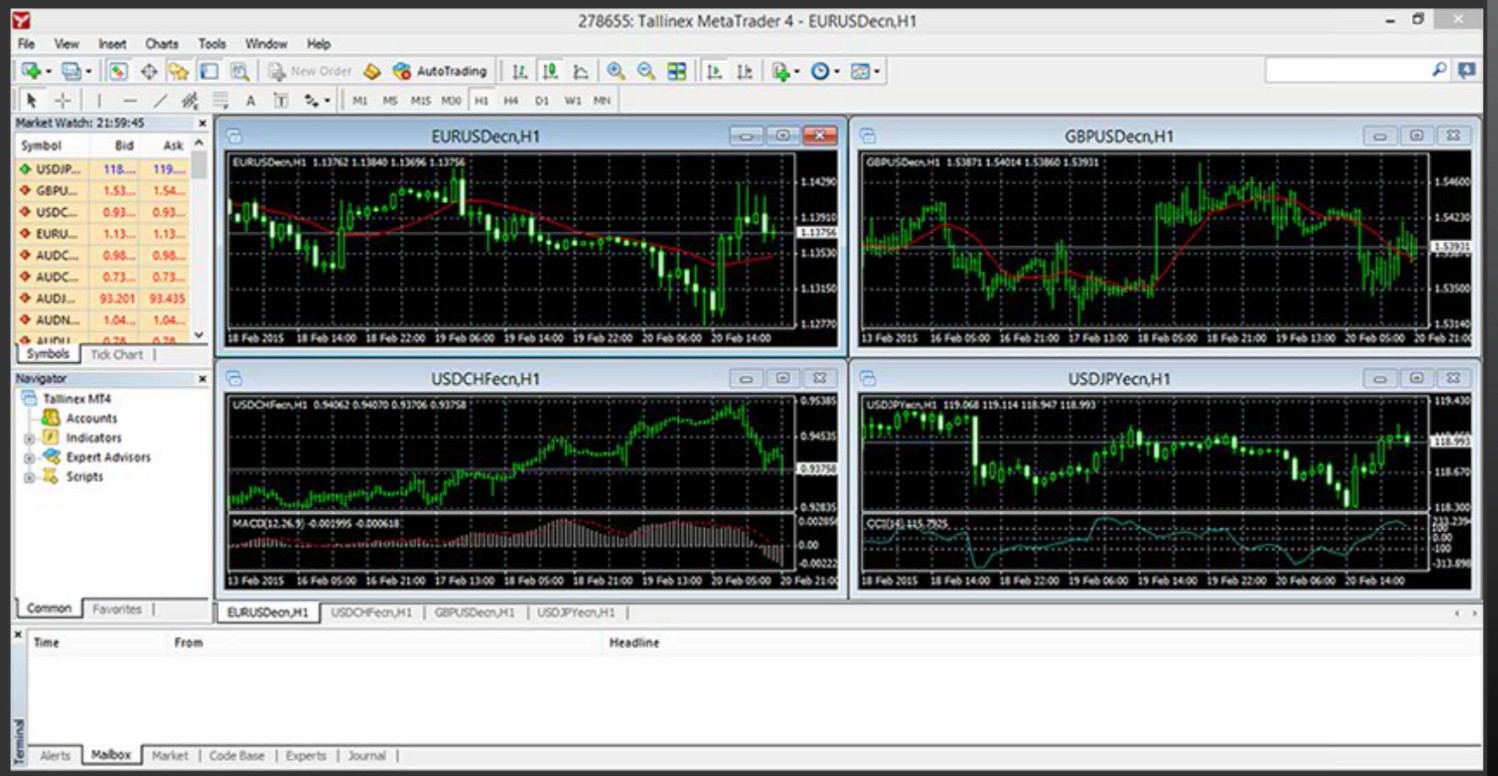
Traders can download the full version of Tickmill’s MT4 client terminal for Windows directly from the official website. The platform is now fully optimized, supporting over 50 built-in indicators, automated trading, and fast backtesting with real market data. It allows users to run multiple charts, apply custom indicators, and use Expert Advisors (EAs) for complete automation. The Tickmill MT4 for Mac is also available as a native installer, making it easier for users to trade without using additional software.
- Pros
- Cons
complete set of tools for technical analysis and automation;
excellent speed and stability for professional trading;
allows full use of Expert Advisors and custom indicators;
reliable for long-term backtesting and advanced strategies.
requires installation and more computer resources;
not ideal for quick or casual access;
updates must be done manually.
Tickmill MT4 WebTrader
The web version of MT4 by Tickmill requires no installation and works directly in any browser, including Chrome, Firefox, and Safari. It offers real-time quotes, live charts, nine timeframes, and simple order management tools. Traders can open, modify, or close positions easily from any device. However, it does not support automated trading or custom indicators. The web platform is perfect for quick access or trading when you are away from your main computer.
- Pros
- Cons
quick access from any computer or browser;
no installation or configuration needed;
simple and clean interface suitable for beginners.
does not support Expert Advisors or custom tools;
fewer charting features than the desktop version;
depends on internet stability and browser performance.
Tickmill MT4 mobile app
Tickmill’s MT4 mobile app works on both Android and iOS devices. It lets traders open and manage trades, view up to ten chart types, and access over 30 technical indicators. Push notifications, price alerts, and synchronized logins keep all devices updated in real time. With a single Tickmill MT4 login, you can move easily between your desktop, web, and mobile platforms. The app is best for monitoring trades and managing positions on the go.
- Pros
- Cons
convenient for trading and monitoring on the go;
easy to use with a clear layout;
includes price alerts and push notifications.
limited screen space for analysis;
no automated trading or strategy testing;
performance may vary depending on mobile network speed.
Each version of Tickmill’s MetaTrader 4 platform suits a different trading style. The desktop version is ideal for automation and deep analysis. The web platform offers lightweight access from any computer, and the mobile app gives traders full control while traveling. Together, they make the Tickmill MT4 download package one of the most flexible and user-friendly trading solutions in 2026.
Tickmill MT4: key features that matter
Ultra‑fast execution and low latency
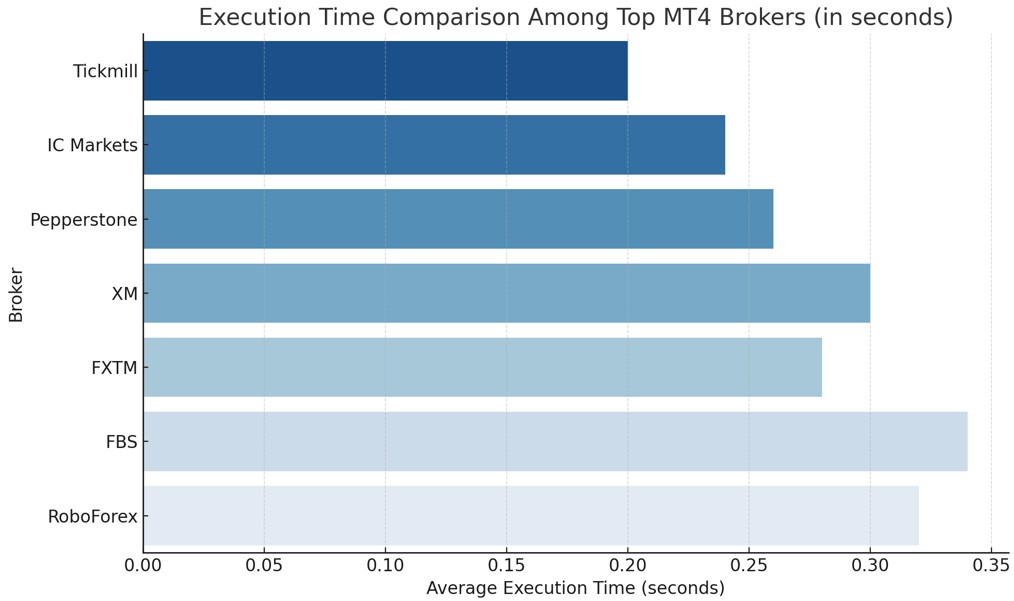
By design, the Tickmill’s MT4 infrastructure targets execution speeds around 0.20 seconds, with optimal routes pushing to 0.15 seconds during high liquidity periods. In comparative tests across major MT4‑offering brokers, Tickmill consistently ranks in the top quartile for minimized slippage and latency.
Cost structure: spreads and commissions
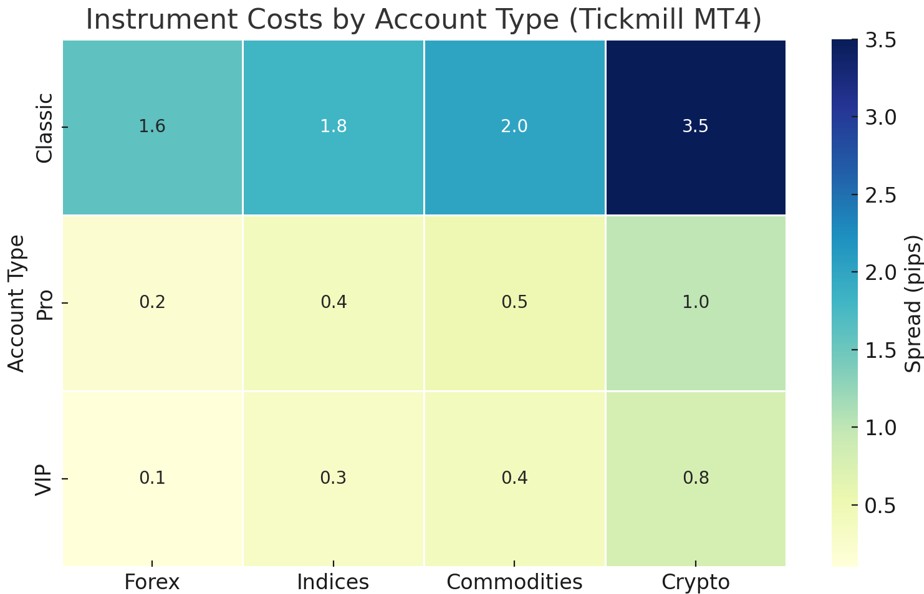
Through Tickmill’s MT4, traders gain access to transparent pricing tiers. On Raw/Pro accounts, spreads begin at 0.0 pips with a fixed commission of around $3 per lot per side; on Standard/Classic accounts, spreads start near 1.6 pips with no commission. These figures remain competitive in the present scenario and are reflective of Tickmill’s drive to support both scalpers and long‑term traders.
Comprehensive asset coverage
The platform supports 60+ Forex pairs, indices, commodities, bonds, and crypto CFDs, all managed via one interface. This wide instrument base enhances portfolio flexibility without requiring multiple accounts or platforms.
Risk tools and automation
The platform includes built‑in risk controls like stop loss, take profit, trailing stops, and margin alerts. Combined with full EA compatibility, traders can automate position management with discipline and precision.
Tickmill download MT4: full guide
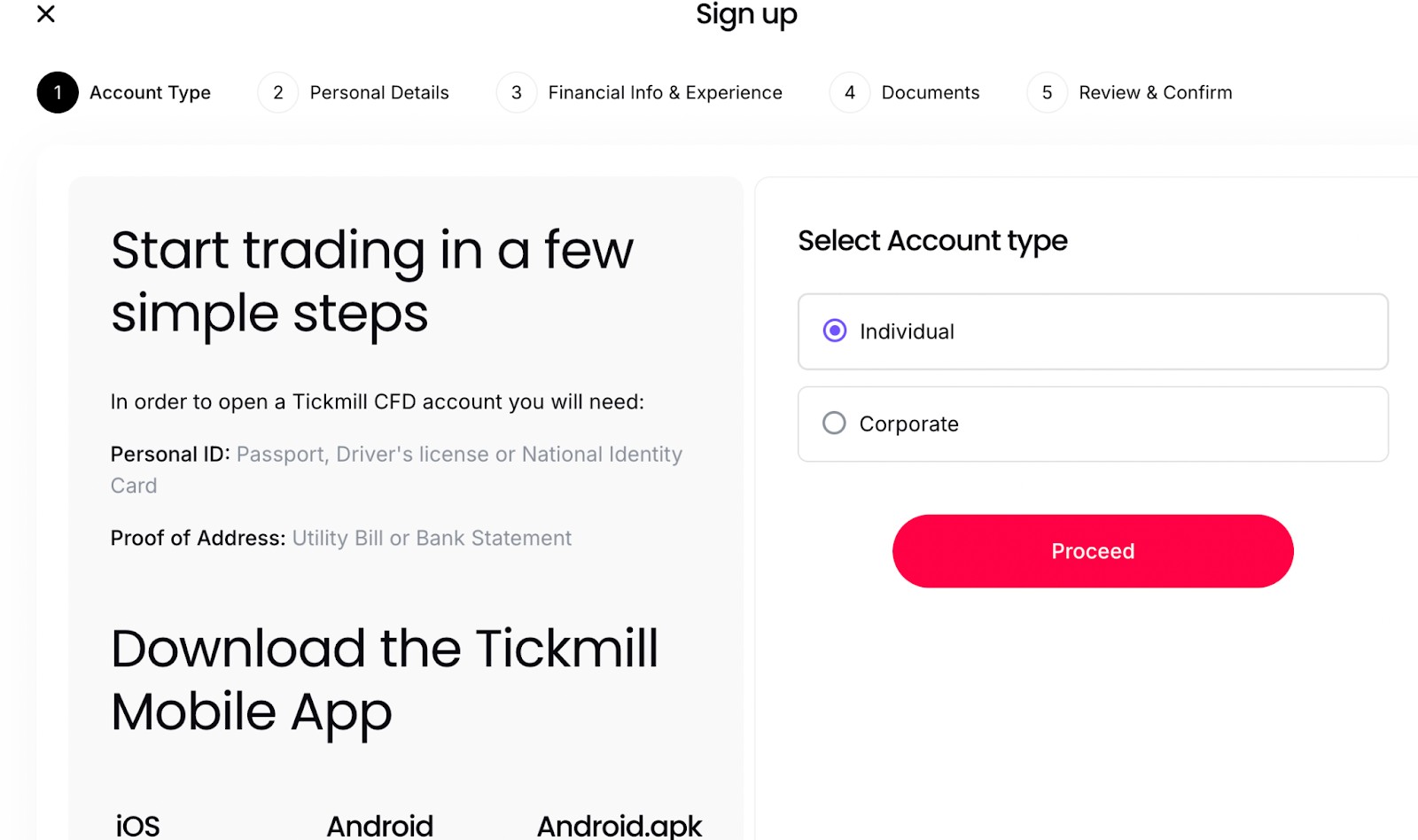
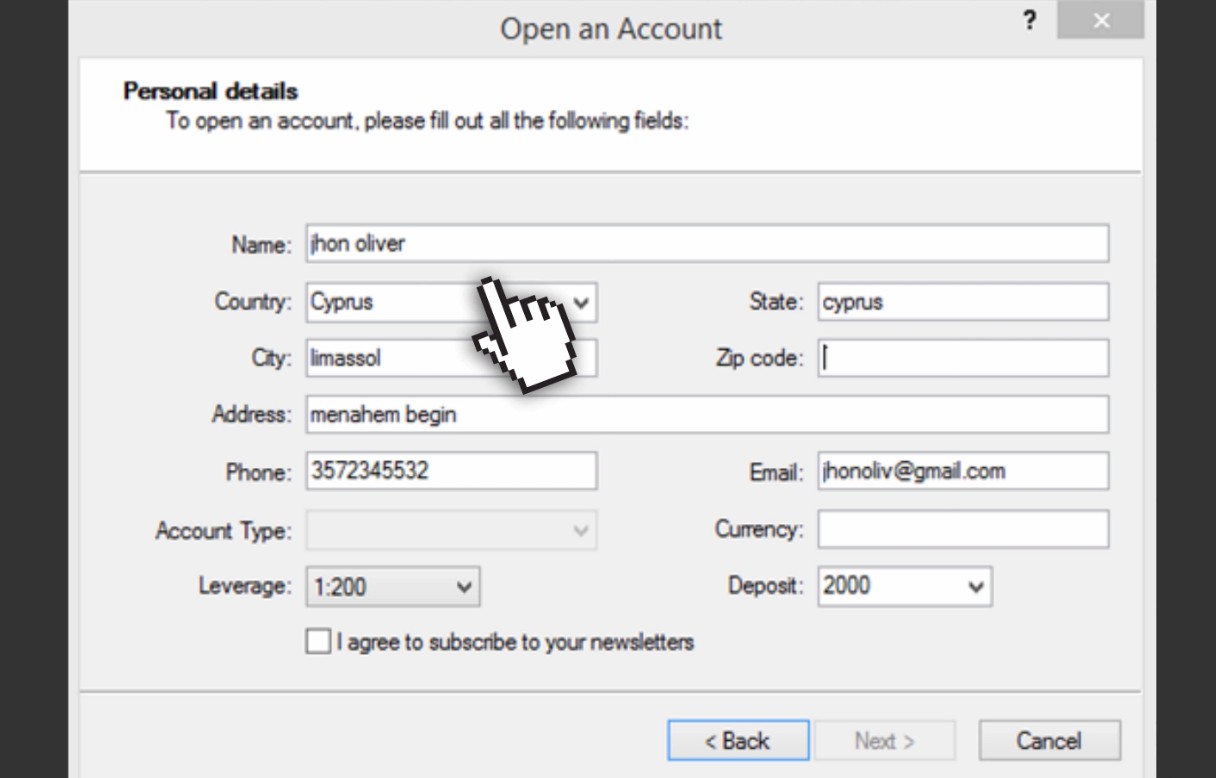
Register an account
Upon sign-up, you receive credentials to access the Tickmill MT4 demo or live versions. The initial deposit is generally $100 or equivalent.
Get the platform installer
Use the Tickmill MT4 download link from the official site.
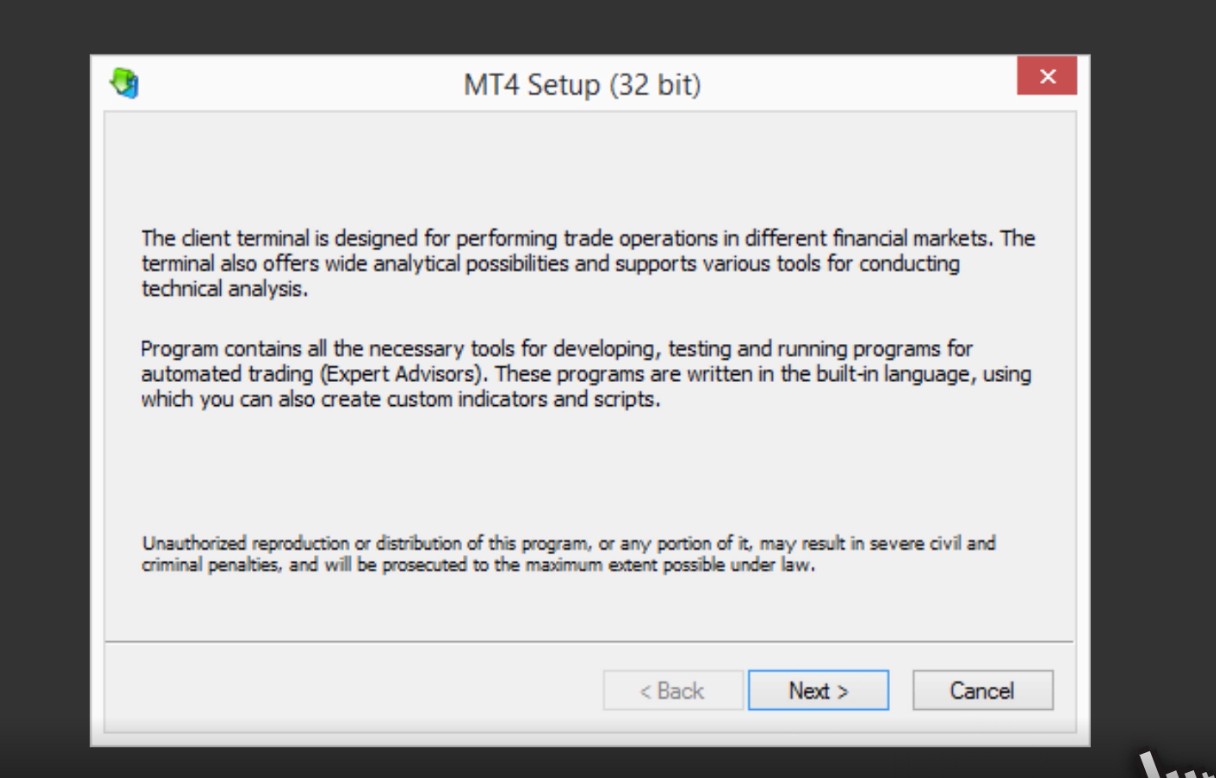
Run the installer and log in
Open the installer, accept prompts how to download Tickmill MT4 platform, and enter your broker server address, login, and password. After installation, launch the Tickmill MT4 client terminal and login to connect to the server.
Customize your setup
Change color schemes, default timeframes, chart templates, load your indicators, and save the layout as a template.
Practice on the demo first
Always begin trading using the demo so you can validate strategies, test EAs, and adapt to execution nuances before risking capital.
Use the demo to refine your edge

Despite MT4 being a legacy platform, Tickmill’s implementation adds real value through execution speed, institutional-grade spreads, and deep market access. Traders using Tickmill’s MT4 should focus on tactical short-term setups like news scalping and EA-driven strategies, where milliseconds matter. For those running manual strategies or swing trades, the MT4 client terminal by Tickmill offers clean order flow and reliable pricing, but it’s the account structure that defines profitability.
If you're using a Classic account, consider upgrading to Pro once volume scales past 10 lots monthly as the 0.0 pip spread and lower commission drastically reduce cost per trade.
Conclusion
Tickmill’s MT4 platform remains one of the most reliable and well-balanced choices for traders. It combines speed, transparency, and flexibility, making it suitable for both beginners and experienced investors. The platform’s multiple versions, desktop, web, and mobile, allow every trader to work in a way that fits their routine.
The desktop version offers the strongest performance and full automation features. The web platform provides quick access without installation, and the mobile app ensures control over trades anywhere. Together, they create a complete trading ecosystem that supports all strategies, from manual scalping to long-term investing.
Tickmill’s focus on stable execution, low trading costs, and continuous updates keeps it competitive in a fast-changing market. For anyone looking for a dependable and professional trading environment, Tickmill’s MT4 platform is a solid choice for the years ahead.
FAQs
Can I use the same login credentials across all MT4 versions?
Yes, once you complete registration and install the Tickmill MT4 client terminal, your credentials will work across the desktop, mobile, and WebTrader platforms. This ensures seamless access and synchronized data on any device.
Is there a difference in execution speed between mobile and desktop MT4?
Generally, the desktop version offers slightly faster execution than mobile due to server proximity and stability. Traders relying on speed-sensitive strategies should prioritize desktop or VPS setups.
Do I need a special account to access demo trading?
No, demo access is available to all users after completing the basic registration. Through Tickmill’s MT4, you can simulate trades, test EAs, and analyze market behavior without risking real funds.
Can I install MT4 on multiple devices at the same time?
Yes, MT4 allows simultaneous logins from multiple devices. After the download of Tickmill’s MT4 is complete, traders can manage their accounts on a desktop and mobile in parallel, as long as security protocols are respected.
Related Articles
Team that worked on the article
Aleksandra Chaikina has been a contributor to Traders Union since 2021. With over 15 years of experience in copywriting and more than 5 years focused on financial content, she specializes in producing detailed guides, analytics, and comparative reviews across various sectors, including cryptocurrencies, Forex, investment strategies, and financial technologies.
Dan Blystone began his trading career in 1998 as an arbitrage clerk on the floor of the Chicago Mercantile Exchange (CME). He later traded bond and Eurex futures at proprietary firms such as Altea Trading, gaining valuable experience in high-frequency trading and risk management.
Chinmay Soni is a financial analyst with more than 5 years of experience in working with stocks, Forex, derivatives, and other assets. As a founder of a boutique research firm and an active researcher, he covers various industries and fields, providing insights backed by statistical data.
-
 Afghanistan
-
 Albania
-
 Algeria
-
 Angola
-
 Argentina
-
 Armenia
-
 Australia
-
 Austria
-
 Azerbaijan
-
 Bahamas
-
 Bahrain
-
 Bangladesh
-
 Belarus
-
 Belgium
-
 Bolivia
-
 Botswana
-
 Brazil
-
 Brunei
-
 Bulgaria
-
 Cambodia
-
 Cameroon
-
 Canada
-
 Chile
Chile
-
 China
China
-
 Colombia
-
 Congo
Congo
-
 Costa Rica
-
 Cote d'Ivoire
-
 Croatia
-
 Cuba
Cuba
-
 Cyprus
-
 Czechia
-
 DR Congo
-
 Denmark
-
 Dominican Republic
-
 Ecuador
-
 Egypt
Egypt
-
 El Salvador
-
 Estonia
-
 Eswatini
-
 Ethiopia
-
 Finland
-
 France
-
 Georgia
-
 Germany
-
 Ghana
Ghana
-
 Greece
-
 Haiti
Haiti
-
 Hong Kong
-
 Hungary
-
 India
India
-
 Indonesia
-
 Iran, Islamic republic
-
 Iraq
Iraq
-
 Ireland
-
 Israel
-
 Italy
Italy
-
 Jamaica
-
 Japan
Japan
-
 Jordan
-
 Kazakhstan
-
 Kenya
Kenya
-
 Korea
Korea
-
 Kuwait
-
 Kyrgyzstan
-
 Laos
Laos
-
 Latvia
-
 Lebanon
-
 Lesotho
-
 Libya
Libya
-
 Lithuania
-
 Luxembourg
-
 Madagascar
-
 Malaysia
-
 Malta
Malta
-
 Mauritius
-
 Mexico
-
 Moldova
-
 Mongolia
-
 Montenegro
-
 Morocco
-
 Mozambique
-
 Myanmar
-
 Namibia
-
 Nepal
Nepal
-
 Netherlands
-
 New Zealand
-
 Nigeria
-
 North Macedonia
-
 Norway
-
 Oman
Oman
-
 Pakistan
-
 Palestine
-
 Panama
-
 Papua New Guinea
-
 Paraguay
-
 Peru
Peru
-
 Philippines
-
 Poland
-
 Portugal
-
 Puerto Rico
-
 Qatar
Qatar
-
 Reunion
-
 Romania
-
 Rwanda
-
 Saudi Arabia
-
 Serbia
-
 Singapore
-
 Slovakia
-
 Slovenia
-
 Somalia
-
 South Africa
-
 Spain
Spain
-
 Sri Lanka
-
 Sweden
-
 Switzerland
-
 Syria
Syria
-
 Taiwan
-
 Tajikistan
-
 Tanzania
-
 Thailand
-
 Trinidad and Tobago
-
 Tunisia
-
 Turkey
-
 UAE
UAE
-
 Uganda
-
 Ukraine
-
 United Kingdom
-
United States
-
 Uruguay
-
 Uzbekistan
-
 Venezuela
-
 Vietnam
-
 Yemen
Yemen
-
 Zambia
-
 Zimbabwe
- Forex
- Crypto












