
How To Top Up A Bybit Web3 Wallet: Instructions, Fees, And Key Features


Editorial Note: While we adhere to strict Editorial Integrity, this post may contain references to products from our partners. Here's an explanation for How We Make Money. None of the data and information on this webpage constitutes investment advice according to our Disclaimer.
To top up a Bybit Web3 wallet, open the wallet and click Receive, choose the cryptocurrency, select the correct network, copy the wallet address, and send funds from an external wallet or another exchange. The deposit is completed once the transaction is confirmed on the blockchain.
Bybit continues to expand its on-chain ecosystem through its Web3 Wallet, which allows users to manage crypto assets directly on the blockchain while staying within the Bybit platform. Unlike exchange wallets that operate off-chain, this Web3 wallet uses real blockchain addresses and requires extra care when funding it.
This guide explains how to top up a Web3 wallet on Bybit safely and correctly. It covers different funding scenarios, including how to transfer to your Bybit wallet from another exchange, how to make a deposit from an external wallet to Bybit, and how to move funds internally before sending them on-chain.
The instructions below are suitable for both beginners and experienced users. They are especially helpful if you need to send crypto to your Bybit wallet, move assets from another platform, or understand how on-chain deposits differ from regular exchange transfers when managing your Bybit wallet balance.
How to top up a Bybit Web3 wallet: Step-by-step guide

Bybit’s Web3 Wallet is integrated into the exchange ecosystem, but it functions separately from your Spot, Funding, or Earn balances. When you top up a Web3 wallet on Bybit, funds are sent to a real on-chain address rather than moved internally within the platform. You can fund the wallet either by making a deposit from an external wallet to Bybit or by transferring assets inside your Bybit account and then sending them on-chain.
The process is the same whether you use the mobile app or a browser extension. It consists of five clear steps.
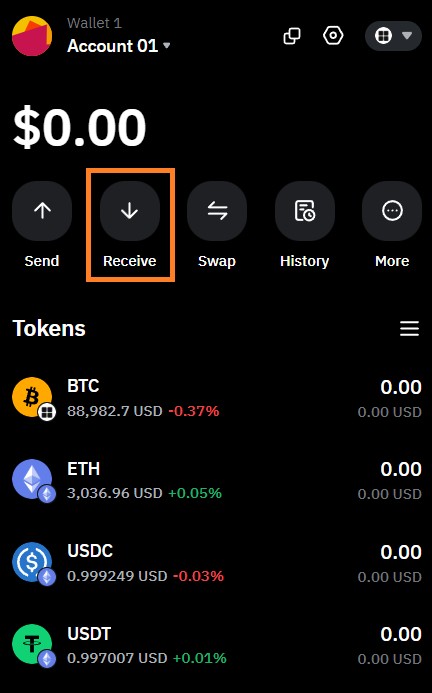
Step 1. Click the “Receive” button in the main menu
Log in to Bybit’s Web3 Wallet and open the main menu. Select Receive to generate a deposit address. This address is required before you transfer to your Bybit wallet from any external source.
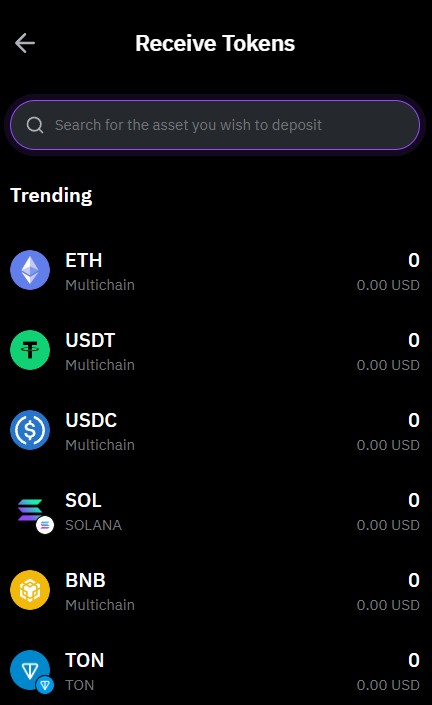
Step 2. Selecting the cryptocurrency for the deposit
Before transferring funds to a Bybit Web3 wallet, decide which cryptocurrency you want to use. Find the required coin in the corresponding menu, using the search function for convenience.
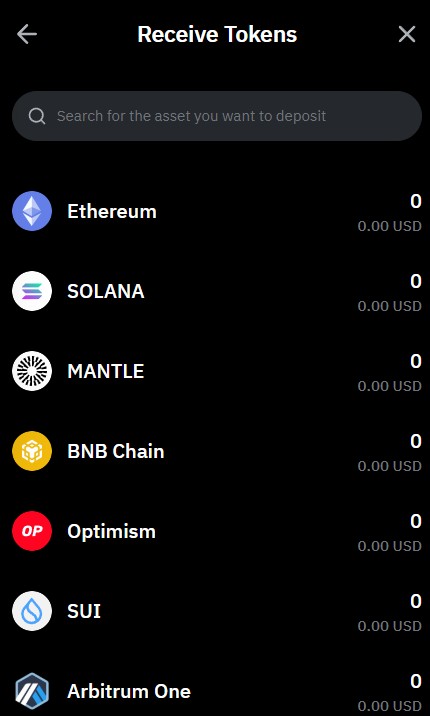
Step 3. Choose the network
Selecting the correct network is critical. When you top up a Web3 wallet on Bybit, the network selected in the wallet must exactly match the network used by the sending wallet or exchange. If the networks do not match, the funds may be permanently lost.
Step 4. Get the address
After selecting the asset and network, the wallet will display a unique on-chain address. Copy the address carefully or use the QR code provided. Always double-check the first and last characters before proceeding.
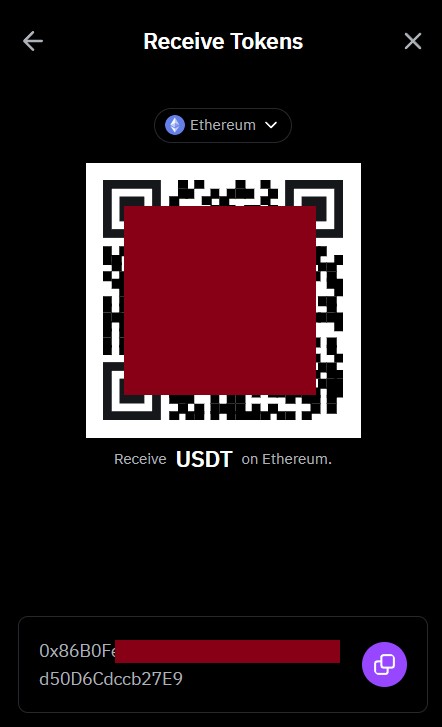
Step 5. Complete the deposit
Paste the address into the sending wallet or exchange, enter the amount, and confirm the transaction. Once the blockchain confirms the transfer, the funds will appear in your Web3 wallet balance.
This guide is fully universal. It answers questions such as how to transfer funds from a Telegram wallet to a Bybit Wallet, how to move assets from the Bybit exchange to a Bybit Wallet, how to transfer between two Bybit wallets, and how to transfer funds to a Bybit Wallet from any external wallet.
How to transfer from Earn to a Bybit Spot wallet
If you use Bybit Earn and want to continue trading or send funds on-chain, first move assets from Earn to your Spot wallet. This step is required before you can transfer funds to your Web3 wallet or make any on-chain deposit.
Follow these steps to avoid confusion between balances:
Open the Earn section. Log in to your Bybit account and open the Earn area, such as Savings, Staking, or other yield products.
Select the product and asset. Choose the Earn product you want to exit and click the Redeem option for the specific cryptocurrency.
Set the destination wallet. Select the Spot wallet as the destination for the redeemed funds.
Enter the amount and confirm. Specify how much you want to withdraw, review the details, and confirm the transaction.
Wait for the credit. Once processed, the funds will appear in your Spot wallet balance.
After the funds are in your Spot wallet, you can either continue trading on the exchange or proceed to transfer to your Bybit wallet on-chain using the Web3 Wallet deposit process.
How to transfer from a Telegram wallet to Bybit
Transferring funds from a Telegram wallet to Bybit is a standard on-chain withdrawal. The key requirement is that the network used in the Telegram wallet matches the network selected on Bybit.
To complete the transfer safely:
Generate a deposit address on Bybit. Open Bybit’s Web3 Wallet or exchange deposit page, choose the cryptocurrency, and select the correct network.
Copy the address carefully. Use only the address shown in the deposit screen to avoid address substitution risks.
Send funds from the Telegram wallet. Paste the Bybit address into the Telegram wallet, enter the amount, and confirm the transaction.
Wait for blockchain confirmation. Once the required confirmations are completed, the funds will be credited to your Bybit wallet.
This process is the same whether you are sending a small test amount or completing a larger transfer. Always double-check the network and address before confirming, as on-chain transfers cannot be reversed.
What is Bybit Web3 wallet and how does it differ from the Bybit Exchange wallet
Bybit offers two different ways to store and manage crypto assets: the exchange wallet and the Web3 Wallet. Although both are accessed from the same platform, they serve different purposes and operate in different ways.
Bybit’s Web3 Wallet is an on-chain, non-custodial wallet. Assets are stored on real blockchain addresses, and transactions take place directly on the network. This wallet allows users to interact with dApps, perform on-chain swaps, use DeFi protocols, and manage NFTs. Control over funds is tied to wallet credentials, such as a seed phrase or MPC-based access, rather than only an exchange login.
The Bybit exchange wallet, which includes Spot, Funding, and Earn balances, is custodial. Assets are held within Bybit’s internal system and are mainly used for trading, yield products, and internal transfers. These balances are not associated with individual on-chain addresses, and most operations happen off-chain inside the exchange.
Key differences to keep in mind:
Storage model. The Web3 wallet stores assets on the blockchain, while the exchange wallet holds funds within Bybit’s platform.
Use case. The Web3 wallet is designed for on-chain activity, whereas the exchange wallet is intended for trading and account-based operations.
Fees and gas. On-chain actions require network gas fees, while most exchange transfers do not.
Risk profile. Mistakes in a Web3 wallet, such as using the wrong network, are irreversible, while exchange transfers carry lower technical risk but depend on platform rules.
In short, the exchange wallet is best for trading and centralized services, while Bybit’s Web3 Wallet is used when you need direct access to blockchain networks and decentralized applications.
| Parameter | Bybit Wallet Web3 | Bybit Exchange Wallet (Funding / Spot / Unified Trading Account) |
|---|---|---|
| Storage type | On-chain wallet; non-custodial (keys controlled by the user) | Custodial: assets are stored on the exchange side |
| Where funds are stored | On the blockchain at your address (each network has its own address) | Inside the Bybit platform without an on-chain address per user |
| Purpose | Web3 activities: dApps, DeFi, NFTs, on-chain trading, bridges, swaps | CEX trading: spot, derivatives, Earn, margin trading, internal transfers |
| Funding | Via blockchain: token + network → address → on-chain transaction | Exchange deposit: Bybit deposit address for a CEX account |
| Deposit fees | Network gas fees and/or fiat provider fees; Bybit usually does not charge for on-chain deposits | Usually no deposit fee from Bybit; gas is paid when sending from an external wallet |
| Credit speed | Depends on the network and the number of confirmations | Depends on the network and Bybit’s internal confirmation rules |
| Gas required for transactions | Yes: native network token (ETH, BNB, etc.) is required | No: fees are deducted internally by the exchange |
| Risks | Network or address errors are irreversible, as with any Web3 wallet | Lower error risk, but dependent on exchange rules and infrastructure |
| Access to funds | Via private keys/seed phrase or MPC mechanisms (Keyless) | Via Bybit account (login, 2FA, KYC policies) |
| Best use case | When you need networks and dApps outside the exchange | When the goal is trading and operations within Bybit |
An exchange wallet is an account for trading on Bybit, while Bybit Web3 wallet is your personal blockchain wallet within the Bybit ecosystem.
Which cryptocurrencies and networks are supported by Bybit Wallet
Before you transfer to your Bybit wallet or make a deposit from an external wallet to Bybit, it is important to check whether the asset and network you plan to use are supported. Bybit’s Web3 Wallet supports more than 30 blockchain networks. These include major EVM-compatible networks as well as selected non-EVM chains. Support continues to expand as new networks are integrated into Bybit’s on-chain infrastructure.
Key points to understand before funding your wallet:
Network support matters more than the token name. The same asset, such as USDT, may exist on multiple networks. When you deposit crypto from an external wallet to Bybit, the network selected in the wallet must match the sending network exactly.
EVM networks are widely supported. Ethereum, BNB Chain, Arbitrum, Optimism, and other EVM networks are commonly available for on-chain deposits.
Non-EVM networks have specific rules. Some networks require memos or tags, and missing these can cause funds to be lost.
Solana support is separate. Bybit’s Web3 Wallet includes dedicated Solana support for on-chain services and tokens on that network, which is relevant if you plan to send crypto to your Bybit wallet from Solana-based wallets.
Availability can change. Networks and tokens may be added or temporarily disabled due to upgrades or maintenance.
Always verify network availability inside the wallet interface before initiating a transfer. This is especially important when planning a deposit from an external wallet to Bybit, as unsupported assets or networks may not be credited automatically.
The list of available coins is constantly changing, so always check whether the token you need is supported. Use the search by token name or ticker and verify that the required network is available, especially before making a deposit on Bybit from an external wallet.
What are the conditions for funding a Bybit wallet account?
Before you top up the Web3 wallet on Bybit, it is important to understand the basic conditions that apply to on-chain deposits. These rules determine fees, minimum amounts, and how quickly your deposit is credited to your Bybit wallet balance.
Fees when funding a Web3 wallet on Bybit
Bybit does not charge its own fee when you deposit crypto from an external wallet to Bybit’s Web3 Wallet. The only cost involved is the blockchain network fee, also known as gas, which is paid to miners or validators on the selected network.
If you are sending funds from another exchange or wallet, that platform may apply its own withdrawal fee. This is outside Bybit’s control and should be checked before confirming the transfer.
Minimum deposit amounts
Each cryptocurrency and network has its own minimum deposit requirement. When you make a deposit from an external wallet to Bybit, sending an amount below the minimum may result in the funds not being credited automatically. The minimum amount is always shown in the deposit interface before confirmation.
Deposit credit speed
How fast your wallet balance on Bybit updates depends entirely on the blockchain:
fast Layer 2 networks and sidechains may confirm deposits within minutes;
congested networks, such as Ethereum during peak periods, can take significantly longer;
some assets require multiple confirmations before funds become visible.
If you are sending funds to your wallet from Bybit, always track the transaction using the blockchain hash rather than refreshing the balance repeatedly.
Common deposit mistakes and how to avoid them
Even experienced users make mistakes when they top up a Web3 wallet on Bybit. The reason is simple. On-chain transfers are irreversible, and the blockchain does not correct human error. Below are the most common issues and how to avoid them when you transfer funds to your Bybit wallet.
Wrong network selected. Users send a token on one network while a different network is selected in the Bybit wallet. This often happens with USDT. Solution: Select the network in your Bybit wallet first, then copy the address and confirm the same network in the sending wallet.
Using an unsupported token standard. Wrapped tokens or rare standards may not be recognized even if the token name looks correct. Solution: Check that the exact token and network are supported in Bybit’s Web3 Wallet before sending.
Amount below the minimum deposit. Each network has a minimum required amount, and smaller transfers may not be credited. Solution: Review the minimum shown in the deposit screen before confirming the transfer.
Missing memo or tag. Some networks require an additional memo or tag. Without it, funds may not be credited. Solution: If a memo or tag field is shown, copy it as carefully as the wallet address.
No native token for gas. Users deposit only stablecoins and cannot swap or move funds because there is no token to pay network fees. Solution: Always send a small amount of the network’s native token along with your main transfer.
Copying addresses from transaction history. Attackers use address poisoning by sending tiny amounts from similar-looking addresses. Solution: Copy the address only from the wallet’s deposit screen.
Clipboard malware. The copied address is replaced by malware before pasting. Solution: Always verify the first and last characters of the address before sending.
Sending unsupported assets. NFTs or tokens from non-integrated networks may not appear in the wallet at all. Solution: Confirm asset and network support in the wallet interface before transferring.
Following these precautions significantly reduces the risk of losing funds when you make a deposit from an external wallet to Bybit.
If you want to minimize risk, follow the “two-check rule”: verify both the network and the address before clicking “Send,” and make a test deposit when using a new network.
How to transfer money to a Bybit wallet safely?
Knowing how to transfer funds safely is just as important as knowing how to top up a Web3 wallet on Bybit. On-chain transactions cannot be reversed, so even small mistakes can result in permanent loss. While Bybit’s Web3 Wallet is protected at the application level, responsibility for address and network accuracy always lies with the user.
To reduce risk when you transfer funds to your Bybit wallet, follow these practical safety rules:
Use the address only from the deposit screen. Always copy the address directly from the Web3 wallet deposit interface. Avoid using addresses from chats, notes, or transaction history.
Double-check the network every time. The network selected in the sending wallet must match the network shown in Bybit. Even a correct address will fail if the network is wrong.
Verify address characters after pasting. Check the first and last characters to protect against clipboard malware that replaces addresses.
Send a small test transfer first. When using a new network or wallet, test with a small amount before sending a larger balance.
Keep native tokens for gas fees. Without ETH, BNB, MATIC, or another native coin, you may not be able to move or swap assets after the transfer.
Avoid unknown bridges and dApps immediately after funding. Confirm that assets appear correctly in the wallet before interacting with third-party services.
Protect access credentials. Store seed phrases offline and never share them. Avoid public Wi-Fi unless you use a trusted VPN.
If these steps become routine, transferring funds to your Bybit wallet becomes a predictable and low-risk process rather than a stressful one.
How to transfer crypto from Trust Wallet to Bybit
Many users need to move assets from Trust Wallet to Bybit for trading or further on-chain use. This is a standard blockchain transfer, but accuracy matters because mistakes cannot be reversed. Before starting, confirm that the asset is supported on Bybit and that the same network is available on both platforms.
Step-by-step transfer process
Create a deposit address on Bybit. Open Bybit, select the cryptocurrency, and choose the correct network. This address is where the funds from Trust Wallet will be sent.
Open Trust Wallet and select the same asset. Make sure the network shown in Trust Wallet matches the one selected on Bybit.
Paste the Bybit address and enter the amount. After pasting the address, review the amount and network once more before confirming the transaction.
Confirm and send the transaction. Wait for blockchain confirmations before assuming the transfer is complete.
Sending USDT from Trust Wallet to Bybit
Stablecoins require extra attention. Many users want to send USDT from Trust Wallet to Bybit, or transfer USDT between the two wallets, and the most common mistake is choosing the wrong network.
When sending USDT:
verify whether the token is on ERC-20, TRC-20, BNB Chain, or another supported network;
select the same network in Bybit’s deposit screen;
for larger amounts, complete a test transfer first.
Safety notes
When transferring from a Trust wallet to a Bybit wallet, keep these rules in mind:
double-check the network before confirming;
copy the address only from Bybit’s deposit screen;
track the transaction using the blockchain hash;
start with a small amount if you are unsure.
Handled correctly, transferring assets from Trust Wallet to Bybit is a simple and repeatable process across most supported cryptocurrencies.
Bybit wallet alternatives: Popular exchange wallets
Bybit Wallet is conveniently integrated into the exchange ecosystem and covers most basic needs for working with cryptocurrencies and Web3. At the same time, the non-custodial wallet market is actively evolving, giving users a choice among several strong solutions. Below, we briefly review notable alternatives to Bybit Wallet so you can compare functionality, fees, and ease of use before making a final decision.
| OKX | Coinbase | Crypto.com | Cryptohopper | BTCC | Kraken | |
|---|---|---|---|---|---|---|
|
Deposit fee |
No | No | No | No | No | No |
|
Withdrawal fee |
0.0004 BTC 2.6 USDT | Fixed fee - 25 USD PayPal - 1.5% USDC - 10 USD | 0.0005 BTC | No | 0.0004 BTC 0.005 ETH 6%. if there was no futures trading | 0.0005 BTC |
|
Cold storage |
Yes | Yes | Yes | No | Yes | Yes |
|
Fiat support |
No | No | No | No | No | No |
|
Android |
Yes | Yes | Yes | Yes | Yes | Yes |
|
iOS |
Yes | Yes | Yes | Yes | Yes | Yes |
|
Bank Card |
Yes | Yes | Yes | No | Yes | Yes |
|
Bank transfer |
No | Yes | Yes | No | Yes | Yes |
|
Google Pay |
Yes | Yes | Yes | No | No | Yes |
|
Apple Pay |
Yes | Yes | Yes | No | No | Yes |
|
Open an account |
Go to broker Your capital is at risk. |
Go to broker Your capital is at risk. |
Go to broker Your capital is at risk. |
Go to broker Your capital is at risk. |
Go to broker Your capital is at risk.
|
Go to broker Your capital is at risk. |
Risks and warnings
Funding a Web3 wallet on Bybit is technically simple, but the risks are higher than with internal exchange transfers. On-chain transactions are irreversible, and there is no recovery mechanism if something goes wrong.
The most common risks to be aware of:
Address errors. Malware or manual copying mistakes can replace the correct address with a different one. Always verify the first and last characters before sending.
Network mismatches. Sending a token on the wrong network is one of the most frequent causes of permanent loss, especially with assets like USDT that exist on multiple chains.
Unsupported assets. Tokens or NFTs from networks not integrated into Bybit’s Web3 Wallet may not appear or may be unrecoverable.
High network fees. During periods of congestion, gas fees can consume a significant portion of the transfer, particularly on Ethereum.
Loss of access credentials. If a seed phrase or backup is lost when changing devices, access to funds may be permanently lost.
To reduce risk, avoid rushing transfers, do not rely on saved addresses from transaction history, and make test transfers when using a new network or wallet. Treat every on-chain transaction as final, because in Web3, there is no “undo” button.
Careful checks prevent irreversible on-chain mistakes

From a practical standpoint, topping up a Web3 wallet on Bybit is less about speed and more about discipline. Most losses I see do not come from technical failures, but from rushed decisions. Users often skip basic checks, such as confirming the network or reviewing the address carefully, because the process feels familiar. In reality, every on-chain transfer should be treated as a first-time action, especially when moving funds from an external wallet.
I always recommend slowing down and building simple habits. Generate the address fresh from the wallet screen, check the network twice, and start with a small test transfer when using a new source or chain. These steps may feel repetitive, but they eliminate nearly all critical errors. A Web3 wallet gives you full control, but that control comes with full responsibility. When accuracy becomes routine, funding your Bybit Web3 wallet stops being risky and becomes predictable.
Conclusion
Topping up a Web3 wallet on Bybit follows the same logic as any on-chain transfer. You select a coin, choose the correct network, generate an address, and send funds on the blockchain. The process itself is simple, but accuracy is critical at every step.
The main takeaway is that mistakes on-chain cannot be reversed. Always verify the address and network, respect minimum deposit limits, and keep a small amount of the native token for gas fees. If you slow down and double-check before confirming a transfer, funding your Web3 wallet on Bybit becomes a routine and reliable operation rather than a source of risk.
FAQs
Can I fund Bybit Wallet directly from a hardware wallet?
Yes, if the hardware wallet supports the required network and token. You simply send funds to the Bybit Wallet address via the selected chain. Make sure the hardware wallet does not use a non-standard address format for that network.
What should I do if a hard fork or network upgrade occurs while I am making a deposit?
It is better to wait for the network to stabilize if you see warnings in the wallet or from the provider. During such periods, confirmations may take longer, and fees can increase sharply. For large amounts, postponing the transfer is a reasonable decision.
How can I be sure that the address I see is really mine?
Compare it with an address you saved earlier or open the address view in several parts of the wallet interface. If the address differs, do not send funds. This helps protect against device-level address substitution.
Is there any point in using multiple networks for the same asset?
Yes, if you work with different dApps or strategies across multiple ecosystems (for example, keeping part of USDT on Ethereum and part on Arbitrum or BNB Chain). However, it is important to remember that the same token on different networks is essentially separate balances. To avoid confusion, keep notes on which networks hold your main amounts (for example, “USDT – main balance on Arbitrum, small reserve on Ethereum”) and always check which network you are using before each transfer.
Related Articles
Team that worked on the article
Anastasiia has 17 years of experience in finance and content marketing. She believes that the support of information and expert opinion is very important for the success of investors and new traders.
Dan Blystone began his trading career in 1998 as an arbitrage clerk on the floor of the Chicago Mercantile Exchange (CME). He later traded bond and Eurex futures at proprietary firms such as Altea Trading, gaining valuable experience in high-frequency trading and risk management.
Chinmay Soni is a financial analyst with more than 5 years of experience in working with stocks, Forex, derivatives, and other assets. As a founder of a boutique research firm and an active researcher, he covers various industries and fields, providing insights backed by statistical data.
-
 Afghanistan
-
 Albania
-
 Algeria
-
 Angola
-
 Argentina
-
 Armenia
-
 Australia
-
 Austria
-
 Azerbaijan
-
 Bahamas
-
 Bahrain
-
 Bangladesh
-
 Belarus
-
 Belgium
-
 Bolivia
-
 Botswana
-
 Brazil
-
 Brunei
-
 Bulgaria
-
 Cambodia
-
 Cameroon
-
 Canada
-
 Chile
Chile
-
 China
China
-
 Colombia
-
 Congo
Congo
-
 Costa Rica
-
 Cote d'Ivoire
-
 Croatia
-
 Cuba
Cuba
-
 Cyprus
-
 Czechia
-
 DR Congo
-
 Denmark
-
 Dominican Republic
-
 Ecuador
-
 Egypt
Egypt
-
 El Salvador
-
 Estonia
-
 Eswatini
-
 Ethiopia
-
 Finland
-
 France
-
 Georgia
-
 Germany
-
 Ghana
Ghana
-
 Greece
-
 Haiti
Haiti
-
 Hong Kong
-
 Hungary
-
 India
India
-
 Indonesia
-
 Iran, Islamic republic
-
 Iraq
Iraq
-
 Ireland
-
 Israel
-
 Italy
Italy
-
 Jamaica
-
 Japan
Japan
-
 Jordan
-
 Kazakhstan
-
 Kenya
Kenya
-
 Korea
Korea
-
 Kuwait
-
 Kyrgyzstan
-
 Laos
Laos
-
 Latvia
-
 Lebanon
-
 Lesotho
-
 Libya
Libya
-
 Lithuania
-
 Luxembourg
-
 Madagascar
-
 Malaysia
-
 Malta
Malta
-
 Mauritius
-
 Mexico
-
 Moldova
-
 Mongolia
-
 Montenegro
-
 Morocco
-
 Mozambique
-
 Myanmar
-
 Namibia
-
 Nepal
Nepal
-
 Netherlands
-
 New Zealand
-
 Nigeria
-
 North Macedonia
-
 Norway
-
 Oman
Oman
-
 Pakistan
-
 Palestine
-
 Panama
-
 Papua New Guinea
-
 Paraguay
-
 Peru
Peru
-
 Philippines
-
 Poland
-
 Portugal
-
 Puerto Rico
-
 Qatar
Qatar
-
 Reunion
-
 Romania
-
 Rwanda
-
 Saudi Arabia
-
 Serbia
-
 Singapore
-
 Slovakia
-
 Slovenia
-
 Somalia
-
 South Africa
-
 Spain
Spain
-
 Sri Lanka
-
 Sweden
-
 Switzerland
-
 Syria
Syria
-
 Taiwan
-
 Tajikistan
-
 Tanzania
-
 Thailand
-
 Trinidad and Tobago
-
 Tunisia
-
 Turkey
-
 UAE
UAE
-
 Uganda
-
 Ukraine
-
 United Kingdom
-
United States
-
 Uruguay
-
 Uzbekistan
-
 Venezuela
-
 Vietnam
-
 Yemen
Yemen
-
 Zambia
-
 Zimbabwe
- Forex
- Crypto










- How to top up a Bybit Web3 wallet: Step-by-step guide
- How to transfer from Earn to a Bybit Spot wallet
- How to transfer from a Telegram wallet to Bybit
- What is Bybit Web3 wallet and how does it differ from the Bybit Exchange wallet
- Which cryptocurrencies and networks are supported by Bybit Wallet
- What are the conditions for funding a Bybit wallet account?
- Common deposit mistakes and how to avoid them
- How to transfer money to a Bybit wallet safely?
- How to transfer crypto from Trust Wallet to Bybit
- Bybit wallet alternatives: Popular exchange wallets
- Risks and warnings
- Expert opinion
- Conclusion
- FAQs


