
How To Delete Telegram Wallet: A Complete Step-by-Step Guide


Editorial Note: While we adhere to strict Editorial Integrity, this post may contain references to products from our partners. Here's an explanation for How We Make Money. None of the data and information on this webpage constitutes investment advice according to our Disclaimer.
To delete your Telegram wallet you need to:
Digital wallets have become a key component for traders using Telegram, especially with the rise of self-custodial TON Wallets and embedded mini-apps. In 2026, as more traders demand tighter privacy, better compliance with regulatory policies, and clearer asset control, the need to remove or replace wallets has grown.
This guide explains how to delete a Telegram wallet completely and securely, without losing access to funds or leaving unnecessary data behind.
Risk warning: Cryptocurrency markets are highly volatile, with sharp price swings and regulatory uncertainties. Research indicates that 75-90% of traders face losses. Only invest discretionary funds and consult an experienced financial advisor.
Understanding Telegram Wallet types
Telegram currently supports two wallet types:
Wallet in Telegram (custodial): integrated wallet requiring basic Telegram account credentials.
TON Wallet (self-custodial): seed phrase-based, user-held private key solution.
When learning how to delete a Telegram wallet, start by identifying your wallet type, as this will determine the deletion path and risk level.
Deleting your Telegram wallet: step-by-step guide
Many guides oversimplify this, but deleting a Telegram wallet isn’t the same as erasing a bank account. You’re only removing wallet access from your device. The blockchain address continues to exist permanently. Here’s how to do it properly:
Transfer all funds first
Before anything else, move your TON or other assets to another self-custodial wallet (like Tonkeeper) or a verified exchange account. Once you delete the app, your wallet keys are lost if you don’t have your seed phrase.
Disconnect all connected apps and bots
Open your TON Wallet or Tonkeeper app. Go to “Connected Apps” and revoke permissions for all dApps or trading bots. This prevents any further connection prompts or signing requests.
End all Telegram sessions
In Telegram, open Settings → Privacy and Security → Active Sessions and terminate every session except the one you’re using. Then enable two-factor authentication for extra protection.
Back up your recovery phrase
If it’s a self-custodial TON Wallet, write down the 24-word recovery phrase clearly and store it offline. This is the only way to restore access later.
Log out and uninstall Telegram
Log out of your Telegram account from all devices, then uninstall the app. On Android, clear cached data before uninstalling to ensure no residual files remain.
Reinstall Telegram to confirm deletion
Reinstall the app and log in again. You’ll see that the wallet option no longer appears under the menu, confirming that local wallet data and keys were deleted.
These steps ensure your Telegram wallet is safely deleted from the device while keeping your funds secure and your blockchain address inaccessible without your seed phrase.
Post-removal checklist
After removal, ensure:
Telegram no longer displays wallet access under the hamburger menu.
No mini-apps retain wallet state.
Email recovery and 2FA settings are updated.
For traders, an important part of knowing how to delete a Telegram wallet is confirming that nothing can be reconnected or abused silently. If re-creating a wallet, avoid reusing the same seed phrase.
How to delete a Tonkeeper wallet in Telegram? Step-by-step instructions
Now let’s take Tonkeeper, since it’s one of the most common wallets used inside Telegram for managing TON assets. This process helps you safely remove your wallet from the interface, disconnect all linked apps, and tidy up your data before finishing its use.
Step 1. Open your Tonkeeper wallet
Log in to your wallet. Open the chat where Tonkeeper is integrated and tap the “Keeper” button in the lower-left corner of the screen to launch it.

Step 2. Make sure your seed phrase is backed up
Before deleting your Telegram wallet, confirm that your 24-word recovery phrase is securely stored. You might need it later to restore access. In Tonkeeper, you can find it by going to Settings → Recovery Phrase. Write it down carefully and store it in a safe, offline place that no one else can access.
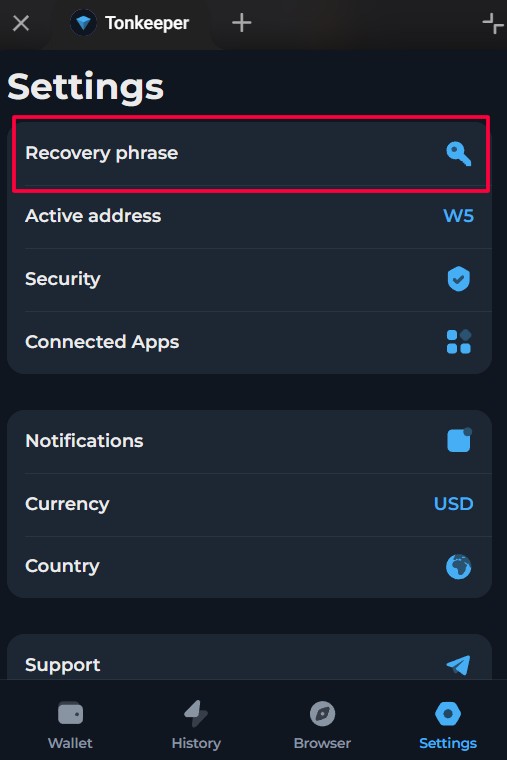
Step 3. Delete the wallet and confirm the action
Now, to actually delete your Telegram wallet, go to Settings → Delete Account at the bottom of the menu. Tonkeeper will ask you to confirm that your seed phrase is saved. Check the box to confirm and tap Delete. The wallet will then be removed from your Telegram interface and your device.
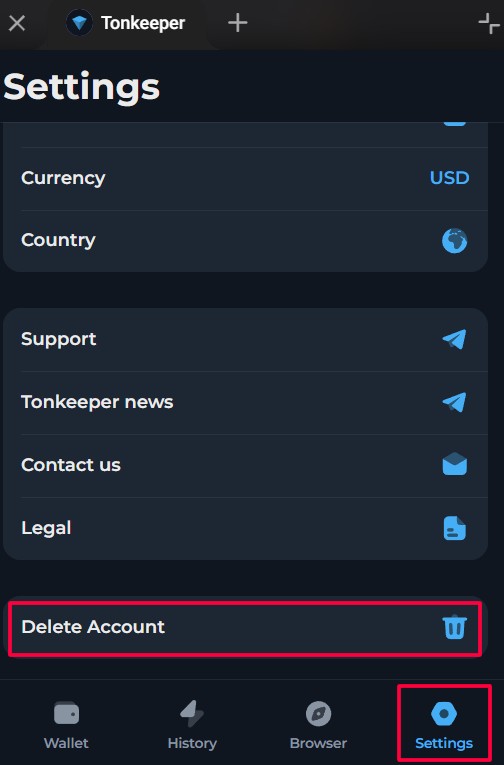
This completes the deletion process. The wallet will no longer appear in Telegram, but remember that your TON address still exists on the blockchain and can be restored anytime using your recovery phrase.
What happens after deletion?
Deleting the Telegram app or wallet access does not affect the underlying blockchain ledger. Your TON address and its history remain visible and immutable.
As per TON Developer Docs 2025 (ton.org), smart contract balances, transaction history, and wallet metadata are preserved indefinitely, even after the app is deleted.
So even though you may delete your Telegram wallet from your phone, your public key is still indexed on-chain and can be queried by any TON explorer.
Why you might want to remove your wallet
In 2026, a growing number of traders choose to remove Telegram wallets for the following reasons:
In September 2024, Telegram wallet services were temporarily suspended in the UK, citing non-compliance with local financial regulations. This led many UK-based users to shift to hardware or self-custodial wallets.
In parallel, Telegram implemented stricter KYC policies and changed its fiat service providers in mid-2024, requiring higher identity verification levels for P2P transactions. These moves, though designed for compliance, also sparked privacy concerns, especially among traders who operate across multiple jurisdictions.
If you're about to delete the Telegram wallet, align this step with a secure transition strategy to another solution.
Backup and recovery: critical first steps
Before initiating deletion, securing your wallet’s 24-word recovery phrase is non-negotiable. This phrase is the sole key to restoring access to funds stored on the TON blockchain. Failing to do so may result in permanent loss of funds.
Recommended recovery precautions
Write down the phrase. Record all 24 words on paper. Use permanent ink and avoid sharing digitally.
Create multiple offline copies. Store in at least two separate secure locations (e.g., home safe + bank deposit box).
Do not use screenshots or cloud storage. According to Chainalysis’ 2025 Crypto Crime Mid‑Year Update, personal wallet compromises accounted for 23.35% of all stolen fund activity year‑to‑date in 2025.
Leverage optional email-based recovery. Telegram provides an optional recovery feature for custodial wallets. While not a replacement for seed backup, it serves as a secondary safeguard for less experienced users.
Test your backup. Attempt a controlled wallet restoration on a secondary device using your recovery phrase. This ensures you wrote it down correctly and can rely on it if your primary device fails.
Use fireproof/waterproof storage tools. Professional traders increasingly rely on metal seed storage kits that protect recovery phrases from physical damage.
Security recommendations for advanced users
If you're a trader with advanced security requirements:
Rotate to a new seed phrase after deletion.
Use Telegram session management to kill all active sessions.
Wipe Telegram backups from Google Drive / iCloud (for auto-backup users).
Avoid reinstalling Telegram using the synced cloud app restore.
All these safeguards will help you avoid attacks that use leftover cache data from Telegram cloud backups.
How to withdraw Telegram wallet funds via exchanges
Before you delete your Telegram Wallet, it's essential to transfer your funds securely, especially if you're not planning to restore them later via a seed phrase. Below we have presented a list of top crypto exchanges in your region. You can choose any of them to withdraw your funds safely.
| Coinbase | OKX | BTCC | Cryptohopper | Crypto.com | |
|---|---|---|---|---|---|
|
Min. Deposit, $ |
10 | 10 | 10 | No | 1 |
|
Coins Supported |
400+ | 600+ | 399 | 1000 | 400+ |
|
Spot Taker fee, % |
0.5 | 0.1 | 0.3 | 0 | 0.5 |
|
Spot Maker Fee, % |
0.5 | 0.08 | 0.2 | 0 | 0.25 |
|
Alerts |
Yes | Yes | No | Yes | Yes |
|
Copy trading |
No | Yes | Yes | Yes | No |
|
TU overall score |
8.5 | 8.46 | 8.08 | 7.8 | 7.76 |
|
Open an account |
Go to broker Your capital is at risk. |
Go to broker Your capital is at risk. |
Go to broker Your capital is at risk.
|
Go to broker Your capital is at risk. |
Go to broker Your capital is at risk. |
Deleting a wallet should feel like closing a chapter securely

As someone who has helped traders migrate wallets for years, I can tell you this – deleting a wallet is never just about pressing a button; it’s about eliminating digital residue. Even after you remove your Telegram wallet, cached data and residual API connections may remain. That’s why I always recommend performing a “digital hygiene sweep” afterward.
After uninstalling Telegram, clear your device’s keychain and browser storage if you ever used TON-related mini-apps. Then, use a trusted antivirus or privacy cleaner to ensure no leftover JSON or wallet cache remains. This step is often ignored but critical if you’ve ever connected your wallet to bots or experimental DeFi integrations.
Finally, don’t reuse your old recovery phrase when setting up a new wallet. Generate a fresh seed instead. This not only minimizes cross-wallet linkage on the blockchain but also prevents potential metadata tracking.
Conclusion
Ensuring the safe deletion of your Telegram wallet in 2026 is crucial to protecting your financial assets and personal data. By following the step-by-step guide—covering backup, transaction history, and revoking wallet access—users can take control of their crypto security, just as experienced TON traders would. The process not only reduces risks of unauthorized access but also prepares individuals for a responsible exit from digital finance platforms. Ultimately, taking these precautions underscores the importance of proactive digital privacy management in modern crypto ecosystems. Remember: safeguarding your wallet today means securing your future in the ever-evolving world of blockchain.
FAQs
What should you check after deleting your Telegram wallet to ensure complete removal?
Is it possible to restore a deleted Telegram wallet, and what information is required?
What potential risks remain if you forget to disconnect bots and mini-apps before deleting your Telegram wallet?
How does the deletion process differ between Tonkeeper and other self-custodial wallets on Telegram?
Editors' Top Picks and Insights






Related Articles
Team that worked on the article
Mikhail Vnuchkov joined Traders Union as an author in 2020. He began his professional career as a journalist-observer at a small online financial publication, where he covered global economic events and discussed their impact on the segment of financial investment, including investor income.
Dan Blystone began his trading career in 1998 as an arbitrage clerk on the floor of the Chicago Mercantile Exchange (CME). He later traded bond and Eurex futures at proprietary firms such as Altea Trading, gaining valuable experience in high-frequency trading and risk management.
Chinmay Soni is a financial analyst with more than 5 years of experience in working with stocks, Forex, derivatives, and other assets. As a founder of a boutique research firm and an active researcher, he covers various industries and fields, providing insights backed by statistical data.
Crypto trading involves the buying and selling of cryptocurrencies, such as Bitcoin, Ethereum, or other digital assets, with the aim of making a profit from price fluctuations.
Xetra is a German Stock Exchange trading system that the Frankfurt Stock Exchange operates. Deutsche Börse is the parent company of the Frankfurt Stock Exchange.
CFD is a contract between an investor/trader and seller that demonstrates that the trader will need to pay the price difference between the current value of the asset and its value at the time of contract to the seller.
Index in trading is the measure of the performance of a group of stocks, which can include the assets and securities in it.
Cryptocurrency is a type of digital or virtual currency that relies on cryptography for security. Unlike traditional currencies issued by governments (fiat currencies), cryptocurrencies operate on decentralized networks, typically based on blockchain technology.

-
 Afghanistan
-
 Albania
-
 Algeria
-
 Angola
-
 Argentina
-
 Armenia
-
 Australia
-
 Austria
-
 Azerbaijan
-
 Bahamas
-
 Bahrain
-
 Bangladesh
-
 Belarus
-
 Belgium
-
 Bolivia
-
 Botswana
-
 Brazil
-
 Brunei
-
 Bulgaria
-
 Cambodia
-
 Cameroon
-
 Canada
-
 Chile
Chile
-
 China
China
-
 Colombia
-
 Congo
Congo
-
 Costa Rica
-
 Cote d'Ivoire
-
 Croatia
-
 Cuba
Cuba
-
 Cyprus
-
 Czechia
-
 DR Congo
-
 Denmark
-
 Dominican Republic
-
 Ecuador
-
 Egypt
Egypt
-
 El Salvador
-
 Estonia
-
 Eswatini
-
 Ethiopia
-
 Finland
-
 France
-
 Georgia
-
 Germany
-
 Ghana
Ghana
-
 Greece
-
 Haiti
Haiti
-
 Hong Kong
-
 Hungary
-
 India
India
-
 Indonesia
-
 Iran, Islamic republic
-
 Iraq
Iraq
-
 Ireland
-
 Israel
-
 Italy
Italy
-
 Jamaica
-
 Japan
Japan
-
 Jordan
-
 Kazakhstan
-
 Kenya
Kenya
-
 Korea
Korea
-
 Kuwait
-
 Kyrgyzstan
-
 Laos
Laos
-
 Latvia
-
 Lebanon
-
 Lesotho
-
 Libya
Libya
-
 Lithuania
-
 Luxembourg
-
 Madagascar
-
 Malaysia
-
 Malta
Malta
-
 Mauritius
-
 Mexico
-
 Moldova
-
 Mongolia
-
 Montenegro
-
 Morocco
-
 Mozambique
-
 Myanmar
-
 Namibia
-
 Nepal
Nepal
-
 Netherlands
-
 New Zealand
-
 Nigeria
-
 North Macedonia
-
 Norway
-
 Oman
Oman
-
 Pakistan
-
 Palestine
-
 Panama
-
 Papua New Guinea
-
 Paraguay
-
 Peru
Peru
-
 Philippines
-
 Poland
-
 Portugal
-
 Puerto Rico
-
 Qatar
Qatar
-
 Reunion
-
 Romania
-
 Rwanda
-
 Saudi Arabia
-
 Serbia
-
 Singapore
-
 Slovakia
-
 Slovenia
-
 Somalia
-
 South Africa
-
 Spain
Spain
-
 Sri Lanka
-
 Sweden
-
 Switzerland
-
 Syria
Syria
-
 Taiwan
-
 Tajikistan
-
 Tanzania
-
 Thailand
-
 Trinidad and Tobago
-
 Tunisia
-
 Turkey
-
 UAE
UAE
-
 Uganda
-
 Ukraine
-
 United Kingdom
-
United States
-
 Uruguay
-
 Uzbekistan
-
 Venezuela
-
 Vietnam
-
 Yemen
Yemen
-
 Zambia
-
 Zimbabwe
- Forex
- Crypto










- Understanding Telegram Wallet types
- Deleting your Telegram wallet: step-by-step guide
- Post-removal checklist
- How to delete a Tonkeeper wallet in Telegram?
- What happens after deletion?
- Why you might want to remove your wallet
- Backup and recovery: critical first steps
- Security recommendations for advanced users
- How to withdraw Telegram wallet funds via exchanges
- Expert opinion
- Conclusion
- FAQs


