BitPay Wallet Review 2026 | Full Guide


Editorial Note: While we adhere to strict Editorial Integrity, this post may contain references to products from our partners. Here's an explanation for How We Make Money. None of the data and information on this webpage constitutes investment advice according to our Disclaimer.
BitPay Wallet is a secure non-custodial crypto wallet that allows users to store, send, and spend digital assets like Bitcoin and Ethereum with full control. It stands out for its easy setup, integrated BitPay Card, and transparent fee structure, making crypto transactions practical and accessible worldwide.
The crypto world is full of wallets promising security and convenience, but few manage to balance both. BitPay Wallet succeeds where many fall short; it gives users true ownership of their assets while making crypto spending as effortless as traditional payments. In this review, we take a detailed look at its setup, safety, Bitpay wallet withdrawal fees, and how to add funds to Bitpay wallet.
What is a BitPay Wallet? Is Bitpay a good wallet?
BitPay Wallet is a non-custodial, secure crypto wallet designed to store, send, and receive cryptocurrencies Bitpay wallet supported coins are Bitcoin (BTC), Ethereum (ETH), and several stablecoins. Developed by BitPay Inc., one of the oldest payment processors in the crypto industry, the wallet offers users full control over their private keys and integrates seamlessly with the BitPay Card for spending crypto in most places.

It supports both mobile (BitPay Wallet App) and desktop versions, making it a convenient option for traders, long-term holders, and users who frequently pay with crypto.
BitPay Wallet features
The BitPay crypto wallet combines usability and security. Here are its main features:
Multi-asset support. Bitcoin, Ethereum, Litecoin, Bitcoin Cash, Polygon, and stablecoins like USDC and BUSD.
Full control. Users own their private keys, ensuring self-custody.
Integrated payment system. Connect directly to the BitPay Card or use BitPay Checkout to make crypto payments.
Open-source and secure. Code is fully auditable and regularly tested.
Backup and recovery options. Protect your funds with a recovery phrase and biometric login.
User-friendly interface. Bitpay wallet apk is available for Android, iOS, Windows, macOS, and Linux.
These features make BitPay one of the top-performing wallets in 2026, suitable for both beginners and professionals.
How to use BitPay Wallet
Starting with BitPay digital wallet is simple, even for users who are new to crypto. The process focuses on giving you full control from the first step, so you can manage and move your digital assets securely without relying on third parties. Below is a straightforward guide to help you install, create, and fund your BitPay Wallet safely.
Download and install BitPay Wallet
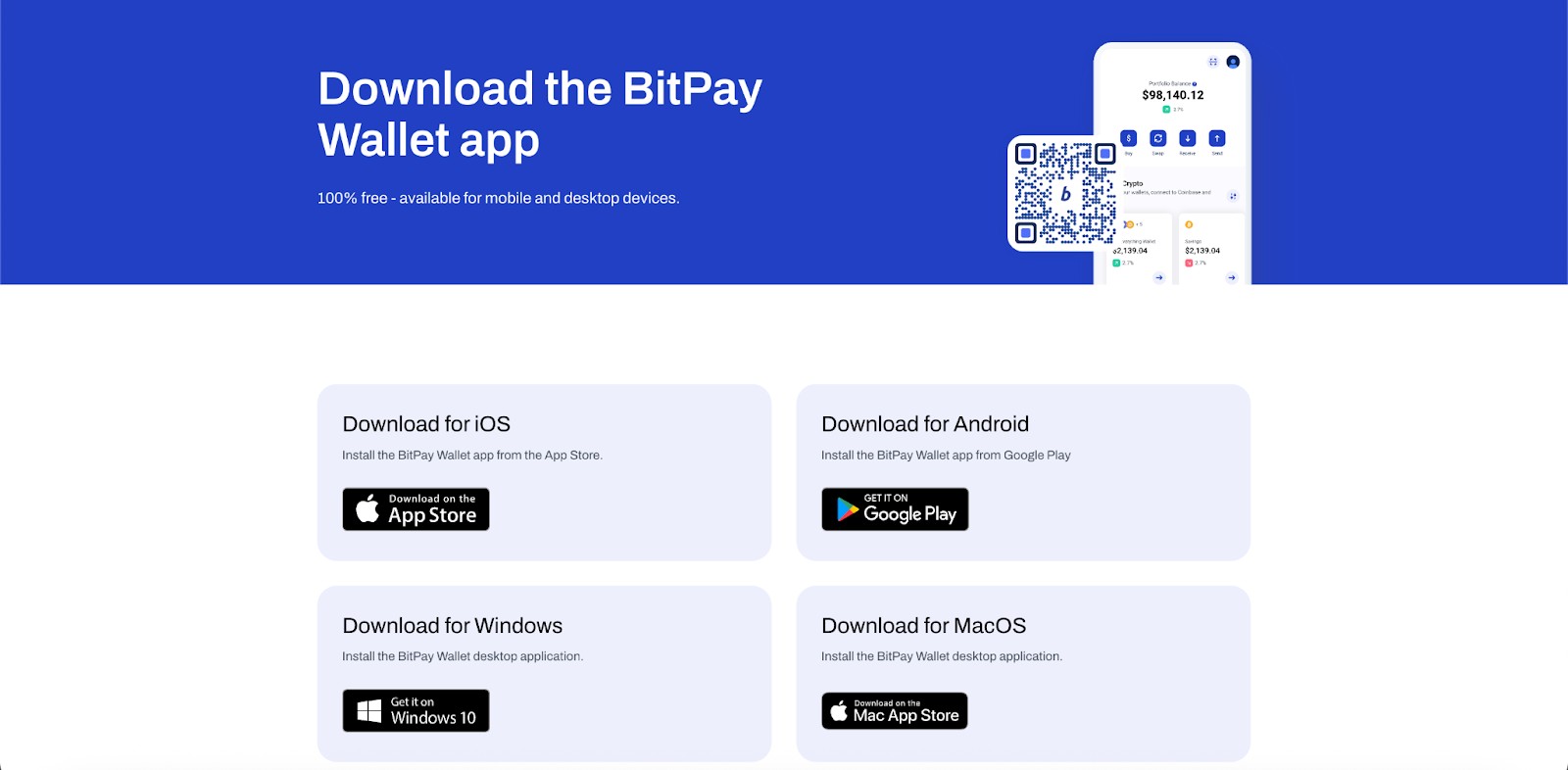
To get started, download the BitPay Wallet App from the official website or your mobile app store. Desktop users can use BitPay Wallet for Windows or macOS. Avoid downloading APKs from third-party sites to prevent hacks or phishing.
Create a BitPay Wallet
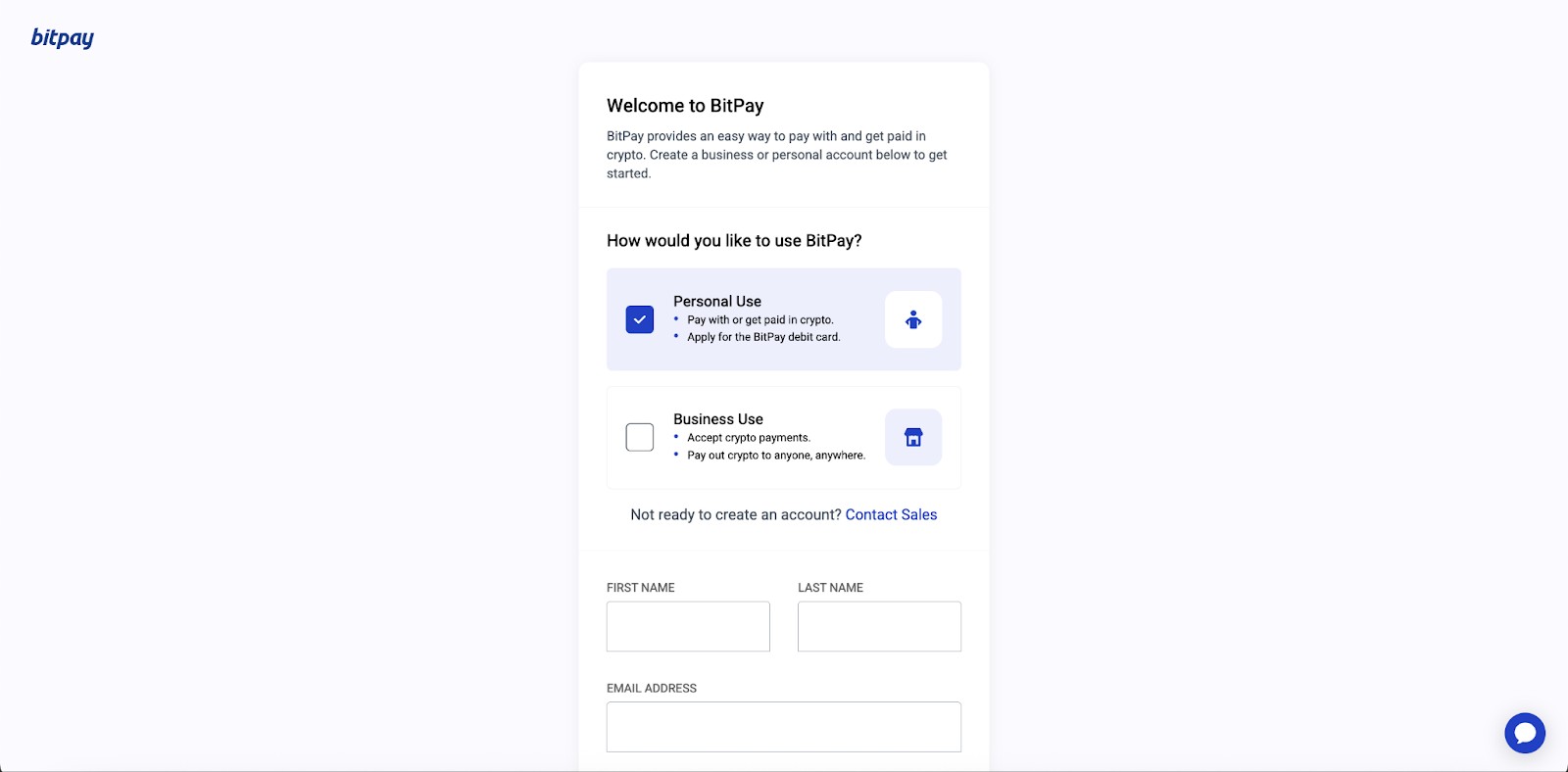
Open the app and select Create a new wallet.
Choose your desired currency and backup your BitPay wallet recovery phrase.
Set a PIN or biometric protection for extra security.
How to find my BitPay Wallet address
Tap the cryptocurrency you want to receive (e.g., Bitcoin or Ethereum), then select Receive. Your BitPay wallet address (a QR code or alphanumeric string) will appear. You can share this address with others to receive crypto.
How to add money to BitPay Wallet
There are two main ways to add funds to BitPay Wallet:
Purchase crypto directly in the app using a debit card, Apple Pay, or MoonPay integration.
Transfer crypto from another wallet or exchange by copying your BitPay address and pasting it into the sender’s withdrawal section.
How to transfer Bitcoin to BitPay Wallet
How to send Bitcoin from BitPay to another wallet
Select Send, enter the recipient’s wallet address, confirm the amount, and pay the network fee. The transaction will be verified on the blockchain within minutes.
Security and recovery
Security is the core of any trustworthy crypto wallet, and BitPay online wallet takes this responsibility seriously. Its design gives users full control over their funds while maintaining an intuitive structure that even new users can navigate safely. Still, true security depends on how carefully you manage your keys and follow protective steps. Here’s what you should know about keeping your wallet secure and restoring access if needed.
Is BitPay Wallet safe?
Yes. BitPay Wallet is both open-source and self-custodial, which means you, not the company, control your private keys. It includes encrypted backups, biometric authentication, and two-factor authentication (2FA) to reduce the risk of unauthorized access.
Because it’s a hot wallet, BitPay stays connected to the internet, allowing quick transactions but also making it more vulnerable to phishing or malware. Recent research by Zhang et al. (2024) highlights that wallet extensions and web-connected applications can be exploited through interface vulnerabilities, reinforcing the need for strict security practices.
For significant holdings, it’s best to move funds to a hardware wallet or another cold storage solution to limit exposure. A 2024 analysis by Alghamdi and Wills found that social engineering and fake support scams remain the most common causes of wallet breaches, emphasizing the importance of verifying all communication channels.
How to recover BitPay Wallet
If your phone is lost or the app becomes inaccessible, recovery is straightforward. During setup, BitPay provides a 12-word recovery phrase. This is your unique key to restoring the wallet. To recover your funds, reinstall the app, select Restore wallet, and enter the recovery phrase exactly as written. Your balances and transaction history will automatically reappear once synchronization completes.
BitPay Wallet fees and limits 2026
Understanding the cost structure is essential before committing to any crypto wallet. BitPay keeps its pricing simple and transparent, with most expenses tied to blockchain activity rather than the platform itself. Here’s a clear breakdown of what to expect when using BitPay Wallet in 2026.
BitPay wallet fees. Only network fees apply, determined by blockchain congestion at the time of the transaction.
Exchange fees. Variable and depend on third-party partners used for buying or swapping crypto within the app.
Withdrawal fees. No internal withdrawal charges; you pay only the blockchain network cost.
BitPay wallet limits. Set by partner providers and based on your KYC (Know Your Customer) verification level.
BitPay supported coins. Includes BTC, ETH, BCH, LTC, MATIC, DOGE, USDC, and other major cryptocurrencies.
BitPay does not impose any wallet maintenance, setup, or inactivity fees. All transactions are processed transparently according to real-time blockchain conditions, making cost management straightforward for both new and experienced users.
BitPay Wallet support
If you face technical issues, contact BitPay wallet support via the official help page. The BitPay wallet support number is not publicly listed; users should avoid unofficial sources to prevent scams. Support includes assistance for:
wallet recovery;
address or transaction issues;
BitPay Card integration;
BitPay wallet login and verification problems.
Pros and сons of BitPay Wallet
Every crypto wallet has its strengths and weaknesses, and BitPay is no exception. It stands out for practicality and payment integration, though it sacrifices some advanced features. Here’s a balanced look at what you gain and what you might miss when using BitPay Wallet.
- Pros
- Cons
Secure, non-custodial wallet that gives you full control of your assets.
Integrated BitPay Card allows convenient crypto spending in everyday transactions.
Clean, intuitive interface that makes it easy for beginners to navigate.
Cross-platform compatibility for use on both mobile and desktop devices.
Limited coin selection compared to wallets with broader ecosystem support.
No staking or DeFi tools, which limits earning potential for advanced users.
Manual backups required, so users must safeguard recovery phrases themselves.
As a hot wallet, it remains connected to the internet, carrying minor exposure risks.
If you’re setting up your BitPay Wallet to store or spend crypto, make sure your trading source is just as reliable. Before transferring funds, explore the best crypto exchanges in your region to find trusted platforms that offer smooth deposits, fair pricing, and safe integration with wallets like BitPay.
| Crypto | Foundation year | Min. Deposit, $ | Coins Supported | Spot Taker fee, % | Spot Maker Fee, % | Alerts | Copy trading | Tier-1 regulation | TU overall score | Open an account | |
|---|---|---|---|---|---|---|---|---|---|---|---|
| Yes | 2017 | 10 | 600+ | 0.1 | 0.08 | Yes | Yes | No | 8.48 | Go to broker Your capital is at risk. |
|
| Yes | 2012 | 10 | 400+ | 0.5 | 0.5 | Yes | No | Yes | 7.84 | Go to broker Your capital is at risk. |
|
| Yes | 2016 | 1 | 400+ | 0.5 | 0.25 | Yes | No | Yes | 7.8 | Go to broker Your capital is at risk. |
|
| Yes | 2018 | No | 1000 | 0 | 0 | Yes | Yes | No | 7.76 | Go to broker Your capital is at risk. |
|
| Yes | 2011 | 10 | 399 | 0.3 | 0.2 | No | Yes | Yes | 7.6 | Go to broker Your capital is at risk.
|
Convenience should never replace control

As someone who has tested countless crypto wallets, I see BitPay Wallet as a solid middle ground between convenience and control. It lets you manage everyday transactions without friction, but it still respects the basic principle of crypto ownership: your keys, your coins. What stands out to me is the wallet’s integration with real-world payments. I’ve used it to make small purchases abroad, and the process was smooth, nearly instant. However, I learned early that comfort can dull caution. It’s easy to forget that a hot wallet, no matter how secure, stays online. For that reason, I always keep only what I need for daily use in BitPay and store the rest offline. In my view, BitPay Wallet does what it promises: it makes crypto practical without locking you into a closed system.
Conclusion
BitPay Wallet stands out in 2026 as a robust solution for users seeking both security and ease of use in crypto payments. Its straightforward setup and impressive support for various coins ensure accessibility, while transparent fees and user-controlled keys provide genuine financial autonomy. For example, seamless payments at participating merchants and clear transaction breakdowns make BitPay practical for daily crypto management. Ultimately, this wallet doesn’t just store digital assets—it empowers individuals to bridge the gap between traditional finance and the decentralized future, putting authentic control back into the hands of users.
FAQs
What security measures should users follow to keep their BitPay Wallet safe?
Are there any limits or requirements for transactions in BitPay Wallet?
How can users restore access to their BitPay Wallet if their device is lost?
How does BitPay Wallet compare to hardware (cold) wallets in terms of security?
Editors' Top Picks and Insights





Related Articles
Team that worked on the article
Viktoras Karapetjanc is a seasoned financial trader, market analyst, and content creator with over 20 years of expertise in Forex, cryptocurrency, and stock markets. As a contributor to the Traders Union website, he provides in-depth analysis, data-driven strategies, and educational content to empower traders of all levels.
Dan Blystone began his trading career in 1998 as an arbitrage clerk on the floor of the Chicago Mercantile Exchange (CME). He later traded bond and Eurex futures at proprietary firms such as Altea Trading, gaining valuable experience in high-frequency trading and risk management.
Chinmay Soni is a financial analyst with more than 5 years of experience in working with stocks, Forex, derivatives, and other assets. As a founder of a boutique research firm and an active researcher, he covers various industries and fields, providing insights backed by statistical data.
Bitcoin is a decentralized digital cryptocurrency that was created in 2009 by an anonymous individual or group using the pseudonym Satoshi Nakamoto. It operates on a technology called blockchain, which is a distributed ledger that records all transactions across a network of computers.
Ethereum is a decentralized blockchain platform and cryptocurrency that was proposed by Vitalik Buterin in late 2013 and development began in early 2014. It was designed as a versatile platform for creating decentralized applications (DApps) and smart contracts.
Xetra is a German Stock Exchange trading system that the Frankfurt Stock Exchange operates. Deutsche Börse is the parent company of the Frankfurt Stock Exchange.
Cryptocurrency is a type of digital or virtual currency that relies on cryptography for security. Unlike traditional currencies issued by governments (fiat currencies), cryptocurrencies operate on decentralized networks, typically based on blockchain technology.
CFD is a contract between an investor/trader and seller that demonstrates that the trader will need to pay the price difference between the current value of the asset and its value at the time of contract to the seller.

-
 Afghanistan
-
 Albania
-
 Algeria
-
 Angola
-
 Argentina
-
 Armenia
-
 Australia
-
 Austria
-
 Azerbaijan
-
 Bahamas
-
 Bahrain
-
 Bangladesh
-
 Belarus
-
 Belgium
-
 Bolivia
-
 Botswana
-
 Brazil
-
 Brunei
-
 Bulgaria
-
 Cambodia
-
 Cameroon
-
 Canada
-
 Chile
Chile
-
 China
China
-
 Colombia
-
 Congo
Congo
-
 Costa Rica
-
 Cote d'Ivoire
-
 Croatia
-
 Cuba
Cuba
-
 Cyprus
-
 Czechia
-
 DR Congo
-
 Denmark
-
 Dominican Republic
-
 Ecuador
-
 Egypt
Egypt
-
 El Salvador
-
 Estonia
-
 Eswatini
-
 Ethiopia
-
 Finland
-
 France
-
 Georgia
-
 Germany
-
 Ghana
Ghana
-
 Greece
-
 Haiti
Haiti
-
 Hong Kong
-
 Hungary
-
 India
India
-
 Indonesia
-
 Iran, Islamic republic
-
 Iraq
Iraq
-
 Ireland
-
 Israel
-
 Italy
Italy
-
 Jamaica
-
 Japan
Japan
-
 Jordan
-
 Kazakhstan
-
 Kenya
Kenya
-
 Korea
Korea
-
 Kuwait
-
 Kyrgyzstan
-
 Laos
Laos
-
 Latvia
-
 Lebanon
-
 Lesotho
-
 Libya
Libya
-
 Lithuania
-
 Luxembourg
-
 Madagascar
-
 Malaysia
-
 Malta
Malta
-
 Mauritius
-
 Mexico
-
 Moldova
-
 Mongolia
-
 Montenegro
-
 Morocco
-
 Mozambique
-
 Myanmar
-
 Namibia
-
 Nepal
Nepal
-
 Netherlands
-
 New Zealand
-
 Nigeria
-
 North Macedonia
-
 Norway
-
 Oman
Oman
-
 Pakistan
-
 Palestine
-
 Panama
-
 Papua New Guinea
-
 Paraguay
-
 Peru
Peru
-
 Philippines
-
 Poland
-
 Portugal
-
 Puerto Rico
-
 Qatar
Qatar
-
 Reunion
-
 Romania
-
 Rwanda
-
 Saudi Arabia
-
 Serbia
-
 Singapore
-
 Slovakia
-
 Slovenia
-
 Somalia
-
 South Africa
-
 Spain
Spain
-
 Sri Lanka
-
 Sweden
-
 Switzerland
-
 Syria
Syria
-
 Taiwan
-
 Tajikistan
-
 Tanzania
-
 Thailand
-
 Trinidad and Tobago
-
 Tunisia
-
 Turkey
-
 UAE
UAE
-
 Uganda
-
 Ukraine
-
 United Kingdom
-
United States
-
 Uruguay
-
 Uzbekistan
-
 Venezuela
-
 Vietnam
-
 Yemen
Yemen
-
 Zambia
-
 Zimbabwe
- Forex
- Crypto