
ELLIPAL Titan Review 2026


Editorial Note: While we adhere to strict Editorial Integrity, this post may contain references to products from our partners. Here's an explanation for How We Make Money. None of the data and information on this webpage constitutes investment advice according to our Disclaimer.
The ELLIPAL Titan remains a top choice for crypto holders who want complete offline protection:
Fully air-gapped with QR. Uses QR codes for safe transfers.
Tamper-proof metal construction. Sealed aluminum body prevents physical hacks.
No bluetooth or USB ports. No wireless or wired data entry.
Supports 10,000+ crypto assets. Works with major and niche coins.
Mobile app for easy sync. Scan to update without a cable.
Best for long-term storage. Designed for cold wallet protection only.
This review takes a closer look at the ELLIPAL Titan and its updated model, the Titan 2.0. We'll break down how its air-gapped security works and how it stacks up against wallets like Ledger and Trezor. If you're just getting into crypto or already managing a serious portfolio, this comparison will give you a clear picture. By the end, you'll know if this wallet fits your needs for keeping digital assets safe.
Risk warning: Cryptocurrency markets are highly volatile, with sharp price swings and regulatory uncertainties. Research indicates that 75-90% of traders face losses. Only invest discretionary funds and consult an experienced financial advisor.
ELLIPAL Titan wallet overview
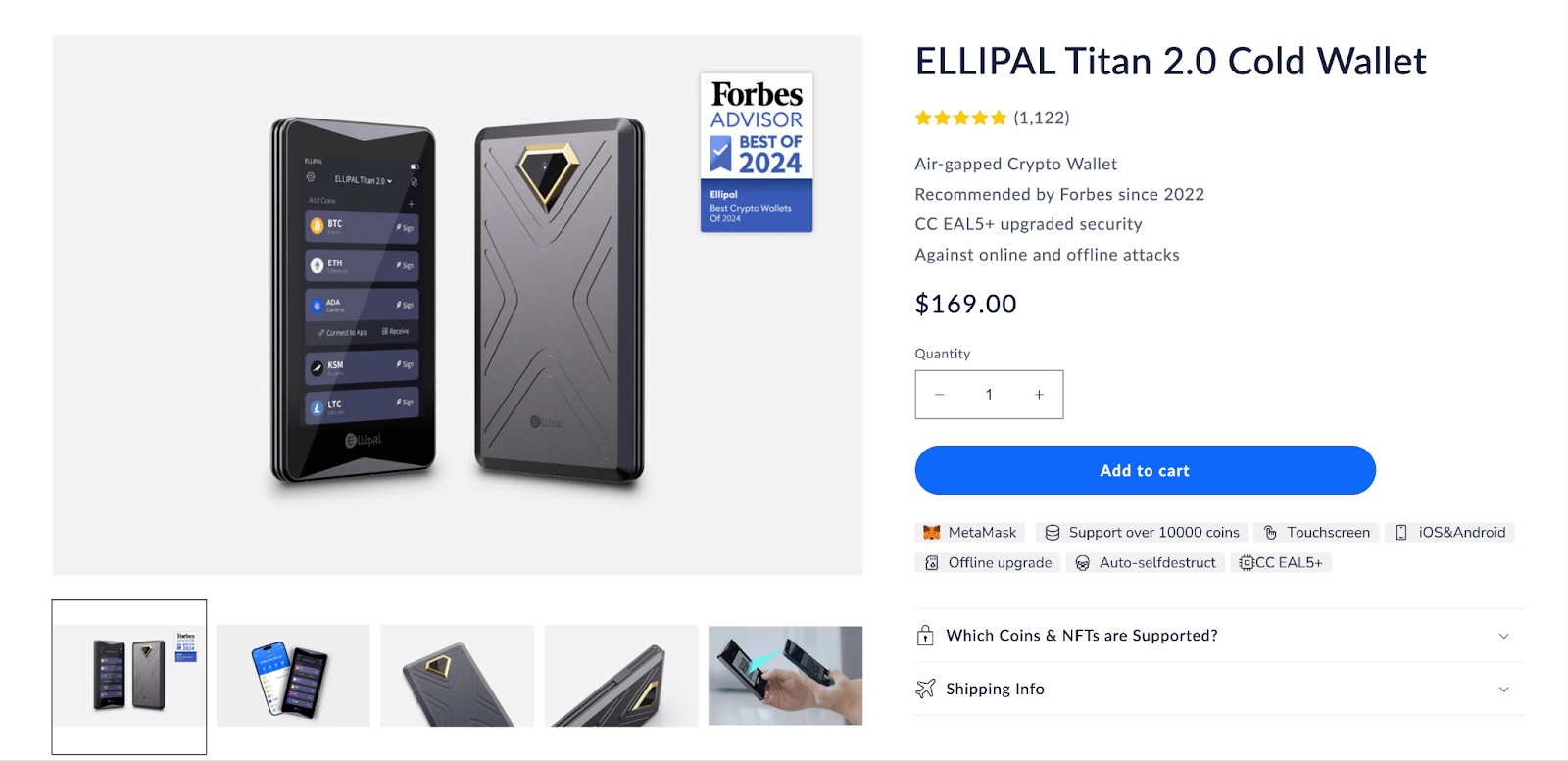
The ELLIPAL Titan is a cold wallet built with serious security in mind. It stays completely offline — no Wi-Fi, Bluetooth, or USB at all. You only interact with it using QR codes, which keeps your keys totally out of reach from hackers. The Titan 2.0 keeps that same approach but feels tougher and runs smoother.
Both versions are made for people who plan to hold their crypto long-term and care deeply about security. Titan 2.0 just makes it more convenient to use, especially if you check your wallet often. It’s faster, feels more solid in hand, and is easier to navigate. All while keeping the same strict offline setup that makes it so secure in the first place.
Here’s a quick comparison between the two models:
| Feature | Titan | Titan 2.0 |
|---|---|---|
| Screen size | 4-inch touchscreen | 4-inch touchscreen |
| Battery | 1400mAh | 2000mAh |
| Build quality | Aluminum alloy | Metal unibody |
| Connectivity | QR code only | QR code only |
| Supported coins | 10,000+ | 10,000+ |
| Security chip | Yes | Yes (Upgraded) |
| Price | ~$169 | ~$189 |
| Ideal use case | Long-term holding | Holding + usability |
Key features of ELLIPAL Titan
100% offline security
The Titan doesn’t use Wi-Fi, USB, or Bluetooth — there’s nothing for hackers to tap into. This strict disconnection leaves no backdoors. Every action happens through QR codes scanned by the companion mobile app. It’s like locking your crypto in a safe that never touches the internet. Since it’s fully air-gapped, it’s nearly impossible to hack remotely, keeping your private keys off the grid at all times.
Durable and tamper-proof design
The wallet has a sleek metal shell that’s made to resist tampering. If someone tries to crack it open, the data wipes itself clean. Even if the device is stolen, your assets stay safe. Further, you won’t worry about dust or splashes — it’s built for real-life conditions. It’s ready for travel, storage, and everyday use without skipping a beat.
Large touchscreen interface
A 4-inch touchscreen keeps things simple and clear. You can manage your crypto right on the device, no laptop needed — just the wallet and the mobile app. It’s easy for beginners and quick for experienced users. You won’t need a tech background to send or receive funds.
Multi-currency support
ELLIPAL supports over 10,000 coins and tokens, including BTC, ETH, ADA, XRP, DOT, and all major ERC-20 assets. They’re always adding new ones through app updates. This wide range makes it great for users with mixed portfolios or anyone diving into newer altcoins.
Mobile app integration
Instead of using a desktop app, ELLIPAL syncs with its mobile app. Scan QR codes to send, receive, and keep your wallet air-gapped. This setup is simple, safe, and keeps the wallet fully offline while your phone connects to the blockchain.
Pros and cons of ELLIPAL Titan
- Pros
- Cons
You never need to plug it in. Since it has no ports, there’s zero chance of malware from USB-based attacks or compromised devices.
Self-destruct if tampered with. If someone tries to physically break in, it auto-wipes—perfect for travel or theft protection.
Uses air-gapped QR code security. All transactions happen via camera scans, which cuts off all digital entry points for hackers.
No desktop app to worry about. The wallet pairs with your phone, skipping the need to install or manage software on your computer.
Losing the app breaks access flow. If you lose your phone and haven’t backed up the mobile app properly, syncing again can be frustrating.
Battery isn’t user-replaceable. Over time, you’ll be tied to wall charging, and if the battery dies completely, replacement isn’t straightforward.
Firmware updates aren’t fast. You’ll sometimes wait weeks for new token support or network fixes.
Not ideal for frequent trades. If you move assets daily, the QR scanning process feels slow compared to tap-to-send wallets.
ELLIPAL Titan security review
ELLIPAL Titan provides top-notch security. Below is a review of its security features:
100% air-gapped operation
The Titan’s strongest feature is how it stays completely offline. It never connects to the internet, computers, or any external devices. That means there’s no chance for malware, phishing, or keylogging to get in.
Your private keys stay locked inside the device and are never exposed to anything online. If you’re serious about security, this setup is about as safe as it gets for holding crypto.
QR code-based transactions
Transactions are done by scanning QR codes. You start the transaction on the app, scan it with the Titan, then scan the signed code back.
It might take a little more time, but this process is safer than plugging in or using Bluetooth. The QR codes only include public info and signatures — your private keys stay hidden.
Anti-tamper & anti-disassembly design
If the device detects someone trying to break into it, it will wipe everything automatically to protect your assets. That way, even if someone grabs the device, they can’t steal your keys.
The casing is a solid piece of metal that shows damage if tampered with. It’s built to hold up against both physical force and digital threats.
Secure element chip
Both versions of the Titan include a secure element chip. This chip stores your private keys and sensitive data in a specially protected part of the hardware.
Even if someone got access to other parts of the device, they still wouldn’t be able to reach what’s inside this chip.
Offline firmware updates
Firmware updates are handled using a microSD card. You download the update, move it to the card, and then install it directly on the device.
Doing it this way avoids the risks that come with online updates, like someone hijacking or altering the file.
Multi-factor authentication options
You can set up passwords, gestures, and recovery phrases to keep your wallet safe. These security steps help stop anyone who gets their hands on your device from accessing your crypto.
Even if you lose the wallet, you won’t lose your funds — as long as you’ve backed things up and followed good security habits.
Supported coins & tokens
The ELLIPAL Titan hardware wallet stands out for its extensive support, accommodating over 10,000 cryptocurrencies across more than 40 blockchains, including major assets like Bitcoin and Ethereum. This vast compatibility ensures that both mainstream and niche tokens can be securely stored.
Notably, the wallet's architecture allows users to manually add ERC-20 tokens. By accessing the Ethereum network within the wallet and inputting specific token details — such as contract address, token name, and decimals — users can manage a wide array of assets beyond the pre-listed options.
How to use ELLIPAL Titan: A step-by-step guide
Step 1: Set up the device
Unbox the Titan and power it on. You’ll be prompted to create a new wallet or recover an existing one using your seed phrase.
Write down the recovery seed on the card provided. This is crucial. If your device is lost or damaged, this seed is the only way to restore your funds.
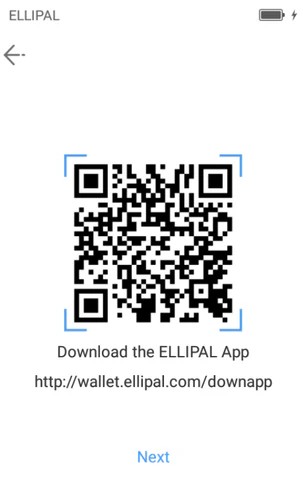
Step 2: Install the mobile app
Download the ELLIPAL mobile app on your smartphone. It’s available on both Android and iOS app stores.
Connect the app to your wallet by scanning the QR code displayed on the Titan’s screen. This links the app to your hardware wallet securely.
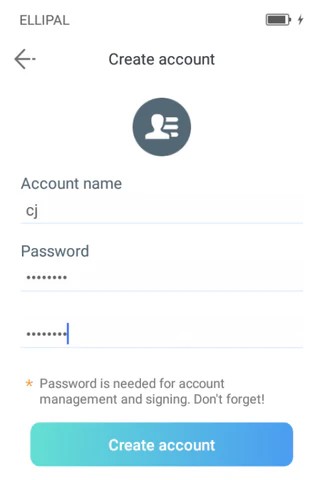
Step 3: Receive crypto
Choose "Receive" in the app. The wallet will display your public address and a QR code.
Share this with the sender or use it to transfer funds from an exchange or another wallet.
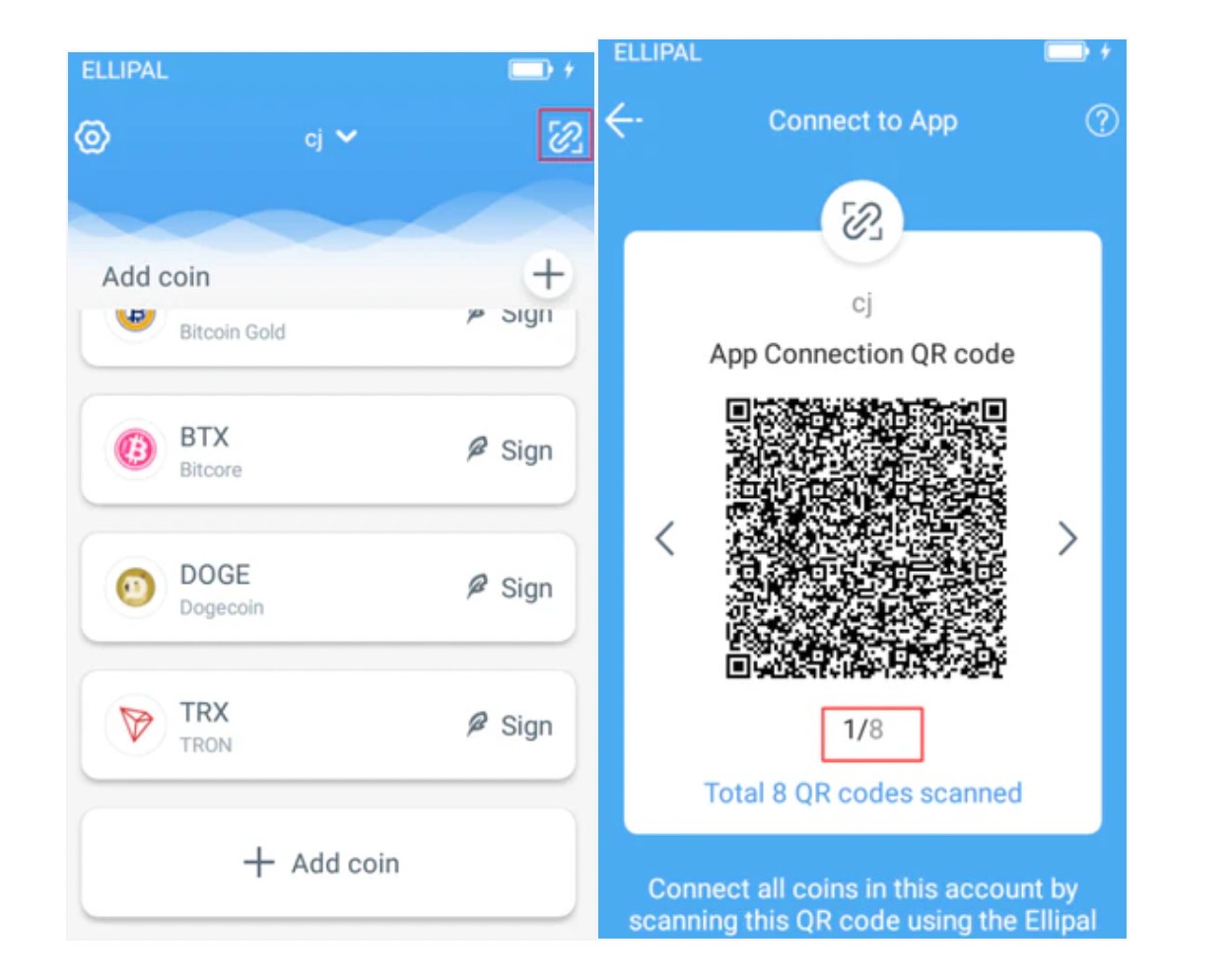
Step 4: Send crypto
Initiate a transaction in the mobile app. The app generates a QR code representing the unsigned transaction.
Scan this code with the Titan. Then, the Titan signs the transaction and shows another QR code. Scan this back into the app to broadcast it.
Alternatives to ELLIPAL Titan
Ledger Nano X
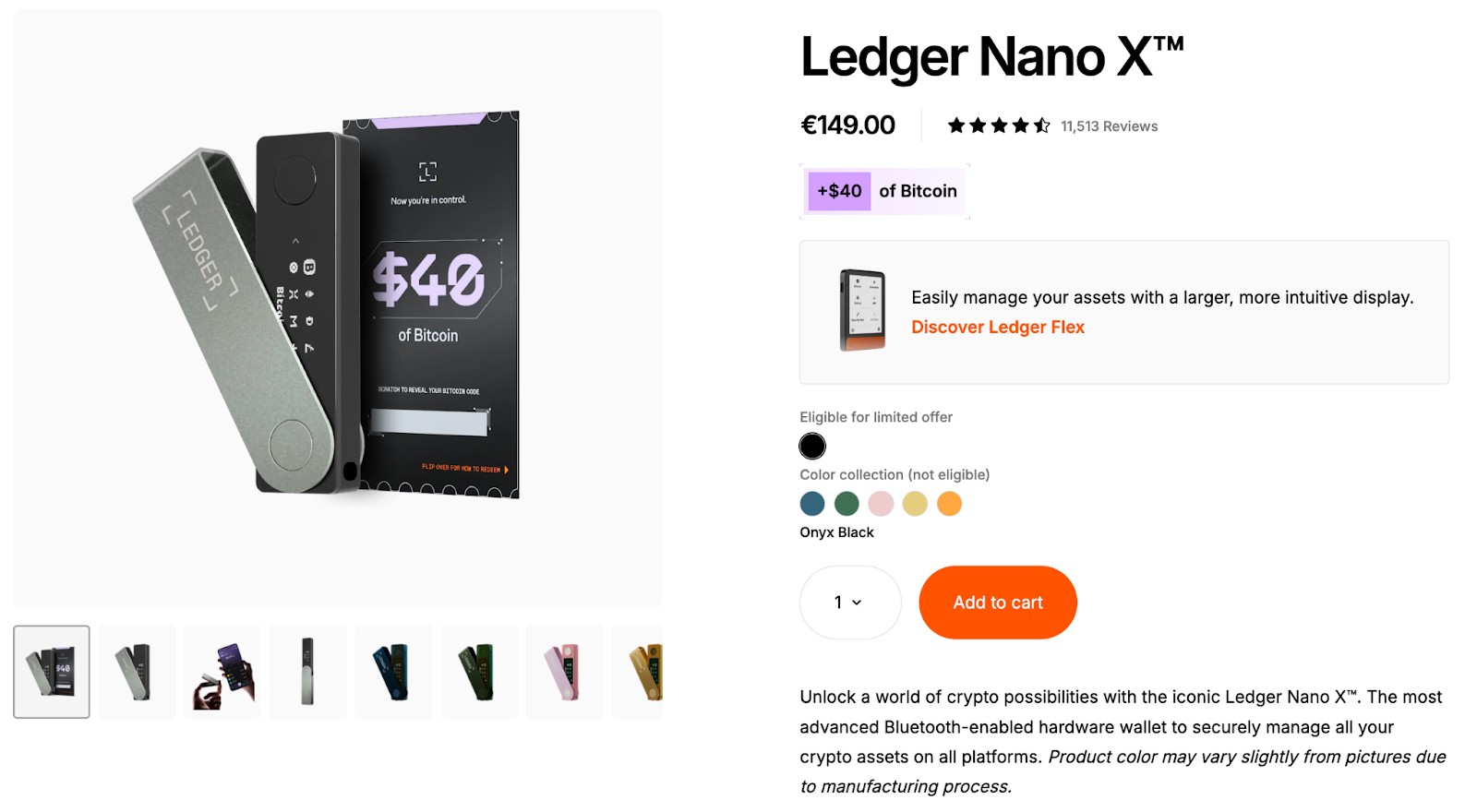
Ledger Nano X is small, lightweight, and good if you want something portable. It connects through Bluetooth or USB, but it’s not entirely air-gapped. While the security is decent, it opens up more connection points than something like the Titan.
Trezor Model T
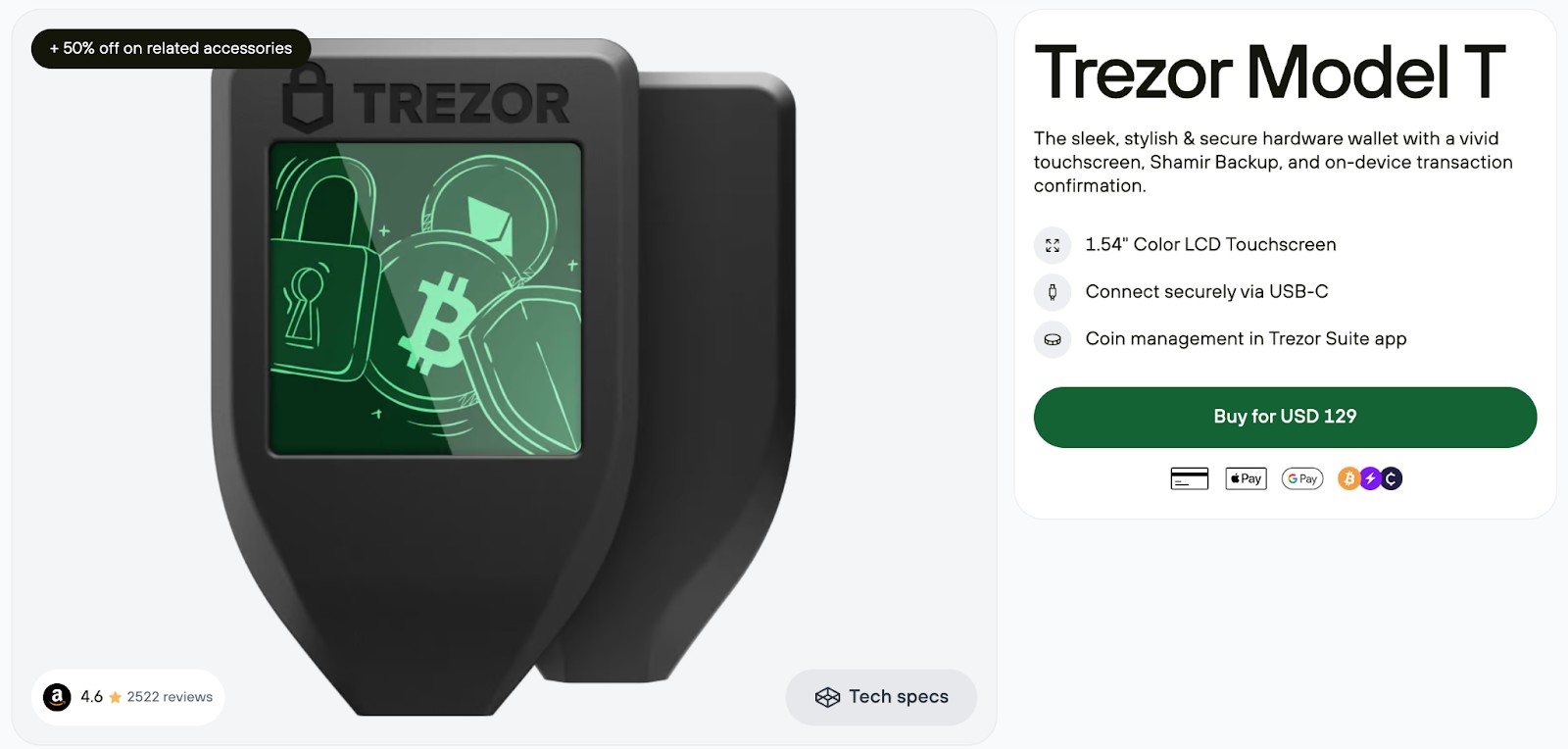
Trezor Model T has a clean touchscreen and runs on transparent, open-source software. It uses a USB connection, so you’ll want to be mindful when plugging into unfamiliar devices. It’s simple to use and works well with DeFi platforms and browser extensions.
Keystone 3 Pro

Keystone Pro relies on QR codes, keeping your transactions fully offline. It also supports multi-sig setups and fingerprint login, which adds another layer of safety. It’s a solid choice if you want air-gapped protection without something as bulky as the Titan.
Storing crypto on exchanges: An alternative to hardware wallets
Some users prefer to keep their crypto on exchanges due to the ease of use. It's convenient for frequent trading, staking, or using DeFi platforms. Regulation is one of the key parameters to judge the security of any exchange. In line with the same, the top exchanges known for their reliable security (and strict regulatory oversight) are listed in the table below:
| Crypto | Foundation year | Min. Deposit, $ | Coins Supported | Spot Taker fee, % | Spot Maker Fee, % | Alerts | Copy trading | Tier-1 regulation | TU overall score | Open an account | |
|---|---|---|---|---|---|---|---|---|---|---|---|
| Yes | 2012 | 10 | 400+ | 0.5 | 0.5 | Yes | No | Yes | 7.84 | Go to broker Your capital is at risk. |
|
| Yes | 2016 | 1 | 400+ | 0.5 | 0.25 | Yes | No | Yes | 7.8 | Go to broker Your capital is at risk. |
|
| Yes | 2011 | 10 | 399 | 0.3 | 0.2 | No | Yes | Yes | 7.6 | Go to broker Your capital is at risk.
|
|
| Yes | 2011 | 10 | 400+ | 0.4 | 0.25 | Yes | Yes | Yes | 7.58 | Go to broker Your capital is at risk. |
|
| Yes | 2018 | No | 100 | 0.07 | 0.04 | Yes | No | Yes | 6.57 | Go to broker Your capital is at risk.
|
Why trust us
15+ years of independent market analysis
140+ evaluation criteria, reviewed by 50+ experts
Data-driven reviews of 200+ platforms, updated regularly
20+ industry awards & a wide network of global media partners
Learn more about our methodology and editorial policies.


However, exchanges are targets for hacks, and you don’t control your private keys. If the platform shuts down, your assets could be lost. So for large amounts or long-term storage, a hardware wallet like the ELLIPAL Titan is much safer.
Protect DeFi assets offline using Titan’s QR-based signing and cable-free security

Most beginners think “air-gapped” just means disconnected from Wi-Fi or Bluetooth — but here’s the real advantage: the ELLIPAL Titan isn’t even physically compatible with USBs or data cables. That means malware can’t sneak in through charging ports or bad firmware updates — a critical edge over Ledger and Trezor when you’re holding assets that could attract phishing or device exploits. It’s not just air-gapped — it’s physically invulnerable to network-layer attacks.
Another rarely talked about power move? Use ELLIPAL Titan’s QR-only signing method to interact with DeFi dApps via WalletConnect, without ever exposing your seed or private keys to a browser extension or hot wallet. This lets you interact with dApps on-chain while keeping your keys completely off any connected device. It's like taking a sniper shot at yield farming — precision without putting yourself in the line of fire.
Conclusion
The ELLIPAL Titan and Titan 2.0 stand out in the crypto hardware wallet space for their security-first design. If you value keeping your private keys completely offline, this device is an excellent choice.
With durable construction, an intuitive interface, and support for thousands of coins, it’s built for serious crypto holders. While it’s not perfect for everyone, it delivers where it matters most: protecting your assets.
FAQs
Can I still use the ELLIPAL Titan if I travel often or go offline for months?
Yes. The ELLIPAL Titan works entirely offline, so as long as you keep your device charged and your recovery phrase safe, you can access your funds anytime — even after months away. Just make sure your mobile app stays updated, and store everything in a secure, travel-ready case.
What happens if the ELLIPAL mobile app gets deleted or my phone is lost?
If your phone is lost or the app is deleted, you can reinstall it and reconnect using your wallet's QR sync. As long as you have your recovery phrase backed up, you won’t lose access to your funds. It’s a good idea to do a test recovery in advance so you’re ready just in case.
Is the Titan 2.0 good for staking or interacting with DeFi platforms?
Yes — but indirectly. You can use the Titan 2.0 with WalletConnect to sign DeFi transactions while staying air-gapped. It takes a bit longer due to QR scanning, but your private keys stay secure. This makes it a smart option if you want to earn yield without compromising cold storage safety.
Can I add new or obscure tokens manually to the ELLIPAL Titan?
Absolutely. For ERC-20 and other token standards, you can manually add custom tokens by entering their contract address and decimals in the mobile app. This is useful for early-stage tokens or niche coins that aren’t pre-listed yet.
Editors' Top Picks and Insights




Related Articles
Team that worked on the article
Alamin Morshed is a contributor at Traders Union. He specializes in writing articles for businesses that want to improve their Google search rankings to compete with their competition.
Chinmay Soni is a financial analyst with more than 5 years of experience in working with stocks, Forex, derivatives, and other assets. As a founder of a boutique research firm and an active researcher, he covers various industries and fields, providing insights backed by statistical data.
Mirjan Hipolito is a journalist and news editor at Traders Union. She is an expert crypto writer with five years of experience in the financial markets.
CFD is a contract between an investor/trader and seller that demonstrates that the trader will need to pay the price difference between the current value of the asset and its value at the time of contract to the seller.
Index in trading is the measure of the performance of a group of stocks, which can include the assets and securities in it.
Ethereum is a decentralized blockchain platform and cryptocurrency that was proposed by Vitalik Buterin in late 2013 and development began in early 2014. It was designed as a versatile platform for creating decentralized applications (DApps) and smart contracts.
Bitcoin is a decentralized digital cryptocurrency that was created in 2009 by an anonymous individual or group using the pseudonym Satoshi Nakamoto. It operates on a technology called blockchain, which is a distributed ledger that records all transactions across a network of computers.
Copy trading is an investing tactic where traders replicate the trading strategies of more experienced traders, automatically mirroring their trades in their own accounts to potentially achieve similar results.

-
 Afghanistan
-
 Albania
-
 Algeria
-
 Angola
-
 Argentina
-
 Armenia
-
 Australia
-
 Austria
-
 Azerbaijan
-
 Bahamas
-
 Bahrain
-
 Bangladesh
-
 Belarus
-
 Belgium
-
 Bolivia
-
 Botswana
-
 Brazil
-
 Brunei
-
 Bulgaria
-
 Cambodia
-
 Cameroon
-
 Canada
-
 Chile
Chile
-
 China
China
-
 Colombia
-
 Congo
Congo
-
 Costa Rica
-
 Cote d'Ivoire
-
 Croatia
-
 Cuba
Cuba
-
 Cyprus
-
 Czechia
-
 DR Congo
-
 Denmark
-
 Dominican Republic
-
 Ecuador
-
 Egypt
Egypt
-
 El Salvador
-
 Estonia
-
 Eswatini
-
 Ethiopia
-
 Finland
-
 France
-
 Georgia
-
 Germany
-
 Ghana
Ghana
-
 Greece
-
 Haiti
Haiti
-
 Hong Kong
-
 Hungary
-
 India
India
-
 Indonesia
-
 Iran, Islamic republic
-
 Iraq
Iraq
-
 Ireland
-
 Israel
-
 Italy
Italy
-
 Jamaica
-
 Japan
Japan
-
 Jordan
-
 Kazakhstan
-
 Kenya
Kenya
-
 Korea
Korea
-
 Kuwait
-
 Kyrgyzstan
-
 Laos
Laos
-
 Latvia
-
 Lebanon
-
 Lesotho
-
 Libya
Libya
-
 Lithuania
-
 Luxembourg
-
 Madagascar
-
 Malaysia
-
 Malta
Malta
-
 Mauritius
-
 Mexico
-
 Moldova
-
 Mongolia
-
 Montenegro
-
 Morocco
-
 Mozambique
-
 Myanmar
-
 Namibia
-
 Nepal
Nepal
-
 Netherlands
-
 New Zealand
-
 Nigeria
-
 North Macedonia
-
 Norway
-
 Oman
Oman
-
 Pakistan
-
 Palestine
-
 Panama
-
 Papua New Guinea
-
 Paraguay
-
 Peru
Peru
-
 Philippines
-
 Poland
-
 Portugal
-
 Puerto Rico
-
 Qatar
Qatar
-
 Reunion
-
 Romania
-
 Rwanda
-
 Saudi Arabia
-
 Serbia
-
 Singapore
-
 Slovakia
-
 Slovenia
-
 Somalia
-
 South Africa
-
 Spain
Spain
-
 Sri Lanka
-
 Sweden
-
 Switzerland
-
 Syria
Syria
-
 Taiwan
-
 Tajikistan
-
 Tanzania
-
 Thailand
-
 Trinidad and Tobago
-
 Tunisia
-
 Turkey
-
 UAE
UAE
-
 Uganda
-
 Ukraine
-
 United Kingdom
-
United States
-
 Uruguay
-
 Uzbekistan
-
 Venezuela
-
 Vietnam
-
 Yemen
Yemen
-
 Zambia
-
 Zimbabwe
- Forex
- Crypto












