
Best Trading Monitors For Forex Success


Editorial Note: While we adhere to strict Editorial Integrity, this post may contain references to products from our partners. Here's an explanation for How We Make Money. None of the data and information on this webpage constitutes investment advice according to our Disclaimer.
Best trading monitors for Forex traders in 2026:
Samsung CHG90 Series 49“ – Best ultrawide monitor for trading;
Dell U4320Q – is one of the best day trading monitors;
LG 34WN80C-B – Ultra wide monitor suitable for most trading purposes;
HP X27q 27" WQHD – is an all-around comfort pick among the best trading monitors;
ViewSonic 32 Inch – performs the dual roles of an external monitor and a standalone monitor;
Samsung J791 – is one of the most popular curved trading monitors.
Having the correct tools at your disposal can make a major difference in your success in the fast-paced world of Forex trading. Choosing between a laptop and a trading monitor is a critical decision that every trader must make.
Every option has pros and cons, and your decision is influenced by a variety of factors. In this article, we'll walk through the factors to consider when deciding between a laptop and the best monitor for trading, as well as how many monitors you'll need for Forex trading.
Best Forex trading screens
It is no folktale attesting that the best trading monitors amplify a trader's trading experience. Most traders use three to five trading monitors to keep up with the markets, but a good monitor can compete. You shouldn't let a trading monitor prevent you from achieving your financial goals if you understand trading and have a great strategy to implement.
Samsung CHG90 Series 49“ – best ultrawide monitor for trading
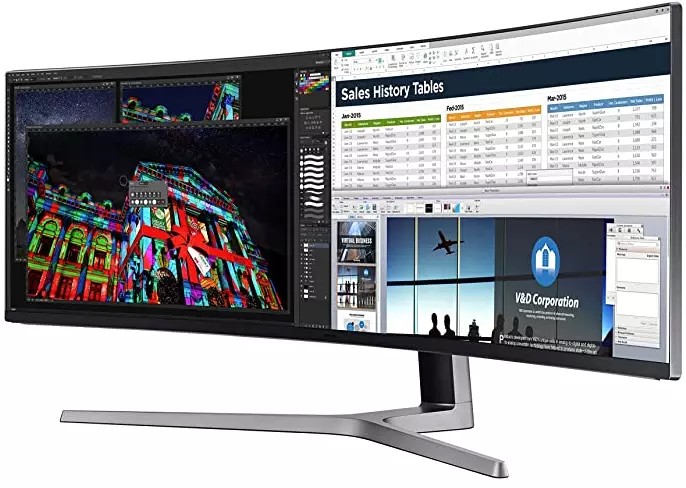
Brand: Samsung
Screen size: 49 inches
Display resolution: 3840 x 1080 pixels
View angle: 178°(H) / 178°(V)
Aspect ratio: 32:9
Price: $900 - $1100
This 49-inch curved monitor features a 32:9 aspect ratio, effectively replacing dual 27-inch displays without bezels interrupting the view. Its expansive screen allows traders to monitor multiple charts, news feeds, and trading platforms simultaneously, enhancing multitasking efficiency. The CHG90 utilizes Quantum Dot (QLED) technology, delivering vibrant and accurate colors, which is crucial for analyzing detailed trading data.
- Pros
- Cons
- Quantum dot technology. Provides vivid and precise color reproduction, aiding in detailed data analysis.
- High refresh rate and low response time. The 144Hz refresh rate and 1ms response time minimize input lag and ghosting, ensuring smooth visuals during rapid market movements.
- High dynamic range (HDR) support. Enhances contrast and brightness levels, offering clearer distinctions in complex charts.
- Ergonomic design. The curved screen reduces eye strain and offers a more natural viewing experience, beneficial during long trading sessions.
- Price point. The premium features come at a higher cost, which may be a consideration for budget-conscious traders.
- Desk space requirement. Its substantial size necessitates ample desk space, which might not be feasible for all setups.
Dell U4320Q
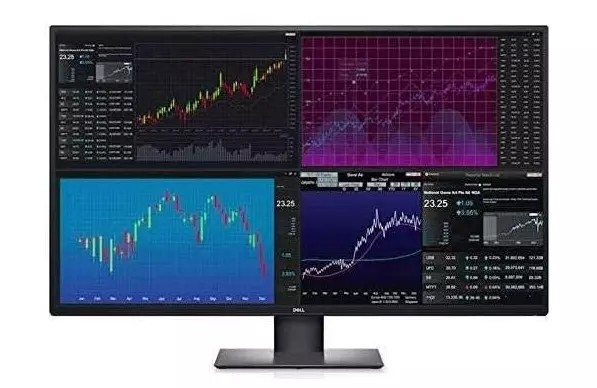
Brand: Dell
Screen size: 43 inches
Display resolution: 3840 x 2160 (4K UHD)
View angle: 178°(H) / 178°(V)
Aspect ratio: 1000:1
Price: $1000 - $1100
The Dell U4320Q is a highly functional 43-inch 4K UHD monitor tailored for professionals, including traders. Its ability to display content from multiple sources simultaneously makes it a standout choice for managing high volumes of data. With the Picture-by-Picture (PBP) feature, users can connect up to four devices and stream content simultaneously, providing unparalleled multitasking capability. This is especially advantageous for traders who need to analyze charts, track news, and monitor multiple markets in real-time.
- Pros
- Cons
- Picture-by-picture (PBP) feature. Allows streaming from up to four connected devices, ideal for multitasking with charts, reports, and news.
- 4K UHD resolution. Delivers sharp visuals and high detail for in-depth data analysis and charting.
- Color accuracy. Ensures vibrant, accurate color reproduction, essential for professional-grade visualization.
- Ergonomic design. Features an adjustable stand for tilt, swivel, and height adjustments, enhancing comfort during long sessions.
- Zoom-ready functionality. Comes with the Zoom Room feature, enhancing productivity during virtual meetings and collaborations.
- Large desk requirement. The 43-inch screen size demands ample space, making it unsuitable for compact setups.
- Not beginner-friendly. Its advanced features and higher price point may not be suitable for novice traders or those on a tight budget.
LG 34WN80C-B UltraWide Monitor
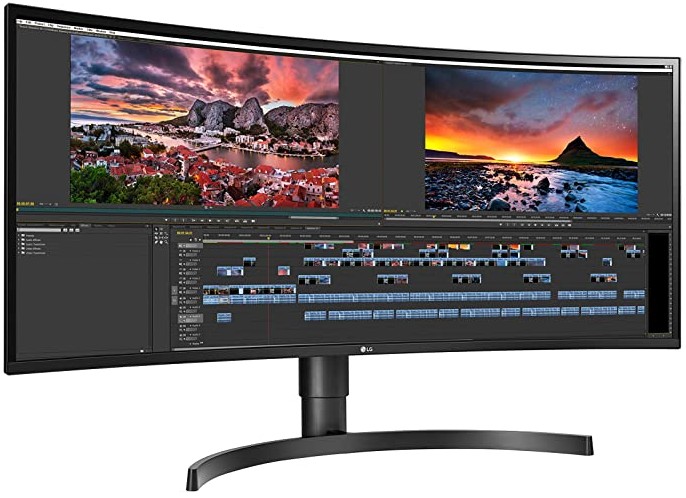
Brand: LG
Screen size: 34 inches
Display resolution: 3440 x 1440 (UltraWide QHD)
View angle: 178°(H) / 178°(V)
Aspect ratio: 32:9
Price: $530 - $600
The LG 34WN80C-B UltraWide Monitor is a versatile and efficient choice for traders who require ample screen real estate for multitasking. With its 34-inch UltraWide QHD display and 21:9 aspect ratio, this monitor is designed for productivity, allowing traders to view multiple charts, applications, and data feeds side-by-side without the need for multiple monitors. Its curved design enhances immersion and reduces eye movement, making it ideal for extended trading sessions.
- Pros
- Cons
- UltraWide QHD resolution. The 3440 x 1440 resolution delivers crisp and detailed visuals, perfect for analyzing multiple trading charts simultaneously.
- On-Screen Control. Allows easy screen division, enabling traders to organize multiple applications and data feeds efficiently.
- USB-C connectivity. Provides fast data transfer and a streamlined workspace with fewer cables.
- Built-in speakers and USB hub. Includes a 4-port USB hub and light sensors, adding convenience for a clutter-free desk.
- Ergonomic design. Features height adjustment up to 6.3 inches, along with tilt capabilities, ensuring long-term comfort during trading sessions.
- Excellent color accuracy. Ensures precise color reproduction and gradient handling, crucial for detailed analysis.
- Price-to-size ratio. While packed with features, some traders may find the price relatively high for a 34-inch monitor.
- Limited size for advanced setups. Traders requiring more screen space may find the 34-inch display limiting compared to larger ultrawide monitors.
HP X27q 27" WQHD
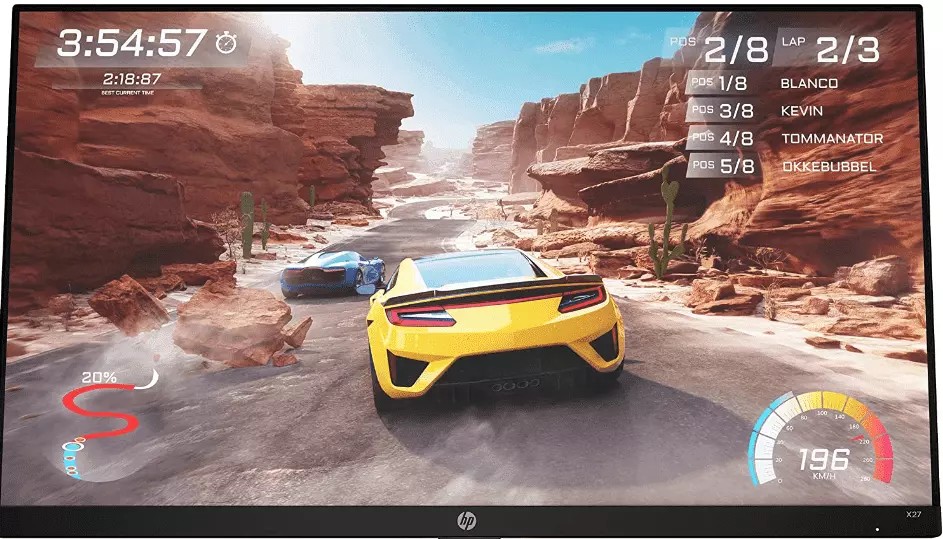
Brand: HP
Screen size: 27 inches
Display resolution: 2560 x 1440 (WQHD)
View angle: 178°(H) / 178°(V)
Aspect ratio: 16:9
Price: $290 - $320
The HP X27q 27" WQHD monitor is an exceptional choice for traders seeking a blend of performance, ergonomics, and value. With its 27-inch WQHD display, it offers sharp visuals and vibrant colors, which are essential for analyzing charts, data, and market trends. The 165 Hz refresh rate and 1ms response time ensure a smooth experience, eliminating delays that could hinder real-time trading.
- Pros
- Cons
- High refresh rate and low response time. The 165 Hz refresh rate and 1ms response time deliver smooth visuals, ensuring precision during fast-paced trading activities.
- IPS panel technology. Provides wide viewing angles and accurate color reproduction for better data analysis.
- AMD FreeSync Premium. Reduces screen tearing and stuttering, offering a seamless experience even during dynamic price movements.
- Ergonomic design. Features adjustable height (up to 3.9 inches), tilt (-5° to 20°), and 90° rotation for maximum comfort and flexibility.
- Thin bezel design. Allows for easy setup of multiple monitors, enhancing multitasking efficiency.
- Limited swivel options. The lack of swivel adjustment may limit flexibility for some users.
- Eye-ease coating. While it reduces low-blue light emissions, some users report slightly grainy visuals due to the coating.
ViewSonic 32 Inch 1080p Widescreen
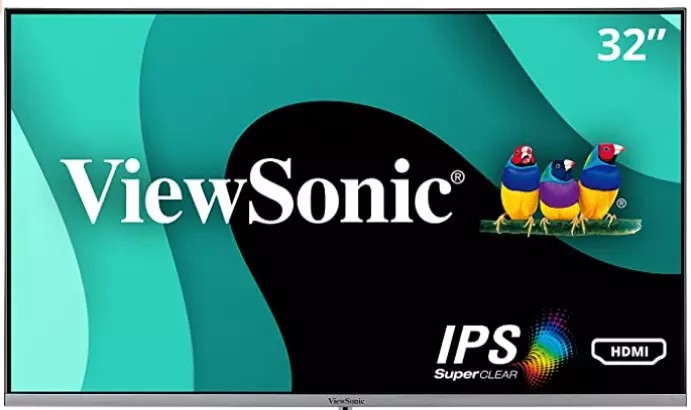
Brand: ViewSonic
Screen size: 32 inches
Display resolution: 1920 x 1080 pixels (Full HD)
View angle: 178°(H) / 178°(V)
Aspect ratio: 16:9
Price: $190 - $225
The ViewSonic 32-Inch 1080p Widescreen Monitor is an affordable and functional choice for traders seeking a large screen with high usability. Its 32-inch display provides ample real estate for multitasking, and the Full HD resolution ensures clear and crisp visuals, ideal for analyzing charts, graphs, and market data. The monitor includes ViewSplit software, allowing users to divide the screen into multiple customizable windows for enhanced productivity.
- Pros
- Cons
- Enhanced eye comfort. Features a blue light filter and flicker-free technology, reducing eye strain during prolonged use.
- Versatile mounting options. VESA compatibility allows easy installation on a rotating stand or mounting arm for tailored setups.
- Superior multitasking. ViewSplit software enables traders to manage multiple applications simultaneously, enhancing productivity.
- Wide viewing angles. The SuperClear IPS panel ensures consistent image quality from various perspectives, ideal for collaborative environments.
- Compact design. The ultra-slim bezel and compact stand save desk space while maintaining a professional appearance.
- Basic feature set. While functional, the monitor lacks advanced features like higher refresh rates or 4K resolution, which might be preferable for some traders.
Samsung J791
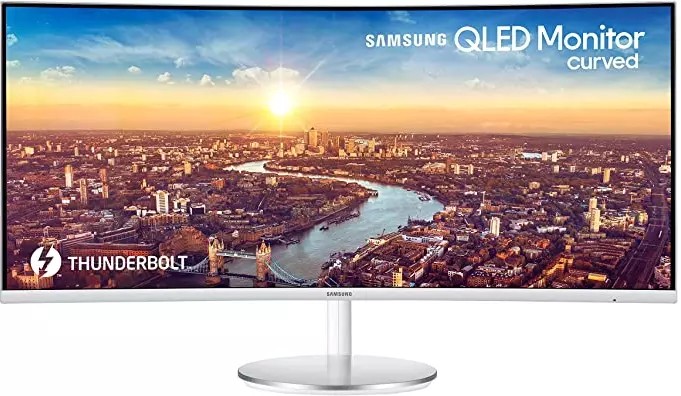
Brand: Samsung
Screen size: 34 inches
Display resolution: 3440 x 1440 (QHD)
View angle: 178°(H) / 178°(V)
Aspect ratio: 3000:1
Price: $590 - $600
The Samsung J791 UltraWide Curved Monitor is a top-tier choice for traders seeking an immersive and high-performance display. With a 34-inch curved QHD screen, this monitor ensures wide and clear visibility of multiple charts, graphs, and trading dashboards, making it ideal for multitasking. Its integration of Intel Thunderbolt 3 technology allows for faster data transfer and connectivity, reducing cable clutter while enhancing productivity.
- Pros
- Cons
- Wide screen with high resolution. The 3440 x 1440 QHD resolution and ultrawide design provide extensive horizontal workspace, enabling efficient multitasking.
- Thunderbolt 3 support. Allows fast data transfer, charging capabilities, and dual-input display functionality, enhancing connectivity and reducing desk clutter.
- Curved display. Enhances immersion and reduces distortion, providing a natural field of view, particularly beneficial for traders analyzing data-intensive dashboards.
- Ergonomic design. Adjustable tilt and height settings ensure user comfort during long hours of use.
- Reduced eye strain. Features such as flicker-free technology and eye-saver mode improve comfort during extended trading sessions.
- Limited contrast. The contrast ratio can cause blacks to appear grayish, particularly in low-light environments.
- Viewing angles. The image quality slightly diminishes when viewed from an angle, making it best suited for direct viewing setups.
- Light glare susceptibility. Not ideal for brightly lit rooms as the screen struggles to minimize glare effectively.
How to choose the best trading monitor?
Choosing the trading monitor requires evaluating several key features to ensure optimal performance, comfort, and efficiency during trading sessions. Here's a guide:
Screen size and resolution. Look for monitors with at least 24 inches for a clear view of charts and data. A resolution of 1080p is the minimum; 4K monitors offer sharper images for better detail, especially if you work with multiple charts.
Refresh rate and response time. A higher refresh rate (e.g., 60Hz or more) ensures smooth updates of charts and prices. Low response times (under 5ms) prevent delays and ghosting in dynamic visuals.
Multiple monitor support. Choose monitors that can be easily integrated into multi-monitor setups, ideal for viewing several assets or tools simultaneously.
Ergonomics and adjustability. Look for stands with height, tilt, and swivel adjustments for comfort during long trading hours.
Connectivity options. Ensure compatibility with your setup by checking for HDMI, DisplayPort, or USB-C inputs.
Color accuracy and panel type. IPS panels provide better color accuracy and viewing angles, while TN panels may be faster but less vibrant. Traders focusing on charts and visuals should prioritize IPS panels.
Budget considerations. High-performance monitors can range from $200 to over $1,000. Balance features with affordability based on your trading needs.
By assessing these factors, you can choose a trading monitor that enhances your workflow and keeps you comfortable during extended trading sessions. When combined thoughtfully, these factors form a well-balanced trading monitor setup that aligns with your trading style, improves chart visibility, and helps you stay focused during fast-moving market conditions.
Laptop vs trading monitor - what should I choose for day trading?
When deciding between a laptop and a dedicated trading monitor for day trading, it's essential to consider factors such as performance, portability, display capabilities, and overall trading efficiency. Here's a comparative overview to assist in making an informed choice:
| Feature | Laptop | Dedicated trading monitor |
|---|---|---|
| Portability | Highly portable for on-the-go trading. | Stationary setup, ideal for fixed workspaces. |
| Performance | Decent power, high-end models can be costly. | Superior performance with desktop systems. |
| Display | Limited screen size, external monitors optional. | Large screen, supports multi-monitor setups. |
| Upgradeability | Limited; major upgrades often require replacement. | Easily upgradable for better performance. |
| Ergonomics | Smaller screens and keyboards may cause discomfort. | Adjustable setups for long-term comfort. |
| Cost | High-performance models are expensive. | Higher initial cost but better long-term value. |
| Connectivity | Fewer ports; docking stations expand options. | Extensive connectivity for multiple peripherals. |
What are the best desktop trading platforms?
When selecting a broker for trading, it's crucial to consider those that offer reliable regulation, fast trading platforms, and low fees. These factors ensure a secure and efficient trading experience. We've chosen three brokers that excel in these areas for our comparison. These brokers provide the necessary stability, speed, and cost-effectiveness, making them ideal for traders looking to maximize their potential in the market.
| Plus500 | Trading.com USA | OANDA | FOREX.com | IG Markets | |
|---|---|---|---|---|---|
|
MT4 |
No | No | Yes | Yes | Yes |
|
MT5 |
No | Yes | Yes | Yes | No |
|
cTrader |
No | No | No | No | No |
|
ECN Commission |
No | No | 3.5 | 5 | 2.3 |
|
ECN Spread EUR/USD |
No | No | 0.15 | 0.2 | 0.8 |
|
Free VPS |
No | No | Yes | Yes | Yes |
|
Regulation level |
Tier-1 | Tier-1 | Tier-1 | Tier-1 | Tier-1 |
|
Open an account |
Go to broker 81% of retail CFD accounts lose money. |
Go to broker Your capital is at risk. |
Go to broker Your capital is at risk. |
Study review | Study review |
I recommend to choose monitors with a resolution of 4K

There are several parameters that traders should consider when choosing a monitor for working with charts and platforms. First, the screen diagonal. Models with a diagonal of 27 to 32 inches are optimal for analyzing charts and working with multiple windows. They provide enough space for comfortable work and allow you to simultaneously monitor several instruments.
Second, the screen resolution. For high-quality display of charts and minimal eye fatigue, it is recommended to choose monitors with a resolution of 4K. Such screens provide a clear picture, which is especially useful when working with small details, levels and indicators.
Finally, additional features. Choose monitors with eye protection technology (Low Blue Light) and anti-glare coating - this is especially important for those who spend many hours trading. It is also worth paying attention to the refresh rate of 60 Hz, which ensures smooth display of data. If you work with multiple monitors, opt for models with thin bezels for a comfortable layout.
Conclusion
When selecting the best trading monitor for Forex activities in 2026, prioritizing screen size, high resolution, and essential functionalities ensures a significant advantage in market analysis and execution. Larger diagonals, such as 27-inch or 32-inch screens, enable seamless multitasking and clear visibility of complex charts and data streams. High resolutions like 4K offer crisp detail that reduces eye strain during long trading sessions, making trades more precise. For example, models equipped with multiple connectivity options and adjustable stands support both comfort and efficiency. Ultimately, investing in the right monitor doesn't just enhance the trading experience—it empowers traders to make smarter, faster decisions in an ever-evolving market.
FAQs
What are the most critical features to look for in the best trading monitors for Forex traders in 2026?
How does refresh rate impact trading performance on Forex trading monitors?
Can using multiple monitors enhance a Forex trader’s workflow and decision-making?
Are there specific ergonomic considerations when setting up a trading monitor station for long sessions?
Editors' Top Picks and Insights






Related Articles
Team that worked on the article
Aleksandra Chaikina has been a contributor to Traders Union since 2021. With over 15 years of experience in copywriting and more than 5 years focused on financial content, she specializes in producing detailed guides, analytics, and comparative reviews across various sectors, including cryptocurrencies, Forex, investment strategies, and financial technologies.
Dan Blystone began his trading career in 1998 as an arbitrage clerk on the floor of the Chicago Mercantile Exchange (CME). He later traded bond and Eurex futures at proprietary firms such as Altea Trading, gaining valuable experience in high-frequency trading and risk management.
Chinmay Soni is a financial analyst with more than 5 years of experience in working with stocks, Forex, derivatives, and other assets. As a founder of a boutique research firm and an active researcher, he covers various industries and fields, providing insights backed by statistical data.
CFD is a contract between an investor/trader and seller that demonstrates that the trader will need to pay the price difference between the current value of the asset and its value at the time of contract to the seller.
Forex trading, short for foreign exchange trading, is the practice of buying and selling currencies in the global foreign exchange market with the aim of profiting from fluctuations in exchange rates. Traders speculate on whether one currency will rise or fall in value relative to another currency and make trading decisions accordingly. However, beware that trading carries risks, and you can lose your whole capital.
Day trading involves buying and selling financial assets within the same trading day, with the goal of profiting from short-term price fluctuations, and positions are typically not held overnight.
An ECN, or Electronic Communication Network, is a technology that connects traders directly to market participants, facilitating transparent and direct access to financial markets.
Yield refers to the earnings or income derived from an investment. It mirrors the returns generated by owning assets such as stocks, bonds, or other financial instruments.

-
 Afghanistan
-
 Albania
-
 Algeria
-
 Angola
-
 Argentina
-
 Armenia
-
 Australia
-
 Austria
-
 Azerbaijan
-
 Bahamas
-
 Bahrain
-
 Bangladesh
-
 Belarus
-
 Belgium
-
 Bolivia
-
 Botswana
-
 Brazil
-
 Brunei
-
 Bulgaria
-
 Cambodia
-
 Cameroon
-
 Canada
-
 Chile
Chile
-
 China
China
-
 Colombia
-
 Congo
Congo
-
 Costa Rica
-
 Cote d'Ivoire
-
 Croatia
-
 Cuba
Cuba
-
 Cyprus
-
 Czechia
-
 DR Congo
-
 Denmark
-
 Dominican Republic
-
 Ecuador
-
 Egypt
Egypt
-
 El Salvador
-
 Estonia
-
 Eswatini
-
 Ethiopia
-
 Finland
-
 France
-
 Georgia
-
 Germany
-
 Ghana
Ghana
-
 Greece
-
 Haiti
Haiti
-
 Hong Kong
-
 Hungary
-
 India
India
-
 Indonesia
-
 Iran, Islamic republic
-
 Iraq
Iraq
-
 Ireland
-
 Israel
-
 Italy
Italy
-
 Jamaica
-
 Japan
Japan
-
 Jordan
-
 Kazakhstan
-
 Kenya
Kenya
-
 Korea
Korea
-
 Kuwait
-
 Kyrgyzstan
-
 Laos
Laos
-
 Latvia
-
 Lebanon
-
 Lesotho
-
 Libya
Libya
-
 Lithuania
-
 Luxembourg
-
 Madagascar
-
 Malaysia
-
 Malta
Malta
-
 Mauritius
-
 Mexico
-
 Moldova
-
 Mongolia
-
 Montenegro
-
 Morocco
-
 Mozambique
-
 Myanmar
-
 Namibia
-
 Nepal
Nepal
-
 Netherlands
-
 New Zealand
-
 Nigeria
-
 North Macedonia
-
 Norway
-
 Oman
Oman
-
 Pakistan
-
 Palestine
-
 Panama
-
 Papua New Guinea
-
 Paraguay
-
 Peru
Peru
-
 Philippines
-
 Poland
-
 Portugal
-
 Puerto Rico
-
 Qatar
Qatar
-
 Reunion
-
 Romania
-
 Rwanda
-
 Saudi Arabia
-
 Serbia
-
 Singapore
-
 Slovakia
-
 Slovenia
-
 Somalia
-
 South Africa
-
 Spain
Spain
-
 Sri Lanka
-
 Sweden
-
 Switzerland
-
 Syria
Syria
-
 Taiwan
-
 Tajikistan
-
 Tanzania
-
 Thailand
-
 Trinidad and Tobago
-
 Tunisia
-
 Turkey
-
 UAE
UAE
-
 Uganda
-
 Ukraine
-
 United Kingdom
-
United States
-
 Uruguay
-
 Uzbekistan
-
 Venezuela
-
 Vietnam
-
 Yemen
Yemen
-
 Zambia
-
 Zimbabwe
- Forex
- Crypto












