
FaucetPay Wallet: How To Use It, Earn Crypto, And Withdraw Funds


Editorial Note: While we adhere to strict Editorial Integrity, this post may contain references to products from our partners. Here's an explanation for How We Make Money. None of the data and information on this webpage constitutes investment advice according to our Disclaimer.
FaucetPay is a cryptocurrency micro-wallet used to earn, store, and withdraw small crypto rewards from faucet and earning sites. To use the FaucetPay wallet, you create an account, connect it to faucet and earning sites, and collect free crypto rewards. You earn cryptocurrency by completing simple tasks, then withdraw funds to an external wallet or exchange once the minimum withdrawal is reached. FaucetPay supports multiple coins and low-fee withdrawals.
FaucetPay Wallet is a widely used micro-wallet for earning cryptocurrency on faucet and reward platforms. It allows users to receive small payouts instantly, store them in one balance, and transfer funds when withdrawal conditions are met. In this review, we explain how to create a FaucetPay account, use the wallet properly, withdraw funds, and reduce security risks.
Risk warning: Cryptocurrency markets are highly volatile, with sharp price swings and regulatory uncertainties. Research indicates that 75-90% of traders face losses. Only invest discretionary funds and consult an experienced financial advisor.
FaucetPay Wallet: what is it and what features does it have?
FaucetPay is a crypto micro-wallet designed to receive, store, and send small cryptocurrency rewards. It is mainly used on faucet and reward platforms that pay users for simple actions like solving captchas, viewing ads, or completing short tasks. The wallet works as an intermediary, collecting micro-payments before they are withdrawn to an external wallet or exchange.
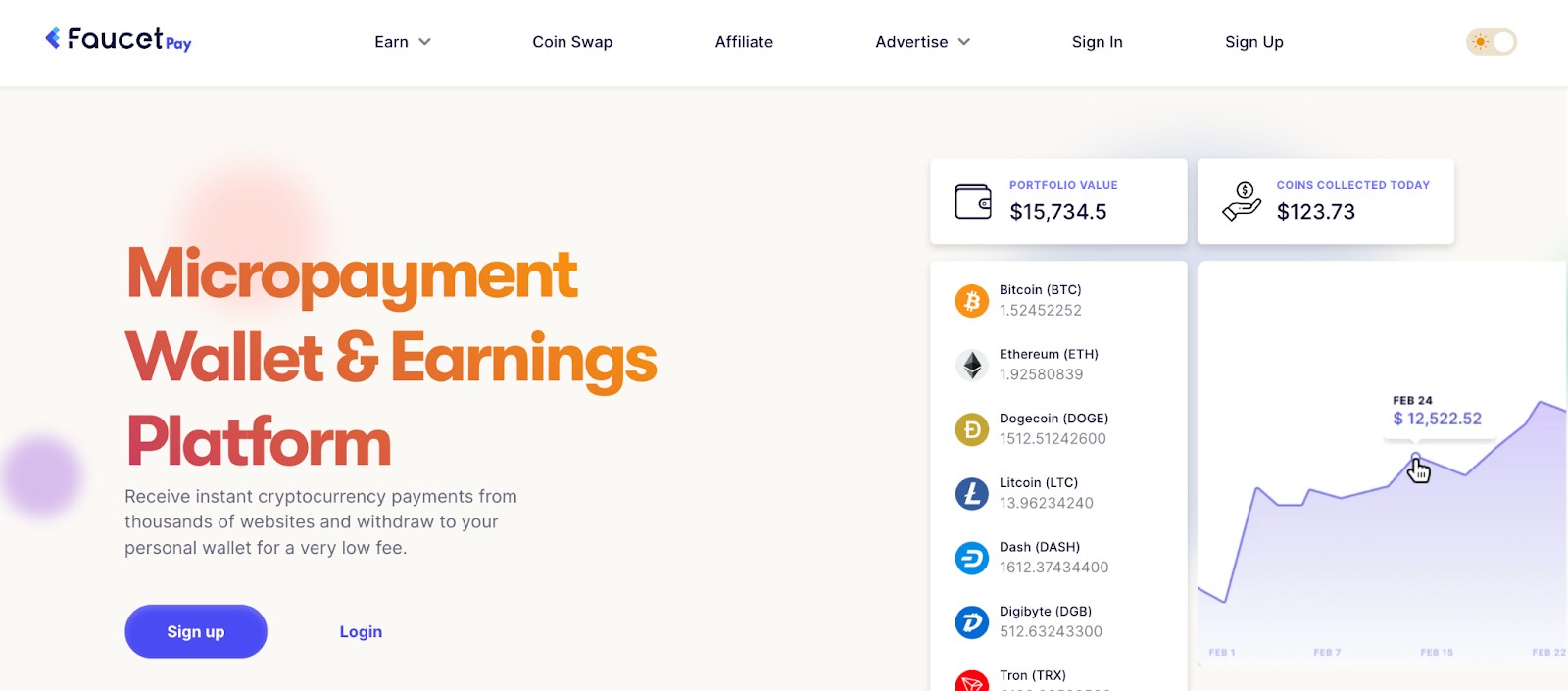
The FaucetPay.io platform supports Bitcoin, Ethereum, Litecoin, Dogecoin, Dash, Tron, and USDT. Because of this wide selection, the FaucetPay wallet is convenient for users who earn different coins from multiple earning sites and want to manage them in one place.
Key features of FaucetPay
The main features of the FaucetPay wallet:
Instant internal transactions. Transfers between FaucetPay-supported websites and user balances are processed instantly.
Wide faucet support. Users can receive payouts from more than 100 platforms listed in the built-in FaucetPay earning section.
Referral and exchange tools. The wallet includes a referral program and a simple internal exchange.
Fixed FaucetPay withdrawal fees. External withdrawals use fixed FaucetPay fees, while internal transfers remain low-cost.
FaucetPay also provides developer tools that allow website owners to automate payouts. These features are described in the official API documentation and are mainly used by faucet operators.
Despite the simplicity of the interface, FaucetPay is a full-fledged cryptocurrency wallet with basic security measures such as two-factor authentication (2FA), email confirmation, and a login history.
Important! The FaucetPay wallet is not cold storage and therefore is not suitable for storing large amounts.
Getting started with FaucetPay: registration and login
Creating a FaucetPay account is simple and free. The process is designed for beginners and usually takes only a few minutes, even if you have never used a crypto wallet before.
Step 1. Starting the registration
To begin, open the FaucetPay official website and click Sign Up in the top-right corner. Currently, the interface is available only in English.

Step 2. Filling out the registration form
Enter a username, a valid email address, and a strong password. This email is required for security notifications and withdrawal confirmations, which answers common questions about what FaucetPay email is used for.
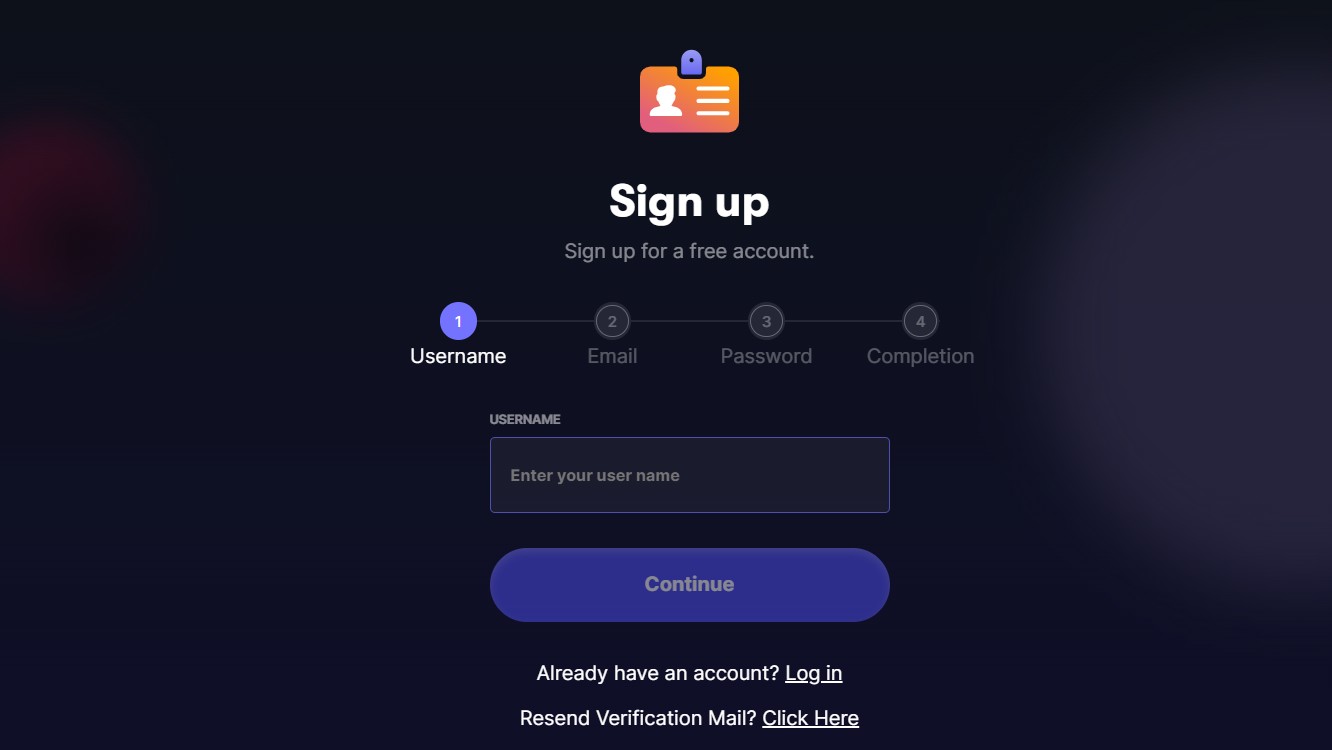
After submitting the form, the account is created immediately. A separate email confirmation for registration is not required, but access to the email remains necessary.
Step 3. Logging into the system
To access your account, click Sign In on the main page. This is the standard FaucetPay login process.
Enter the email address and password you specified during registration to complete login FaucetPay. Authorization via Telegram and MetaMask is also available.
How to use the FaucetPay wallet?
The FaucetPay wallet is designed to be simple, even for first-time users. This section explains how to find your wallet address, receive rewards from earning sites, and top up your balance manually.
Where to find your FaucetPay wallet address
To receive crypto, you need a wallet address linked to your FaucetPay account. Each supported coin has its own address.
Log in to the FaucetPay dashboard, open the Wallet section, and choose a cryptocurrency such as Bitcoin, Litecoin, Ethereum, Tron, or USDT. Click Deposit next to the selected coin.
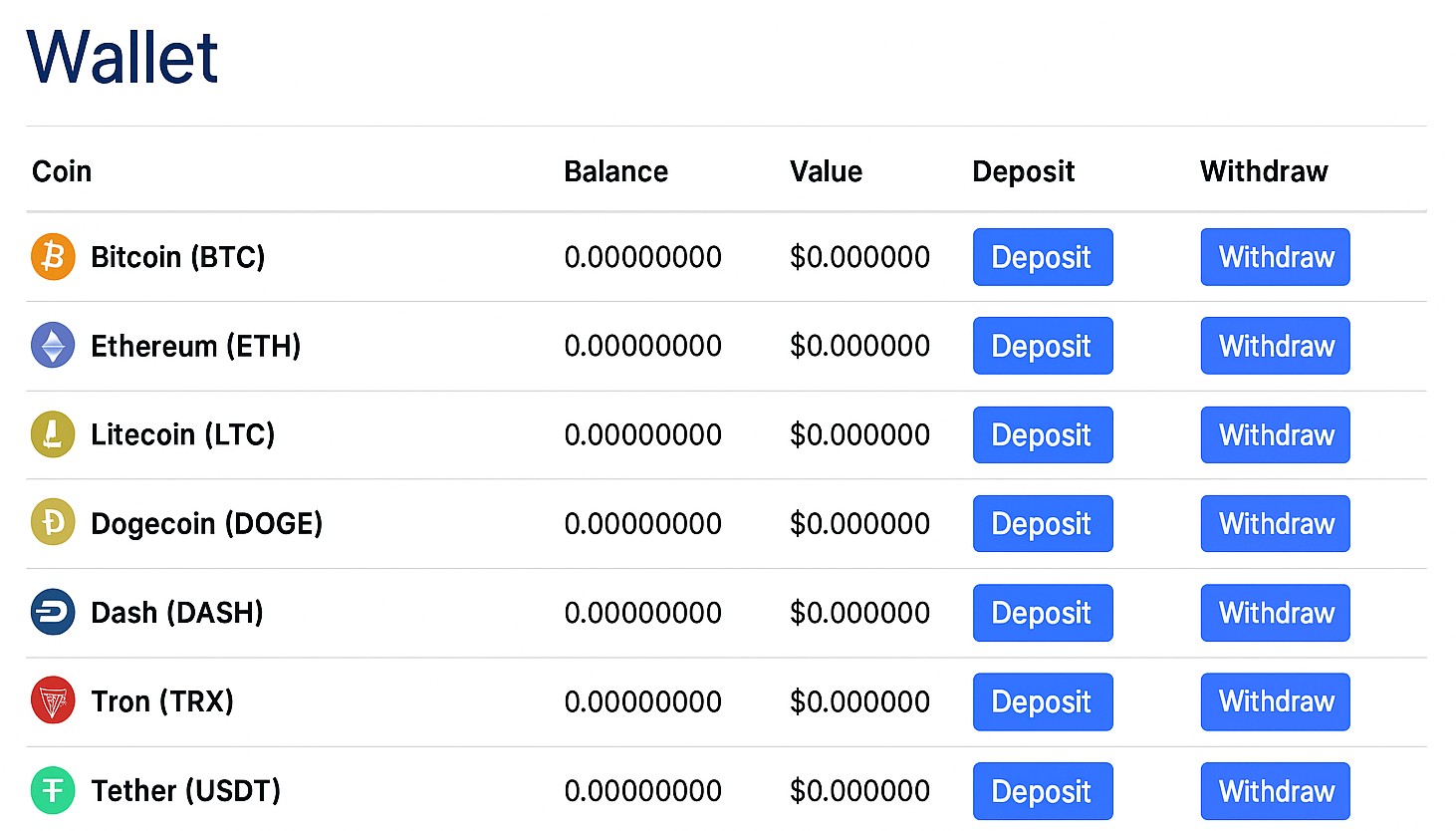
The system will generate your personal FaucetPay wallet address, which you can use to receive payouts.

Important! For some networks, such as Ethereum and Tron, the address may be shared across users. In these cases, FaucetPay assigns funds using your FaucetPay wallet ID, so always check the instructions shown on the deposit page.
How to earn crypto with FaucetPay?
The main purpose of FaucetPay is earning free cryptocurrency through partner platforms. Many users refer to these as FaucetPay earning sites.
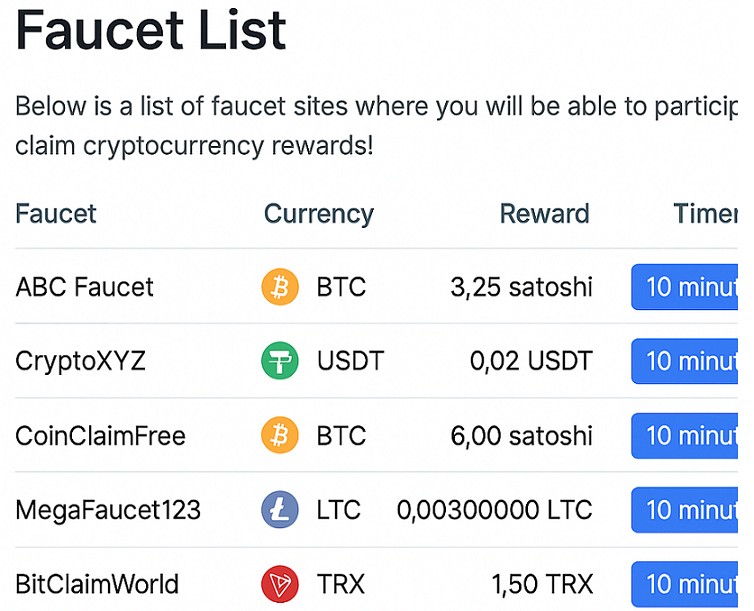
To start earning, open the Earn section in your account and check the built-in list of available faucets on FaucetPay, including various USDT faucets. After choosing a site, enter your FaucetPay address or log in using your email, depending on the platform’s requirements. Complete simple tasks like solving captchas or viewing ads, then claim the reward. Funds are credited instantly to your FaucetPay balance.
This process explains how users earn FaucetPay rewards without making deposits or investments.
Manual balance top-up
You can also fund your account manually. To do this, go to Wallet, select a coin, and click Deposit. Copy the displayed address and use it as the recipient address in another wallet or exchange.
Transfer the desired amount and wait for network confirmations. Deposit limits and network fees depend on the selected cryptocurrency and are shown directly on the deposit page.
Important! FaucetPay works best as a micro-wallet. Collect rewards, then withdraw them once you reach the minimum amount, instead of storing funds long term.
Withdrawing funds from FaucetPay: what you need to know?
Withdrawing funds is a key step for anyone using the FaucetPay wallet for earnings. While the wallet is designed for micro-payments, it still allows users to transfer cryptocurrency to external wallets and exchanges once certain conditions are met.
Minimum amounts and fees
Each supported cryptocurrency on FaucetPay has its own minimum withdrawal amount and network fee. These limits apply to all users and are displayed directly in the withdrawal interface.
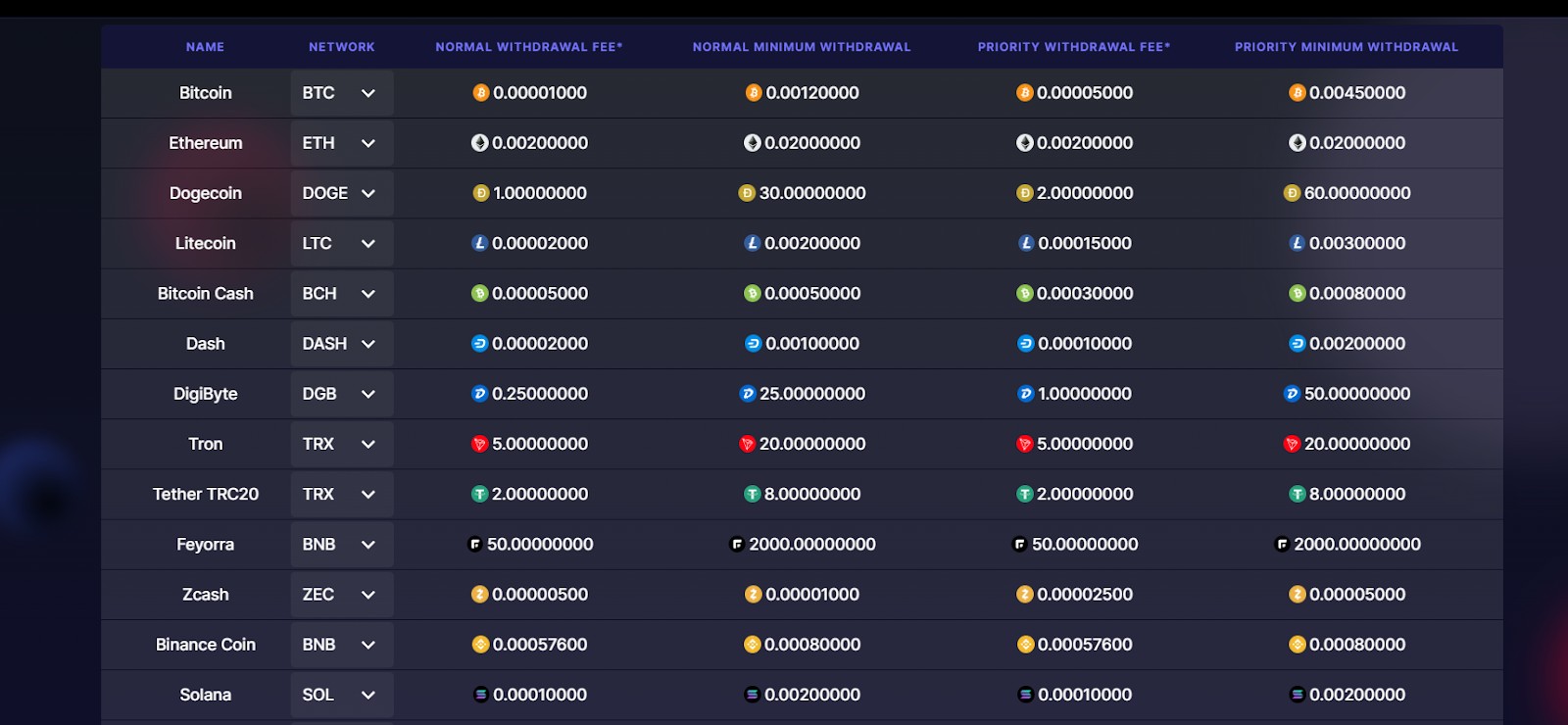
If the withdrawal amount is below the minimum, the request will be rejected. Since fees are charged separately, withdrawing very small balances can significantly reduce net earnings, so many users wait until a larger balance is reached before withdrawing.
Available withdrawal options
FaucetPay does not support direct withdrawals to bank cards or PayPal. There are two practical alternatives:
Withdrawal to a crypto exchange. This is the most common option. After sending funds to an exchange, users can trade or withdraw to a card using P2P or exchange services.
Withdrawal to another crypto wallet. You can transfer funds to wallets such as Trust Wallet or MetaMask. Many users choose this option when moving funds from FaucetPay to Trust Wallet for storage or further transfers.
When withdrawing funds, always select the correct blockchain network. For example, sending a TRC-20 token to an ERC-20 address can result in permanent loss of funds.
FaucetPay does not recover transactions sent to the wrong network. Always double-check the address format and network type before confirming a withdrawal.
How to withdraw money from FaucetPay: step-by-step guide
This section explains how to withdraw from the FaucetPay wallet using a crypto exchange as an example. The process is similar for most supported coins.
Step 1. Log in to your accounts
Log in to your FaucetPay wallet and access your account. You will also need an active account on a cryptocurrency exchange that supports the coin you plan to withdraw.
Step 2. Get a deposit address on the exchange
Open your exchange dashboard and go to the Deposit section. Select the cryptocurrency you want to receive and copy the generated deposit address. This address will be used as the recipient for your withdrawal on FaucetPay. If you don’t already have a cryptocurrency exchange account, create one with any of the top crypto exchanges in the region listed below.
| Coinbase | OKX | BTCC | Cryptohopper | Crypto.com | |
|---|---|---|---|---|---|
|
Min. Deposit, $ |
10 | 10 | 10 | No | 1 |
|
Coins Supported |
400+ | 600+ | 399 | 1000 | 400+ |
|
Spot Taker fee, % |
0.5 | 0.1 | 0.3 | 0 | 0.5 |
|
Spot Maker Fee, % |
0.5 | 0.08 | 0.2 | 0 | 0.25 |
|
Alerts |
Yes | Yes | No | Yes | Yes |
|
Copy trading |
No | Yes | Yes | Yes | No |
|
TU overall score |
8.5 | 8.46 | 8.08 | 7.8 | 7.76 |
|
Open an account |
Go to broker Your capital is at risk. |
Go to broker Your capital is at risk. |
Go to broker Your capital is at risk.
|
Go to broker Your capital is at risk. |
Go to broker Your capital is at risk. |
Step 3. Open the wallet section in FaucetPay
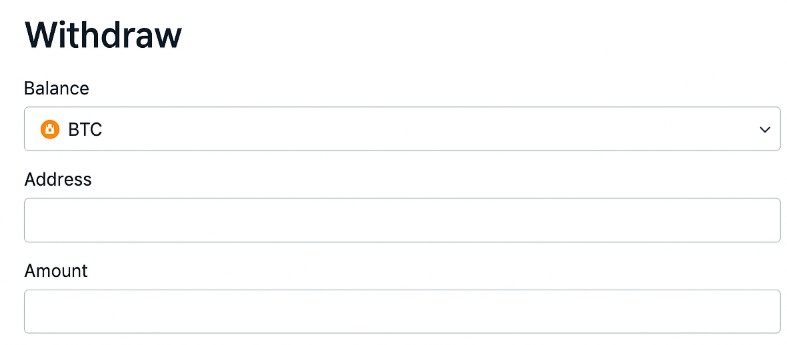
Return to your FaucetPay dashboard, open Wallet, find the required coin, and click Withdraw.
Step 4. Enter withdrawal details
Paste the exchange deposit address into the recipient field. Enter the amount you want to withdraw and review the current withdrawal fees shown on the screen.
Step 5. Choose the withdrawal speed
FaucetPay usually offers two processing options:
Normal withdrawal. Lower fees, slower processing.
Priority withdrawal. Higher fees, faster processing.
Choose the option that best fits your needs.
Step 6. Confirm and wait for completion
Double-check the address, network, and amount. Confirm the transaction using email or two-factor authentication if prompted. Processing time can range from a few minutes to over an hour, depending on network congestion and the selected speed.
Additional features of FaucetPay: earnings and strategies
Beyond basic storage and withdrawals, the FaucetPay wallet includes several tools that help users increase earnings and manage rewards more efficiently. These features are optional but useful for those who actively work with faucet and reward platforms.
FaucetPay earning methods
The main FaucetPay earning methods are based on completing simple tasks on partner platforms. These tasks usually include captcha solving, ad viewing, short clicks, or time-based claims. This is why FaucetPay is often described as a tool to earn free coins without upfront investment.
Most earning platforms send rewards automatically once a task is completed. This allows users to earn FaucetPay steadily by working with several sites at the same time.
Built-in faucet list and bonuses
Inside the dashboard, users can access the built-in FaucetPay list, which shows active earning platforms that support FaucetPay payouts. This helps beginners avoid unreliable sites and understand which platforms are currently paying.
From time to time, FaucetPay also offers internal bonuses and promotions. These rewards are small but can help increase balances faster when combined with regular activity.
Referral program
The FaucetPay referral program allows users to earn a percentage of platform fees generated by invited users. After registration, each account receives a unique referral link.
Referral income depends on user activity and transaction volume. This feature is often used by content creators, bloggers, and forum users.
Scripts and automation warnings
Some users search for tools like a FaucetPay script or automation solutions. It is important to note that using bots, scripts, or automated claiming tools violates platform rules and can lead to account suspension.
FaucetPay App: how to download on Android and iOS
Many users prefer managing earnings from a smartphone. Below is a clear explanation of how the FaucetPay app works and what options are available for Android and iOS.
FaucetPay app for Android
The FaucetPay android app is not available on Google Play. Android users can only install the wallet using an APK file from FaucetPay’s official website.
To complete a FaucetPay app download on Android, follow these steps:
open the FaucetPay website on your mobile browser;
go to the Mobile App section;
download the APK file and allow installation from unknown sources in your phone settings;
install the app and log in using your existing account details.
The mobile version offers the same core features as the web platform, including earnings, transfers, and withdrawals. Only download the FaucetPay APK from the official website. Files from third-party sources may contain malware or phishing code that can compromise your FaucetPay account.
FaucetPay app for iOS
There is no official FaucetPay wallet app in the Apple App Store. iPhone and iPad users access the service through the mobile browser version of the website.
For convenience, you can add FaucetPay’s official site to your home screen. This creates an app-like shortcut that opens the wallet in a separate window and works similarly to a native application.
FaucetPay wallet security
Because the FaucetPay wallet is an online micro-wallet, security should be a top priority. The platform is designed for handling small balances, not for long-term storage of large amounts of cryptocurrency.
Built-in security features
FaucetPay provides several basic protection tools that every user should enable:
Two-factor authentication. A one-time code is required when logging in and confirming withdrawals.
Email notifications. Login alerts and important actions are sent to your registered email address.
Login history. Users can review recent login sessions and detect suspicious activity.
These features help protect access to your FaucetPay account, but they do not eliminate all risks.
Was FaucetPay ever hacked?
Claims about FaucetPay being hacked appear on forums from time to time. In most cases, these incidents are linked to compromised user accounts rather than a breach of the platform itself. Common causes include weak passwords, disabled two-factor authentication, phishing links, or malicious browser extensions.
How to protect your FaucetPay account
To reduce the risk of losing funds, follow these practical rules:
Use a unique password. Do not reuse passwords from email or other services.
Enable two-factor authentication. This adds an extra layer of protection.
Use a dedicated email address. A separate email reduces exposure if other accounts are compromised.
Check the website address. Always use the official FaucetPay domain when logging in.
Avoid suspicious extensions. Some browser add-ons can intercept wallet data.
Do not store large balances. Withdraw funds regularly to a more secure wallet or exchange.
Used correctly, FaucetPay remains a practical tool for micro-earnings, but it should never replace a secure long-term wallet.
FaucetPay user reviews: pros, cons, and real feedback
User feedback helps clarify how the FaucetPay wallet performs in real conditions. Most discussions about FaucetPay reviews focus on reliability, payout speed, and ease of use rather than high earnings.
General user sentiment
Overall, FaucetPay.io reviews are mixed but lean toward neutral to positive. Users who understand that FaucetPay is a micro-wallet, not a full exchange or income platform, are usually satisfied with how it works.
Positive feedback often highlights fast internal payouts and simple account setup. Negative comments usually relate to fees on small withdrawals or account restrictions after rule violations.
Common advantages mentioned by users
Easy account creation. Registration does not require identity verification.
Instant micro-payments. Faucet rewards are credited immediately.
Wide earning support. Many earning sites support FaucetPay payouts.
Common complaints and issues
Basic security level. Protection tools are limited compared to hardware wallets.
Slow support responses. Replies f rom FaucetPay support may take time during high demand.
Account freezes. Some users report restrictions after using VPNs, scripts, or automation tools.
Downtimes
Search queries like “FaucetPay not working” usually relate to delayed withdrawals, temporary website issues, or blocked accounts. In most cases, the problem is caused by rule violations, incorrect withdrawal settings, or network congestion rather than a platform failure.
Important! FaucetPay works reliably when used as intended. Most negative experiences come from unrealistic expectations or misuse of the service.
Risks and warnings
Before using the FaucetPay wallet, it is important to understand the main risks and limitations associated with this service:
Lack of regulation and guarantees. FaucetPay is not a regulated financial service and does not provide deposit insurance or legal protection, meaning funds are not guaranteed in case of disputes, errors, or account issues.
Risk of account restrictions. Accounts may be temporarily limited or frozen if the system detects VPN usage, automated scripts, suspicious browser extensions, or unusual login behavior.
Fees on small balances. Because FaucetPay works with micro-amounts, withdrawal fees on FaucetPay can take a significant share of small balances if funds are withdrawn too early.
Storage and security limitations. FaucetPay is an online micro-wallet and not suitable for storing large balances, as this increases exposure to phishing, access loss, or account compromise.
FaucetPay should be used only as a temporary transit wallet for collecting small rewards and transferring them elsewhere, not as a long-term crypto storage solution.
Good for small earnings, not long-term storage

From years of testing different crypto wallets and earning platforms, I see the FaucetPay wallet as a useful entry-level tool rather than a complete solution. It works well for its intended purpose: collecting small payouts from faucet and reward sites in one place and then withdrawing them later. In my experience, the platform is stable, payouts are credited quickly, and basic withdrawals usually go through without technical problems when account rules are respected.
At the same time, FaucetPay has clear limits. It is not designed for storing large balances, and fees can noticeably reduce profits if you withdraw too often. Account security also depends heavily on the user, especially when two-factor authentication is disabled or the wallet is accessed from multiple devices. For this reason, I recommend using FaucetPay strictly as a temporary wallet: earn small amounts, consolidate them, and move funds to a more secure wallet or exchange as soon as it makes sense.
Conclusion
FaucetPay stands out as a user-friendly micro-wallet that enables individuals to earn and withdraw small amounts of various cryptocurrencies efficiently. Its straightforward design and integration with numerous earning platforms make it accessible for beginners looking to dip their toes into crypto without significant investment. Many users report successful withdrawals and appreciate features like instant micropayments, which add to its credibility. However, as with any online wallet, it’s essential to stay vigilant against potential scams and use strong security measures. Ultimately, FaucetPay demonstrates that with the right tools, even small steps in crypto can lead to meaningful financial empowerment.
FAQs
What are the minimum withdrawal amounts and fees associated with using FaucetPay Wallet?
Is FaucetPay Wallet suitable for long-term storage of cryptocurrency?
How can users enhance the security of their FaucetPay Wallet accounts?
Can FaucetPay Wallet be accessed via a mobile app on Android and iOS devices?
Editors' Top Picks and Insights






Related Articles
Team that worked on the article
Viktoras Karapetjanc is a seasoned financial trader, market analyst, and content creator with over 20 years of expertise in Forex, cryptocurrency, and stock markets. As a contributor to the Traders Union website, he provides in-depth analysis, data-driven strategies, and educational content to empower traders of all levels.
Dan Blystone began his trading career in 1998 as an arbitrage clerk on the floor of the Chicago Mercantile Exchange (CME). He later traded bond and Eurex futures at proprietary firms such as Altea Trading, gaining valuable experience in high-frequency trading and risk management.
Chinmay Soni is a financial analyst with more than 5 years of experience in working with stocks, Forex, derivatives, and other assets. As a founder of a boutique research firm and an active researcher, he covers various industries and fields, providing insights backed by statistical data.
Bitcoin is a decentralized digital cryptocurrency that was created in 2009 by an anonymous individual or group using the pseudonym Satoshi Nakamoto. It operates on a technology called blockchain, which is a distributed ledger that records all transactions across a network of computers.
Cryptocurrency is a type of digital or virtual currency that relies on cryptography for security. Unlike traditional currencies issued by governments (fiat currencies), cryptocurrencies operate on decentralized networks, typically based on blockchain technology.
Index in trading is the measure of the performance of a group of stocks, which can include the assets and securities in it.
Risk management is a risk management model that involves controlling potential losses while maximizing profits. The main risk management tools are stop loss, take profit, calculation of position volume taking into account leverage and pip value.
Ethereum is a decentralized blockchain platform and cryptocurrency that was proposed by Vitalik Buterin in late 2013 and development began in early 2014. It was designed as a versatile platform for creating decentralized applications (DApps) and smart contracts.

-
 Afghanistan
-
 Albania
-
 Algeria
-
 Angola
-
 Argentina
-
 Armenia
-
 Australia
-
 Austria
-
 Azerbaijan
-
 Bahamas
-
 Bahrain
-
 Bangladesh
-
 Belarus
-
 Belgium
-
 Bolivia
-
 Botswana
-
 Brazil
-
 Brunei
-
 Bulgaria
-
 Cambodia
-
 Cameroon
-
 Canada
-
 Chile
Chile
-
 China
China
-
 Colombia
-
 Congo
Congo
-
 Costa Rica
-
 Cote d'Ivoire
-
 Croatia
-
 Cuba
Cuba
-
 Cyprus
-
 Czechia
-
 DR Congo
-
 Denmark
-
 Dominican Republic
-
 Ecuador
-
 Egypt
Egypt
-
 El Salvador
-
 Estonia
-
 Eswatini
-
 Ethiopia
-
 Finland
-
 France
-
 Georgia
-
 Germany
-
 Ghana
Ghana
-
 Greece
-
 Haiti
Haiti
-
 Hong Kong
-
 Hungary
-
 India
India
-
 Indonesia
-
 Iran, Islamic republic
-
 Iraq
Iraq
-
 Ireland
-
 Israel
-
 Italy
Italy
-
 Jamaica
-
 Japan
Japan
-
 Jordan
-
 Kazakhstan
-
 Kenya
Kenya
-
 Korea
Korea
-
 Kuwait
-
 Kyrgyzstan
-
 Laos
Laos
-
 Latvia
-
 Lebanon
-
 Lesotho
-
 Libya
Libya
-
 Lithuania
-
 Luxembourg
-
 Madagascar
-
 Malaysia
-
 Malta
Malta
-
 Mauritius
-
 Mexico
-
 Moldova
-
 Mongolia
-
 Montenegro
-
 Morocco
-
 Mozambique
-
 Myanmar
-
 Namibia
-
 Nepal
Nepal
-
 Netherlands
-
 New Zealand
-
 Nigeria
-
 North Macedonia
-
 Norway
-
 Oman
Oman
-
 Pakistan
-
 Palestine
-
 Panama
-
 Papua New Guinea
-
 Paraguay
-
 Peru
Peru
-
 Philippines
-
 Poland
-
 Portugal
-
 Puerto Rico
-
 Qatar
Qatar
-
 Reunion
-
 Romania
-
 Rwanda
-
 Saudi Arabia
-
 Serbia
-
 Singapore
-
 Slovakia
-
 Slovenia
-
 Somalia
-
 South Africa
-
 Spain
Spain
-
 Sri Lanka
-
 Sweden
-
 Switzerland
-
 Syria
Syria
-
 Taiwan
-
 Tajikistan
-
 Tanzania
-
 Thailand
-
 Trinidad and Tobago
-
 Tunisia
-
 Turkey
-
 UAE
UAE
-
 Uganda
-
 Ukraine
-
 United Kingdom
-
United States
-
 Uruguay
-
 Uzbekistan
-
 Venezuela
-
 Vietnam
-
 Yemen
Yemen
-
 Zambia
-
 Zimbabwe
- Forex
- Crypto










- FaucetPay Wallet: what is it and what features does it have?
- Getting started with FaucetPay: registration and login
- How to use the FaucetPay wallet?
- How to earn crypto with FaucetPay?
- Withdrawing funds from FaucetPay: what you need to know?
- How to withdraw money from FaucetPay: step-by-step guide
- Additional features of FaucetPay: earnings and strategies
- FaucetPay App: how to download on Android and iOS
- FaucetPay user reviews: pros, cons, and real feedback
- Risks and warnings
- Expert opinion
- Conclusion
- FAQs


