Ledger Stax Review (2026)


Editorial Note: While we adhere to strict Editorial Integrity, this post may contain references to products from our partners. Here's an explanation for How We Make Money. None of the data and information on this webpage constitutes investment advice according to our Disclaimer.
Ledger Stax is a top-rated hardware wallet in 2026, known for its strong security and sleek design. It’s a great choice for anyone who wants to store their crypto safely while enjoying an easy-to-use, smartphone-like experience.
Ledger Stax stands apart from typical crypto wallets. It features a curved E Ink touchscreen, wireless charging, and Bluetooth connectivity, giving it a contemporary look with practical usability. Users can check balances, approve transactions, and handle NFTs directly through the interface. It has gained strong appeal among NFT enthusiasts and long-term holders who appreciate both strong protection and visual appeal. In this review, we’ll review its essential features, pricing, supported coins, mobile app functions, as well as comparable alternatives.
Risk warning: Cryptocurrency markets are highly volatile, with sharp price swings and regulatory uncertainties. Research indicates that 75-90% of traders face losses. Only invest discretionary funds and consult an experienced financial advisor.
Ledger Stax wallet overview



Ledger Stax represents Ledger’s most sophisticated hardware wallet so far. It caters to individuals who prioritize robust security while also paying attention to design and ease of use. Its curved E Ink touchscreen improves menu navigation and enhances asset visibility. Wireless charging and Bluetooth support reduce the need for physical connections and enhance mobile compatibility.
When compared with Ledger Nano X or Ledger Nano S Plus, Ledger Stax introduces a more intuitive user experience. It’s the first Ledger device co-designed with Tony Fadell, the mind behind the iPod. His influence is clear in the device’s sleek structure and the always-on screen that displays NFT artwork even when locked.
Ledger Flex, previewed in 2024, is anticipated to be a foldable and more adaptable option, though it remains in development. While Flex is centered on mobility and adaptability, Stax prioritizes display quality and user interface. At present, Stax holds the edge in screen performance, battery longevity, and refined aesthetics.
| Feature | Ledger Stax | Ledger Flex (Expected) |
|---|---|---|
| Display type & size | Curved E Ink touchscreen, 3.7” | Foldable display (TBD) |
| Connectivity | Bluetooth, USB-C | USB-C, potential NFC |
| Wireless charging | Yes | Expected |
| NFT display support | Yes (via always-on display) | Likely |
| Battery | Several weeks per charge | TBD |
| Secure element chip | ST33K1ME (EAL5+ certified) | Expected ST secure chip |
| Price | Around $399 | Unknown (possibly lower) |
| Best for | Premium users, NFT holders | On-the-go users (projected) |
Key features of Ledger Stax
Curved E-ink touchscreen
The notable addition in Ledger Stax is its curved e-ink display. Unlike traditional LCDs, this screen consumes very little power and remains easy to read, even in sunlight. It's well-suited for viewing balances and navigating menus with ease.
The always-on functionality allows users to personalize their lock screen with NFTs or wallet info. This not only enhances the look but also lets you see key info instantly.
Wireless charging
Ledger Stax supports Qi wireless charging, and it's the first Ledger device with this feature. You can use a standard wireless charger or charge it via USB-C. This feature reduces wear and tear from cable use and makes it easier to keep your device charged without cluttering your workspace.
Bluetooth connectivity

Like the Nano X, Ledger Stax includes Bluetooth for easy mobile connection. This means you can manage your assets on the go using the Ledger Live app. Bluetooth is optional, so if you prefer to disable it for extra security, you can. USB-C remains available for wired connection and firmware updates.
Secure element chip
The ST33K1ME chip inside Ledger Stax is EAL5+ certified. This chip is responsible for isolating private keys from external connections, protecting against hacking attempts. The secure element chip is what separates Ledger wallets from many software-based solutions or low-end competitors without hardware isolation.
Large coin and token support
Ledger Stax supports over 5,000 coins and tokens through Ledger Live and third-party integrations. This includes Bitcoin, Ethereum, Solana, BNB, and hundreds of ERC-20 tokens. You can also manage NFTs and use DeFi protocols with MetaMask and WalletConnect integrations, making Stax a good fit for Web3 activity.
Long battery life
Because of the low-power E Ink screen, the device lasts for several weeks on a single charge. Even with regular use, users usually just have to charge it once a month. That’s why it works well for long-term holders who don’t use the wallet daily but want peace of mind about battery life when they do.
Pros and cons of Ledger Stax
- Pros
- Cons
E-ink display helps with “cold confirmation”. Unlike LED screens, the e-ink display doesn’t flicker or lag — what you see on-screen stays long enough for you to double-check transaction details offline.
Best for multi-wallet juggling. If you're managing multiple wallets or tokens, the Stax lets you swipe between them like apps on a phone — actually makes sense, unlike older Nano models.
NFC opens doors to tap-and-pay innovation. This isn’t just planning ahead for features most wallets haven’t caught up to; you can already use contactless signing in select DeFi workflows.
Offline signer with full UX. Most wallets look like gadgets from 2008, but this one gives you a clean experience even without cables — handy for quick peeks without drawing attention.
Proprietary software limits flexibility. If you like to tinker or build your own tools, the Stax keeps you locked into Ledger’s ecosystem more than alternatives like Keystone.
Fragile if used daily. The sleek screen scratches easily if tossed into your backpack with chargers and keys — not ideal if you’re always on the move.
App install caps can bottleneck power users. You can’t run every token app at once, so if you’re into niche altcoins, you’ll find yourself constantly swapping apps.
Doesn't vibe well with self-custody maximalists. Ledger’s past firmware moves made folks who value privacy a little nervous, and the Stax might not tick every box for the ultra-cautious crowd.
Ledger Stax price & fees
The Ledger Stax isn't just another hardware wallet; it comes with a hefty price tag. Selling for $399, it's a lot pricier than other models like the Nano X at $149 and the Nano S Plus at $79. This big jump in price has got people in the crypto community talking. Some users have voiced frustration over sudden increases, with reports of hikes over $200 in certain areas. This makes some feel that the high cost is more about hype than what you actually get.
When it comes to fees, Ledger takes a different approach. They don't take any fees for transactions made through their Ledger Live app; you only pay the usual network fees for your crypto transactions. But if you're buying or swapping cryptocurrencies through services handled by other companies through the app, there are extra fees involved. These charges, often between 3-5%, are set by the external providers and can sometimes be hidden in the exchange rates. So, the ease of using these built-in services could end up costing you more than you'd expect.
How to use Ledger Stax: A step-by-step guide
1. Unbox and charge the device

Start by unboxing your Ledger Stax and charging it using the included USB-C cable or a Qi wireless pad. Wait until it’s fully charged before setup. Charging can take a few hours initially. The always-on screen will show basic instructions even while charging.
2. Set up using Ledger Live
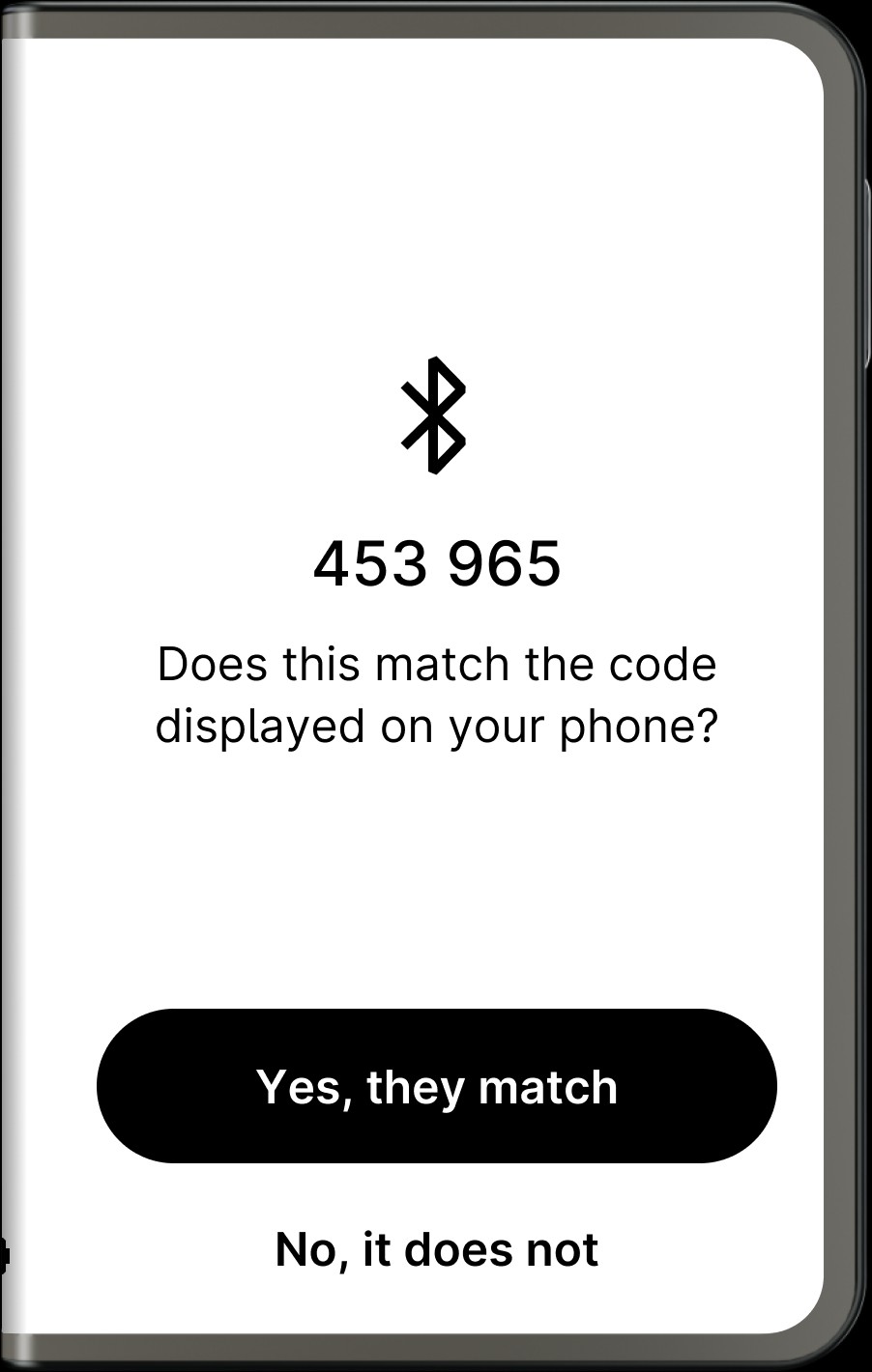
Download the Ledger Live app on your phone or computer. Select "Set up as new device" and follow the on-screen instructions. You’ll be prompted to create a PIN and write down your 24-word recovery phrase. Store this phrase offline in a safe place.
3. Install apps for coins
In Ledger Live, install apps for the cryptocurrencies you want to use. Each coin requires a small app on the wallet. The app lets you manage coins securely and sign transactions through Ledger Stax.
4. Send and receive crypto

To receive crypto, select your account and copy your wallet address. To send it, paste the recipient's address and confirm on your Stax device. Always verify addresses on the device screen before confirming transactions.
5. Use with dApps and NFTs
Connect Ledger Stax to Web3 platforms via MetaMask or WalletConnect. This allows you to interact with DeFi platforms and NFT marketplaces. Your keys remain safe on the device even when you connect to third-party apps.
Alternatives to Ledger Stax
Ledger Nano X

Nano X, also from Ledger, includes Bluetooth and has a basic OLED screen. It’s small, more affordable, but skips wireless charging and high-end display options. It suits users looking for secure access on the go without spending extra.
Trezor Model T

Trezor’s main wallet includes a color touchscreen and runs on open-source firmware. It doesn’t include Bluetooth, which adds to its security for some users. This is a strong choice for those who value transparency and are fine with using only wired connections.
ELLIPAL Titan

This device works without any connections — it doesn’t support Bluetooth, Wi-Fi, or USB. Instead, it relies on QR codes for signing transactions. ELLIPAL Titan is built for high-security storage, though it’s not the most practical choice for frequent access.
Storing crypto on exchanges: An alternative to hardware wallets
While many keep their crypto on exchanges for convenience, this method is riskier. If the exchange is hacked or freezes withdrawals, your assets can be lost. Regulation is one of the key parameters to judge the security of any exchange. In line with the same, the top exchanges known for their reliable security (and strict regulatory oversight) are listed in the table below:
| Crypto | Foundation year | Min. Deposit, $ | Coins Supported | Spot Taker fee, % | Spot Maker Fee, % | Alerts | Copy trading | Tier-1 regulation | TU overall score | Open an account | |
|---|---|---|---|---|---|---|---|---|---|---|---|
| Yes | 2012 | 10 | 400+ | 0.5 | 0.5 | Yes | No | Yes | 8.5 | Go to broker Your capital is at risk. |
|
| Yes | 2011 | 10 | 399 | 0.3 | 0.2 | No | Yes | Yes | 8.08 | Go to broker Your capital is at risk.
|
|
| Yes | 2016 | 1 | 400+ | 0.5 | 0.25 | Yes | No | Yes | 7.76 | Go to broker Your capital is at risk. |
|
| Yes | 2011 | 10 | 400+ | 0.4 | 0.25 | Yes | Yes | Yes | 7.68 | Go to broker Your capital is at risk. |
|
| Yes | 2018 | No | 100 | 0.07 | 0.04 | Yes | No | Yes | 6.57 | Go to broker Your capital is at risk.
|
Why trust us
15+ years of independent market analysis
140+ evaluation criteria, reviewed by 50+ experts
Data-driven reviews of 200+ platforms, updated regularly
20+ industry awards & a wide network of global media partners
Learn more about our methodology and editorial policies.


Hardware wallets like Ledger Stax give you full control. For large amounts or long-term storage, they’re a much safer option than keeping assets on an exchange.
Ledger Stax trains beginners to double-check transactions and avoid wallet mix-ups

For beginners stepping into self-custody in 2026, the Ledger Stax isn’t just a wallet — it’s a behavioral nudge toward better crypto hygiene. One feature that doesn’t get nearly enough credit is the way it forces deliberate action. The persistent e-ink screen means your pending transactions don’t disappear if you blink, and the swipe-to-confirm interface slows you down just enough to reduce signing errors. That tiny pause is huge — especially for beginners prone to speed-tapping their way through steps without checking wallet addresses. It’s not just a security feature; it’s a built-in habit coach.
Another thing newbies often miss: Stax’s vertical NFT support isn’t for show — it’s for muscle memory. You can set a custom NFT on the spine of the device so you know which wallet you're picking up at a glance. For people managing separate wallets for long-term holdings, DeFi experiments, and meme coin madness, that visual tag system can prevent serious blunders. It's a small touch with huge upside when you realize you didn’t accidentally sign a DeFi smart contract from your cold-storage vault.
Conclusion
Ledger Stax sets a new standard for hardware wallets. It’s more than just a storage device — it’s a statement piece for serious crypto users. Between the curved E Ink display, wireless charging, and robust security, it’s a complete package. While the price is on the higher side, the value it provides makes it a worthwhile investment. If you want to store your crypto securely with a modern touch, Ledger Stax is one of the best options in 2026.
FAQs
Can I personalize the Ledger Stax lock screen with my own NFT?
Yes, you can display your personal NFT on the Ledger Stax’s always-on curved E Ink screen. It adds a personal touch and also helps visually identify different wallets if you're managing more than one.
Does Ledger Stax work without the internet?
Yes. Ledger Stax is a cold wallet, so it doesn’t need an internet connection to store or secure your crypto. All private key operations happen offline, with transactions signed internally before being broadcast via a connected device.
Can Ledger Stax be used with multiple Ledger Live accounts?
Yes. You can use Ledger Stax with multiple Ledger Live instances across different devices. Just make sure you only connect to trusted computers or phones, as the wallet still requires your PIN and physical confirmation for transactions.
Can I use Ledger Stax for staking crypto directly?
Yes, Ledger Stax supports staking for select cryptocurrencies through Ledger Live. You can stake assets like Ethereum, Polkadot, and Tezos directly from the wallet interface while keeping your private keys offline and secure.
Editors' Top Picks and Insights




Related Articles
Team that worked on the article
Alamin Morshed is a contributor at Traders Union. He specializes in writing articles for businesses that want to improve their Google search rankings to compete with their competition.
Chinmay Soni is a financial analyst with more than 5 years of experience in working with stocks, Forex, derivatives, and other assets. As a founder of a boutique research firm and an active researcher, he covers various industries and fields, providing insights backed by statistical data.
Mirjan Hipolito is a journalist and news editor at Traders Union. She is an expert crypto writer with five years of experience in the financial markets.
Bitcoin is a decentralized digital cryptocurrency that was created in 2009 by an anonymous individual or group using the pseudonym Satoshi Nakamoto. It operates on a technology called blockchain, which is a distributed ledger that records all transactions across a network of computers.
Copy trading is an investing tactic where traders replicate the trading strategies of more experienced traders, automatically mirroring their trades in their own accounts to potentially achieve similar results.
Cryptocurrency is a type of digital or virtual currency that relies on cryptography for security. Unlike traditional currencies issued by governments (fiat currencies), cryptocurrencies operate on decentralized networks, typically based on blockchain technology.
Ethereum is a decentralized blockchain platform and cryptocurrency that was proposed by Vitalik Buterin in late 2013 and development began in early 2014. It was designed as a versatile platform for creating decentralized applications (DApps) and smart contracts.
CFD is a contract between an investor/trader and seller that demonstrates that the trader will need to pay the price difference between the current value of the asset and its value at the time of contract to the seller.
-
 Afghanistan
-
 Albania
-
 Algeria
-
 Angola
-
 Argentina
-
 Armenia
-
 Australia
-
 Austria
-
 Azerbaijan
-
 Bahamas
-
 Bahrain
-
 Bangladesh
-
 Belarus
-
 Belgium
-
 Bolivia
-
 Botswana
-
 Brazil
-
 Brunei
-
 Bulgaria
-
 Cambodia
-
 Cameroon
-
 Canada
-
 Chile
Chile
-
 China
China
-
 Colombia
-
 Congo
Congo
-
 Costa Rica
-
 Cote d'Ivoire
-
 Croatia
-
 Cuba
Cuba
-
 Cyprus
-
 Czechia
-
 DR Congo
-
 Denmark
-
 Dominican Republic
-
 Ecuador
-
 Egypt
Egypt
-
 El Salvador
-
 Estonia
-
 Eswatini
-
 Ethiopia
-
 Finland
-
 France
-
 Georgia
-
 Germany
-
 Ghana
Ghana
-
 Greece
-
 Haiti
Haiti
-
 Hong Kong
-
 Hungary
-
 India
India
-
 Indonesia
-
 Iran, Islamic republic
-
 Iraq
Iraq
-
 Ireland
-
 Israel
-
 Italy
Italy
-
 Jamaica
-
 Japan
Japan
-
 Jordan
-
 Kazakhstan
-
 Kenya
Kenya
-
 Korea
Korea
-
 Kuwait
-
 Kyrgyzstan
-
 Laos
Laos
-
 Latvia
-
 Lebanon
-
 Lesotho
-
 Libya
Libya
-
 Lithuania
-
 Luxembourg
-
 Madagascar
-
 Malaysia
-
 Malta
Malta
-
 Mauritius
-
 Mexico
-
 Moldova
-
 Mongolia
-
 Montenegro
-
 Morocco
-
 Mozambique
-
 Myanmar
-
 Namibia
-
 Nepal
Nepal
-
 Netherlands
-
 New Zealand
-
 Nigeria
-
 North Macedonia
-
 Norway
-
 Oman
Oman
-
 Pakistan
-
 Palestine
-
 Panama
-
 Papua New Guinea
-
 Paraguay
-
 Peru
Peru
-
 Philippines
-
 Poland
-
 Portugal
-
 Puerto Rico
-
 Qatar
Qatar
-
 Reunion
-
 Romania
-
 Rwanda
-
 Saudi Arabia
-
 Serbia
-
 Singapore
-
 Slovakia
-
 Slovenia
-
 Somalia
-
 South Africa
-
 Spain
Spain
-
 Sri Lanka
-
 Sweden
-
 Switzerland
-
 Syria
Syria
-
 Taiwan
-
 Tajikistan
-
 Tanzania
-
 Thailand
-
 Trinidad and Tobago
-
 Tunisia
-
 Turkey
-
 UAE
UAE
-
 Uganda
-
 Ukraine
-
 United Kingdom
-
United States
-
 Uruguay
-
 Uzbekistan
-
 Venezuela
-
 Vietnam
-
 Yemen
Yemen
-
 Zambia
-
 Zimbabwe
- Forex
- Crypto