Forex Factory Calendar and Other Free Tools to Trade Better



Editorial Note: While we adhere to strict Editorial Integrity, this post may contain references to products from our partners. Here's an explanation for How We Make Money. None of the data and information on this webpage constitutes investment advice according to our Disclaimer.
The forex market offers numerous opportunities for profit, but achieving success is no easy task. It requires dedication, continuous learning, and mastering a range of tools and resources. For traders looking to simplify their journey, quality platforms that provide useful tools, reliable information, and a supportive community are essential.
In this article, we will take a closer look at what Forex Factory offers to traders, including its Forex Factory Calendar, Forex Factory Forum, market tools, and how these can help both beginners and experienced traders enhance their trading strategies. Find out how to use Forex factory tools.
What is Forex Factory?
Forex Factory is one of the oldest and most well-established trading communities on the Internet. As part of the broader Fair Economy Inc. family, which focuses on various investment markets, Forex Factory specializes in the foreign exchange market. This platform hosts thousands of traders at different experience levels, with the goal of becoming a top resource for forex trading information online.
Key Features of Forex Factory
Forex Factory forum
A highly moderated space for traders to share opinions and ideas constructively.
Strict community guidelines prevent trolling, flaming, and fake news, ensuring a supportive environment for all members.
Trades section
The Forex Factory account section provides insight into brokerage accounts managed by thousands of traders.
Key features:
Leaderboard: Highlights top traders with the highest monthly returns.
Real-time trade feed: Shows ongoing trades from active members.
Aggregate-positions analyzer: Enables traders to capitalize on the collective insights of the community.
Forex Factory news tool
A one-stop resource for the most relevant, up-to-date forex market news, updated on a minute-by-minute basis.
Unlike other news aggregators, Forex Factory news offers high-quality, well-curated information with 24/7 editorial oversight.
Forex Factory calendar
A gold standard in economic calendars, continuously updated and improved since 2005.
Features include:
Economic data charting and linking to data sources.
Forex Factory filters for customizing event notifications.
Event impact rating, adaptive timestamps, and detailed event news.
Powered by in-house financial economists to ensure accuracy and reliability, helping traders make informed decisions.
Forex Factory market scanner
A complex tool that aggregates data from multiple sources, delivering exchange-level price integrity.
Unique for its inclusion of synthetic instruments like Gold/GBP, WTI/EUR, and even cryptocurrencies like BTC/JPY.
Brokers guide
A helpful resource for beginner traders, providing real-time spreads, comprehensive broker information, and detailed research tools.
Maintained by the same editorial team that curates Forex Factory news, ensuring accuracy and updated content.
Trade explorer
Designed to help traders analyze their trading performance by synchronizing with their Forex Factory account.
This relatively new tool is already proving valuable for traders looking to refine their strategies and monitor their results.
This overview highlights the critical features that make Forex Factory a top-tier platform for forex traders, with everything from the Forex Factory forum to advanced tools like the Forex Factory market scanner.
How to Open a Forex Factory Account?
Creating a Forex Factory account is fairly easy — all you need to do is to provide your username and password, and a valid email address. The website will automatically detect your trading location from your IP address, though you can adjust it yourself in case it’s wrong.
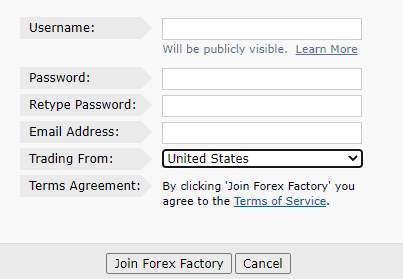 Forex Factory Account
Forex Factory Calendar — Key Tips to Use It Better
One of the simplest tools you’ll be able to use to make better informed trades is the Forex Factory Calendar. As mentioned above, this tool provides a clear overview of all current and short-term global events that can have an impact on the forex market. And we’re going to tell you all about how you can use it to maximise your chances of making a profit!
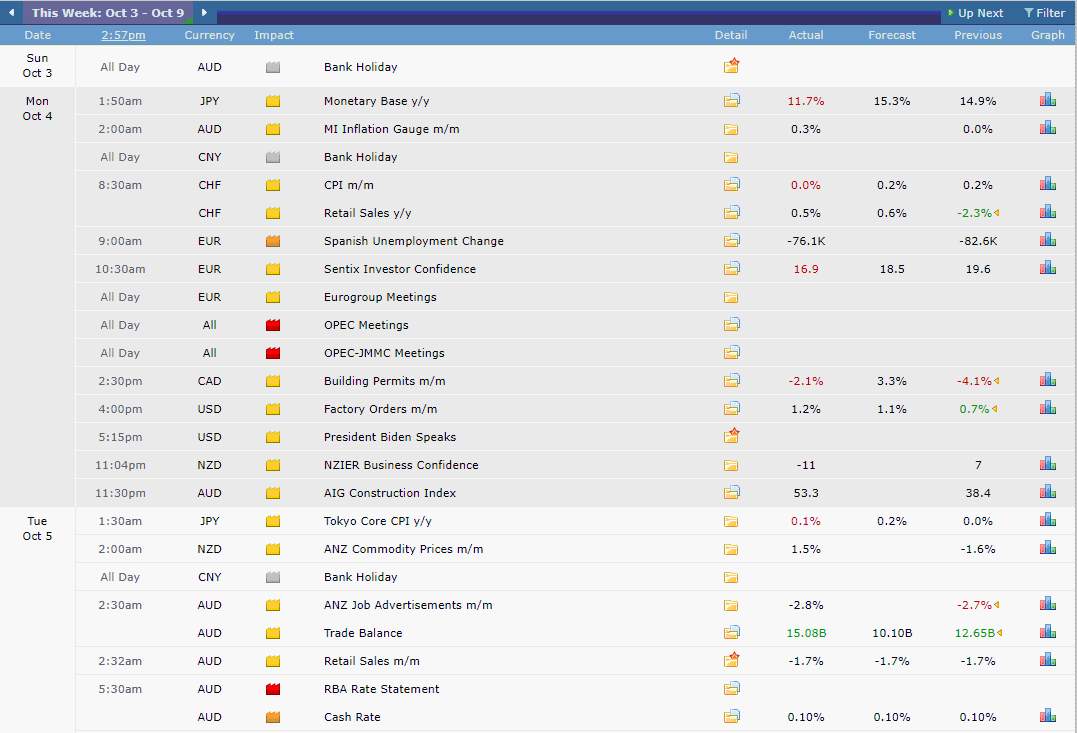 Forex Factory Calendar
Forex Factory Calendar Overview
At first, the Forex Factory Calendar tool may seem complex. However, in reality, you won’t need more than a couple of minutes to get the hang of it — their design team has made sure that all necessary information is available to you at a glance.
The main part of the Calendar tool is this calendar table itself. For each given date, you can see all currency-affecting events — and for those with specific times, you can even see the hours at which they occur. On the left, you can see the currency each event impacts, its name, as well as the expected level of impact. On the right, there are impact projections, which you can also see depicted visually through auto-generated graphs.
To the left of the event list, you will find a tiny calendar which lets you pick a precise date to examine — as well as easy navigation through all the currently analyzed dates.
If the interface seems confusing to you at first, don’t worry — all of the icons have a practical purpose, and you can see a neatly packed legend for all elements on the bottom right.
How To Set Up Forex Factory Calendar
When it comes to using the Forex Factory Calendar, its benefit is pretty obvious — but it’s there only provided you’ve got the correct time. Especially when it comes to financial events that have specific hours, you need to be certain you’ve got the correct settings.
Seeing as the Forex Factory is used by users all around the world, you need to make sure you’ve got the right time zone set on the website. If you’ve correctly chosen your location while making your account, this should already be set by default — but if you change your location or you’ve made a mistake while registering, you’ll need to correct it before using the calendar.
Luckily, you can access the general Forex Factory “clock” by clicking on the time displayed in the header of all pages. This will lead you to the time zone settings, and you can set the correct one there. There’s a handy “Match Automatically” feature that links your device’s time zone to Forex Factory, or you can simply pick the right time zone from an old-fashioned drop-down list.
How to Use Forex Calendar for Trading
As you can see, the Forex Factory Calendar allows you to see every possible currency-related news event, in sync with your local time. However, when you first access the calendar, it can definitely seem overwhelming — there’s an entire world of in-depth financial information displayed from all around the world.
That’s because the default view displays all of the events related to all major currencies. Realistically, you won’t need to see or use all of that information on a daily basis. You simply need to track the events related to the currency pairs you’re trading, in a time frame that’s relevant to your activities. Also, the events are graded by (among other things) their level of impact — depending on how experienced you are with trading, you may not need to see every small event at first.
In the beginning, we recommend setting the event filters to just one or two currency pairs and major events — after that, you can slowly start exploring the calendar in more depth as you become more comfortable with its interface.
How to Use Forex Factory News Calendar Effectively
The Forex Factory News section is another treasure trove of forex-related information. It’s one of the tools that will be essential to your work as a day trader, and it’ll probably be a page you frequently refresh. As such, it’s important to get to know it from the start.
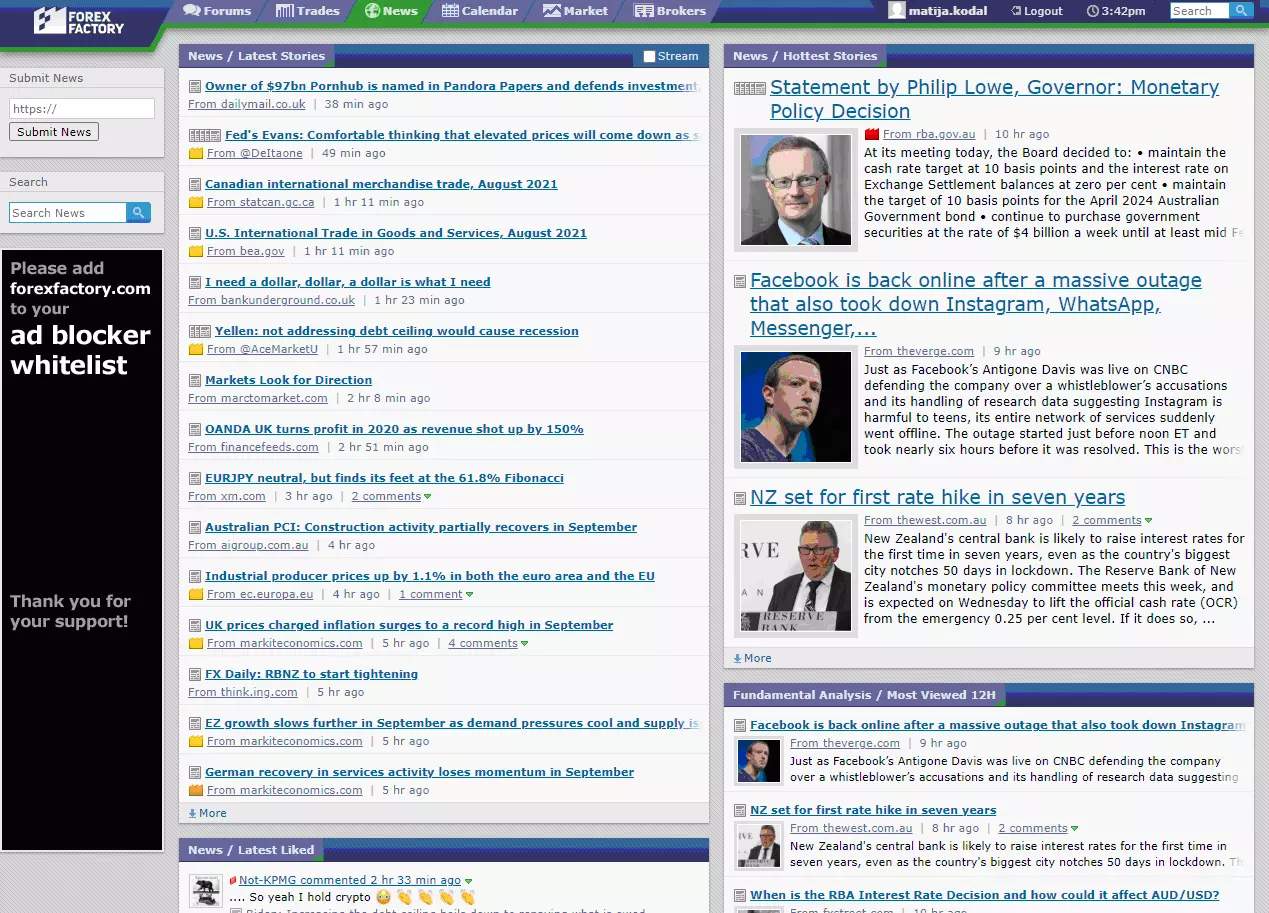 Forex Factory News
On the left panel, you can see the “Submit News” section that all members can use to point the Forex Factory editorial team to various relevant stories. To the right, the main section of the interface consists of currency-related news broken down into categories. The biggest one is the latest news, ordered chronologically — while the rest is divided by its content; from educational news that’s especially useful for beginner traders, to major stories or stories related to specific currency pairs.
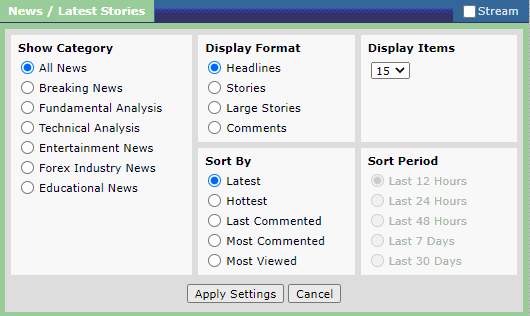 Forex Factory Filters
You can adjust every news box to display the category you’re most interested in — and you can also fiddle with the format and sorting options, depending on your preferences and screen size.
How Does Market Scanner Tool Work?
The tools that we’ve described above allow you to analyze upcoming data and try to make predictions on how the market will move. However, the most detailed analysis depends on more than current and future events — you also need some historical context. And that’s where the Market Scanner tool comes in.
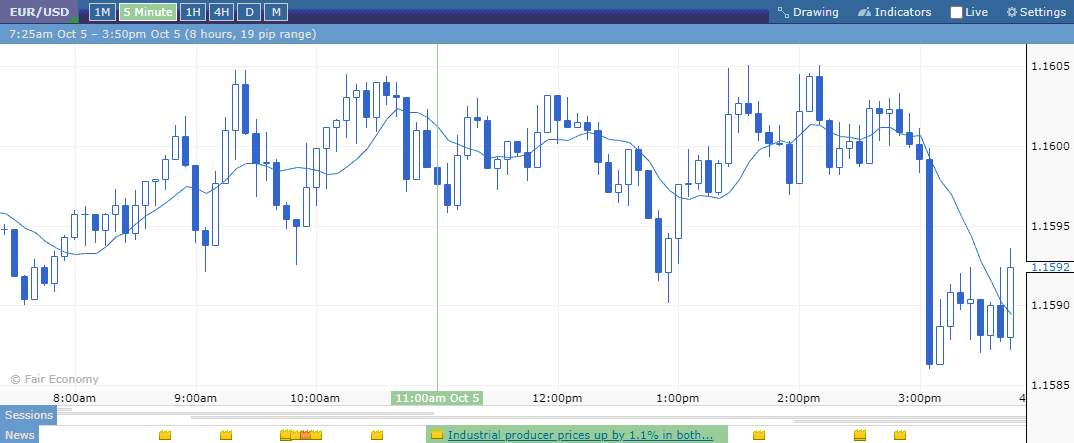 Forex Factory Market Scanner
This is an incredible tool that ties in neatly with the rest of the Forex Factory offer. You can use it to gain a better understanding of the interaction between all types of market-related events and prices on specific currency pairs. Soon enough, you will learn to read the news and make informed predictions on how each event will set off a price hike or drop.
Once you click on the Market tab in the Forex Factory header, you will be greeted with the screen above — a simple price graph at first glance, but actually an immensely powerful tool. You can set it to display the price changes for any currency pair over time — the EUR/USD is the default. It can display multiple time frames — from a minute-by-minute showcase to the entire previous month.
However, once you look closely at the bottom, you will see there’s a small section where this tool pulls data from the Calendar and News. Yes, it shows what forex-related events happened at any point when the market changed — allowing you to draw clear conclusions on how any kind of event will impact the prices in the future.
For example, the screenshot above shows how a 1.1% rise in industrial producer prices has resulted in a short slump for EUR/USD. When the next similar event happens, you’ll know what forex trend to expect as a result.
How To Use the Trade Explorer To Record Your Trading Journal?
Most Forex Factory users would tell you that the Trade Explorer is one of their most invaluable tools. It has many amazing statistical analysis features, but traders mostly use it due to its automatic recording of trades in detail, automatic calculation of each trader’s individual stats, and the marking of all trades on your price chart.
Why should I use this tool?
With hundreds of interactive graphs and metrics, this trade explorer makes it simple for every trader to see their strengths and weaknesses — allowing them to capitalize on the former and minimize the latter.
However, it should be noted that this interface was primarily designed for more experienced users. The statistics are in-depth, and displayed according to the same industry standards used by hedge funds and CTAs.
How to Set Up Forex Factory Journal
Experienced traders are not afraid to share their successes and failures with others — especially on Forex Factory. That’s why the Trade Explorer data can also be used to share your very own Trading Journal with the rest of the Forex community. When you enter the Forums section of the website, you will find the “Trading Journals” part quickly. It contains all of the data shared by other advanced traders, along with their insights and constructive comments from others.
However, bear in mind that this feature is not available to everyone. There are thousands of traders using Forex Factory, and allowing every beginner to start their journal would be counterproductive and difficult to moderate. That’s why the website staff only allow advanced traders to do this — while others can still read their journals and benefit from them as they learn and gain experience.
And once you obtain that status, starting your journal is as easy as starting a new forum thread and importing your data from Trade Explorer.
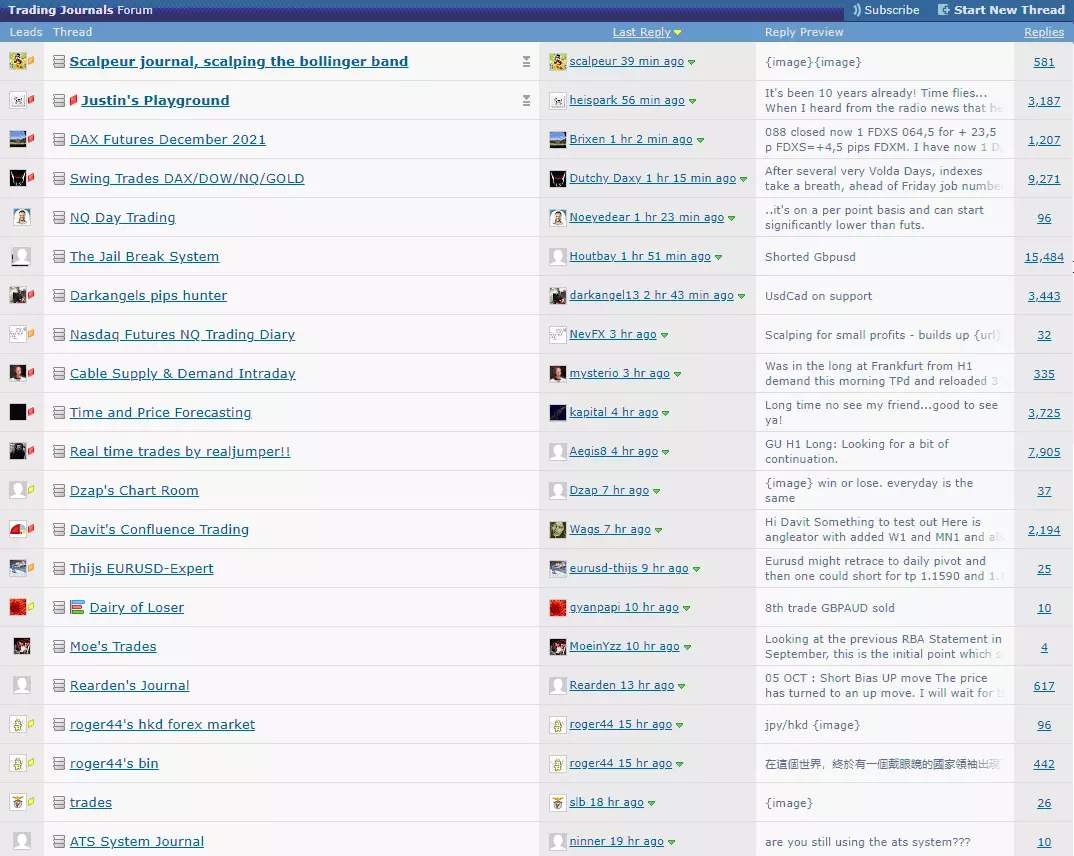 Forex Factory Forum
Automated Trading Reporting
Once you create your own Trade Explorer, all of your historical trading data will be imported from the brokerage account you’ve connected to the Forex Factory. The best part about this is that Forex Factory automatically and securely connects to your brokerage account and gathers new data — so it’s always up to date, in real time.
Even if the automatic synchronization doesn’t happen due to a lack of an Internet connection or some other bug, you can always use the manual sync button to bring it up to speed. As a trader, it’s incredibly useful to have an objective perspective of your performance — and this tool can help you do that better than most broker-specific web interfaces.
Forex Factory Forum
The Forex Factory Forums are a place where members can exchange ideas, debate, and collaborate. This is one of the most populated Forex-specific forums on the entire Internet, and the moderation team constantly ensures there is no spam or low-quality content — a huge part of the forum is made up of experienced traders sharing high-quality posts or answering questions.
When you create a thread to ask a question, you can actually limit replies to members who’ve achieved a specific member rank — ensuring you get the most relevant answers. This will also automatically include any members that you subscribe to.
Brokers Monitor Tool
For beginners who are still looking for the best possible broker, Forex Factory provides help in the form of their Brokers Monitor tool. It contains broker information maintained and updated by the Forex Factory staff, who perform daily research to provide ultimate value to users.
Besides the basic information shown on this page, you can expand every section by clicking on the appropriate icon at the top. Also, most column headers on the page have icons that you can hover over and see more information about the column and its methodology. You can also sort these brokers and individual columns as you see fit.
Crucially, the “spreads” part pulls all of the rates from the standard live accounts of every broker — showing you their current spread displayed in pips. This doesn’t include demo accounts; you’ve got a clear-cut view of what each brokers’ standard traders see.
How Can Market Sentiment Help?
Although plenty of Forex Factory tools can be used to identify market sentiment, there’s one that stands out in particular. On the “Trades” screen, you can see a Positions section — showing you the positions of all the live traders whose brokerage accounts are connected to the Forex Factory on different assets.
You can easily see how many people have decided to short or go long on any given currency pair. However, bear in mind that this is not indicative of the global positions on these currency pairs; the tool is limited to the positions of Forex Factory users.
On the other hand, this is also great because plenty of Forex Factory users (especially those with connected live trading accounts) are highly experienced — meaning their positions can be indicative of the “smart” angle more than the general positions of all Forex traders.
Is Forex Factory Free?
This is actually one of the best parts of Forex Factory — it contains all of the valuable tools we’ve described above, as well as an active community of experienced traders. And all of that for absolutely free! Any beginner can benefit from learning how to trade with more advanced information and seeing what their peers are up to — and you can do that on Forex Factory without paying a dime.
Summary
Finding the right community to join is imperative for any Forex trader — especially for beginners. That’s why Forex Factory is incredibly valuable, as it allows anyone to join their community for free. Even though some of the community features are reserved for advanced members to streamline moderation, anyone can benefit from their package of trading tools for free. The combo of their News and Calendar tools provides all relevant information on real-world events that influence the Forex market.
On the other hand, you can gain an excellent perspective on what impacts Forex currency pairs by examining the Market Scanner — the tool uses event data and pairs it with price changes in one neat graph. Also, the Forums are home to a vibrant community, and you can also use them to record your own Trade Journal.
Finally, if you haven’t selected your first broker — the Brokers Guide will show you in-depth information on all the relevant online Forex brokers across the world. In short, there aren’t many communities that bring this kind of value to the average trader.
FAQs
What is the Forex Factory used for?
This is a highly-complex trading community and platform, giving curated forex information to traders in real-time. The data provided is as versatile as it is complex — containing everything from user journals to economic news and trading strategies.
Which forex broker is legit?
You can use the Brokers Guide to find all of the legal and legitimate brokers in the world.
How do I become an advanced member?
After you connect your Forex Factory account to a live brokerage account, the moderation team decides when you’re ready to become an advanced member and contribute content to the community.
Are all Forex Factory tools free?
Yes, every piece of Forex Factory content is accessible at zero cost to the traders — though some of it requires that a trader reaches the “advanced member” status. However, even that doesn’t require you to pay anything.
Editors' Top Picks and Insights

Bitcoin price prediction based on RSI: Is BTC poised for a new rally?

Toncoin becomes Gram: Why Durov restored token's original name

Why Tether flipping Ethereum is a pivotal moment for crypto

MiCA deadline: Why crypto companies are leaving Europe

From “Holy Trinity” to WLD crash: How Arthur Hayes became a market-moving seller

The world's first trillionaire: How Musk built his fortune on electric cars, space and AI
Related Articles
Team that worked on the article
Upendra Goswami is a full-time digital content creator, marketer, and active investor. As a creator, he loves writing about online trading, blockchain, cryptocurrency, and stock trading.
Chinmay Soni is a financial analyst with more than 5 years of experience in working with stocks, Forex, derivatives, and other assets. As a founder of a boutique research firm and an active researcher, he covers various industries and fields, providing insights backed by statistical data.
Mirjan Hipolito is a journalist and news editor at Traders Union. She is an expert crypto writer with five years of experience in the financial markets.
CFD is a contract between an investor/trader and seller that demonstrates that the trader will need to pay the price difference between the current value of the asset and its value at the time of contract to the seller.
Bitcoin is a decentralized digital cryptocurrency that was created in 2009 by an anonymous individual or group using the pseudonym Satoshi Nakamoto. It operates on a technology called blockchain, which is a distributed ledger that records all transactions across a network of computers.
Scalping in trading is a strategy where traders aim to make quick, small profits by executing numerous short-term trades within seconds or minutes, capitalizing on minor price fluctuations.
Day trading involves buying and selling financial assets within the same trading day, with the goal of profiting from short-term price fluctuations, and positions are typically not held overnight.
Ethereum is a decentralized blockchain platform and cryptocurrency that was proposed by Vitalik Buterin in late 2013 and development began in early 2014. It was designed as a versatile platform for creating decentralized applications (DApps) and smart contracts.

-
 Afghanistan
-
 Albania
-
 Algeria
-
 Angola
-
 Argentina
-
 Armenia
-
 Australia
-
 Austria
-
 Azerbaijan
-
 Bahamas
-
 Bahrain
-
 Bangladesh
-
 Belarus
-
 Belgium
-
 Bolivia
-
 Botswana
-
 Brazil
-
 Brunei
-
 Bulgaria
-
 Cambodia
-
 Cameroon
-
 Canada
-
 Chile
Chile
-
 China
China
-
 Colombia
-
 Congo
Congo
-
 Costa Rica
-
 Cote d'Ivoire
-
 Croatia
-
 Cuba
Cuba
-
 Cyprus
-
 Czechia
-
 DR Congo
-
 Denmark
-
 Dominican Republic
-
 Ecuador
-
 Egypt
Egypt
-
 El Salvador
-
 Estonia
-
 Eswatini
-
 Ethiopia
-
 Finland
-
 France
-
 Georgia
-
 Germany
-
 Ghana
Ghana
-
 Greece
-
 Haiti
Haiti
-
 Hong Kong
-
 Hungary
-
 India
India
-
 Indonesia
-
 Iran, Islamic republic
-
 Iraq
Iraq
-
 Ireland
-
 Israel
-
 Italy
Italy
-
 Jamaica
-
 Japan
Japan
-
 Jordan
-
 Kazakhstan
-
 Kenya
Kenya
-
 Korea
Korea
-
 Kuwait
-
 Kyrgyzstan
-
 Laos
Laos
-
 Latvia
-
 Lebanon
-
 Lesotho
-
 Libya
Libya
-
 Lithuania
-
 Luxembourg
-
 Madagascar
-
 Malaysia
-
 Malta
Malta
-
 Mauritius
-
 Mexico
-
 Moldova
-
 Mongolia
-
 Montenegro
-
 Morocco
-
 Mozambique
-
 Myanmar
-
 Namibia
-
 Nepal
Nepal
-
 Netherlands
-
 New Zealand
-
 Nigeria
-
 North Macedonia
-
 Norway
-
 Oman
Oman
-
 Pakistan
-
 Palestine
-
 Panama
-
 Papua New Guinea
-
 Paraguay
-
 Peru
Peru
-
 Philippines
-
 Poland
-
 Portugal
-
 Puerto Rico
-
 Qatar
Qatar
-
 Reunion
-
 Romania
-
 Rwanda
-
 Saudi Arabia
-
 Serbia
-
 Singapore
-
 Slovakia
-
 Slovenia
-
 Somalia
-
 South Africa
-
 Spain
Spain
-
 Sri Lanka
-
 Sweden
-
 Switzerland
-
 Syria
Syria
-
 Taiwan
-
 Tajikistan
-
 Tanzania
-
 Thailand
-
 Trinidad and Tobago
-
 Tunisia
-
 Turkey
-
 UAE
UAE
-
 Uganda
-
 Ukraine
-
 United Kingdom
-
United States
-
 Uruguay
-
 Uzbekistan
-
 Venezuela
-
 Vietnam
-
 Yemen
Yemen
-
 Zambia
-
 Zimbabwe
- Forex
- Crypto