
How To Create Bybit Wallet Web3: A Complete Beginner’s Guide


Editorial Note: While we adhere to strict Editorial Integrity, this post may contain references to products from our partners. Here's an explanation for How We Make Money. None of the data and information on this webpage constitutes investment advice according to our Disclaimer.
How to create Bybit Wallet step by step:
Bybit has grown into a full trading ecosystem with both a centralized account and a separate Web3 wallet for on-chain activity. This guide explains how to create a Bybit wallet, which networks it supports, and how to set it up safely on mobile or in your browser. If you are unsure how to create a wallet on Bybit for the first time, this walkthrough will help you start using Web3 tools with confidence.
How to create a Bybit Wallet: step-by-step instructions

Bybit Wallet is a non-custodial Web3 tool that links your exchange account to the on-chain market. It allows you to manage assets across multiple networks and connect to DeFi apps and DEXs in one place.
If you want to learn how to create Bybit wallet access without confusion, the setup is simple. You can access the Bybit wallet through the browser extension or the mobile app, and both follow the same basic steps.
Step 1. Visit the Bybit Wallet website
Before you create your Web3 wallet, note that Bybit Wallet has a separate website. Open it and click “Connect Wallet.”

Step 2. Choose a storage type
Before you create a Bybit wallet, decide which version suits you best. There are two options:
Chrome browser extension;
mobile app for Android and iOS.
You can start with one option and install the other later. This way, you can create a Bybit wallet in whatever format is more convenient for you.

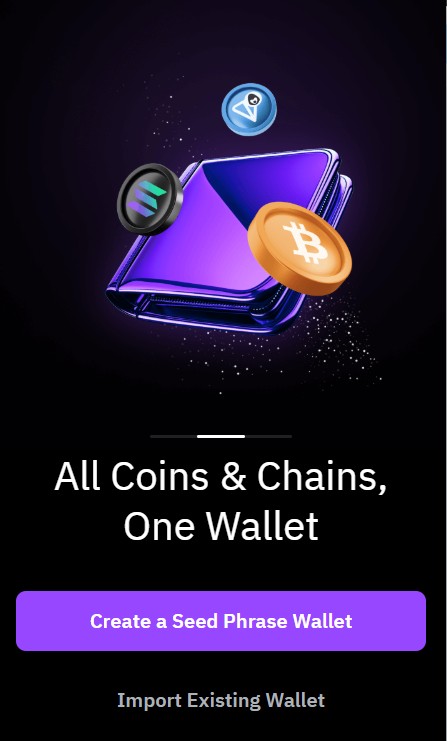
Step 3. Select “Create a Seed Phrase Wallet”
After installation, start registration.
If this is your first non-custodial wallet, choose “Create a Seed Phrase Wallet”.
If you already have a wallet and want to switch to Bybit Wallet, select “Import Existing Wallet.”
Step 4. Set a password
Create a strong password following the required length and character rules. This password protects the wallet on your device.

Step 5. Save your seed phrase
The app will generate a 12-word seed phrase. Write it down and confirm it. Your seed phrase is the only recovery method and is required for ownership verification of your Bybit wallet if you ever restore the wallet on a new device.

Step 6. Start using your wallet
That’s it, your wallet is ready. You can copy your address, fund it, and begin using it. To generate a specific token address, choose the cryptocurrency and network first. To complete the setup, top up a Bybit Web3 wallet by selecting a cryptocurrency, choosing the correct network, generating the deposit address, and transferring crypto to it.
Important! You do not need KYC to create a Bybit wallet. This is a non-custodial wallet, meaning only you control the private keys.
What is a Bybit Wallet?
Bybit Wallet on Web3 is a standalone, non-custodial wallet that gives you direct access to the on-chain market. It is separate from your exchange account and uses its own blockchain addresses, security rules, and approval system. Unlike a custodial CEX wallet, only you control the private keys, which is why your seed phrase is essential for ownership verification of your Bybit wallet during recovery. Unlike the Web3 wallet, a USDT wallet on Bybit within the exchange is custodial, allowing users to manage deposits, balances, and trading funds without handling private keys themselves.
Bybit Wallet is designed for users who want more than simple spot trading. It supports DEX swaps, DeFi tools, NFT storage, and multichain transfers in one interface. Traders use it to explore tokens not yet listed on exchanges, interact with lending and farming protocols, join airdrops, and work with L2 networks and cross-chain routes. These features make it a flexible starting point for anyone learning how to create Bybit wallet access for Web3 activity. Because the wallet operates directly on the blockchain, it is also important to understand how to transfer crypto from Bybit to another wallet when moving assets to external exchanges, Web3 wallets, or other blockchain addresses.

Bybit spot wallet: what is it and how to create it
Many users also search for “how-to” tutorials on opening a Bybit wallet for spot trading. A spot wallet is not a separate product. It is the main balance inside your exchange account where funds are stored for buying and selling crypto at market prices.
Here’s how to open Bybit wallet for spot trading:
Register an account. Go to the Bybit website or app, choose Sign Up, and confirm your email or phone code to activate your account.
Check verification rules. Some regions require basic KYC before deposits or trading, so review the verification status in your profile.
Add funds. Deposit crypto, use P2P, or choose fiat methods. The assets appear in your Spot balance automatically.
Open the Spot section. Select Wallet → Spot to view balances, transfers, and history. You do not need to create a Bybit wallet separately for spot trading because it is built into the account from the start.
What cryptocurrencies does Bybit Wallet support?
Before you create a Bybit wallet, it helps to understand what networks the wallet supports. Bybit Wallet connects to more than 30 blockchains and thousands of tokens. This makes it suitable for early-stage assets, DeFi tools, and cross-chain activity.
Supported ecosystems include:
EVM networks. Ethereum and many L2 or sidechains such as Arbitrum, Optimism, Base, and Scroll, all using the familiar 0x… address format.
Solana. A separate address format used for high-speed, early-market tokens that often appear before centralized listings.
Additional chains. Bybit continues adding networks to expand multichain coverage.
In short, when you create a Bybit wallet, you gain a single interface for a wide range of Web3 assets.
Asset lists change quickly. The most reliable way to check current support is inside the wallet: Assets → All Networks.
Features and key benefits of Bybit Wallet
Bybit Wallet works as a full Web3 toolkit across many networks. Once you know how to create a Bybit wallet, you can manage tokens, interact with DeFi apps, and move assets on-chain through one interface.
Multichain portfolio view. Track assets across different networks in a single dashboard.
Transfer tools. Send and receive tokens with full transaction history and hash details.
Integrated swaps. Swap tokens inside the wallet, including assets not listed on exchanges.
Cross-chain movement. Shift assets between supported networks when available routes permit it.
Web3 earning options. Access staking and other DeFi tools through simple approval flows.
DApp browser. Connect to DEXs, lending protocols, games, and other on-chain apps without external extensions.
NFT support. Store NFTs securely and interact with external marketplaces.
Single EVM address. Use one 0x… address across compatible EVM networks.
Web3 discovery hub. Find airdrops, early tokens, and ecosystem tools directly through the wallet.
Watch-only mode. Monitor any public wallet address without importing private keys.
UTA integration. On-chain tokens can be purchased with funds from the Unified Trading Account.

Non-custodial Bybit Wallet security
Once you understand how to create a Bybit wallet, the next priority is learning safe habits. A non-custodial setup gives you full control, but it also means every mistake is permanent. These practices help protect your funds:
Secure your Bybit account. Use a strong password, avoid shared devices, and update credentials regularly.
Check every website carefully. Phishing pages often copy official branding. Bybit will never request your seed phrase or private keys.
Approve transactions with caution. Only sign actions you recognize. If an approval screen appears unexpectedly, cancel it.
Review and revoke dApp permissions. Old approvals can expose tokens. Use tools like revoke.cash through the wallet’s dApp section and keep small amounts of native gas tokens ready for revocation fees.
Prepare for recovery. Your seed phrase is required for ownership verification of your Bybit wallet if you rebuild it on a new device, so store it securely offline.
These steps greatly lower the chance of losing funds while using on-chain tools.
Risks and warnings
Working with a non-custodial setup requires care because on-chain actions cannot be reversed. These are the main risks to consider when using your Bybit wallet:
Loss of seed phrase. If the phrase is lost, you cannot recover the wallet, and it is required for future ownership verification of your Bybit wallet.
Wrong-network transfers. Sending assets on an unsupported network or to the wrong token standard may lead to permanent loss of funds.
Phishing and fake dApps. Malicious sites can prompt signatures that drain the wallet if you approve them.
Unrevoked permissions. Old or forgotten smart-contract approvals can expose your tokens to unwanted access.
Volatile on-chain assets. Many Web3 tokens face sharp price swings or low liquidity, especially at launch.
Bridge and swap failures. Cross-chain tools may delay, fail, or require higher fees during congestion.
Careful testing, double-checking networks, and keeping most funds in secure offline storage greatly reduces avoidable mistakes.
As users become comfortable managing assets and interacting with Web3 through a Bybit wallet, many naturally look at how it fits into their broader trading setup. At this stage, exploring a few of the best crypto exchanges available in your region can help you compare options for buying, selling, and transferring assets, making it easier to move funds between on-chain wallets and exchange accounts as your activity grows.
| OKX | Coinbase | Crypto.com | Cryptohopper | BTCC | |
|---|---|---|---|---|---|
|
Min. Deposit, $ |
10 | 10 | 1 | No | 10 |
|
Coins Supported |
600+ | 400+ | 400+ | 1000 | 399 |
|
Spot Taker fee, % |
0.1 | 0.5 | 0.5 | 0 | 0.3 |
|
Spot Maker Fee, % |
0.08 | 0.5 | 0.25 | 0 | 0.2 |
|
Alerts |
Yes | Yes | Yes | Yes | No |
|
Copy trading |
Yes | No | No | Yes | Yes |
|
TU overall score |
8.48 | 7.84 | 7.8 | 7.76 | 7.6 |
|
Open an account |
Go to broker Your capital is at risk. |
Go to broker Your capital is at risk. |
Go to broker Your capital is at risk. |
Go to broker Your capital is at risk. |
Go to broker Your capital is at risk.
|
Start slow, build habits, and treat every action with intention

When I teach new users to work with Web3 tools, I always stress the importance of slowing down during setup. Creating a Bybit wallet is simple, yet every choice made in those first minutes influences long-term safety. I check the seed phrase twice, test a small transfer, and review the networks I plan to use before moving larger amounts. These habits help catch mistakes early and make the wallet feel familiar before any riskier activity begins.
Over time, I also learned the value of keeping clear boundaries between daily activity and long-term storage. I use different addresses for experiments, stable holdings, and DeFi interaction, which keeps problems contained if something goes wrong. I treat each signature request as a decision, not a routine click. With a bit of structure and consistent review, a Bybit wallet becomes a reliable tool instead of a source of stress.
Conclusion
Bybit Wallet is a flexible way to work with the on-chain market while keeping full control of your assets. This guide walked through how to create a Bybit wallet, the networks it supports, and the tools available for swaps, DeFi, NFTs, and multichain management. With one interface for many blockchains, it fits beginners and active Web3 users alike. A non-custodial wallet also demands steady habits. Protect your seed phrase, approve transactions carefully, and review permissions often. When these basics become part of your routine, your Bybit wallet can serve as a reliable tool for exploring Web3 safely and confidently.
FAQs
What if you changed your phone and want to restore the Bybit Wallet?
Install Bybit Wallet on the new device and choose “Import Existing Wallet.” Enter your seed phrase. Make sure the device is safe and malware-free before importing.
Why can a transaction get “stuck” in Bybit Wallet?
Usually because the network is congested or gas is too low. First, wait confirmation times can increase during congestion. If your network supports it, speed up or cancel the transaction by resending with a higher fee.
Is it useful to use testnets with Bybit Wallet?
Yes. Testnets help you learn DeFi mechanics (bridges, approvals, swaps) without risking real money.
What’s the safest way to use cross-chain bridges?
Always check which bridge is used in the route and start with a small amount. Review public audits and incident history when possible.
Related Articles
Team that worked on the article
Ivan is a financial expert and analyst specializing in Forex, crypto, and stock trading. He prefers conservative trading strategies with low and medium risks, as well as medium-term and long-term investments.
Dan Blystone began his trading career in 1998 as an arbitrage clerk on the floor of the Chicago Mercantile Exchange (CME). He later traded bond and Eurex futures at proprietary firms such as Altea Trading, gaining valuable experience in high-frequency trading and risk management.
Chinmay Soni is a financial analyst with more than 5 years of experience in working with stocks, Forex, derivatives, and other assets. As a founder of a boutique research firm and an active researcher, he covers various industries and fields, providing insights backed by statistical data.
-
 Afghanistan
-
 Albania
-
 Algeria
-
 Angola
-
 Argentina
-
 Armenia
-
 Australia
-
 Austria
-
 Azerbaijan
-
 Bahamas
-
 Bahrain
-
 Bangladesh
-
 Belarus
-
 Belgium
-
 Bolivia
-
 Botswana
-
 Brazil
-
 Brunei
-
 Bulgaria
-
 Cambodia
-
 Cameroon
-
 Canada
-
 Chile
Chile
-
 China
China
-
 Colombia
-
 Congo
Congo
-
 Costa Rica
-
 Cote d'Ivoire
-
 Croatia
-
 Cuba
Cuba
-
 Cyprus
-
 Czechia
-
 DR Congo
-
 Denmark
-
 Dominican Republic
-
 Ecuador
-
 Egypt
Egypt
-
 El Salvador
-
 Estonia
-
 Eswatini
-
 Ethiopia
-
 Finland
-
 France
-
 Georgia
-
 Germany
-
 Ghana
Ghana
-
 Greece
-
 Haiti
Haiti
-
 Hong Kong
-
 Hungary
-
 India
India
-
 Indonesia
-
 Iran, Islamic republic
-
 Iraq
Iraq
-
 Ireland
-
 Israel
-
 Italy
Italy
-
 Jamaica
-
 Japan
Japan
-
 Jordan
-
 Kazakhstan
-
 Kenya
Kenya
-
 Korea
Korea
-
 Kuwait
-
 Kyrgyzstan
-
 Laos
Laos
-
 Latvia
-
 Lebanon
-
 Lesotho
-
 Libya
Libya
-
 Lithuania
-
 Luxembourg
-
 Madagascar
-
 Malaysia
-
 Malta
Malta
-
 Mauritius
-
 Mexico
-
 Moldova
-
 Mongolia
-
 Montenegro
-
 Morocco
-
 Mozambique
-
 Myanmar
-
 Namibia
-
 Nepal
Nepal
-
 Netherlands
-
 New Zealand
-
 Nigeria
-
 North Macedonia
-
 Norway
-
 Oman
Oman
-
 Pakistan
-
 Palestine
-
 Panama
-
 Papua New Guinea
-
 Paraguay
-
 Peru
Peru
-
 Philippines
-
 Poland
-
 Portugal
-
 Puerto Rico
-
 Qatar
Qatar
-
 Reunion
-
 Romania
-
 Rwanda
-
 Saudi Arabia
-
 Serbia
-
 Singapore
-
 Slovakia
-
 Slovenia
-
 Somalia
-
 South Africa
-
 Spain
Spain
-
 Sri Lanka
-
 Sweden
-
 Switzerland
-
 Syria
Syria
-
 Taiwan
-
 Tajikistan
-
 Tanzania
-
 Thailand
-
 Trinidad and Tobago
-
 Tunisia
-
 Turkey
-
 UAE
UAE
-
 Uganda
-
 Ukraine
-
 United Kingdom
-
United States
-
 Uruguay
-
 Uzbekistan
-
 Venezuela
-
 Vietnam
-
 Yemen
Yemen
-
 Zambia
-
 Zimbabwe
- Forex
- Crypto












