ATAS: Honest Review


Editorial Note: While we adhere to strict Editorial Integrity, this post may contain references to products from our partners. Here's an explanation for How We Make Money. None of the data and information on this webpage constitutes investment advice according to our Disclaimer.
ATAS is a professional platform for trading stocks, futures, and cryptocurrencies. ATAS has about 25 broker/exchange connectors and over 300 indicators.
Advantages: A trading simulator; about 400 types of footprint charts; professional indicators, such as Market Profiles, Delta, DOM Levels, Smart Tape, Cluster Search, Big Trades, and others; an API (application programming interface); a fully functional demo version; and useful educational content
Disadvantages: There are paid features; the Windows version often freezes; the interface and drawing tools may seem unaesthetic; and an additional connection to quote providers is required
Trading a highly competitive business. To survive in it, you need an advantage, and finding one keeps getting harder.
Order Flow trading is one of the ways to improve trading performance. In this article, TU reviews the pros and cons of ATAS, a professional platform for trading stocks, futures, and cryptocurrencies, which makes the most of Order Flow.
What is a professional trading platform?
A professional trading platform is complex software designed for experienced traders and institutional investors. It offers not only “buy” and “sell” buttons and standard candlestick charts, but also advanced features, such as:
the most accurate and flexibly customizable charts with various modes and time frames
real-time processing of market data
technical analysis tools, including many more indicators than the RSI, MACD, and moving averages
algorithmic trading
account management, and a lot more
ATAS is one of such platforms, and you can download it right now for free. If you are seriously aiming for success in stock, cryptocurrency, and futures trading, you must use world class tools.
While ATAS delivers advanced Order Flow analytics and professional-level charting tools, its real effectiveness depends on the broker or exchange you connect it to. Execution speed, liquidity depth, regulatory framework, and trading costs all directly influence how efficiently you can use tools like Footprint charts, Smart DOM, and Market Replay.
Because ATAS supports connections to multiple brokers and exchanges, selecting the right trading partner becomes just as important as choosing the platform itself.
To help you evaluate your options, we’ve outlined several brokers that traders commonly use with professional trading software.
| Trading.com USA | Plus500 | OANDA | FOREX.com | IG Markets | |
|---|---|---|---|---|---|
|
Min. deposit, $ |
50 | 100 | No | 100 | 1 |
|
Tradable assets |
69 | 2800 | 129 | 5500 | 20000 |
|
Standard EUR/USD spread |
1.1 | 0.7 | 0.3 | 1.0 | 0.9 |
|
Max. leverage |
1:50 | 1:300 | 1:200 | 1:50 | 1:200 |
|
Max. Regulation Level |
Tier-1 | Tier-1 | Tier-1 | Tier-1 | Tier-1 |
|
TU overall score |
6.88 | 6.67 | 6.63 | 6.47 | 6.38 |
|
Open an account |
Go to broker Your capital is at risk. |
Go to broker 81% of retail CFD accounts lose money. |
Go to broker Your capital is at risk. |
Study review | Study review |
How to install and start ATAS
This is easy. Register on the ATAS website and sign in to your user account. Credit card details are not required for registration.
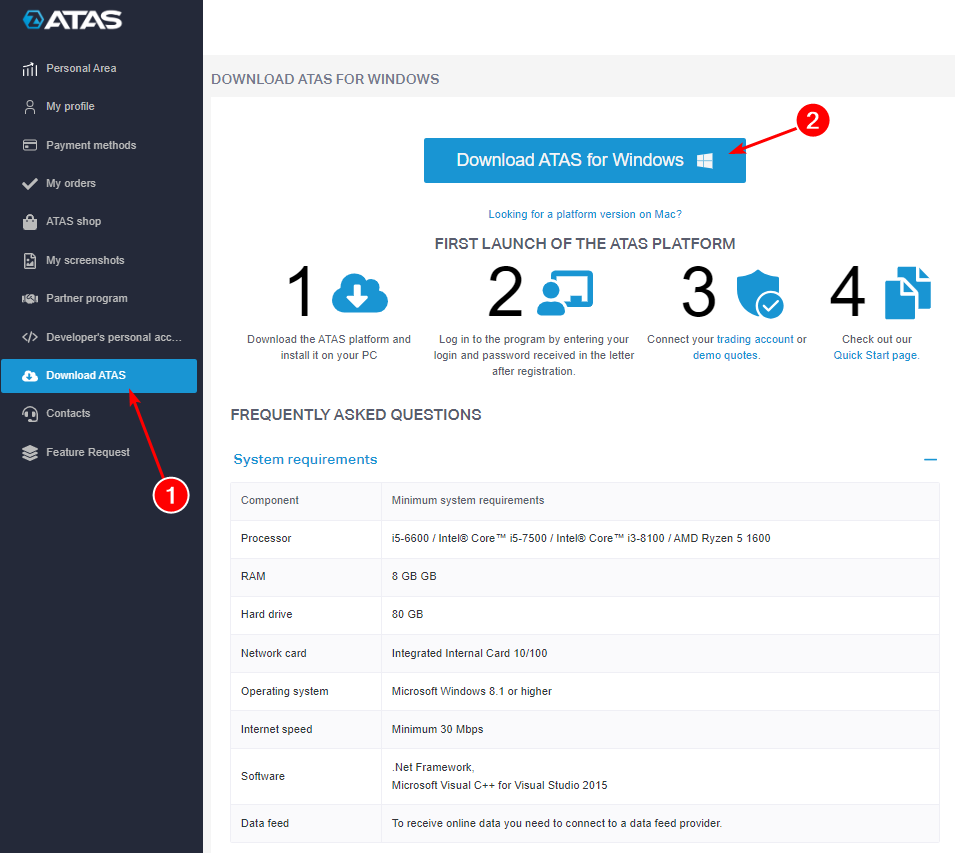 How to download ATAS for free
Next:
Go to “Download ATAS”
Download the installation file
Important! ATAS was initially created for Windows, but the developers are ready to release a MAC version in 2024.
When the installation file is downloaded, install and start ATAS.
Enter your login and password in the welcome window and click OK. That’s it.
Note the Learn section, which includes educational content on using ATAS, as well as Order Flow analysis, Profiles, Level II, and other tutorials.
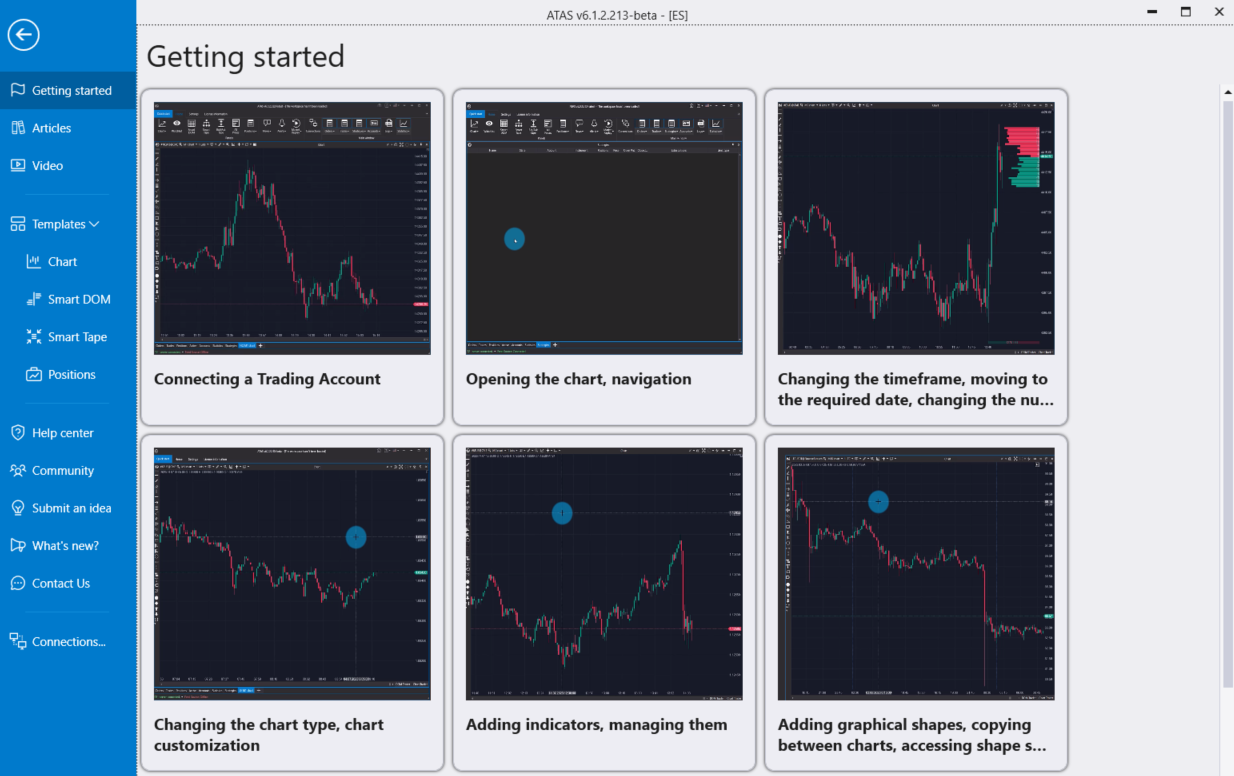 The Learn section on ATAS
It is obvious that ATAS’ team tries to make it easier for users to master this complicated product. And human support is just one of the platform’s advantages.
ATAS advantages
- The platform's benefits also include:
- Custom time frames
- Footprint charts
- 400+ indicators
- Market Replay trading simulator
- Convenient trading features
- Smart Tape and Smart DOM modules
- Regular updates and an API
Let’s briefly look at each advantage before mentioning the downsides.
Custom time frames
ATAS provides advanced features for working with time frames. Besides the standard types, such as 15-minute or 1-hour charts, users can select Range, Tick, Reversal, Volume, and other chart types as shown by number 1 below. The downside is that Point and Figure, Heikin Ashi, Kagi, and some other chart types are not available. However, they are little-known.
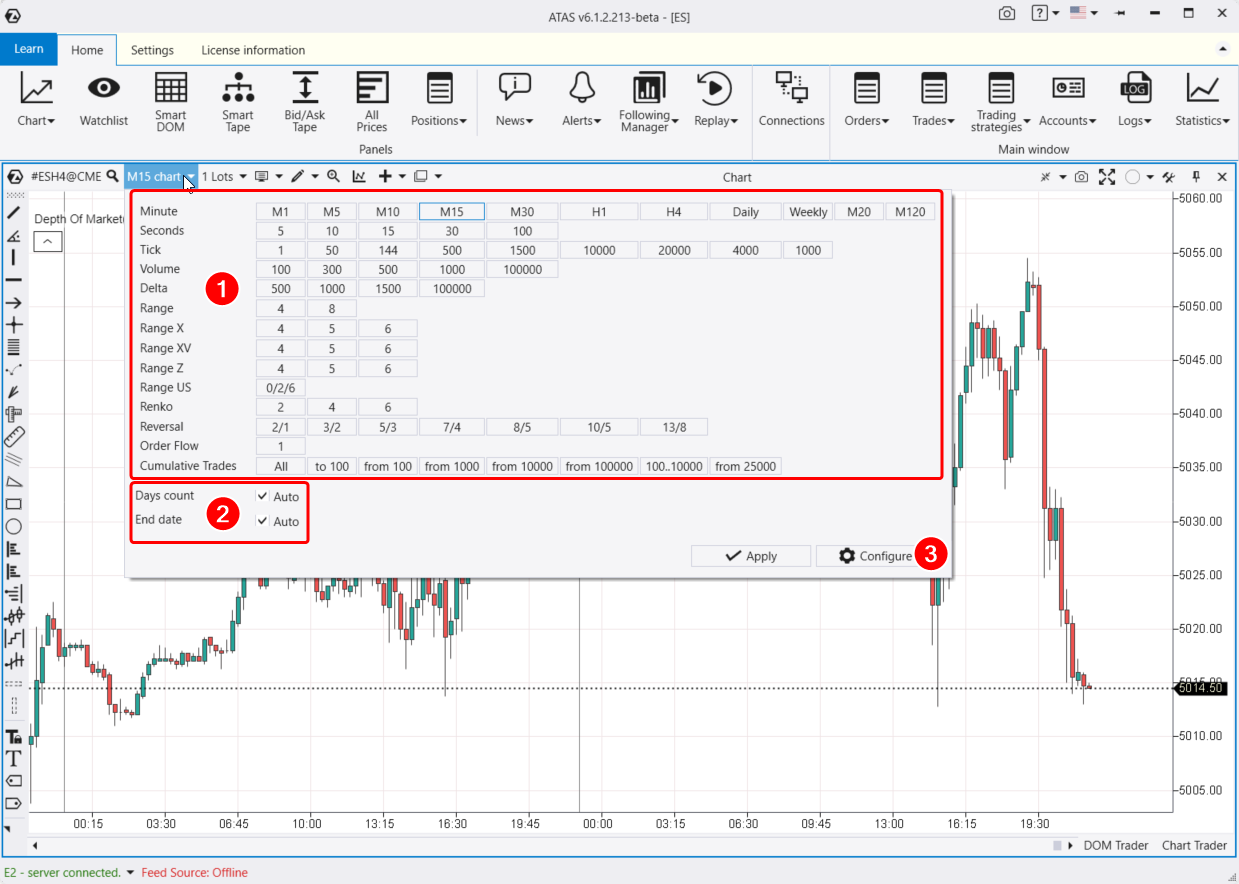 Chart types on ATAS
Number 2 shows the features for loading history. For example, you can see down to the second the consequences of the coronavirus panic in spring 2020.
Number 3 shows the button for creating your own unique time frames.
Footprint charts
To switch a chart to the footprint mode, press Shift+K or stretch the time scale left and right with the mouse.
Footprint mode settings will open on the left as shown by number 1 below. For more settings, press Ctrl+S or click the sign shown by number 3.
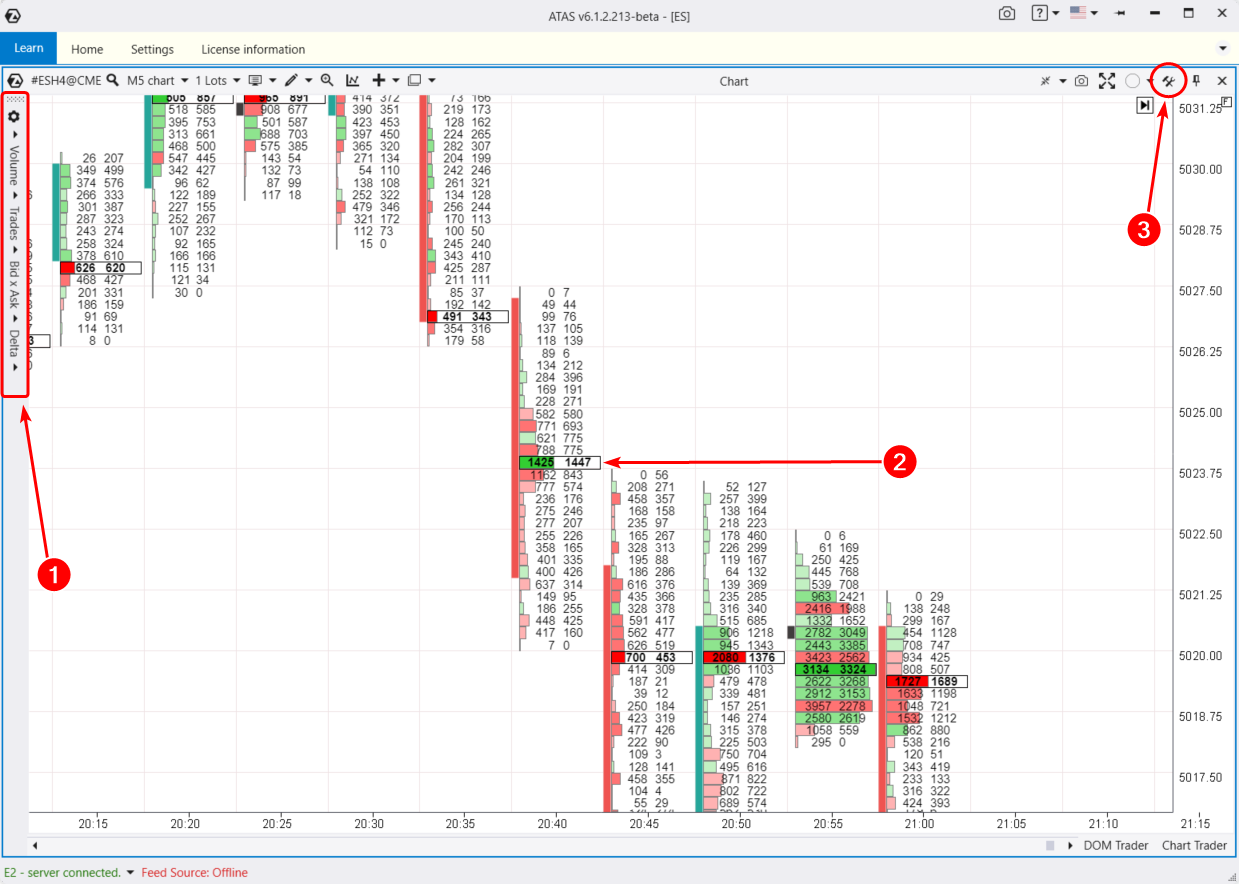 Footprint charts on ATAS
Number 2 shows how useful the footprints can be. Note that the large volume level on the 20:40 candlestick serves as a resistance level for the next few candlesticks, which can be used to open short positions.
400+ indicators
To open the indicator manager, press Ctrl+I or use the context menu by clicking the mouse’s right button on the chart.
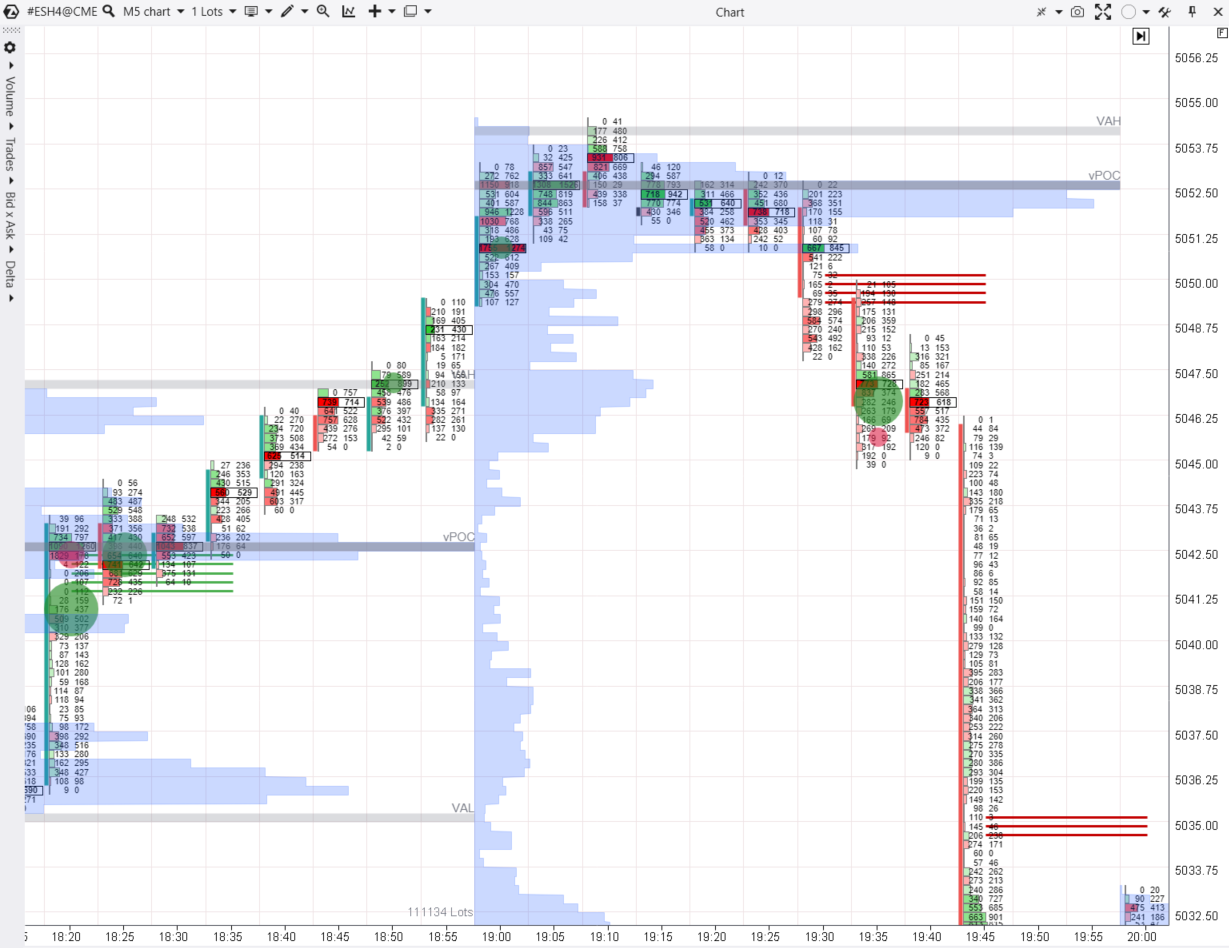 An example of some indicators on ATAS
The following indicators were added to the ES (E-mini S&P-500) futures chart:
Big Trades. The green circles represent the buys and the red ones represent the sells
Market Profile - the blue histogram
Stacked Imbalances - the red and green lines
Indicators can be set once and saved as a template.
Market Replay
This great simulator enables you to learn to use Order Flow, footprints, Level II, and other professional tools for stock, crypto, and futures trading. With Market Replay, you do not risk your capital and learn faster.
To start the simulator, click the Replay button (1), activate the replay mode (2), set the parameters (3), and click Play (4).
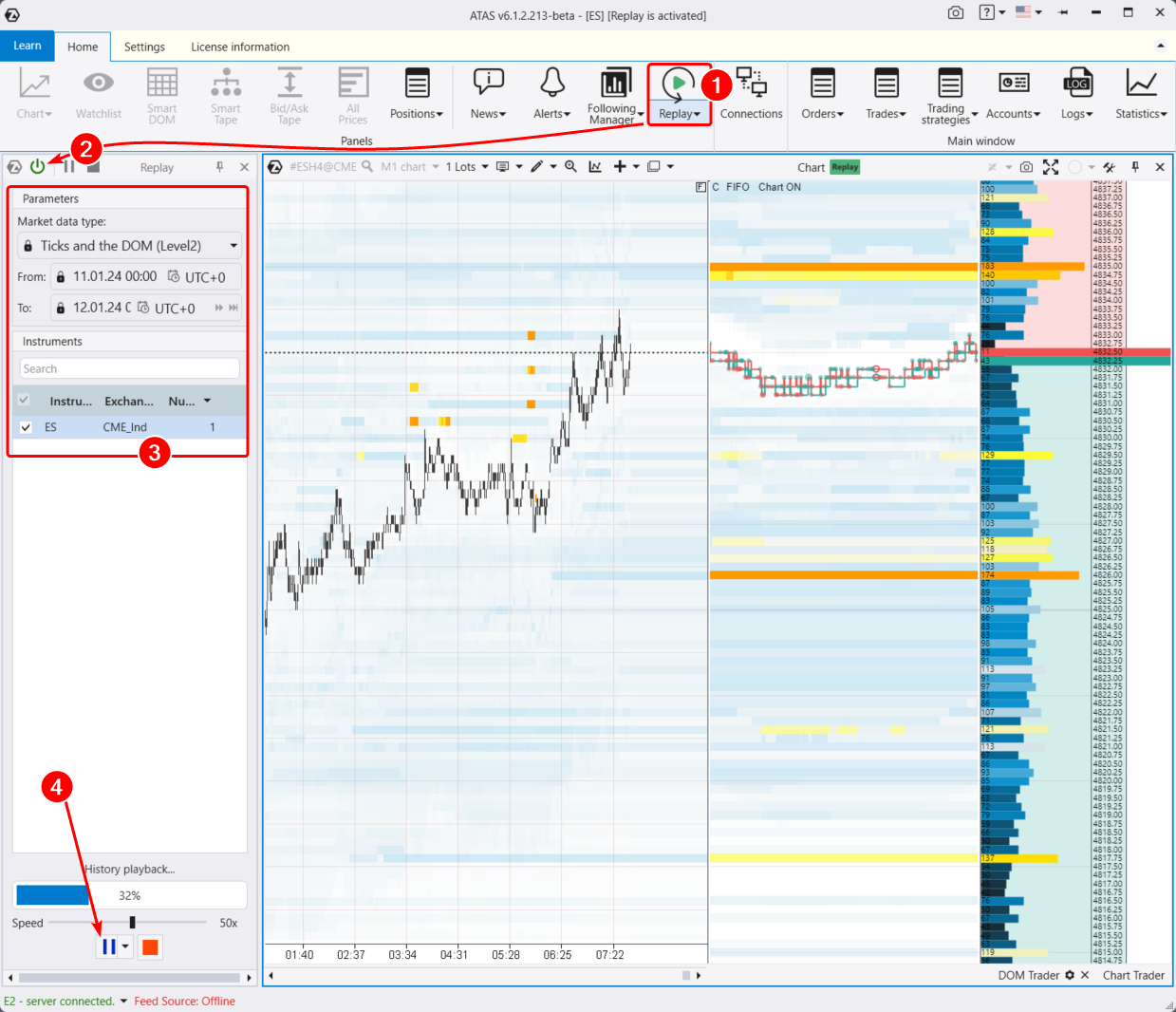 Market Replay at work
The screenshot demonstrates how the Market Replay simulator works. The setup from this example can be used to learn intraday scalping with the application of the DOM Levels indicator and the DOM Trader panel that makes trading more convenient.
Convenient trading
One of the main features is the Chart Trader panel.
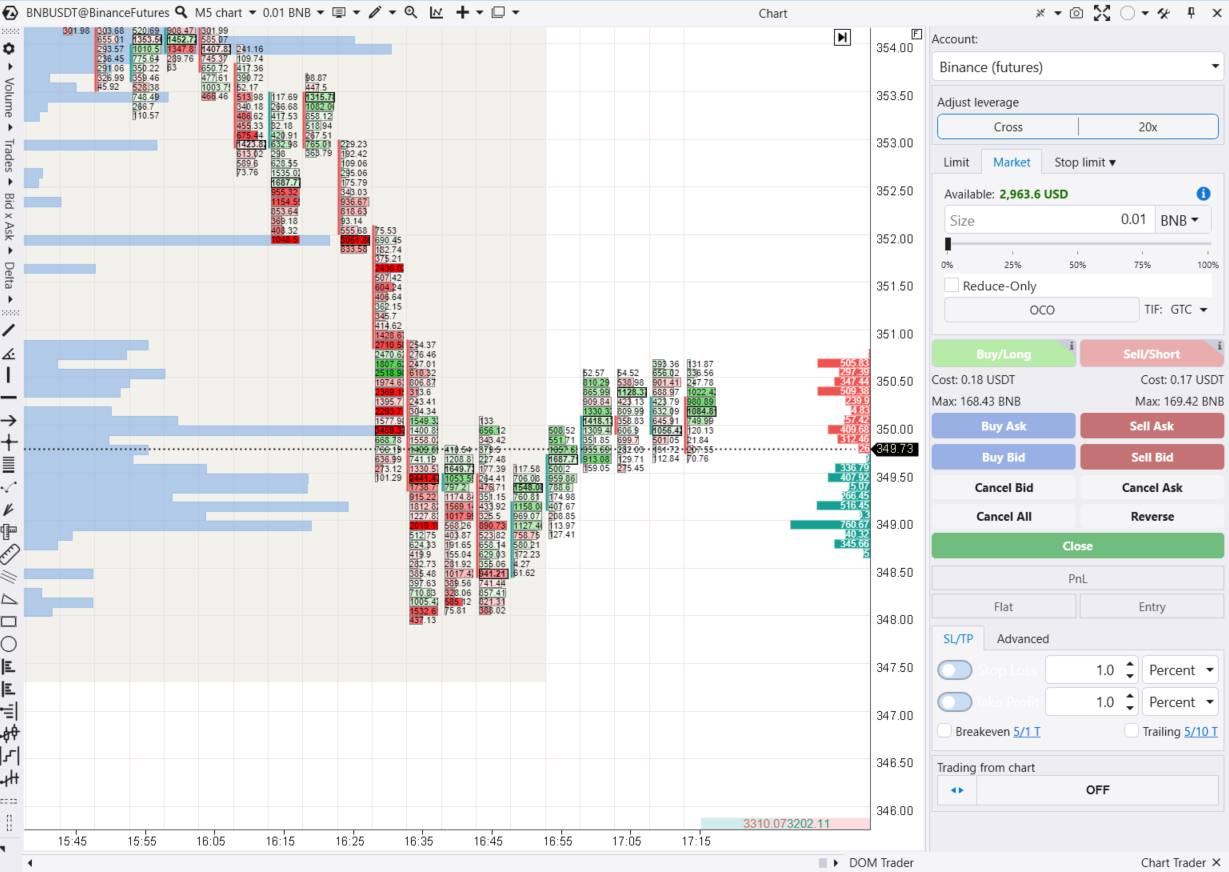 Chart Trader panel
In the crypto market, it allows you to:
select an account, volume, and margin type
set an automatic stop loss, take profit, and trailing stop
set up hotkeys, etc
Smart Tape and Smart DOM
The screenshot below shows the Smart DOM and Smart Tape modules.
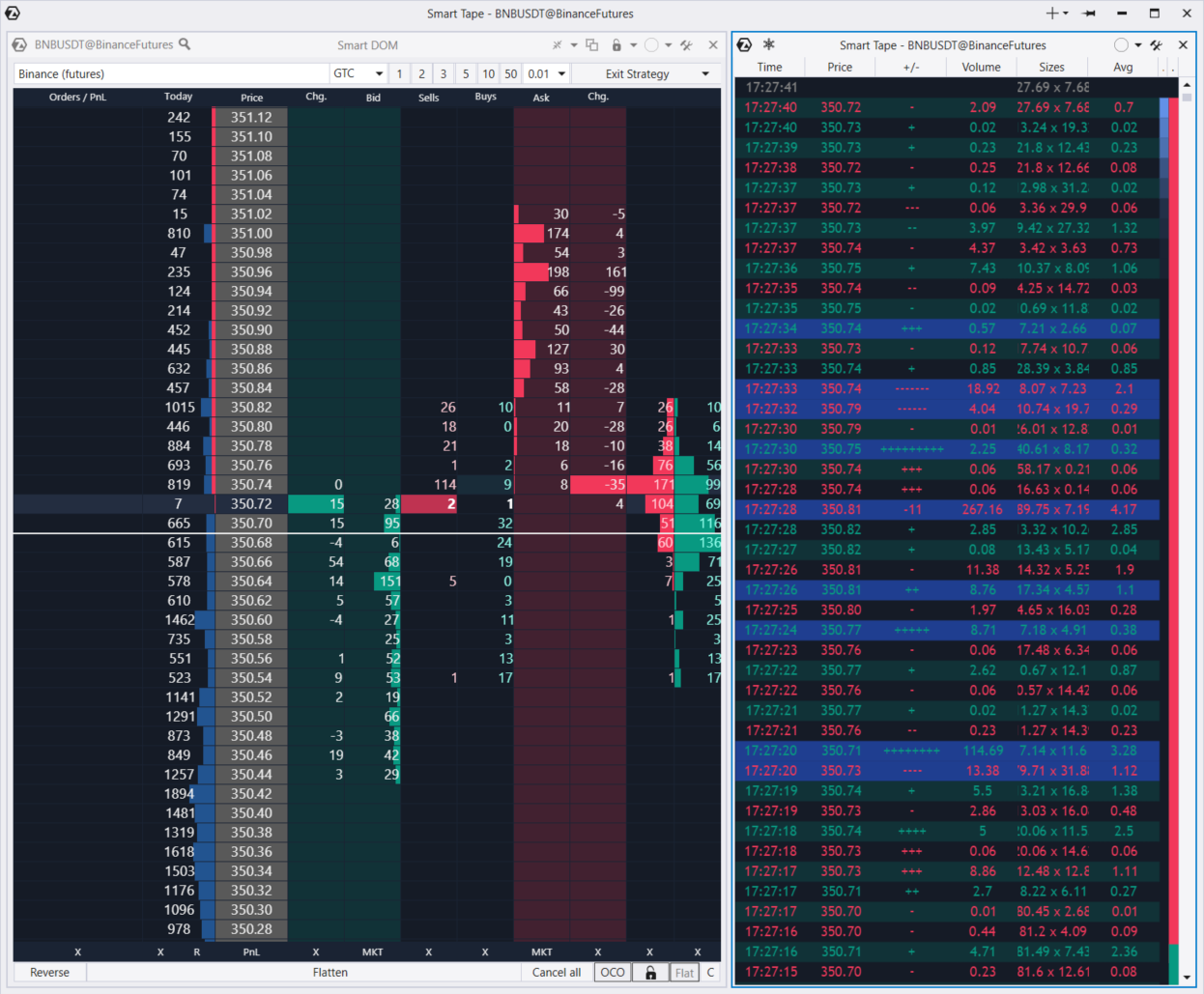 ATAS’ Smart Tape and Smart DOM modules
Smart Tape is a Time and Sales print feed (order flow) that has several useful features:
trade size filter
trade aggregation
feed speed indicator
Smart DOM is an order book that helps you trade, track the number of trades at each price level, and more.
Regular updates and API
Finally, it’s worth noting that:
The platform is regularly updated. Approximately twice a week, beta versions with improvements and corrections are released
Developers interact with users. Users can offer improvements for the platform’s features or vote for the already made changes
You can connect your solutions via the API. These can be your own indicators or trading bots written in C#
ATAS disadvantages
Of course, this review would be unfair if it did not mention the platform’s downsides:
Complexity. It takes more than a month to master the platform
Paid features. The first 14 days of using ATAS are free of charge, after which limits apply. However, compared to competitors, ATAS offers more features for less money
The platform often freezes, which can be a problem for open positions
Design. The interface and drawing tools may seem unaesthetic, although this is not crucially important for trading
Also, take into account that to receive real-time chart updates, you must be connected to quote providers.
I always caution traders to be realistic about their goals

From my perspective, ATAS is not a platform you choose casually – it’s a platform you commit to. I would recommend it primarily to traders who are serious about understanding market microstructure rather than simply reacting to standard price charts. If you are willing to invest time into learning how liquidity, volume imbalances, and order flow truly drive price movement, ATAS can significantly deepen your analytical edge.
However, I always caution traders to be realistic about their goals. If you are a beginner still mastering risk management or basic technical analysis, the complexity may slow you down rather than accelerate your progress. ATAS rewards discipline and structured thinking, but it demands patience in return.
In my view, the best way to approach ATAS is to start with the demo and simulator, test it alongside your current setup, and evaluate whether the additional data genuinely improves your decision-making. Tools alone do not create profitability – but when used properly, advanced analytics platforms like ATAS can refine execution quality and confidence.
Conclusion
ATAS stands out as a robust order flow trading platform, offering traders unparalleled access to advanced analytics, real-time order flow insights, and customizable footprint charts. By integrating a trading simulator, ATAS allows users to sharpen their strategies in a risk-free environment, fostering greater confidence when transitioning to live markets. For example, its detailed volume analysis tools and intuitive chart customization empower traders to identify critical market trends and optimize entry or exit points. Ultimately, ATAS provides the depth and flexibility modern traders need to stay ahead, proving that knowledge-driven trading is the key to consistent success.
FAQs
Does ATAS support automated trading and integration with custom trading bots?
Is ATAS available for operating systems other than Windows?
How does connecting ATAS to different brokers and exchanges impact trading efficiency?
What types of charting tools and indicators are unique to ATAS compared to standard trading platforms?
Editors' Top Picks and Insights






Related Articles
Team that worked on the article
For over 15 years, Oleg worked as a copywriter and journalist at advertising and marketing agencies, as well as radio and television companies. His writing style is aimed at using simple terms to explain only those things that matter to the reader – benefits, risks, and realizable ideas.
Dan Blystone began his trading career in 1998 as an arbitrage clerk on the floor of the Chicago Mercantile Exchange (CME). He later traded bond and Eurex futures at proprietary firms such as Altea Trading, gaining valuable experience in high-frequency trading and risk management.
Chinmay Soni is a financial analyst with more than 5 years of experience in working with stocks, Forex, derivatives, and other assets. As a founder of a boutique research firm and an active researcher, he covers various industries and fields, providing insights backed by statistical data.
Forex trading, short for foreign exchange trading, is the practice of buying and selling currencies in the global foreign exchange market with the aim of profiting from fluctuations in exchange rates. Traders speculate on whether one currency will rise or fall in value relative to another currency and make trading decisions accordingly. However, beware that trading carries risks, and you can lose your whole capital.
Forex leverage is a tool enabling traders to control larger positions with a relatively small amount of capital, amplifying potential profits and losses based on the chosen leverage ratio.
Cryptocurrency is a type of digital or virtual currency that relies on cryptography for security. Unlike traditional currencies issued by governments (fiat currencies), cryptocurrencies operate on decentralized networks, typically based on blockchain technology.
Risk management is a risk management model that involves controlling potential losses while maximizing profits. The main risk management tools are stop loss, take profit, calculation of position volume taking into account leverage and pip value.
Social trading is a form of online trading that allows individual traders to observe and replicate the trading strategies of more experienced and successful traders. It combines elements of social networking and financial trading, enabling traders to connect, share, and follow each other's trades on trading platforms.

-
 Afghanistan
-
 Albania
-
 Algeria
-
 Angola
-
 Argentina
-
 Armenia
-
 Australia
-
 Austria
-
 Azerbaijan
-
 Bahamas
-
 Bahrain
-
 Bangladesh
-
 Belarus
-
 Belgium
-
 Bolivia
-
 Botswana
-
 Brazil
-
 Brunei
-
 Bulgaria
-
 Cambodia
-
 Cameroon
-
 Canada
-
 Chile
Chile
-
 China
China
-
 Colombia
-
 Congo
Congo
-
 Costa Rica
-
 Cote d'Ivoire
-
 Croatia
-
 Cuba
Cuba
-
 Cyprus
-
 Czechia
-
 DR Congo
-
 Denmark
-
 Dominican Republic
-
 Ecuador
-
 Egypt
Egypt
-
 El Salvador
-
 Estonia
-
 Eswatini
-
 Ethiopia
-
 Finland
-
 France
-
 Georgia
-
 Germany
-
 Ghana
Ghana
-
 Greece
-
 Haiti
Haiti
-
 Hong Kong
-
 Hungary
-
 India
India
-
 Indonesia
-
 Iran, Islamic republic
-
 Iraq
Iraq
-
 Ireland
-
 Israel
-
 Italy
Italy
-
 Jamaica
-
 Japan
Japan
-
 Jordan
-
 Kazakhstan
-
 Kenya
Kenya
-
 Korea
Korea
-
 Kuwait
-
 Kyrgyzstan
-
 Laos
Laos
-
 Latvia
-
 Lebanon
-
 Lesotho
-
 Libya
Libya
-
 Lithuania
-
 Luxembourg
-
 Madagascar
-
 Malaysia
-
 Malta
Malta
-
 Mauritius
-
 Mexico
-
 Moldova
-
 Mongolia
-
 Montenegro
-
 Morocco
-
 Mozambique
-
 Myanmar
-
 Namibia
-
 Nepal
Nepal
-
 Netherlands
-
 New Zealand
-
 Nigeria
-
 North Macedonia
-
 Norway
-
 Oman
Oman
-
 Pakistan
-
 Palestine
-
 Panama
-
 Papua New Guinea
-
 Paraguay
-
 Peru
Peru
-
 Philippines
-
 Poland
-
 Portugal
-
 Puerto Rico
-
 Qatar
Qatar
-
 Reunion
-
 Romania
-
 Rwanda
-
 Saudi Arabia
-
 Serbia
-
 Singapore
-
 Slovakia
-
 Slovenia
-
 Somalia
-
 South Africa
-
 Spain
Spain
-
 Sri Lanka
-
 Sweden
-
 Switzerland
-
 Syria
Syria
-
 Taiwan
-
 Tajikistan
-
 Tanzania
-
 Thailand
-
 Trinidad and Tobago
-
 Tunisia
-
 Turkey
-
 UAE
UAE
-
 Uganda
-
 Ukraine
-
 United Kingdom
-
United States
-
 Uruguay
-
 Uzbekistan
-
 Venezuela
-
 Vietnam
-
 Yemen
Yemen
-
 Zambia
-
 Zimbabwe
- Forex
- Crypto