
What Is cTrader And How Does It Work In 2026


Editorial Note: While we adhere to strict Editorial Integrity, this post may contain references to products from our partners. Here's an explanation for How We Make Money. None of the data and information on this webpage constitutes investment advice according to our Disclaimer.
cTrader is a premium trading platform developed by Spotware Systems for FX/CFD trading. cTrader Mobile, Windows, Mac and Web apps provide sub-millisecond processing, multiple order types, precise native charting, advanced protection tools and transparent trade records. The platform supports 86 built-in and thousands of custom technical indicators, while plugins extend it with new tools, services and interface elements. cTrader Algo enables the development of algorithms in C# and Python. Cloud execution of cBots enables 24/7 algo trading from any cTrader app without a VPS. The platform also includes a cross-broker copy service with appealing strategies to invest in. cTrader delivers an advanced toolkit for IBs, including Invite, signal links, deeplinks, shared deals and more. cTrader Store is a secure marketplace for free and paid trading products with trial versions, licensing and source code protection, also offering a choice of trusted brokers. As of 2026, cTrader serves over 11 million traders, has an Excellent Trustpilot score and brings together a community of over 100 thousand members.
cTrader is known for its ultra-fast execution, transparent trading practices and modern interface. It supports a wide range of tools, from advanced charting and technical analysis to fully automated trading through cBots and integrated copy trading. cTrader is available across desktop, web and mobile devices, with settings synced through the cloud.
In this review, our experts break down how cTrader works, what it offers and who it is best suited for in 2026. We cover the platform's key features, pros and cons, broker support and more.
What is cTrader?
cTrader offers a wide set of features built for both new and experienced traders. The platform combines fast execution, professional-grade charting tools, algorithmic trading and copy trading in one package. Below is an overview of what the platform includes.
| Category | What it offers |
|---|---|
| Trading | Sub-millisecond order execution on world-class infrastructure with Equinix data centres in London and New York. Supports 4 order types: market, limit, stop and stop-limit. Includes Depth of market (DOM) with Level II pricing and VWAP. |
| Charting | 8 chart types (Bar chart, Candlestick chart, Line chart, Dot chart, Heikin Ashi chart, HLC chart, Renko chart, Range chart) and 5 period types (time, tick, range, Renko, Heikin Ashi). 86 built-in indicators plus support for custom indicators. Multi-chart layouts with cloud-synced workspaces. |
| Algo trading | cTrader Algo lets traders build and run cBots using C# and Python. Built-in backtesting and optimisation tools. Free 24/7 cloud execution with no need for VPS. |
| Copy trading | cTrader Copy allows users to follow and replicate strategies from other successful traders. Transparent performance stats, equity stop loss protection and no lock-in periods. |
| cTrader Store | A global marketplace for trading products: cBots, indicators, plugins, copy strategies, etc. Traders can install products directly from the Store on any device. Algo creators can publish and monetise their tools. |
| Risk management | Advanced 5-level take profit, stop loss, break-even, advanced SL/TP, price alerts and custom margin calls, trailing stop loss, smart stop-out and fair stop-out mechanisms. Detailed trade receipts and reporting for full transparency. |
| Platform access | Available on Windows, Mac, Web, iOS and Android. Supports 23 languages. The platform is free to use through supported brokers. |
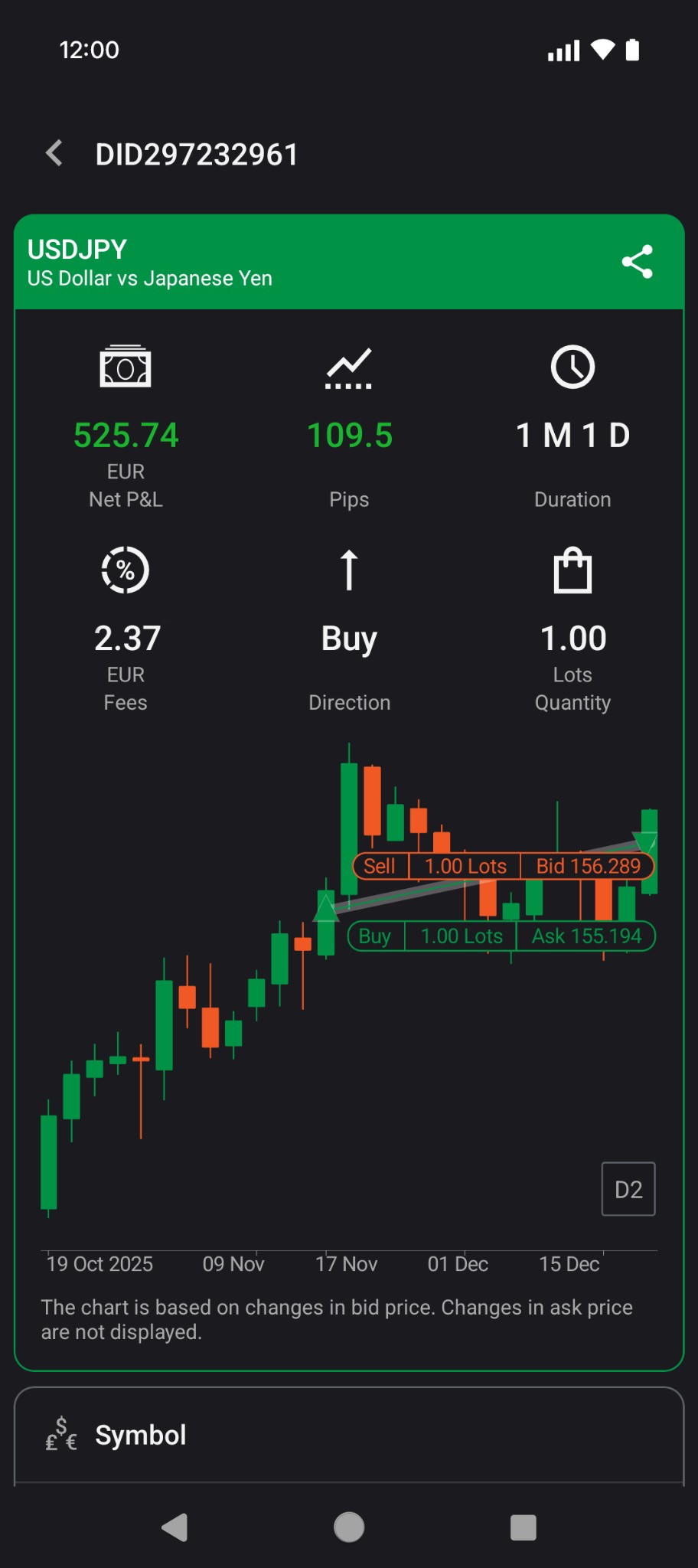
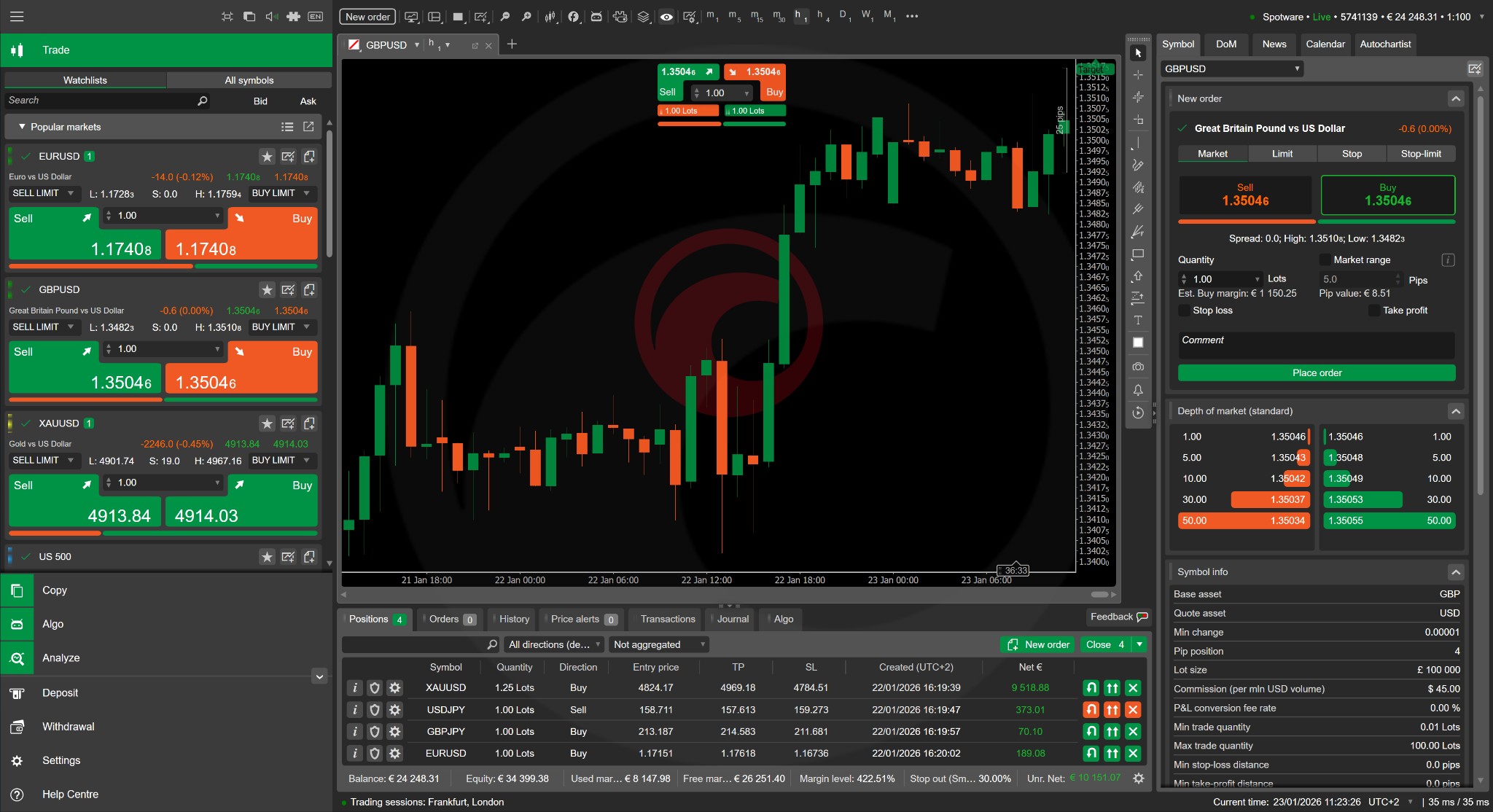
The platform is built around the Traders First™ principle, which means it focuses on fair execution, full transparency and protection against manipulative practices like price injection or stop-loss hunting. cTrader only works with regulated brokers, adding an extra layer of trust for traders, and has never been banned from app stores.
Pros and cons of cTrader
cTrader offers a strong mix of advanced tools and easy-to-use design. However, like any trading platform, it has both strengths and weaknesses. Here is a breakdown of the main pros and cons based on the platform's current capabilities in 2026.
- Pros
- Cons
trusted trading environment that protects traders from scam and unfair practices;
ultra-fast and reliable order execution;
powerful native charting across cTrader apps;
advanced risk management tools (mentioned earlier);
free cloud execution of trading robots for 24/7 algo trading without a VPS;
plugins with cross-app placements for added functionality and UI customisation;
secure marketplace cTrader Store with successful trading products for traders of all levels;
built-in copy trading with ready-to-go successful strategies;
advanced IB toolkit for seamless lead generation and attribution of referrals;
modern, award-winning mobile trading app with top app store ratings;
built-in FX news, economic calendar and executable signals from top providers.
Fewer but more credible brokers because of stricter onboarding. Compared to MetaTrader platforms, fewer brokers currently support cTrader, which limits choice for some traders.
No built-in social community feed. While cTrader does not include a traditional in-app social feed for user discussions, it offers executable trading signals and integrated market news from leading industry providers, allowing traders to access actionable insights and market updates directly within the platform.
Charting and technical analysis tools
cTrader provides one of the most complete charting environments available on any retail trading platform. Its native charting engine combines speed, flexibility and precision, making it suitable for everything from quick scalping setups to detailed swing trading analysis. For traders who want to better understand platform functionality and improve their workflow, exploring cTrader tips can be especially useful, as they demonstrate practical ways to navigate charts, customize layouts, and use tools more efficiently in real trading scenarios.
The platform supports 8 chart types: Bar chart, Candlestick chart, Line chart, Dot chart, Heikin Ashi chart, HLC chart, Renko chart, Range chart. On top of that, it offers 5 period types, including standard time-based periods, tick, range, Renko and Heikin Ashi. This gives traders the ability to filter out market noise and focus on meaningful price movements beyond traditional periods.
For technical analysis, cTrader includes 86 built-in indicators covering trend, oscillators, volatility, volume and other. Traders can also create or import custom indicators through cTrader Algo. This makes the indicator library highly expandable.
The platform also includes a full set of drawing tools for manual chart analysis. These include trendlines, support and resistance levels, Fibonacci retracement and expansion, Andrews pitchfork, equidistant channels, shapes, markers and text annotations. A built-in risk-reward tool helps traders plan entries and exits with clear visual targets on the chart.
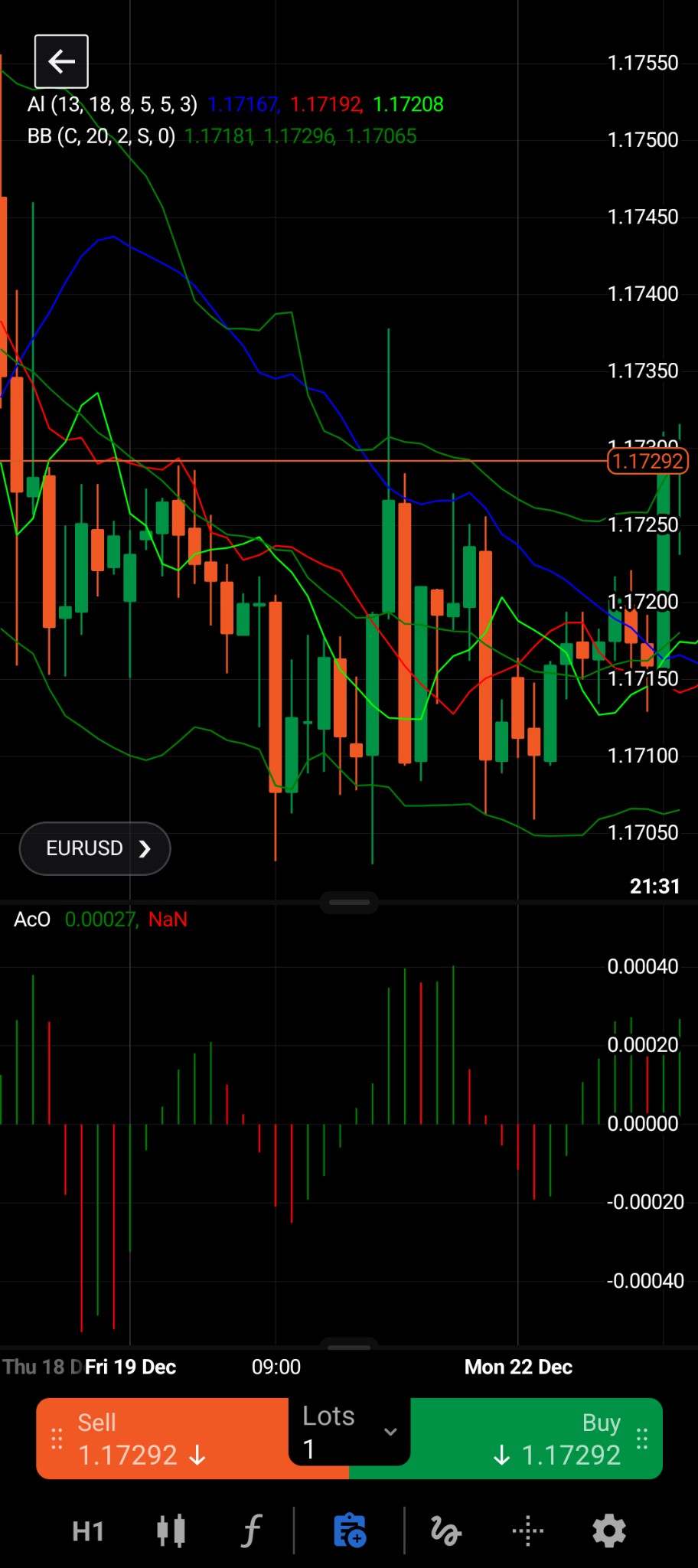
One of the most convenient features of cTrader charting is its multi-chart workspace (supported only in non-mobile apps). Traders can open several charts at once in different layout modes, including multi-chart, single-chart and free-chart. All layouts can be saved as templates and synced across devices through the cloud. Detachable charts also allow multi-monitor setups on desktop, which is useful for traders who track several instruments at the same time.
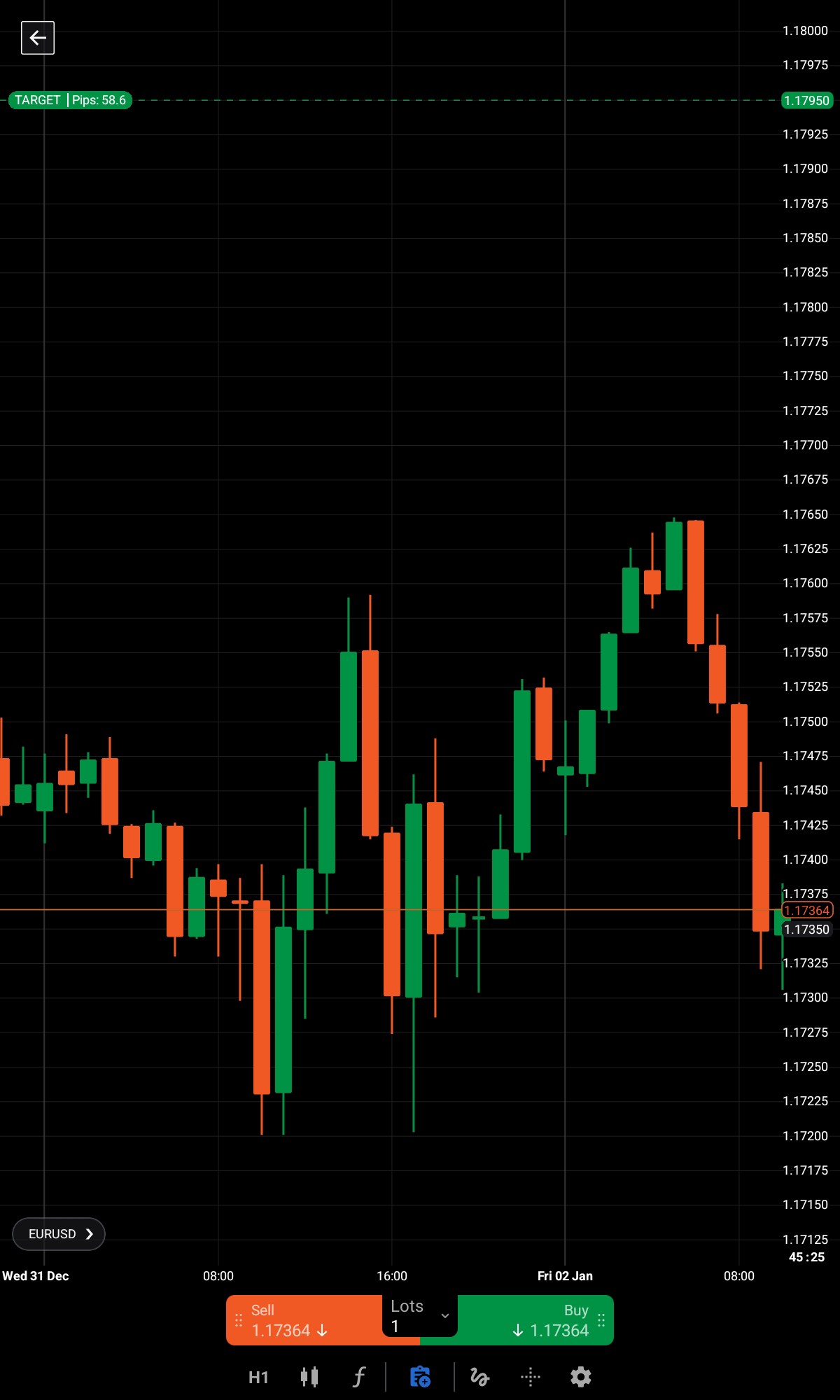
Additional charting features include synchronised crosshairs, detailed zoom and scroll controls, candle countdown, colour themes, etc. These tools improve workflow for active traders who manage multiple open positions across different markets.
Algorithmic trading with cTrader
cTrader provides a powerful environment for algorithmic trading through cTrader Algo. This tool allows traders to develop, test and run automated trading strategies without relying on any third-party software or services.
The core of cTrader automation is the cBot, which is a programmable trading robot that can open and close positions, manage orders and run continuously based on predefined rules. Traders can build cBots using C# or Python, both supported natively within the platform. The built-in code editor is based on Monaco (the same editor used in Visual Studio Code) and includes IntelliSense, syntax highlighting and code templates to speed up development.
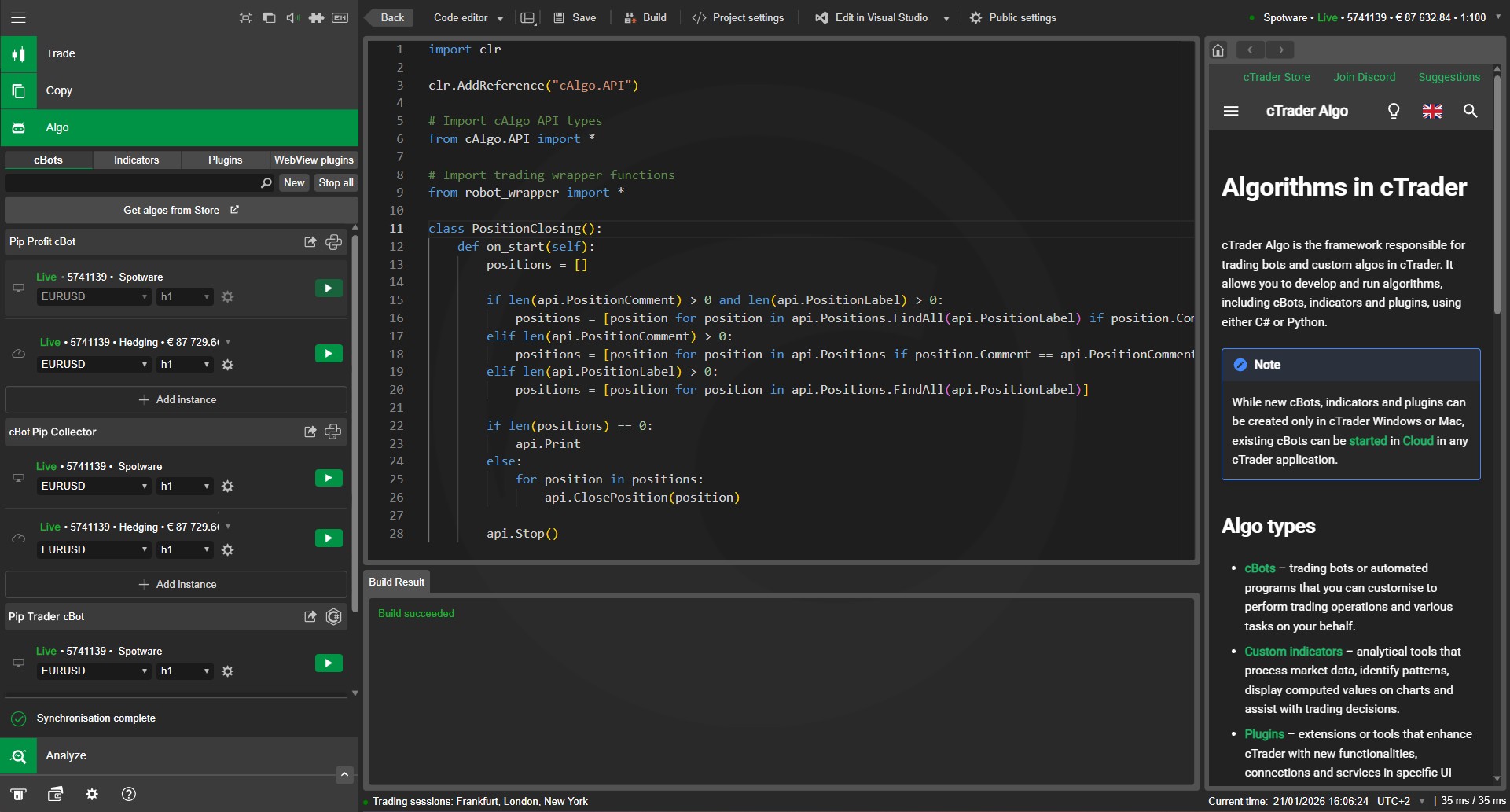
Once a strategy is ready, traders can validate it using cTrader’s built-in backtesting and optimisation tools. Backtesting allows strategies to be tested against historical data across multiple instruments and timeframes, including minute, hourly, and tick-level data. Visual backtesting displays trade entries and exits directly on the chart, making it easier to identify issues related to timing or strategy logic.
The optimisation engine further enhances this process by testing multiple parameter combinations, helping traders refine performance before deploying strategies in live markets.
In addition to testing capabilities, cTrader also provides advanced licensing and protection tools for developers, ensuring that proprietary algorithms and trading robots are securely distributed. These features allow creators to control access to their products, protect intellectual property, and monetise their strategies with confidence within the cTrader environment.
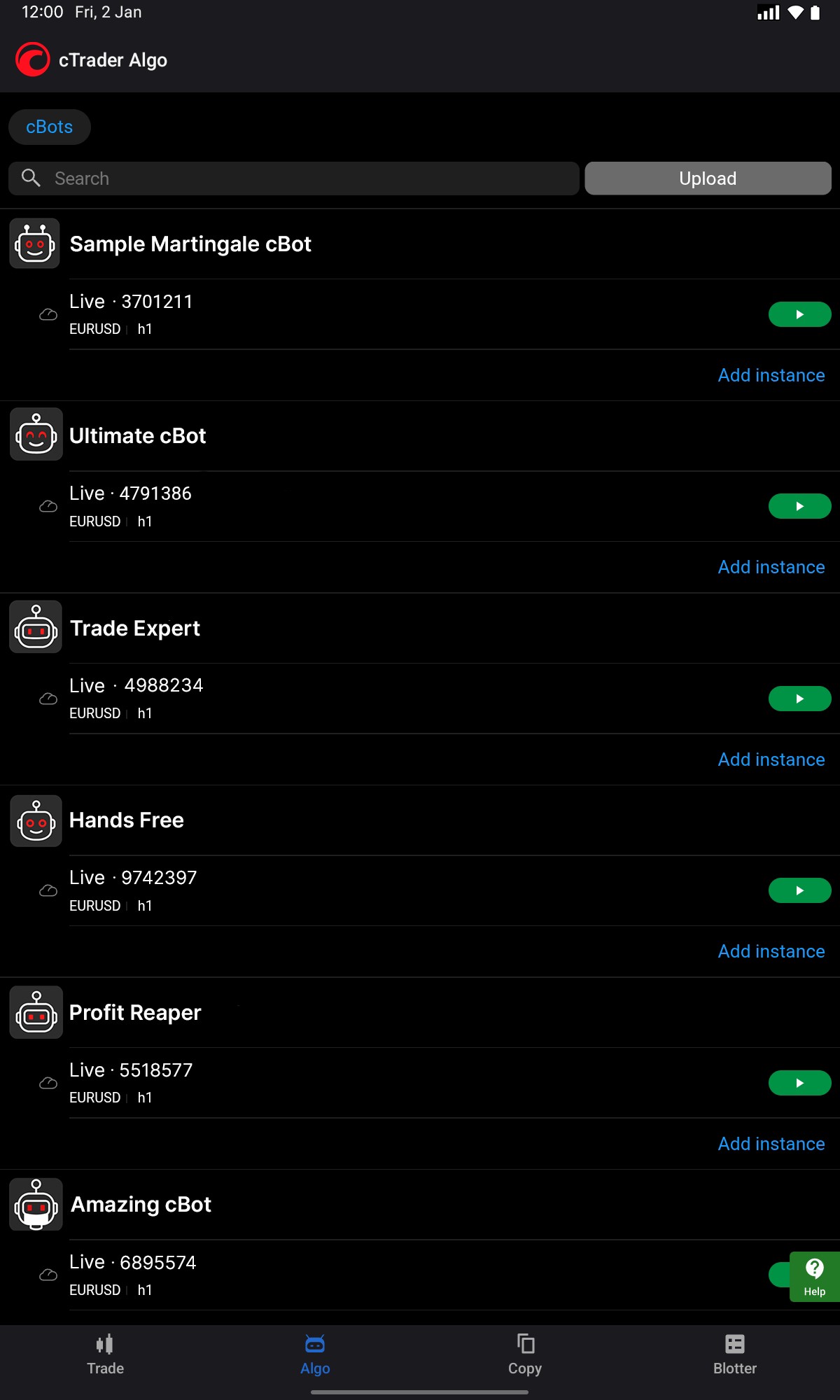
One of the biggest advantages of cTrader for algo traders is its free 24/7 cloud execution. cBots can run around the clock on Spotware's cloud servers without the need for a VPS or a computer that stays on at all times. This removes a major cost and technical barrier that many traders face on other platforms. Cloud-hosted cBots can be launched and managed from any device, including mobile.
Traders with different levels of experience can browse cTrader Store, which offers a growing library of ready-made trading robots, indicators and plugins developed by the community. Developers can also publish their tools in Store, with built-in licensing and source code protection for monetisation. This creates a full environment where both users and creators benefit.
For more advanced use cases, the platform offers Open API that allow developers to build fully custom trading applications for web, desktop and mobile. This supports integration with external analytics tools, AI-based systems and third-party services without vendor lock-in.
Copy trading on cTrader
cTrader Copy is a fully integrated social trading platform that allows users to follow and replicate strategies from other traders in real time. Unlike traditional PAMM or MAM systems, cTrader Copy removes common limitations such as lack of visibility and rigid fee structures, offering a more open and transparent approach.
The system works on an equity-to-equity model. When a strategy provider opens a trade, the same position is mirrored in the follower's account with proportional sizing based on their allocated funds. This ensures fair position sizing regardless of account balance differences between the provider and the investor.
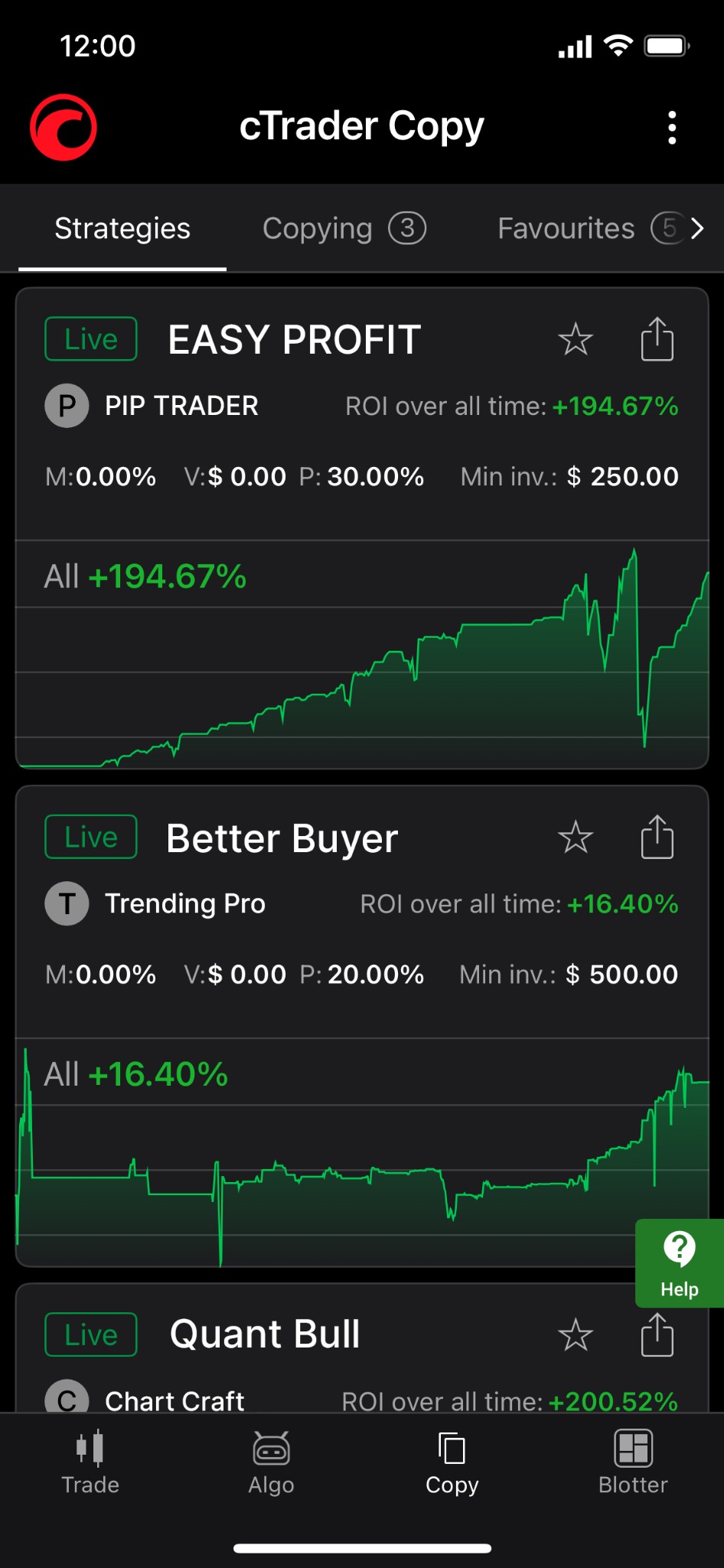
Transparency is a key strength of cTrader Copy. Every strategy page shows detailed performance metrics including ROI over all time, provider funds, investor funds, winning versus losing deals and full volume breakdowns. Open positions and trading history are visible in live mode, so investors can evaluate real performance rather than relying on marketing claims. To be listed on the platform, strategies must meet strict criteria: a positive account balance, at least one open position, at least one deal within the last 72 hours and an all-time ROI above -90%.
For investors, cTrader Copy includes several built-in risk controls. The equity stop-loss feature protects against unexpected drawdowns. There are no lock-in periods, meaning followers can exit or adjust their exposure at any time. A dedicated dashboard provides real-time monitoring of all copied strategies and their performance.
| For investors | For strategy providers |
|---|---|
| Browse hundreds of cross-broker strategies with full performance stats | Set custom fees: performance-based, volume-based and management fees |
| Equity-to-equity copying ensures proportional position sizing | Built-in promotion tools including shareable invite links and profile pages |
| Equity stop loss protection against large drawdowns | Cross-broker access lets investors from any cTrader broker copy strategies |
| No lock-in periods, exit or adjust at any time | Full control over trading account and strategy (manual or automated) |
| Available on desktop, web and mobile with synced settings | Retain full trading independence while monetising performance |
Experienced traders can become a strategy provider and earn fees through their performance. Providers retain full control over their accounts and can choose between manual or automated strategies. The cross-broker design means investors from any cTrader broker can copy a strategy, expanding the provider's potential audience.
cTrader Copy is fully integrated into the platform and works across all devices. There is no need for third-party apps or services, which keeps the experience smooth and consistent.
Plugins that extend copy trading on cTrader
One of the advantages of cTrader’s broader environment is that copy trading does not have to remain limited to the platform’s native interface. Through desktop plugins and WebView plugins, users can add extra functionality and customise how copy trading data is displayed and managed across desktop, web and mobile environments. This is especially useful for traders, strategy providers and partners who want a more tailored workflow than the default setup.
Plugins can be used to introduce custom dashboards, analytics panels, trade calculators, symbol notes, technical widgets and embedded third-party tools directly into the cTrader environment. In the context of copy trading, this can mean clearer monitoring of strategy performance, more convenient allocation tracking, or custom interfaces that help users compare multiple strategies more efficiently. Rather than replacing cTrader Copy, plugins act as an additional layer that enhances usability and adapts the platform to specific trading or business needs.
For strategy providers and partners, plugins also open the door to stronger branding and UI customisation. Brokers or advanced users can integrate bespoke tools, CRM-linked workflows, external analytics, or educational content into the platform interface while keeping the experience native and consistent. This makes cTrader particularly appealing for firms that want to build a differentiated copy trading offering without sacrificing speed, stability or cross-device access.
Because these extensions are part of cTrader’s Open Trading Platform™ approach, they fit naturally into the environment rather than operating as disconnected add-ons. The result is a more flexible copy trading environment where traders can move beyond basic strategy following and create a workflow that better matches their style, goals and level of experience.
IB tools
The cTrader environment provides a comprehensive set of IB (Introducing Broker) tools designed to attract, engage, and convert traders into long-term referrals. At the core of this system is cTrader Invite, supported by advanced sharing and engagement features such as signal links, deeplinks, shared deals, and Shared Access.
cTrader Invite
cTrader Invite acts as an all-in-one partner toolkit that allows IBs to generate tracked referral links and QR codes, attribute users automatically, and monitor performance in real time. Any shared link that includes a partner’s username ensures proper attribution, turning clicks into trackable referrals within the broker’s system.
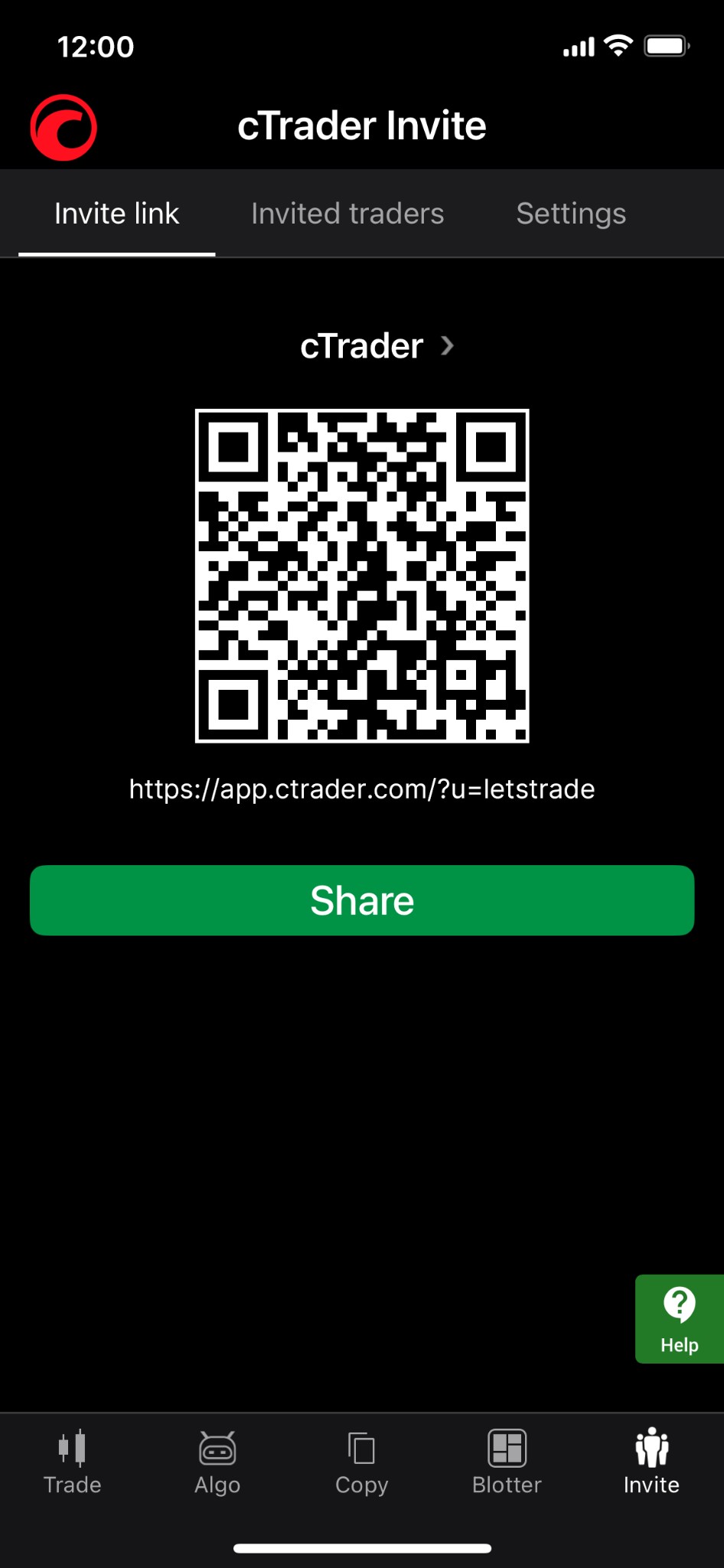
Beyond simple referrals, Invite also enables partners to:
promote specific products (strategies, bots, plugins);
build a personal profile page as a conversion-focused landing hub;
track invited traders and optimise campaigns using analytics.
Signal links
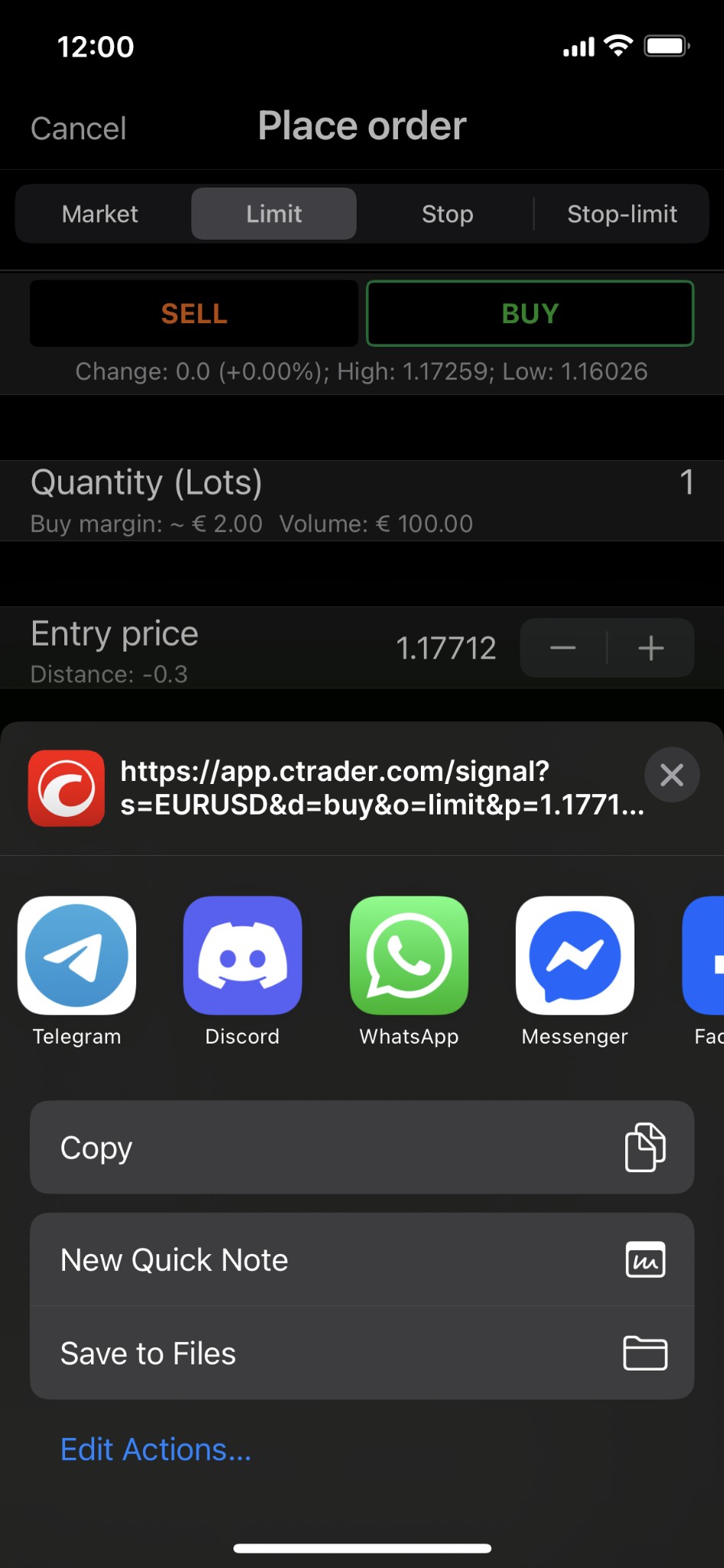
Signal links are designed for real-time trading communication. They allow IBs and traders to share fully configured trade ideas (including entry, stop-loss, and take-profit levels) via a single URL. When clicked, the link opens a pre-filled order screen in cTrader, making execution seamless for followers.
This tool is particularly effective for:
showcasing trading expertise;
distributing trade ideas instantly;
building trust with an audience.
Deeplinks
Deeplinks are advanced URLs that direct users to specific sections or actions within the platform, such as opening an account, making a deposit, or viewing transactions.
For IBs, this means:
creating targeted calls-to-action (CTAs);
reducing friction in the onboarding process;
increasing conversion rates by guiding users to exact actions.
Sharing deals
cTrader allows partners to share specific trading opportunities, strategies, and successful setups directly from the platform. These “deals” can be distributed via invite links or social channels, helping IBs highlight performance and attract new users.
This functionality supports:
content-driven marketing;
social trading promotion;
showcasing profitable strategies.
Shared access
Shared Access tools enable traders to interact with strategies, signals, and trading environments more collaboratively, forming a bridge between IBs and their audience. Combined with Invite links, this feature strengthens engagement and retention by allowing users to follow, copy, or interact with trading activity more directly.
Overall, the cTrader IB toolkit goes beyond traditional referral links. It creates a full conversion funnel — from first click (invite link) to engagement (signals, deals) and final action (deeplinks), helping partners maximise both acquisition and retention within a single environment.
cTrader vs MetaTrader
One of the most common questions traders ask is how cTrader compares to MetaTrader (MT4 and MT5). Both are widely used Forex and CFD trading platforms, but they differ in several important areas. Below is a side-by-side comparison based on the current state of each platform in 2026.
| Feature | cTrader | MetaTrader 4/5 |
|---|---|---|
| Interface | Modern, intuitive design with cloud-synced workspaces and built-in user guide | Functional but dated layout, especially MT4. MT5 is more modern but less polished. |
| Chart types | 8 chart types and 5 period types | MT4: 3 chart types. MT5: 3 chart types with more timeframes. No native Renko or range. |
| Indicators | 86 built-in indicators plus custom indicator support through C# and Python | MT4: 30 built-in. MT5: 38 built-in. Custom indicators through MQL4/MQL5 only. |
| Algo trading | Native C# and Python support. Free 24/7 cloud execution for cBots. No VPS needed. | MQL4/MQL5 only. Requires VPS or always-on computer for continuous operation. |
| Copy trading | cTrader Copy with transparent stats, equity-to-equity copying and cross-broker access | MT4: limited built-in options. MT5: Signals service available but less transparent. |
| Execution | Sub-millisecond execution on Equinix data centres. Depth of Market with VWAP. | Execution depends on broker. DOM available in MT5 but not MT4. |
| Marketplace | cTrader Store with cBots, indicators, plugins, copy strategies and other products, also offering a trusted broker choice | MQL5 Market with EAs and indicators. Larger library but no cloud launch. |
| Mobile apps | Full-featured native apps for iOS and Android. Top-rated in app stores. Available in app stores worldwide | MT4 and MT5 apps available but MT4 is no longer updated for new users on some systems. |
| Broker support | Growing but still fewer brokers compared to MetaTrader | Widest broker support in the industry. Most brokers offer MT4 or MT5 or both. |
| Transparency | Traders First™ principle. No price injection, detailed trade receipts, regulated brokers only. | Transparency depends on individual broker setup. |
For traders who value execution quality, built-in automation and a cleaner user experience, cTrader is the stronger choice. For those who need the widest possible broker selection or are already comfortable with MQL, MetaTrader remains a solid option.
How to start trading on cTrader
Getting started with cTrader is simple and takes only a few steps. Here is how to trade on the platform from account setup to placing your first order.
Step 1. Choose a broker
Select a regulated broker that supports cTrader. Compare trading conditions such as spreads, commissions and available instruments. Later in this article, we list some of the best cTrader brokers to help you decide.
Step 2. Register an account
Sign up with your chosen broker by providing basic details such as your name, email and contact information. Most brokers complete registration within a few minutes.
Step 3. Pick an account type
Decide between a demo account and a live account. A demo account lets you explore the platform and test strategies with virtual funds at no risk. A live account lets you trade with real money.
Step 4. Access the platform
You can download cTrader for Windows or Mac, open it in your browser through the web version at app.ctrader.com, or install the mobile app on iOS or Android. No software installation is needed for the web version.
Step 5. Log in and set up your workspace
Use your credentials to log in. Your workspaces, chart templates and watchlists sync across all devices through the cloud, so you can set up once and access everything from desktop, mobile or web.
Step 6. Fund your account
Deposit funds into your live trading account based on your broker's requirements. Minimum deposits vary between brokers.
Step 7. Start trading
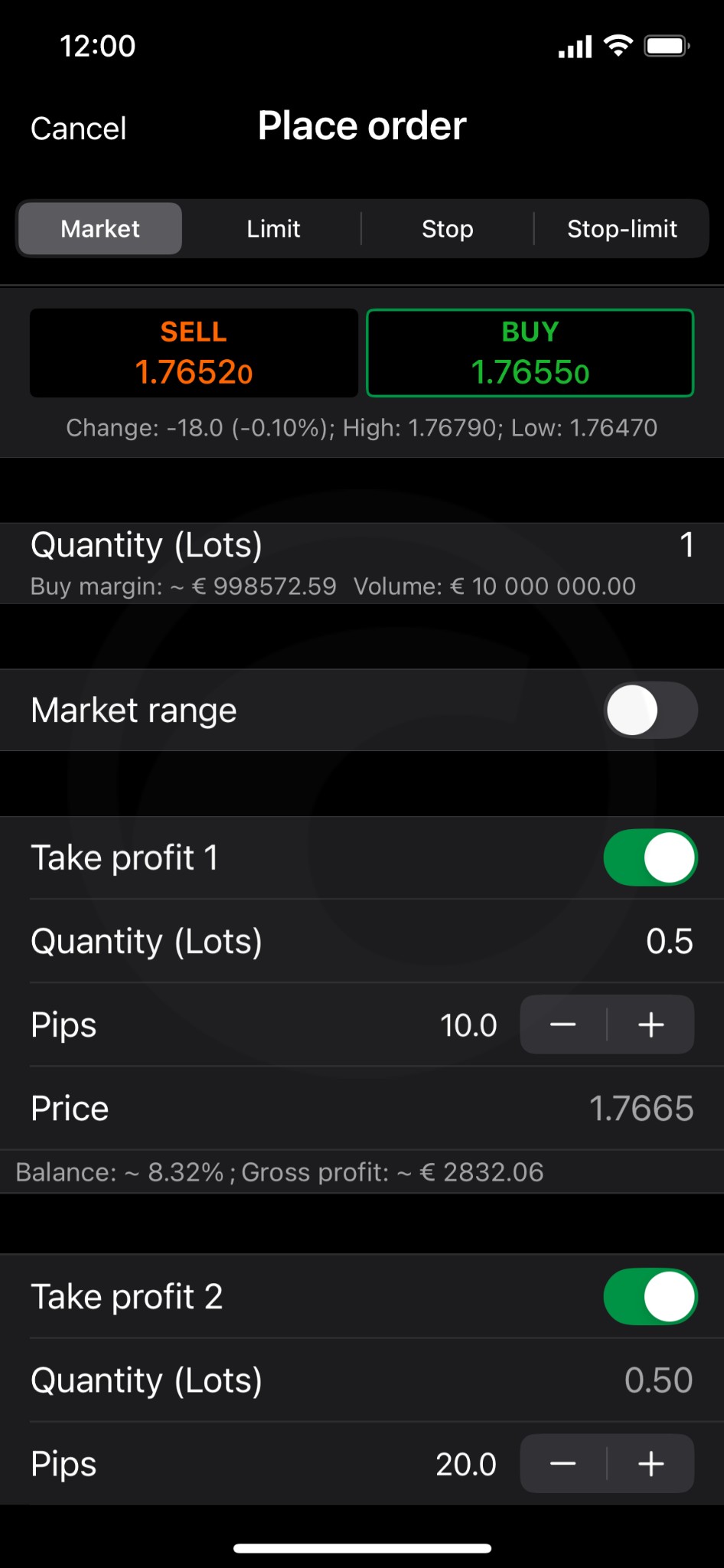
Once funded, you can begin placing orders. cTrader supports 4 order types: market, limit, stop and stop-limit. You can also explore additional features such as copy trading, algorithmic trading with cBots or tools from cTrader Store depending on your strategy.
Best brokers with cTrader
cTrader is supported by a range of well-known Forex and CFD brokers, each offering different trading conditions, fees and market access. Choosing the right broker is an important step because execution quality, spreads and available instruments can vary significantly between providers.
When selecting a broker, consider factors such as regulation, minimum deposit requirements, available asset classes and whether the broker offers both demo and live accounts on cTrader. All brokers listed below have been verified by our experts based on their reliability, trading conditions and regulatory status.
| Pepperstone | Fusion Markets | GTCFX | FxPro | IC.com | |
|---|---|---|---|---|---|
|
cTrader |
Yes | Yes | Yes | Yes | Yes |
|
Tradable assets |
1200 | 250 | 27000 | 2100 | 2250 |
|
Trading bots (EAs) |
Yes | Yes | Yes | Yes | Yes |
|
Copy trading |
Yes | Yes | Yes | Yes | Yes |
|
API |
Yes | Yes | Yes | No | Yes |
|
Negative balance protection |
Yes | No | Yes | Yes | Yes |
|
Max. Regulation Level |
Tier-1 | Tier-1 | Tier-3 | Tier-1 | Tier-1 |
|
Open an account |
Go to broker Your capital is at risk.
|
Go to broker Your capital is at risk. |
Go to broker Your capital is at risk. |
Go to broker Your capital is at risk. |
Go to broker Your capital is at risk. |
Prop challenges and listing
cTrader has created a dedicated environment for prop trading, making it easier for traders to discover, compare, and join funded account programs directly within one interface. Instead of searching across multiple websites, users can access a structured marketplace that aggregates prop firms and their evaluation challenges in one place.
The platform currently features 40+ prop firms and over 500 active challenges, allowing traders to filter options by account size, evaluation steps, profit targets, drawdown limits, and profit split. This structured listing helps both beginners and experienced traders quickly identify programs that match their trading style and risk tolerance.
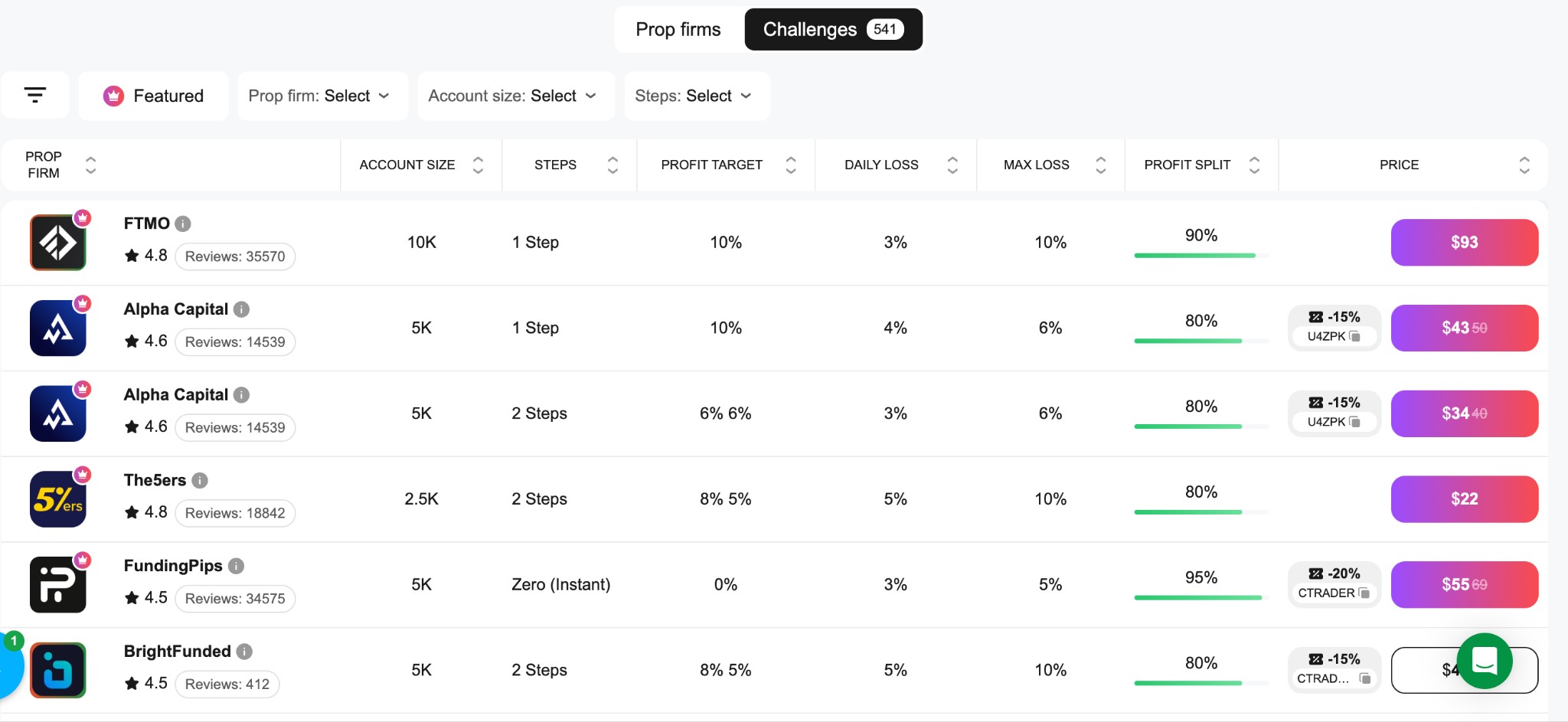
Each challenge is presented with transparent conditions, including:
required profit targets and loss limits;
number of evaluation phases (1-step, 2-step, or instant funding);
profit split after funding;
entry cost and account size options;
In addition to challenges, cTrader also provides a separate listing of prop firms with detailed profiles, allowing traders to review payout policies, supported instruments, commissions, and trading rules before committing.
One important advantage of the cTrader environment is its focus on reliability. Only vetted prop firms are included in the listing, which reduces the risk of dealing with unreliable providers and helps traders make more informed decisions.
Another key benefit is pricing flexibility. Many challenges listed on the platform include discounts of up to 40%, making it significantly more affordable to test multiple strategies or retry evaluations without excessive costs.
Overall, cTrader’s prop challenge marketplace acts as a centralized hub where traders can explore opportunities, compare conditions, and access funded accounts faster — all within a transparent and user-friendly environment.
cTrader Store affiliate programme
The cTrader Store Affiliate Programme introduces a more advanced monetisation model for trading audiences by combining product promotion and broker referrals within a single environment. Unlike traditional affiliate setups that rely on one income source, this program allows partners to earn from two parallel revenue streams, significantly expanding earning potential.
At its core, the programme enables affiliates to generate income in two ways:
cTrader Store commissions — earned when users purchase trading tools such as bots, indicators, or plugins through referral links.
Broker (IB) commissions — earned when referred users register and trade with partner brokers.
This dual structure means that a single user journey can generate multiple monetisation events. For example, a trader may first discover a tool via an affiliate link, purchase it, and later open an account with a broker — allowing the affiliate to earn from both actions.
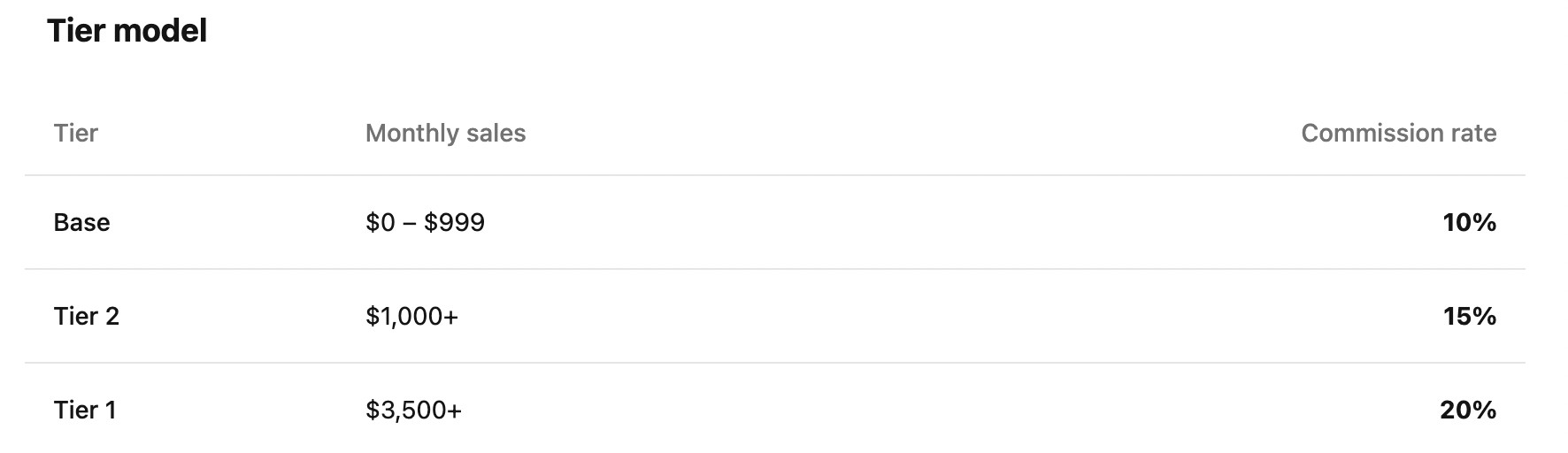
The programme offers commission rates ranging from 10% up to 20% on product sales, with additional long-term earning potential when affiliates refer developers who sell their tools in the cTrader Store. In such cases, partners can earn ongoing commissions from future sales generated by those creators.
A key advantage is flexibility. Affiliates can create referral links to any page within the cTrader environment, including product pages, seller profiles, categories, or curated tool collections. This makes it easy to align links with content formats such as reviews, tutorials, comparisons, or strategy guides.
The programme also includes practical tools to support promotion, such as:
ready-made banners and marketing materials;
performance tracking and analytics;
a 30-day attribution window;
payout thresholds starting from $100.
Importantly, the cTrader Store Affiliate Programme is not limited to introducing brokers. It is open to content creators, educators, bloggers, YouTubers, and community owners, allowing anyone with a trading-focused audience to monetise their traffic without needing to develop their own trading tools.
Overall, the cTrader Store Affiliate Programme extends the traditional IB model by adding a product layer to the monetisation funnel, creating more touchpoints for engagement and significantly increasing conversion opportunities within the trading environment.
Risks and warnings
Key risks to keep in mind:
Market risk. Price volatility in Forex and CFD markets can lead to significant losses, especially when using leverage. Even experienced traders can face unexpected drawdowns during major economic events or sudden market moves.
Execution risk. Although cTrader provides sub-millisecond execution, slippage may still occur during periods of extreme volatility or low liquidity. This applies to all trading platforms, not just cTrader.
Copy trading risk. Following other traders through cTrader Copy does not guarantee profits. Past performance of a strategy provider is not a reliable indicator of future results. Always review a strategy's full history and risk metrics before investing.
Algorithmic trading risk. Automated strategies built with cBots may fail due to coding errors, poor optimisation or unexpected market conditions. Backtesting results do not always reflect live trading outcomes.
Broker dependency. Trading conditions such as spreads, commissions and available instruments depend on the broker you choose. The same strategy may perform differently across different brokers.
Best for active traders who value speed and transparency

I have been using cTrader for both manual and algorithmic trading over the past few years, and it remains one of the most technically solid platforms I have worked with. The execution speed is consistently fast, the charting is clean and responsive, and the ability to run cBots on free cloud servers without a VPS has saved me both time and money. What sets cTrader apart for me is how everything works together. You can go from analysing a chart to building a cBot to copying a strategy, all within the same platform, without needing third-party tools.
That said, I would recommend cTrader primarily to traders who are willing to spend some time learning what the platform can do. Beginners can start with copy trading or a demo account, but the real value comes when you explore the automation tools and deeper charting features. For active traders, scalpers and anyone interested in algo trading, cTrader offers one of the best combinations of speed, transparency and flexibility on the market today.
Conclusion
cTrader stands out as a sophisticated trading platform, offering unparalleled speed, transparency, and flexibility ideal for active and algorithmic traders. Its robust suite of features, such as advanced native charting, seamless cBot automation with free cloud execution, and fully integrated copy trading, creates a powerful and all-encompassing environment for both beginners and experts. For instance, running cBots without needing a VPS and using multi-chart synchronized workspaces directly benefit traders seeking efficiency and innovation. Ultimately, cTrader’s focus on the 'Traders First' principle empowers users to trade smarter and more confidently in an increasingly competitive market.
FAQs
How does cTrader ensure transparency and fairness in trade execution?
What risk management tools are available on cTrader to help protect traders’ accounts?
Can traders access cTrader on multiple devices, and are settings synchronized across platforms?
In what ways can plugins enhance the cTrader trading experience?
Editors' Top Picks and Insights






Related Articles
Team that worked on the article
Viktoras Karapetjanc is a seasoned financial trader, market analyst, and content creator with over 20 years of expertise in Forex, cryptocurrency, and stock markets. As a contributor to the Traders Union website, he provides in-depth analysis, data-driven strategies, and educational content to empower traders of all levels.
Dan Blystone began his trading career in 1998 as an arbitrage clerk on the floor of the Chicago Mercantile Exchange (CME). He later traded bond and Eurex futures at proprietary firms such as Altea Trading, gaining valuable experience in high-frequency trading and risk management.
Chinmay Soni is a financial analyst with more than 5 years of experience in working with stocks, Forex, derivatives, and other assets. As a founder of a boutique research firm and an active researcher, he covers various industries and fields, providing insights backed by statistical data.
Social trading is a form of online trading that allows individual traders to observe and replicate the trading strategies of more experienced and successful traders. It combines elements of social networking and financial trading, enabling traders to connect, share, and follow each other's trades on trading platforms.
Proprietary trading (prop trading) is a financial trading strategy where a financial firm or institution uses its own capital to trade in various financial markets, such as stocks, bonds, commodities, or derivatives, with the aim of generating profits for the company itself. Prop traders typically do not trade on behalf of clients but instead trade with the firm's money, taking on the associated risks and rewards.
Forex trading, short for foreign exchange trading, is the practice of buying and selling currencies in the global foreign exchange market with the aim of profiting from fluctuations in exchange rates. Traders speculate on whether one currency will rise or fall in value relative to another currency and make trading decisions accordingly. However, beware that trading carries risks, and you can lose your whole capital.
A margin call is a demand made by a broker or a financial institution to a trader or investor who is using margin (borrowed funds) to cover potential losses in a trading account. It occurs when the value of the securities or assets held in the account falls below a certain threshold, known as the maintenance margin or margin requirement, as specified by the broker.
Xetra is a German Stock Exchange trading system that the Frankfurt Stock Exchange operates. Deutsche Börse is the parent company of the Frankfurt Stock Exchange.

-
 Afghanistan
-
 Albania
-
 Algeria
-
 Angola
-
 Argentina
-
 Armenia
-
 Australia
-
 Austria
-
 Azerbaijan
-
 Bahamas
-
 Bahrain
-
 Bangladesh
-
 Belarus
-
 Belgium
-
 Bolivia
-
 Botswana
-
 Brazil
-
 Brunei
-
 Bulgaria
-
 Cambodia
-
 Cameroon
-
 Canada
-
 Chile
Chile
-
 China
China
-
 Colombia
-
 Congo
Congo
-
 Costa Rica
-
 Cote d'Ivoire
-
 Croatia
-
 Cuba
Cuba
-
 Cyprus
-
 Czechia
-
 DR Congo
-
 Denmark
-
 Dominican Republic
-
 Ecuador
-
 Egypt
Egypt
-
 El Salvador
-
 Estonia
-
 Eswatini
-
 Ethiopia
-
 Finland
-
 France
-
 Georgia
-
 Germany
-
 Ghana
Ghana
-
 Greece
-
 Haiti
Haiti
-
 Hong Kong
-
 Hungary
-
 India
India
-
 Indonesia
-
 Iran, Islamic republic
-
 Iraq
Iraq
-
 Ireland
-
 Israel
-
 Italy
Italy
-
 Jamaica
-
 Japan
Japan
-
 Jordan
-
 Kazakhstan
-
 Kenya
Kenya
-
 Korea
Korea
-
 Kuwait
-
 Kyrgyzstan
-
 Laos
Laos
-
 Latvia
-
 Lebanon
-
 Lesotho
-
 Libya
Libya
-
 Lithuania
-
 Luxembourg
-
 Madagascar
-
 Malaysia
-
 Malta
Malta
-
 Mauritius
-
 Mexico
-
 Moldova
-
 Mongolia
-
 Montenegro
-
 Morocco
-
 Mozambique
-
 Myanmar
-
 Namibia
-
 Nepal
Nepal
-
 Netherlands
-
 New Zealand
-
 Nigeria
-
 North Macedonia
-
 Norway
-
 Oman
Oman
-
 Pakistan
-
 Palestine
-
 Panama
-
 Papua New Guinea
-
 Paraguay
-
 Peru
Peru
-
 Philippines
-
 Poland
-
 Portugal
-
 Puerto Rico
-
 Qatar
Qatar
-
 Reunion
-
 Romania
-
 Rwanda
-
 Saudi Arabia
-
 Serbia
-
 Singapore
-
 Slovakia
-
 Slovenia
-
 Somalia
-
 South Africa
-
 Spain
Spain
-
 Sri Lanka
-
 Sweden
-
 Switzerland
-
 Syria
Syria
-
 Taiwan
-
 Tajikistan
-
 Tanzania
-
 Thailand
-
 Trinidad and Tobago
-
 Tunisia
-
 Turkey
-
 UAE
UAE
-
 Uganda
-
 Ukraine
-
 United Kingdom
-
United States
-
 Uruguay
-
 Uzbekistan
-
 Venezuela
-
 Vietnam
-
 Yemen
Yemen
-
 Zambia
-
 Zimbabwe
- Forex
- Crypto










- What is cTrader
- Pros and cons of cTrader
- Charting and technical analysis tools
- Algorithmic trading with cTrader
- Copy trading on cTrader
- IB tools
- cTrader vs MetaTrader
- How to start trading on cTrader
- Best brokers with cTrader
- Prop challenges and listing
- cTrader Store affiliate programme
- Risks and warnings
- Expert opinion
- Conclusion
- FAQs


