
InstaForex MT4 Review - How to Download and Set Up?


Editorial Note: While we adhere to strict Editorial Integrity, this post may contain references to products from our partners. Here's an explanation for How We Make Money. None of the data and information on this webpage constitutes investment advice according to our Disclaimer.
InstaForex MT4 is a widely used platform for trading Forex and CFDs. It features a user-friendly interface, real-time quotes, multiple order types — including pending orders and a trailing stop — as well as automated trading through Expert Advisors. The platform is available as a web version, a desktop application, and mobile apps for Android and iOS. It also supports a wide range of technical indicators and chart analysis tools.
InstaForex is a modern broker company specializing in providing high-quality services for trading on Forex markets. InstaForex MT4 Trading Terminal is among the most popular offerings from the platform, allowing traders to send two orders simultaneously, open four pending orders, and use trailing stops.
Like most other international brokers, InstaForex also offers MT4 and MT5 trading platforms. In this guide, we explain the InstaForex MT4 download and set-up process and describe the extra perks traders get with this platform.
InstaForex MT4 review


MetaTrader 4, or MT4, is a widely used electronic trading platform for retail foreign exchange. Russian software company MetaQuotes Software Corp developed the platform and is currently licensing the MT4 software to almost 500 brokers and banks worldwide.
MT4 has a user-friendly interface and offers many features to make forex trading more convenient. In addition, MT4 is available for most devices, including Windows, iPhone, and Android.
One of the main reasons MT4 is so popular is its ease of use. The platform has a well-designed interface that is both user-friendly and customizable. You can easily access all the features you need with just a few clicks.
It also has plenty of features. Some of the most popular include:
A large variety of technical indicators
Customizable charts
Real-time quotes and news
One-click trading
Although MT4 was initially developed to trade Forex, you can now use it to trade indices, ETFs, commodities, stocks, and other assets. In addition, InstaForex MT4 can be used in multiple formats, such as web, desktop, and mobile app.
MT4 Web
MT4 web has a customizable interface and offers all the desktop version features. You can access it from any web browser without downloading or installing any software. Here are some attractive features of the MT4 web platform:
Advanced Charting: You can use a variety of technical indicators and drawing tools to analyze the market.
Real-time Quotes: You can view real-time quotes of the financial instruments available on MT4.
Trade History: The trade history is automatically saved on the web platform. You can view it whenever you want.
Market Watch: The web version also lets you track the prices of multiple instruments in the market watch window.
MT4 Mobile
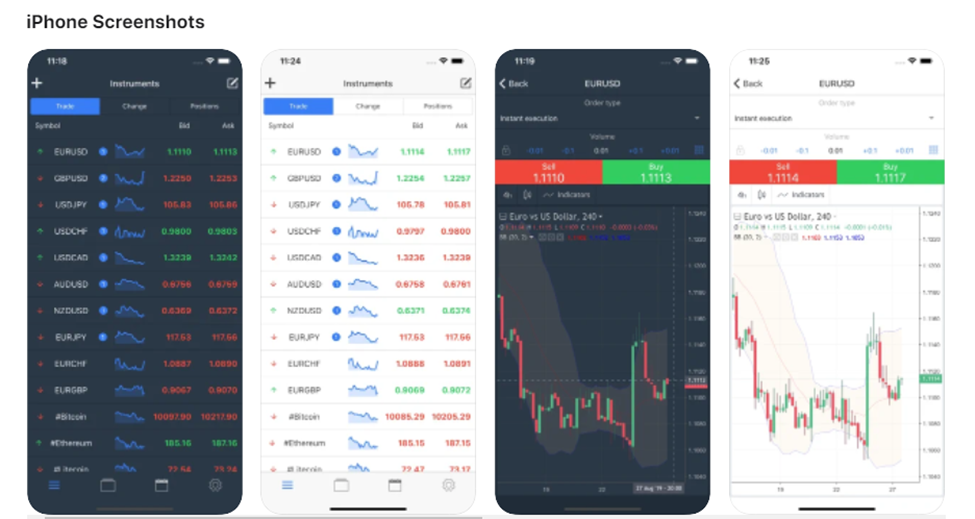
Nowadays, the MT4 mobile trading platform is becoming increasingly popular. It allows traders to trade on the go without being tied down to a desktop computer. The MT4 mobile platform is available for iPhone, iPad, Android, and Windows Phone devices.
You can download it for free from any of the app stores. The app lets you monitor the market, place trades, and manage your account, all from your mobile device.
MT4 Desktop
The desktop version of MT4 is the most popular and widely used platform. It offers all the features that traders need to trade Forex, CFDs, and Futures. The desktop version is available for Windows.
InstaForex MT4 advantages
InstaForex MT4 has many valuable features for traders who want to trade the financial markets. It is a powerful and user-friendly platform that offers a wide range of features for traders of all experience levels.
Here are some features to take advantage of:
Nine time frames: Having a wide selection of time frames allows you to track short-term or long-term trends and follow different strategies.
Trailing stop: A trailing stop is a stop-loss order set at a certain percentage below the market price. As the market price moves up, the trailing stop moves up with it, but if the market price falls, the stop-loss order is executed at the new stop-loss price.
One-click trading: With Instaforex MT4, you can enjoy one-click trading, which allows you to place trades with just one click of the mouse.
Automated trading: When you use the MT4 platform, you can take advantage of its automated trading features. It means that you can set up your trades to be executed automatically. For example, you can set up your stop-loss and take-profit orders in advance, and the platform will execute them for you.
Free advisors and indicators: Trading indicators and advisors can help you make better trading decisions. InstaForex MT4 offers a wide selection of free indicators and advisors.
Locked positions: Locking a position means that you can keep it open for a certain period, even if the market price moves against you. This feature is helpful if you want to hold a position for a more extended period.
Online financial news: You can keep up with the latest financial news with InstaForex MT4. The platform offers a wide range of online news sources that you can access for free.
More importantly, InstaForex MT4 is highly secure since it has 128-bit encryption. It means that your personal information and trading activities are safe on the platform.
How to download InstaForex MT4 for free
Downloading InstaForex MT4 is simple and available for both mobile devices and Windows computers.
Step 1. Check system requirements
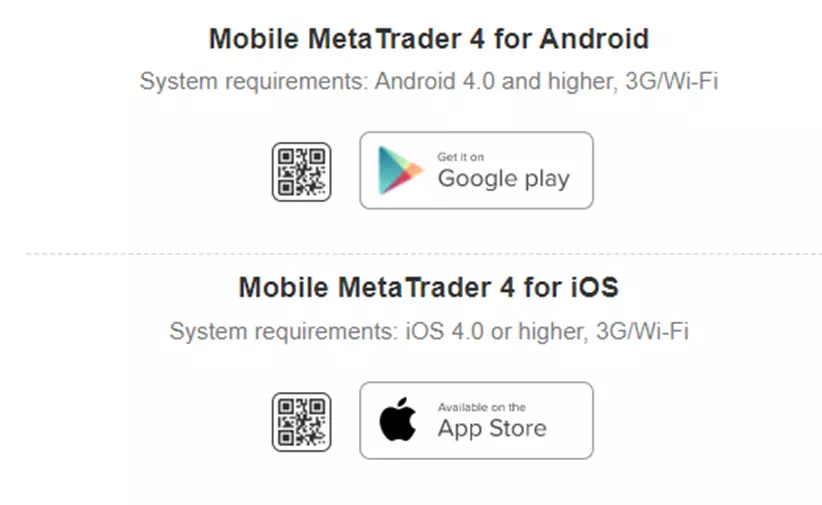
Before downloading, make sure your device meets the following requirements:
For Mobile (Android & iOS):
Android 4.0 or later.
iOS 4.0 or later.
A stable 3G or Wi-Fi connection.
For Windows:
Windows 7 or later.
Step 2. Download the MT4 mobile app (Android & iOS)
Go to the App Store. Open the Google Play Store (Android) or the App Store (iOS).
Download and Install the App. Search for “InstaForex MT4,” then tap Download or Install.
Launch the Application. After installation, tap the MT4 icon to open the app.
Log In or Create an Account. Log in to your existing account or create a new one.
Step 3. Download MT4 for Windows
Visit the Official InstaForex Website. Go to the official InstaForex website.
Click “Download for Windows”. Locate and select the Download for Windows option.
Run the Installation File. Once the file has been downloaded, open it and follow the on-screen instructions to complete the installation.
How to set up MT4 from InstaForex?
Once you’ve downloaded the app for desktop or Windows, getting started from there is quite straightforward. If you have an existing account, log in using your details. If you don’t have an account, you can create a new one.
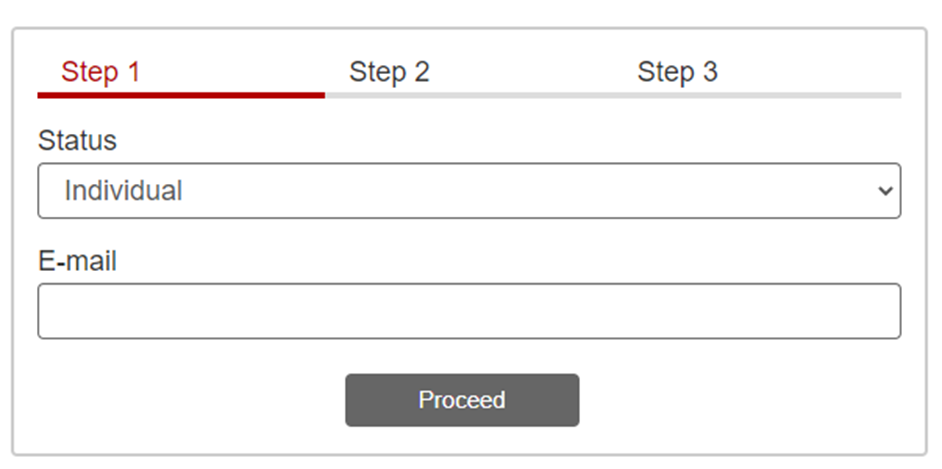
Step 1. Select status
Нou have to identify your status (individual or company) and provide your email address.
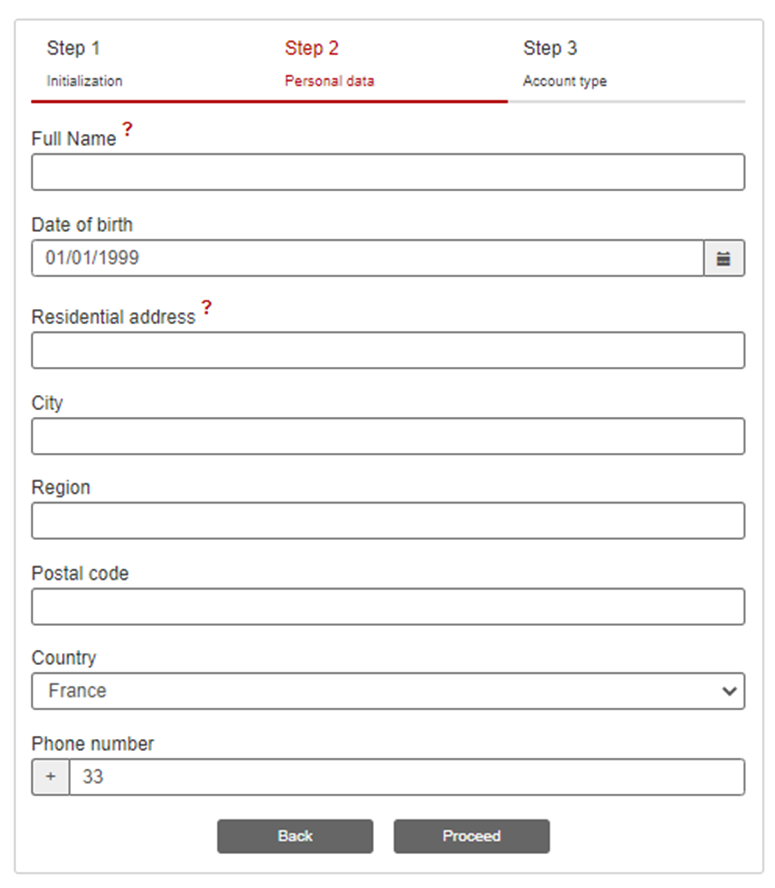
Step 2. Provide personal details
You must provide your personal information, such as full name, date of birth, residential address, city, postal code, phone number, etc. Make sure you provide your correct information. Plus, you must enter your active email and phone number since you’ll get alerts and messages regularly.
Step 3. Generate a password
You generate a password for your account and choose the account type. You also need to specify the leverage and account currency in this step.
The ''leverage'' in a trade setting refers to using borrowed money to increase one's potential returns. For example, in foreign exchange (forex) trading, leverage refers to an account feature that allows traders to control more significant positions than what their capital would otherwise allow.
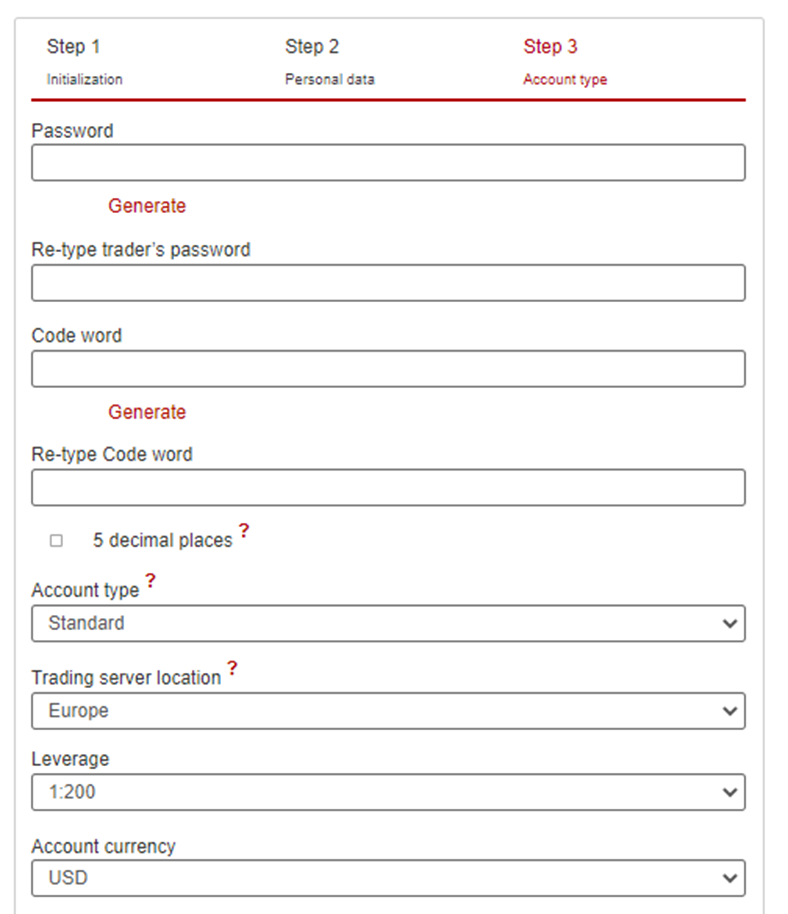
If you have an affiliate code, you type it here too. As per the affiliate program, the person who has referred you to InstaForex will get a certain percentage of the trade fees as commission.
In the end, you choose your mobile phone’s operating system and click on ‘Open Account.’ Both of these steps are optional, though.
Alternatives to InstaForex: brokers that offer MetaTrader 4 (MT4)
If you are considering alternatives to InstaForex, it’s worth reviewing brokers that also offer the MetaTrader 4 platform. MT4 remains one of the most widely used trading solutions for Forex due to its extensive analytical toolkit and support for automated strategies. The table below lists brokers that provide access to the MT4 platform.
| OANDA | FOREX.com | IG Markets | Zaner | XM | |
|---|---|---|---|---|---|
|
MT4 |
Yes | Yes | Yes | Yes | Yes |
|
MT5 |
Yes | Yes | No | No | Yes |
|
WebTrader |
Yes | Yes | Yes | Yes | Yes |
|
Tradable assets |
129 | 5500 | 20000 | 100 | 1400 |
|
Currency pairs |
68 | 80 | 80 | 50 | 57 |
|
Max. Regulation Level |
Tier-1 | Tier-1 | Tier-1 | Tier-1 | Tier-1 |
|
Demo |
Yes | Yes | Yes | Yes | Yes |
|
Open an account |
Go to broker Your capital is at risk. |
Study review | Study review | Study review | Go to broker Your capital is at risk. |
MetaTrader 4 — a classic in the Forex market

MT4 remains a well-established and widely adopted platform for traders of all experience levels. It combines a straightforward interface with robust functionality — from flexible chart customization to automated trading through Expert Advisors (EAs). Its key strengths include stability, fast execution, and a clear operational structure, which is particularly valuable for beginners.
InstaForex offers the standard version of MT4 with its familiar set of tools. The platform is available via web, desktop, and mobile devices, providing access to trading from virtually any location.
Here are several practical tips for using MT4:
start with a demo account;
customize charts and templates to match your strategy;
use stop-loss and take-profit orders for every trade;
avoid excessive leverage;
limit risk per trade to no more than 1–2% of your capital;
test Expert Advisors in the strategy tester;
monitor the economic calendar.
Overall, when using MT4, it is advisable to avoid emotional decision-making, regularly review your trading history, and keep the platform updated to the latest version.
Conclusion
InstaForex MT4 stands out as a reliable and user-friendly trading platform that caters to both beginners and experienced traders, thanks to its wide range of features such as one-click trading and automated Expert Advisors. The uncomplicated setup process across desktop, web, and mobile devices ensures that users can quickly access advanced tools like customizable charts and trailing stops. Alternative brokers also offer MT4, showing its unmatched popularity and versatility within the Forex trading industry. Ultimately, choosing InstaForex MT4 means investing in a secure and efficient system that empowers you to trade confidently and strategically in the fast-paced Forex market.
FAQs
Can you use InstaForex MT4 on multiple devices simultaneously?
What security measures does InstaForex MT4 use to protect your account and data?
How does automated trading work on InstaForex MT4?
Is it possible to trade assets other than Forex using InstaForex MT4?
Editors' Top Picks and Insights






Related Articles
Team that worked on the article
Dwight specializes in risk, corporate finance, alternatives, fintech, general business trends, and financial markets, and he has broad experience managing complex projects. Dwight is an author for the Traders Union website.
Olga Shendetskaya has been a part of the Traders Union team as an author, editor and proofreader since 2017. Since 2020, Shendetskaya has been the assistant chief editor of the website of Traders Union, an international association of traders.
Mirjan Hipolito is a journalist and news editor at Traders Union. She is an expert crypto writer with five years of experience in the financial markets.
Forex leverage is a tool enabling traders to control larger positions with a relatively small amount of capital, amplifying potential profits and losses based on the chosen leverage ratio.
A Trailing Stop Order is a type of order that automatically adjusts the stop-loss level as the market price moves in a favorable direction, helping to protect profits.
A futures contract is a standardized financial agreement between two parties to buy or sell an underlying asset, such as a commodity, currency, or financial instrument, at a predetermined price on a specified future date. Futures contracts are commonly used in financial markets to hedge against price fluctuations, speculate on future price movements, or gain exposure to various assets.
CFD is a contract between an investor/trader and seller that demonstrates that the trader will need to pay the price difference between the current value of the asset and its value at the time of contract to the seller.
Yield refers to the earnings or income derived from an investment. It mirrors the returns generated by owning assets such as stocks, bonds, or other financial instruments.
-
 Afghanistan
-
 Albania
-
 Algeria
-
 Angola
-
 Argentina
-
 Armenia
-
 Australia
-
 Austria
-
 Azerbaijan
-
 Bahamas
-
 Bahrain
-
 Bangladesh
-
 Belarus
-
 Belgium
-
 Bolivia
-
 Botswana
-
 Brazil
-
 Brunei
-
 Bulgaria
-
 Cambodia
-
 Cameroon
-
 Canada
-
 Chile
Chile
-
 China
China
-
 Colombia
-
 Congo
Congo
-
 Costa Rica
-
 Cote d'Ivoire
-
 Croatia
-
 Cuba
Cuba
-
 Cyprus
-
 Czechia
-
 DR Congo
-
 Denmark
-
 Dominican Republic
-
 Ecuador
-
 Egypt
Egypt
-
 El Salvador
-
 Estonia
-
 Eswatini
-
 Ethiopia
-
 Finland
-
 France
-
 Georgia
-
 Germany
-
 Ghana
Ghana
-
 Greece
-
 Haiti
Haiti
-
 Hong Kong
-
 Hungary
-
 India
India
-
 Indonesia
-
 Iran, Islamic republic
-
 Iraq
Iraq
-
 Ireland
-
 Israel
-
 Italy
Italy
-
 Jamaica
-
 Japan
Japan
-
 Jordan
-
 Kazakhstan
-
 Kenya
Kenya
-
 Korea
Korea
-
 Kuwait
-
 Kyrgyzstan
-
 Laos
Laos
-
 Latvia
-
 Lebanon
-
 Lesotho
-
 Libya
Libya
-
 Lithuania
-
 Luxembourg
-
 Madagascar
-
 Malaysia
-
 Malta
Malta
-
 Mauritius
-
 Mexico
-
 Moldova
-
 Mongolia
-
 Montenegro
-
 Morocco
-
 Mozambique
-
 Myanmar
-
 Namibia
-
 Nepal
Nepal
-
 Netherlands
-
 New Zealand
-
 Nigeria
-
 North Macedonia
-
 Norway
-
 Oman
Oman
-
 Pakistan
-
 Palestine
-
 Panama
-
 Papua New Guinea
-
 Paraguay
-
 Peru
Peru
-
 Philippines
-
 Poland
-
 Portugal
-
 Puerto Rico
-
 Qatar
Qatar
-
 Reunion
-
 Romania
-
 Rwanda
-
 Saudi Arabia
-
 Serbia
-
 Singapore
-
 Slovakia
-
 Slovenia
-
 Somalia
-
 South Africa
-
 Spain
Spain
-
 Sri Lanka
-
 Sweden
-
 Switzerland
-
 Syria
Syria
-
 Taiwan
-
 Tajikistan
-
 Tanzania
-
 Thailand
-
 Trinidad and Tobago
-
 Tunisia
-
 Turkey
-
 UAE
UAE
-
 Uganda
-
 Ukraine
-
 United Kingdom
-
United States
-
 Uruguay
-
 Uzbekistan
-
 Venezuela
-
 Vietnam
-
 Yemen
Yemen
-
 Zambia
-
 Zimbabwe
- Forex
- Crypto












