Best Expert Advisor (EA) Builders Review



Editorial Note: While we adhere to strict Editorial Integrity, this post may contain references to products from our partners. Here's an explanation for How We Make Money. None of the data and information on this webpage constitutes investment advice according to our Disclaimer.
The best expert advisor builders are:
RoboForex EA Builder
A versatile tool for fully automated strategies, with high order execution speed and comprehensive risk management options.Dukascopy Visual JForex
A drag-and-drop visual programming environment for building algorithmic trading strategiesEA Studio (Expert Advisor Studio)
Web-based builder offering multi-time frame strategies, customization, and optimization tools for seamless trading.StrategyQuant X
Advanced platform enabling complex strategy creation, backtesting with tick data, and optimization using genetic optimizer.Forex Strategy Builder Professional
No-coding-needed builder compatible with MT4 and MT5, featuring Strategy Optimizer and 100+ indicators.Molanis Strategy Builder for MT4
User-friendly platform with click-and-drag diagrams, supporting multiple Forex currencies and timeframes.
Creating a profitable automated trading strategy can be a challenge for many Forex traders. However, expert advisor (EA) builders provide a powerful yet user-friendly solution. EA builders allow anyone to develop complex algorithmic trading systems without requiring coding skills.
In this article, we will explore some of the top EA builders on the market and review their key features and capabilities. From beginner-friendly platforms to advanced professional tools, we'll break down the options to help you find the best expert advisor builder to suit your needs and automation goals. Our expert analysis and review will uncover how each tool streamlines the process of strategy creation, backtesting, optimization and implementation.
What is an expert advisor builder?
An expert advisor builder is a powerful software that helps traders in creating automated strategies, without the need for any programming knowledge. They are commonly referred to as EAs, and these trading systems are capable of executing traders based on predefined rules and indicators.
According to experts, these systems are the ability to quickly analyze market conditions and adapt to them, thereby increasing profitability. With the help of an expert advisor builder, traders can define their own entry, exit, and target parameters in their trading strategy and generate the necessary code to put into the software. This helps traders to implement their trading strategy rather effectively.
Best expert advisor builder in 2026
Let’s explore some of the best EA builders in 2025, and take a look at their key features.
RoboForex EA Builder


 RoboForex EA builder
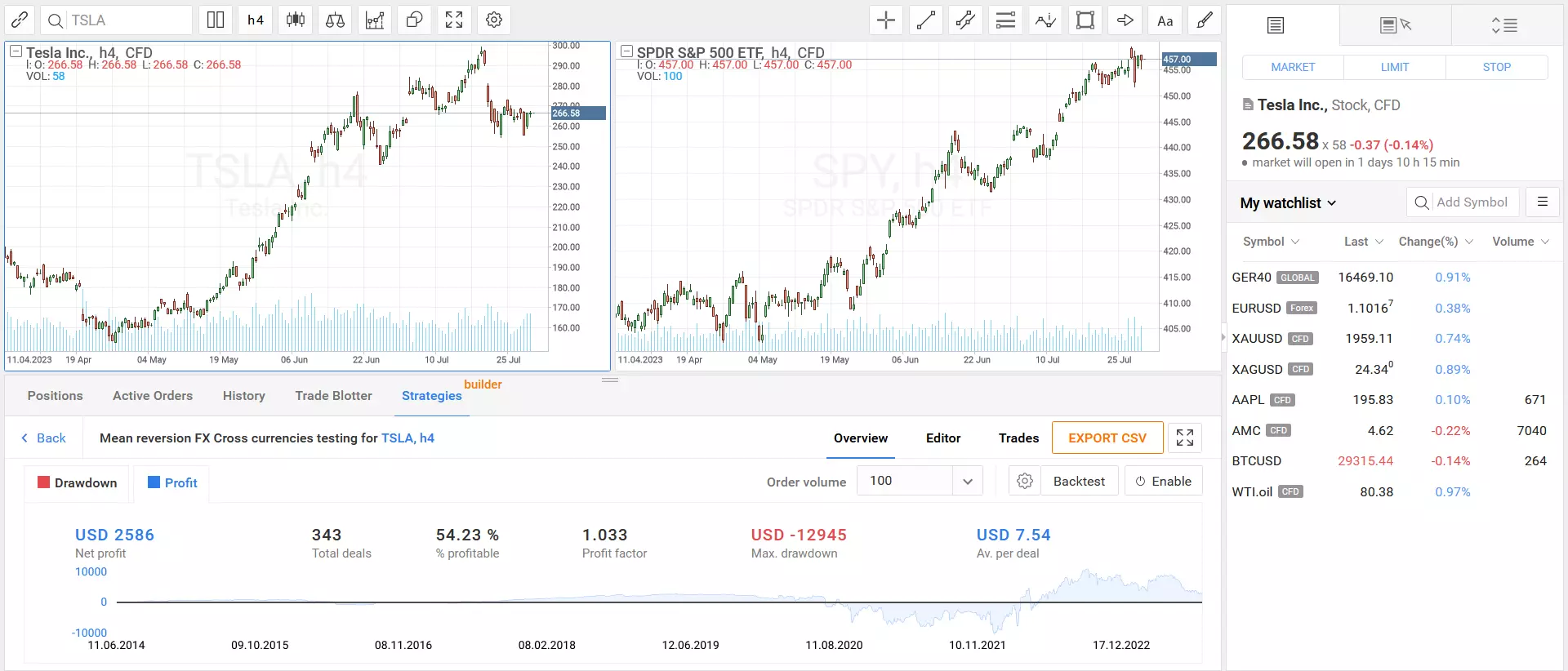
RoboForex EA builder is a versatile tool designed to assist Forex traders in creating and implementing a fully automated strategy. Also known as the Trading Strategy Builder, it follows a three-step process wherein a trader has to create his own strategy or choose from predetermined, ready-made templates. Following that, the trader can customize the strategy for different markets. After the trader has tested the strategy, he can run the algorithm in the live market.
RoboForex EA builder is specifically popular among traders for its high-order execution speed. Also, the difference between RoboForex’s EA and others is that RoboForex runs its strategies on servers, while others run it on terminals, resulting in lower speed. Using this tool, traders can access historical data dating back all the way to 1970, which enables them to conduct much more thorough backtesting for their long-term strategies.
This EA has incorporated many risk management options for its users, allowing them to take control of their unrealized profit and loss in each of their strategies. Users can also create, edit and implement their strategies on a real-time basis, and this gives a much needed freedom to them to explore various trading techniques.
| Features | Description |
|---|---|
| Three-Step Process | Follows a simple process of creating, testing, and implementing trading strategies |
| High-Order Execution Speed | Operates strategies on servers, resulting in faster execution |
| Historical Data | Access to historical data dating back to 1970 for thorough backtesting |
| Risk Management | Offers risk management options for control over unrealized profit and loss |
| Real-Time Customization | Allows real-time creation, editing, and implementation of trading strategies |
Dukascopy Visual JForex

 Dukascopy Visual JForex
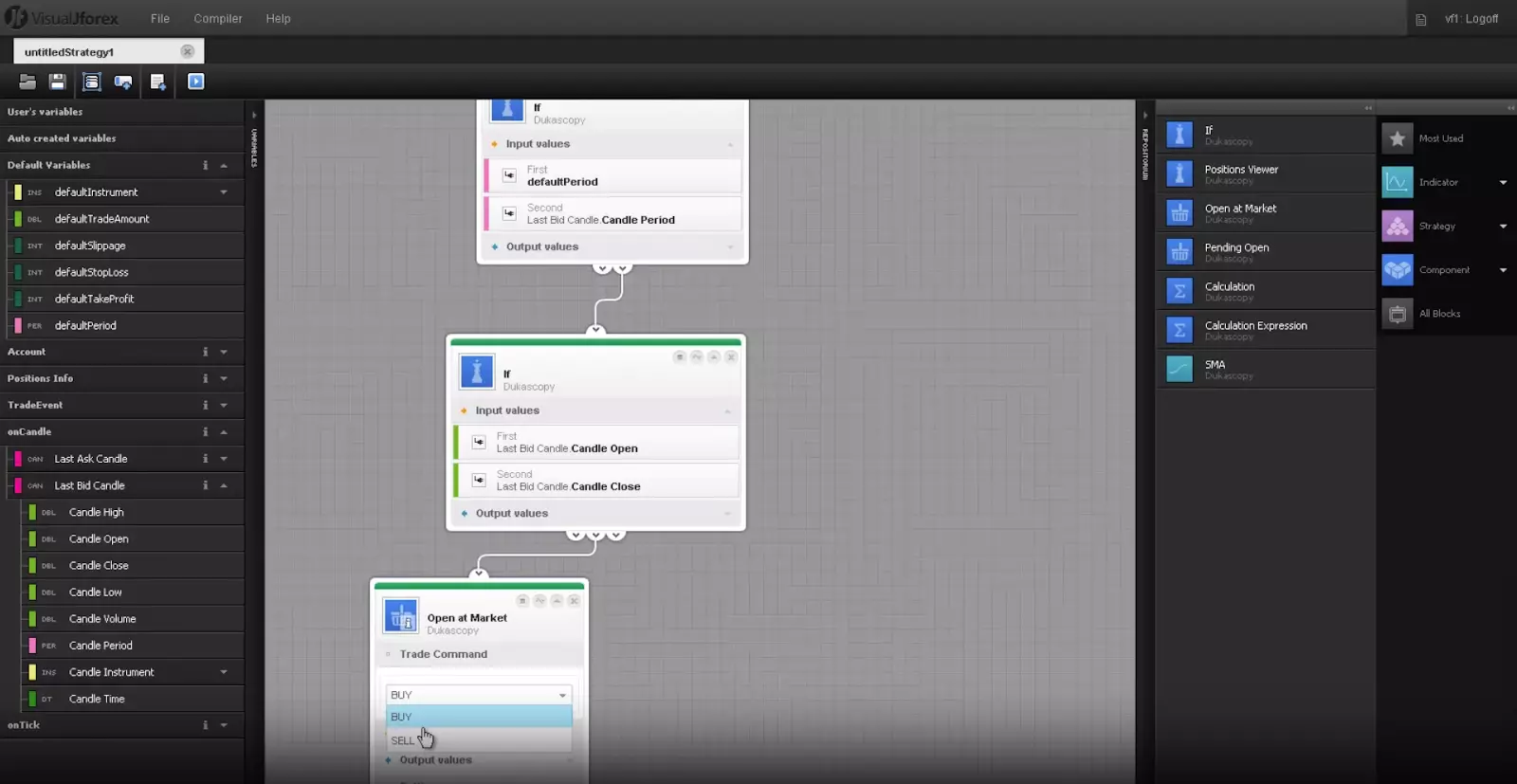
JForex is an innovative trading platform from Swiss forex broker Dukascopy that enables traders to design, test, and implement automated trading strategies without any programming required. The visually-oriented strategy builder uses an intuitive drag-and-drop interface to combine technical indicators, conditions, and actions to create rule-based systems. Traders can tap into an extensive library of preconfigured strategies to use as templates or build highly-customized algorithms from the ground up. Backtesting functionality allows performance metrics like risk parameters and profitability projections to be simulated across historical market data prior to live deployment. JForex grants access to Dukascopy's collection of advanced charting tools for refined analysis as well as seamless order execution through their reputable ECN infrastructure. Whether a novice seeking simplicity or an expert desiring maximum customization, JForex provides traders an accessible gateway to automated algorithmic trading.
| Features | Description |
|---|---|
| Intuitive design tool | Construct trading strategies visually by simply clicking and dragging preconfigured modules into place |
| Extensive building blocks collection | Access to a diverse assortment of over 40 elements spanning technical indicators, risk control techniques, and order triggers straight out of the box |
| Historical analysis capabilities | Scrutinize strategies using past market performance to confirm viability and calibrate settings for optimum results |
| Seamless live execution | Put optimized strategies into action in real-time markets immediately through a Dukascopy platform |
EA Studio (Expert Advisor Studio)
 EA Studio builder
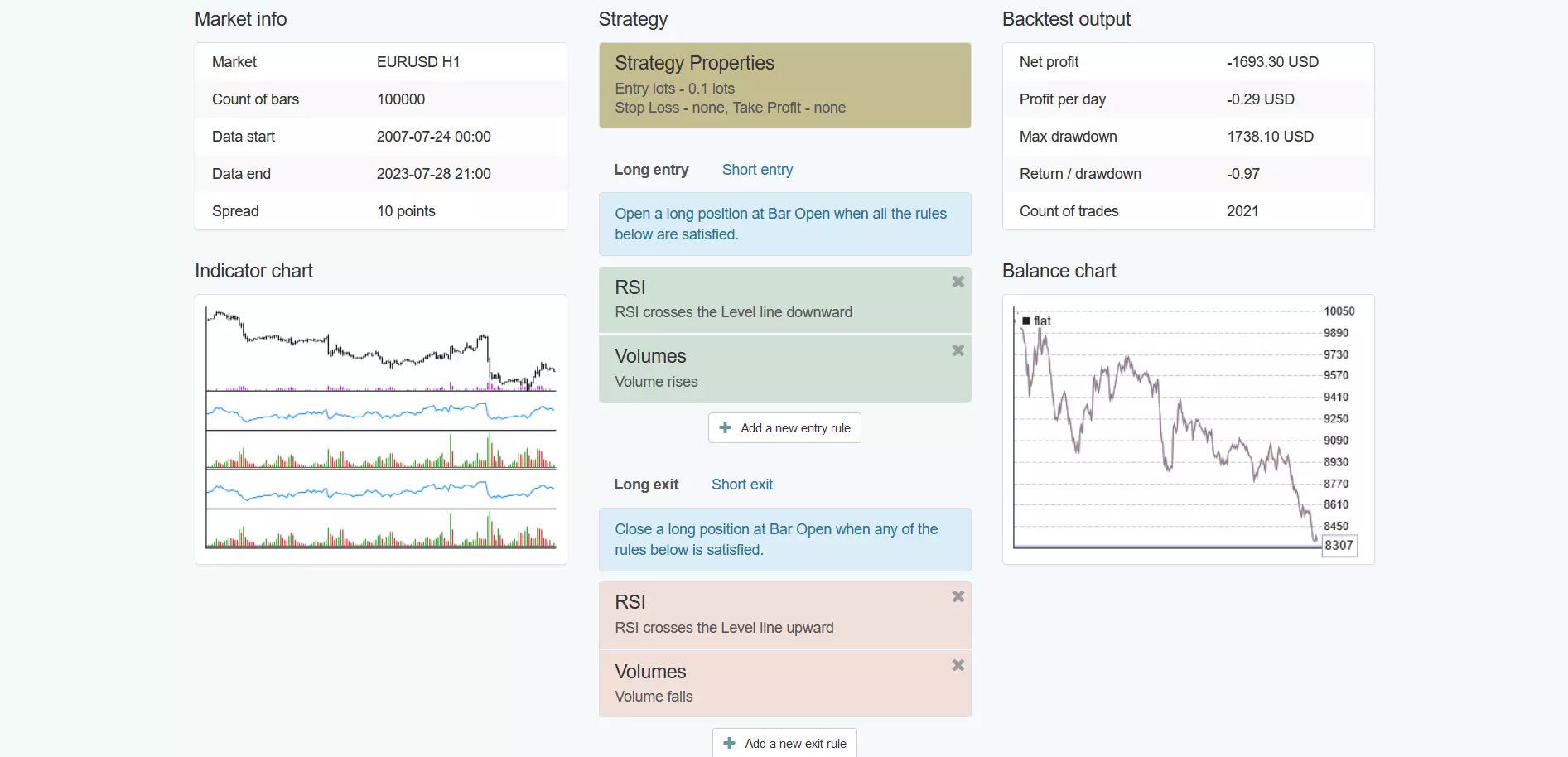
EA Studio is another prominent web-based expert advisor builder, and it offers a very intuitive user experience with a clean, seamless UI. Further, there is no need for software installations with EA studio, making it accessible to both beginner and experienced traders alike.
One of the major advantages of this platform is its ability to generate strategies and trading systems in multiple time frames. This gives the traders a robust trading setup and ensures that the strategy can be profitable even in adverse market conditions. As a result, the probability of generating false signals decreases, and with the help of various customization and optimization tools offered by EA Studio, users can ensure that their trading strategy is tested in different market conditions.
EA Studio provides a 15-day trial for all new users so that they can test out the capabilities of the software before making a purchase. The platform is compatible with mobiles, tablets, and desktops, and ensures that the software can run smoothly from anywhere, albeit with an internet connection.
| Features | Description |
|---|---|
| Intuitive Interface | Offers a user-friendly interface with easy navigation |
| Multiple Time Frames | Generates strategies based on various time frames for robust trading setups |
| 15-Day Trial | Provides a free 15-day trial period for testing the platform |
| Compatibility | Compatible with desktops, laptops, tablets, and mobiles for accessibility from anywhere |
StrategyQuant X
 StrategyQuant X
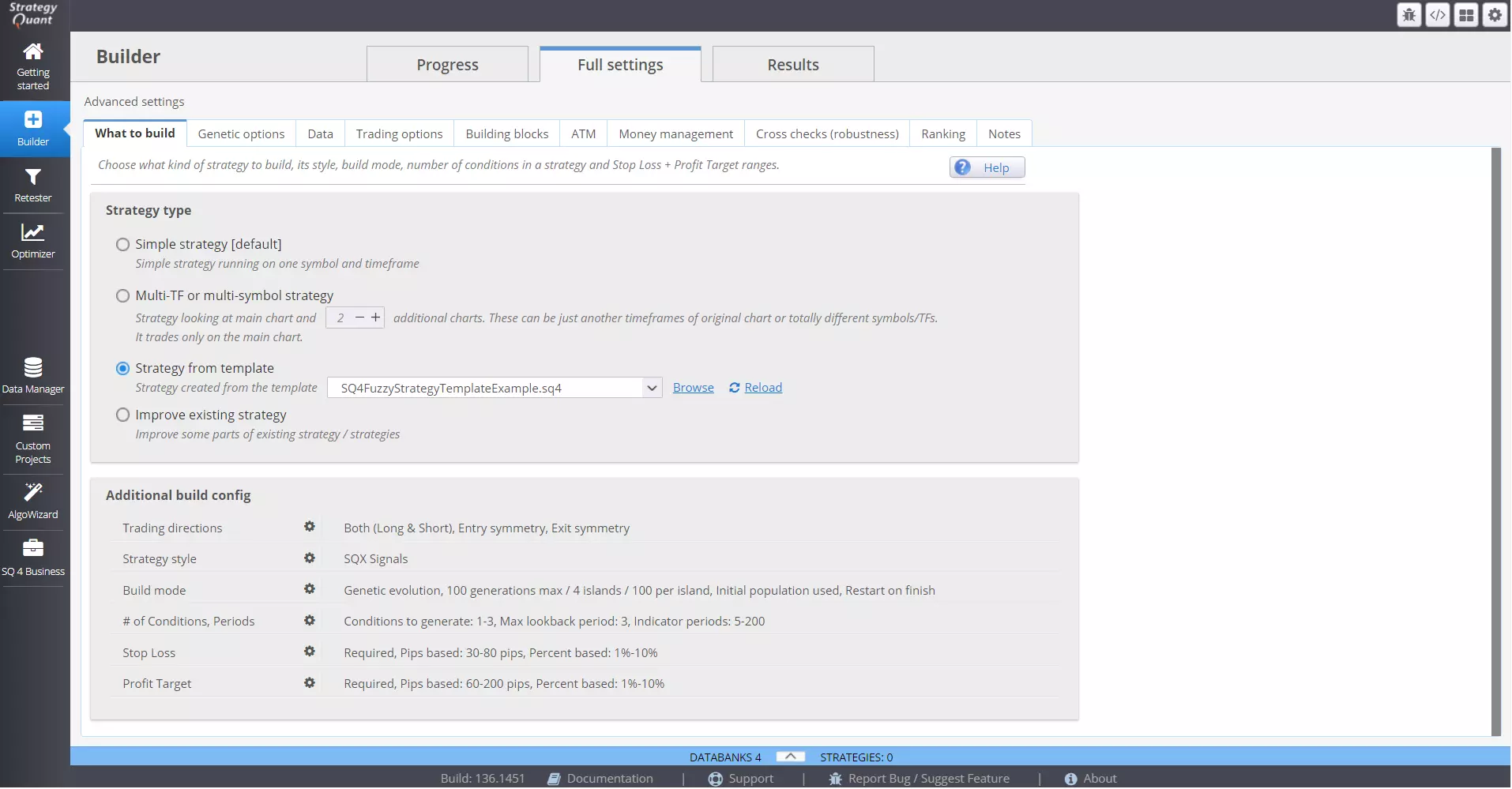
StrategyQuant X is a powerful tool that caters to the needs of advanced traders, who can build a complex strategy using this software with ease. It has very sophisticated strategy-building tools incorporated in it, and traders can make use of them to create and backtest their own trading strategy.
Essentially, backtesting is done using tick data. This level of analysis is very useful to those traders who want to know how their strategy is performing on a real-time basis, giving them valuable data and insight to fine-tune their trading strategies. Furthermore, the platform has a built-in optimization feature called the genetic optimizer, wherein traders can refine their strategies until they reach the optimal setting and parameter for their strategy to function.
StrategyQuant X helps traders to develop setups that are tailored to their needs and preferences. Traders can work with different and multiple time frames, indicators and set complex entry, exit, and stop-loss levels. This gives them the customization that a trading strategy needs and enables them to develop a strategy that is profitable in the long run.
| Features | Description |
|---|---|
| Advanced Builder | Designed for advanced traders to create complex strategies |
| Tick Data Backtesting | Allows backtesting strategies using tick data for real-time performance analysis |
| Genetic Optimizer | Incorporates the genetic optimizer for refining strategies to optimal settings |
| Customization | Enables customization of time frames, indicators, entry, exit, and stop-loss levels |
Forex Strategy Builder Professional
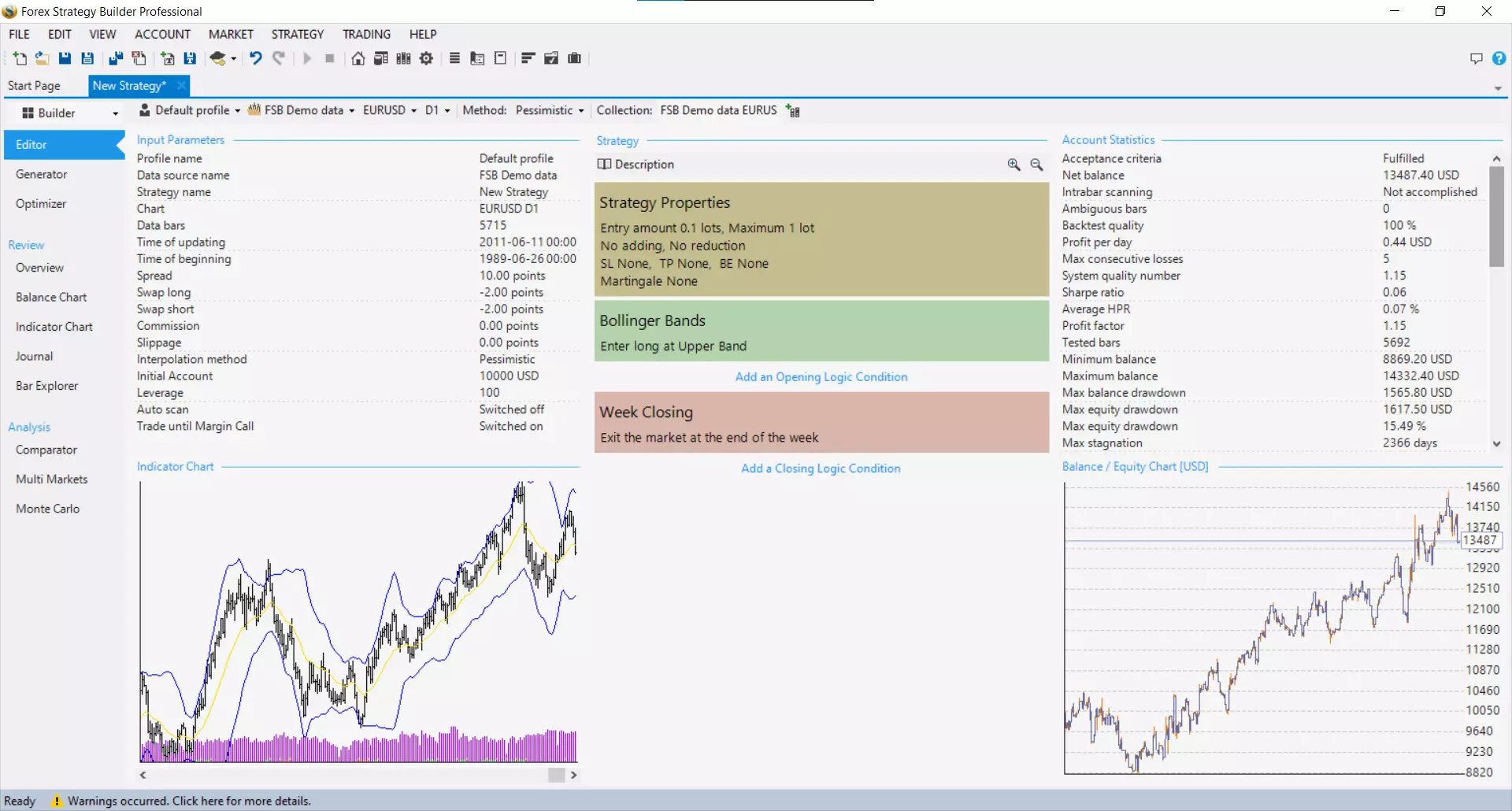 Forex Strategy Builder Professional
Forex Strategy Builder Professional (FSB) is a premier Forex EA builder that eliminates the need for programming in order to build a trading strategy. The platform is compatible with both MT4 and MT5, and offers a free 15-day trial period to test out its features.
FSB’s platform is known for its innovative approach to EA building, and it is accessible to all traders who want to create, test and analyze their own trading strategy. It has a very intuitive interface and gives traders the necessary tools to optimize their strategies for the right conditions. One of its standout features is the FSB’s Strategy Optimizer. It enables traders to fine-tune their own strategies by using other successful strategies as reference points. This optimizer can be accessed through the MT4 platform and allows users to export the strategies built into its platform with ease.
FSB also provides its traders with detailed analysis, backtesting capabilities, and more than 100+ indicators in its platform library. These features help both amateur and experienced traders to develop well-defined trading strategies.
| Features | Description |
|---|---|
| No Programming Needed | Eliminates the need for programming, making strategy building accessible to all traders |
| 15-Day Free Trial | Offers a free 15-day trial to explore features before purchase |
| Strategy Optimizer | Fine-tunes strategies using successful ones as reference points |
| Analysis and Indicators | Provides detailed analysis, backtesting capabilities, and over 100+ indicators |
Molanis Strategy Builder for MT4
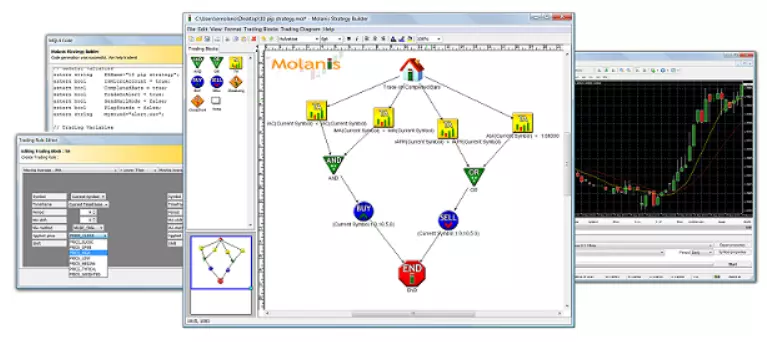 Molanis Strategy Builder for MT4
Molanis Strategy Builder for MT4 is a very well-defined and creative platform for building strategies. It uses a clean graphical user interface with click and drag & drop diagrams, enabling traders to enter their own settings without the need for complex scripts.
This tool also helps traders to trade in multiple Forex currencies and timeframes. It has an easy-to-navigate platform that allows traders to focus and optimize their own trading strategy in a manner that they are not cornered by complex technical settings.
The Molanis Strategy Builder can analyze diagrams through the MQL generator and transform them into ready-to-use Expert Advisors. Users can create or edit these Forex signals and, in-turn, enhance their trading capabilities.
| Features | Description |
|---|---|
| Click and Drag Interface | Uses click and drag & drop diagrams for easy settings input |
| Multi-Currency and Timeframes | Enables trading in multiple Forex currencies and timeframes |
| User-Focused | Allows traders to focus on optimizing their strategies without complex technical settings |
| Expert Advisor Generation | Transforms diagrams into ready-to-use Expert Advisors for enhanced trading capabilities |
Pros and cons of expert advisor builders
Expert advisor builders have their own set of advantages and disadvantages. Here are a few of them.
- Pros
- Cons
- Easy-to-use interfaces. Expert advisor builders offer intuitive graphical interfaces that allow users to visually design and construct EAs without requiring coding experience. The drag-and-drop workflows make it simple to link indicators, scripts, and trading logic. This lowers the bar significantly compared to traditional programming.
- Pre-built components. Many tools come with large libraries of pre-built indicators, trading strategies, alerts, and other components that can be incorporated into custom EAs with a few clicks. This saves users tremendous time over building everything from scratch.
- Continuous optimization. Built-in strategy testing and optimization features allow parameters to be tweaked and thoroughly backtested directly from the interface. Strategies can be refined over time based on performance data.
- Limited customization. The visual interfaces can constrain customization compared to manual coding. Workarounds may be needed for complex, unique trading strategies.
- Workflow dependence. The strategies are tied to and limited by the specific logic and components supported in the given builder.
- Less troubleshooting ability. Debugging issues is more difficult without access to the actual code. Bugs may be hard to isolate and fix without programming skills.
How to find the best EA builder?
Selecting the best EA (Expert Advisor) builder involves careful consideration of several key factors.
Testing
Look for a robust platform that allows for extensive backtesting, walk-forward analysis, and strategy optimization. An ideal builder will let you test over different timeframes, asset classes, and historical periods to refine strategies. It should support the automated optimization of thousands of parameter combinations to find optimal settings. Equally important is robust simulation features to incubate strategies by simulating historical market behavior across many hypothetical accounts and scenarios over multiple years. Quality builders provide in-depth reports on equity curves and drawdowns to evaluate performance before trading live.
Customization
Evaluate builder libraries for a good selection of pre-built indicators, trading systems, and scripting objects that can be easily incorporated into strategies. But also consider customization options that allow full logic and workflow adjustments via visual block programming interfaces. Advanced users benefit from the ability to write custom indicators as code or attach third-party .ex4 files. Support for programming features like conditionals, loops, and function imports adds power and flexibility.
Support
Ensure it provides dedicated online support and an engaged user community forum to assist with troubleshooting. Communities with thousands of active members indicate longevity and responsive developer maintenance.
Cost assessment
Evaluate pricing models and note if affordable annual subscriptions cover ongoing upgrades or if high perpetual license fees require expensive reinvestment over time.
Reviews
Finally, read reviews from other traders to gauge reliability, bug fixes over time, and how the development team addressed issues for customers. Overall ratings above 4.5/5 stars suggest strong performance.
Choosing the right EA builder is only half of the equation. Even the most well-designed automated strategy can fail if it runs in an unsuitable trading environment. Execution speed, spreads, VPS stability, and broker policies toward algorithmic trading directly affect EA performance.
To help you align your automated strategy with the right infrastructure, the table below compares Forex brokers that are well-suited for running expert advisors, based on execution quality, platform support, and technical conditions for automation.
| zForex | OANDA | Trading.com USA | FOREX.com | IG Markets | |
|---|---|---|---|---|---|
|
Min. deposit, $ |
10 | No | 50 | 100 | 1 |
|
Tradable assets |
80 | 129 | 69 | 5500 | 20000 |
|
Standard EUR/USD spread |
0.3 | 0.3 | 1.1 | 1.0 | 0.9 |
|
Max. leverage |
1:1000 | 1:200 | 1:50 | 1:50 | 1:200 |
|
Trading bots (EAs) |
Yes | Yes | Yes | Yes | Yes |
|
TU overall score |
8.05 | 6.89 | 6.15 | 6.87 | 6.82 |
|
Open an account |
Go to broker Your capital is at risk.
|
Go to broker Your capital is at risk. |
Go to broker Your capital is at risk. |
Study review | Study review |
Start by defining how you plan to trade, not which tool looks the most advanced

The biggest mistake traders make is choosing an EA builder that doesn’t match their actual workflow. My recommendation is to start by defining how you plan to trade, not which tool looks the most advanced. If your goal is to automate a simple, repeatable idea and deploy it quickly, a builder with fast execution and stable infrastructure will matter more than endless customization. Speed, reliability, and ease of adjustment often outperform complexity in live trading.
For traders who want long-term consistency, I always advise prioritizing testing depth over visual convenience. Tools that allow robust backtesting across different market regimes help you understand how a strategy behaves when conditions change, not just when they are favorable. I’ve seen many visually impressive strategies fail simply because they weren’t stress-tested properly. Automation works best when it’s built around discipline and data, not just clever logic.
Finally, treat EA builders as strategy laboratories, not profit machines. Use them to experiment, filter ideas, and eliminate weak setups before risking capital. The strongest results I’ve seen come from traders who continuously refine one or two solid systems instead of chasing dozens of automated strategies at once. Consistency, controlled risk, and realistic expectations matter far more than the tool itself.
Conclusion
In summary, selecting the right expert advisor builder is crucial for traders seeking to maximize efficiency and profitability. Platforms like RoboForex EA builder and StrategyQuant X exemplify how automation can simplify complex strategies and provide a competitive edge in dynamic markets. By leveraging advanced features and user-friendly interfaces, these tools empower both novice and experienced traders to create robust, custom trading systems. Ultimately, harnessing the power of these leading EA builders can be the turning point that transforms a trading approach from ordinary to extraordinary.
FAQs
How important is historical data access when choosing the best Expert Advisor (EA) builder in 2026?
What types of customization do leading EA builders offer for different trading needs?
Do all EA builders require software installation, or are web-based solutions available in 2026?
How do built-in strategy optimization tools in EA builders enhance automated trading?
Editors' Top Picks and Insights

Pokémon cards for $2,500: How collectibles became a new form of gambling

The privacy paradox: How the crypto mixer market has changed

Is Bitcoin right for you? Five traits shared by many cryptocurrency holders

Chasing hits: Why investors are losing interest in Netflix

Tokenized stocks in the spotlight: How do they work and are they worth trading?

Do politicians make the best stock traders?
Related Articles
Team that worked on the article
Parshwa is a content expert and finance professional possessing deep knowledge of stock and options trading, technical and fundamental analysis, and equity research. As a Chartered Accountant Finalist, Parshwa also has expertise in Forex, crypto trading, and personal taxation.
Dan Blystone began his trading career in 1998 as an arbitrage clerk on the floor of the Chicago Mercantile Exchange (CME). He later traded bond and Eurex futures at proprietary firms such as Altea Trading, gaining valuable experience in high-frequency trading and risk management.
Chinmay Soni is a financial analyst with more than 5 years of experience in working with stocks, Forex, derivatives, and other assets. As a founder of a boutique research firm and an active researcher, he covers various industries and fields, providing insights backed by statistical data.
CFD is a contract between an investor/trader and seller that demonstrates that the trader will need to pay the price difference between the current value of the asset and its value at the time of contract to the seller.
An Expert Advisor (EA) is a piece of software or script used in the MetaTrader trading platform to automate trading strategies. EAs are programmed to execute trading decisions based on predefined criteria, rules, and algorithms, allowing for automated and systematic trading without the need for manual intervention.
Index in trading is the measure of the performance of a group of stocks, which can include the assets and securities in it.
Day trading involves buying and selling financial assets within the same trading day, with the goal of profiting from short-term price fluctuations, and positions are typically not held overnight.
Backtesting is the process of testing a trading strategy on historical data. It allows you to evaluate the strategy's performance in the past and identify its potential risks and benefits.
-
 Afghanistan
-
 Albania
-
 Algeria
-
 Angola
-
 Argentina
-
 Armenia
-
 Australia
-
 Austria
-
 Azerbaijan
-
 Bahamas
-
 Bahrain
-
 Bangladesh
-
 Belarus
-
 Belgium
-
 Bolivia
-
 Botswana
-
 Brazil
-
 Brunei
-
 Bulgaria
-
 Cambodia
-
 Cameroon
-
 Canada
-
 Chile
Chile
-
 China
China
-
 Colombia
-
 Congo
Congo
-
 Costa Rica
-
 Cote d'Ivoire
-
 Croatia
-
 Cuba
Cuba
-
 Cyprus
-
 Czechia
-
 DR Congo
-
 Denmark
-
 Dominican Republic
-
 Ecuador
-
 Egypt
Egypt
-
 El Salvador
-
 Estonia
-
 Eswatini
-
 Ethiopia
-
 Finland
-
 France
-
 Georgia
-
 Germany
-
 Ghana
Ghana
-
 Greece
-
 Haiti
Haiti
-
 Hong Kong
-
 Hungary
-
 India
India
-
 Indonesia
-
 Iran, Islamic republic
-
 Iraq
Iraq
-
 Ireland
-
 Israel
-
 Italy
Italy
-
 Jamaica
-
 Japan
Japan
-
 Jordan
-
 Kazakhstan
-
 Kenya
Kenya
-
 Korea
Korea
-
 Kuwait
-
 Kyrgyzstan
-
 Laos
Laos
-
 Latvia
-
 Lebanon
-
 Lesotho
-
 Libya
Libya
-
 Lithuania
-
 Luxembourg
-
 Madagascar
-
 Malaysia
-
 Malta
Malta
-
 Mauritius
-
 Mexico
-
 Moldova
-
 Mongolia
-
 Montenegro
-
 Morocco
-
 Mozambique
-
 Myanmar
-
 Namibia
-
 Nepal
Nepal
-
 Netherlands
-
 New Zealand
-
 Nigeria
-
 North Macedonia
-
 Norway
-
 Oman
Oman
-
 Pakistan
-
 Palestine
-
 Panama
-
 Papua New Guinea
-
 Paraguay
-
 Peru
Peru
-
 Philippines
-
 Poland
-
 Portugal
-
 Puerto Rico
-
 Qatar
Qatar
-
 Reunion
-
 Romania
-
 Rwanda
-
 Saudi Arabia
-
 Serbia
-
 Singapore
-
 Slovakia
-
 Slovenia
-
 Somalia
-
 South Africa
-
 Spain
Spain
-
 Sri Lanka
-
 Sweden
-
 Switzerland
-
 Syria
Syria
-
 Taiwan
-
 Tajikistan
-
 Tanzania
-
 Thailand
-
 Trinidad and Tobago
-
 Tunisia
-
 Turkey
-
 UAE
UAE
-
 Uganda
-
 Ukraine
-
 United Kingdom
-
United States
-
 Uruguay
-
 Uzbekistan
-
 Venezuela
-
 Vietnam
-
 Yemen
Yemen
-
 Zambia
-
 Zimbabwe
- Forex
- Crypto