
Best Crypto Wallets For Windows: A Complete Guide


Editorial Note: While we adhere to strict Editorial Integrity, this post may contain references to products from our partners. Here's an explanation for How We Make Money. None of the data and information on this webpage constitutes investment advice according to our Disclaimer.
Best crypto wallets for Windows PC in 2026:
Electrum – lightweight Bitcoin wallet with instant sync and advanced multi-sig support.
Exodus – beginner-friendly multi-asset wallet with simple UI and built-in swaps.
Guarda – multi-chain wallet with staking and secure non-custodial backups.
Atomic – hybrid wallet offering swaps, staking, and support for 500+ assets.
Ledger Live – hardware wallet with 5,500+ asset support and offline cold storage.
Trezor Suite – secure hardware wallet with recovery seed and strong privacy tools.
Windows continues to dominate the desktop ecosystem in 2026. Many investors rely on a crypto wallet for their Windows system to secure their digital assets. Beginners seek user-friendly tools, while experienced traders need advanced features such as multi-signature, DeFi access, and hardware integration. Selecting the right Windows-compatible crypto wallet is essential for both convenience and long-term protection.
Risk warning: Cryptocurrency markets are highly volatile, with sharp price swings and regulatory uncertainties. Research indicates that 75-90% of traders face losses. Only invest discretionary funds and consult an experienced financial advisor.
Best Bitcoin wallets for Windows PC in 2026
In 2026, traders and investors have several strong options for a Bitcoin wallet for Windows PC, each designed for different needs. Advanced users value Electrum for its speed and customization. Beginners prefer Exodus for simplicity and broad asset support. Guarda is well-suited for staking and multi-asset management. Atomic Wallet functions as a hybrid with more than 500 supported assets. For those prioritizing maximum safety, Ledger Live and Trezor Suite provide hardware-based cold storage combined with powerful desktop apps.
| Wallet | Type | Supported assets | Key features | Best for |
|---|---|---|---|---|
| Electrum | Advanced | Bitcoin only | Lightweight, instant sync, multi-sig, plugins | Experienced traders, fast use |
| Exodus | Beginner | 300+ | Easy UI, built-in swaps, recovery seed | Beginners, everyday portfolio |
| Guarda | Beginner | 400+ | Staking, multi-chain, non-custodial backups | Multi-asset traders, stakers |
| Atomic | Hybrid | 500+ | Non-custodial, staking, swaps, wide coverage | Traders seeking flexibility |
| Ledger Live | Hardware | 5,500+ | Secure element, passphrase, cold storage | Long-term investors, institutions |
| Trezor Suite | Hardware | 5,000+ | Secure chip, recovery seed, cold storage | Privacy-focused long-term storage |
Key insights
Electrum is the fastest Bitcoin desktop wallet for Windows, syncing instantly.
Atomic Wallet is the most versatile desktop Bitcoin wallet for Windows, supporting 500+ assets.
Ledger Live supports over 5,500 tokens, making it the strongest Bitcoin wallet for a Windows PC when paired with hardware.
Market context
As per Zion Market Research, the global crypto wallet market was valued at USD 18.5 billion in 2026 and is expected to surpass USD 89 billion by 2030 with a CAGR above 24%.
The chart below shows projected growth from 2024–2030:

Even though mobile wallets dominate, the Bitcoin wallet segment for Windows holds a significant share among professional traders who value control, backups, and larger storage. With Windows covering over 70% of PCs worldwide (as per Statista), nearly all major providers release a Bitcoin wallet software for Windows alongside other OS versions.
How to choose the right wallet for Windows
When comparing the best crypto wallets for Windows, users should focus on the following aspects:
Security. A strong Windows Bitcoin wallet provides encrypted keys, supports hardware, and offers multi-signature.
Supported assets. A good crypto wallet for Windows must handle Bitcoin, Ethereum, tokens, and NFTs.
Interface. A desktop Bitcoin wallet for Windows should offer simple navigation for beginners, but also advanced options for professionals.
Backups and recovery. A dependable Bitcoin wallet for Windows PC must also allow recovery with seed phrases in case of device loss.
Types of wallets on Windows
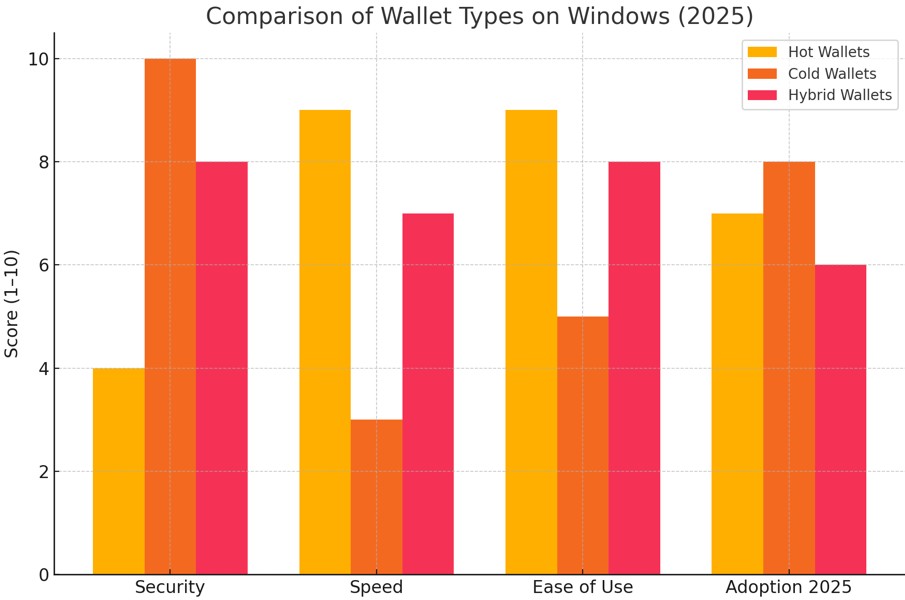
Hot wallets
Hot wallets are the most common form of a Bitcoin wallet for Windows, installed as desktop apps that remain connected to the internet. They allow fast transactions and are popular among traders who move assets frequently. In 2026, hot wallets often include multi-chain support, DeFi integrations, and built-in swaps, features that were rare just a few years ago. However, they remain vulnerable to phishing, malware, and OS-level exploits. Chainalysis reports that 70% of reported crypto thefts in 2024 targeted hot wallets. For this reason, professional traders rarely keep their full balance in a hot desktop Bitcoin wallet for Windows, using them mainly for active trading or daily liquidity.
Cold wallets
Cold wallets are offline solutions that store private keys securely, usually paired with a desktop wallet to authorize transactions. These wallets include hardware devices such as Ledger and Trezor, or advanced offline setups like Armory. Cold storage represents the gold standard for security. Reuters reports that as of 2026, institutional investors hold more than 80% of their digital assets in cold wallets, reflecting their unmatched protection against online attacks. The trade-off is convenience: transactions require physical confirmation or secondary devices, making them slower than hot wallets.
Hybrid wallets
Hybrid wallets combine the speed of hot wallets with the safety of cold storage. A cryptowallet for Windows PC in hybrid form lets traders keep a small balance online for daily transactions while securing the bulk of funds offline. Modern examples include Atomic Wallet (non-custodial with staking and swaps) paired with hardware integration. By 2026, hybrid systems will be gaining popularity among mid-size funds and active traders because they reduce counterparty risk while preserving usability. They also integrate features such as multi-device synchronization, Layer-2 support, and encrypted cloud backups, allowing mobility without giving up control.
Recommended wallets
Beginner-friendly
Exodus remains one of the best Windows crypto wallets, with support for more than 300 assets and a clean interface. Guarda is another reliable choice, frequently used as a crypto wallet for Windows 10, offering staking and backups.
Advanced solutions
Electrum is a lightweight Bitcoin wallet optimized mainly for Windows 10 and designed for advanced traders. Armory is a more technical Windows wallet for crypto, offering offline cold storage and scripting.
Hybrid choice
In hybrid form, Atomic Wallet stands out as the best Bitcoin wallet for Windows, supporting 500+ assets and built-in swaps.
Hardware integration
Ledger Live and Trezor Suite operate as software based wallets, providing secure hardware support.
Pitfalls to avoid
Not every crypto wallet for Windows is safe. Attackers often clone official websites or distribute modified versions of popular wallets through torrents and unverified forums.
Outdated apps may stop receiving security patches, leaving vulnerabilities open. A crypto wallet download for Windows without active developer support poses serious risks, as unpatched exploits are frequently used by hackers. Traders should avoid any wallet download offered through third-party sources, since they are the most common entry points for credential-stealing malware.
Phishing attacks also remain a concern: fake update prompts or malicious extensions inside a desktop Bitcoin wallet for Windows can capture recovery seeds.
To reduce risks, users should:
Always verify digital signatures and checksums when performing a Bitcoin wallet download.
Choose wallets with frequent update cycles and transparent development logs.
Avoid storing large amounts in hot wallets, even if the Windows Bitcoin wallet appears reputable.
Safe setup and usage
Before you download a Bitcoin wallet for PC, preparation is critical. Traders should update the operating system, activate trusted antivirus software, and use a firewall to minimize attack surfaces. In 2026, Microsoft Defender improved its ability to detect crypto-mining malware, but phishing campaigns remain the main risk vector.
A Bitcoin wallet for Windows is secure only if recovery phrases are stored offline. Best practice includes writing the seed on metal backup plates, splitting it across secure locations, and avoiding digital copies on cloud services. According to Ledger Security Lab, more than 35% of wallet breaches in 2024 were due to poor seed storage.
Additional measures include:
Verifying wallet signatures before installation.
Running the wallet in a dedicated Windows user profile with limited admin rights.
Combining hot and cold storage: keep trading funds in a hot wallet and larger holdings in a hardware device.
By combining these practices, traders can significantly reduce risks while still benefiting from the advanced features of modern wallets.
How to withdraw from a Bitcoin wallet for Windows
After setting up a crypto wallet for Windows, many traders transfer funds to exchanges for trading, staking, or converting to fiat. Choosing the right exchange is as important as choosing the right Windows Bitcoin wallet, since liquidity, fees, and security vary widely. The table below compares leading crypto exchanges, focusing on key aspects that matter.
| Crypto | Foundation year | Min. Deposit, $ | Coins Supported | Spot Taker fee, % | Spot Maker Fee, % | Alerts | Copy trading | Tier-1 regulation | TU overall score | Open an account | |
|---|---|---|---|---|---|---|---|---|---|---|---|
| Yes | 2017 | 10 | 600+ | 0.1 | 0.08 | Yes | Yes | No | 8.48 | Go to broker Your capital is at risk. |
|
| Yes | 2012 | 10 | 400+ | 0.5 | 0.5 | Yes | No | Yes | 7.84 | Go to broker Your capital is at risk. |
|
| Yes | 2016 | 1 | 400+ | 0.5 | 0.25 | Yes | No | Yes | 7.8 | Go to broker Your capital is at risk. |
|
| Yes | 2018 | No | 1000 | 0 | 0 | Yes | Yes | No | 7.76 | Go to broker Your capital is at risk. |
|
| Yes | 2011 | 10 | 399 | 0.3 | 0.2 | No | Yes | Yes | 7.6 | Go to broker Your capital is at risk.
|
Treat wallets that lack consistent patching or transparency

While the surge of options of Bitcoin wallet for Windows in 2026 gives traders more choice, it also creates noise. Many wallets advertise flashy features like built-in swaps and NFT dashboards, but these are often secondary compared to core security and update frequency. Traders should treat wallets that lack consistent patching or transparency as short-term tools, useful only for testing or low balances.
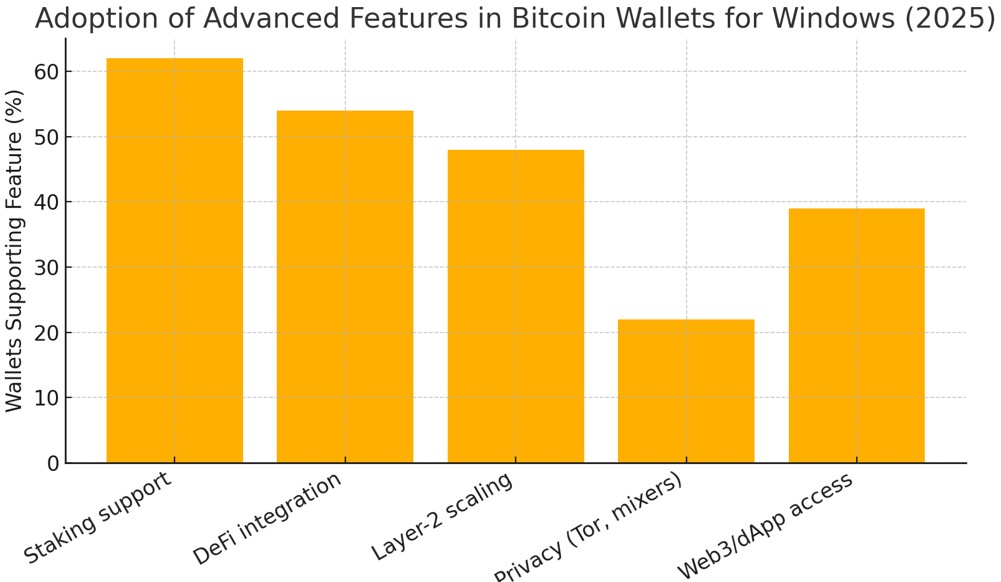
For serious trading or holding, shift funds into a desktop Bitcoin wallet with verified audits and combine it with hardware. This ensures flexibility without compromising safety. If your strategy involves frequent DeFi interaction, select a crypto wallet with Layer-2 support and Tor integration, but keep only what you need for execution. Long-term capital should always rest in hybrid or cold storage setups. The market is innovating fast, but smart traders separate genuine utility from hype, focusing on wallets that balance usability, privacy, and recovery strength rather than trend-driven add-ons.
Conclusion
Choosing the best crypto wallet for Windows in 2026 comes down to prioritizing security, consistent updates, and transparency over flashy features. While wallets like Electrum and Exodus excel in speed and user experience, ultimate safety is best achieved by combining hot wallets for daily use with hardware options such as Ledger Live for long-term storage. Relying solely on unvetted or outdated wallets exposes users to significant risks, regardless of ease of use or asset diversity. In the fast-evolving crypto space, smart traders focus on wallets that offer robust protection and reliable recovery, ensuring lasting peace of mind over fleeting convenience.
FAQs
What security features should I prioritize when choosing the best crypto wallet for Windows in 2026?
How do hot, cold, and hybrid wallets differ in terms of convenience and risk for Windows users?
Why is wallet developer transparency and update frequency important for long-term crypto asset protection on Windows?
What steps should Windows users take before setting up a new crypto wallet to maximize security?
Editors' Top Picks and Insights



Related Articles
Team that worked on the article
Oleg Tkachenko is an economic analyst and risk manager having more than 14 years of experience in working with systemically important banks, investment companies, and analytical platforms. He has been a Traders Union analyst since 2018.
Dan Blystone began his trading career in 1998 as an arbitrage clerk on the floor of the Chicago Mercantile Exchange (CME). He later traded bond and Eurex futures at proprietary firms such as Altea Trading, gaining valuable experience in high-frequency trading and risk management.
Chinmay Soni is a financial analyst with more than 5 years of experience in working with stocks, Forex, derivatives, and other assets. As a founder of a boutique research firm and an active researcher, he covers various industries and fields, providing insights backed by statistical data.
Cryptocurrency is a type of digital or virtual currency that relies on cryptography for security. Unlike traditional currencies issued by governments (fiat currencies), cryptocurrencies operate on decentralized networks, typically based on blockchain technology.
Index in trading is the measure of the performance of a group of stocks, which can include the assets and securities in it.
Bitcoin is a decentralized digital cryptocurrency that was created in 2009 by an anonymous individual or group using the pseudonym Satoshi Nakamoto. It operates on a technology called blockchain, which is a distributed ledger that records all transactions across a network of computers.
CFD is a contract between an investor/trader and seller that demonstrates that the trader will need to pay the price difference between the current value of the asset and its value at the time of contract to the seller.
Ethereum is a decentralized blockchain platform and cryptocurrency that was proposed by Vitalik Buterin in late 2013 and development began in early 2014. It was designed as a versatile platform for creating decentralized applications (DApps) and smart contracts.

-
 Afghanistan
-
 Albania
-
 Algeria
-
 Angola
-
 Argentina
-
 Armenia
-
 Australia
-
 Austria
-
 Azerbaijan
-
 Bahamas
-
 Bahrain
-
 Bangladesh
-
 Belarus
-
 Belgium
-
 Bolivia
-
 Botswana
-
 Brazil
-
 Brunei
-
 Bulgaria
-
 Cambodia
-
 Cameroon
-
 Canada
-
 Chile
Chile
-
 China
China
-
 Colombia
-
 Congo
Congo
-
 Costa Rica
-
 Cote d'Ivoire
-
 Croatia
-
 Cuba
Cuba
-
 Cyprus
-
 Czechia
-
 DR Congo
-
 Denmark
-
 Dominican Republic
-
 Ecuador
-
 Egypt
Egypt
-
 El Salvador
-
 Estonia
-
 Eswatini
-
 Ethiopia
-
 Finland
-
 France
-
 Georgia
-
 Germany
-
 Ghana
Ghana
-
 Greece
-
 Haiti
Haiti
-
 Hong Kong
-
 Hungary
-
 India
India
-
 Indonesia
-
 Iran, Islamic republic
-
 Iraq
Iraq
-
 Ireland
-
 Israel
-
 Italy
Italy
-
 Jamaica
-
 Japan
Japan
-
 Jordan
-
 Kazakhstan
-
 Kenya
Kenya
-
 Korea
Korea
-
 Kuwait
-
 Kyrgyzstan
-
 Laos
Laos
-
 Latvia
-
 Lebanon
-
 Lesotho
-
 Libya
Libya
-
 Lithuania
-
 Luxembourg
-
 Madagascar
-
 Malaysia
-
 Malta
Malta
-
 Mauritius
-
 Mexico
-
 Moldova
-
 Mongolia
-
 Montenegro
-
 Morocco
-
 Mozambique
-
 Myanmar
-
 Namibia
-
 Nepal
Nepal
-
 Netherlands
-
 New Zealand
-
 Nigeria
-
 North Macedonia
-
 Norway
-
 Oman
Oman
-
 Pakistan
-
 Palestine
-
 Panama
-
 Papua New Guinea
-
 Paraguay
-
 Peru
Peru
-
 Philippines
-
 Poland
-
 Portugal
-
 Puerto Rico
-
 Qatar
Qatar
-
 Reunion
-
 Romania
-
 Rwanda
-
 Saudi Arabia
-
 Serbia
-
 Singapore
-
 Slovakia
-
 Slovenia
-
 Somalia
-
 South Africa
-
 Spain
Spain
-
 Sri Lanka
-
 Sweden
-
 Switzerland
-
 Syria
Syria
-
 Taiwan
-
 Tajikistan
-
 Tanzania
-
 Thailand
-
 Trinidad and Tobago
-
 Tunisia
-
 Turkey
-
 UAE
UAE
-
 Uganda
-
 Ukraine
-
 United Kingdom
-
United States
-
 Uruguay
-
 Uzbekistan
-
 Venezuela
-
 Vietnam
-
 Yemen
Yemen
-
 Zambia
-
 Zimbabwe
- Forex
- Crypto












