How To Withdraw From Telegram Wallet: Full Guide


Editorial Note: While we adhere to strict Editorial Integrity, this post may contain references to products from our partners. Here's an explanation for How We Make Money. None of the data and information on this webpage constitutes investment advice according to our Disclaimer.
To withdraw from Telegram Wallet:
Telegram Wallet has rapidly grown into one of the most widely used crypto wallets worldwide, offering seamless access to TON, USDT, BTC, DOGS, Notcoin, and more all directly inside the Telegram app. But while deposits and transfers are straightforward, many users struggle with one critical question: how to withdraw money from Telegram Wallet safely and efficiently.
In this guide, you will find not only step-by-step instructions but also insights, research data, and expert strategies that make this article worth bookmarking and sharing.
Risk warning: Cryptocurrency markets are highly volatile, with sharp price swings and regulatory uncertainties. Research indicates that 75-90% of traders face losses. Only invest discretionary funds and consult an experienced financial advisor.
Telegram Wallet in 2026: why withdrawals matter
Since its launch in 2023, Telegram Wallet has made its mark in digital finance.
By October 2025, it boasts more than 100 million activated wallets, representing a tenth of Telegram’s vast 1 billion+ active user base.
Crypto-related services have rapidly expanded, now accounting for roughly 40% of Telegram’s projected $650 million in platform revenue for 2026, with cryptocurrency features driving media and in-app transactional growth.
Following the July 2025 rollout in the U.S., withdrawal options are now also available to Telegram’s 87 million American users, with functionality frequently updated and tailored to regional banking, crypto, and regulatory requirements.
How to withdraw from Telegram Wallet: step-by-step guide
Withdrawing funds from Telegram Wallet may seem complicated at first, but the process is straightforward once you know where to look. Below is a clear step-by-step guide that walks you through the entire withdrawal process, whether you’re sending crypto to an exchange, moving funds to a bank card, or simply cashing out TON, USDT, BTC, DOGS, or Notcoin.
1. Open the @wallet Bot
Go to the @wallet bot in Telegram. Tap on Wallet and decide on the asset you want to withdraw (Eg. TON, USDT, BTC, DOGS, Notcoin).

2. Select "Send"
Tap Send.

You will see available options:
external wallet or exchange (crypto address is required);
bank card (limited regional availability);
Telegram contact.

3. Enter destination details
For crypto withdrawal, paste your deposit address from the exchange. Always check that the network type matches (TON, TRC-20, ERC-20).
For bank withdrawal, follow instructions. Funds are typically converted to USDT or TON first, then sent to your linked card.
4. Confirm fees and send
Telegram Wallet shows the network fee (e.g., BTC fees can be high, while TON and USDT are cheaper). Confirm carefully and send.
5. Wait for processing
Crypto withdrawals: usually 5 to 15 minutes.
Bank withdrawals: 24 to 48 hours.
If you’re planning regular withdrawals from Telegram Wallet, it helps to connect it with a reliable crypto exchange in your region. A trusted exchange makes it easier to swap your coins for fiat, move funds quickly to your bank, and keep fees low. The best crypto exchanges also offer strong security and responsive support, so your withdrawals stay smooth and stress-free. Consider the ones listed below, as they are known for providing the best support in your region.
| OKX | Coinbase | Crypto.com | Cryptohopper | BTCC | |
|---|---|---|---|---|---|
|
Min. Deposit, $ |
10 | 10 | 1 | No | 10 |
|
Coins Supported |
600+ | 400+ | 400+ | 1000 | 399 |
|
Spot Taker fee, % |
0.1 | 0.5 | 0.5 | 0 | 0.3 |
|
Spot Maker Fee, % |
0.08 | 0.5 | 0.25 | 0 | 0.2 |
|
Alerts |
Yes | Yes | Yes | Yes | No |
|
Copy trading |
Yes | No | No | Yes | Yes |
|
TU overall score |
8.48 | 7.84 | 7.8 | 7.76 | 7.6 |
|
Open an account |
Go to broker Your capital is at risk. |
Go to broker Your capital is at risk. |
Go to broker Your capital is at risk. |
Go to broker Your capital is at risk. |
Go to broker Your capital is at risk.
|
Withdrawing specific tokens
Each cryptocurrency in Telegram Wallet follows the same basic withdrawal flow, but there are small differences depending on the token and the network you choose. Here’s how to handle withdrawals for DOGS, USDT, TON, and Notcoin. While major steps remain the same, we have provided cues on the parts that change.
How to withdraw DOGS from Telegram Wallet
DOGS, linked to the Last Dogs game, can be withdrawn to Binance or Bybit. Simply copy your DOGS address from the exchange and confirm withdrawal.
How to withdraw USDT from Telegram Wallet
Choose USDT, select TRC-20 or TON network for low fees, enter your exchange wallet address, and withdraw.
How to withdraw TON
Withdraw TON directly to Binance or Bybit TON addresses. This is the fastest and cheapest method.
How to withdraw Notcoin
Select Notcoin, copy your $NOT address from Binance, paste it, and confirm withdrawal.
How to withdraw to a bank account or PayPal
Telegram Wallet does not natively support direct PayPal or bank withdrawals for most regions. Instead, the universal method is:
Withdraw to an exchange (e.g., Binance, Bybit).
Convert crypto to fiat (USD, EUR, PKR, etc.).
Withdraw to your bank or PayPal via the exchange’s withdrawal feature.
How to transfer crypto from Telegram Wallet to Bybit


Copy your Bybit deposit address.
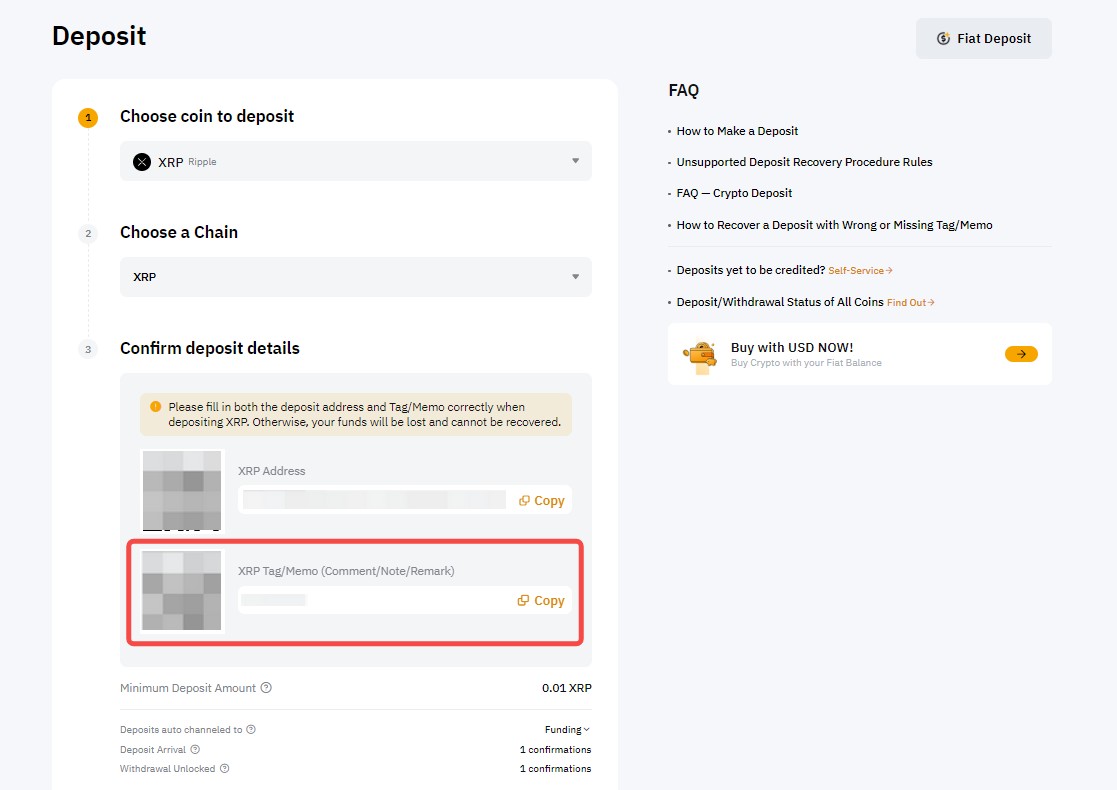
Paste it into Telegram Wallet withdrawal.
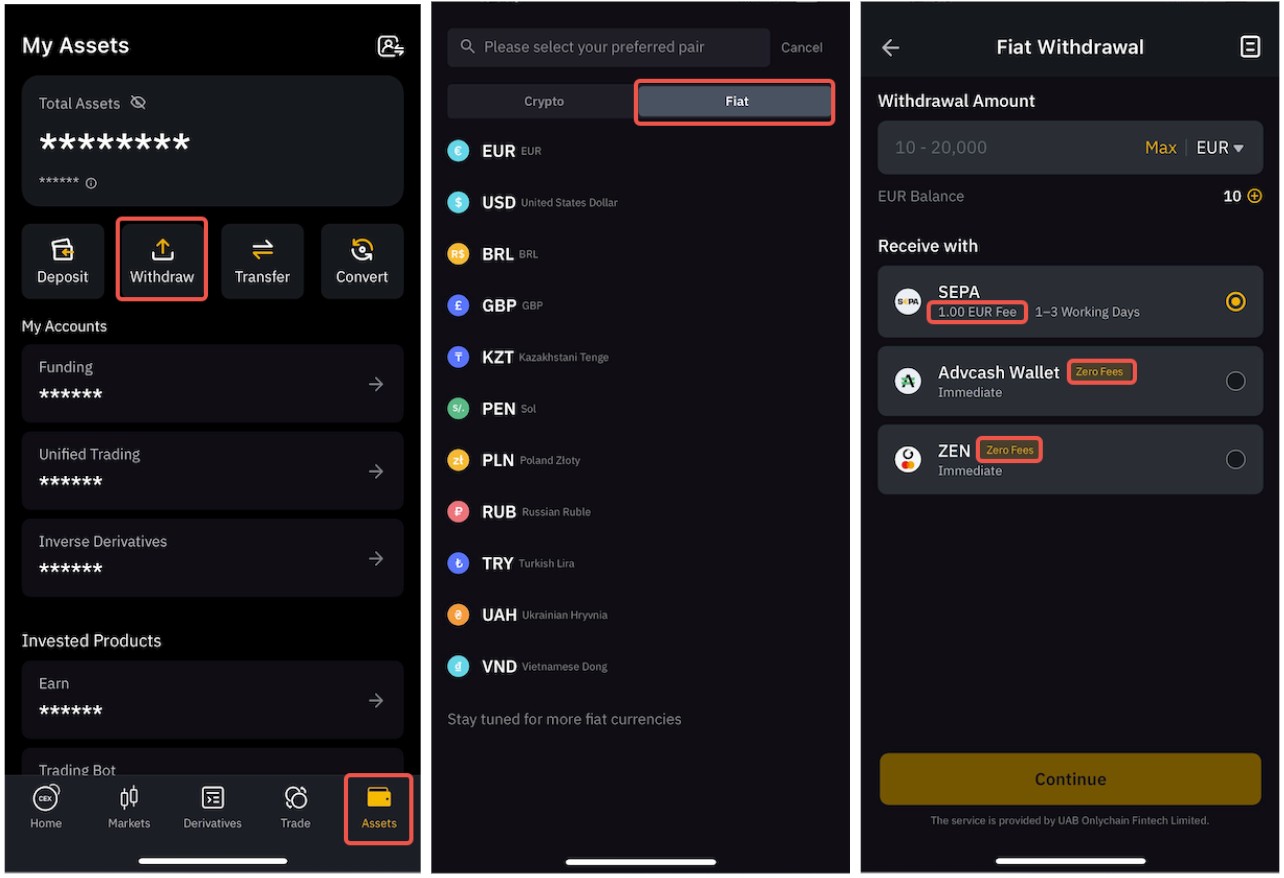
Confirm and transfer.
Sell crypto on Bybit and withdraw fiat to your bank.
Fees: what to expect
Before making a transfer, it’s important to understand the withdrawal fees, which vary depending on the token and network you choose.
BTC withdrawal fee – high and variable, depending on blockchain congestion.
TON withdrawal fee – low and fast.
USDT withdrawal fee – best via TRC-20 or TON networks.
DOGS and Notcoin – low, but always check before confirming.
Some sources suggest Telegram uses a flat $2 withdrawal fee in certain cases, making large withdrawals cheaper.
Security and risks: what you should know
While Telegram Wallet is convenient, users should be aware of key security concerns and risks before relying on it for storing or withdrawing large amounts of crypto.
Custodial risks
Telegram Wallet is a custodial wallet, meaning funds are controlled by the platform. If your Telegram account is banned or compromised, you could lose access. Reports exist of users losing funds even when blockchain transfers appeared successful.
Scam risks
An academic study found that Telegram channels host a large number of crypto fraud schemes, including pump-and-dumps and Ponzi bots. Always double-check bot authenticity.
Recommended strategy
For larger holdings, transfer funds to a non-custodial wallet (e.g., ZenGo, Ledger). ZenGo’s MPC security and 3FA make it safer for long-term storage.
Go-to network for withdrawals

I’ve seen how quickly the Telegram wallet has matured into a powerful tool for everyday crypto users. In March 2025, the platform introduced yield and staking features, offering up to 4% rewards on TON, which was a major step toward making the wallet not just a transfer tool but also an investment gateway. Looking back further, the April 2024 USDT integration proved the market’s appetite when more than $100 million in USDT was minted on TON within weeks. These developments reinforce why TON is now my preferred network for withdrawals; it consistently delivers faster confirmations and lower fees than BTC or ERC-20 USDT.
From my experience, there are a few essential practices I always recommend. Start with a small test withdrawal before moving larger amounts. It's a cheap way to avoid expensive mistakes. Stick with TON or TRC-20 networks for the best mix of speed and affordability. Double-check every address because crypto transfers can’t be reversed. If you’re converting to fiat, route your funds through a trusted exchange rather than trying to go directly to a bank. And finally, for anyone holding significant balances, I strongly advise moving assets into a non-custodial wallet like Ledger or ZenGo to ensure long-term control and security.
Conclusion
Withdrawing money from Telegram Wallet is now more accessible and flexible than ever, empowering users to move assets quickly across networks like TON and USDT with minimal fees and fast processing. While the process is user-friendly, it is crucial to prioritize safety by testing small transfers first and always double-checking withdrawal addresses, as shown by reports of successful test withdrawals and the low costs associated with the TON network. For anyone managing larger balances, using a non-custodial wallet like Ledger or ZenGo is the gold standard for security and control. Ultimately, the real power of Telegram Wallet lies in combining its seamless in-app experience with strategic use of trusted exchanges and best security practices, ensuring both convenience and peace of mind in every transaction.
FAQs
What are the typical processing times for Telegram Wallet withdrawals to exchanges or bank accounts?
Are there network-specific fee differences when withdrawing from Telegram Wallet?
Which withdrawal destinations are supported by Telegram Wallet, and are there regional limitations?
What safety precautions should users take when withdrawing large amounts from Telegram Wallet?
Editors' Top Picks and Insights






Related Articles
Team that worked on the article
Oleg Tkachenko is an economic analyst and risk manager having more than 14 years of experience in working with systemically important banks, investment companies, and analytical platforms. He has been a Traders Union analyst since 2018.
Dan Blystone began his trading career in 1998 as an arbitrage clerk on the floor of the Chicago Mercantile Exchange (CME). He later traded bond and Eurex futures at proprietary firms such as Altea Trading, gaining valuable experience in high-frequency trading and risk management.
Chinmay Soni is a financial analyst with more than 5 years of experience in working with stocks, Forex, derivatives, and other assets. As a founder of a boutique research firm and an active researcher, he covers various industries and fields, providing insights backed by statistical data.
CFD is a contract between an investor/trader and seller that demonstrates that the trader will need to pay the price difference between the current value of the asset and its value at the time of contract to the seller.
Bitcoin is a decentralized digital cryptocurrency that was created in 2009 by an anonymous individual or group using the pseudonym Satoshi Nakamoto. It operates on a technology called blockchain, which is a distributed ledger that records all transactions across a network of computers.
Risk management is a risk management model that involves controlling potential losses while maximizing profits. The main risk management tools are stop loss, take profit, calculation of position volume taking into account leverage and pip value.
Cryptocurrency is a type of digital or virtual currency that relies on cryptography for security. Unlike traditional currencies issued by governments (fiat currencies), cryptocurrencies operate on decentralized networks, typically based on blockchain technology.
Yield refers to the earnings or income derived from an investment. It mirrors the returns generated by owning assets such as stocks, bonds, or other financial instruments.
-
 Afghanistan
-
 Albania
-
 Algeria
-
 Angola
-
 Argentina
-
 Armenia
-
 Australia
-
 Austria
-
 Azerbaijan
-
 Bahamas
-
 Bahrain
-
 Bangladesh
-
 Belarus
-
 Belgium
-
 Bolivia
-
 Botswana
-
 Brazil
-
 Brunei
-
 Bulgaria
-
 Cambodia
-
 Cameroon
-
 Canada
-
 Chile
Chile
-
 China
China
-
 Colombia
-
 Congo
Congo
-
 Costa Rica
-
 Cote d'Ivoire
-
 Croatia
-
 Cuba
Cuba
-
 Cyprus
-
 Czechia
-
 DR Congo
-
 Denmark
-
 Dominican Republic
-
 Ecuador
-
 Egypt
Egypt
-
 El Salvador
-
 Estonia
-
 Eswatini
-
 Ethiopia
-
 Finland
-
 France
-
 Georgia
-
 Germany
-
 Ghana
Ghana
-
 Greece
-
 Haiti
Haiti
-
 Hong Kong
-
 Hungary
-
 India
India
-
 Indonesia
-
 Iran, Islamic republic
-
 Iraq
Iraq
-
 Ireland
-
 Israel
-
 Italy
Italy
-
 Jamaica
-
 Japan
Japan
-
 Jordan
-
 Kazakhstan
-
 Kenya
Kenya
-
 Korea
Korea
-
 Kuwait
-
 Kyrgyzstan
-
 Laos
Laos
-
 Latvia
-
 Lebanon
-
 Lesotho
-
 Libya
Libya
-
 Lithuania
-
 Luxembourg
-
 Madagascar
-
 Malaysia
-
 Malta
Malta
-
 Mauritius
-
 Mexico
-
 Moldova
-
 Mongolia
-
 Montenegro
-
 Morocco
-
 Mozambique
-
 Myanmar
-
 Namibia
-
 Nepal
Nepal
-
 Netherlands
-
 New Zealand
-
 Nigeria
-
 North Macedonia
-
 Norway
-
 Oman
Oman
-
 Pakistan
-
 Palestine
-
 Panama
-
 Papua New Guinea
-
 Paraguay
-
 Peru
Peru
-
 Philippines
-
 Poland
-
 Portugal
-
 Puerto Rico
-
 Qatar
Qatar
-
 Reunion
-
 Romania
-
 Rwanda
-
 Saudi Arabia
-
 Serbia
-
 Singapore
-
 Slovakia
-
 Slovenia
-
 Somalia
-
 South Africa
-
 Spain
Spain
-
 Sri Lanka
-
 Sweden
-
 Switzerland
-
 Syria
Syria
-
 Taiwan
-
 Tajikistan
-
 Tanzania
-
 Thailand
-
 Trinidad and Tobago
-
 Tunisia
-
 Turkey
-
 UAE
UAE
-
 Uganda
-
 Ukraine
-
 United Kingdom
-
United States
-
 Uruguay
-
 Uzbekistan
-
 Venezuela
-
 Vietnam
-
 Yemen
Yemen
-
 Zambia
-
 Zimbabwe
- Forex
- Crypto