
Forex Flex EA Review


Editorial Note: While we adhere to strict Editorial Integrity, this post may contain references to products from our partners. Here's an explanation for How We Make Money. None of the data and information on this webpage constitutes investment advice according to our Disclaimer.
Forex Flex EA is an automated trading system designed to operate on the MT4 platform. It utilizes innovative virtual trade technology to identify the most profitable entry points in the market. Forex Flex EA stands out due to its flexibility, allowing traders to customize various parameters to suit their trading preferences.
This review talks about the features, performance, and user experience of Forex Flex EA to help traders make an informed decision of whether to invest in the platform or not.
What is Forex Flex EA?

Forex Flex EA is one such EA that promises to enhance trading efficiency and profitability. It is an automated trading system for the MetaTrader 4 platform, designed to optimize trading through innovative virtual trade technology, customizable settings, and multiple trading strategies.
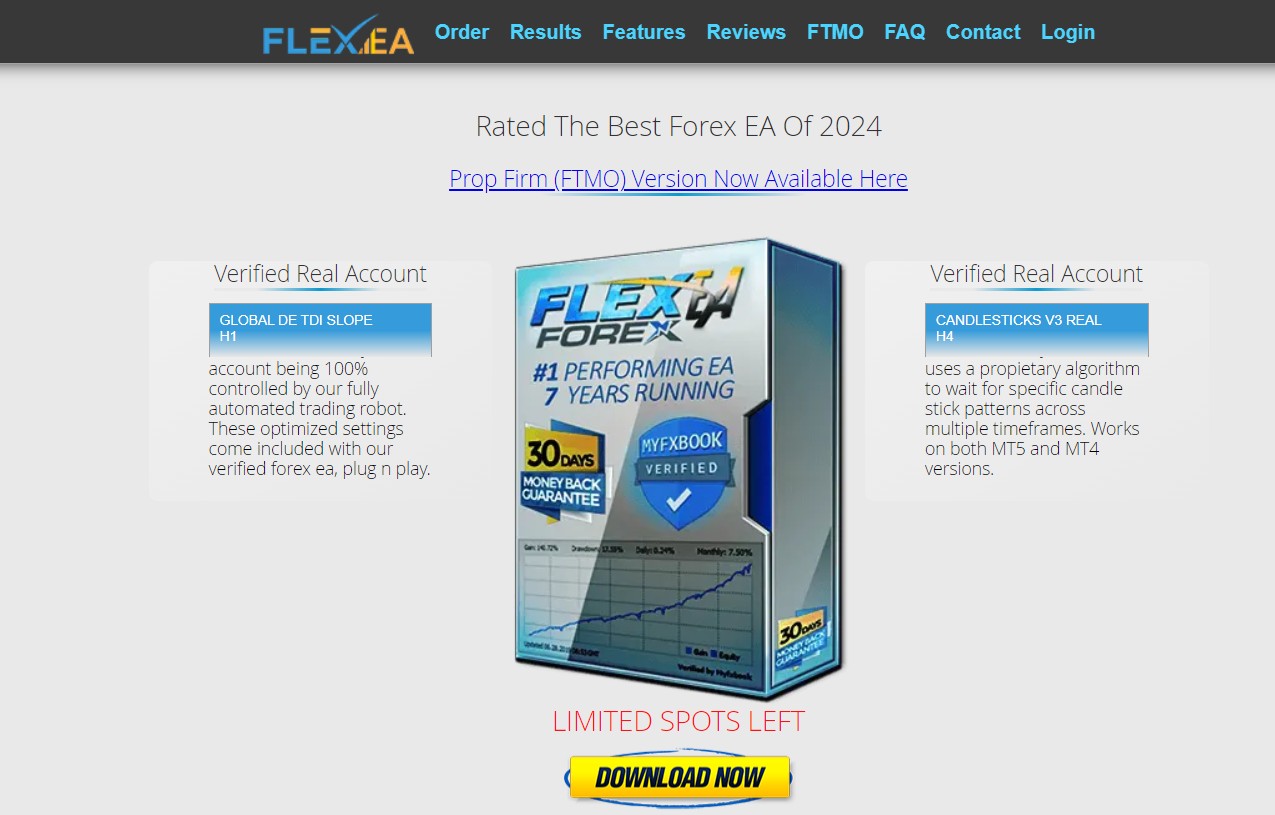
Key features of Forex Flex EA:
Virtual trade technology. Forex Flex EA uses a unique virtual trade technology that simulates trades to find the most favorable market conditions before placing real trades. This reduces the risk and increases the chances of successful trades.
Customizable settings. The EA offers a wide range of customizable settings, enabling traders to tailor the system according to their trading style. This includes settings for lot size, stop loss, take profit, and more.
Multiple trading strategies. Forex Flex EA supports multiple trading strategies, such as trend trading, countertrend trading, and grid trading. Traders can switch between these strategies or combine them to maximize profitability.
News filter. The EA comes with a built-in news filter that prevents trading during high-impact news events. This helps avoid market volatility and potential losses during such periods.
Stealth mode. One thing traders will love is the stealth mode. It keeps your stop losses and take profits hidden from your broker, which can help avoid broker manipulation. It’s perfect for traders dealing with brokers that might otherwise interfere with your trades.
Risk management. Forex Flex EA includes robust risk management features, including equity protection, drawdown control, and lot size management. These features help protect the trading account from significant losses.
Pricing and packages
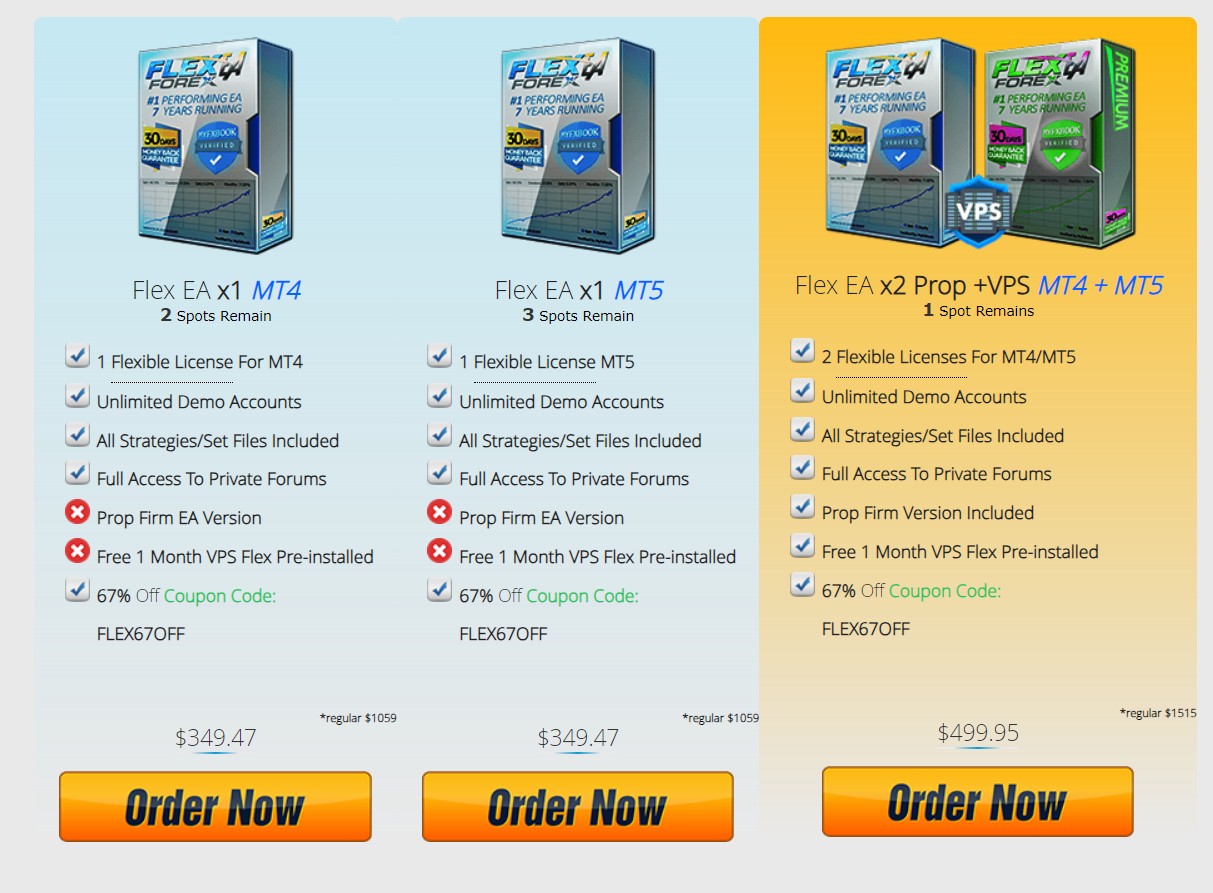
Forex Flex EA is available in several packages to cater to different trading needs. The basic package includes one real account license and lifetime updates, while the more advanced packages offer multiple licenses and additional features. The pricing is competitive, considering the range of features and benefits provided by the EA.
Performance and results
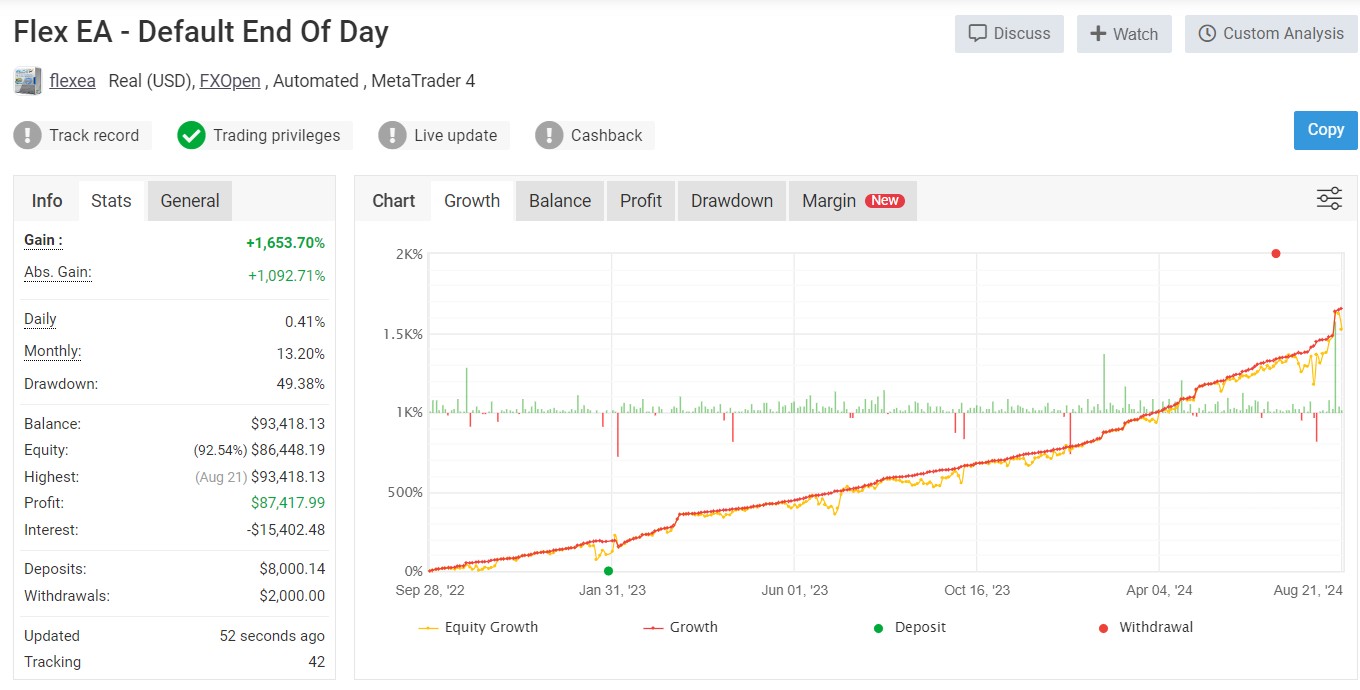
Forex Flex EA has been tested extensively in various market conditions. Backtests and live trading results show a consistent performance with steady profits. The EA's ability to adapt to changing market conditions and its advanced risk management features contribute to its reliability.
User experience
Traders using Forex Flex EA have reported positive experiences, highlighting the EA's ease of use, flexibility, and consistent performance. The customizable settings and multiple trading strategies allow both novice and experienced traders to benefit from the EA. Additionally, the customer support provided by the developers has received praise for being responsive and helpful.
How to use Forex Flex EA: a step-by-step guide
Purchase and download. Buy Forex Flex EA from the official website and download the installation files.
Install on MetaTrader 4. Open your MetaTrader 4 platform, go to “File” > “Open Data Folder,” and copy the EA files into the “Experts” folder. Restart MT4 to load the EA.
Attach EA to a chart. Open a new chart for the currency pair you wish to trade. Drag and drop Forex Flex EA from the “Navigator” window onto the chart.
Configure settings. Customize the EA settings according to your trading preferences. This includes adjusting parameters like lot size, stop loss, take profit, and selecting your preferred trading strategy.
Enable auto trading. Ensure that the “AutoTrading” button in the MT4 toolbar is enabled. This allows the EA to execute trades automatically based on the configured settings.
Monitor performance: Regularly check the performance of Forex Flex EA. Make adjustments as necessary to optimize performance and align with changing market conditions.
Update regularly. Keep the EA updated to benefit from the latest improvements and enhancements provided by the developers. This ensures the EA remains effective in various market conditions.
However, even the most advanced Expert Advisor cannot operate effectively without a reliable trading environment. Since Forex Flex EA runs on MetaTrader 4 and relies on stable execution, low spreads, and uninterrupted connectivity, choosing the right broker becomes a critical part of the strategy. Below are some Forex brokers that support automated trading and allow the use of Expert Advisors (EAs) on the MT4 platform.
| Trading.com USA | OANDA | FOREX.com | IG Markets | Interactive Brokers | |
|---|---|---|---|---|---|
|
Min. deposit, $ |
50 | No | 100 | 1 | No |
|
Tradable assets |
69 | 129 | 5500 | 20000 | 30000 |
|
Standard EUR/USD spread |
1.1 | 0.3 | 1.0 | 0.9 | 0.5 |
|
Max. leverage |
1:50 | 1:200 | 1:50 | 1:200 | 1:30 |
|
Max. Regulation Level |
Tier-1 | Tier-1 | Tier-1 | Tier-1 | Tier-1 |
|
TU overall score |
6.88 | 6.63 | 6.47 | 6.38 | 6.37 |
|
Open an account |
Go to broker Your capital is at risk. |
Go to broker Your capital is at risk. |
Study review | Study review | Study review |
Bringing the best out of Forex Flex EA

Forex Flex EA's standout feature is how it uses virtual trades to zero in on the best entry points—a tool that most new traders don’t think to maximize. Instead of simply following the default setup, try setting the virtual trades to four instead of six for pairs like EUR/USD. This small change can help you catch more frequent opportunities while still keeping risks in check. It's not just about playing it safe—it's about giving yourself a bit more flexibility in the markets without going overboard. Take your time to experiment and watch how the market reacts before locking in your strategy.
Another clever way to enhance your experience is by tweaking the news filter. Rather than shutting off trading completely around news releases, try setting it to avoid trading only 30 minutes before and after big announcements. This way, you’re not missing out on potential gains once the dust settles after a news event. Keep an eye on high-impact events that really shake up the pairs you're trading and don’t worry about the smaller news. It’s these kinds of adjustments that make the difference between a generic robot and a trading assistant that works just for you.
Conclusion
Forex Flex EA stands out as a flexible and innovative automated trading solution that empowers both new and experienced traders on the MetaTrader 4 platform. Its unique virtual trade technology and customizable strategies allow users to adapt the EA for optimal performance in shifting market conditions. For example, adjusting the number of virtual trades or fine-tuning the news filter can help users strike the perfect balance between risk management and profitability. Ultimately, those who treat Forex Flex EA as a dynamic trading assistant and invest time in customization will unlock its full potential and gain a powerful edge in the forex market.
FAQs
How does Forex Flex EA's stealth mode contribute to safer trading?
What risk management features are integrated into Forex Flex EA?
Who can benefit from using Forex Flex EA—beginners or experienced traders?
How often should traders update Forex Flex EA to maintain optimal performance?
Editors' Top Picks and Insights






Related Articles
Team that worked on the article
Oleg Tkachenko is an economic analyst and risk manager having more than 14 years of experience in working with systemically important banks, investment companies, and analytical platforms. He has been a Traders Union analyst since 2018.
Dan Blystone began his trading career in 1998 as an arbitrage clerk on the floor of the Chicago Mercantile Exchange (CME). He later traded bond and Eurex futures at proprietary firms such as Altea Trading, gaining valuable experience in high-frequency trading and risk management.
Chinmay Soni is a financial analyst with more than 5 years of experience in working with stocks, Forex, derivatives, and other assets. As a founder of a boutique research firm and an active researcher, he covers various industries and fields, providing insights backed by statistical data.
An Expert Advisor (EA) is a piece of software or script used in the MetaTrader trading platform to automate trading strategies. EAs are programmed to execute trading decisions based on predefined criteria, rules, and algorithms, allowing for automated and systematic trading without the need for manual intervention.
Bitcoin is a decentralized digital cryptocurrency that was created in 2009 by an anonymous individual or group using the pseudonym Satoshi Nakamoto. It operates on a technology called blockchain, which is a distributed ledger that records all transactions across a network of computers.
Cryptocurrency is a type of digital or virtual currency that relies on cryptography for security. Unlike traditional currencies issued by governments (fiat currencies), cryptocurrencies operate on decentralized networks, typically based on blockchain technology.
Backtesting is the process of testing a trading strategy on historical data. It allows you to evaluate the strategy's performance in the past and identify its potential risks and benefits.
Volatility refers to the degree of variation or fluctuation in the price or value of a financial asset, such as stocks, bonds, or cryptocurrencies, over a period of time. Higher volatility indicates that an asset's price is experiencing more significant and rapid price swings, while lower volatility suggests relatively stable and gradual price movements.

-
 Afghanistan
-
 Albania
-
 Algeria
-
 Angola
-
 Argentina
-
 Armenia
-
 Australia
-
 Austria
-
 Azerbaijan
-
 Bahamas
-
 Bahrain
-
 Bangladesh
-
 Belarus
-
 Belgium
-
 Bolivia
-
 Botswana
-
 Brazil
-
 Brunei
-
 Bulgaria
-
 Cambodia
-
 Cameroon
-
 Canada
-
 Chile
Chile
-
 China
China
-
 Colombia
-
 Congo
Congo
-
 Costa Rica
-
 Cote d'Ivoire
-
 Croatia
-
 Cuba
Cuba
-
 Cyprus
-
 Czechia
-
 DR Congo
-
 Denmark
-
 Dominican Republic
-
 Ecuador
-
 Egypt
Egypt
-
 El Salvador
-
 Estonia
-
 Eswatini
-
 Ethiopia
-
 Finland
-
 France
-
 Georgia
-
 Germany
-
 Ghana
Ghana
-
 Greece
-
 Haiti
Haiti
-
 Hong Kong
-
 Hungary
-
 India
India
-
 Indonesia
-
 Iran, Islamic republic
-
 Iraq
Iraq
-
 Ireland
-
 Israel
-
 Italy
Italy
-
 Jamaica
-
 Japan
Japan
-
 Jordan
-
 Kazakhstan
-
 Kenya
Kenya
-
 Korea
Korea
-
 Kuwait
-
 Kyrgyzstan
-
 Laos
Laos
-
 Latvia
-
 Lebanon
-
 Lesotho
-
 Libya
Libya
-
 Lithuania
-
 Luxembourg
-
 Madagascar
-
 Malaysia
-
 Malta
Malta
-
 Mauritius
-
 Mexico
-
 Moldova
-
 Mongolia
-
 Montenegro
-
 Morocco
-
 Mozambique
-
 Myanmar
-
 Namibia
-
 Nepal
Nepal
-
 Netherlands
-
 New Zealand
-
 Nigeria
-
 North Macedonia
-
 Norway
-
 Oman
Oman
-
 Pakistan
-
 Palestine
-
 Panama
-
 Papua New Guinea
-
 Paraguay
-
 Peru
Peru
-
 Philippines
-
 Poland
-
 Portugal
-
 Puerto Rico
-
 Qatar
Qatar
-
 Reunion
-
 Romania
-
 Rwanda
-
 Saudi Arabia
-
 Serbia
-
 Singapore
-
 Slovakia
-
 Slovenia
-
 Somalia
-
 South Africa
-
 Spain
Spain
-
 Sri Lanka
-
 Sweden
-
 Switzerland
-
 Syria
Syria
-
 Taiwan
-
 Tajikistan
-
 Tanzania
-
 Thailand
-
 Trinidad and Tobago
-
 Tunisia
-
 Turkey
-
 UAE
UAE
-
 Uganda
-
 Ukraine
-
 United Kingdom
-
United States
-
 Uruguay
-
 Uzbekistan
-
 Venezuela
-
 Vietnam
-
 Yemen
Yemen
-
 Zambia
-
 Zimbabwe
- Forex
- Crypto












