
Best cTrader Brokers 2026


Editorial Note: While we adhere to strict Editorial Integrity, this post may contain references to products from our partners. Here's an explanation for How We Make Money. None of the data and information on this webpage constitutes investment advice according to our Disclaimer.
TOP cTrader Brokers 2026:
- Pepperstone - Best for scalping strategies (spread from 0 pips)
- Fusion Markets - Best for low cost Forex trading (ECN fee is only $2.25 per side)
- GTCFX - Regulated by the VFSC and FSC, offering Forex and CFD trading with leverage up to 1:1000
- FxPro - Biggest choice of currency pairs (70+ FX CFDs)
- IC.com - Biggest Forex broker by trading volume (average volume over 29B per day)
- XBTFX - Cryptocurrency-focused broker offering forex and CFD trading
cTrader is a trading platform designed for active traders who prefer the dynamics of trading on ECN accounts. It offers a range of advanced features tailored for in-depth charting, analysis, and automation, making it a preferred choice for many seasoned traders.
Our experts compared brokers that not only support this trading platform but also excel in providing exceptional trade execution speeds. These brokers collaborate with major liquidity providers, ensuring optimal trading conditions. Moreover, they offer additional functionalities such as Virtual Private Servers (VPS) and other automation tools, enhancing the overall trading experience for their clients.
Warning: There is a high level of risk involved when trading leveraged products such as Forex/CFDs. Between 65% and 82% of retail investor accounts lose money when trading CFDs. You should consider whether you understand how CFDs work and whether you can afford to take the high risk of losing your money.
Best cTrader Brokers Compared
Our analysts compared the top cTrader brokers based on parameters such as ECN/Raw spread account conditions, which are typically best suited for this platform, as well as the additional features for advanced traders offered by these brokers.
| Pepperstone | Fusion Markets | GTCFX | FxPro | IC.com | XBTFX | |
|---|---|---|---|---|---|---|
|
Currency pairs |
90 | 90 | 150 | 70 | 61 | 75 |
|
ECN Commission |
3 | 2.25 | 3.5 | 3 | 3.5 | 3.5 |
|
ECN Spread EUR/USD |
0.1 | 0.1 | 0.2 | 0.2 | 0.1 | 0.01 |
|
TradingView |
Yes | Yes | No | No | Yes | No |
|
Open an account |
Go to broker Your capital is at risk.
|
Go to broker Your capital is at risk. |
Go to broker Your capital is at risk. |
Go to broker Your capital is at risk. |
Go to broker Your capital is at risk. |
Go to broker Your capital is at risk. |





What Are cTrader Pros and Cons?
Although no trading platform is perfect for everyone, there are options that can offer cutting-edge features after some tweaks. However, an out-of-the-box version that’s more reliable will require fewer investments.
- Pros
- Cons
- A user interface that’s intuitive and easy to use and navigate.
- Excellent charting and technical analysis tools.
- Fast and efficient execution.
- A growing community of cTrader indicators and cTrader bots developers.
- C# coding language.
- Automated and mirror trading.
- Execution models involving NDD, STP, and ECN.
- Traders who are new to the platform may have difficulty navigating the features.
- Trading solutions are less automated than on MT4.
- Limited availability.
cTrader vs. MetaTrader: Which Should I Use?
The most popular trading platform is MetaTrader 4, while advanced traders prefer cTrader. MT4 is easier to use, faster, and has an extensive library of automation bots. As compared to MT4, cTrader offers superior charting, functionality, and market depth.
To get a deeper understanding of how the two trading platforms compare, it helps to look at key criteria, including:
User interface: cTrader’s interface is well-known for its smoothness, simplicity, and intuitiveness. However, MT4’s user interface and ease of use could make it the better platform, depending on the trader.
Support for auto-trading functionalities: For auto-trading, MT4 offers Expert Advisors that are easy to use, customizable, and work well for both new and experienced traders. cAlgo is cTrader’s equivalent and is programmable in C#. However, the support functionalities for MT4's auto-trading tools are considered to be among the best in the market. MT4 also has a vast online community, so it's easier for users to find support for this platform on the internet, whereas cTrader's auto-trading may have limited support.
Market depth functionality: Trading at precise price points requires traders to understand market depth in order to access liquidity. In cTrader, you can assess market depth based on standard depth, price depth, or VWAP depth. However, MT4 only offers one feature for market depth. In terms of providing a comprehensive overview of market depth, cTrader outperforms MT4.
Flexibility and customization: In cTrader, there’s less flexibility for traders to customize indicators according to their preferences. However, MT4 has many tools that allow the platform to be fully customized, with or without knowing a programming language, making it a much more flexible platform.
In a nutshell, cTrader’s extensive charting capabilities and technical analysis tools may be best for more advanced traders, while MT4’s ease-of-use may be well-suited for beginners.
Is cTrader Good For Beginners?
Even though cTrader is used by many advanced traders, beginners can also benefit from it. CTrader was developed by Spotware, a company that has been around for more than ten years. At that time, the platform was designed to support both manual and automated trading as well as a community of traders in order to help traders learn how to use the platform and trade the markets.
CTrader also offers one of the best free manual trading terminals. Moreover, cTrader allows advanced risk management settings that can be applied with a single click of the mouse when submitting orders to the broker, as well as user-friendly trade buttons positioned throughout the chart.
Beginners can also benefit from cTrader’s chart analysis tools. As opposed to many other trading platforms, cTrader's vendors provide full documentation on many of their third-party indicators to help traders take advantage of them effectively.
CTrader is also one of the best trading platforms for automated trading. By automating your trading, a robot will open, close, and manage your orders based on a set of rules. cTrader uses one of the easiest programming languages around. Having access to so much free educational content and videos on the internet is a huge bonus. Also, third-party trading tools can assist traders using certain indicators in their trading strategies.
The community and support built up around a platform can also be a major deciding factor when choosing a platform. Spotware provides its customers with access to a unique ecosystem that allows them to get answers to any question using Telegram groups and forums.
How to Choose a cTrader Broker
To find the best cTrader broker for your unique needs and preferences, consider the following factors:
- Regulation: This attribute is usually the first consideration for any broker. According to analysts, the industry's top-tier regulators are CySEC, ASIC, FCA, as well as other trusted bodies from Europe, North America, and Australia. Whenever possible, don’t deal with brokers whose sole regulation is provided by organizations based in offshore jurisdictions like the Cayman Islands or the Bahamas. Exceptions to this rule include brands with a long history, licenses from recognized regulators, and impeccable reputations.
- Negative balance protection: While negative balance protection may seem insignificant, it's still vital in a highly leveraged market like forex. In most cases, brokers offer this feature, but it doesn’t hurt to double-check. When trading, negative balance protection ensures that you won't owe a broker if you suffer a substantial loss.
- Execution model: Most brokers are classified as ECN or market maker. It’s important to note that neither model is necessarily better than the other, and many brokerages use both. However, it can still help to understand the pros and cons of each and what you can expect from either execution model. An ECN broker, for example, typically has variable spreads, which might not be suitable for all trading strategies. Alternatively, many market makers provide fixed spreads, which might be useful for some traders. The majority of ECN brokers allow discretionary and automated strategies, but market makers often prohibit scalping, hedging, and robots.
Trading costs: You should consider spreads, commissions, funding/withdrawal charges, and inactivity fees when assessing trading costs. There are a number of cTrader brokers that offer competitive spreads. In some cases, however, you may be charged a commission for accounts with zero spread, which can also vary significantly from one broker to another. When choosing a broker, you may also have to consider deposit and withdrawal fees.
Range of instruments: Almost all brokers offer 28 combinations of major and minor pairs. Other brokerages, however, may be limited when it comes to exotics, which is an important factor to consider.
cTrader Charts Setup
With the cTrader platform, you can arrange the open charts into different configurations and modes, as well as detach them for maximum viewing. cTrader offers 3 different chart layout modes: Multi Chart, Single Chart, and Free Chart, all of which can be customized based on your favorite symbols.
To get started with chart setup on cTrader:
Once you’ve chosen a broker, visit their website. You should have an option to install cTrader. Choose whether you want to download the mobile app, desktop version, or web trader.
Create a cTrader account by entering your email and password. A demo account will automatically be created for you. You can also create a live trading account by linking your cTrader ID with the broker of your choosing.
Now, set up your charts. There are many ways to customize your charts. You can choose between Single-Chart Mode, Multi-Chart Mode, and Free Chart Mode. Choose your preferred configuration by clicking one of the icons at the top-left corner of the screen.
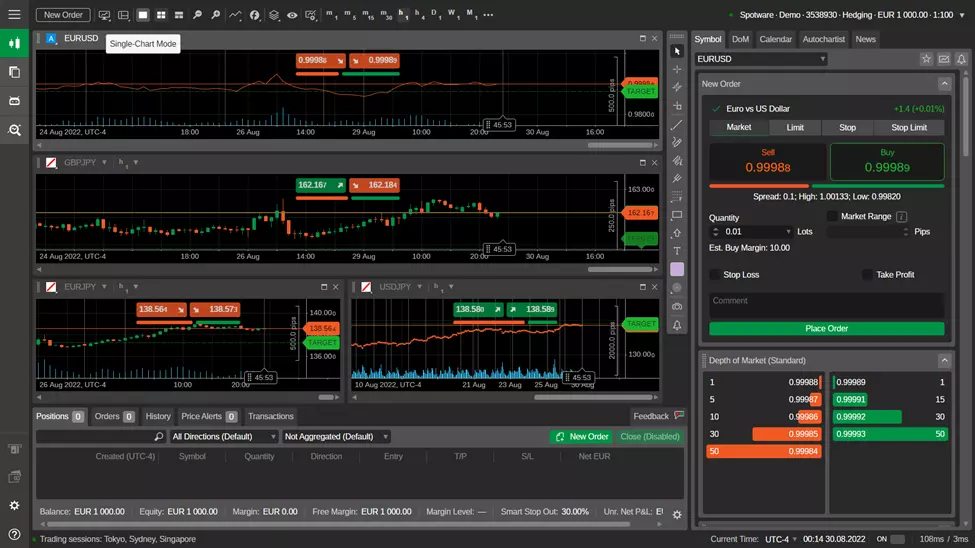 cTrader Charts Setup
Click the hamburger menu on the far left. Choose the markets you want to watch by clicking on currency pair.
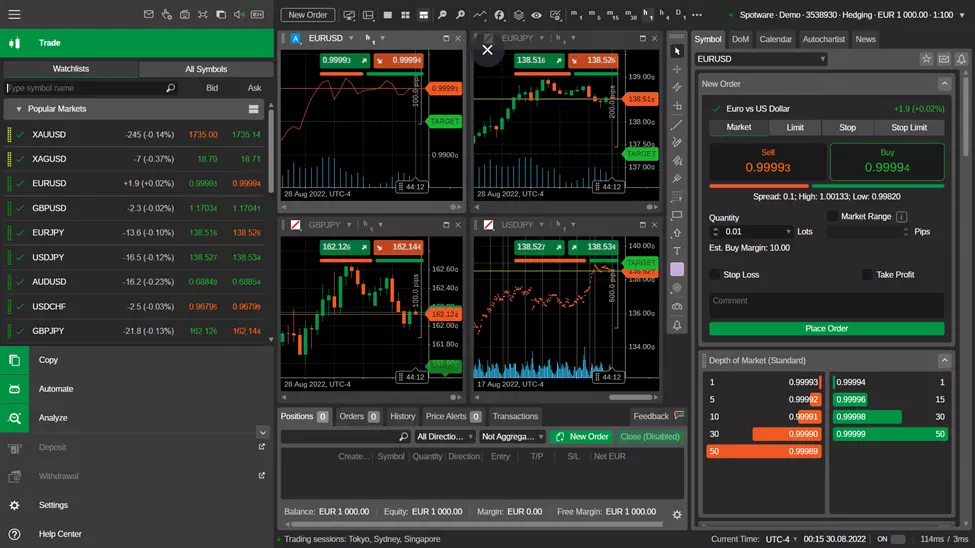 cTrader Charts Setup
You can also drag and reorder charts by holding down the left mouse key and dragging it where you want it to go.
To add indicators to your chart, click on the Indicators icon and choose an indicator from one of the categories. The Indicator Window will appear where you can set various indicator parameters such as the source, the time periods, the line thickness, the line color, the line style, and so on. Click ‘’OK’’ to place the indicator.
What is the Minimum Deposit for cTrader?
As a popular trading platform, cTrader is offered by various brokers, and the minimum deposit requirement can vary depending on the broker you choose. Here are examples of five cTrader brokers, along with their respective minimum deposit requirements:
IC Markets: IC Markets is another reputable broker offering cTrader as one of their trading platforms. IC Markets have a minimum deposit requirement of $200 for their cTrader account, similar to Pepperstone.
FxPro: FxPro is a globally recognised broker that also supports cTrader. FxPro have a minimum deposit requirement that is slightly higher than the previous two brokers, with a minimum deposit of $500 for their cTrader account.
FP Markets: FP Markets is a broker offering cTrader as one of their trading platforms. They have a relatively lower minimum deposit requirement of $100 for their cTrader account.
Pepperstone: Pepperstone is a well-known broker that provides access to cTrader. They do not have a minimum deposit requirement for their cTrader account.
Fibo Group: Fibo Group is a well-established broker providing access to cTrader. Their minimum deposit requirement for the cTrader account is only $1.
How to Use the cTrader Platform
Below is a list of tips for using the cTrader platform:
Familiarize Yourself with the Platform: Start by exploring the different features and functions of the cTrader platform. Understand the layout, navigation, and where to find essential tools and options.
Learn Charting and Analysis Tools: cTrader provides various charting and analysis tools to help you make informed trading decisions. Learn about the various trading indicators, drawing tools, and chart timeframes available to find what works best for you.
Use Stop Loss and Take Profit Orders: Implementing stop loss and take profit orders is crucial for managing risk and protecting your profits. Set these orders when entering a trade to automatically close the position at a specific price level if it moves against you (stop loss) or in your favor (take profit).
Customize the Workspace: cTrader allows you to customize your workspace to suit your preferences. Arrange charts, watchlists, and other tools in a way that provides a clear and organized view. You can save your layout as a template for future use.
Use Price Alerts: Set up price alerts to be notified when a specific instrument reaches a certain price level. This can help you stay updated on market movements and potential trading opportunities even when you're not actively monitoring the platform.
Explore the cTrader Community: The cTrader platform has a vibrant user community where traders share their experiences, strategies, and indicators. Engage with the community to learn from others, ask questions, and discover valuable resources.
Is cTrader Suitable for Scalping?
Yes, cTrader is considered suitable for Forex scalping trading due to several reasons:
Fast Execution: Scalping involves making quick trades with small profit targets, so having a platform with swift execution is crucial. cTrader is known for its high-speed trade execution, which allows traders to enter and exit trades swiftly.
Advanced Charting Tools: Scalpers heavily rely on technical analysis and real-time market data to identify short-term price patterns and execute trades accordingly. cTrader provides advanced charting tools with numerous indicators, drawing tools, and timeframes, allowing scalpers to analyze price movements effectively and make informed decisions in a fast-paced trading environment.
One-Click Trading: cTrader offers one-click trading functionality, allowing traders to enter and exit positions with a single click. This feature reduces the time and effort required to place trades, enabling scalpers to act swiftly on their trading strategies.
Customisation Options: cTrader allows traders to tailor the platform to their needs. Scalpers can adjust the layout, add or remove various panels and tools, and create personalized indicators and trading algorithms using the cTrader API.
Depth of Market (DOM) View: cTrader provides a DOM view, showing the order book and liquidity levels for particular instruments. This feature enables scalpers to gauge the market's liquidity and potential price movements.
Expert Opinion

Sifting through "top cTrader broker" ratings can be tricky. Here's what truly matters:
- Safety first: Your funds deserve safety. Seek brokers licensed by respected authorities like the Financial Conduct Authority (FCA) or the CyprusSecurities and Exchange Commission (CySEC).
- Cost counts: Don't get squeezed by fees. Compare spreads (price gaps between buying and selling) and commission structures across brokers. Lower costs mean more profit potential.
- Trading arsenal: cTrader offers a solid base, but some brokers provide extras. Look for features like advanced charting tools, a wider range of technical indicators, or compatibility with automated trading (cAlgo).
- Market match: Trade what you want, where you want. Ensure the cTrader platform offered by the broker supports the markets you're interested in, like forex, stocks, or commodities.
- Support system: Getting help shouldn't be a struggle. Choose a broker with responsive customer support through channels like live chat, email, or phone.
By prioritizing these factors and researching individual brokers, you'll be well-equipped to navigate the cTrader broker landscape and find the perfect platform to launch your trading journey.
Conclusion
Choosing the right cTrader broker is crucial for leveraging the platform’s advanced features and maximizing your trading potential. The best brokers combine strong regulation, competitive costs, and robust support for both manual and automated strategies, ensuring a safer and more efficient trading environment. For example, brokers like Pepperstone with no minimum deposit and IC Markets with a swift execution model highlight how varied broker offerings can match different trader needs. Ultimately, success comes down to aligning your goals with a reputable cTrader broker that empowers you to trade confidently and harness the full capabilities of this innovative platform.
FAQs
How does cTrader's chart customization differ from other trading platforms?
What risk management tools are available on the cTrader platform when used with top brokers?
Is automated trading supported on cTrader, and what programming language is required?
What are the main considerations for deposit and withdrawal costs with cTrader brokers?
Editors' Top Picks and Insights






Related Articles
Team that worked on the article
Mikhail Vnuchkov joined Traders Union as an author in 2020. He began his professional career as a journalist-observer at a small online financial publication, where he covered global economic events and discussed their impact on the segment of financial investment, including investor income.
Chinmay Soni is a financial analyst with more than 5 years of experience in working with stocks, Forex, derivatives, and other assets. As a founder of a boutique research firm and an active researcher, he covers various industries and fields, providing insights backed by statistical data.
Mirjan Hipolito is a journalist and news editor at Traders Union. She is an expert crypto writer with five years of experience in the financial markets.

-
 Afghanistan
-
 Albania
-
 Algeria
-
 Angola
-
 Argentina
-
 Armenia
-
 Australia
-
 Austria
-
 Azerbaijan
-
 Bahamas
-
 Bahrain
-
 Bangladesh
-
 Belarus
-
 Belgium
-
 Bolivia
-
 Botswana
-
 Brazil
-
 Brunei
-
 Bulgaria
-
 Cambodia
-
 Cameroon
-
 Canada
-
 Chile
Chile
-
 China
China
-
 Colombia
-
 Congo
Congo
-
 Costa Rica
-
 Cote d'Ivoire
-
 Croatia
-
 Cuba
Cuba
-
 Cyprus
-
 Czechia
-
 DR Congo
-
 Denmark
-
 Dominican Republic
-
 Ecuador
-
 Egypt
Egypt
-
 El Salvador
-
 Estonia
-
 Eswatini
-
 Ethiopia
-
 Finland
-
 France
-
 Georgia
-
 Germany
-
 Ghana
Ghana
-
 Greece
-
 Haiti
Haiti
-
 Hong Kong
-
 Hungary
-
 India
India
-
 Indonesia
-
 Iran, Islamic republic
-
 Iraq
Iraq
-
 Ireland
-
 Israel
-
 Italy
Italy
-
 Jamaica
-
 Japan
Japan
-
 Jordan
-
 Kazakhstan
-
 Kenya
Kenya
-
 Korea
Korea
-
 Kuwait
-
 Kyrgyzstan
-
 Laos
Laos
-
 Latvia
-
 Lebanon
-
 Lesotho
-
 Libya
Libya
-
 Lithuania
-
 Luxembourg
-
 Madagascar
-
 Malaysia
-
 Malta
Malta
-
 Mauritius
-
 Mexico
-
 Moldova
-
 Mongolia
-
 Montenegro
-
 Morocco
-
 Mozambique
-
 Myanmar
-
 Namibia
-
 Nepal
Nepal
-
 Netherlands
-
 New Zealand
-
 Nigeria
-
 North Macedonia
-
 Norway
-
 Oman
Oman
-
 Pakistan
-
 Palestine
-
 Panama
-
 Papua New Guinea
-
 Paraguay
-
 Peru
Peru
-
 Philippines
-
 Poland
-
 Portugal
-
 Puerto Rico
-
 Qatar
Qatar
-
 Reunion
-
 Romania
-
 Rwanda
-
 Saudi Arabia
-
 Serbia
-
 Singapore
-
 Slovakia
-
 Slovenia
-
 Somalia
-
 South Africa
-
 Spain
Spain
-
 Sri Lanka
-
 Sweden
-
 Switzerland
-
 Syria
Syria
-
 Taiwan
-
 Tajikistan
-
 Tanzania
-
 Thailand
-
 Trinidad and Tobago
-
 Tunisia
-
 Turkey
-
 UAE
UAE
-
 Uganda
-
 Ukraine
-
 United Kingdom
-
United States
-
 Uruguay
-
 Uzbekistan
-
 Venezuela
-
 Vietnam
-
 Yemen
Yemen
-
 Zambia
-
 Zimbabwe
- Forex
- Crypto










- Best cTrader Brokers Tools Compared
- What Are cTrader Pros and Cons?
- cTrader vs. MetaTrader
- Is cTrader Good For Beginners?
- How to Choose a cTrader Broker
- cTrader Charts Setup
- What is the Minimum Deposit for cTrader?
- How to Use the cTrader Platform
- Is cTrader Suitable for Scalping?
- Expert Opinion
- Conclusion
- FAQs


