Best Autochartist Brokers Reviews


Editorial Note: While we adhere to strict Editorial Integrity, this post may contain references to products from our partners. Here's an explanation for How We Make Money. None of the data and information on this webpage constitutes investment advice according to our Disclaimer.

If you're too busy to read the entire article and want a quick answer, the best autochartist broker is Trading.com USA. Why? Here are its key advantages:
- Is legit in your country (Identified as United States
 )
) - Has a good user satisfaction score
- Real-time alerts
- Customizable filters
Best autochartist brokers:
- OANDA - Best for trading with advanced technical analysis tools (TradingView charts support)
- FOREX.com - Diverse range of tradable assets (80+ currency pairs)
- IG Markets - Favorable Forex trading conditions (0 fees, avg. EUR/USD spread - 0.8)
- Blackbird - Best professional desktop platform for Spanish traders (for 11 years received Barron's Award for the best platform in the world, CNMV regulation)
- Wonderinterest - A broker licensed by CySEC, providing access to Forex, CFDs, and real stock trading through MT5 and XOH Trader platforms.
- Pepperstone - Best for scalping strategies (spread from 0 pips)
Traders can identify market patterns, set critical alerts, and fine-tune trading strategies using Autochartist, a widely used technical analysis tool. Selecting an Autochartist broker is an important decision, as not all brokers provide the same degree of integration and support. This comprehensive, easy-to-follow guide helps traders choose an Autochartist broker that best fits their needs.
Warning: There is a high level of risk involved when trading leveraged products such as Forex/CFDs. Between 65% and 82% of retail investor accounts lose money when trading CFDs. You should consider whether you understand how CFDs work and whether you can afford to take the high risk of losing your money.
Best Autochartist brokers
Autochartist scans patterns, key levels, and volatility in real time, pushing actionable alerts straight to your platform. Below are the best brokers with native Autochartist support — compare market coverage, spreads/fees, minimum deposit, and etc.
| Demo | Min. deposit, $ | Max. leverage | Currency pairs | Standard EUR/USD spread | Autochartist | TU overall score | Open an account | |
|---|---|---|---|---|---|---|---|---|
| Yes | No | 1:200 | 68 | 0.3 | Yes | 6.66 | Go to broker Your capital is at risk. |
|
| Yes | 100 | 1:50 | 80 | 1.0 | Yes | 6.49 | Study review | |
| Yes | 1 | 1:200 | 80 | 0.9 | Yes | 6.39 | Study review | |
| Yes | 1 | 1:30 | 50 | 0.3 | Yes | 5.81 | Study review | |
| Yes | 250 | 1:30 | 44 | 0.5 | Yes | 4.98 | Study review | |
| Yes | No | 1:500 | 90 | 0.6 | Yes | 9.3 | Go to broker Your capital is at risk.
|






What is Autochartist and how to use it
Autochartist, with its many useful features, is a strong technical analysis tool that traders can use to improve their trading tactics.
Key features of Autochartist
Pattern recognition: Autochartist looks for different chart patterns, like triangles, flags, and head and shoulders patterns, by scanning the financial markets. This enables traders to predict future changes in price.
Volatility analysis: By measuring market volatility, traders can modify their risk-reduction plans as necessary.
Alerts and notifications: To make sure traders do not miss out on possible setups, Autochartist can be configured to send alerts and notifications when particular chart patterns or trading opportunities appear.
Performance statistics: Traders have access to performance statistics that provide information about the likelihood of success for various chart patterns.
Market reports: Autochartist gives users access to daily market reports that include insightful information about important price levels and possible trading opportunities.
Key features of Autochartist
Using Autochartist effectively requires a systematic strategy after selecting the right broker:
Choose assets: Selecting the financial instruments you wish to trade or analyze with Autochartist should be your first step. This can include stocks, commodities, Forex currency pairs, and more.
Alert setup: You can instruct the tool to notify you when particular trends or price points are found. You can subscribe to these alerts via email, the trading platform, or mobile notifications.
Pattern interpretation: Examine the patterns that Autochartist identified and the analysis that goes with them. Recognize the effects they may have on future price fluctuations.
Risk management: Adjust your risk management tactics, such as placing take-profit and stop-loss orders, by using the volatility analysis and performance data.
Constant learning: Use the insights to inform your trading decisions by staying current with Autochartist's daily market reports.
Pros and cons of Autochartist
These are the benefits and drawbacks of using Autochartist, which can be a useful tool in your trading tool box.
- Pros
- Cons
- Time-saving analysis: The process of spotting possible trading opportunities and chart patterns is automated by Autochartist. By doing this, traders avoid wasting important time on manual analysis.
- Improved decision-making: Autochartist gives traders data-driven insights through its pattern recognition and volatility analysis, which may help them make better decisions and possibly increase the accuracy of their trades.
- Alerts and notifications: To make sure traders do not miss out on possible setups, Autochartist can send out real-time alerts and notifications when particular patterns or trading opportunities appear.
- Cost of subscription: Certain brokers may charge a fee for using Autochartist.
- This can raise trading expenses, particularly for traders with limited funds.
- Over-reliance: There is a chance that traders will rely too much on Autochartist and neglect their own research and judgment, which are critical for long-term trading success. It should supplement a trader's knowledge and abilities, not replace them.
RoboForex is a brokerage company that was founded in 2009. RoboForex is a leading software developer in the Forex industry and one of the best Forex brokers based on client reviews.
RoboForex is recognized as a reliable partner by the most respected financial market experts. The company has won numerous prestigious awards. The RoboForex group of companies has an international license to provide services from FSC Belize (license No. 000138/437).
The minimum deposit in RoboForex is $10. Leverage up to 1:2000. Traders choose RoboForex for reliability, favorable trading conditions, minimum spreads, and commission fees. The company is recommended for beginner traders and experienced investors.
How to choose the best Autochartist broker?
Brokers typically offer Autochartist for free on a limited number of account types, though some will offer it on all account types. Here are three important considerations for novices when choosing the best Autochartist broker:
Research broker reputation: To start, look into and assess possible Autochartist brokers' reputations. Seek out reputable brokers who have been in business for a while and are licensed.
Autochartist integration: Find out how much Autochartist integration the broker offers. It is possible that some brokers offer a more seamless and user-friendly Autochartist experience than others.
Support and education: Select a broker who provides novices with informational materials and assistance. When learning how to use Autochartist, having access to webinars, tutorials, and customer support can be quite helpful.
How to start trading with Autochartist
Autochartist can be used as a desktop application, web terminal, or plugin for other platforms like cTrader, MT4, and MT5. Because Autochartist installation is so simple, it only takes a few minutes. Assuming you already have a MetaTrader account, just go to Autochartist, download the plugin, and follow these step-by-step instructions to get started.
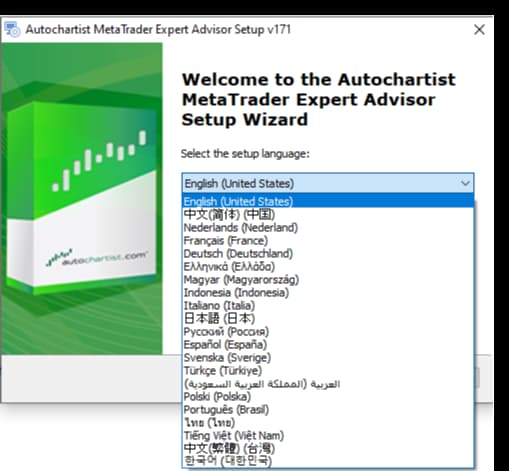
Step 1: Following the download, you'll be asked to choose a language for installation. Please select your desired language settings, and then go on to press OK.
 Best autochartist brokers
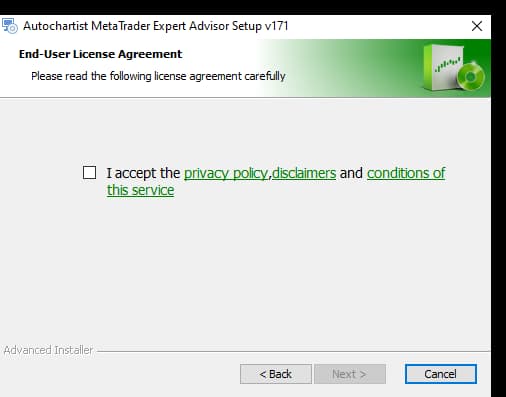
Step 2: After selecting your desired language, you will have to agree to the terms of service, privacy statement, and disclaimers. Read and accept the terms of service, then click the next button to proceed.
 Best autochartist brokers
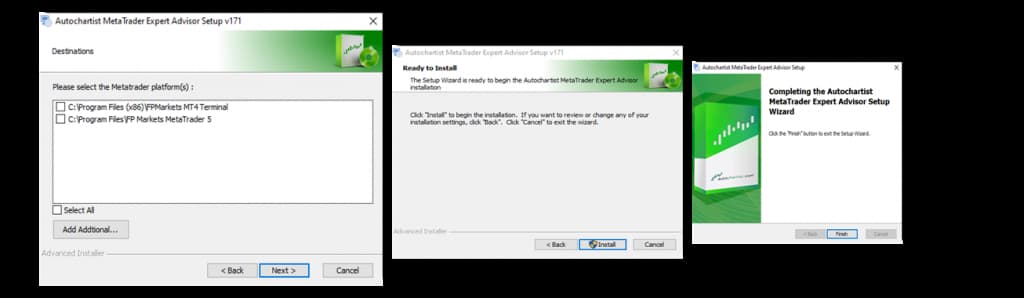
Step 3: In the next step, you will have to choose the MetaTrader 4 or 5 platform to install the plugin. Once chosen, click the Install button to begin the download. After the download, click the Finish button to finish the installation process, then restart the MetaTrader platform.
 Best autochartist brokers
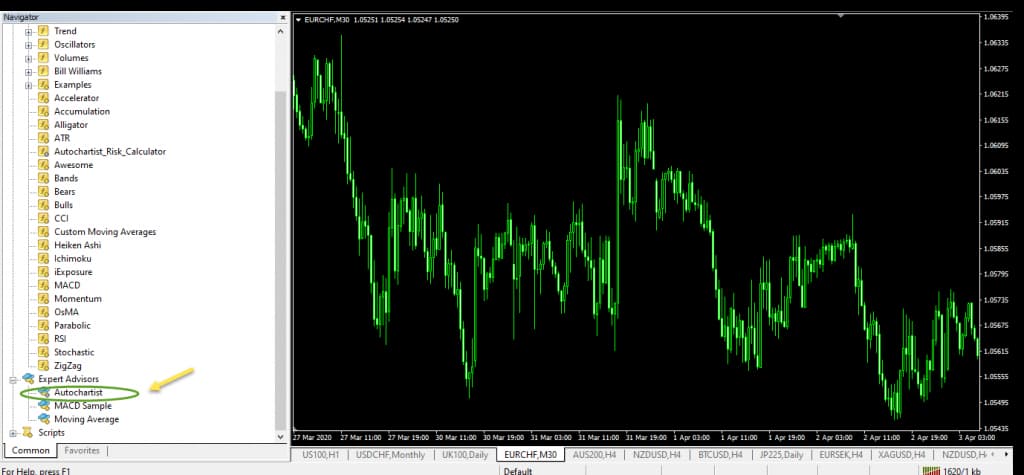
Step 4: After restarting your MetaTrader platform, locate the Autochartist plugin in the Navigator folder under Expert Advisors. You can then simply drag and drop the Autochartist MetaTrader plugin onto your chart to start trading with it.
 Best autochartist brokers
Autochartist interface
Autochartist is a technical analysis tool used for identifying potential trading opportunities in the financial markets. Autochartist will automatically display the data that has already been loaded if this is your first time using it. Let’s take a detailed look at the Autochartist interface.
1. Dashboard (A): This is where you find tools and options for customizing your analysis. It typically includes features like setting parameters for market scanning, an overview of chat patterns, fibonacci patterns, and more.
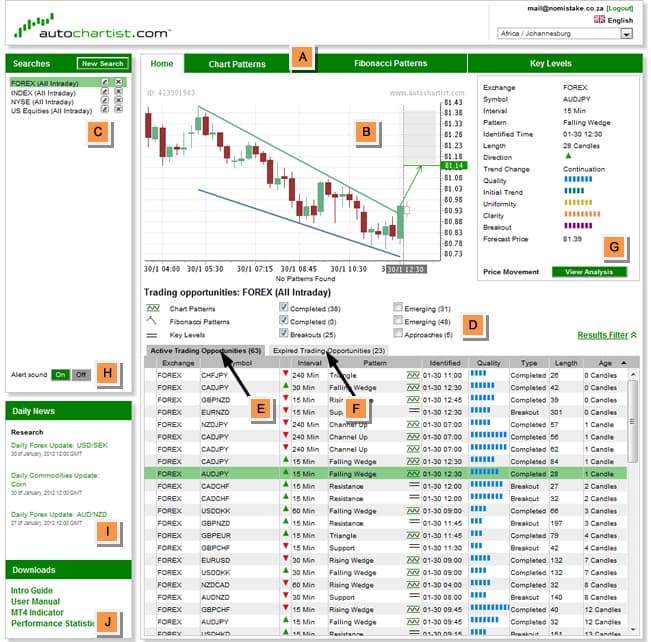
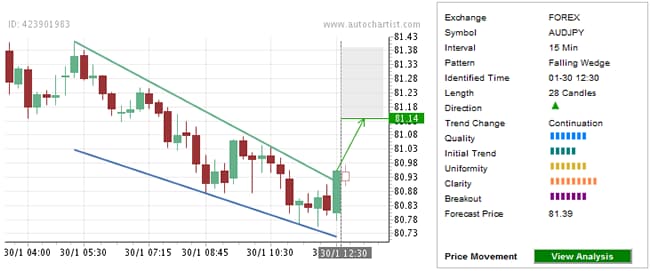
2. Pattern display (B): This section showcases various technical patterns identified in the market. These patterns could include chart patterns (like triangles, wedges, heads, and shoulders), Fibonacci patterns, or other technical formations. The pattern display area visually represents these patterns for easier identification.
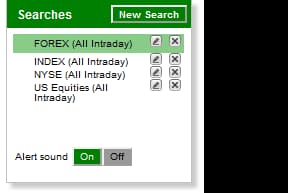
3. Search pane (C): A search pane contains a set of criteria defined by you. This is where you can input specific criteria or preferences for the types of trading opportunities you want to find. You might set parameters like the type of patterns you're interested in, volatility thresholds, or specific financial instruments.
4. Results filter (D): One easy way to narrow down the kinds of trading opportunities you might be interested in is to use the results filter. It allows you to filter the results generated based on your specific criteria.

5. Results pane (Active Trading Opportunities) (E): When you log in, this section of the dashboard is always open. It displays currently active or potential trading opportunities that meet the criteria and patterns set in the search pane. It shows the identified opportunities, including the pattern detected, potential entry and exit points, and other relevant information for making informed trading decisions.

6. Results pane (Expired Trading Opportunities) (F): All expired results for your search highlighted in the search pane are listed in this section, which displays historical trading opportunities that were once active but are no longer regarded as valid.

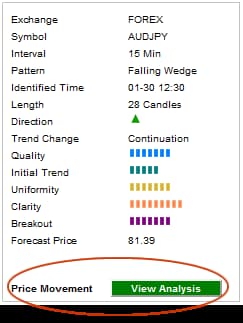
7. View analysis (PowerStats) (G): This section provides statistical data or analytics into the relative movement of all instruments. This is a great help when creating new trading strategies or enhancing and reassessing current ones.
8. Sound switch (H): This is a simple control panel that allows users to turn on or off sound notifications for alerts or specific events.

9. Daily news pane (I): This pane offers you access to Autochartist's daily and weekly commentary that is published in top news wires, along with useful news updates and market insights.
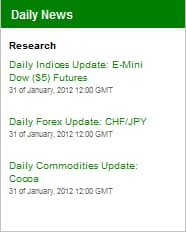
10. Downloads pane (J): This is where you can access additional resources, reports, and instructions for Autochartist’s MetaTrader plugin.
Autochartist can sharpen your trading decisions

From my experience, Autochartist is most effective when used as a confirmation tool, not a signal generator. I often advise traders to treat its pattern alerts as a prompt for deeper analysis rather than an instant entry point. Combining Autochartist signals with your own strategy filters – such as support and resistance validation, volume confirmation, or fundamental triggers – dramatically improves accuracy.
Another key recommendation is customization: adjust Autochartist’s parameters to fit your preferred instruments and timeframes instead of relying on default settings. This keeps alerts relevant and reduces noise. And most importantly, always pair automated insights with proper risk management. Even the best analytics can’t replace disciplined position sizing and emotional control.
Used wisely, Autochartist can sharpen your trading decisions and save hours of manual chart scanning – but the ultimate edge still comes from how you interpret and act on its data.
Conclusion
Choosing a reliable Autochartist broker is key to maximizing your trading potential and efficiency. As highlighted by Traders Union experts, top brokers like RoboForex and Tickmill offer robust platforms that seamlessly integrate Autochartist’s advanced analytical tools. When selecting a broker, prioritize those with solid reputations, user-friendly interfaces, and strong customer support to ensure a smooth Autochartist experience. Ultimately, the right partnership empowers traders to make smarter, data-driven decisions—turning insight into action and elevating your trading journey to new heights.
FAQs
What is the process for integrating Autochartist into popular trading platforms?
How do the customizable filters in Autochartist improve trading strategy development?
Which types of financial instruments can be analyzed using Autochartist with compatible brokers?
What key interface features make Autochartist user-friendly for both novices and experienced traders?
Editors' Top Picks and Insights






Related Articles
Team that worked on the article
Winnifred Emmanuel is a freelance financial analyst and writer with years of experience in working with financial websites and businesses. Her expertise spans various areas, including commodities, Forex, stocks, and cryptocurrency.
Dan Blystone began his trading career in 1998 as an arbitrage clerk on the floor of the Chicago Mercantile Exchange (CME). He later traded bond and Eurex futures at proprietary firms such as Altea Trading, gaining valuable experience in high-frequency trading and risk management.
Chinmay Soni is a financial analyst with more than 5 years of experience in working with stocks, Forex, derivatives, and other assets. As a founder of a boutique research firm and an active researcher, he covers various industries and fields, providing insights backed by statistical data.
CFD is a contract between an investor/trader and seller that demonstrates that the trader will need to pay the price difference between the current value of the asset and its value at the time of contract to the seller.
Forex leverage is a tool enabling traders to control larger positions with a relatively small amount of capital, amplifying potential profits and losses based on the chosen leverage ratio.
An Expert Advisor (EA) is a piece of software or script used in the MetaTrader trading platform to automate trading strategies. EAs are programmed to execute trading decisions based on predefined criteria, rules, and algorithms, allowing for automated and systematic trading without the need for manual intervention.
Day trading involves buying and selling financial assets within the same trading day, with the goal of profiting from short-term price fluctuations, and positions are typically not held overnight.
An investor is an individual, who invests money in an asset with the expectation that its value would appreciate in the future. The asset can be anything, including a bond, debenture, mutual fund, equity, gold, silver, exchange-traded funds (ETFs), and real-estate property.
-
 Afghanistan
-
 Albania
-
 Algeria
-
 Angola
-
 Argentina
-
 Armenia
-
 Australia
-
 Austria
-
 Azerbaijan
-
 Bahamas
-
 Bahrain
-
 Bangladesh
-
 Belarus
-
 Belgium
-
 Bolivia
-
 Botswana
-
 Brazil
-
 Brunei
-
 Bulgaria
-
 Cambodia
-
 Cameroon
-
 Canada
-
 Chile
Chile
-
 China
China
-
 Colombia
-
 Congo
Congo
-
 Costa Rica
-
 Cote d'Ivoire
-
 Croatia
-
 Cuba
Cuba
-
 Cyprus
-
 Czechia
-
 DR Congo
-
 Denmark
-
 Dominican Republic
-
 Ecuador
-
 Egypt
Egypt
-
 El Salvador
-
 Estonia
-
 Eswatini
-
 Ethiopia
-
 Finland
-
 France
-
 Georgia
-
 Germany
-
 Ghana
Ghana
-
 Greece
-
 Haiti
Haiti
-
 Hong Kong
-
 Hungary
-
 India
India
-
 Indonesia
-
 Iran, Islamic republic
-
 Iraq
Iraq
-
 Ireland
-
 Israel
-
 Italy
Italy
-
 Jamaica
-
 Japan
Japan
-
 Jordan
-
 Kazakhstan
-
 Kenya
Kenya
-
 Korea
Korea
-
 Kuwait
-
 Kyrgyzstan
-
 Laos
Laos
-
 Latvia
-
 Lebanon
-
 Lesotho
-
 Libya
Libya
-
 Lithuania
-
 Luxembourg
-
 Madagascar
-
 Malaysia
-
 Malta
Malta
-
 Mauritius
-
 Mexico
-
 Moldova
-
 Mongolia
-
 Montenegro
-
 Morocco
-
 Mozambique
-
 Myanmar
-
 Namibia
-
 Nepal
Nepal
-
 Netherlands
-
 New Zealand
-
 Nigeria
-
 North Macedonia
-
 Norway
-
 Oman
Oman
-
 Pakistan
-
 Palestine
-
 Panama
-
 Papua New Guinea
-
 Paraguay
-
 Peru
Peru
-
 Philippines
-
 Poland
-
 Portugal
-
 Puerto Rico
-
 Qatar
Qatar
-
 Reunion
-
 Romania
-
 Rwanda
-
 Saudi Arabia
-
 Serbia
-
 Singapore
-
 Slovakia
-
 Slovenia
-
 Somalia
-
 South Africa
-
 Spain
Spain
-
 Sri Lanka
-
 Sweden
-
 Switzerland
-
 Syria
Syria
-
 Taiwan
-
 Tajikistan
-
 Tanzania
-
 Thailand
-
 Trinidad and Tobago
-
 Tunisia
-
 Turkey
-
 UAE
UAE
-
 Uganda
-
 Ukraine
-
 United Kingdom
-
United States
-
 Uruguay
-
 Uzbekistan
-
 Venezuela
-
 Vietnam
-
 Yemen
Yemen
-
 Zambia
-
 Zimbabwe
- Forex
- Crypto