FxPro Direct and Settings - Read it to Earn More!


Editorial Note: While we adhere to strict Editorial Integrity, this post may contain references to products from our partners. Here's an explanation for How We Make Money. None of the data and information on this webpage constitutes investment advice according to our Disclaimer.
If you already have an account on FxPro, follow these steps:
Open one more account in your FxPro Direct.
Send a request to change the group to info@fxpro.com from the mailbox you specified when you registered on the broker’s website, specifying the number of your trading account and our ID 221002.
Add the number of your account to the Accounts section on the TU’s website, wait for the account confirmation, make a deposit and start trading.
After you’ve traded for one month, rebates for trading on FxPro (compensation for a part of spread or the fees per each closed trade) will be credited to your balance on TU.
In this guide, we explain how FxPro Direct works, how to configure your account settings correctly, and what steps are required to qualify for TU rebates. We also review the broker's key features, account opening process, platform functionality, and feedback from real traders to help you get the most value from your FxPro trading experience.
Note! Verify your account on FxPro to receive rebates regularly.
Rebates from TU and traders’ reviews


Rebate amount:
For each transaction made with FxPro, TU pays a $4.8 rebate per 1 standard lot. To learn more about rebates, terms and conditions, visit “Trader’s Income”. TU clients get 80% of the amount paid by the broker.
Example of calculating the rebate from TU
Note! All figures used in this section are provided only as an example. To learn the exact spread for each trading instrument and account type, go to “FX Calculator” on the FxPro’s website.
You trade the EUR/USD currency pair and pay the spread to the broker for each completed transaction in the amount of $6 per lot. You trade 10 lots in a month, and the spread is $60 in total. Traders registered via TU with FxPro will get a compensation of $48 to their balance on TU.
Traders’ reviews about TU rebates
Mike, managing trader, London
There are about ten English-language rebate services working with the English speaking traders. I have experience of working with several of them, and TU turned out the best for me for several reasons:
There are over a hundred brokers here, while other services have no more than 40-50. I can tell you from experience that it is better to work with several brokers, as some offer good conditions for scalping, others a good social trading platform, some have cryptocurrencies, etc. TU offers TU offers a good choice of brokers.
Regular real rebates. I had a situation with another service, when the amount I received was 30% less than I expected. I loaded the trades to Excel, calculated the spread, gave customer support my calculations and still had a hard time convincing them that I was right. I’ve been working with TU for almost 18 months and have not had any such issues. All compensations are paid exactly according to the calculations.
On some accounts, the rebates are credited on a monthly basis, and there are no delays. Everything works smoothly. I highly recommend it!
Luigi, novice trader, Bern
I’ve been pleasantly surprised with the opportunity to at least partially recover my expenses. The compensation is credited to my account on TU, with no delays. Thank you!
Nicolas, trader, Paris
I regularly reinvest the rebates I receive back in trading. I actually get a lower spread than if I had registered with the broker directly. So here’s my advice: if you decide to open a real account with a broker, use TU’s referral link, it is free. The only drawback is that the rebates are paid not for all accounts, but all of that is specified in the terms and conditions on the TU’s website.
Brief review of FxPro
FxPro is an international company providing Forex trading services. The company was established in 2006 and has since grown its equity to EUR 100 mn with clients from 170 countries. The company offers access to trading 7 classes of assets, including cryptocurrencies, and four platforms – classic MT4, MT5, professional cTrade and a proprietary platform.
FxPro benefits:
The broker is authorized in 4 jurisdictions – UK, Cyprus, South Africa and the Bahamas. The broker’s offices hold licenses of FCA, CySEC, SCB.
90% of orders are executed in less than 14 ms; signal delays from data centers are close to zero. The average order execution speed in the market is 100 ms.
Low percentage of slippage. According to the 2020 statistics, 80.48% of orders were executed without slippage, while 9.60% of orders were executed with positive slippage. In terms of re-quotes, only 1.14% of all instant orders received a re-quote.
On some account types, the broker orders micro lots. There is no minimum threshold on stop levels. The broker attracts clients primarily with technology and quality of service, and therefore offers no bonus programs.
FxPro – features and functionality
FxPro Direct login allows you to open new accounts, manage payments, etc. Trading begins with the registration on FxPro Direct, opening of an account and installation of the platform.
FxPro Direct Features:
Managing your wallet and financial transactions. You can deposit to and withdraw money from your virtual wallet, and also transfer money inside the broker’s system between the real accounts and the wallet. Transfers between demo accounts are not possible. Transfers inside the system between real accounts can also be performed through the wallet.
Account management. Opening of any number of real and demo accounts.
A set of instruments to help the traders, which includes market sentiment, quotes, schedule of trading sessions, etc.
Access to Trading Central analytics (analytical platform, one of the leaders in the segment of technical analysis of the market, which holds the license of SEC, the U.S. regulator).
There is a step-by-step guide on the main menu for those who do not like to learn the features by trial and error method.
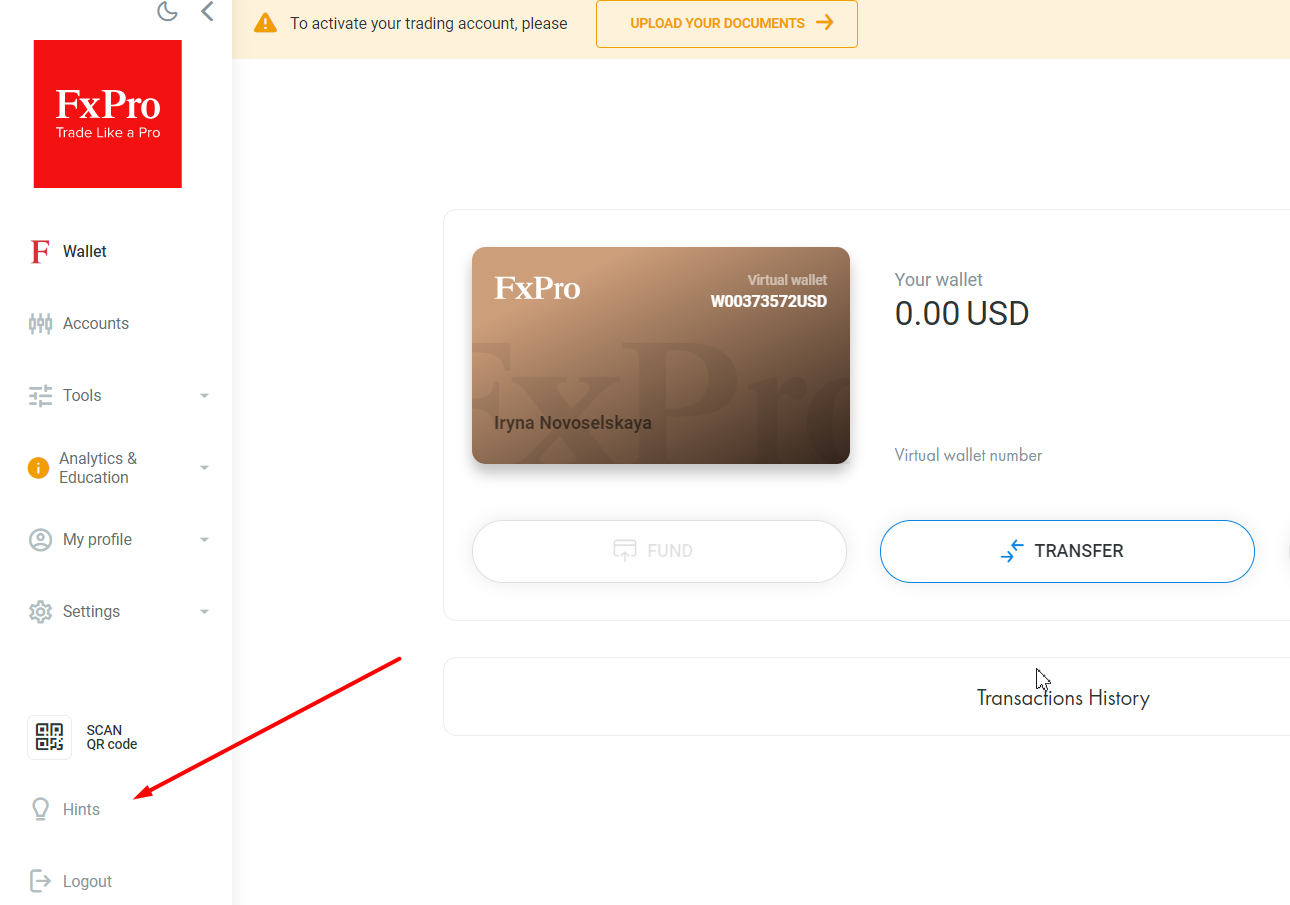 FxPro Direct Review – Features and functionality
Accessing your on FxPro Direct
There are two ways to access your FxPro Direct: by logging in or registering. It is very difficult to get lost on the website – the Log In and Register buttons almost always stay in the top right corner regardless of the page of the website you are on.
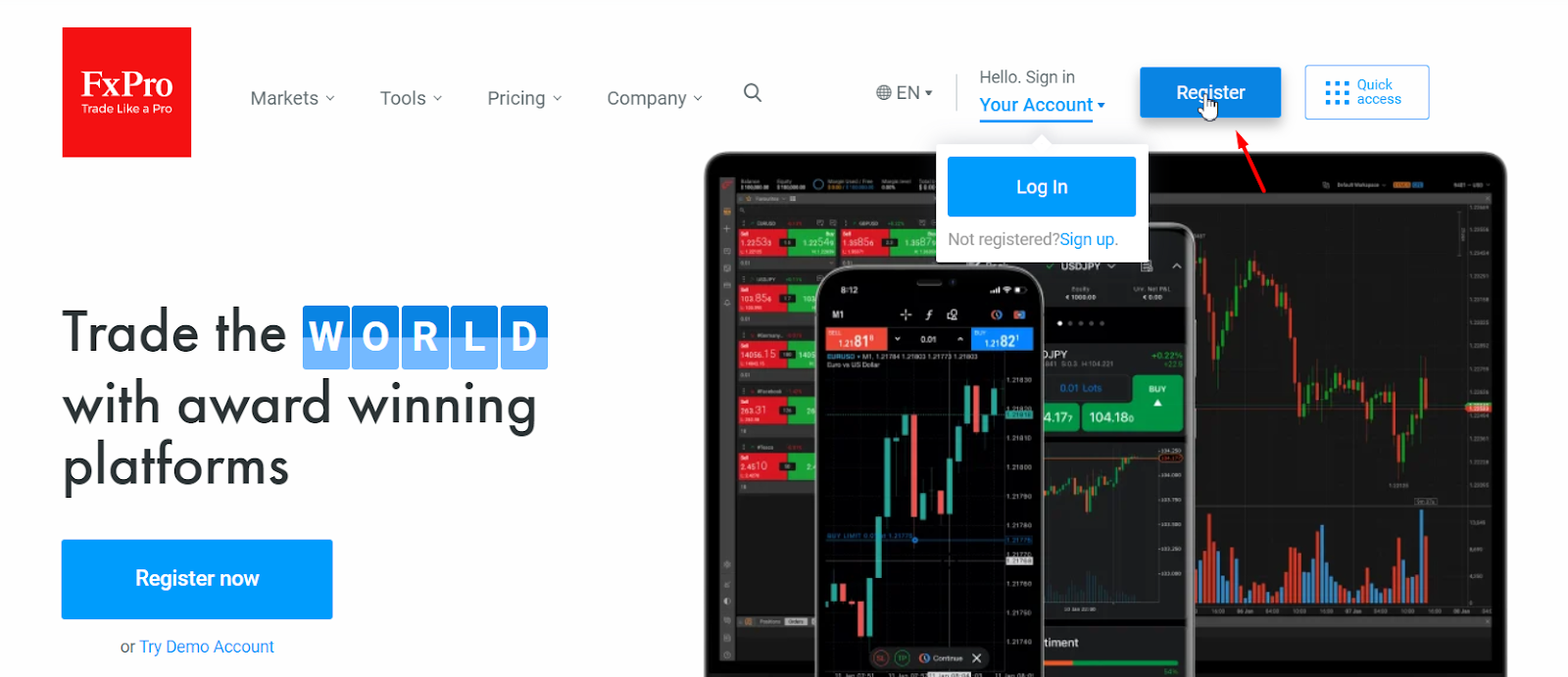 FxPro Direct Review – Access and registration
You can also access the registration form using the links for opening a demo account.
Logging in on FxPro official website. The order of actions.
Logging in means accessing your FxPro Direct, under the condition that you’ve already registered on the platform. Registration is entering primary information and receiving the login and password to the account. If you’ve already done that, then click on Sign In Your Account and then Log In.
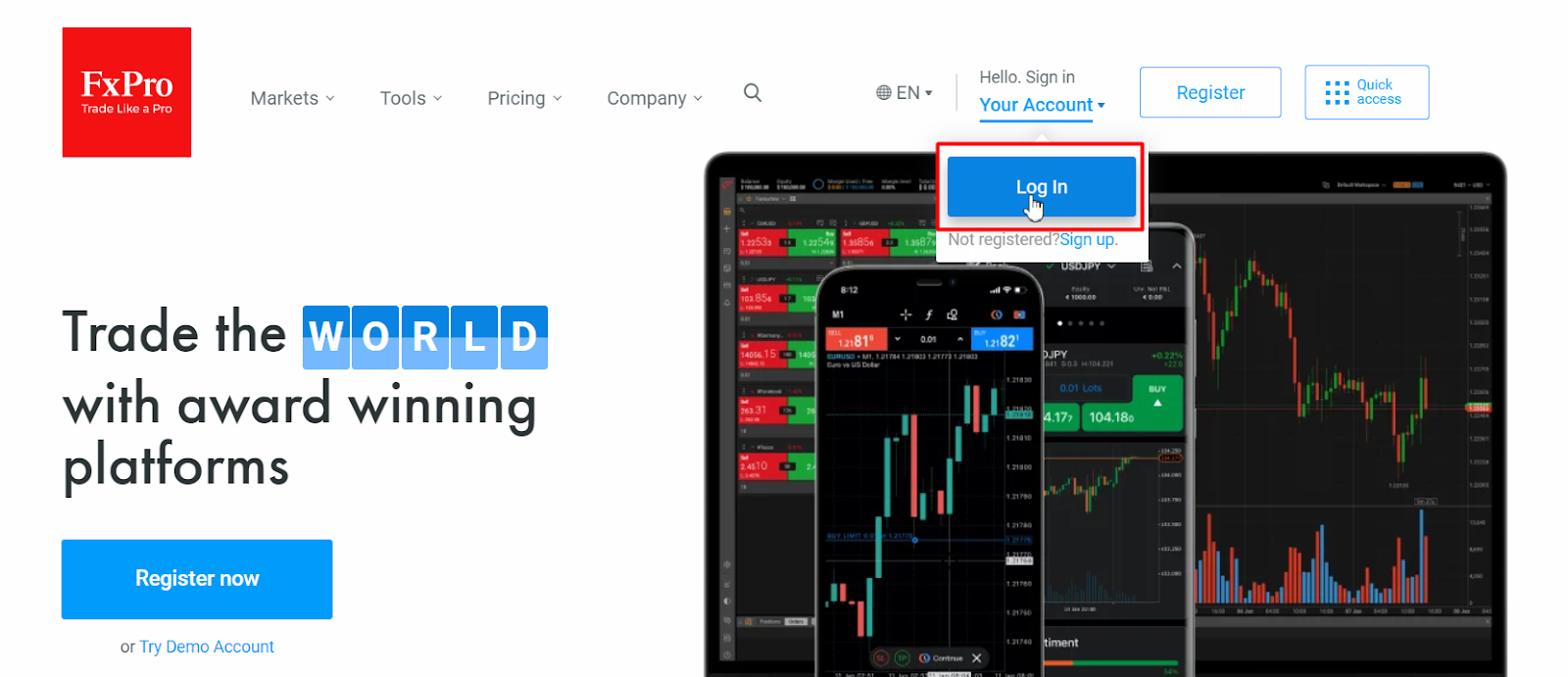 PFxPro Direct Review – Logging in
In the pop-up window, enter the email you specified during registration and your password.
Changing the password to your FxPro Direct.
You can change your password when you Log In your FxPro Direct. The first option is for when you forgot your password, so that you can generate a new one. The second option is for security reasons, as it is recommended that you change your password at least every couple of months.
Changing the password when logging in:
Click on “Log In”, and in the next window click “Forgot Your Password?”
Enter your email. Confirm that you are a real person by entering captcha or confirming images.
The instructions will be sent to your email.
Changing the password in this case may require up to 5 minutes.
Changing the password in your FxPro Direct:
Go to Settings/Password Settings.
Enter your old password, then the new password and then confirm your new password.
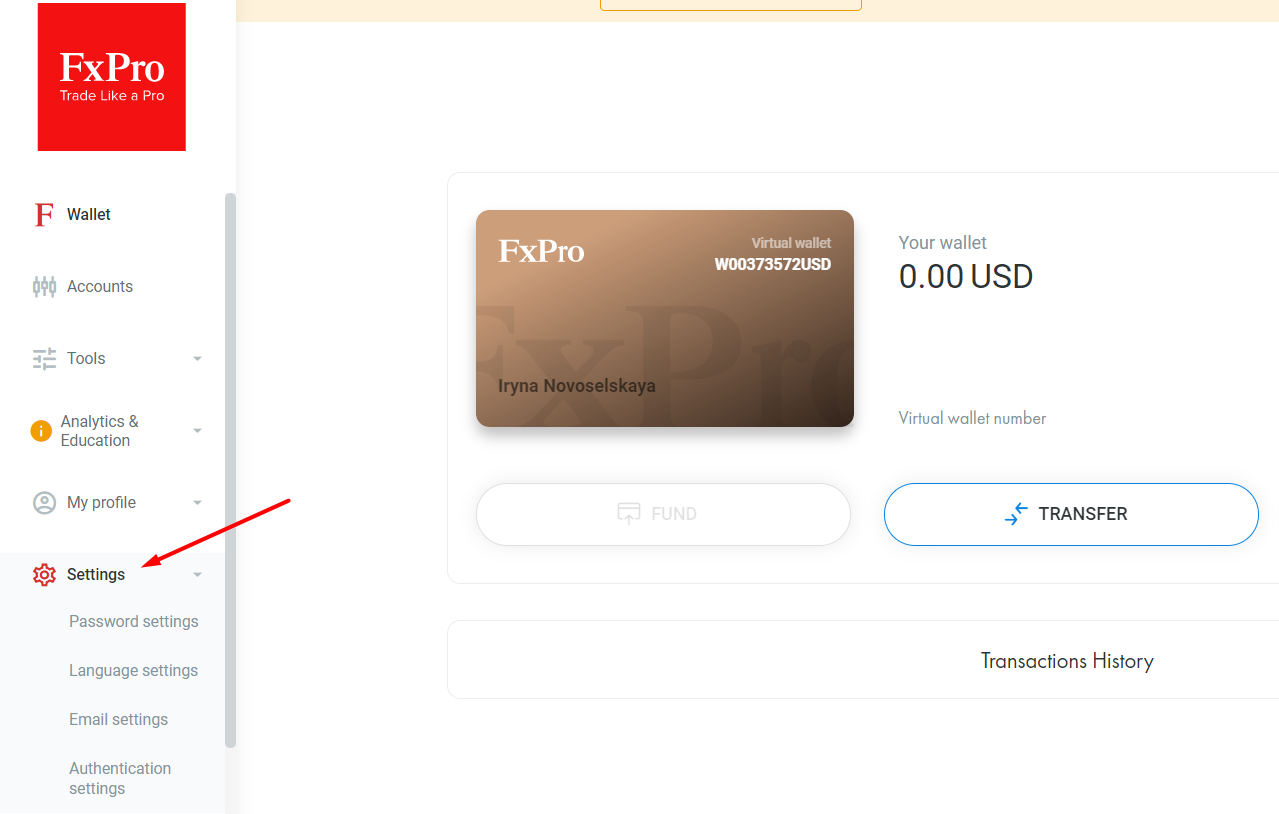 Changing the password in the FxPro Direct
The password must only include Latin alphabet letters, at least one capital and lowercase letters, at least one number and have at least six characters in total.
A guide on registering in FxPro Direct
Registration is required if you are visiting the FxPro for the first time and don’t have an FxPro Direct yet. You will not be able to open a trading account and fund it without registration.
Registration on FxPro Direct on the FxPro website:
Click “Register”.
 Procedure of registering on FxPro Direct
Fill out the registration form. It contains several steps, where you will be required to provide personal information, estimated income, employment, etc.
Some of the questions are required by the regulator for assigning the category and setting individual leverage.
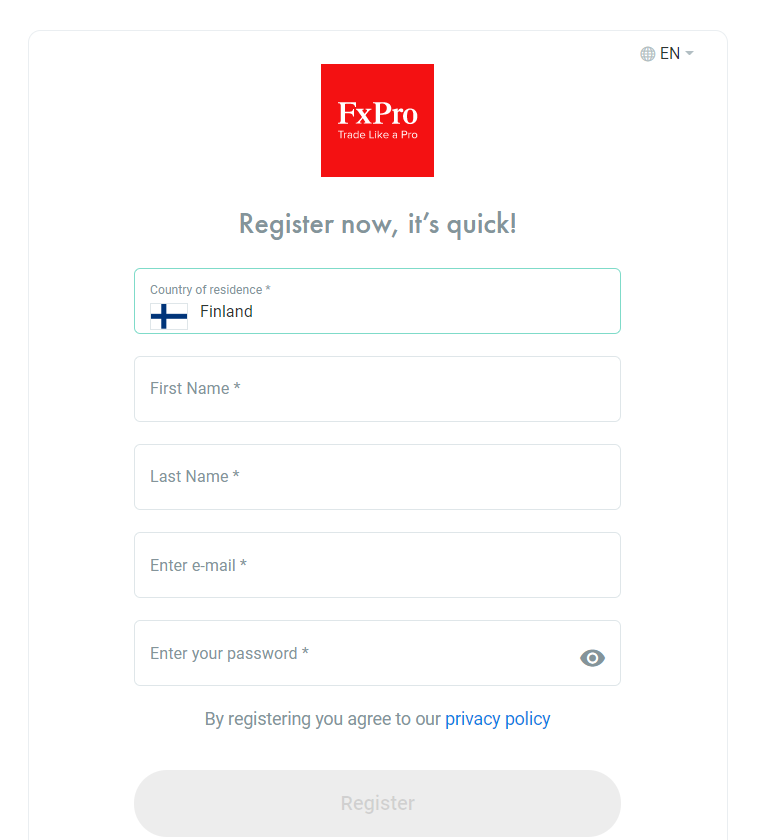 Filling out registration form for registering on FxPro Direct
You can use third-party services to generate the password. Make sure to enter only accurate information, otherwise you may have issues with verification.
Specify your account details. The first account is opened during the registration. You can open other accounts from your FxPro Direct after registration.
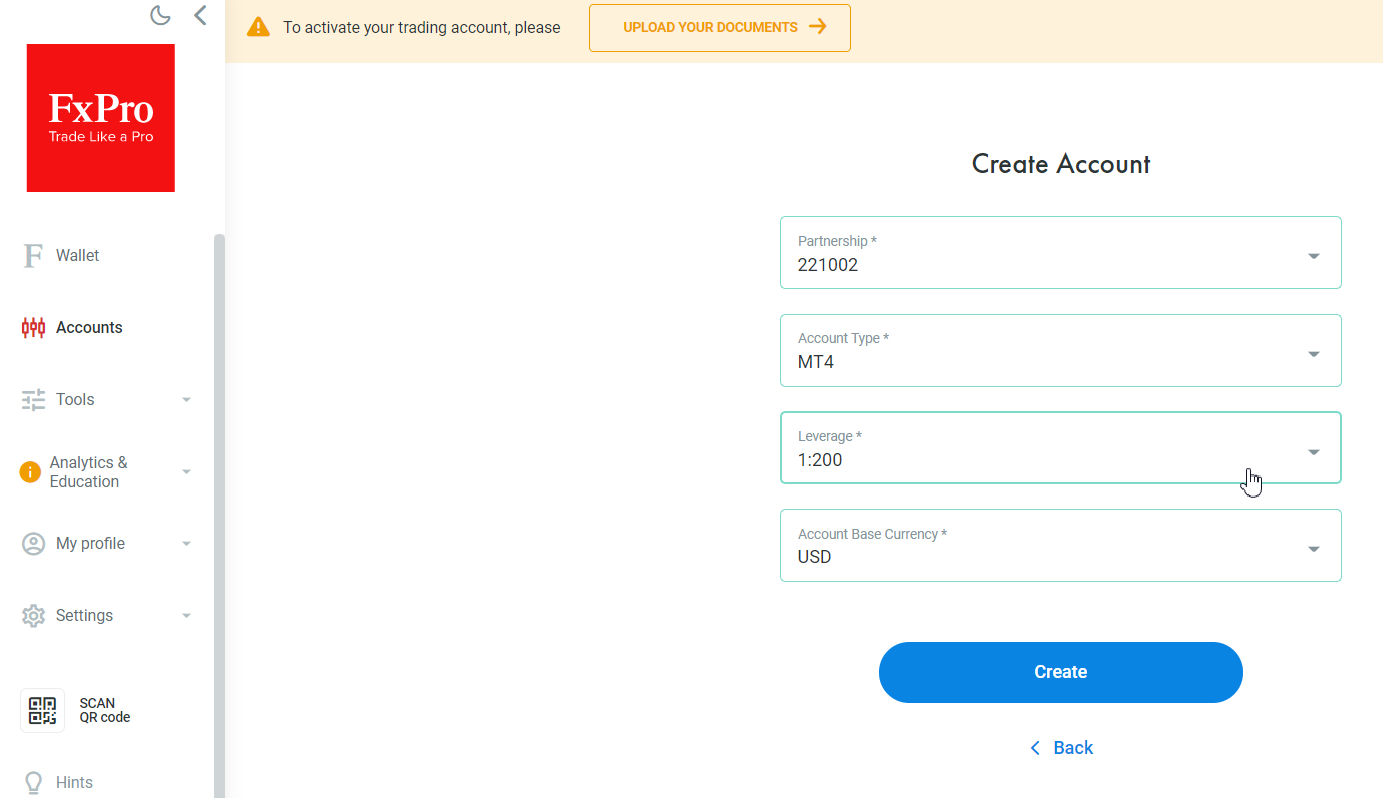 Entering details of a new account during registration on FxPro Direct
The registration is complete; you’ve been automatically logged in your FxPro Direct. You will receive an email with the details of your account in order to link it to the platform you chose during registration.
A guide on opening an account on the FxPro official website
The first account is opened automatically during registration. In your FxPro Direct, you can open any number of other real and demo accounts.
Opening a demo account on FxPro
The algorithm for opening a demo account:
In the main menu of the Persona Account on the left, click “Accounts”. In the new window, select “Demo Accounts”
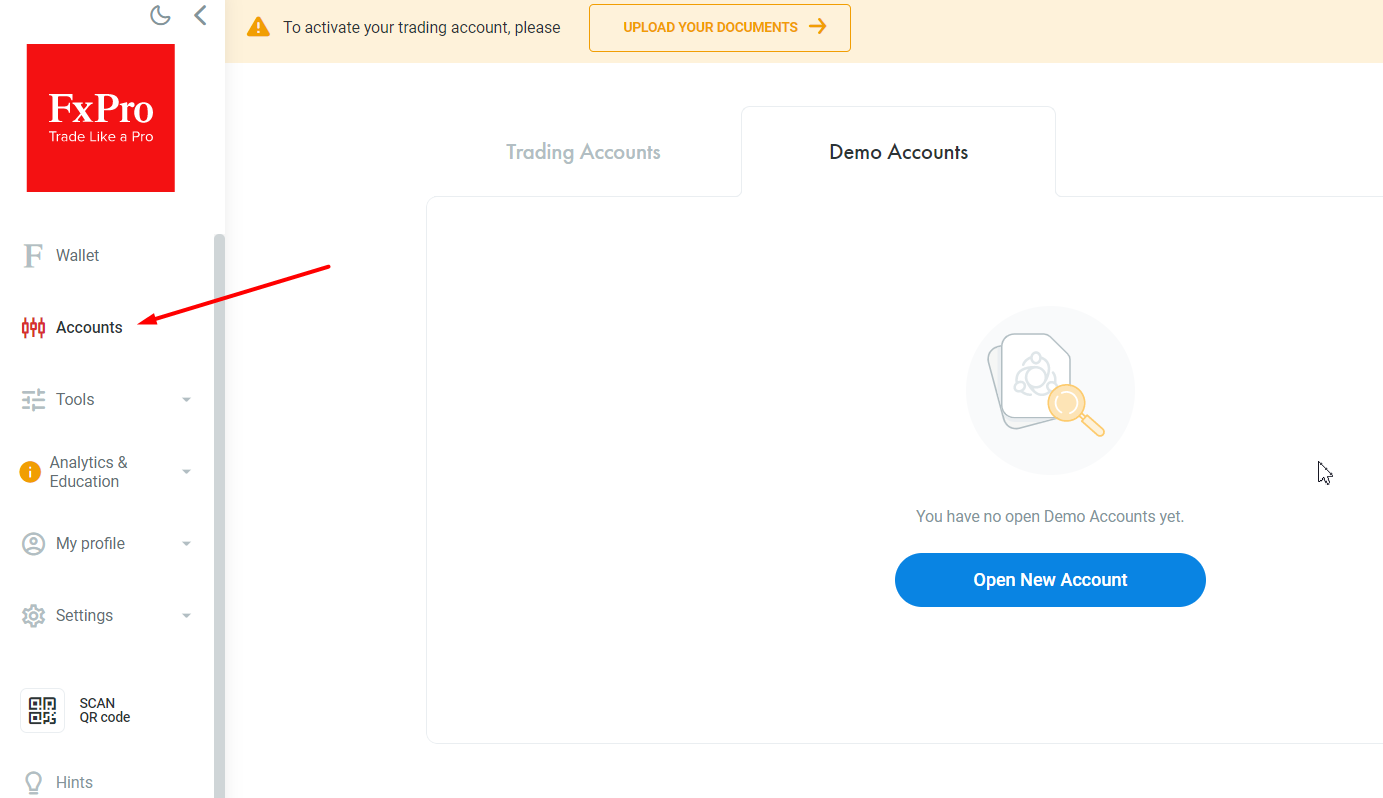 Opening a demo account on FxPro Direct
Click on “Open New Account”. Specify the account type and currency. The Features of the FxPro Direct allow you to open a demo account of every type of real account. This way, you will be able to see the difference between them, compare spreads and other trading conditions without depositing real money.
After you complete this procedure, the account will appear in the main window, and an email will be sent with the account details for linking it to the trading platform (login, password, server). Demo accounts are active for three months.
Opening a real account on the FxPro website
The algorithm for opening a real trading account is similar. In the Accounts menu, select “Create New Account”, and enter its details.
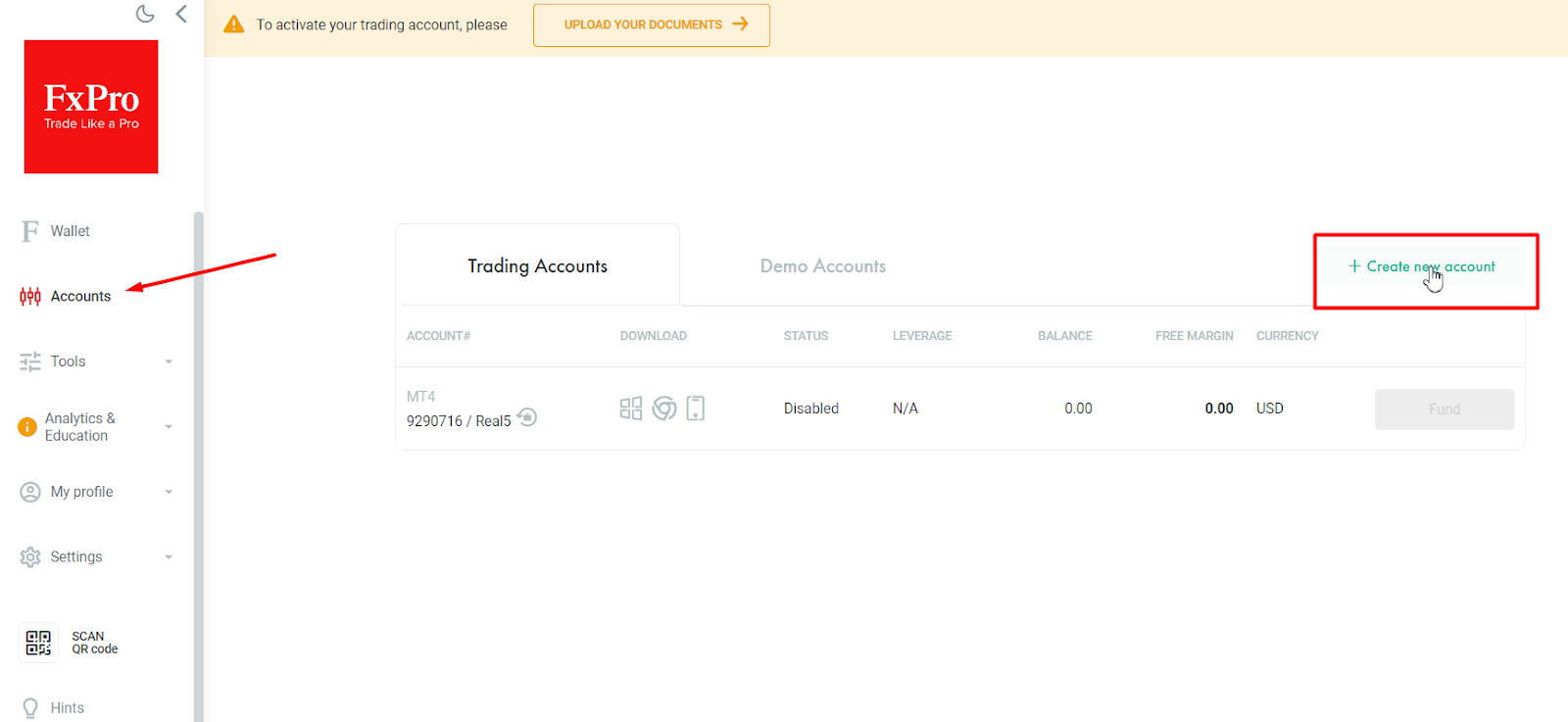 Opening a real account on FxPro Direct
Registering on FxPro via TU
Traders Union is a rebate service, an analytical platform and a community of traders, who are ready to help each other in any trading issues.
Pros of registering in the TU community:
You receive compensation for the spread. For example, if the spread was USD 10 after you closed the trade, you can get up to 80% of this amount compensated.
It is free. TU does not charge any commissions or fees. Verification is similar to verification on FxPro. You are only asked to take a bit of time to register.
TU is an analytical platform, where you can find free indicator templates, reviews of strategies, trading ideas, etc.
TU is a free legal support should you have any disputes with the broker.
TU is a forum of traders, where you can ask questions or share your knowledge and experience.
It works like this. If you open an account with the broker directly, you don’t lose anything, but you don’t get anything. If you register on the TU’s website and then follow the referral link to register an account on the FxPro’s website, you work with the broker on standard conditions, but you get partial compensation for the spread.
A guide on opening an account on FxPro via TU
Register on the TU’s website. The algorithm of registration and authorization is similar to the one described for FxPro.
Pass verification and receive confirmation.
On the homepage of the website, select FxPro from the list and click “Study review”.
Read the review of the broker and click “Open an Account”.
Link the account you opened with the broker to the account on TU. You will find the guide on how to link accounts in the Personal Account on TU.
Once you’ve successfully completed these steps, you will see your FxPro account number with the ‘confirmed’ message in your Personal Account on TU. Now you will receive partial compensation for the spread to your TU account. It can be withdrawn to a confirmed wallet or to the trading account on FxPro.
Review of FxPro Direct
After registration, your FxPro Direct will open. It is easy to use and has a minimum of required features.
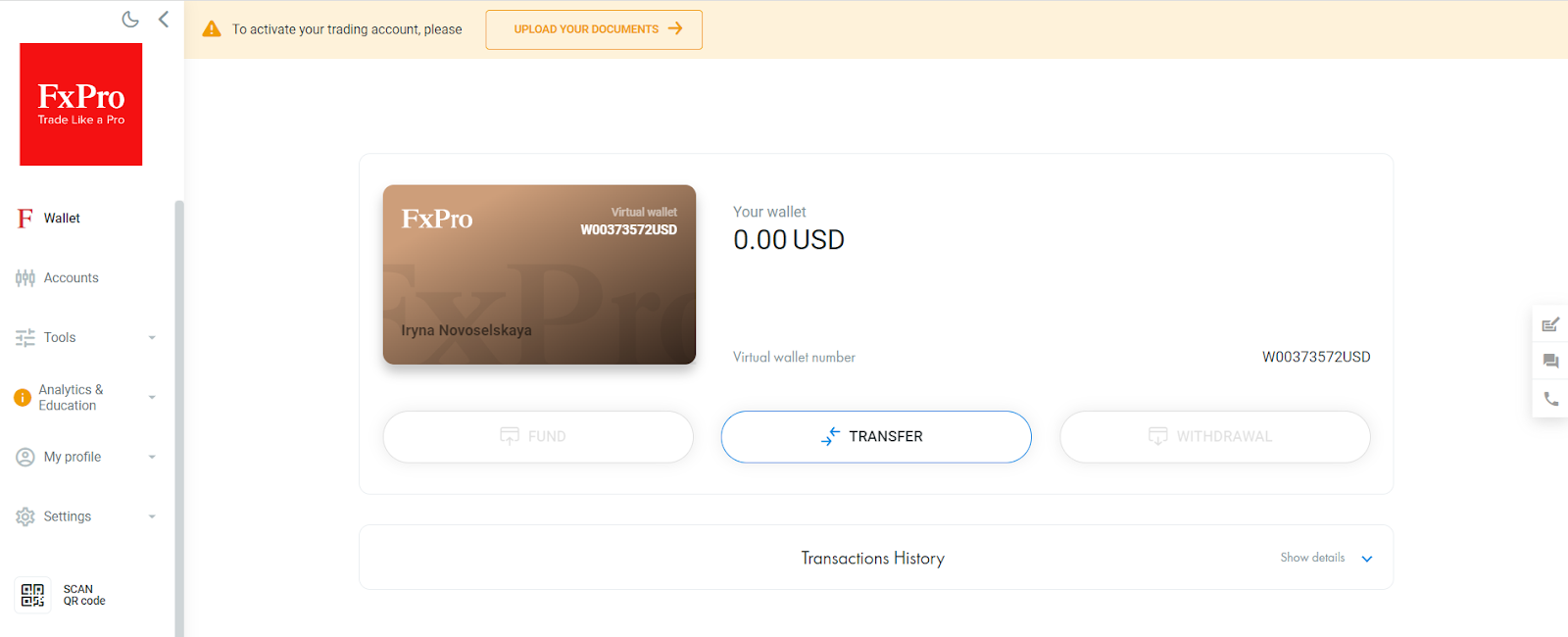 FxPro Direct – Review of features
The menu can be provisionally divided into three parts:
Main menu with the sections of all available features.
Data display window with information on the menu’s tabs. The link to verification is above it. You can pass verification also by going to account settings.
Quick help. Feedback, live chat and call.
Let’s review the features of the main menu in more detail.
FxPro Direct Features
Wallet.
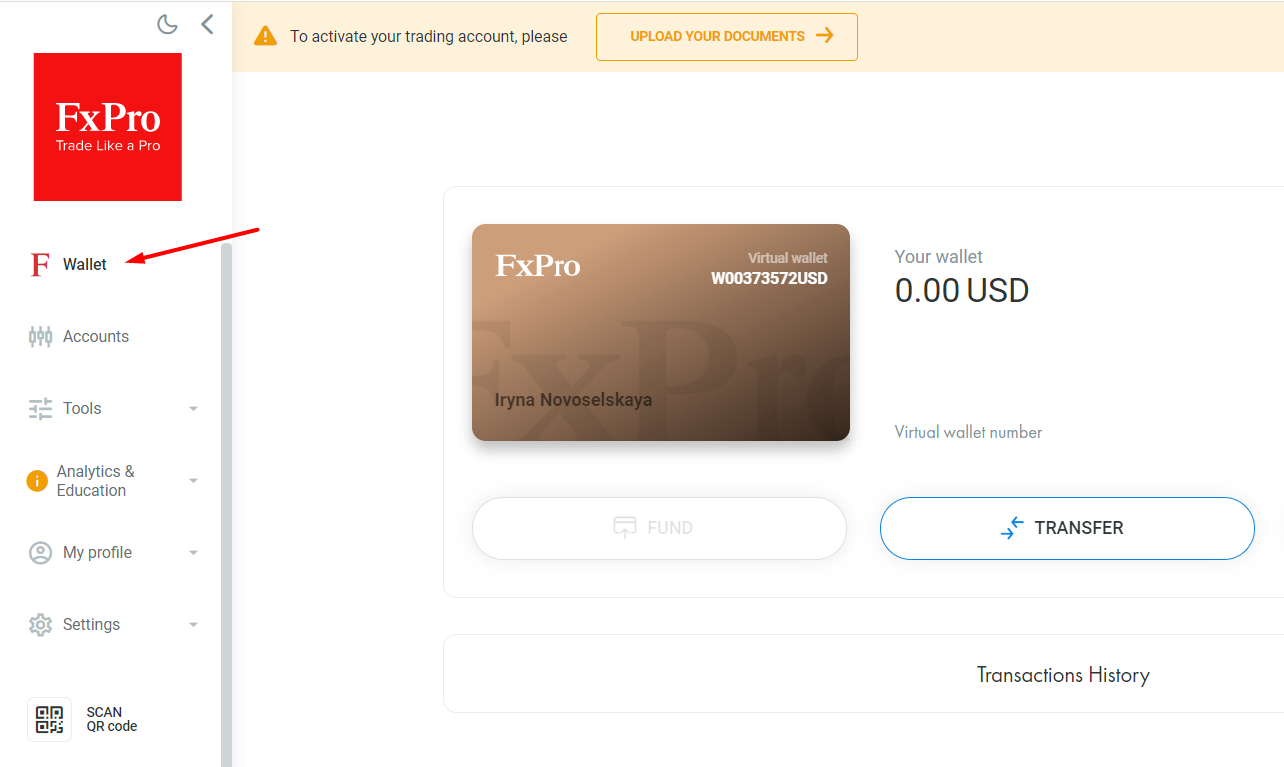 Review of FxPro Direct features – Wallet
Virtual wallet is the account you deposit money to and withdraw money from, but it is not linked to any trading platform. The algorithm of work is as follows:
Make a deposit to the account of the virtual wallet. The Deposit button. You can also deposit funds to the real account directly in the Accounts tab.
Transfer any amount to open real trading accounts. The Transfer button.
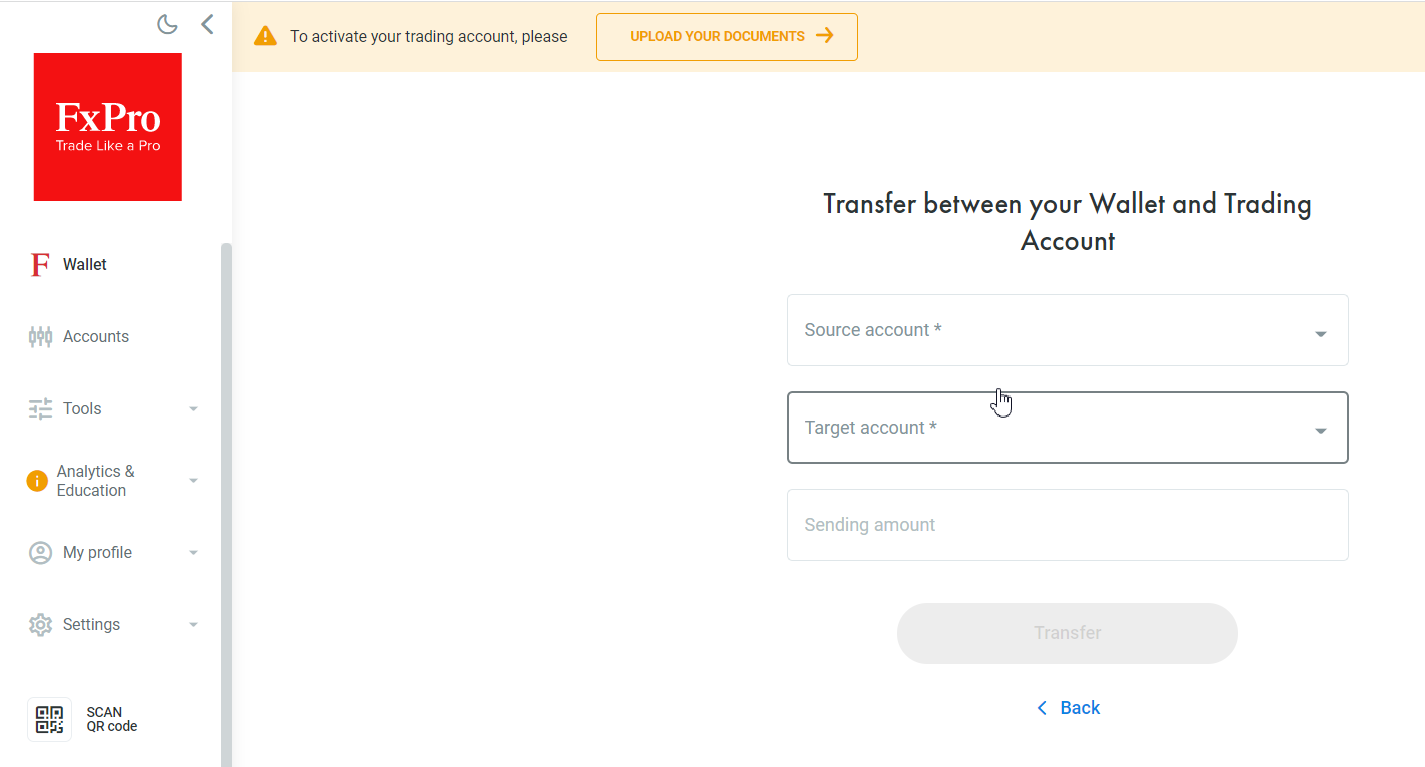 Review of FxPro Direct features – transfers between accounts
Open and close trades. If there is a Stop-Out on one of the accounts, you will keep the money on other accounts and the wallet.
If you want to transfer money from one account to another, you can use the wallet as a transit account.
Withdraw money from the wallet. The Withdraw button.
The history of transactions between the wallet and accounts is shown in the data display window.
Accounts
This is the tab, where you can manage your accounts. Here, you can open and close real and demo accounts, view statistics, etc.Additional features:
Changing the password to a specific account.
Installation files for the trading platform based on the account type (versions for desktop, browser, mobile). The screen below shows the accounts opened for the MT4 platform.
Changing leverage for a specific account.
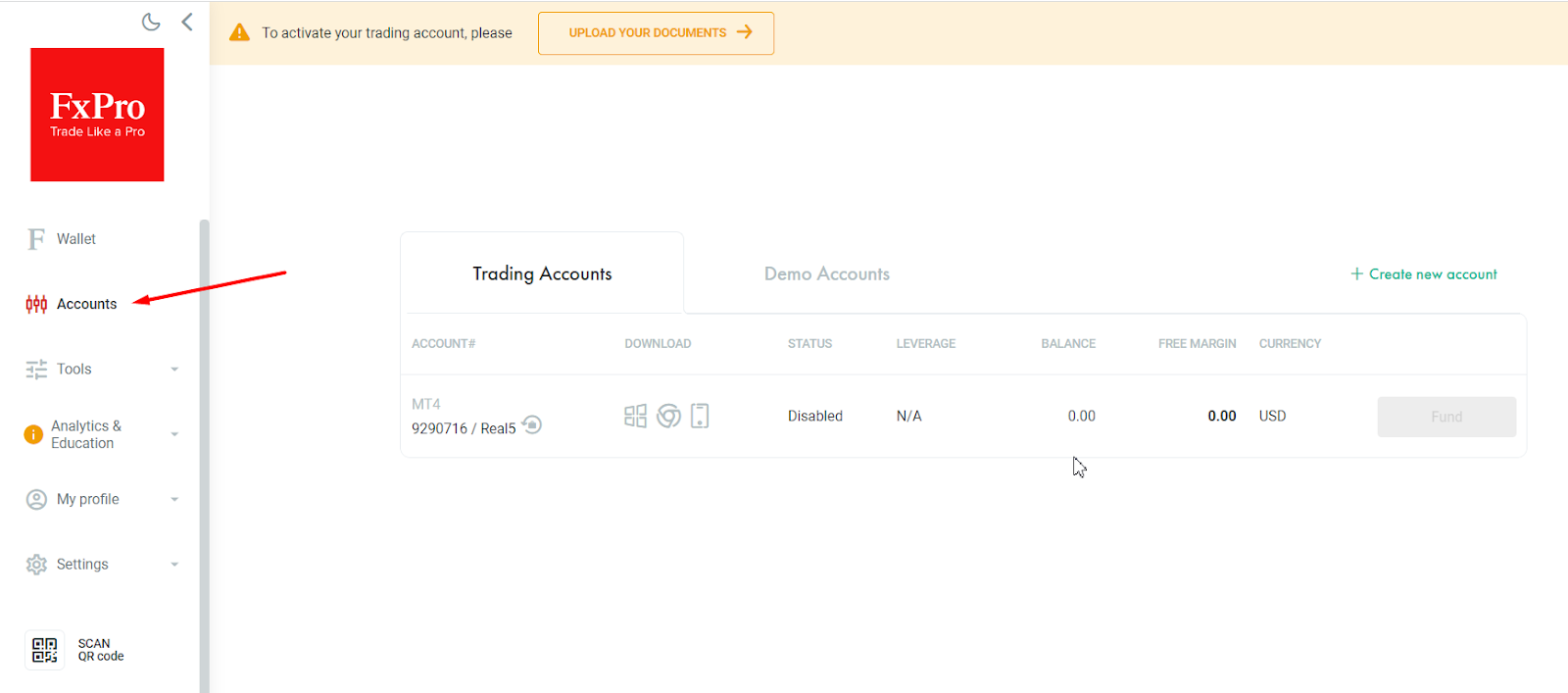 Review of FxPro Direct features – Accounts
Instruments.
Trader’s supporting tools for building trading ideas. There are three sections:
Trader’s supporting tools for building trading ideas. There are three sections:
3.1. Trader’s dashboard, featuring four tables:
Price movement statistics in percentage for the chosen period. The list includes over 60 currency pairs, time frame – from 1 day to 1 year.
Market sentiment. The ratio of long and short positions of FxPro traders as of a specific date.
Quotes of the assets: currency pairs, assets of stock and commodity markets.
Schedule of sessions at the international stock exchanges.
3.2. Economic calendar. This is the list of news releases that impact the quotes of currency pairs and the time of their release. There is a filter that allows you to soft information by importance, period, currency pair.
3.3. All-in-One Calculator for calculating the cost of a pip, collateral amount, swap, cTrader’s fee.
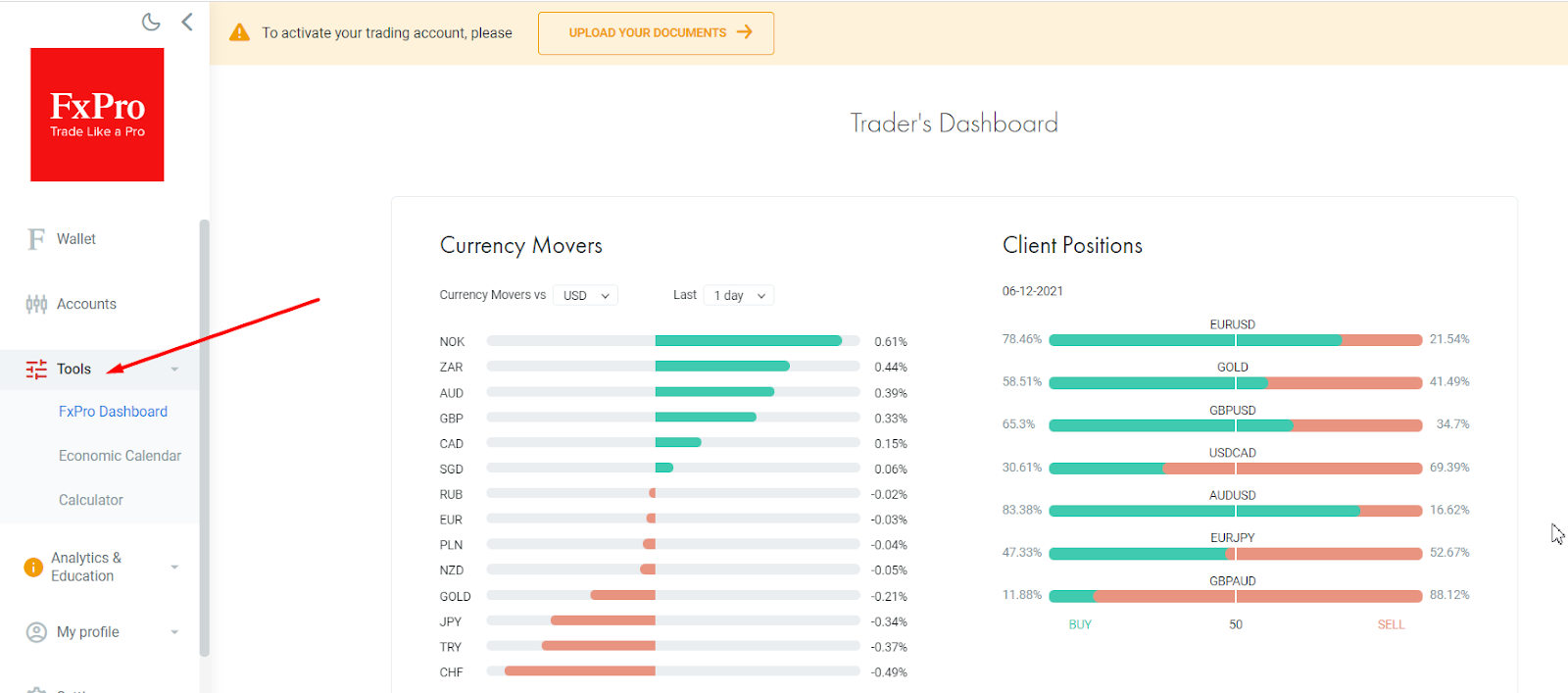 Review of FxPro Direct features – Instruments
Analytics and education.
This section features analytical instruments and basic information and includes 4 subsections:
Squawk. Urgent financial news in audio format, including latest analytics, fundamental news alerts, newsfeed, latest reports and articles.
Trading Central. The company is an independent provider of technical analytics and trading signals. After you make a deposit on your account, the daily analysis is delivered to your FxPro Direct and email.
FxPro E-books. This is the broker’s e-library, where you can download books on trading for free (from basics to lot, from leverage to CFD, on fundamental analysis, etc.).
Webinars on different topics of fundamental analysis, risk management, psychology, etc.
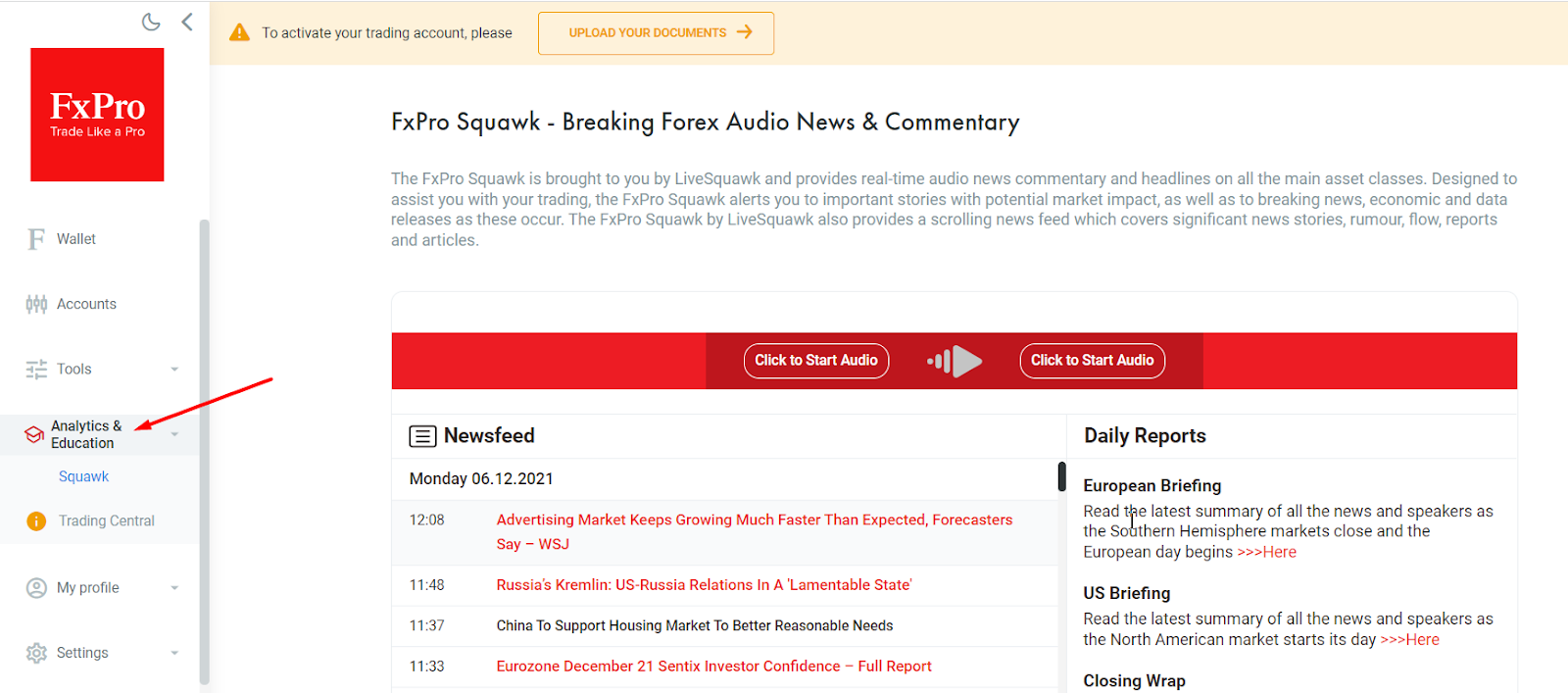 Review of FxPro Direct features – Analytics and education
My profile.
This section is designed for changing personal information, if needed, uploading documents, etc. Here, you can change and add your personal data, contact information, pass verification, add bank details, tax ID numbers. Also here you will find all legal documentation that regulates the relations between traders and the broker: Client Agreement, Order Execution Policy, Risk Disclosure Notice, etc.
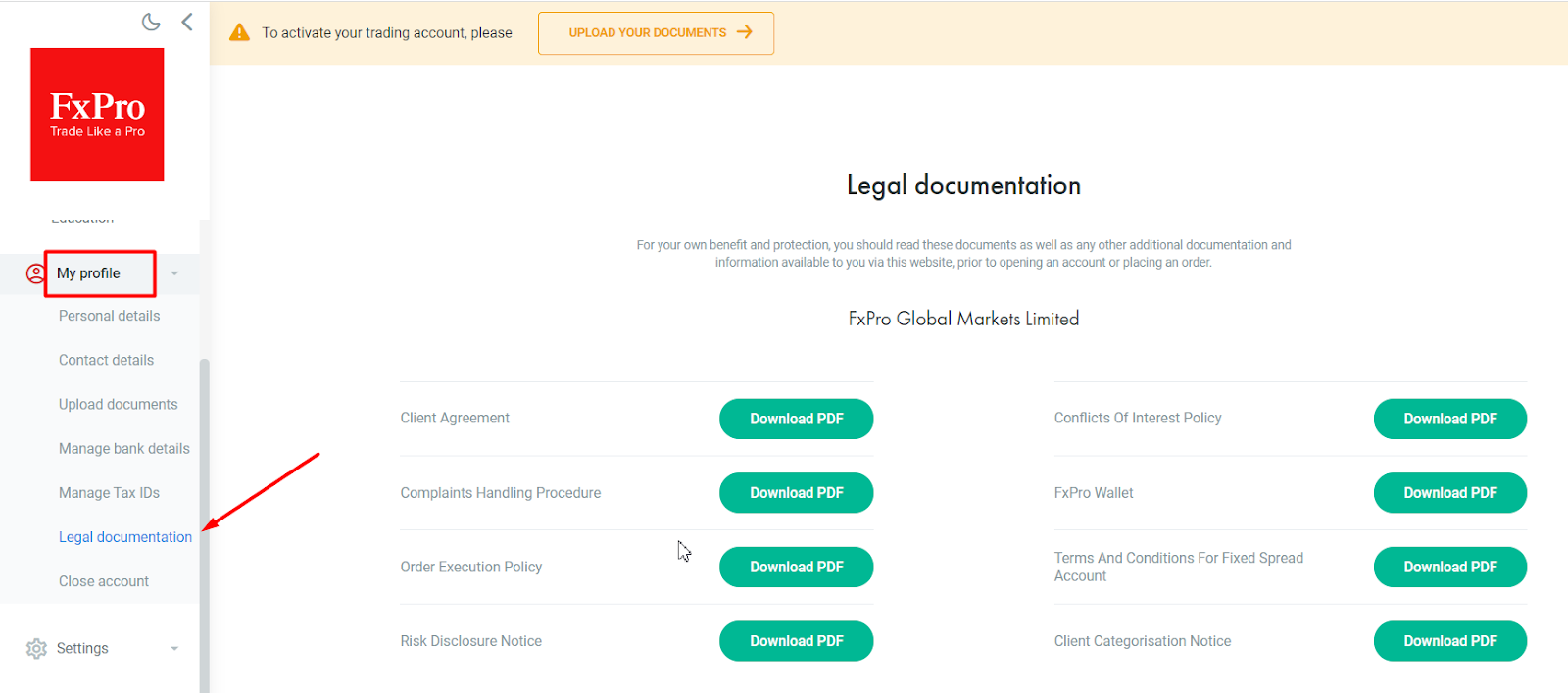 Review of FxPro Direct features – My profile
QR code
Downloading the FxPro Direct app. Use this QR code in order to download the application directly from Google Play or AppStore.
Hints.
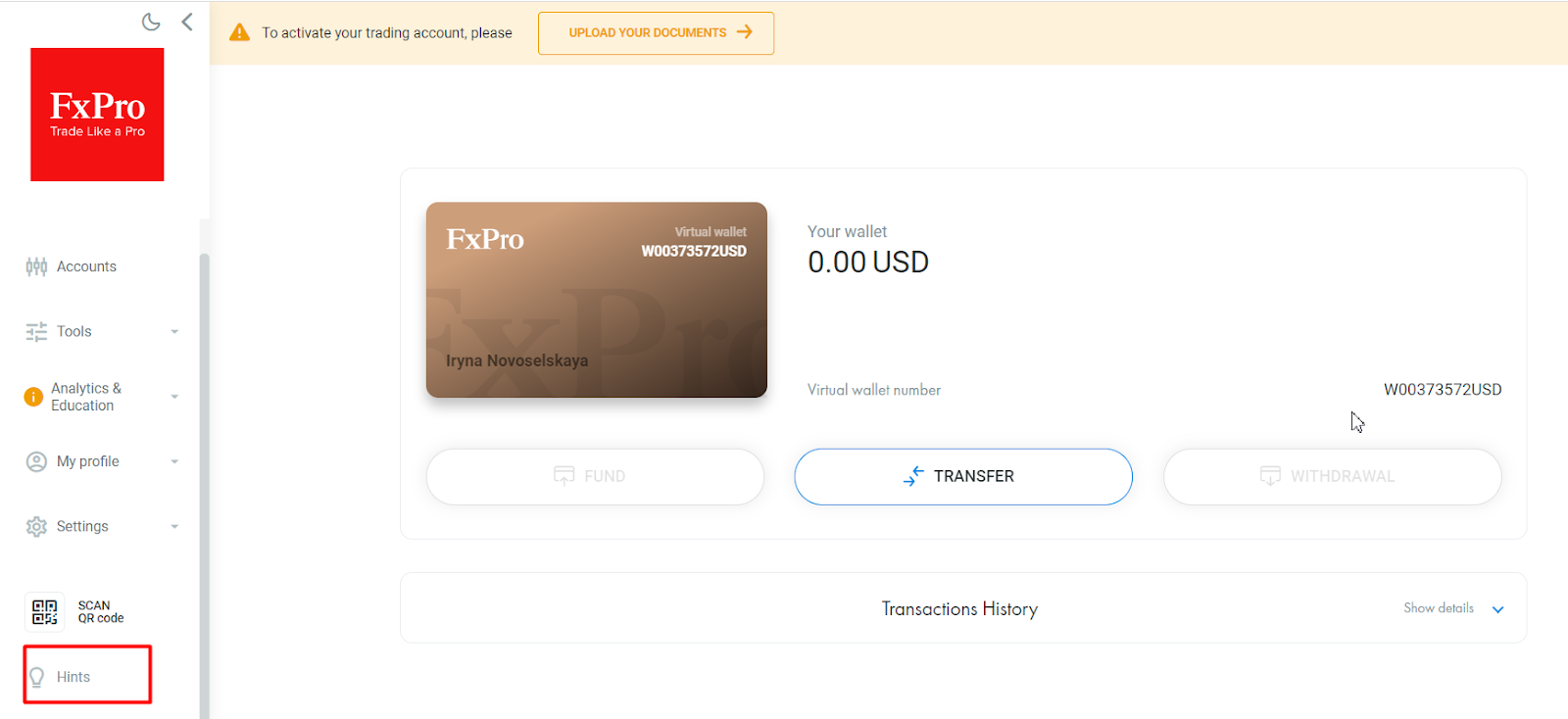 Review of FxPro Direct features – Hints
A guide on the features of the FxPro Direct Login. If you don’t want to do it by trial and error, check out the guide that provides information on the main features of the account. It will take up to 10 minutes.
FxPro Direct Features
Managing accounts and transactions.
The procedure of account opening, using the wallet, internal and external transfers have already been analyzed in this review.
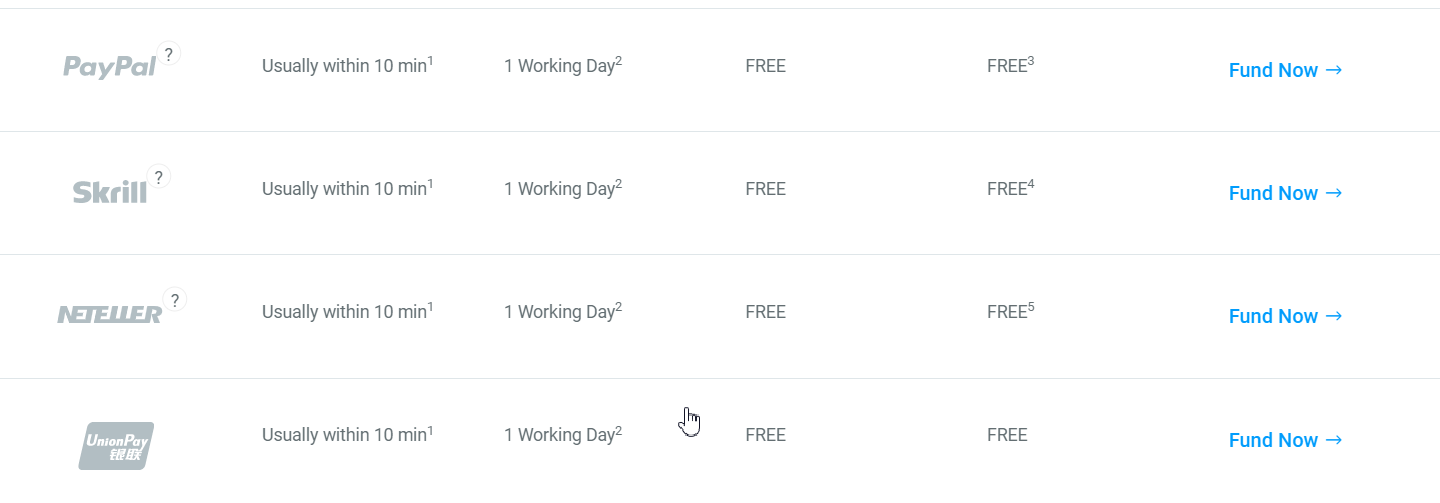 Review of FxPro Direct features – Depositing funds to the accounts
Verification.
Passing the verification procedure. For initial verification, you only need to send the photo of your passport and take a selfie. However, the broker may request to also provide proof of residence and proof that you are the owner of the card or electronic wallet.
Additional features of FxPro Direct
Customer support.
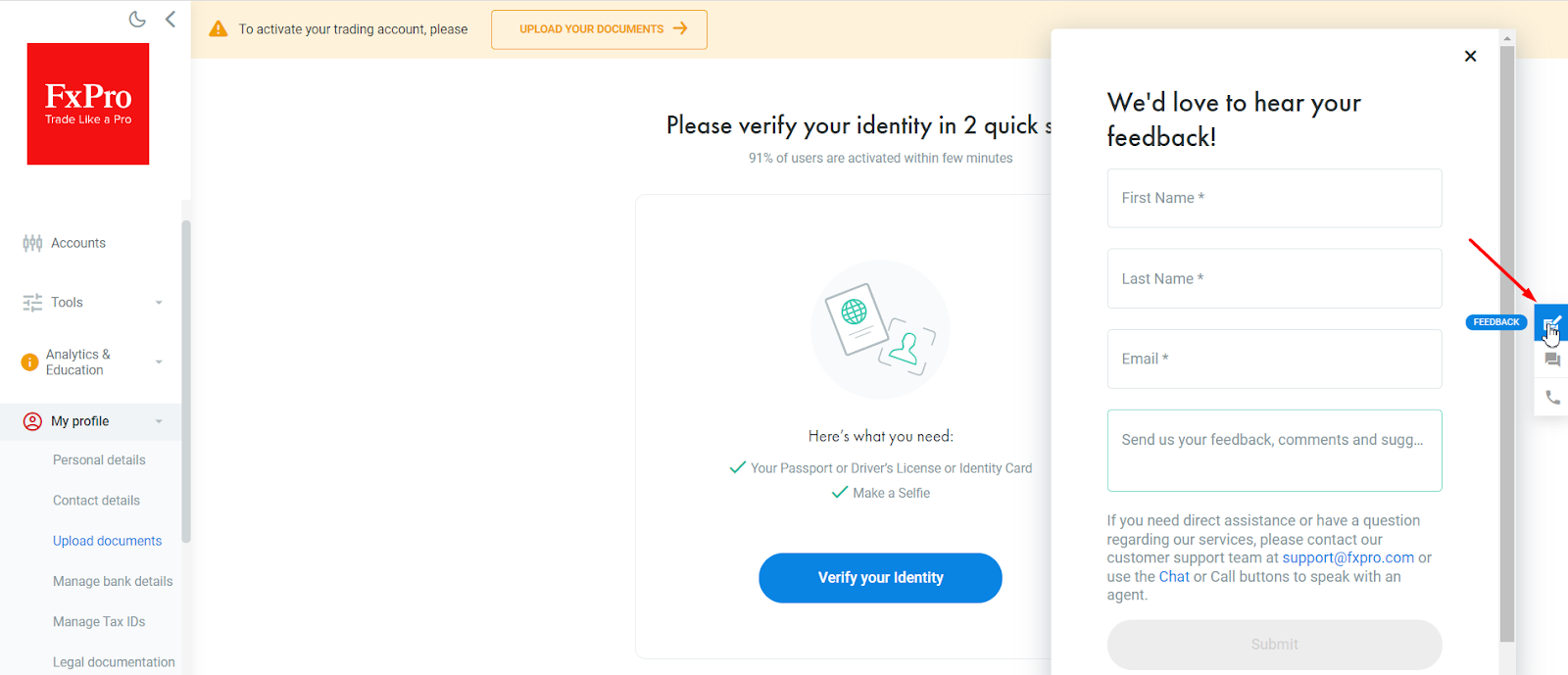 Review of FxPro Direct features – Customer support
The panel for quick access to customer support can be found on the right side of the FxPro Direct. Customer support responds to questions on the live chat within one minute.
In the “Feedback” the email of customer support is specified. If you need to send a letter to the broker with an attachment, that’s where you need to go.
Changing the background theme of your FxPro Direct
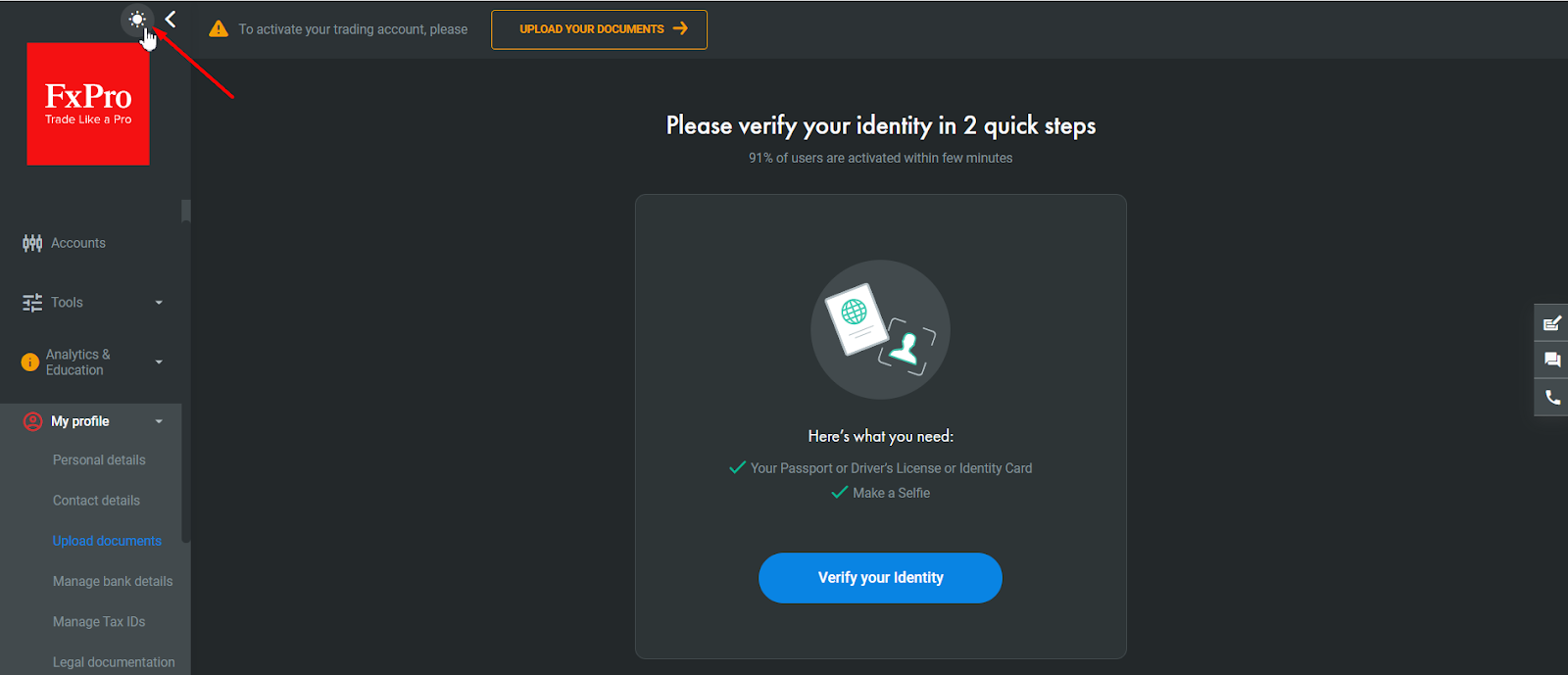 Review of FxPro Direct features – FxPro Direct theme
Entering tax identification numbers
FxPro is a regulated broker and this information is a requirement of the regulators for certain situations. Entering this information may be required if the broker acts as a tax agent.
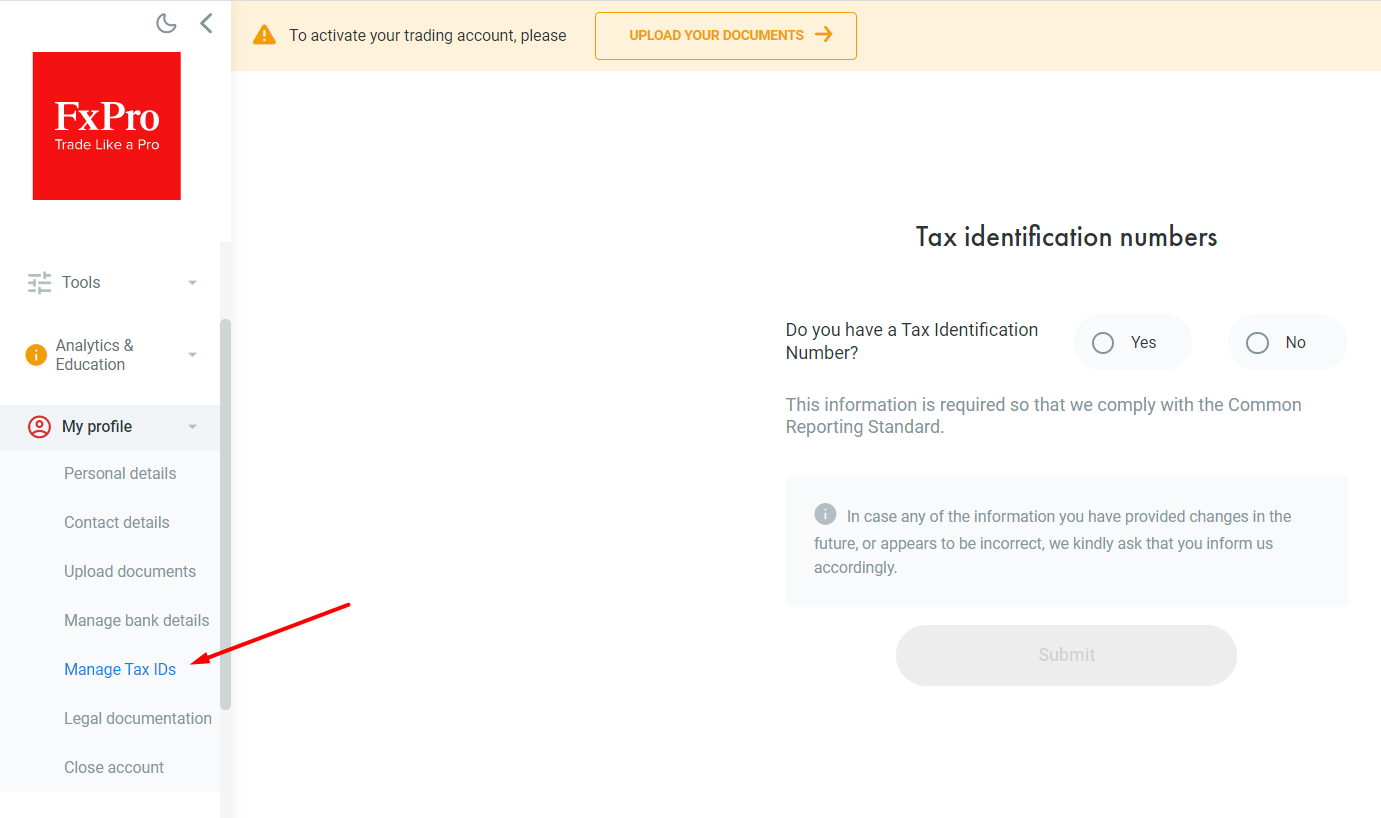 Review of FxPro Direct features – Entering tax identification number
Pros and Cons of FxPro Direct
- Pros
- Cons
- Quick verification. You need to provide scanned copies of your passport (ID card, driver’s license) and a selfie. According to the broker’s statistics, 91% of users are verified within one hour. For comparison: verification by the majority of brokers requires proof of address/residence and takes 1-3 days.
- Quick access to trading via the QR code. It is convenient for trading from mobile devices.
- Quick money transfer between the accounts with zero fees within one second.
- Insufficient level of protection – there is no confirmation of password change and other actions via the mobile phone. The account is linked to the email, where all personal messages are sent. Two-factor authentication also involves sending the code to the email. A stranger only needs to know the email address and password in order to change the password to the account. After that, he can open/close orders on your behalf. The only advantage is that he won’t be able to withdraw money to his account.
FxPro Direct focuses on essential trading tools rather than extra features

From my experience, FxPro Direct is better suited for traders who value functionality over additional services. I appreciate platforms that allow me to manage accounts, transfer funds quickly, and access analytics without unnecessary distractions. The absence of copy trading, bonus campaigns, or PAMM accounts may disappoint some users, but for active traders this simplified approach can actually improve focus and workflow. At the same time, before opening an account, I recommend carefully checking trading specifications and fee details with customer support, since some important conditions are not always presented clearly on the website.
Conclusion
FxPro Direct is a practical account management area designed to keep the core functions in one place. It allows traders to open and manage accounts, handle deposits and withdrawals, transfer funds internally, access analytics, and use supporting tools without unnecessary complexity. For traders already using FxPro, it serves as a convenient control panel for everyday account operations.
At the same time, its main strength is simplicity rather than feature depth. FxPro Direct is best viewed as a functional extension of the broker’s trading environment, especially for account administration, verification, and transaction management. For traders who also register through TU, it can provide an additional benefit through rebates, making the overall trading setup more cost-efficient.
FAQs
FAQs
What if I forgot my FxPro Direct password?
Use the “Forgot Your Password?” option on the login page. If you no longer have access to your email, contact FxPro support and verify your identity to restore access.
How do I verify my FxPro account?
Upload a valid ID (passport, driver's license, or ID card) and complete the selfie verification. Additional proof of payment ownership may be required.
What transactions can I perform in FxPro Direct?
FxPro Direct allows you to deposit and withdraw funds through your Wallet, transfer money between trading accounts, and open or manage both live and demo accounts from a single interface.
Can FxPro Direct help me trade better?
Yes. FxPro Direct provides market sentiment data, an economic calendar, market analysis tools, audio news updates, and quick mobile access via QR code.
Editors' Top Picks and Insights






Related Articles
Team that worked on the article
Chinmay Soni is a financial analyst with more than 5 years of experience in working with stocks, Forex, derivatives, and other assets. As a founder of a boutique research firm and an active researcher, he covers various industries and fields, providing insights backed by statistical data.
Dr. BJ Johnson is a PhD in English Language and an editor with over 15 years of experience. He earned his degree in English Language in the U.S and the UK.
Mirjan Hipolito is a journalist and news editor at Traders Union. She is an expert crypto writer with five years of experience in the financial markets.
Forex trading, short for foreign exchange trading, is the practice of buying and selling currencies in the global foreign exchange market with the aim of profiting from fluctuations in exchange rates. Traders speculate on whether one currency will rise or fall in value relative to another currency and make trading decisions accordingly. However, beware that trading carries risks, and you can lose your whole capital.
CFD is a contract between an investor/trader and seller that demonstrates that the trader will need to pay the price difference between the current value of the asset and its value at the time of contract to the seller.
Forex indicators are tools used by traders to analyze market data, often based on technical and/or fundamental factors, to make informed trading decisions.
Social trading is a form of online trading that allows individual traders to observe and replicate the trading strategies of more experienced and successful traders. It combines elements of social networking and financial trading, enabling traders to connect, share, and follow each other's trades on trading platforms.
Risk management is a risk management model that involves controlling potential losses while maximizing profits. The main risk management tools are stop loss, take profit, calculation of position volume taking into account leverage and pip value.
-
 Afghanistan
-
 Albania
-
 Algeria
-
 Angola
-
 Argentina
-
 Armenia
-
 Australia
-
 Austria
-
 Azerbaijan
-
 Bahamas
-
 Bahrain
-
 Bangladesh
-
 Belarus
-
 Belgium
-
 Bolivia
-
 Botswana
-
 Brazil
-
 Brunei
-
 Bulgaria
-
 Cambodia
-
 Cameroon
-
 Canada
-
 Chile
Chile
-
 China
China
-
 Colombia
-
 Congo
Congo
-
 Costa Rica
-
 Cote d'Ivoire
-
 Croatia
-
 Cuba
Cuba
-
 Cyprus
-
 Czechia
-
 DR Congo
-
 Denmark
-
 Dominican Republic
-
 Ecuador
-
 Egypt
Egypt
-
 El Salvador
-
 Estonia
-
 Eswatini
-
 Ethiopia
-
 Finland
-
 France
-
 Georgia
-
 Germany
-
 Ghana
Ghana
-
 Greece
-
 Haiti
Haiti
-
 Hong Kong
-
 Hungary
-
 India
India
-
 Indonesia
-
 Iran, Islamic republic
-
 Iraq
Iraq
-
 Ireland
-
 Israel
-
 Italy
Italy
-
 Jamaica
-
 Japan
Japan
-
 Jordan
-
 Kazakhstan
-
 Kenya
Kenya
-
 Korea
Korea
-
 Kuwait
-
 Kyrgyzstan
-
 Laos
Laos
-
 Latvia
-
 Lebanon
-
 Lesotho
-
 Libya
Libya
-
 Lithuania
-
 Luxembourg
-
 Madagascar
-
 Malaysia
-
 Malta
Malta
-
 Mauritius
-
 Mexico
-
 Moldova
-
 Mongolia
-
 Montenegro
-
 Morocco
-
 Mozambique
-
 Myanmar
-
 Namibia
-
 Nepal
Nepal
-
 Netherlands
-
 New Zealand
-
 Nigeria
-
 North Macedonia
-
 Norway
-
 Oman
Oman
-
 Pakistan
-
 Palestine
-
 Panama
-
 Papua New Guinea
-
 Paraguay
-
 Peru
Peru
-
 Philippines
-
 Poland
-
 Portugal
-
 Puerto Rico
-
 Qatar
Qatar
-
 Reunion
-
 Romania
-
 Rwanda
-
 Saudi Arabia
-
 Serbia
-
 Singapore
-
 Slovakia
-
 Slovenia
-
 Somalia
-
 South Africa
-
 Spain
Spain
-
 Sri Lanka
-
 Sweden
-
 Switzerland
-
 Syria
Syria
-
 Taiwan
-
 Tajikistan
-
 Tanzania
-
 Thailand
-
 Trinidad and Tobago
-
 Tunisia
-
 Turkey
-
 UAE
UAE
-
 Uganda
-
 Ukraine
-
 United Kingdom
-
United States
-
 Uruguay
-
 Uzbekistan
-
 Venezuela
-
 Vietnam
-
 Yemen
Yemen
-
 Zambia
-
 Zimbabwe
- Forex
- Crypto